
- 1在无GUI环境下(headless模式)配置并使用Python+selenium+chromium/firefox的流程_selenium+headless firefox 需要下载firefox吗?
- 2ONLYOFFICE:兼顾协作与安全的开源办公套件
- 3[Python从零到壹] 五十九.图像增强及运算篇之图像锐化Scharr、Canny、LOG实现边缘检测_图像使用canny使得增强后的图像
- 4微信小程序---缓慢展开和收起效果(不需要wx:if控制实现)_微信小程序点击展开效果动画
- 5*++p、++*p、(*p)++、*(p++)、*p++的区别
- 6Spring Boot 笔记 012 创建接口_添加文章分类
- 7sklearn中的聚类算法K-Means_sklearn kmeans
- 8midjourney指令笔记+踩坑日记+gpt论文润色指令_mj 提示:--stylize must be between 1250 and 5000 with
- 9EXCEL数据分析的基本知识_excel画图叫什么分析
- 10基于nodejs+vue地方特色的风景文化宣传网站vscode_前端地区宣传网页
备战数学建模50-终结篇(攻坚站15)_数学建模降噪题目
赞
踩
今天应该数学建模的最后一篇博文了,我们好好梳理一下,对缺少的知识点做一个汇总,希望我们在国赛能取得一个好成绩,也希望看到这篇博客的同学都有好运,人生中的每一段旅程都有意义,希望我们都能享受过程并取得一个满意的结果,道阻且长,行则将至,向上吧,年轻人!
目录
一、互信息
1.1、互信息基本概念


1.2、互信息计算与matlab实现
可以选择与产品辛烷值(RON)非线性相关度较高的自变量,理论上互信息值较大的变量对于因变量的影响是较大的,是具有代表性的变量。但实际上,这些变量间相关性较高,即这些变量代表的可能是同一性质的操作,这一类性质的改变对于产品辛烷值的影响较大,所以它们的互信息量都处于较大的范围。为了使得选择的主要变量尽可能的具有代表性和独立性,所以需要在互信息分析的基础上去除掉自变量之间相关性高的部分,从而保证选择的变量不仅对因变量的相关度较高,而且各变量之间尽可能不相关,能够较为全面地代表操作变量整体。
我们这里使用matlab计算变量与产品辛烷值的互信息,选择互信息大的,在根据变量相关性,剔除相关性强的变量。
- %计算两列向量之间的互信息
- %u1:输入计算的向量1
- %u2:输入计算的向量2
- %wind_size:向量的长度
- function mi = calmi(u1, u2, wind_size)
- x = [u1, u2];
- n = wind_size;
- [xrow, xcol] = size(x);
- bin = zeros(xrow,xcol);
- pmf = zeros(n, 2);
- for i = 1:2
- minx = min(x(:,i));
- maxx = max(x(:,i));
- binwidth = (maxx - minx) / n;
- edges = minx + binwidth*(0:n);
- histcEdges = [-Inf edges(2:end-1) Inf];
- [occur,bin(:,i)] = histc(x(:,i),histcEdges,1); %通过直方图方式计算单个向量的直方图分布
- pmf(:,i) = occur(1:n)./xrow;
- end
- %计算u1和u2的联合概率密度
- jointOccur = accumarray(bin,1,[n,n]); %(xi,yi)两个数据同时落入n*n等分方格中的数量即为联合概率密度
- jointPmf = jointOccur./xrow;
- Hx = -(pmf(:,1))'*log2(pmf(:,1)+eps);
- Hy = -(pmf(:,2))'*log2(pmf(:,2)+eps);
- Hxy = -(jointPmf(:))'*log2(jointPmf(:)+eps);
- MI = Hx+Hy-Hxy;
- mi = MI/sqrt(Hx*Hy);
- clc
- clear
- load('origin.mat')
- wind_size = size(data,1)
- mi = zeros(354,1) ;
- for i = 1 : 354
- u1 = data(:,i);
- u2 = data(:,end);
- mi(i) = calmi(u1, u2, wind_size);
- end
-
- [res,index] = sort(mi,'descend')
二、Mann-Kendall 检验
2.1、M-K检验的理论知识
Mann-Kendall 检验法(M-K 法)是用于提取序列变化趋势的有效工具,也是“应用气候学实习”课程中重要的授课内容。
M-K 检验法最初由曼(H. B. Mann)和肯德尔(M.G. Kendall)提出了原理并发展了这一方法,是世界气象组织推荐的用于提取序列变化趋势的有效工具 。M-K 检验法不受个别异常值的干扰,能够客观反映时间序列趋势,目前已经被广泛用于气候参数和水文序列的分析中。M-K 法可以根据输出的两个序列(UF和 UB)明确突变的时段和区域。

2.2、M-K检验的matlab实现
- Data = [1961,4.7;
- 1962,4.98;
- 1963,5.39;
- 1964,5.72;
- 1965,4.88;
- 1966,5.02;
- 1967,5.1;
- 1968,5.19;
- 1969,4.31;
- 1970,4.86;
- 1971,5.28;
- 1972,4.9;
- 1973,5.23;
- 1974,4.6;
- 1975,5.88;
- 1976,4.58;
- 1977,5.37;
- 1978,5.24;
- 1979,4.91;
- 1980,4.84;
- 1981,4.98;
- 1982,5.54;
- 1983,5.67;
- 1984,4.31;
- 1985,4.67;
- 1986,4.49;
- 1987,4.96;
- 1988,5.18;
- 1989,5.41;
- 1990,6.06;
- 1991,5.4;
- 1992,5.38;
- 1993,5.3;
- 1994,6.18;
- 1995,5.58;
- 1996,5.2;
- 1997,5.8;
- 1998,6.81;
- 1999,6.47;
- 2000,6;
- 2001,6.16;
- 2002,6.42;
- 2003,6.7;
- 2004,6.18;
- 2005,5.52;
- 2006,6.46;
- 2007,6.73;
- 2008,5.86;
- 2009,5.61;
- 2010,5.31;
- 2011,5.69;
- 2012,5.05;
- 2013,5.13;
- 2014,6.09;
- 2015,6.13
- ] ;
- y = Data(:,2);%平均温度序列
- Sk = zeros(size(y)); % 定义累计量序列 Sk,长度 = y,初始值 =0,Sk(1) =0
- UFk = zeros(size(y)); % 定义统计量 UFk,长度 = y,初始值 =0,UFk(1) =0
- s = 0; % 定义 Sk 序列的元素 s
- for i =2:length(y)
- for j =1:i
- if y(i) > y(j)
- s = s +1;
- else
- s = s +0;
- end
- end
- Sk(i) = s;
- E = i* (i - 1) /4; % Sk(i)的均值,见式(3)
- Var = i* (i - 1)* (2* i +5) /72; % Sk(i)方差,见式(3)
- UFk(i) = (Sk(i)- E) /sqrt(Var);% 正序列 UF 值,见式(2)
- end
- Sk2 = zeros(size(y)); % 定义逆序累计量序列 Sk2,长度= y,初始值 =0,Sk(2) =0
- UBk = zeros(size(y)); % 定义逆序统计量 UBk,长度 = y,初始值 =0,UBk(1) =0
- s =0;
- y2 = flipud(y); % 按时间序列逆转平均温度序列
- for i =2:length(y2)
- for j =1:i
- if y2(i) > y2(j)
- s = s +1;
- else
- s = s +0;
- end
- end
- Sk2(i) = s;
- E = i* (i - 1) /4; %均值
- Var = i* (i - 1)* (2* i +5) /72; %方差
- UBk(i) = 0 - (Sk2(i) - E) /sqrt(Var);
- end
- UBk2 = flipud(UBk); %逆序列 UB 值
-
- x = Data(:,1);%年份序列
- n = length(x);%年份序列的长度
- figure %做图
- plot(x,UFk,'r-','linewidth',1.5);%画 UF 线
- hold on
- plot(x,UBk2,'b-.','linewidth',1.5);%画 UB 线
- plot(x,1.96* ones(n,1),'k:','linewidth',1);
- axis([min(x),max(x),-5,5]);%设置 X 轴范围和间距
- legend('UF 统计量','UB 统计量','0.05 显著水平');% 设置图例
- xlabel('年 Year','FontName','TimesNewRoman','FontSize',10);%X 轴标题
- ylabel('统计量 MK Value','FontName','TimesNewRoman','Fontsize',10);%Y 轴标题
- hold on
- plot(x,-1.96 * ones(n,1),'k:','linewidth',1);
- plot(x,0 * ones(n,1),'k-. ','linewidth',1);% 图片绘制
由图可知,该地区 1961 ~2015 年气温呈显著上升趋势,UF 和 UB 统计量有交点
且交点在置信直线范围之间,表明气温在 1989 年前后发生了突变。

三、小波分析
3.1、小波分析基本理论
第一:去噪
小波分析的重要应用之一就是用于信号降噪。我们知道,一个含噪的一维信号模型可以表示为下图。其中s(k)为含噪信号,f(k)为有用信号,e(k)为噪声信号。这里我们认为e(k)是一个 1 级高斯白噪声,通常表现为高频信号,而实际工程中f(k)通常为低频信号或者是一些比较稳定的信号。
因此我们可按如下的方法进行降噪处理。首先对信号进行小波分解, 一般地,噪声信号多包含在具有较高频率的细节中,从而,可利用门限阈值等形式对所分解的小波系数进行处理,然后对信号进行小波重构即可达到对信号降噪的目的。对信号降噪实质上是抑制信号中的无用部分,恢复信号中有用部分的过程。
小波信号降噪一般分为以下三个步骤:
(1)确定小波分解的层数,对信号进行分解。
(2)确定各个分解层下细节信号的阈值,对细节信号进行阈值量化处理。
(3)利用阈值处理后的细节信号和逼近信号进行重构,得到降噪后的信号。
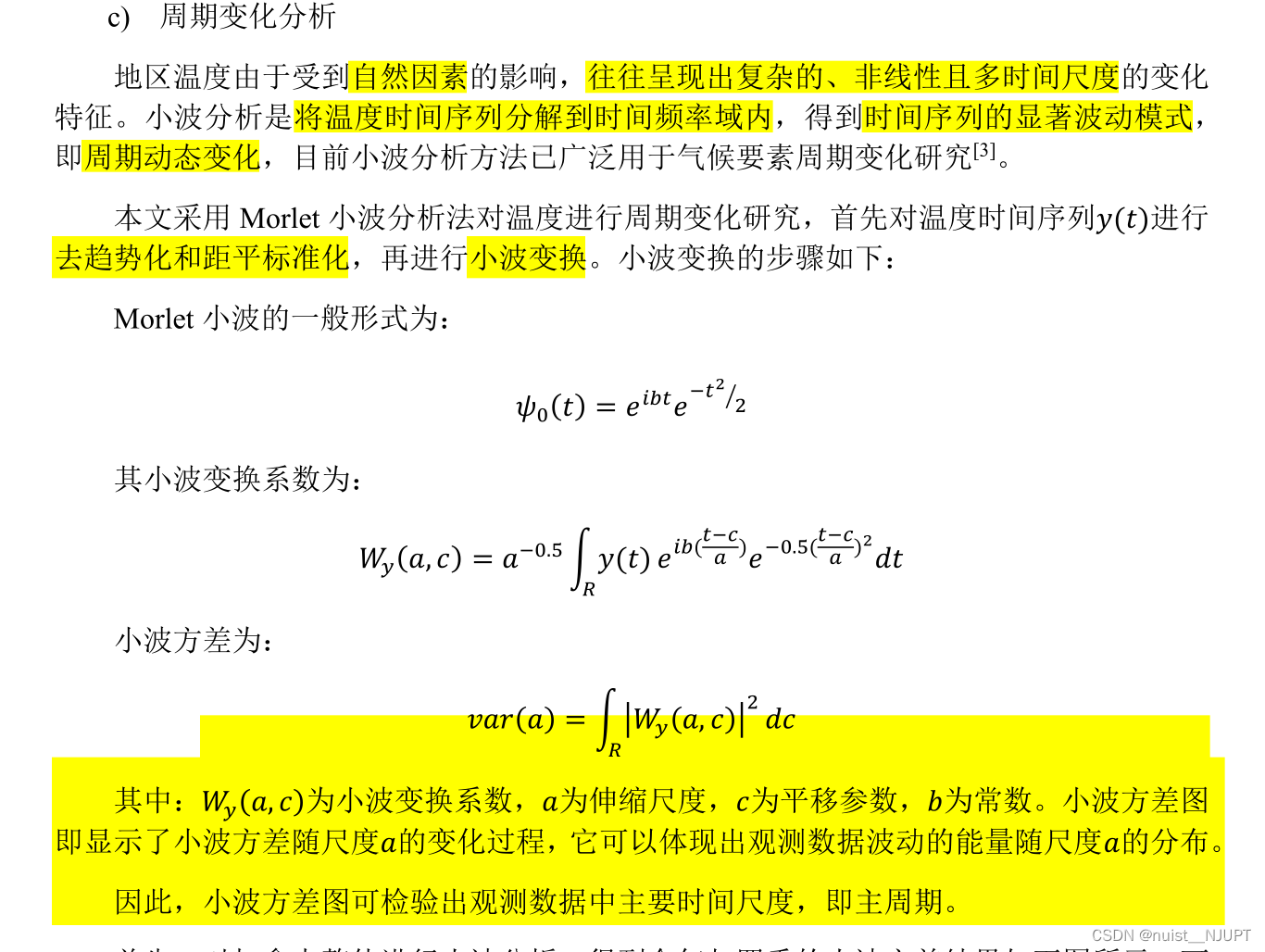
第二:周期变化分析
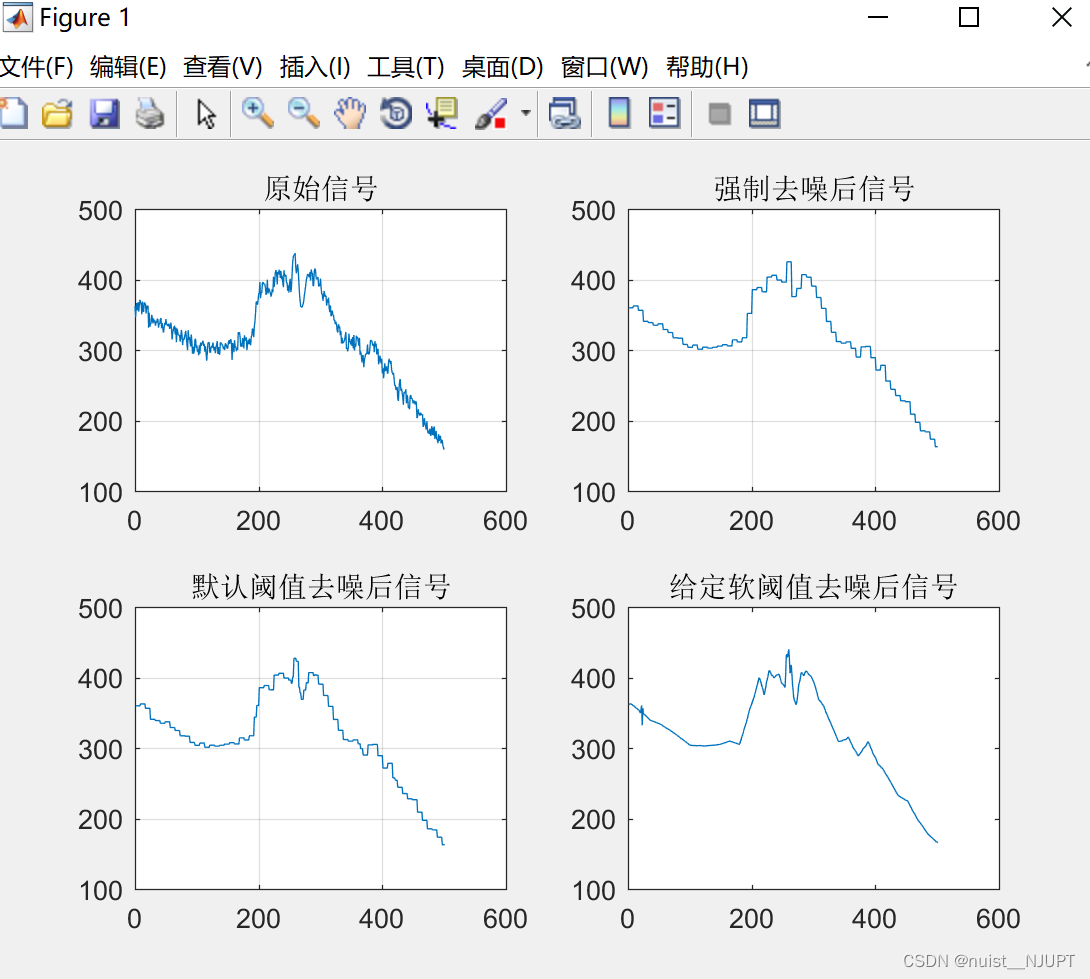
3.2、小波分析去噪matlab实现
-
- clc;
- clear all;
- % 载入信号
- % Load electrical signal and select a part of it.
- load leleccum;
- indx = 2600:3100;
-
- %装载采集的信号
- x = leleccum(indx);
- lx=length(x);
- t=[0:1:length(x)-1]';
-
- %% 绘制监测所得信号
- subplot(2,2,1);
- plot(t,x);
- title('原始信号');
- grid on
- %% 用db1小波对原始信号进行3层分解并提取小波系数
- [c,l]=wavedec(x,3,'db1');
- ca3=appcoef(c,l,'db1',3);
- cd3=detcoef(c,l,3);
- cd2=detcoef(c,l,2);
- cd1=detcoef(c,l,1);
- %% 对信号进行强制去噪处理并图示
- cdd3=zeros(1,length(cd3));
- cdd2=zeros(1,length(cd2));
- cdd1=zeros(1,length(cd1));
- c1=[ca3,cdd3,cdd2,cdd1];
- x1=waverec(c1,l,'db1');
- subplot(2,2,2);
- plot(x1);
- title('强制去噪后信号');
- grid on
-
- %% 默认阈值对信号去噪并图示%%
- %用ddencmp( )函数获得信号的默认阈值,使用wdencmp( )函数实现去噪过程
- [thr,sorh,keepapp]=ddencmp('den','wv',x);
- x2=wdencmp('gbl',c,l,'db1',3,thr,sorh,keepapp);
- subplot(2,2,3);
- plot(x2);
- title('默认阈值去噪后信号');
- grid on
-
- %% 给定的软阈值进行去噪处理并图示
- wname = 'db3'; lev = 5;
- [c,l] = wavedec(x,lev,wname);
- alpha = 1.5; m = l(1);
- [thr,nkeep] = wdcbm(c,l,alpha,m)
- [xd,cxd,lxd,perf0,perfl2] = wdencmp('lvd',c,l,wname,lev,thr,'h');
- subplot(2,2,4);
- plot(xd);
- title('给定软阈值去噪后信号');
3.3、小波分析周期变化分析matlab实现
- %1.xiaozao函数,是需要对标准化的序列进行消除数据噪音分析;
- %2.Db3函数,是对数列进行Db3趋势分析;
- %3.period函数,是求得时间序列的实部和模的平方。
- %其中周期变化图是实部的等值线图
- %而小波方差是模的平方的算数平均。
- clc
- clear
- close all;
- load 暴雨量.mat
- start_year=1958
-
- a=s(:,1);
- b=zscore(a);
- scales=[1:1:32];
- %进行连续小波变换得到小波系数矩阵,选择复morlet小波函数
- wf=cwt(b,scales,'cmor1-1'); %计算小波系数
- shibu=real(wf);% 求得系数的实部
- mo=abs(wf); %计算小波系数模的绝对值
- mofang=mo.^2; %计算小波系数的模方
- fangcha=mean(mofang,2); %计算小波方差,小波方差是模的平方的算数平均
- %**********画小波实部*************
- figure(1);
- j = j + 1;
- % subplot(121);
- % axis([1961,2015,0,50]);
- width=713;%宽度,像素数
- height=493;%高度
- left=300;%距屏幕左下角水平距离
- bottem=200;%距屏幕左下角垂直距离
- set(gcf,'position',[left,bottem,width,height])
-
- contourf(shibu,10,'-');
- colormap('Jet');
- colorbar;
- hold on
- set(gca,'FontSize',13,'Fontname', 'Times New Roman','Fontweight','bold');
- xlabel('Year/a','FontName','Times new roman','FontSize',16,'Fontweight','bold');
- ylabel('Scales/year','FontName','Times new roman','FontSize',16,'Fontweight','bold');
- %set(gca,'XTick',1965:5:2017);
- %set(gca,'XTicklabel', 1962:1:2017); %更新XTickLabel
- set(gca,'xlim',[1 length(s)],'XTick',1:roundn(length(s)/5,0):length(s),'XTickLabel',start_year:roundn(length(s)/5,0):(start_year+length(s)-1))%修改横坐标的范围
- title('(a)','Fontname','Times new roman','FontSize',18,'Fontweight','bold','position',[-4,52]);
- %saveas(gca,[path_out5,num2str(j)],'png');
- %close;
-
-
-
- %********小波方差*************%
- figure(2);
- j = j + 1;
- width=713;%宽度,像素数
- height=493;%高度
- left=300;%距屏幕左下角水平距离
- bottem=200;%距屏幕左下角垂直距离
- set(gcf,'position',[left,bottem,width,height])
-
- % subplot(122);
- plot(fangcha,'k-','linewidth',1.5);
- set(gca,'FontName','Times new roman','FontSize',16,'Fontweight','bold');
- xlabel('Scales/year','FontName','Times new roman','FontSize',16,'Fontweight','bold');
- ylabel('Variance','FontName','Times new roman','FontSize',16,'Fontweight','bold');
- title('(b)','Fontname','Times new roman','FontSize',18,'Fontweight','bold','position',[-3,1.8]);
- set(gca,'XTick',0:5:31);
- axis([1 32 0 2]);
- grid on;
- %saveas(gca,[path_out5,num2str(j)],'png');
- %close;
-
- %********小波模**************%
- figure(3);
- j = j + 1;
- %subplot(122);
- width=713;%宽度,像素数
- height=493;%高度
- left=300;%距屏幕左下角水平距离
- bottem=200;%距屏幕左下角垂直距离
- set(gcf,'position',[left,bottem,width,height])
- contourf(mo,10,'-');
- colormap('Jet');
- colorbar;
- hold on
- set(gca,'FontName','Times new roman','FontSize',13,'Fontweight','bold');
- xlabel('Year','FontName','Times new roman','FontSize',16,'Fontweight','bold');
- ylabel('Scales/year','FontName','Times new roman','FontSize',16,'Fontweight','bold');
- title('(c)','Fontname','Times new roman','FontSize',18,'Fontweight','bold','position',[-4,52]);
- set(gca,'xlim',[1 length(s)],'XTick',1:roundn(length(s)/5,0):length(s),'XTickLabel',start_year:roundn(length(s)/5,0):(start_year+length(s)-1))
- %saveas(gca,[path_out5,num2str(j)],'png');
- %close;
-
- %********小波模方**************%
- figure(4);
- j = j + 1;
- %subplot(122);
- width=713;%宽度,像素数
- height=493;%高度
- left=300;%距屏幕左下角水平距离
- bottem=200;%距屏幕左下角垂直距离
- set(gcf,'position',[left,bottem,width,height])
- contourf(mofang,10,'-');
- colormap('Jet');
- colorbar;
- hold on
- set(gca,'FontName','Times new roman','FontSize',13,'Fontweight','bold');
- xlabel('Year','FontName','Times new roman','FontSize',16,'Fontweight','bold');
- ylabel('Scales/year','FontName','Times new roman','FontSize',16,'Fontweight','bold');
- set(gca,'xlim',[1 length(s)],'XTick',1:roundn(length(s)/5,0):length(s),'XTickLabel',start_year:roundn(length(s)/5,0):(start_year+length(s)-1))
- %saveas(gca,[path_out5,num2str(j)],'png');
小波实部等值线图如下:

小波方差图如下:

小波模等值线图如下: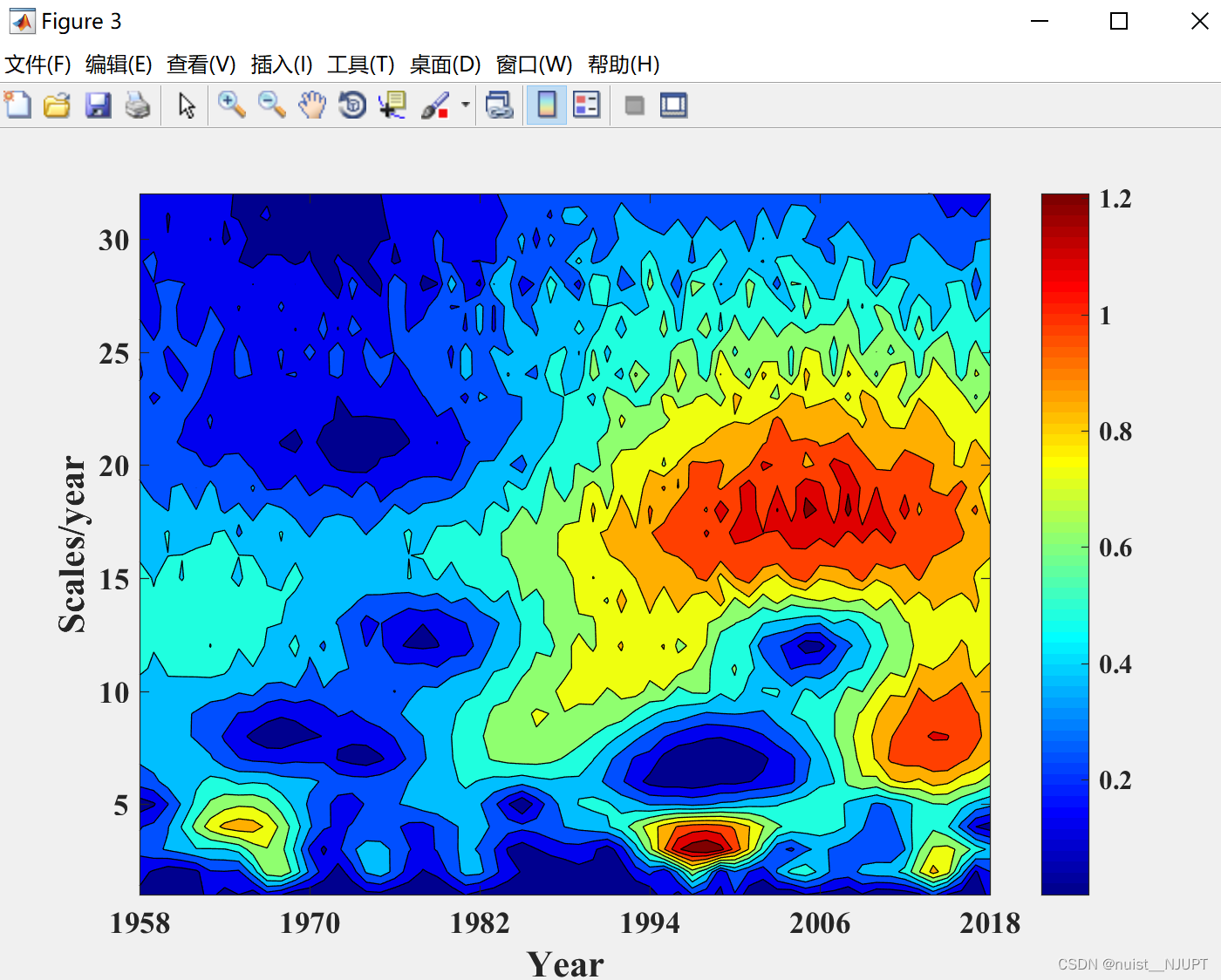
小波模方的等值线图: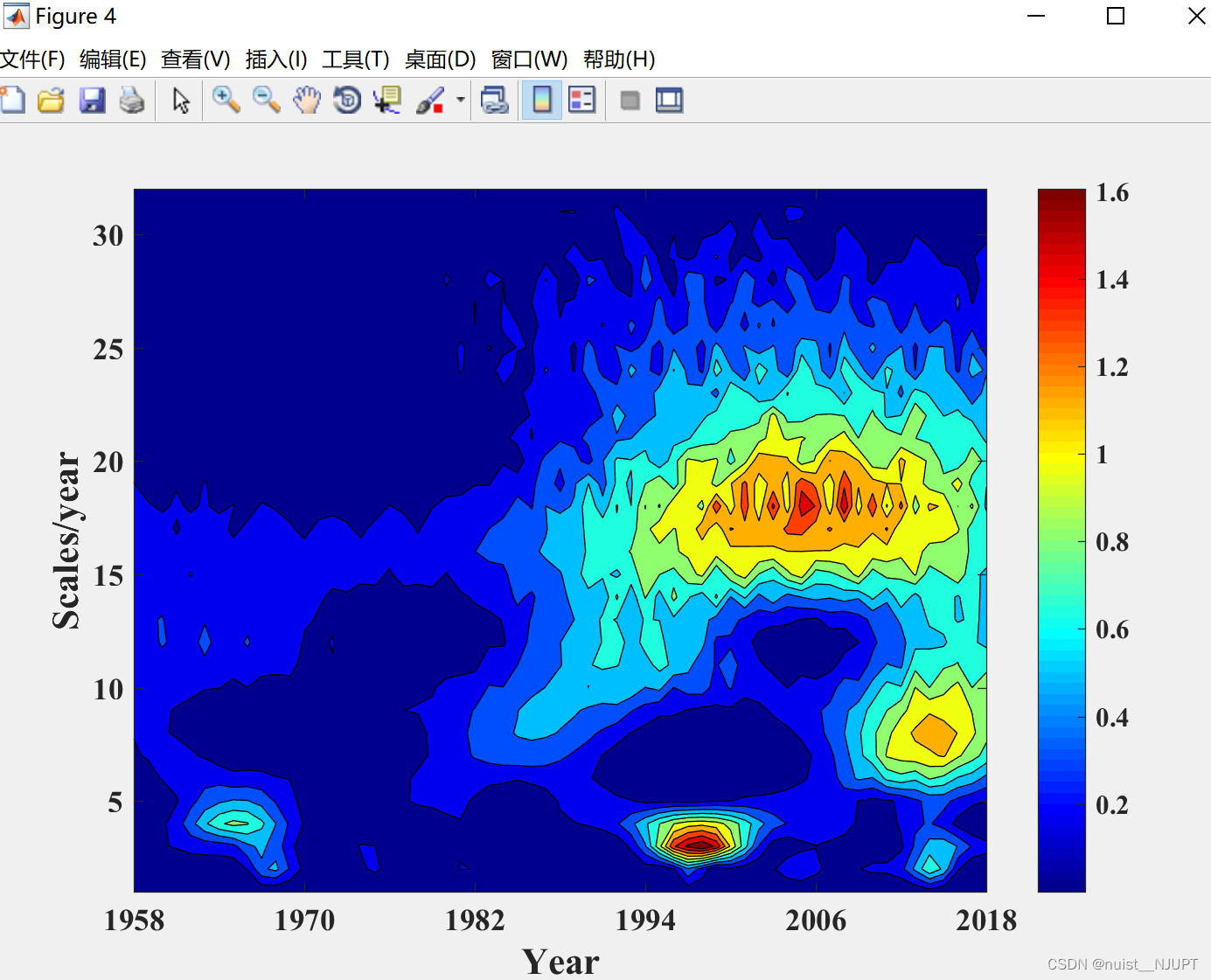
四、机器学习的常见树模型
由于之前的博客介绍了决策树和随机森林,这次主要介绍AdaBoost,GDBT,XGBoost,LigthGBM四种模型的理论及实现过程。
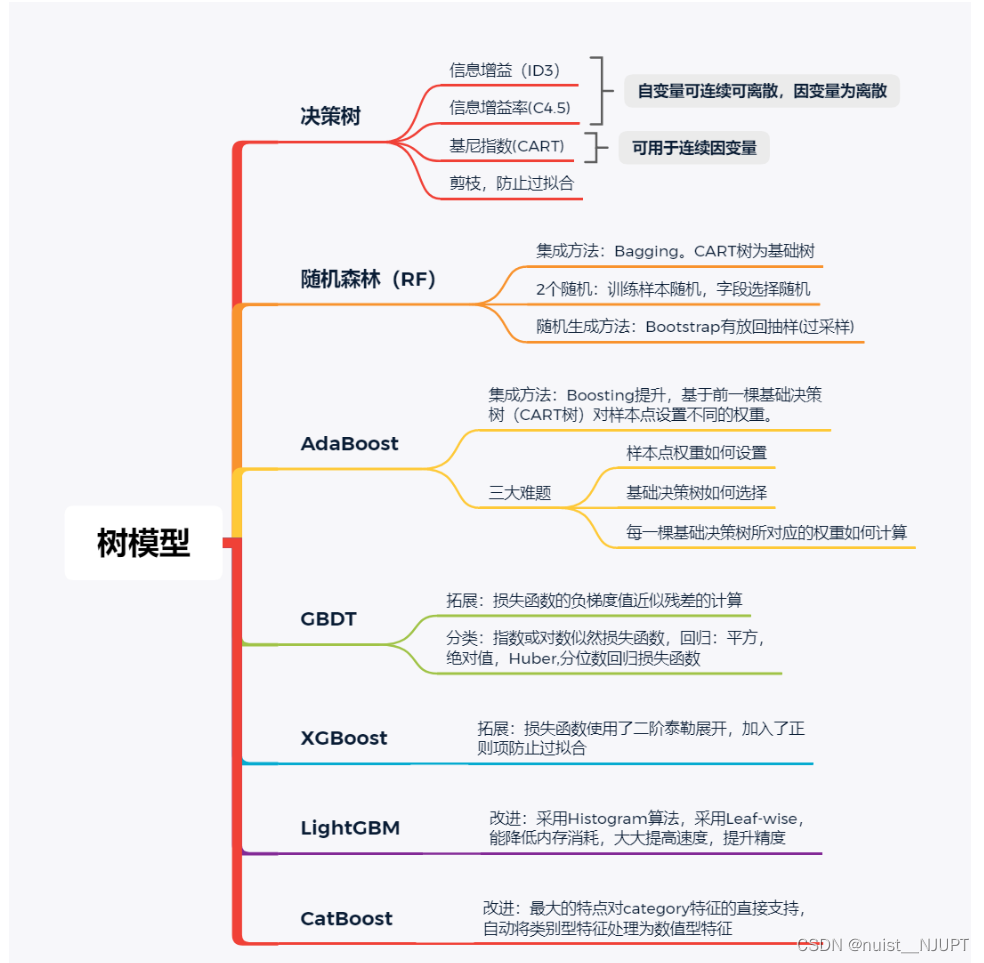
4.1、AdaBoost模型的基本思想和算法流程
Adaboost是一种迭代算法,其核心思想是针对同一个训练集训练不同的分类器(弱分类器),然后把这些弱分类器集合起来,构成一个更强的最终分类器(强分类器)。
我们看一下Adaboost的模型,就是给分类误差小的分类器分配更多的权值,给分类误差大的分类器分配更大的权值。

我们看一下Adaboost的具体实现流程,首先输入训练样本x和y,然后初始化训练样本的权值分布,具体如下:
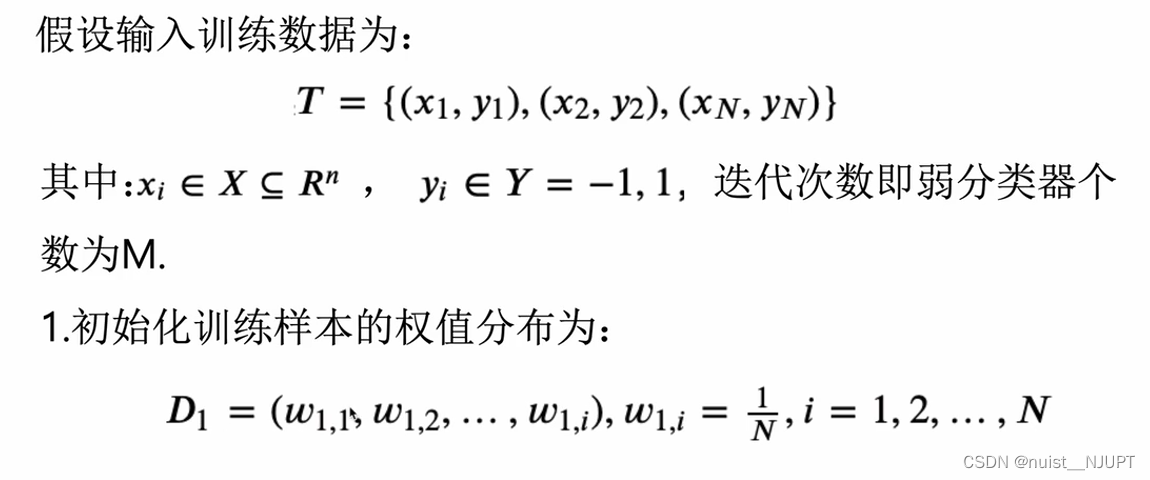
接下来进行遍历得到所有的弱分类器和所有的权值,具体如下:
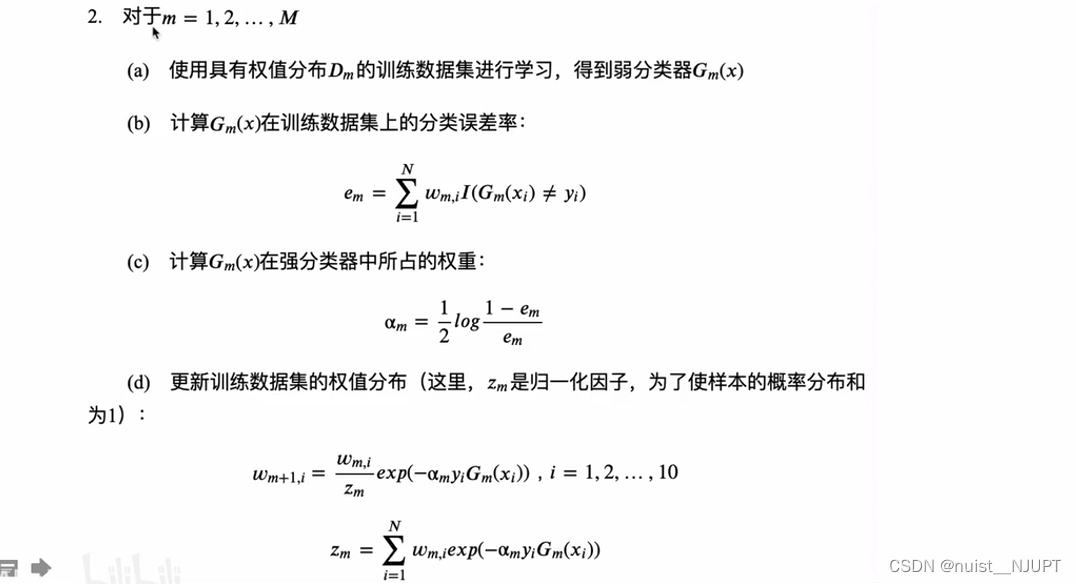
最后得到最终的分类器如下:

该算法其实是一个简单的弱分类算法提升过程,这个过程通过不断的训练,可以提高对数据的分类能力。整个过程如下所示:
1. 先通过对N个训练样本的学习得到第一个弱分类器;
2. 将分错的样本和其他的新数据一起构成一个新的N个的训练样本,通过对这个样本的学习得到第二个弱分类器 ;
3. 将1和2都分错了的样本加上其他的新样本构成另一个新的N个的训练样本,通过对这个样本的学习得到第三个弱分类器;
4. 最终经过提升的强分类器。即某个数据被分为哪一类要由各分类器权值决定。
4.2、AdaBoost模型的具体实现
下面使用python实现该模型的算法,完成一个二分类任务,我们使用Sklearn中的AdaBoost接口进行实践,具体如下:
- import numpy as np
- import matplotlib.pyplot as plt
- from sklearn.ensemble import AdaBoostClassifier
- from sklearn.tree import DecisionTreeClassifier
- from sklearn.datasets import make_gaussian_quantiles
-
- # 用make_gaussian_quantiles生成多组多维正态分布的数据
- # 生成2维正态分布,设定样本数1000,协方差2
- #其中x1是200行2列的数据,y1是200个输出样本表示分类结果
- x1, y1 = make_gaussian_quantiles(
- cov=2., n_samples=200, n_features=2, n_classes=2, shuffle=True, random_state=1)
- # 为了增加样本分布的复杂度,再生成一个数据分布
- #x2是300行2列的数据,y2是300个输出样本表示分类结果
- x2, y2 = make_gaussian_quantiles(mean=(
- 3, 3), cov=1.5, n_samples=300, n_features=2, n_classes=2, shuffle=True, random_state=1)
-
- #合并X水平合并,y竖直合并,然后按0和1不同颜色绘制散点图
- X=np.vstack((x1,x2))
- y=np.hstack((y1,1-y2))
- # 绘制生成数据
- plt.scatter(X[:,0],X[:,1],c=y)
- plt.show()
-
- #设定弱分类器CART
- weakClassifier=DecisionTreeClassifier(max_depth=2)
- #构建模型并进行训练
- clf=AdaBoostClassifier(base_estimator=weakClassifier,algorithm='SAMME',n_estimators=300,learning_rate=0.8)
- clf.fit(X, y)
-
- # 模型预测
- x1_min=X[:,0].min()-1
- x1_max=X[:,0].max()+1
- x2_min=X[:,1].min()-1
- x2_max=X[:,1].max()+1
- x1_,x2_=np.meshgrid(np.arange(x1_min,x1_max,0.02),np.arange(x2_min,x2_max,0.02))
- y_=clf.predict(np.c_[x1_.ravel(),x2_.ravel()])
- print(y)
-
- # 结果绘制
- #绘制分类效果
- y_=y_.reshape(x1_.shape)
- plt.contourf(x1_,x2_,y_,cmap=plt.cm.Paired)
- plt.scatter(X[:,0],X[:,1],c=y)
- plt.show()
原始的散点图与分类后的效果图如下:

4.3、GBDT(梯度提升决策树)基本理论
我们看一下GDBT模型,就是梯度提升+决策树,利用损失函数的负梯度尽心你和学习器。

我们具体看一下为什么可以在GDBT模型中使用负梯度作为残差进行拟合,具体如下:

我们看一下这个GDBT的梯度提升的流程,具体如下:
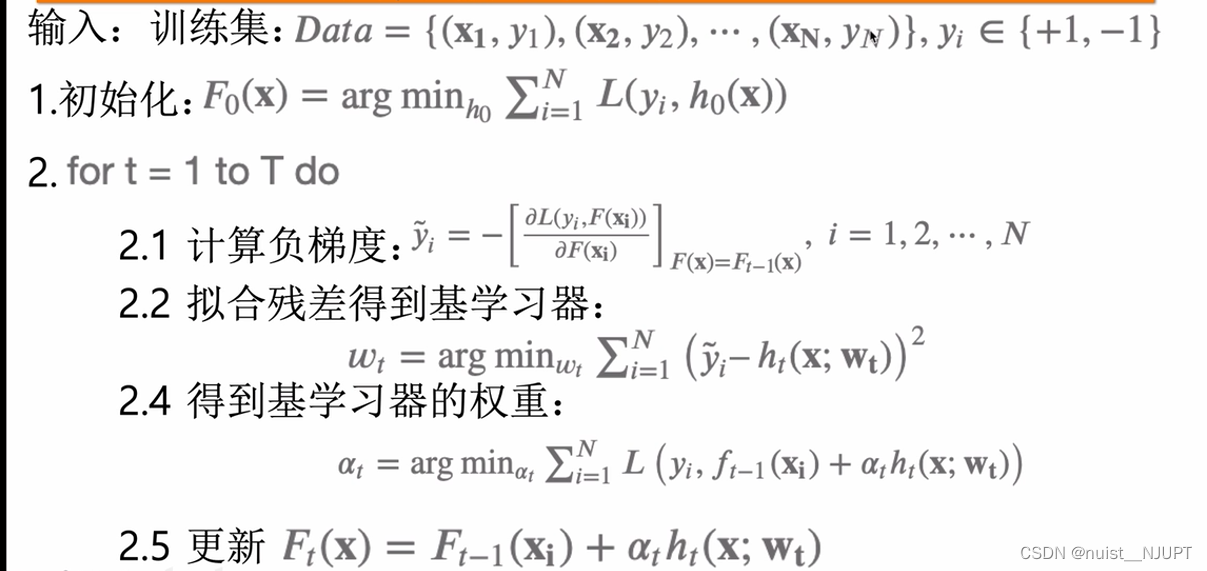
4.4、XGBoost的基本理论
我们看一下XGBoost是GBBT模型的一种,XGBoost提供并行树提升(也称为GBDT,GBM),可以快速准确地解决许多数据科学问题。

我们先回顾一下决策树的概念,就是将不用的类别映射到叶子节点的概率进行分类和回归。
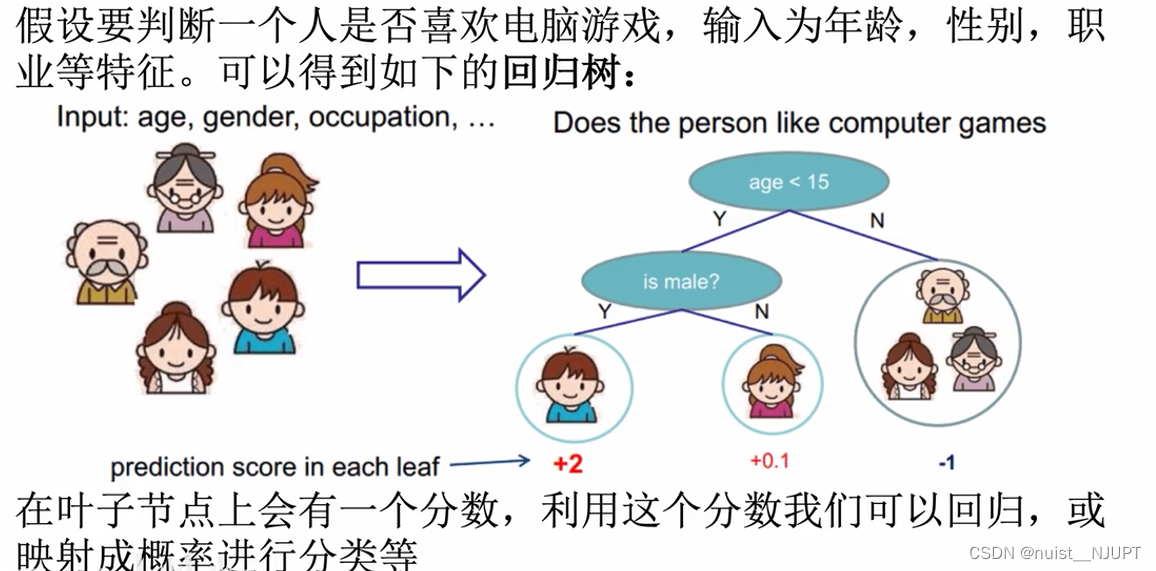
使用单个树进行集成学习的能力优先,一般考虑使用多棵树进行集成学习,就是随机森林或者提升树。

对于XGBoost的模型形式如下:是利用向前分布算法,学习到包含K棵树的加法模型。
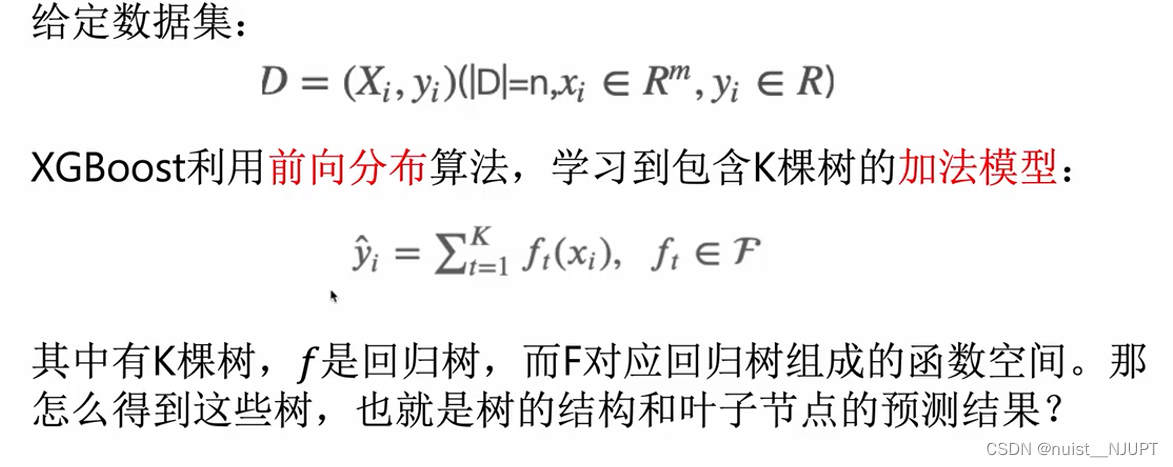
4.5、XGBoost的实践(分类和回归)
分类问题,根据输入特征进行学习生成多个弱学习器,将多个弱学习器组合成一个强学习器,通过强学习器进行预测,输入的多组数据一共包含四个特征,输入的分类一共为3类:
- import xgboost as xgb
- from xgboost import plot_importance,plot_tree
- from sklearn.datasets import load_iris
- from sklearn.model_selection import train_test_split
- from sklearn.metrics import accuracy_score
- import matplotlib.pyplot as plt
-
- # 加载样本数据集
- #X有四个特征,y有三个类别:0,1,2
- iris = load_iris()
- X,y = iris.data,iris.target
-
- # 获取特征名称:四个名称
- feature_name = iris.feature_names
-
- # 数据分割
- X_train, X_test, y_train, y_test = train_test_split(X, y, test_size=0.2, random_state=3)
-
- # 模型训练
- model = xgb.XGBClassifier(max_depth=5, n_estimators=50, silent=True, objective='multi:softmax',feature_names=feature_name)
- model.fit(X_train, y_train)
-
- # 预测
- y_pred = model.predict(X_test)
- print(y_pred)
-
- # 计算准确率
- accuracy = accuracy_score(y_test,y_pred)
- print("accuarcy: %.2f%%" % (accuracy*100.0))
-
- # 显示重要特征
- plot_importance(model)
- plot_tree(model,num_trees=5)
- plt.show()
测试集预测的结果如下,一共分为三类,即0,1,2.

四个特征的重要性排名如下:

绘制的决策树如下:

回归问题:
根据输入特征和输出特征进行回归,输入的多组数据的特征数目是9个,对结果进行预测,代码如下:
-
- import xgboost as xgb
- from xgboost import plot_importance,plot_tree
- from sklearn.model_selection import train_test_split
- from sklearn.datasets import load_boston
- import matplotlib.pyplot as plt
-
- # 获取数据
- boston = load_boston()
- X,y = boston.data,boston.target
-
-
- # 数据集划分
- X_train, X_test, y_train, y_test = train_test_split(X, y, test_size=0.2, random_state=0)
-
- # 模型训练
- model = xgb.XGBRegressor(max_depth=5, learning_rate=0.1, n_estimators=50, silent=True, objective='reg:gamma')
- model.fit(X_train, y_train)
-
- # 预测
- y_pred = model.predict(X_test)
- print(y_pred)
-
- # 显示重要特征
- plot_importance(model)
- # 可视化树的生成情况,num_trees是树的索引
- plot_tree(model, num_trees=17)
- plt.show()
回归的预测结果如下:

对9个特征的重要性进行排名如下:

绘制的决策树如下所示:

五、支持向量机SVM
5.1、支持向量机基本理论
支持向量机(Support Vector Machine, SVM)是一类按监督学习(supervised learning)方式对数据进行二元分类的广义线性分类器(generalized linear classifier),其决策边界是对学习样本求解的最大边距超平面(maximum-margin hyperplane) 。
支持向量机可以用于分类,回归预测和时间序列预测。
5.2、SVM实现持向量机回归(SVR)模型
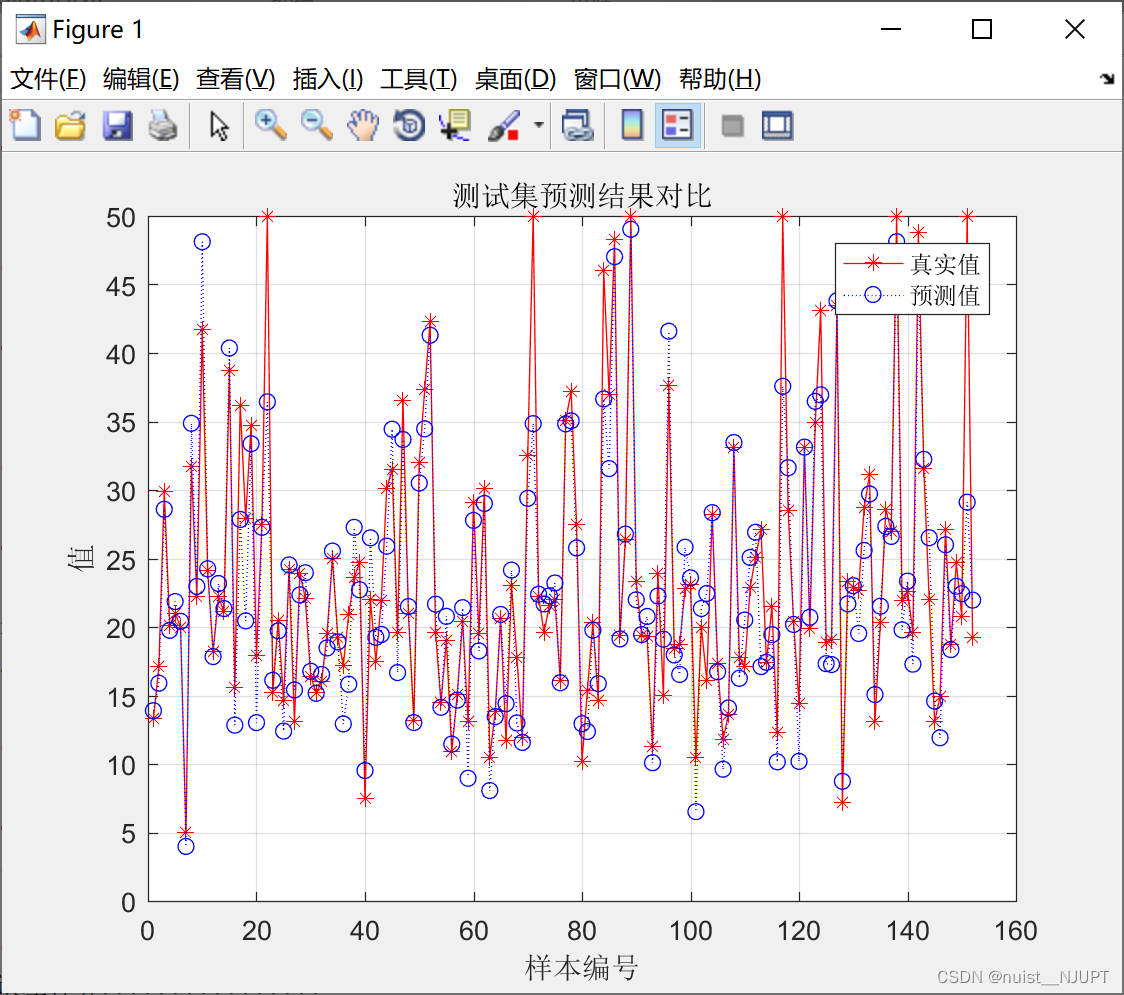
我们将数据划分为训练集和测试集,训练集有354组数据和13个特征,测试集是152组数据和13个特征,对数据进行回归预测,matlab的代码如下:
- close all;
- clc
- clear
- %% 下载数据
- load('p_train.mat');
- load('p_test.mat');
- load('t_train.mat');
- load('t_test.mat');
- %% 数据归一化
- %输入样本归一化
- [pn_train,ps1] = mapminmax(p_train');
- pn_train = pn_train';
- pn_test = mapminmax('apply',p_test',ps1);
- pn_test = pn_test';
- %输出样本归一化
- [tn_train,ps2] = mapminmax(t_train');
- tn_train = tn_train';
- tn_test = mapminmax('apply',t_test',ps2);
- tn_test = tn_test';
- %% SVR模型创建/训练
- % 寻找最佳c参数/g参数——交叉验证方法
- % SVM模型有两个非常重要的参数C与gamma。
- % 其中 C是惩罚系数,即对误差的宽容度。
- % c越高,说明越不能容忍出现误差,容易过拟合。C越小,容易欠拟合。C过大或过小,泛化能力变差
- % gamma是选择RBF函数作为kernel后,该函数自带的一个参数。隐含地决定了数据映射到新的特征空间后的分布,
- % gamma越大,支持向量越少,gamma值越小,支持向量越多。支持向量的个数影响训练与预测的速度。
- [c,g] = meshgrid(-10:0.5:10,-10:0.5:10);
- [m,n] = size(c);
- cg = zeros(m,n);
- eps = 10^(-4);
- v = 5;
- bestc = 0;
- bestg = 0;
- error = Inf;
- for i = 1:m
- for j = 1:n
- cmd = ['-v ',num2str(v),' -t 2',' -c ',num2str(2^c(i,j)),' -g ',num2str(2^g(i,j) ),' -s 3 -p 0.1'];
- cg(i,j) = svmtrain(tn_train,pn_train,cmd);
- if cg(i,j) < error
- error = cg(i,j);
- bestc = 2^c(i,j);
- bestg = 2^g(i,j);
- end
- if abs(cg(i,j) - error) <= eps && bestc > 2^c(i,j)
- error = cg(i,j);
- bestc = 2^c(i,j);
- bestg = 2^g(i,j);
- end
- end
- end
- % 创建/训练SVR
- cmd = [' -t 2',' -c ',num2str(bestc),' -g ',num2str(bestg),' -s 3 -p 0.01'];
- model = svmtrain(tn_train,pn_train,cmd);
-
- %% SVR仿真预测
- % [Predict_1,error_1,dec_values_1] = svmpredict(tn_train,pn_train,model);
- [Predict_2,error_2,dec_values_2] = svmpredict(tn_test,pn_test,model);
- % 反归一化
- % predict_1 = mapminmax('reverse',Predict_1,ps2);
- predict_2 = mapminmax('reverse',Predict_2,ps2);
- %% 计算误差
- [len,~]=size(predict_2);
- error = t_test - predict_2;
- error = error';
- MAE1=sum(abs(error./t_test'))/len;
- MSE1=error*error'/len;
- RMSE1=MSE1^(1/2);
- R = corrcoef(t_test,predict_2);
- r = R(1,2);
- disp(['........支持向量回归误差计算................'])
- disp(['平均绝对误差MAE为:',num2str(MAE1)])
- disp(['均方误差为MSE:',num2str(MSE1)])
- disp(['均方根误差RMSE为:',num2str(RMSE1)])
- disp(['决定系数 R^2为:',num2str(r)])
- figure(1)
- plot(1:length(t_test),t_test,'r-*',1:length(t_test),predict_2,'b:o')
- grid on
- legend('真实值','预测值')
- xlabel('样本编号')
- ylabel('值')
- string_2 = {'测试集预测结果对比'};
- title(string_2)
预测效果如下:
5.3、SVM实现分类任务
下面是使用SVM实现对红酒分类的预测,一共187组数据,13个特征,输出的类别为3类。
- %% Matlab神经网络43个案例分析
- % 基于SVM的数据分类预测——意大利葡萄酒种类识别
- %% 清空环境变量
- close all;
- clear;
- clc;
- format compact;
- %% 数据提取
-
- % 载入测试数据wine,其中包含的数据为classnumber = 3,wine:178*13的矩阵,wine_labes:178*1的列向量
- load chapter_WineClass.mat;
-
- % 画出测试数据的box可视化图
- figure;
- boxplot(wine,'orientation','horizontal','labels',categories);
- title('wine数据的box可视化图','FontSize',12);
- xlabel('属性值','FontSize',12);
- grid on;
-
- % 画出测试数据的分维可视化图
- figure
- subplot(3,5,1);
- hold on
- for run = 1:178
- plot(run,wine_labels(run),'*');
- end
- xlabel('样本','FontSize',10);
- ylabel('类别标签','FontSize',10);
- title('class','FontSize',10);
- for run = 2:14
- subplot(3,5,run);
- hold on;
- str = ['attrib ',num2str(run-1)];
- for i = 1:178
- plot(i,wine(i,run-1),'*');
- end
- xlabel('样本','FontSize',10);
- ylabel('属性值','FontSize',10);
- title(str,'FontSize',10);
- end
-
- % 选定训练集和测试集
-
- % 将第一类的1-30,第二类的60-95,第三类的131-153做为训练集
- train_wine = [wine(1:30,:);wine(60:95,:);wine(131:153,:)];
- % 相应的训练集的标签也要分离出来
- train_wine_labels = [wine_labels(1:30);wine_labels(60:95);wine_labels(131:153)];
- % 将第一类的31-59,第二类的96-130,第三类的154-178做为测试集
- test_wine = [wine(31:59,:);wine(96:130,:);wine(154:178,:)];
- % 相应的测试集的标签也要分离出来
- test_wine_labels = [wine_labels(31:59);wine_labels(96:130);wine_labels(154:178)];
-
- %% 数据预处理
- % 数据预处理,将训练集和测试集归一化到[0,1]区间
-
- [mtrain,ntrain] = size(train_wine);
- [mtest,ntest] = size(test_wine);
-
- dataset = [train_wine;test_wine];
- % mapminmax为MATLAB自带的归一化函数
- [dataset_scale,ps] = mapminmax(dataset',0,1);
- dataset_scale = dataset_scale';
-
- train_wine = dataset_scale(1:mtrain,:);
- test_wine = dataset_scale( (mtrain+1):(mtrain+mtest),: );
- %% SVM网络训练
- tic;
- model = svmtrain(train_wine_labels, train_wine, '-c 2 -g 1');
- toc;
- %% SVM网络预测
- tic;
- [predict_label, accuracy,dec_value1] = svmpredict(test_wine_labels, test_wine, model);
- toc;
- %% 结果分析
-
- % 测试集的实际分类和预测分类图
- % 通过图可以看出只有一个测试样本是被错分的
- figure;
- hold on;
- plot(test_wine_labels,'o');
- plot(predict_label,'r*');
- xlabel('测试集样本','FontSize',12);
- ylabel('类别标签','FontSize',12);
- legend('实际测试集分类','预测测试集分类');
- title('测试集的实际分类和预测分类图','FontSize',12);
- grid on;

5.4、SVM实现时间序列预测
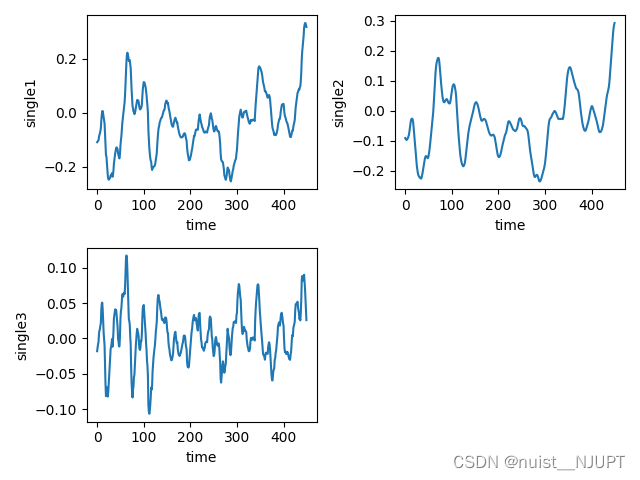
我们看一下SVM对于时间序列的预测,数据如下,第1列为时间,后面3列为时间的序列的数据,根据svm模型对时间序列数据进行预测,首先绘制B,C,D三类的时间序列变化图。

绘制出时间序列变化图,具体的时间序列变化如下所示,三组都是400个时间序列的样本数据。
模型训练与预测的代码如下,对测试集进行预测,绘制预测值和真实值的曲线,最后绘制预测误差的曲线。
- #time时间列,single1,信号值,取前多少个X_data预测下一个数据
- def time_slice(time,single,X_lag):
- sample = []
- label = []
- for k in range(len(time) - X_lag - 1):
- t = k + X_lag
- sample.append(single[k:t])
- label.append(single[t + 1])
- return sample,label
-
- sample,label = time_slice(time,single1,5)
-
- # 数据集划分
- X_train, X_test, y_train, y_test = train_test_split(sample, label, test_size=0.3, random_state=42)
- # 数据集掷乱
- random_seed = 13
- X_train, y_train = shuffle(X_train, y_train, random_state=random_seed)
- # 参数设置SVR准备
- parameters = {'kernel': ['rbf'], 'gamma': np.logspace(-5, 0, num=6, base=2.0),
- 'C': np.logspace(-5, 5, num=11, base=2.0)}
- # 网格搜索:选择十折交叉验证
- svr = svm.SVR()
- grid_search = GridSearchCV(svr, parameters, cv=10, n_jobs=4, scoring='neg_mean_squared_error')
- # SVR模型训练
- grid_search.fit(X_train, y_train)
- # 输出最终的参数
- print(grid_search.best_params_)
- # 模型的精度
- print(grid_search.best_score_)
- # SVR模型保存
- joblib.dump(grid_search, 'svr.pkl')
- # SVR模型加载
- svr = joblib.load('svr.pkl')
- # SVR模型测试
- y_hat = svr.predict(X_test)
- # 计算预测值与实际值的残差绝对值
- abs_vals = np.abs(y_hat - y_test)
-
- plt.subplot(1, 1, 1)
- plt.plot(y_test, c='k', label='data')
- plt.plot(y_hat, c='g', label='svr model')
- plt.xlabel('data')
- plt.ylabel('target')
- plt.title('Support Vector Regression')
- plt.legend()
- plt.show()
- plt.subplot(1, 1, 1)
- plt.plot(abs_vals)
- plt.show()
使用训练好的svm模型进行预测值和真实值的拟合曲线图如下:
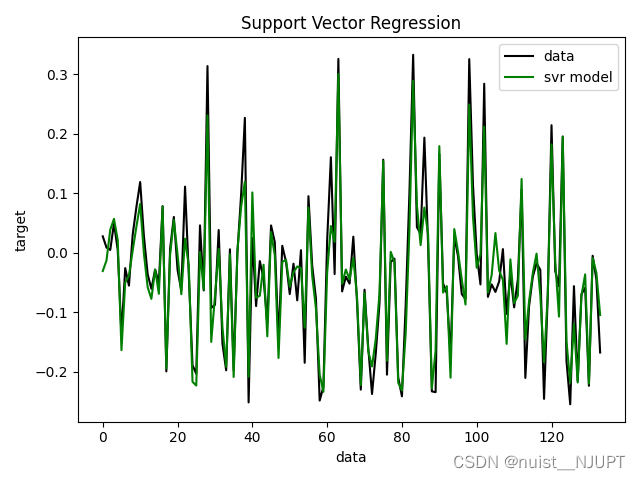
预测的值和真实值之间的误差变化图,具体如下:

六、基于prophet的时间序列预测
6.1、prophet理论与实现一
我们可以看一下Prophet模型进行时间序列预测的基本模型,具体包括趋势项,周期项,节假日项,误差项,四个项目共同组成prophet模型。

我们根据原始时间序列数据去预测后30天的申购总额和赎回总额,原始数据是2013年7月到2014年的8月,我们使用当前的时间序列数据预测未来30天的,具体如下:

python代码实现如下:
- import pandas as pd
- import numpy as np
- import matplotlib.pyplot as plt
- from prophet import Prophet
- from prophet.diagnostics import cross_validation
- from prophet.diagnostics import performance_metrics
- from prophet.plot import plot_cross_validation_metric
- import warnings
- warnings.filterwarnings('ignore')
-
- #读取数据
- data_user = pd.read_csv('user_balance_table.csv')
- #将第一列的时间数据转换成固定格式
- data_user['report_date'] = pd.to_datetime(data_user['report_date'], format='%Y%m%d')
- #输出前面的头部信息
- print(data_user.head())
-
- #取时间列和另外要预测的两列
- data_user_byday = data_user.groupby(['report_date'])['total_purchase_amt','total_redeem_amt'].sum().sort_values(['report_date']).reset_index()
- print(data_user_byday.head())
-
-
- # 定义模型
- def FB(data: pd.DataFrame) -> pd.DataFrame:
- df = pd.DataFrame({
- 'ds': data.report_date,
- 'y': data.total_purchase_amt,
- })
-
- #申购总额的最大值和最小值
- df['cap'] = data.total_purchase_amt.values.max()
- df['floor'] = data.total_purchase_amt.values.min()
-
- m = Prophet(
- changepoint_prior_scale=0.05,
- daily_seasonality=False,
- yearly_seasonality=True, # 年周期性
- weekly_seasonality=True, # 周周期性
- growth="logistic",
- )
-
- m.add_seasonality(name='monthly', period=30.5, fourier_order=5, prior_scale=0.1)#月周期性
- m.add_country_holidays(country_name='CN') # 中国所有的节假日
- m.fit(df)
- future = m.make_future_dataframe(periods=30, freq='D') # 预测时长
- #预测的申购总额的最大值和最小值
- future['cap'] = data.total_purchase_amt.values.max()
- future['floor'] = data.total_purchase_amt.values.min()
- forecast = m.predict(future)
- fig = m.plot_components(forecast)
- fig1 = m.plot(forecast)
- return forecast
-
- result_purchase = FB(data_user_byday)
- print(result_purchase)
- plt.show()
预测结果如下:

预测的周期性和趋势图等如下:
 6.2、 prophet理论与实现二
数据部分,2013年7月到2014年8月的数据,对后30天的赎回总额进行预测,具体如下:
python代码如下:
- import pandas as pd
- import numpy as np
- import matplotlib.pyplot as plt
- from prophet import Prophet
- from prophet.diagnostics import cross_validation
- from prophet.diagnostics import performance_metrics
- from prophet.plot import plot_cross_validation_metric
- import warnings
- warnings.filterwarnings('ignore')
-
- #读取数据
- data_user = pd.read_csv('user_balance_table.csv')
- #将第一列的时间数据转换成固定格式
- data_user['report_date'] = pd.to_datetime(data_user['report_date'], format='%Y%m%d')
- #输出前面的头部信息
- print(data_user.head())
-
- #取时间列和另外要预测的两列
- data_user_byday = data_user.groupby(['report_date'])['total_purchase_amt','total_redeem_amt'].sum().sort_values(['report_date']).reset_index()
- print(data_user_byday.head())
-
- # 定义模型
- def FB(data: pd.DataFrame) -> pd.DataFrame:
-
- df = pd.DataFrame({
- 'ds': data.report_date,
- 'y': data.total_redeem_amt,
- })
-
- df['cap'] = data.total_redeem_amt.values.max()
- df['floor'] = data.total_redeem_amt.values.min()
-
- m = Prophet(
- changepoint_prior_scale=0.05,
- daily_seasonality=False,
- yearly_seasonality=True, # 年周期性
- weekly_seasonality=True, # 周周期性
- growth="logistic",
- )
- #365/12
- m.add_seasonality(name='monthly', period=30.5, fourier_order=5, prior_scale=0.1) # 月周期性
- m.add_country_holidays(country_name='CN' ) # 中国所有的节假日
-
- m.fit(df)
-
- future = m.make_future_dataframe(periods=30, freq='D' ) # 预测时长
- future['cap'] = data.total_redeem_amt.values.max()
- future['floor'] = data.total_redeem_amt.values.min()
-
- forecast = m.predict(future)
-
- fig = m.plot_components(forecast)
- fig1 = m.plot(forecast)
-
- return forecast
- result_redeem = FB(data_user_byday)
- print(result_redeem)
- plt.show()
预测结果如下:
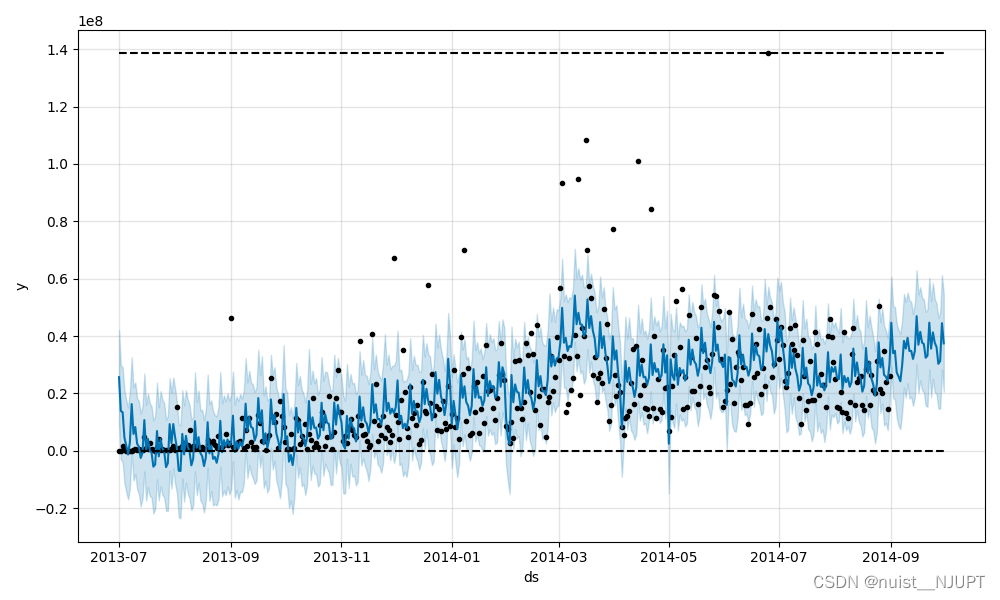
周期性分析结果如下: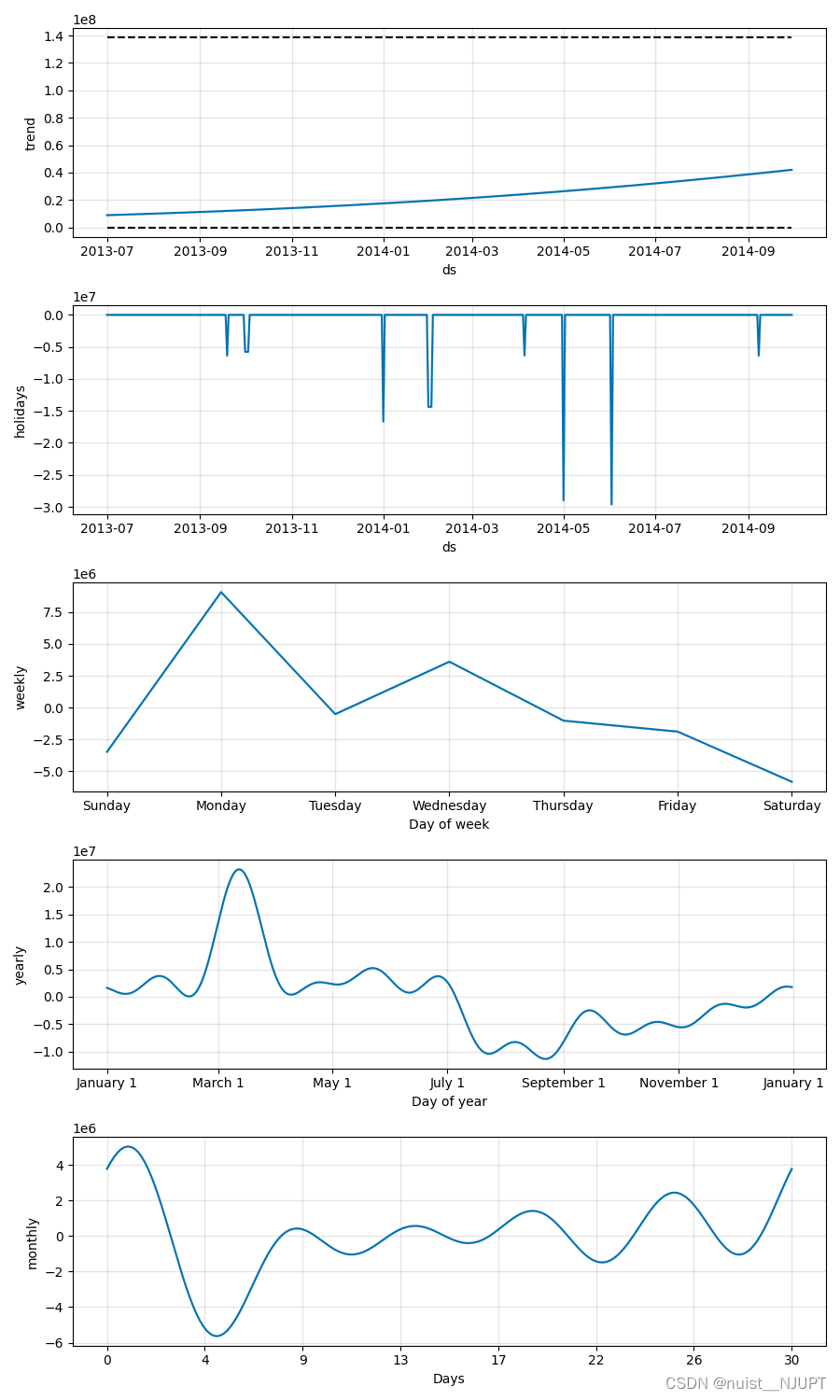
七、图像处理方法
7.1、图像的去噪、增强
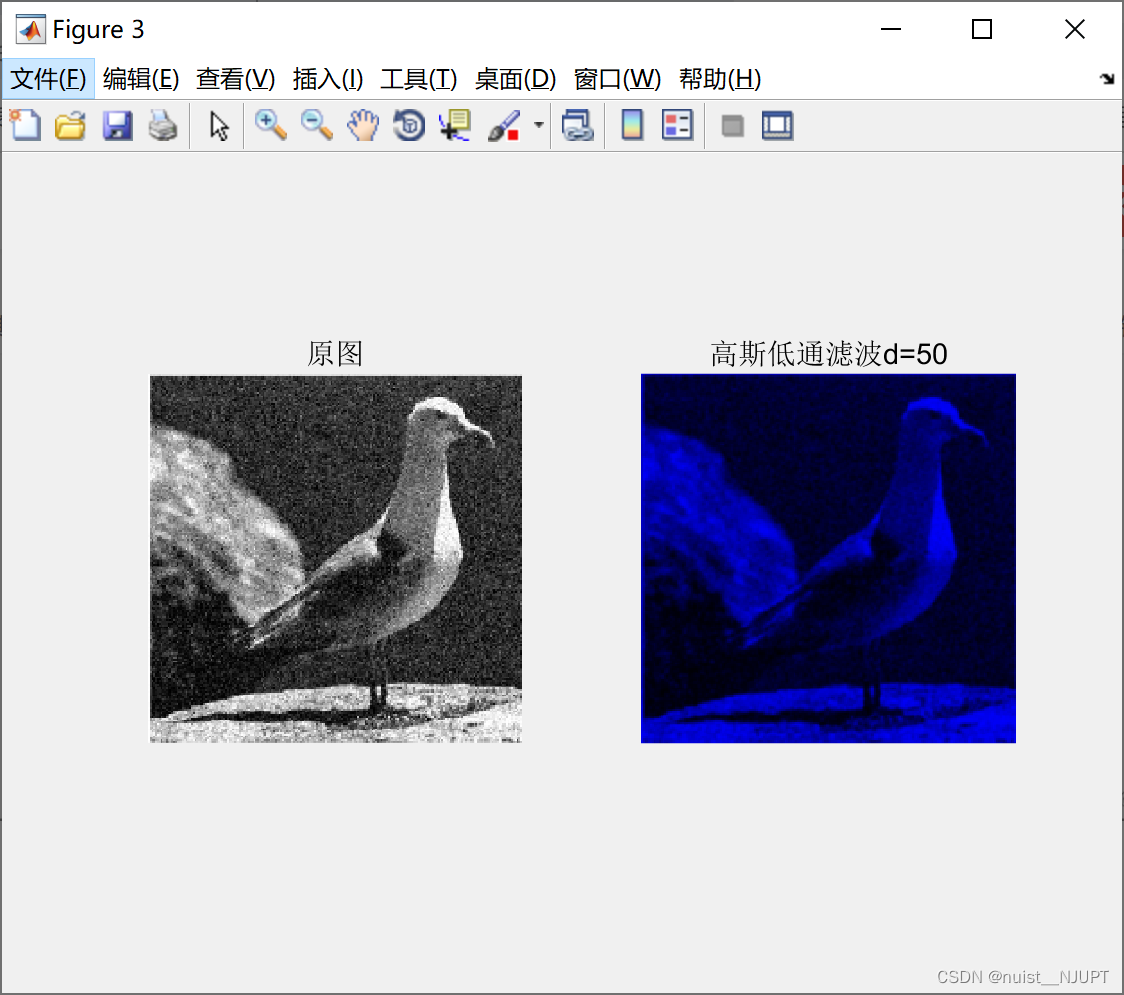
1、去噪是采用滤波的方式,本文使用了三种滤波方式:均值滤波,中值滤波,高斯高通滤波,滤波的主要代码如下,滤波的主要效果展示在图片中:
- clear;
- clc
- g = imread('bird.jpg');
- gg = imnoise(g, 'gaussian'); %添加高斯噪声
-
- subplot(2,2,1);
- imshow(gg);
- title('高斯噪声');
- j = 2;
-
- for i = 3:4:11
- subplot(2,2,j);
- G = avefilter(gg, i);
- imshow(G);
- title([num2str(i), '\ast', num2str(i), '均值滤波']);
- j = j+1;
- end
-
- figure(2);
- g = imread('bird.png');
- gg = imnoise(g, 'salt & pepper', 0.05); %添加椒盐噪声
-
- subplot(2,2,1), imshow(gg);
- title('椒盐噪声');
-
- j = 2;
- for i = 3:4:11
- G = medianfilter(gg, i);
- subplot(2,2,j);
- imshow(G);
- title([num2str(i), '\ast', num2str(i), '中值滤波']);
- j = j+1;
- end
-
- figure(3);
- d0=50; %阈值
- image=imread('bird.jpg');
- [M,N,P] = size(image);
-
- img_f = fft2(double(image));%傅里叶变换得到频谱
- img_f=fftshift(img_f); %移到中间
-
- m_mid=floor(M/2);%中心点坐标
- n_mid=floor(N/2);
-
- h = zeros(M,N,P);%高斯低通滤波器构造
- for i = 1:M
- for j = 1:N
- d = ((i-m_mid)^2+(j-n_mid)^2);
- h(i,j) = exp(-d/(2*(d0^2)));
- end
- end
-
- img_lpf = h.*img_f;
-
- img_lpf=ifftshift(img_lpf); %中心平移回原来状态
- img_lpf=uint8(real(ifft2(img_lpf))); %反傅里叶变换,取实数部分
-
- subplot(1,2,1);
- imshow(image);
- title('原图');
- subplot(1,2,2);
- imshow(img_lpf);
- title('高斯低通滤波d=50');
- function G = avefilter(F, k)
- % F 是待处理的图像
- % k 是模版的大小,奇数
- [m,n,p] = size(F) ;
-
- % 转换数据类型,便于计算
- G = uint16(zeros(m, n));
- Ft = uint16(F);
- M = uint16(ones(k, k));
- h = (k+1)/2;
-
- for i = 1:m
- for j = 1:n
- if((i < h)|| (j < h)|| (i > m-h+1)|| (j > n-h+1)) %不能被模版处理的区域
- G(i, j) = Ft(i, j);
- continue; %像素值不变
- end
- %取同样大小的图像块,中间的像素是待处理的像素
- T = Ft(i-(k-1)/2: i+(k-1)/2, j-(k-1)/2: j+(k-1)/2);
- T = T.*M; %和模版相乘
- G(i, j) = sum(T(:))/k^2; %结果求和并计算平均值
- end
- end
- G = uint8(G); %结果转换成8-bit图像的数据类型
- function G = medianfilter(F, k)
- % F 是待处理的图像
- % k 是模版的大小,奇数
- [m,n,p] = size(F) ;
-
- % 转换数据类型,便于计算
- G = uint16(zeros(m, n)); Ft = uint16(F); M = uint16(ones(k, k));
- h = (k+1)/2;
-
- for i = 1:m
- for j = 1:n
- if((i < h)|| (j < h)|| (i > m-h+1)|| (j > n-h+1)) %不能被模版处理的区域
- G(i, j) = Ft(i, j);
- continue; %像素值不变
- end
- % 取同样大小的图像块,中间的像素是待处理的像素
- T = Ft(i-(k-1)/2: i+(k-1)/2, j-(k-1)/2: j+(k-1)/2);
- T = T(:); %将矩阵转换为一维向量
- G(i, j) = median(T); %求中值并赋值给中间像素
- end
- end
- G = uint8(G); %结果转换成8-bit图像的数据类型
滤波效果如下:
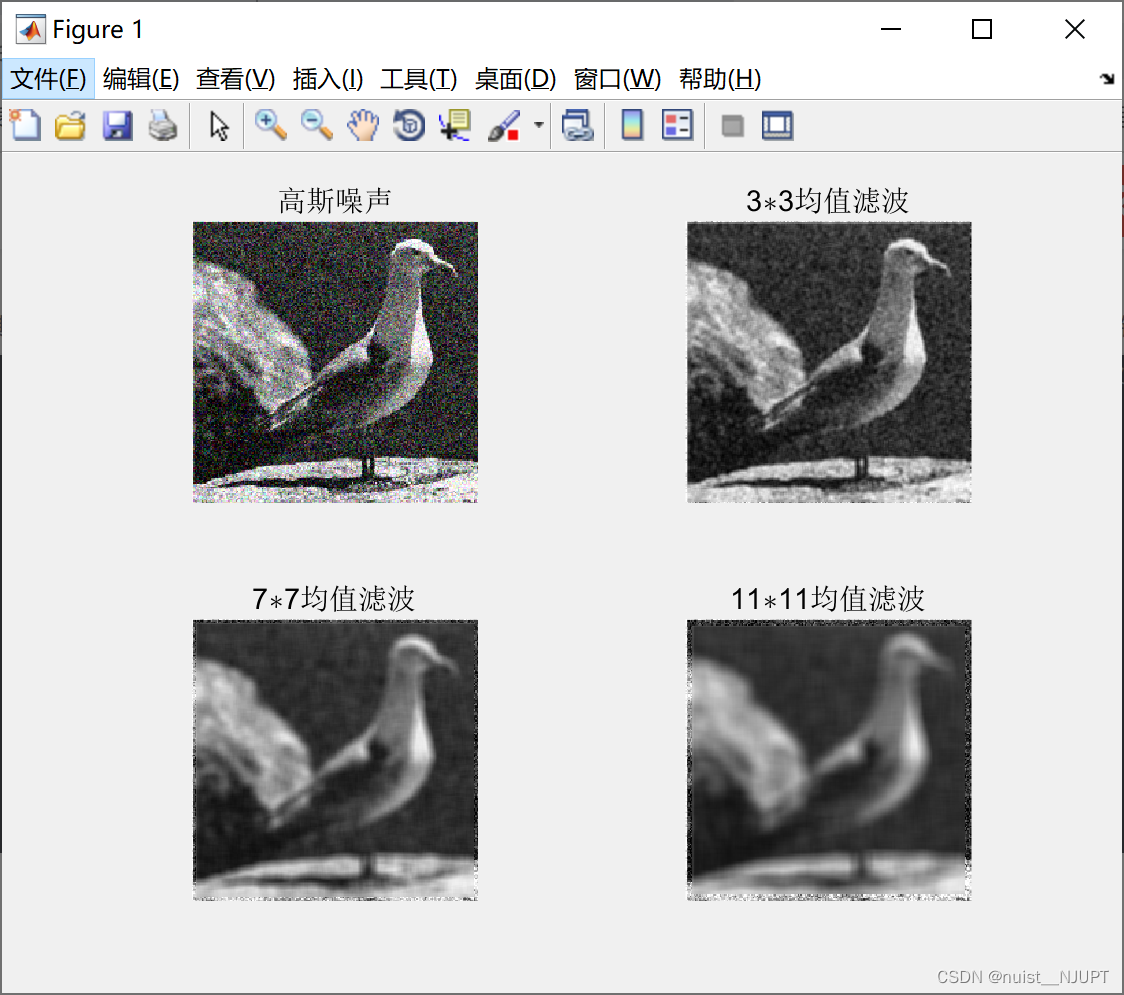

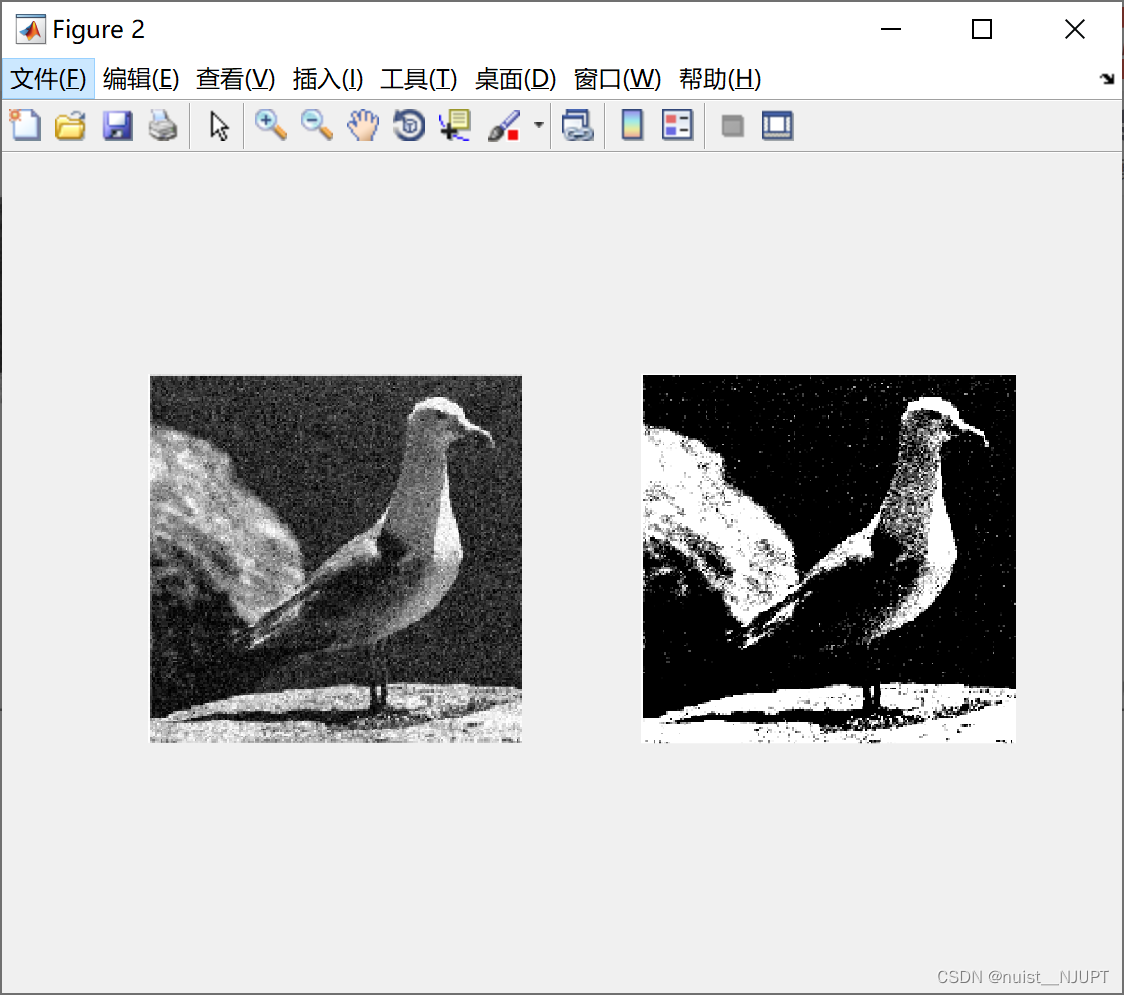
2-接下来对图像进行增强处理, 主要采用两种方式,一种是灰度线性变换,另外一种是直方图均衡变换。
matlab实现灰度线性变换和直方图均衡变换进行图像增强的代码如下:
- %% 获取灰色图像直方图
- I = imread('bird.jpg'); %读取图片
- I = rgb2gray(I); %把图片从rgb格式转为灰度图
-
- row = size(I, 1); %获取图片像素的行列数
- column = size(I, 2);
- N = zeros(1, 256); %一个空的容器,用来记录每个像素出现的次数
-
- % 两个循环用来遍历每一个像素
- for i = 1:row
- for j = 1:column
- k = I(i, j); % 获取该像素点的像素值
- N(k + 1) = N(k + 1) + 1; % 记录下该像素值出现的次数
- end
- end
-
- %展示图片
- figure(1);
- subplot(121);imshow(I);
- subplot(122);bar(N);
-
- %% 灰色线性变换进行图像增强
- I = imread('bird.jpg');
- I = rgb2gray(I);
- I = double(I);
-
- J = (I - 80) * 255 / 70;
- row = size(I, 1);
- column = size(I, 2);
-
- for i = 1:row
- for j = 1:column
- if J(i, j) < 0
- J(i, j) = 0;
- elseif J(i, j) > 255
- J(i, j) = 255;
- end
- end
- end
-
- figure(2);
- subplot(121);imshow(uint8(I));
- subplot(122);imshow(uint8(J));
-
- %% 直方图均衡变换进行图像增强
- %R,G,B直方图展示
- figure(3) ;
- I = imread('bird.jpg');
- subplot(221);imshow(I);
- subplot(222);imhist(I(:, :, 1));title('R');
- subplot(223);imhist(I(:, :, 2));title('G');
- subplot(224);imhist(I(:, :, 3));title('B');
- %均衡化方法
- I = imread('bird.jpg');
- G = rgb2gray(I) ;
- J = histeq(G);
- figure(4);
- subplot(221);imshow(G);
- subplot(222);imshow(J);
- subplot(223);imhist(G);
- subplot(224);imhist(J);
效果图如下:
原始图像和原始图像的灰色直方图如下:

对图像做了灰色线性变换后的图像对比如下:
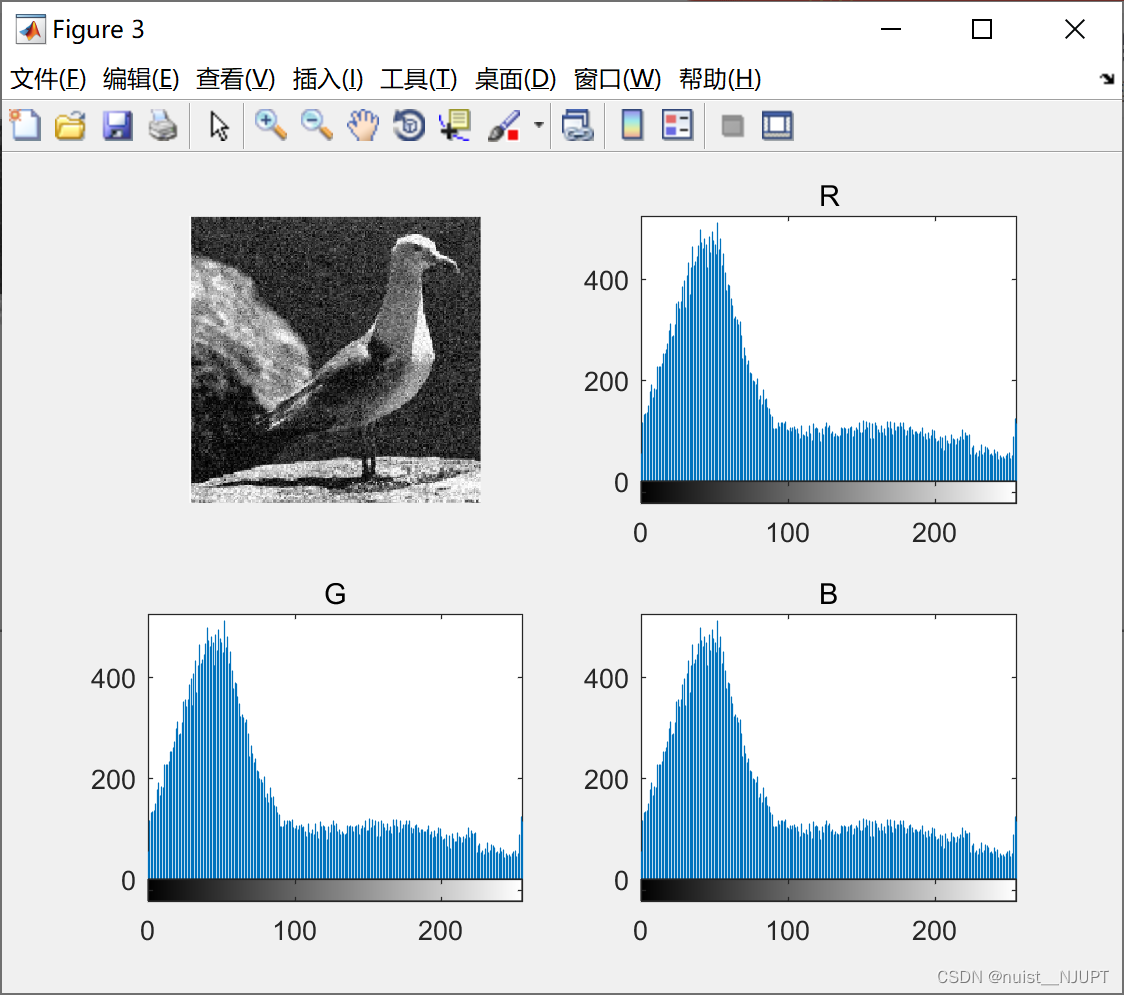
原始图像的RGB直方图如下:
对原始图像做了直方图均衡变换的效果图:

7.2、图像特征提取
使用SITF算法进行图像特征提取,提取的特征位置如下,具体的matlab代码如下:
我们先看一下提取的效果:

主函数如下:
- clear;
- clc
- [image, descriptors, locs] = sift('deng.jpg');
- disp('descriptors如下:') ;
- disp(descriptors) ;
- image1 = imread('deng.jpg');
- showkeys(image1, locs)
sift算法函数如下:
- % [image, descriptors, locs] = sift(imageFile)
- %
- % This function reads an image and returns its SIFT keypoints.
- % Input parameters:
- % imageFile: the file name for the image.
- %
- % Returned:
- % image: the image array in double format
- % descriptors: a K-by-128 matrix, where each row gives an invariant
- % descriptor for one of the K keypoints. The descriptor is a vector
- % of 128 values normalized to unit length.
- % locs: K-by-4 matrix, in which each row has the 4 values for a
- % keypoint location (row, column, scale, orientation). The
- % orientation is in the range [-PI, PI] radians.
- %
- % Credits: Thanks for initial version of this program to D. Alvaro and
- % J.J. Guerrero, Universidad de Zaragoza (modified by D. Lowe)
-
- function [image, descriptors, locs] = sift(imageFile)
-
- % Load image
- image1 = imread(imageFile);
- image = rgb2gray(image1) ;
-
- % If you have the Image Processing Toolbox, you can uncomment the following
- % lines to allow input of color images, which will be converted to grayscale.
- % if isrgb(image)
- % image = rgb2gray(image);
- % end
-
- [rows, cols] = size(image);
-
- % Convert into PGM imagefile, readable by "keypoints" executable
- f = fopen('tmp.pgm', 'w');
- if f == -1
- error('Could not create file tmp.pgm.');
- end
- fprintf(f, 'P5\n%d\n%d\n255\n', cols, rows);
- fwrite(f, image', 'uint8');
- fclose(f);
- % Call keypoints executable
- if isunix
- command = '!./sift ';
- else
- command = '!siftWin32 ';
- end
- command = [command ' <tmp.pgm >tmp.key'];
- eval(command);
- % Open tmp.key and check its header
- g = fopen('tmp.key', 'r');
- if g == -1
- error('Could not open file tmp.key.');
- end
- [header, count] = fscanf(g, '%d %d', [1 2]);
- if count ~= 2
- error('Invalid keypoint file beginning.');
- end
- num = header(1);
- len = header(2);
- if len ~= 128
- error('Keypoint descriptor length invalid (should be 128).');
- end
- % Creates the two output matrices (use known size for efficiency)
- locs = double(zeros(num, 4));
- descriptors = double(zeros(num, 128));
- % Parse tmp.key
- for i = 1:num
- [vector, count] = fscanf(g, '%f %f %f %f', [1 4]); %row col scale ori
- if count ~= 4
- error('Invalid keypoint file format');
- end
- locs(i, :) = vector(1, :);
-
- [descrip, count] = fscanf(g, '%d', [1 len]);
- if (count ~= 128)
- error('Invalid keypoint file value.');
- end
- % Normalize each input vector to unit length
- descrip = descrip / sqrt(sum(descrip.^2));
- descriptors(i, :) = descrip(1, :);
- end
- fclose(g);
特征点的展示函数如下:
- % showkeys(image, locs)
- %
- % This function displays an image with SIFT keypoints overlayed.
- % Input parameters:
- % image: the file name for the image (grayscale)
- % locs: matrix in which each row gives a keypoint location (row,
- % column, scale, orientation)
-
- function showkeys(image, locs)
-
- disp('Drawing SIFT keypoints ...');
-
- % Draw image with keypoints
- figure('Position', [50 50 size(image,2) size(image,1)]);
- colormap('gray');
- imagesc(image);
- hold on;
- imsize = size(image);
- for i = 1: size(locs,1)
- % Draw an arrow, each line transformed according to keypoint parameters.
- TransformLine(imsize, locs(i,:), 0.0, 0.0, 1.0, 0.0);
- TransformLine(imsize, locs(i,:), 0.85, 0.1, 1.0, 0.0);
- TransformLine(imsize, locs(i,:), 0.85, -0.1, 1.0, 0.0);
- end
- hold off;
- % ------ Subroutine: TransformLine -------
- % Draw the given line in the image, but first translate, rotate, and
- % scale according to the keypoint parameters.
- %
- % Parameters:
- % Arrays:
- % imsize = [rows columns] of image
- % keypoint = [subpixel_row subpixel_column scale orientation]
- %
- % Scalars:
- % x1, y1; begining of vector
- % x2, y2; ending of vector
- function TransformLine(imsize, keypoint, x1, y1, x2, y2)
-
- % The scaling of the unit length arrow is set to approximately the radius
- % of the region used to compute the keypoint descriptor.
- len = 6 * keypoint(3);
-
- % Rotate the keypoints by 'ori' = keypoint(4)
- s = sin(keypoint(4));
- c = cos(keypoint(4));
-
- % Apply transform
- r1 = keypoint(1) - len * (c * y1 + s * x1);
- c1 = keypoint(2) + len * (- s * y1 + c * x1);
- r2 = keypoint(1) - len * (c * y2 + s * x2);
- c2 = keypoint(2) + len * (- s * y2 + c * x2);
-
- line([c1 c2], [r1 r2], 'Color', 'r');
道阻且长,行则将至,我们都是这条人生路途中的追梦人,大家加油吧,希望我们数模竞赛能取得一个好成绩,加油吧,少年!

