- 1MCU学习笔记_SPI_mcu读取设置msb有什么用
- 2一文讲清Python的7大学习路线(建议收藏)_python技术栈学习路线
- 3R语言基础学习-02 (此语言用途小众 用于数学 生物领域 基因分析)
- 4揭秘AI魔法绘画:Stable Diffusion引领无限创意新纪元_ai绘画教程:文生图+图生图+提示词+模型训练+插件应用
- 5飞腾服务器通过KunLun BIOS 对JBOD模式的系统盘进行格式化,删除系统盘中残留数据的操作方法_飞腾服务器如何格式化硬盘
- 6AI:06-基于OpenCV的二维码识别技术的研究_opencv识别二维码原理
- 7若依ruoyi框架实现单点登录或者接入统一认证_若依单点登录
- 8pytorch并行报错RuntimeError: unable to write to file</torch_xxx>_runtimeerror: unable to write to file
- 9面试必备:分库分表经典15连问_分库分表面试题
- 102023年第2季社区Task挑战赛升级新玩法,等你来战!_bcos3 复杂查询
LangChain(0.0.340)官方文档一:快速入门_langchain 0.0.350 下载
赞
踩
LangChain官网、LangChain官方文档 、langchain Github、langchain API文档、llm-universe
文章目录
一、LangChain简介(v0.0.340)
1.1 整体框架
LangChain是一个用于开发由语言模型驱动的应用程序的框架。它使得应用程序具备以下特点:
- 上下文感知(context-aware):连接语言模型与上下文来源(提示说明、少量示例、用于构建响应的内容等)。
- 推理(Reason):依赖语言模型进行推理(根据提供的上下文考虑如何回答,采取什么行动等)。
该框架包括几个部分:
- LangChain库:Python和JavaScript库。包含用于各种组件的接口和集成,用于将这些组件组合成链和代理的基本运行时,以及链和代理的现成实现。
- LangChain Templates:提示模板,一系列易于部署的参考体系结构,适用于各种任务。
- LangServe:一个用于将LangChain链部署为REST API的库。
- LangSmith:一个开发者平台,允许您在任何LLM框架上调试、测试、评估和监视构建在LangChain上的链,并与LangChain无缝集成。
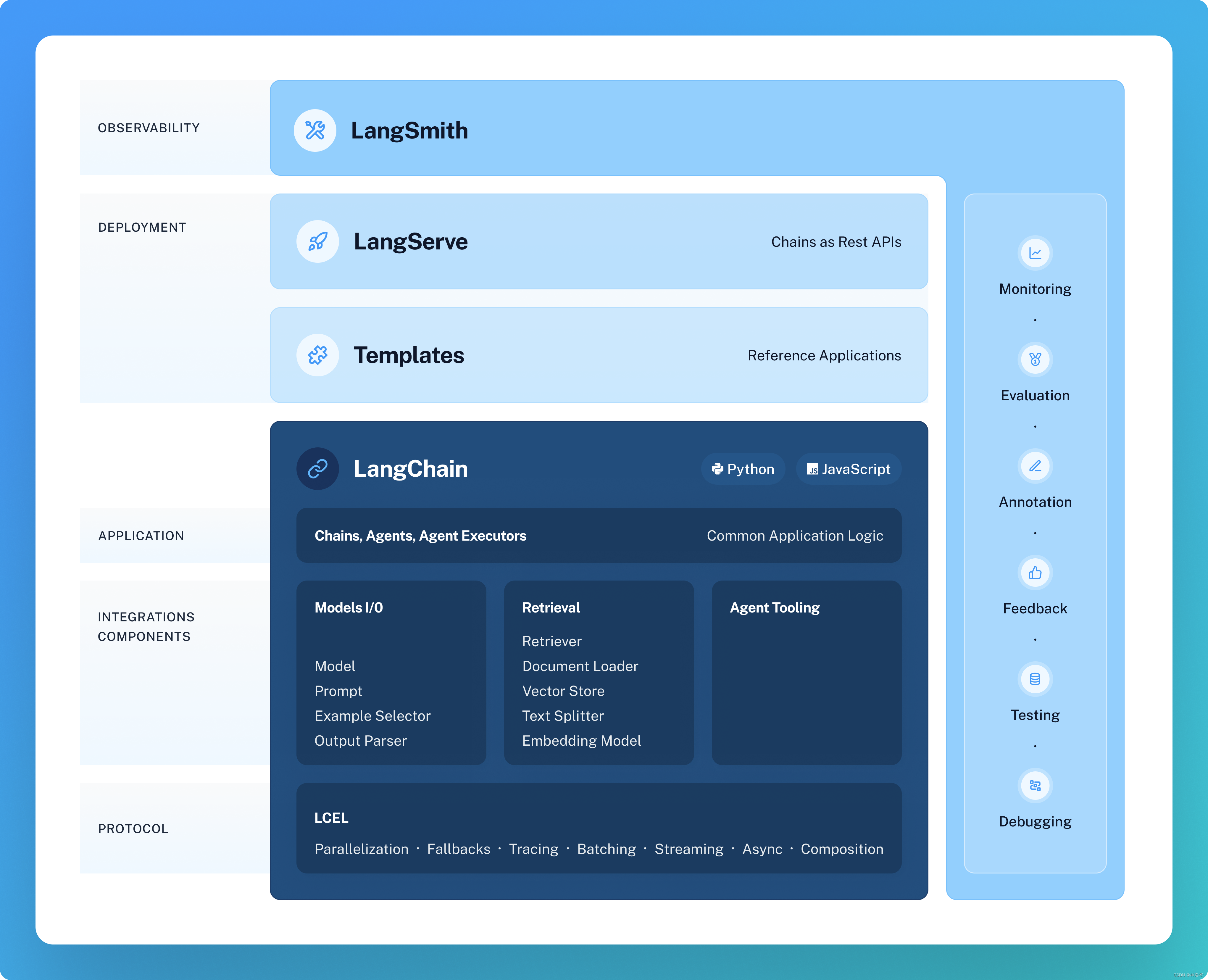
这些产品共同简化整个应用程序生命周期:
- 开发:使用LangChain/LangChain.js编写您的应用程序。通过使用Templates进行参考,迅速入门。
- 投产:使用LangSmith检查、测试和监控您的链,以便您可以不断改进并放心地部署。
- 部署:使用LangServe将任何链转化为API。
下面开始介绍LangChain的主要组件,每一个都有标准的、可扩展的接口和集成。
1.2 主要组件
1.2.1 Model I/O
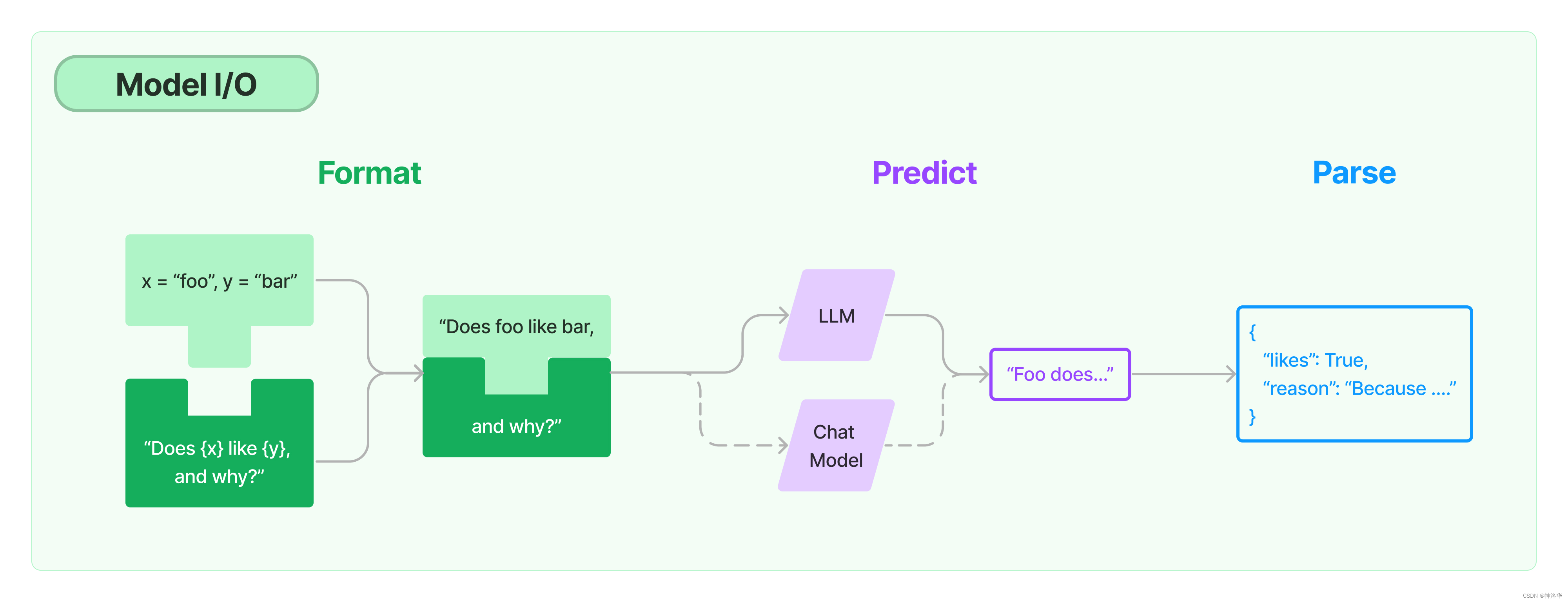
任何语言模型应用的核心要素就是模型,LangChain为您提供了与任何语言模型进行接口的构建模块 Model I/O。
-
Prompts:模板化、动态选择和管理模型输入。
-
Chat models:由语言模型支持,但接受聊天消息列表作为输入并返回聊天消息的模型。
-
LLMs:接受文本字符串作为输入并返回文本字符串的模型。
-
Output parsers:输出解析器,从模型输出中提取信息。
在LangChain框架中
LLMs是指纯文本模型,其API接受一个字符串提示并生成一个字符串完成。Chat models指的是在LLMs上专门经过对话微调的聊天模型,输入不是单个字符串,而是一个包含聊天消息列表的结构,通常带有说话者的标签,而输出是一个AI聊天消息。
1.2.2 Retrieval
参考《Kaggle - LLM Science Exam(二):Open Book QA&debertav3-large详解》、《NLP(廿一):从 RAG 到 Self-RAG —— LLM 的知识增强》、《How do domain-specific chatbots work? An Overview of Retrieval Augmented Generation (RAG)》
1.2.2.1 RAG
大语言模型(Large Language Model, LLM),比如 ChatGPT ,可以回答许多不同的问题。但是大语言模型的知识来源于其训练数据集,并没有用户的信息(比如用户的个人数据,公司的自有数据),也没有最新发生时事的信息(在大模型数据训练后发表的文章或者新闻)。因此大模型能给出的答案比较受限。
RAG(Retrieval Augmented Generation, 检索增强生成),即 LLM 在回答问题或生成文本时,先会从大量文档中检索出相关的信息,然后基于这些信息生成回答或文本,从而提高预测质量。RAG 方法使得开发者不必为每一个特定的任务重新训练整个大模型,只需要外挂上知识库,即可为模型提供额外的信息输入,提高其回答的准确性。RAG模型尤其适合知识密集型的任务。
在 LLM 已经具备了较强能力的基础上,仍然需要 RAG ,主要有以下几点原因:
- 幻觉问题:LLM 文本生成的底层原理是基于概率的 token by token 的形式,因此会不可避免地产生“一本正经的胡说八道”的情况。RAG基于知识源的事实内容,可减少幻觉。
- 时效问题:LLM 的规模越大,大模型训练的成本越高,周期也就越长。那么具有时效性的数据也就无法参与训练,所以也就无法直接回答时效性相关的问题,例如“帮我推荐几部热映的电影?”。RAG可以轻松扩展知识,减少模型大小和训练成本。
- 数据安全问题:通用的 LLM 没有企业内部数据和用户数据,那么企业想要在保证安全的前提下使用 LLM,最好的方式就是把数据全部放在本地,企业数据的业务计算全部在本地完成。而在线的大模型仅仅完成一个归纳的功能。
- 可扩展性:RAG 可以针对多种任务进行微调和定制,包括QA、文本摘要、对话系统等。
- 可解释性 (Interpretability):检索到的项目作为模型预测中来源的参考
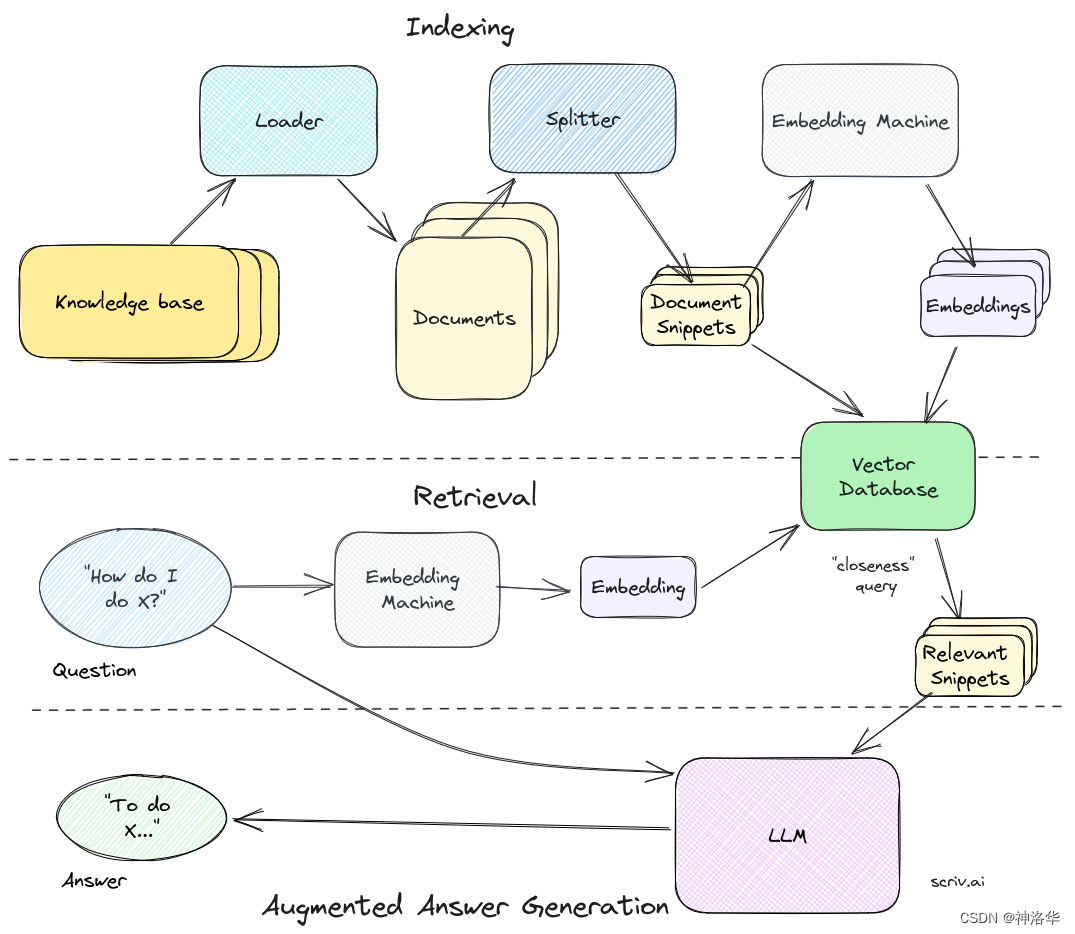
整个RAG pipeline可以表示为:
-
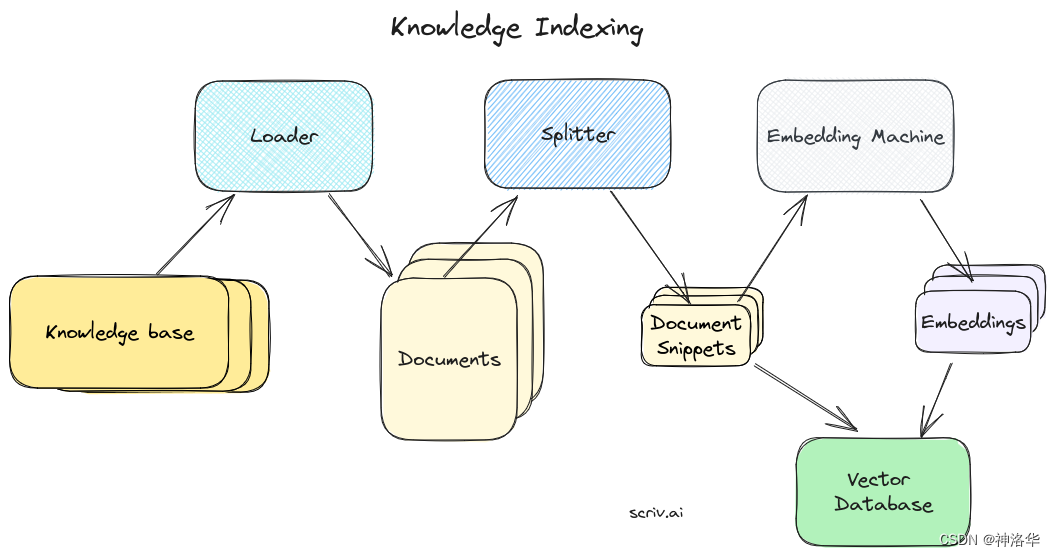
为知识库构建索引
- 获取知识源(
knowledge base),使用一个加载器(loader)将其转化为单独的文档(Document) - 使用分割器(
splitters)将其分成易于处理的小块或片段(document snippets)。 - 将这些片段传递给嵌入式机器(
embedding machine),将其转化为可用于语义搜索的向量。 - 将这些片段的embedding保存在我们的矢量数据库中(
vector database),同时保留它们的文本片段。
- 获取知识源(
-
检索
将 问题/任务 输入相同的嵌入式机器得到其嵌入表示,并传递到我们的矢量数据库。然后通过检索得到最匹配的片段,这些片段就是问题最相关的上下文(context),可用于增强LLM生成的回答或响应。 -
加强型的答案生成(augmented answer generation)
将获取的相关知识片段,与自定义系统提示和问题进行合并,然后一起格式化,并最终得到基于相关上下文的问题答案。
1.2.2.2 Retrieval
为了支持上述应用的构建,LangChain 的Retrieval模块通过以下方式提供组件来加载、转换、存储和查询数据,实现数据连接(Data connection):Document loaders、Document transformers、Text embedding models、Vector stores 以及 Retrievers。数据连接模块部分的基本框架如下图所示。
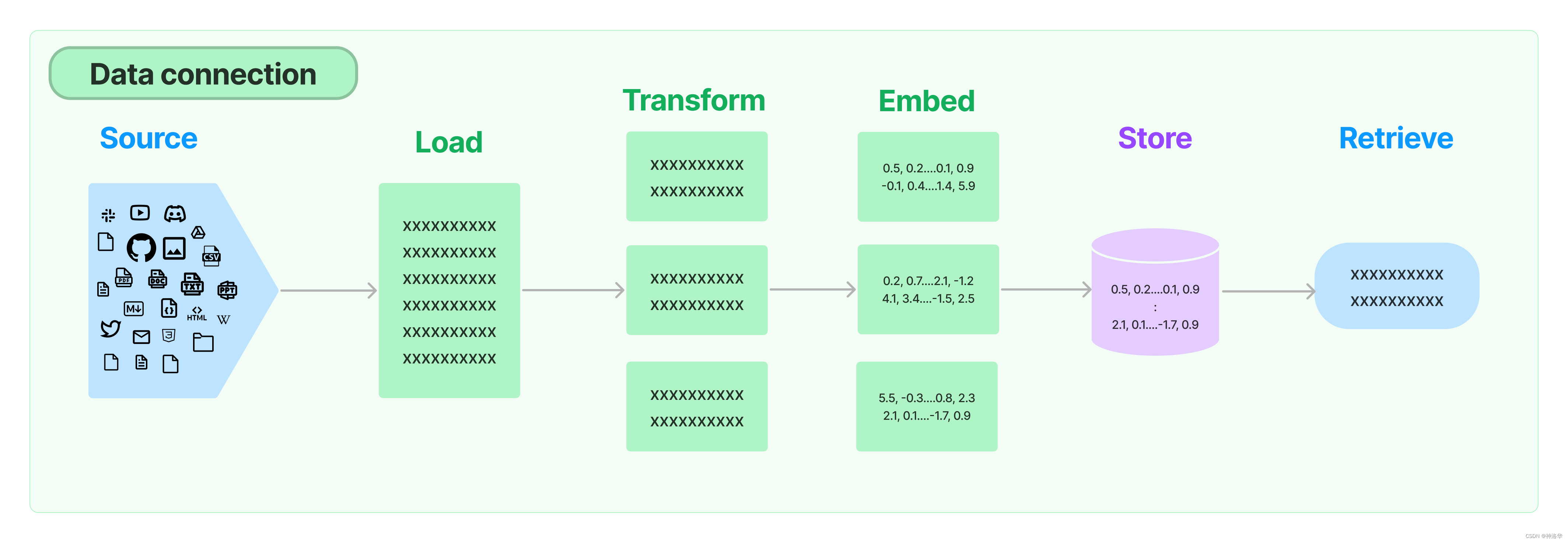
Document loaders:LangChain提供了超过100种不同的文档加载器,可加载所有类型的文档(HTML、PDF、代码)。
Document transformers:文档变换的主要部分是Text splitters,此外还有去除冗余内容、翻译、添加元数据等功能。
在RAG中,原始的文档可能涵盖很多内容,内容越多,整个文档的embedding就越“不具体”(unspecific),检索算法就越难检索到到最相似的结果。通常情况下,用户提问的主题只是和页面中的某些文本相匹配,所以我们需要将文档拆分成embeddable chunks,便于搜索。另外文档拆分也是一门技术, 拆分后的snippets太大不能很好地匹配查询,太小会没有足够有用的上下文来生成答案。此外还涉及如何拆分(通常有标题时按标题进行拆分)等等问题。一旦我们有了文档片段,我们就将它们保存到我们的矢量数据库中,下面是为知识库编制索引的完整图片:
Text embedding models:检索的另一个关键部分是为文档创建嵌入。LangChain提供与超过25种不同的embedding providers and methods,从开源到专有API。
Vector stores:LangChain集成了超过50种不同的vectorstores,从开源的本地存储到云端专有存储,以支持数据库的高效存储和检索。
Retrievers:LangChain支持许多不同的检索算法,这也是LangChain最有价值的地方之一。基本方法有简单的语义搜索,此外还有一些改进算法,包括:
- Parent Document Retriever:父文档检索器。允许您为每个父文档创建多个嵌入,使您能够查找较小的块但返回较大的上下文。
- Self Query Retriever:自查询检索器。用户的问题通常包含对某些不仅仅是语义的内容的引用,而是表达某种逻辑的元数据过滤器。自查询允许您从查询中提取出查询的语义部分,而不包括其他存在于查询中的元数据过滤器。
- Ensemble Retriever:组合检索器。有时您可能希望从多个不同的来源或使用多个不同的算法中检索文档。组合检索器使您能够轻松实现此目标。
1.2.3 Chain
在简单的应用中,单独使用LLM是可以的,但在更复杂的应用中,可能需要将多个大型语言模型进行链式组合,或与其他组件进行链式调用,以对多个输入同时进行处理。Chain允许将多个组件组合在一起,创建一个单一的、连贯的应用程序。例如,可以创建一个链,接受用户输入,使用 PromptTemplate 对其进行格式化,然后将格式化后的提示词传递给大语言模型。你也可以通过将多个链组合在一起或将链与其他组件组合来构建更复杂的链。
我们支持许多有用的内置 Chain,比如LLMChain(基本的链类型)、SequentialChain(处理单个输入且单个输出的情况)、Router Chain(同一输入router到不同的输出)。
除了使用传统的Chain接口,LangChain还提供了最新的LCEL(LangChain Expression Language)框架来实现chaining,详见其文档。
1.3 其它组件
1.3.1 Meomory
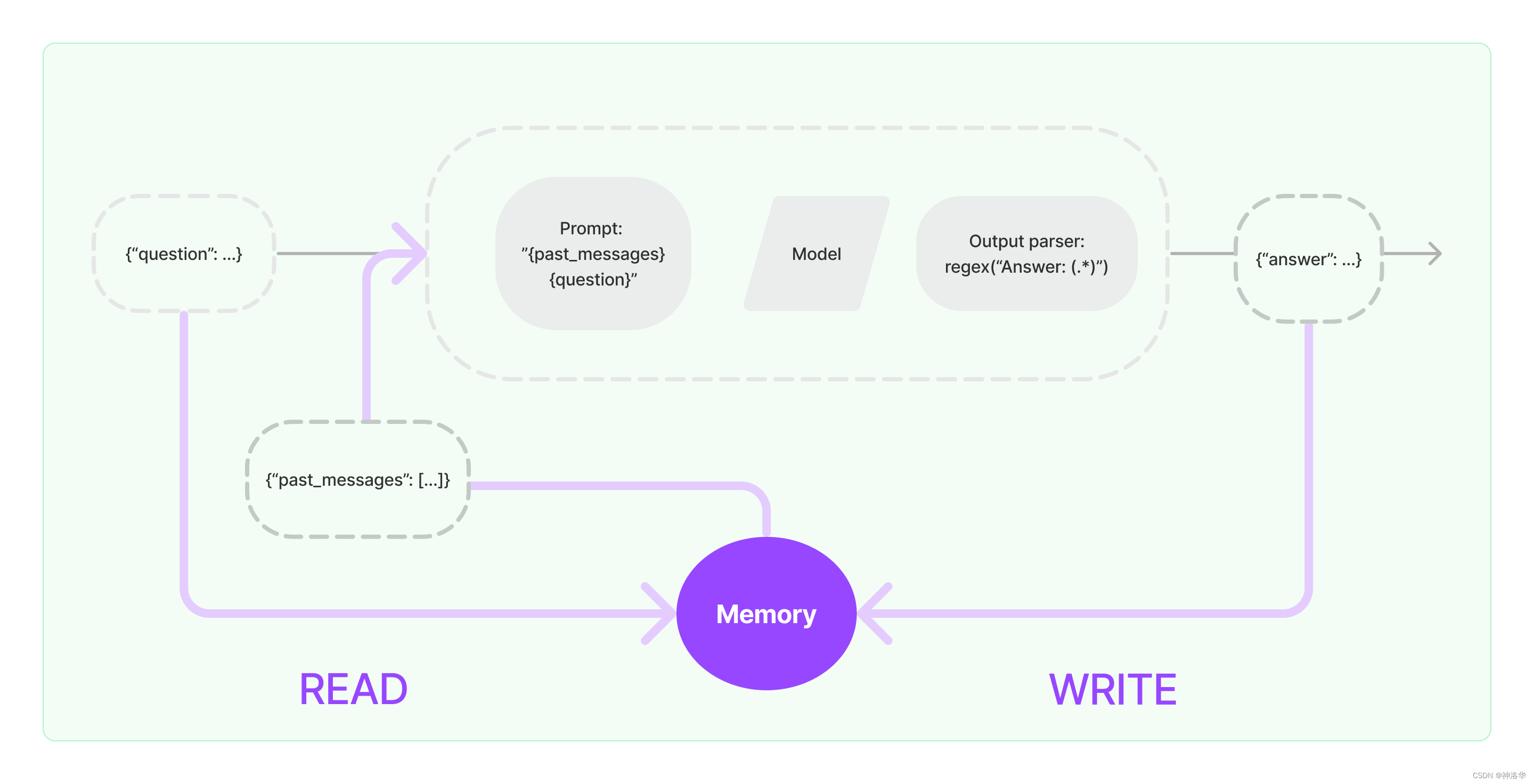
在 LangChain 中,记忆(Memory)指的是大语言模型(LLM)的短期记忆。为什么是短期记忆?那是因为LLM训练好之后 ,获得了一些长期记忆,它的参数便不会因为用户的输入而发生改变。当用户与训练好的LLM进行对话时,LLM 会暂时记住用户的输入和它已经生成的输出,以便预测之后的输出。而模型输出完毕后,它便会“遗忘”之前用户的输入和它的输出。因此,之前的这些信息只能称作为 LLM 的短期记忆。
Chains和Agents默认是无状态的,它们并不记忆你之前的交流内容,但在某些应用中,如聊天机器人,记住先前的互动很重要。为此,LangChain提供了memory组件,以管理和操作先前的聊天消息。这些组件可以灵活地嵌入Chains中,并通过独立函数或Chains方式使用。
memory类型可以返回字符串或消息列表,用于提取信息,比如最近的N条消息或所有先前消息的摘要。最简单的内存类型是buffer memory,用来保留先前的所有消息。
1.3.2 Agents
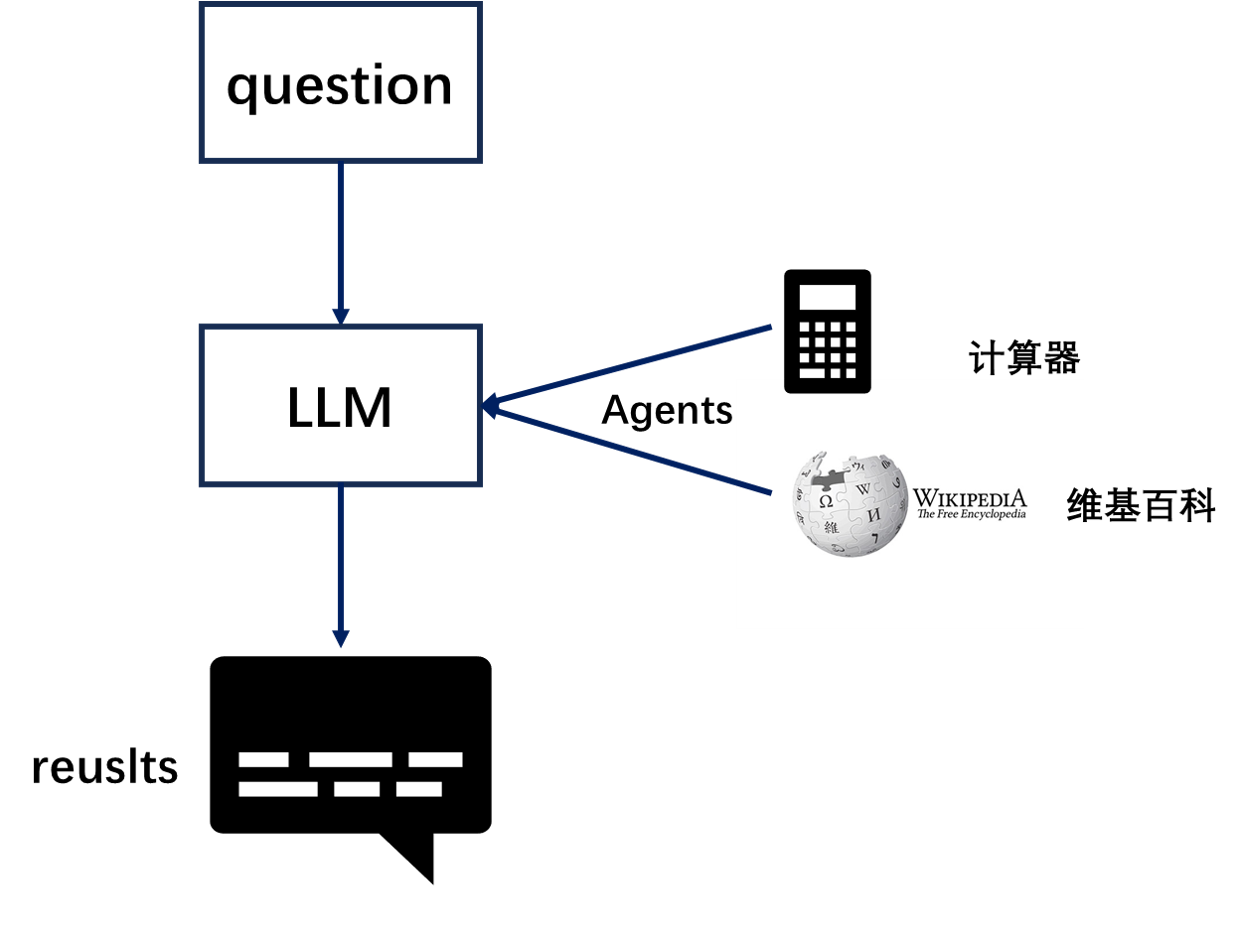
大型语言模型(LLMs)非常强大,但它们缺乏“最笨”的计算机程序可以轻松处理的特定能力。LLM 对逻辑推理、计算和检索外部信息的能力较弱,这与最简单的计算机程序形成对比。例如,语言模型无法准确回答简单的计算问题,还有当询问最近发生的事件时,其回答也可能过时或错误,因为无法主动获取最新信息。这是由于当前语言模型仅依赖预训练数据,与外界“断开”。要克服这一缺陷, LangChain 框架提出了 “代理”( Agent ) 的解决方案。代理作为语言模型的外部模块,可提供计算、逻辑、检索等功能的支持,使语言模型获得异常强大的推理和获取信息的超能力。
1.3.3 Callback
LangChain提供了一个Callbacks(回调系统),允许您连接到LLM应用程序的各个阶段。这对于日志记录、监视、流式处理和其他任务非常有用。
Callback 模块扮演着记录整个流程运行情况的角色,充当类似于日志的功能。在每个关键节点,它记录了相应的信息,以便跟踪整个应用的运行情况。例如,在 Agent 模块中,它记录了调用 Tool 的次数以及每次调用的返回参数值。Callback 模块可以将收集到的信息直接输出到控制台,也可以输出到文件,甚至可以传输到第三方应用程序,就像一个独立的日志管理系统一样。通过这些日志,可以分析应用的运行情况,统计异常率,并识别运行中的瓶颈模块以进行优化。
Callback 模块的具体实现包括两个主要功能:
- CallbackHandler :记录每个应用场景(如 Agent、LLchain 或 Tool )的日志,它是单个日志处理器,主要记录单个场景的完整日志信息。
- CallbackManager:封装和管理所有的 CallbackHandler ,包括单个场景的处理器,也包括整个运行时链路的处理器。"
1.4 资源
- 常见示例:
- 文档问答:Retrieval-augmented generation(RAG)
- 聊天机器人:Chatbots
- 分析结构化数据:SQL
- prompt-engineering-for-developers:基于基于吴恩达老师的五门课程打造,包括《ChatGPT Prompt Engineering for Developers》、《Building Systems with the ChatGPT API》、《LangChain for LLM Application Development》等。
- 社区:
- 博客:优秀文章,例如《LangChain Templates》
1.5 安装
-
pip安装
pip install langchain- 1
-
conda安装
conda install langchain -c conda-forge- 1
-
源码安装
git clone https://github.com/langchain-ai/langchain.git cd langchain pip install -e .- 1
- 2
- 3
另外还有一些扩展功能,需要单独安装依赖:
-
langchain-experimental:包含实验性 LangChain 代码,旨在用于研究和实验用途pip install langchain-experimental- 1
-
LangServe:帮助开发人员将 LangChain 可运行对象和链部署为 REST API。 LangServe由LangChain CLI自动安装,如果不使用 LangChain CLI,请运行:pip install "langserve[all]"- 1
-
LangChain CLI:对于使用 LangChain 模板和其他 LangServe 项目非常有用pip install langchain-cli- 1
二、快速开始(zhipu)
参考《LangChain:LLM应用程序开发(上)——Models、Prompt、Parsers、Memory、Chains》、LangChain文档《Quickstart》
2.1 环境准备
2.1.1 配置QIANFAN API
langchain文档本来是使用OpenAI API来演示,本文选择使用文心一言 API来进行演示,注册即送20元的额度,有效期一个月。首先我们需要进入文心千帆服务平台,注册登录之后选择“应用接入”——“创建应用”。然后简单输入基本信息,选择默认配置,创建应用即可。
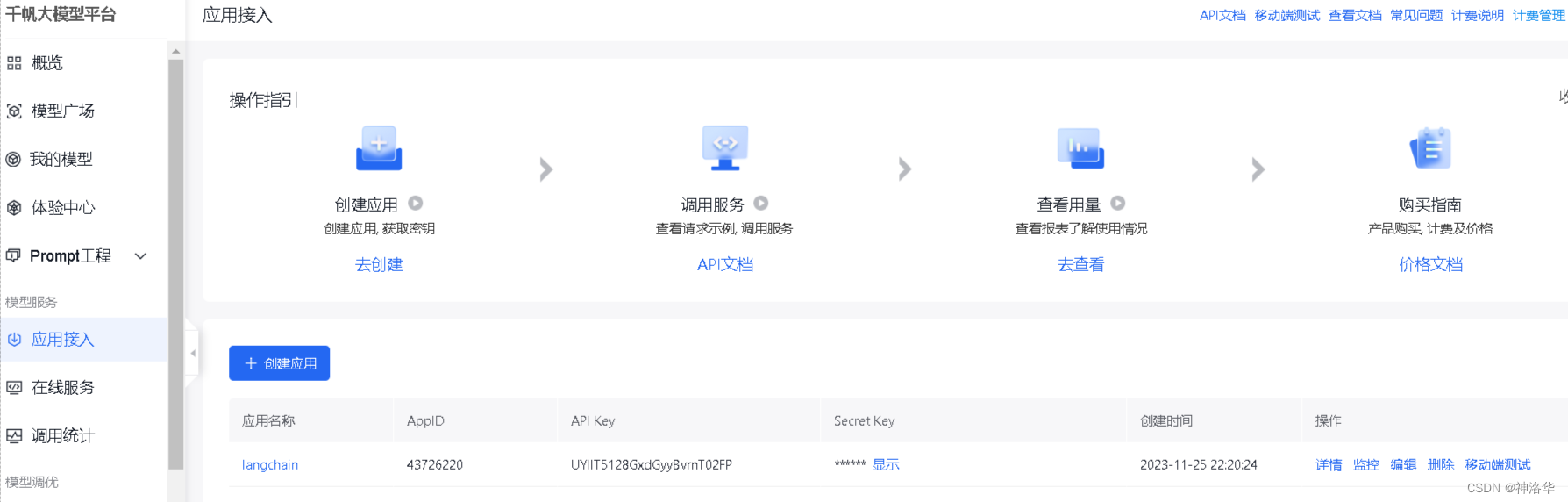
创建完成后,点击应用的“详情”即可看到此应用的 AppID,API Key,Secret Key。然后在百度智能云在线调试平台-示例代码中心快速调试接口,获取AccessToken(不解之处,详见API文档)。最后在项目文件夹下使用vim .env(Linux)或type nul > .env(Windows cmd)创建.env文件,并在其中写入:
QIANFAN_AK="xxx"
QIANFAN_SK="xxx"
access_token="xxx"
- 1
- 2
- 3
下面将这些变量配置到环境中,后续就可以自动使用了。
# 使用openai、智谱ChatGLM、百度文心需要分别安装openai,zhipuai,qianfan
import os
import openai,zhipuai,qianfan
from langchain.llms import ChatGLM
from langchain.chat_models import ChatOpenAI,QianfanChatEndpoint

from dotenv import load_dotenv, find_dotenv
_ = load_dotenv(find_dotenv()) # read local .env file
openai.api_key =os.environ['OPENAI_API_KEY']
zhipuai.api_key =os.environ['ZHIPUAI_API_KEY']
qianfan.qianfan_ak=os.environ['QIANFAN_AK']
qianfan.qianfan_sk=os.environ['QIANFAN_SK']
- 1
- 2
- 3
- 4
- 5
- 6
- 7
- 8
- 9
- 10
- 11
- 12
2.1.2 配置LangSmith
在使用 LangChain 构建的应用程序中,随着复杂性的增加,了解链或代理内部发生了什么变得非常重要。最佳方法是使用 LangSmith 来检查。首先在 LangSmith官网进行注册,然后设置环境变量以开始记录跟踪:
export LANGCHAIN_TRACING_V2="true"
export LANGCHAIN_API_KEY=...
- 1
- 2
LangServe 帮助开发者将 LangChain 链部署为 REST API,本章中,我们也将展示如何使用 LangServe 部署应用。
…
2.2 直接调用openai API
!pip install -q langchain==0.0.339
!pip install  -q openai==0.28   		# 使用此分发的必须是openai旧版本
- 1
- 2
import openai,os
from kaggle_secrets import UserSecretsClient
user_secrets = UserSecretsClient()
openai.api_key = user_secrets.get_secret("openai")
openai.api_base = "https://api.chatllm.vip/v1"
- 1
- 2
- 3
- 4
- 5
messages = [
    {
        "role": "user",
        "content": '你是谁',
     },
 ]
openai.ChatCompletion.create(model="gpt-3.5-turbo-0301", messages=messages)
- 1
- 2
- 3
- 4
- 5
- 6
- 7
<OpenAIObject chat.completion id=chatcmpl-8O9BYKPsEXTVjmCx5GEg7rDFolKPt at 0x7ef2702d3b50> JSON: {
  "id": "chatcmpl-8O9BYKPsEXTVjmCx5GEg7rDFolKPt",
  "object": "chat.completion",
  "created": 1700765872,
  "model": "gpt-3.5-turbo-0301",
  "choices": [
    {
      "index": 0,
      "message": {
        "role": "assistant",
        "content": "\u6211\u662f\u8fd9\u4e2a\u5e73\u53f0\u4e0a\u7684AI\u865a\u62df\u52a9\u624b\u3002"
      },
      "finish_reason": "stop"
    }
  ],
  "usage": {
    "prompt_tokens": 12,
    "completion_tokens": 17,
    "total_tokens": 29
  }
}

- 1
- 2
- 3
- 4
- 5
- 6
- 7
- 8
- 9
- 10
- 11
- 12
- 13
- 14
- 15
- 16
- 17
- 18
- 19
- 20
- 21
2.3 使用 LangChain LCEL的方式调用OpenAI或QIANFAN API
2.3.1 最简示例
LangChain实现其功能最主要的三个组件是:
- LLM/Chat Model:LangChain核心推理引擎。
- Prompt Template:为语言模型提供说明,控制语言模型的输出内容。
- Output Parser:将来自语言模型的原始响应转换为更可行的格式,从而便于在下游使用输出
之前说过,LLM 输入和输出都是字符串,而Chat Model输入聊天消息列表,输出AI消息。在langchain中,消息接口由 BaseMessage 定义,它有两个必需属性:
content:消息的内容。通常为字符串。role:消息来源(BaseMessage)的实体类别,比如:HumanMessage:来自人类/用户的BaseMessage。AIMessage:来自AI/助手的BaseMessage。SystemMessage:来自系统的BaseMessage。FunctionMessage/ ToolMessage:包含函数或工具调用输出的BaseMessage。ChatMessage:如果上述角色都不合适,可以自定义角色。
调用 LLM 或 ChatModel 的最简单方法是使用 .invoke() 方法,这是 LangChain 表达式语言(LCEL)所有对象的通用同步调用方法:
- LLM.invoke:接收字符串,返回字符串。
- ChatModel.invoke:接收 BaseMessage 列表,返回 BaseMessage。
from langchain.llms import OpenAI,QianfanLLMEndpoint
from langchain.chat_models import ChatOpenAI,QianfanChatEndpoint

#llm,chat_model = OpenAI(),ChatOpenAI()
llm,chat_model = QianfanLLMEndpoint(),QianfanChatEndpoint()
- 1
- 2
- 3
- 4
- 5
开始调用:
from langchain.schema import HumanMessage

text = "What would be a good company name for a company that makes colorful socks?"
messages = [HumanMessage(content=text)]
llm.invoke(text)                           # 输出:Feetful of Fun

chat_model.invoke(messages)			       # 输出:AIMessage(content="Socks O'Color")
- 1
- 2
- 3
- 4
- 5
- 6
- 7
2.3.2 Prompt templates
2.3.2.1 PromptTemplate
大语言模型(LLM)的应用程序通常不会直接将用户输入传入模型,相反,它们会将用户输入添加提示模板中,以便为当前任务提供额外上下文。
在上一个例子中,我们向模型传递输入是生成公司名称的完整指示,如果简化这一输入,用户只需要提供公司/产品的描述,而不需要编写完整的指令,会更方便。
from langchain.prompts import PromptTemplate

prompt = PromptTemplate.from_template("What is a good name for a company that makes {product}?")
prompt.format(product="colorful socks")
- 1
- 2
- 3
- 4
What is a good name for a company that makes colorful socks?
- 1
如下所示,你可以直接调用llm的invoke方法对此完整prompt进行响应,但这只适用于最简单的情况。通常情况下,我们会组合其它组件进行链式调用(见2.3.4章节)。
llm.invoke(prompt.format(product="colorful socks"))
- 1
'" A good name for a company that makes colorful socks could be \\"Colorful Kneesocks\\" or \\"Socktastic.\\" Another option could be \\"Crazy Socks\\" or \\"ColorfulHoots.\\""'
- 1
2.3.2.2 ChatPromptTemplate
PromptTemplate还可用于生成消息列表。在这种情况下,提示不仅包含有关内容的信息,还包括每条消息的角色和其在消息列表中的位置。最常见的实现方式是使用ChatPromptTemplate,它是一个包含多条ChatPromptTemplate的列表。每个ChatPromptTemplate都包含如何格式化该聊天消息的指示,包括其角色和内容。通过这种(role, content)二元组的方式,可以方便地生成包含多个消息的列表。
from langchain.prompts.chat import ChatPromptTemplate

template = "You are a helpful assistant that translates {input_language} to {output_language}."
human_template = "{text}"

chat_prompt = ChatPromptTemplate.from_messages([
    ("system", template),
    ("human", human_template),
])

messages=chat_prompt.format_messages(input_language="English", output_language="French", text="I love programming.")
messages
- 1
- 2
- 3
- 4
- 5
- 6
- 7
- 8
- 9
- 10
- 11
- 12
[
    SystemMessage(content="You are a helpful assistant that translates English to French.", additional_kwargs={}),
    HumanMessage(content="I love programming.")
]
- 1
- 2
- 3
- 4
同理,你也可以直接对此完整prompt进行响应(估计是百度文心默认返回中文):
chat_model.invoke(messages)
- 1
AIMessage(content='编程是一项非常有趣和有挑战性的工作,它需要创造力、逻辑思维和解决问题的能力。您喜欢编程的哪些方面呢?', additional_kwargs={'id': 'as-y14rh51w4e', 'object': 'chat.completion', 'created': 1702305298, 'result': '编程是一项非常有趣和有挑战性的工作,它需要创造力、逻辑思维和解决问题的能力。您喜欢编程的哪些方面呢?', 'is_truncated': False, 'need_clear_history': False, 'usage': {'prompt_tokens': 4, 'completion_tokens': 26, 'total_tokens': 30}})
- 1
以上这些任务模板可以重复使用,加入更多的变量来进行组合控制,还可以适应更多的任务。有关此部分更详细的内容,请查看Prompt templates。
2.3.3 Output parsers
OutputParser 主要有几种类型,包括:
- 将LLM输出的文本转换为结构化信息(如 JSON)
- 将 ChatMessage 转换为仅包含文本的字符串
- 将message之外的其他返回信息(如 OpenAI 函数调用)转换为字符串
更多内容详见Output Parser。下面只是简单地编写一个输出解析器,将LLM输出的字符串转换为列表(逗号分割)
from langchain.schema import BaseOutputParser

class CommaSeparatedListOutputParser(BaseOutputParser):
    """Parse the output of an LLM call to a comma-separated list."""

    def parse(self, text: str):
        """Parse the output of an LLM call."""
        return text.strip().split(", ")

CommaSeparatedListOutputParser().parse("hi, bye")  # 输出['hi', 'bye']
- 1
- 2
- 3
- 4
- 5
- 6
- 7
- 8
- 9
- 10
2.3.4 使用LCEL组合成链
我们现在可以将所有这些组合成一个链条。这个链条将接受输入变量,将这些变量传递给提示模板以创建提示,然后将提示传递给语言模型,最后将输出通过(可选)输出解析器进行解析。
from typing import List
from langchain.chat_models import ChatOpenAI
from langchain.schema import BaseOutputParser

class CommaSeparatedListOutputParser(BaseOutputParser[List[str]]):
    """Parse the output of an LLM call to a comma-separated list."""


    def parse(self, text: str) -> List[str]:
        """Parse the output of an LLM call."""
        return text.strip().split(", ")

template = """You are a helpful assistant who generates comma separated lists.
A user will pass in a category, and you should generate 5 objects in that category in a comma separated list.
ONLY return a comma separated list, and nothing more."""
human_template = "{text}"

chat_prompt = ChatPromptTemplate.from_messages([
    ("system", template),
    ("human", human_template),
])
chain = chat_prompt | ChatOpenAI() | CommaSeparatedListOutputParser()
chain.invoke({"text": "colors"})
- 1
- 2
- 3
- 4
- 5
- 6
- 7
- 8
- 9
- 10
- 11
- 12
- 13
- 14
- 15
- 16
- 17
- 18
- 19
- 20
- 21
- 22
- 23
['red', 'blue', 'green', 'yellow', 'orange']
- 1
如果中间模型使用
QianfanChatEndpoint(),最终结果会多出很多别的字,答案就不是解析出来的五种颜色的列表,估计是英文prompt效果控制的不好。
上述代码中,我们使用语法 | 将这些组件连接在一起。此 | 语法由 LangChain 表达式语言 (LCEL) 提供支持,并依赖于其通用的 Runnable 接口。
type(chain)
- 1
langchain_core.runnables.base.RunnableSequence
- 1
可以看到chain是RunnableSequence类型(可运行序列),其中每个可运行对象的输出是下一个可运行对象的输入,每个chain的定义都不一样,所以其输入格式得看第一个组件的输入格式。示例中第一个组件是chat_prompt,需要传入'text'的值,所以其输入是字典格式。如果直接传入上一节的messages,会报错TypeError: Expected mapping type as input to ChatPromptTemplate. Received <class 'list'>。
2.4 使用 内置chain组合成链
参考《Chains》、《LangChain:LLM应用程序开发(上)——Models、Prompt、Parsers、Memory、Chains》
2.4.1 单个问题
在1.2.3节中讲过,链的实现有两种方式:Chain和LCEL。下面使用传统的Chain方式实现一遍。LLMChain是最基本的链类型,会经常使用。它接收一个提示模板,用于将用户输入进行格式化,然后从LLM返回响应。
from langchain import PromptTemplate

template = """Question: {question}

Answer: """
prompt = PromptTemplate(
        template=template,
    input_variables=['question']
)

# user question
question = "Which NFL team won the Super Bowl in the 2010 season?"
prompt.format(question=question)
- 1
- 2
- 3
- 4
- 5
- 6
- 7
- 8
- 9
- 10
- 11
- 12
- 13
'Question: Which NFL team won the Super Bowl in the 2010 season?\n\nAnswer: '
- 1
input_variables表示提示模板里变量的名称列表
from langchain.chains import LLMChain

chain = LLMChain(llm=chat_model, prompt=prompt, output_parser=CommaSeparatedListOutputParser())
print(chain(question))
- 1
- 2
- 3
- 4
{'question': 'Which NFL team won the Super Bowl in the 2010 season?', 'text': 'The 2010 season of the NFL ended with the New York Giants winning the Super Bowl.'}
- 1
print(chain.run(question))
- 1
[‘The 2010 season Super Bowl was won by the New Orleans Saints.’]
chain(messages)
- 1
{'question': [SystemMessage(content='You are a helpful AI bot. Your name is Bob.'),
  HumanMessage(content='Hello, how are you doing?'),
  AIMessage(content="I'm doing well, thanks!"),
  HumanMessage(content='What is your name?')],
 'text': 'The answer would depend on the context and question asked. If the question is about the name of the AI bot, it would respond with "Bob". If the question is about its name in general, it would respond with "I\'m a helpful AI bot named Bob". If the question is about its functionality or purpose, it would respond with information about its purpose and capabilities.'}
- 1
- 2
- 3
- 4
- 5
chain.run(messages)
- 1
'The answer depends on the context and question. If the question is about Bob\'s name, the answer would be "Bob". If the question is about the name of the AI bot, the answer would be "I\'m a helpful AI bot named Bob". If the question is about how Bob is doing, the answer would be "I\'m doing well, thanks!" or something similar.\n\nTherefore, it is not possible to give a specific answer without knowing the context and question.'
- 1
type(chain)
- 1
langchain.chains.llm.LLMChain
- 1
此外还有SequentialChain、Router Chain等,以及 Prompt templates和Output parsers更多使用示例,可参考《LangChain:LLM应用程序开发(上)——Models、Prompt、Parsers、Memory、Chains》。
2.4.2 多个问题
如果我们想问多个问题,我们可以尝试两种方法:
- 使用 generate 方法遍历所有问题,一次回答一个问题。
- 将所有问题放入 LLM 的单个提示中,这仅适用于性能较好的 LLM。
第一种方法:
qs = [
    {'question': "Which NFL team won the Super Bowl in the 2010 season?"},
    {'question': "If I am 6 ft 4 inches, how tall am I in centimeters?"},
    {'question': "Who was the 12th person on the moon?"},
    {'question': "How many eyes does a blade of grass have?"}
]

chain = LLMChain(llm=chat_model, prompt=prompt)
print(chain.generate(qs))									# 答案太长,就不写了
- 1
- 2
- 3
- 4
- 5
- 6
- 7
- 8
- 9
第二种方法:
multi_template = """Answer the following questions one at a time.

Questions:
{questions}

Answers:
"""
long_prompt = PromptTemplate(template=multi_template, input_variables=["questions"])


qs_str = (
    "Which NFL team won the Super Bowl in the 2010 season?\n" +
    "If I am 6 ft 4 inches, how tall am I in centimeters?\n" +
    "Who was the 12th person on the moon?" +
    "How many eyes does a blade of grass have?"
)

print(chain.run(qs_str))
- 1
- 2
- 3
- 4
- 5
- 6
- 7
- 8
- 9
- 10
- 11
- 12
- 13
- 14
- 15
- 16
- 17
- 18
1. In the 2010 season, the New Orleans Saints won the Super Bowl for the NFL.
2. 6'4" in centimeters is 193 cm.
3. The 12th person on the moon was Neil Armstrong.
4. A blade of grass has one eye.
- 1
- 2
- 3
- 4
2.5 使用 LangSmith 进行跟踪
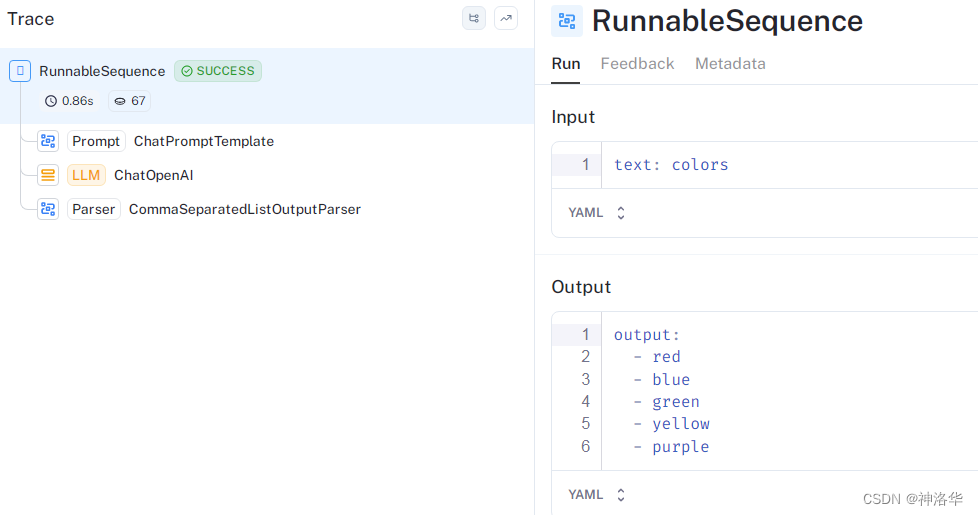
在2.1节中,我们已经设置好环境变量,那么运行时所有模型和链调用都将自动记录到 LangSmith 中。随后,我们可以使用LangSmith添加链接描述来调试和注释我们的应用程序跟踪,并将它们转换为评估未来应用程序版本的数据集。点击此处,可以查看上述链的跟踪结果。
2.6 使用 LangServe进行部署
现在我们已经构建了一个应用程序,我们需要将其部署为服务。LangServe 帮助开发人员将 LCEL 链部署为 REST API。该库与 FastAPI 集成,并使用 pydantic 进行数据验证。
要为我们的应用程序创建一个服务器,我们首先需要创建一个serve.py文件,其中包含以下三个部分:
- 我们的链的定义(与上述相同)
- 我们的FastAPI应用
- 通过langserve.add_routes定义一个路线,用于提供链的服务。
#!/usr/bin/env python
from typing import List

from fastapi import FastAPI
from langchain.prompts import ChatPromptTemplate
from langchain.chat_models import ChatOpenAI
from langchain.schema import BaseOutputParser
from langserve import add_routes

# 1. Chain definition

class CommaSeparatedListOutputParser(BaseOutputParser[List[str]]):
    """Parse the output of an LLM call to a comma-separated list."""


    def parse(self, text: str) -> List[str]:
        """Parse the output of an LLM call."""
        return text.strip().split(", ")

template = """You are a helpful assistant who generates comma separated lists.
A user will pass in a category, and you should generate 5 objects in that category in a comma separated list.
ONLY return a comma separated list, and nothing more."""
human_template = "{text}"

chat_prompt = ChatPromptTemplate.from_messages([
    ("system", template),
    ("human", human_template),
])
category_chain = chat_prompt | ChatOpenAI() | CommaSeparatedListOutputParser()

# 2. App definition
app = FastAPI(
  title="LangChain Server",
  version="1.0",
  description="A simple api server using Langchain's Runnable interfaces",
)

# 3. Adding chain route
add_routes(
    app,
    category_chain,
    path="/category_chain",
)

if __name__ == "__main__":
    import uvicorn

    uvicorn.run(app, host="localhost", port=8000)
- 1
- 2
- 3
- 4
- 5
- 6
- 7
- 8
- 9
- 10
- 11
- 12
- 13
- 14
- 15
- 16
- 17
- 18
- 19
- 20
- 21
- 22
- 23
- 24
- 25
- 26
- 27
- 28
- 29
- 30
- 31
- 32
- 33
- 34
- 35
- 36
- 37
- 38
- 39
- 40
- 41
- 42
- 43
- 44
- 45
- 46
- 47
- 48
现在执行这个文件:
python serve.py
- 1
这将在 localhost:8000 上提供服务
2.7 playground
每个LangServe服务都自带一个简单的内置UI,用于配置和调用带有流式输出和中间步骤可视化的应用程序。前往 http://localhost:8000/category_chain/playground/ 尝试一下
2.8 Client
现在,让我们设置一个客户端,以便通过编程方式与我们的服务进行交互,使用langserve.RemoteRunnable可以轻松实现这一点。
from langserve import RemoteRunnable

remote_chain = RemoteRunnable("http://localhost:8000/category_chain/")
remote_chain.invoke({"text": "colors"})
- 1
- 2
- 3
- 4
['red', 'blue', 'green', 'yellow', 'orange']
- 1
在环境中配置OpenAI API key,有几种方式:
-
将OPENAI_API_KEY配置为环境变量
#pip install openai import openai export OPENAI_API_KEY="..."- 1
- 2
- 3
-
如果您不想设置环境变量,可以在启动OpenAI() 类时直接通过openai.api_key参数传递密钥:
from langchain.llms import OpenAI llm = OpenAI(openai.api_key="...")- 1
- 2
- 3
-
最后一种方式是自动导入。在项目根目录下创建
.env文件(如果没有),然后使用 load_dotenv, find_dotenv来导入(推荐)vim .env # linux/Mac type nul > .env # Windows # 文件中写入OPENAI_API_KEY = "xxx"- 1
- 2
- 3
- 4
import os import openai from dotenv import load_dotenv, find_dotenv _ = load_dotenv(find_dotenv()) # read local .env file openai.api_key =os.environ['OPENAI_API_KEY']- 1
- 2
- 3
- 4
- 5
- 6