
- 1elasticsearch批量修改,批量更新某个字段
- 2Pycharm安装教程(2023)附许可证申请_pycharm许可证
- 3forever保护node server进程报错(node:8156) Warning: Accessing non-existent property ‘padLevels‘ of module e_warning: accessing non-existent property 'padlevel
- 4Java深入浅出------------初识Java_深入浅出java
- 5OpenCV+Python 批量处理图像之裁剪(crop)操作_python opencv crop
- 6设置python环境变量的三种方法(pycharm)_pycharm环境变量配置
- 7Http协议之Content-Type理解_http content-type
- 8【随手记】python中的nonlocal关键字
- 9阿里资深算法专家:如何突围大厂算法面试?
- 10Fully convolutional networks
LangChain(0.0.340)官方文档八:Retrieval——Document transformers
赞
踩
LangChain官网、LangChain官方文档 、langchain Github、langchain API文档、llm-universe
文章目录
一、Text splitters
文档变换的主要部分是Text splitters,此外还有Filter redundant docs, translate docs, extract metadata(去除冗余内容、翻译、添加元数据等)功能。
在RAG中,原始的文档可能涵盖很多内容,内容越多,整个文档的embedding就越“不具体”(unspecific),检索算法就越难检索到到最相似的结果。通常情况下,用户提问的主题只是和页面中的某些文本相匹配,所以我们需要将文档拆分成embeddable chunks,便于搜索。
另外文档拆分也是一门技术, 拆分后的snippets太大不能很好地匹配查询,太小会没有足够有用的上下文来生成答案。此外还涉及如何拆分(通常有标题时按标题进行拆分)等等问题,存在很多潜在的复杂性。理想情况下,您希望将语义相关的文本片段保留在一起。一旦我们有了文档片段,我们就将它们保存到我们的矢量数据库中,并为其编制索引:
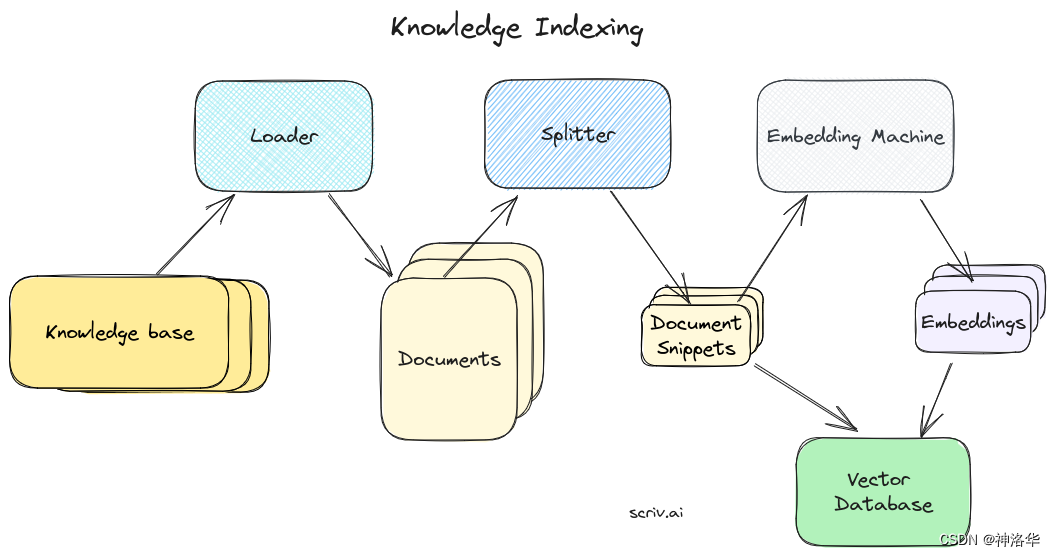
Text splitters的主要工作是:
- 文本分割:首先,文本被分割成较小的chunks,通常是句子级别。
- 组合小块:接下来,这些chunks逐步组合成更大的chunks,直到达到一定的大小限制,称之为文本片段(snippets)。例如一定的字符数、词数或其他度量。
- 创建重叠:为了保持上下文的连贯性,通常会在保留一定的重叠的基础上创建下一个文本片段。
1.1 快速开始(RecursiveCharacterTextSplitter)
LangChain提供了不同的Text splitters,区别在于文本如何分割以及如何定义chunk size。默认的文本分割器是 RecursiveCharacterTextSplitter,用于将文本递归地按字符进行分割,其主要参数为:
separators(可选):字符列表,用于指定分割文本的字符。默认情况下是按["\n\n", "\n", " ", ""]的顺序进行递归地分割,即先分成段落,然后是句子,最后是单词。chunk_size:指定分割后的文本块的大小(以length_function测量)length_function:用于测量文本长度的方法。默认为len函数,即计算字符的长度chunk_overlap:指定文本块之间的重叠部分的大小keep_separator:是否保留分割字符作为分割结果的一部分,默认为True。is_separator_regex:分割字符是否为正则表达式。默认为Falseadd_start_index:是否在元数据中包含原始文档中每个块的起始位置。
主要方法是:
split_text(text: str):拆分单个text文本create_documents(texts: List[str], metadatas: Optional[List[dict]] = None):将多个文本列表拆分成为文档对象,并关联元数据(可选)。from_language:对不同语言的代码文本进行分割,详见1.4章节。get_separators_for_language:获取指定语言(代码)的默认分隔符列表。
# create_documents方法示例
from langchain.text_splitter import RecursiveCharacterTextSplitter

# This is a long document we can split up.
with open('../../state_of_the_union.txt') as f:
    state_of_the_union = f.read()

text_splitter = RecursiveCharacterTextSplitter(
    # Set a really small chunk size, just to show.
    chunk_size = 100,
    chunk_overlap  = 20,
    length_function = len,
    add_start_index = True,
)

texts = text_splitter.create_documents([state_of_the_union])
print(texts[0])
print(texts[1])

- 1
- 2
- 3
- 4
- 5
- 6
- 7
- 8
- 9
- 10
- 11
- 12
- 13
- 14
- 15
- 16
- 17
- 18
page_content='Madam Speaker, Madam Vice President, our First Lady and Second Gentleman. Members of Congress and' metadata={'start_index': 0}
page_content='of Congress and the Cabinet. Justices of the Supreme Court. My fellow Americans.' metadata={'start_index': 82}
- 1
- 2
# split_text方法
text_splitter.split_text(state_of_the_union)[0]
- 1
- 2
'Madam Speaker, Madam Vice President, our First Lady and Second Gentleman. Members of Congress and the Cabinet. Justices of the Supreme Court. My fellow Americans. \n\nLast year COVID-19 kept us apart. This year we are finally together again. \n\nTonight, we meet as Democrats Republicans and Independents. But most importantly as Americans. \n\nWith a duty to one another to the American people to the Constitution. \n\nAnd with an unwavering resolve that freedom will always triumph over tyranny. \n\nSix days ago, Russia’s Vladimir Putin sought to shake the foundations of the free world thinking he could make it bend to his menacing ways. But he badly miscalculated. \n\nHe thought he could roll into Ukraine and the world would roll over. Instead he met a wall of strength he never imagined. \n\nHe met the Ukrainian people. \n\nFrom President Zelenskyy to every Ukrainian, their fearlessness, their courage, their determination, inspires the world.'
- 1
我们还可以给文档添加元数据,比如:
metadatas = [{"document": 1}, {"document": 2}]
documents = text_splitter.create_documents([state_of_the_union, state_of_the_union], metadatas=metadatas)
print(documents[0])
- 1
- 2
- 3
page_content='Madam Speaker, Madam Vice President, our First Lady and Second Gentleman. Members of Congress and the Cabinet. Justices of the Supreme Court. My fellow Americans. \n\nLast year COVID-19 kept us apart. This year we are finally together again. \n\nTonight, we meet as Democrats Republicans and Independents. But most importantly as Americans. \n\nWith a duty to one another to the American people to the Constitution. \n\nAnd with an unwavering resolve that freedom will always triumph over tyranny. \n\nSix days ago, Russia’s Vladimir Putin sought to shake the foundations of the free world thinking he could make it bend to his menacing ways. But he badly miscalculated. \n\nHe thought he could roll into Ukraine and the world would roll over. Instead he met a wall of strength he never imagined. \n\nHe met the Ukrainian people. \n\nFrom President Zelenskyy to every Ukrainian, their fearlessness, their courage, their determination, inspires the world.' lookup_str='' metadata={'document': 1} lookup_index=0
- 1
- 创建
metadatas列表,包含两个文档的元数据(字典格式) - 使用
create_documents方法创建了两个文档,两个文档都是state_of_the_union,并传入metadatas参数,将其与之前的文档元数据相关联
1.2 MarkdownHeaderTextSplitter
1.2.1 按结构拆分md文件
在进行文档分割时,通常希望将具有共同上下文的文本保持在一起。考虑到这一点,我们希望能尊重文档本身的结构,比如Markdown文件按照标题进行组织,那么在特定标题组内创建分块是一个直观的想法。
MarkdownHeaderTextSplitter可以根据指定的一组标题来拆分Markdown文件,每个部分都包含一个标题和相应的内容。根据Markdown文件的结构将文本拆分为不同的部分,可以更好地保留文档的结构和上下文信息,而嵌入过程会考虑文本中句子和短语之间的整体上下文和关系,以得到更全面的向量表示。
from langchain.text_splitter import MarkdownHeaderTextSplitter

md = "# Foo\n\n    ## Bar\n\nHi this is Jim\n\nHi this is Joe\n\n ### Boo \n\n Hi this is Lance \n\n ## Baz\n\n Hi this is Molly"

headers_to_split_on = [
    ("#", "Header 1"),
    ("##", "Header 2"),
    ("###", "Header 3"),
]

markdown_splitter = MarkdownHeaderTextSplitter(headers_to_split_on=headers_to_split_on)
md_header_splits = markdown_splitter.split_text(md)
md_header_splits
- 1
- 2
- 3
- 4
- 5
- 6
- 7
- 8
- 9
- 10
- 11
- 12
- 13
[Document(page_content='Hi this is Jim  \nHi this is Joe', metadata={'Header 1': 'Foo', 'Header 2': 'Bar'}),
 Document(page_content='Hi this is Lance', metadata={'Header 1': 'Foo', 'Header 2': 'Bar', 'Header 3': 'Boo'}),
 Document(page_content='Hi this is Molly', metadata={'Header 1': 'Foo', 'Header 2': 'Baz'})]
- 1
- 2
- 3
查看分割之后的结果:
type(md_header_splits[0])
- 1
langchain.schema.document.Document
- 1
md_header_splits[0].page_content,md_header_splits[0].metadata
- 1
('Hi this is Jim \nHi this is Joe', {'Header 1': 'Foo', 'Header 2': 'Bar'})
- 1
1.2.2 继续分割 Markdown group
在将Markdown文本按照标题拆分成多个Markdown group后,可以对这些Markdown group进行进一步的拆分,以便更好地处理和分析文本数据。下面示例中,我们在Markdown group上应用字符级分割,你可以使用其它不同的文本分割器。
from langchain.text_splitter import MarkdownHeaderTextSplitter

md = "# Intro \n\n    ## History \n\n Markdown[9] is a lightweight markup language for creating formatted text using a plain-text editor. John Gruber created Markdown in 2004 as a markup language that is appealing to human readers in its source code form.[9] \n\n Markdown is widely used in blogging, instant messaging, online forums, collaborative software, documentation pages, and readme files. \n\n ## Rise and divergence \n\n As Markdown popularity grew rapidly, many Markdown implementations appeared, driven mostly by the need for \n\n additional features such as tables, footnotes, definition lists,[note 1] and Markdown inside HTML blocks. \n\n #### Standardization \n\n From 2012, a group of people, including Jeff Atwood and John MacFarlane, launched what Atwood characterised as a standardisation effort. \n\n ## Implementations \n\n Implementations of Markdown are available for over a dozen programming languages."

headers_to_split_on = [
    ("#", "Header 1"),
    ("##", "Header 2"),
]

# MD splits
markdown_splitter = MarkdownHeaderTextSplitter(headers_to_split_on=headers_to_split_on)
md_header_splits = markdown_splitter.split_text(md)

# Char-level splits
from langchain.text_splitter import RecursiveCharacterTextSplitter

chunk_size = 250
chunk_overlap = 30
text_splitter = RecursiveCharacterTextSplitter(chunk_size=chunk_size, chunk_overlap=chunk_overlap)

splits = text_splitter.split_documents(md_header_splits)
splits
- 1
- 2
- 3
- 4
- 5
- 6
- 7
- 8
- 9
- 10
- 11
- 12
- 13
- 14
- 15
- 16
- 17
- 18
- 19
- 20
- 21
- 22
[Document(page_content='Markdown[9] is a lightweight markup language for creating formatted text using a plain-text editor. John Gruber created Markdown in 2004 as a markup language that is appealing to human readers in its source code form.[9]', metadata={'Header 1': 'Intro', 'Header 2': 'History'}),
 Document(page_content='Markdown is widely used in blogging, instant messaging, online forums, collaborative software, documentation pages, and readme files.', metadata={'Header 1': 'Intro', 'Header 2': 'History'}),
 Document(page_content='As Markdown popularity grew rapidly, many Markdown implementations appeared, driven mostly by the need for  \nadditional features such as tables, footnotes, definition lists,[note 1] and Markdown inside HTML blocks.  \n#### Standardization', metadata={'Header 1': 'Intro', 'Header 2': 'Rise and divergence'}),
 Document(page_content='#### Standardization  \nFrom 2012, a group of people, including Jeff Atwood and John MacFarlane, launched what Atwood characterised as a standardisation effort.', metadata={'Header 1': 'Intro', 'Header 2': 'Rise and divergence'}),
 Document(page_content='Implementations of Markdown are available for over a dozen programming languages.', metadata={'Header 1': 'Intro', 'Header 2': 'Implementations'})]
- 1
- 2
- 3
- 4
- 5
1.3 HTMLHeaderTextSplitter
1.3.1 按结构拆分HTML文件
与MarkdownHeaderTextSplitter类似,HTMLHeaderTextSplitter也是一个“结构感知”的文本拆分工具,它在元素级别对HTML进行拆分,每个部分都包含一个标题和相应的内容,并为每个标题添加元数据。
HTMLHeaderTextSplitter可以逐元素地返回chunks,也可以将具有相同元数据的元素组合起来,这样可以保持相关文本的语义分组,并保留文档结构中的上下文信息,其常用方法为:
__init__(headers_to_split_on: List[Tuple[str, str]], return_each_element: bool = False):初始化HTMLHeaderTextSplitter对象,指定要拆分的标题和是否返回每个元素。aggregate_elements_to_chunks(elements: List[ElementType]) -> List[Document]:将具有相同元数据的元素组合成块。split_text(text: str) -> List[Document]:将HTML文本字符串拆分为多个文档。split_text_from_file(file: Any) -> List[Document]:从HTML文件中拆分文本。split_text_from_url(url: str) -> List[Document]:从Web URL中拆分HTML文本
另外,它可以与其他文本分割器一起使用,作为拆分流程的一部分。
from langchain.text_splitter import HTMLHeaderTextSplitter

html_string = """
<!DOCTYPE html>
<html>
<body>
    <div>
        <h1>Foo</h1>
        <p>Some intro text about Foo.</p>
        <div>
            <h2>Bar main section</h2>
            <p>Some intro text about Bar.</p>
            <h3>Bar subsection 1</h3>
            <p>Some text about the first subtopic of Bar.</p>
            <h3>Bar subsection 2</h3>
            <p>Some text about the second subtopic of Bar.</p>
        </div>
        <div>
            <h2>Baz</h2>
            <p>Some text about Baz</p>
        </div>
        <br>
        <p>Some concluding text about Foo</p>
    </div>
</body>
</html>
"""

headers_to_split_on = [
    ("h1", "Header 1"),
    ("h2", "Header 2"),
    ("h3", "Header 3"),
]

html_splitter = HTMLHeaderTextSplitter(headers_to_split_on=headers_to_split_on)
html_header_splits = html_splitter.split_text(html_string)
html_header_splits
- 1
- 2
- 3
- 4
- 5
- 6
- 7
- 8
- 9
- 10
- 11
- 12
- 13
- 14
- 15
- 16
- 17
- 18
- 19
- 20
- 21
- 22
- 23
- 24
- 25
- 26
- 27
- 28
- 29
- 30
- 31
- 32
- 33
- 34
- 35
- 36
- 37
[Document(page_content='Foo'),
 Document(page_content='Some intro text about Foo.  \nBar main section Bar subsection 1 Bar subsection 2', metadata={'Header 1': 'Foo'}),
 Document(page_content='Some intro text about Bar.', metadata={'Header 1': 'Foo', 'Header 2': 'Bar main section'}),
 Document(page_content='Some text about the first subtopic of Bar.', metadata={'Header 1': 'Foo', 'Header 2': 'Bar main section', 'Header 3': 'Bar subsection 1'}),
 Document(page_content='Some text about the second subtopic of Bar.', metadata={'Header 1': 'Foo', 'Header 2': 'Bar main section', 'Header 3': 'Bar subsection 2'}),
 Document(page_content='Baz', metadata={'Header 1': 'Foo'}),
 Document(page_content='Some text about Baz', metadata={'Header 1': 'Foo', 'Header 2': 'Baz'}),
 Document(page_content='Some concluding text about Foo', metadata={'Header 1': 'Foo'})]
- 1
- 2
- 3
- 4
- 5
- 6
- 7
- 8
1.3.2 继续分割HTML group
from langchain.text_splitter import RecursiveCharacterTextSplitter

url = "https://plato.stanford.edu/entries/goedel/"

headers_to_split_on = [
    ("h1", "Header 1"),
    ("h2", "Header 2"),
    ("h3", "Header 3"),
    ("h4", "Header 4"),
]

html_splitter = HTMLHeaderTextSplitter(headers_to_split_on=headers_to_split_on)

# for local file use html_splitter.split_text_from_file(<path_to_file>)
html_header_splits = html_splitter.split_text_from_url(url)

chunk_size = 500
chunk_overlap = 30
text_splitter = RecursiveCharacterTextSplitter(chunk_size=chunk_size, chunk_overlap=chunk_overlap)

# Split
splits = text_splitter.split_documents(html_header_splits)
splits[80:82]
- 1
- 2
- 3
- 4
- 5
- 6
- 7
- 8
- 9
- 10
- 11
- 12
- 13
- 14
- 15
- 16
- 17
- 18
- 19
- 20
- 21
- 22
- 23
[Document(page_content='We see that Gödel first tried to reduce the consistency problem for analysis to that of arithmetic. This seemed to require a truth definition for arithmetic, which in turn led to paradoxes, such as the Liar paradox (“This sentence is false”) and Berry’s paradox (“The least number not defined by an expression consisting of just fourteen English words”). Gödel then noticed that such paradoxes would not necessarily arise if truth were replaced by provability. But this means that arithmetic truth', metadata={'Header 1': 'Kurt Gödel', 'Header 2': '2. Gödel’s Mathematical Work', 'Header 3': '2.2 The Incompleteness Theorems', 'Header 4': '2.2.1 The First Incompleteness Theorem'}),
 Document(page_content='means that arithmetic truth and arithmetic provability are not co-extensive — whence the First Incompleteness Theorem.', metadata={'Header 1': 'Kurt Gödel', 'Header 2': '2. Gödel’s Mathematical Work', 'Header 3': '2.2 The Incompleteness Theorems', 'Header 4': '2.2.1 The First Incompleteness Theorem'}),
- 1
- 2
1.3.3 局限性
HTMLHeaderTextSplitter算法假设HTML文档中存在信息层次结构,其中标题元素通常位于相关文本元素的上方。算法假设标题元素是文本元素的前一个同级元素、祖先元素或它们的组合。这种假设使得算法能够将标题与其关联的文本进行匹配和分组,以便更好地保留文档结构中的上下文信息。
然而,不同HTML文档之间的结构变化非常大,这种假设并不总是成立,可能会导致某些标题被忽略或无法正确关联。比如以下示例中,标记为"h1"的文本可能位于与预期位置不同的子树中,导致"h1"元素及其相关文本没有出现在块元数据(chunk metadata)中。
url = "https://www.cnn.com/2023/09/25/weather/el-nino-winter-us-climate/index.html"

headers_to_split_on = [
    ("h1", "Header 1"),
    ("h2", "Header 2"),
]

html_splitter = HTMLHeaderTextSplitter(headers_to_split_on=headers_to_split_on)
html_header_splits = html_splitter.split_text_from_url(url)
print(html_header_splits[1].page_content[:500])
- 1
- 2
- 3
- 4
- 5
- 6
- 7
- 8
- 9
- 10
No two El Niño winters are the same, but many have temperature and precipitation trends in common.
Average conditions during an El Niño winter across the continental US.
One of the major reasons is the position of the jet stream, which often shifts south during an El Niño winter. This shift typically brings wetter and cooler weather to the South while the North becomes drier and warmer, according to NOAA.
Because the jet stream is essentially a river of air that storms flow through, the
- 1
- 2
- 3
- 4
1.4 Split code
使用RecursiveCharacterTextSplitter的from_language方法,可以对不同的代码语言进行文本分割,get_separators_for_language方法可以获取指定语言的默认分隔符列表。
from langchain.text_splitter import RecursiveCharacterTextSplitter,Language

# 查看所有支持的语言
[e.value for e in Language]
- 1
- 2
- 3
- 4
['cpp', 'go', 'java', 'kotlin', 'js', 'ts', 'php', 'proto', 'python', 'rst', 'ruby', 'rust', 'scala', 'swift',
 'markdown', 'latex', 'html', 'sol', 'csharp', 'cobol']
- 1
- 2
# 查看Python语言的默认分隔符
RecursiveCharacterTextSplitter.get_separators_for_language(Language.PYTHON)
- 1
- 2
['\nclass ', '\ndef ', '\n\tdef ', '\n\n', '\n', ' ', '']
- 1
1.4.1 Python
下面是使用 PythonTextSplitter 的示例:
PYTHON_CODE = """
def hello_world():
    print("Hello, World!")

# Call the function
hello_world()
"""
python_splitter = RecursiveCharacterTextSplitter.from_language(
    language=Language.PYTHON, chunk_size=50, chunk_overlap=0
)
python_docs = python_splitter.create_documents([PYTHON_CODE])
python_docs
- 1
- 2
- 3
- 4
- 5
- 6
- 7
- 8
- 9
- 10
- 11
- 12
[Document(page_content='def hello_world():\n    print("Hello, World!")', metadata={}),
 Document(page_content='# Call the function\nhello_world()', metadata={})]
- 1
- 2
1.4.2 JS
JS_CODE = """
function helloWorld() {
  console.log("Hello, World!");
}

// Call the function
helloWorld();
"""

js_splitter = RecursiveCharacterTextSplitter.from_language(
    language=Language.JS, chunk_size=60, chunk_overlap=0
)
js_docs = js_splitter.create_documents([JS_CODE])
js_docs
- 1
- 2
- 3
- 4
- 5
- 6
- 7
- 8
- 9
- 10
- 11
- 12
- 13
- 14
[Document(page_content='function helloWorld() {\n  console.log("Hello, World!");\n}', metadata={}),
 Document(page_content='// Call the function\nhelloWorld();', metadata={})]
- 1
- 2
1.4.3 Markdown
markdown_text = """
# 声明:本文内容由网友自发贡献,不代表【wpsshop博客】立场,版权归原作者所有,本站不承担相应法律责任。如您发现有侵权的内容,请联系我们。转载请注明出处:https://www.wpsshop.cn/article/detail/54967?site
Copyright © 2003-2013 www.wpsshop.cn 版权所有,并保留所有权利。

