
热门标签
热门文章
- 1SpringCloud基础2——Nacos配置、Feign、Gateway_nacos feign配置
- 2JavaScript高级:构造函数
- 3Flink在流处理上常见的Source和sink操作
- 4[python爬虫] Selenium爬取新浪微博内容及用户信息
- 52022 网络安全人才市场状况研究报告_中国网络安全人才建设报告(2022年)
- 6mongodb 在centos7里用systemctl起不来_systemctl /etc/rc.d/init.d/mongod
- 7【Linux】nc 网络诊断 | 文件传输 命令详解
- 8jar包下载网站_jar包下载地址
- 9Java 随机生成一个五位以内的数,然后输出该数共有多少位,每位分别是什么_java 5以内的随机数
- 10leetcode 接雨水二
当前位置: article > 正文
Git中的工作区和暂存区_git暂存区和工作区
作者:代码吟游诗人2 | 2024-02-01 16:22:39
赞
踩
git暂存区和工作区
Git和其他版本控制系统如SVN的一个不同之处就是有暂存区的概念。
0. 相关专业名词
staged changes:已更改的东西
unstaged changes:未更改的东西
stage 暂存区
1. 工作区(Working Directory)
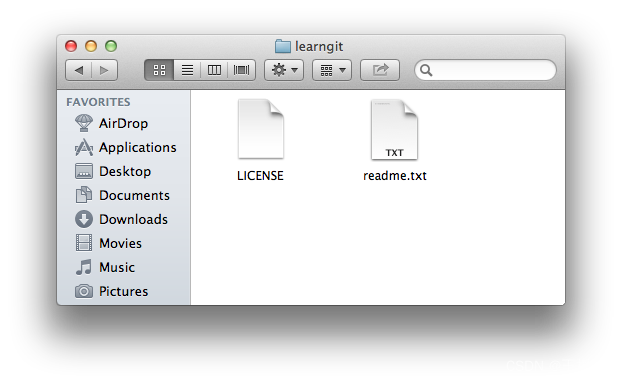
就是你在电脑里能看到的目录,比如我的learngit文件夹就是一个工作区:
2. 版本库(Repository)
工作区有一个隐藏目录.git,这个不算工作区,而是Git的版本库。
Git的版本库里存了很多东西,其中最重要的就是称为stage(或者叫index)的暂存区,还有Git为我们自动创建的第一个分支master,以及指向master的一个指针叫HEAD。
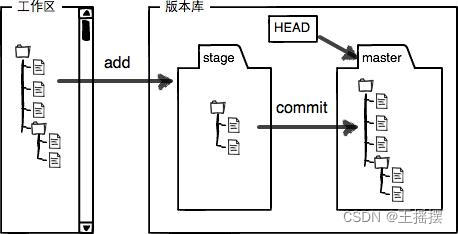
gitz中commit的实际过程
前面讲了我们把文件往Git版本库里添加的时候,是分两步执行的:
-
第一步是用git add把文件添加进去,实际上就是把文件修改添加到暂存区;
-
第二步是用git commit提交更改,实际上就是把暂存区的所有内容提交到当前分支。
-
因为我们创建Git版本库时,Git自动为我们创建了唯一一个master分支,所以,现在,git commit就是往master分支上提交更改。
你可以简单理解为,需要提交的文件修改通通放到暂存区,然后,一次性提交暂存区的所有修改。
实践
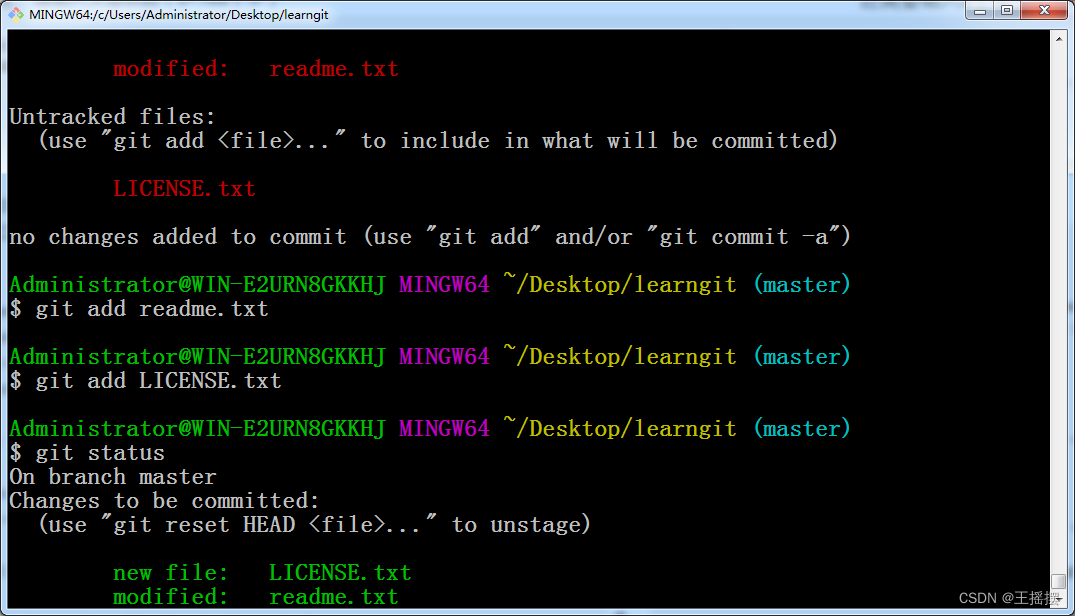
新创建一个文件,查看当前缓存区的工作状态,发现没有添加,将两个文件都提交后,再次查看缓存区的工作状态。
$ git status
On branch master
Changes not staged for commit:
  (use "git add <file>..." to update what will be committed)
  (use "git checkout -- <file>..." to discard changes in working directory)

        modified:   readme.txt

Untracked files:
  (use "git add <file>..." to include in what will be committed)

        LICENSE.txt

no changes added to commit (use "git add" and/or "git commit -a")

Administrator@WIN-E2URN8GKKHJ MINGW64 ~/Desktop/learngit (master)
$ git add readme.txt

Administrator@WIN-E2URN8GKKHJ MINGW64 ~/Desktop/learngit (master)
$ git add LICENSE.txt

Administrator@WIN-E2URN8GKKHJ MINGW64 ~/Desktop/learngit (master)
$ git status
On branch master
Changes to be committed:
  (use "git reset HEAD <file>..." to unstage)

        new file:   LICENSE.txt
        modified:   readme.txt

- 1
- 2
- 3
- 4
- 5
- 6
- 7
- 8
- 9
- 10
- 11
- 12
- 13
- 14
- 15
- 16
- 17
- 18
- 19
- 20
- 21
- 22
- 23
- 24
- 25
- 26
- 27
- 28
- 29
- 30
重新提交到Git后,再次查看暂存区工作状态,舒服了!
$ git commit -m "understand how stage works"
[master 0b5e9b3] understand how stage works
 2 files changed, 2 insertions(+), 1 deletion(-)
 create mode 100644 LICENSE.txt

Administrator@WIN-E2URN8GKKHJ MINGW64 ~/Desktop/learngit (master)
$ git status
On branch master
nothing to commit, working directory clean
- 1
- 2
- 3
- 4
- 5
- 6
- 7
- 8
- 9
小结
暂存区是Git非常重要的概念,弄明白了暂存区,就弄明白了Git的很多操作到底干了什么。
在Git bash中文件的颜色
红色:表示的是unstaged changes,目前还没有被添加到缓存区stage绿色:表示的是staged changes,表示已经添加到了缓存区,等待提交
声明:本文内容由网友自发贡献,不代表【wpsshop博客】立场,版权归原作者所有,本站不承担相应法律责任。如您发现有侵权的内容,请联系我们。转载请注明出处:https://www.wpsshop.cn/article/detail/54236
推荐阅读
相关标签

