
- 12022 年全国职业院校技能大赛高职组云计算赛项试卷
- 2Eclipse使用配置tomcat服务:Server配置_eclipse server locations
- 3手把手教你使用Python调用 ChatGPT!支持http代理_chatgpt python 代理
- 4SpringBoot使用多线程_springboot 多线程
- 5JDK产品的发展史_jdk历史版本
- 6四次挥手详解
- 7200.【2023年华为OD机试真题(C卷)】求最多可以派出多少支团队(贪心算法-Java&Python&C++&JS实现)
- 8基于云原生的边缘计算在大麦现场的探索应用_基于云原生技术、适配工业场景的边缘云平台设计
- 9Macs Fan Control Pro v1.5.16_macs fan control 1.5.16
- 10Spring Boot(四):Thymeleaf 使用详解_spring thymeleaf
zookeeper 单服务器的集群搭建_exception causing close of session 0x0: zookeepers
赞
踩
一、前言
ZooKeeper是一个分布式的,开放源码的分布式应用程序协调服务,是Google的Chubby一个开源的实现,是Hadoop和Hbase的重要组件。它是一个为分布式应用提供一致性服务的软件,提供的功能包括:配置维护、域名服务、分布式同步、组服务等。
ZooKeeper的目标就是封装好复杂易出错的关键服务,将简单易用的接口和性能高效、功能稳定的系统提供给用户。
ZooKeeper包含一个简单的原语集,提供Java和C的接口。
二、搭建
安装包:apache-zookeeper-3.5.8-bin.tar.gz 服务器:centos7 jdk版本:1.8.0_251
zookeeper安装路径:/usr/zookeeper ,开始解压,如下所示:
tar -zxvf apache-zookeeper-3.5.8-bin.tar.gz单服务器配置集群,我们将解压后的文件:apache-zookeeper-3.5.8-bin 复制,复制命令如下:
cp -r apache-zookeeper-3.5.8-bin/ apache-zookeeper-3.5.8-01cp: 复制命令 -r :表示复制文件夹目录。
复制后如下所示:
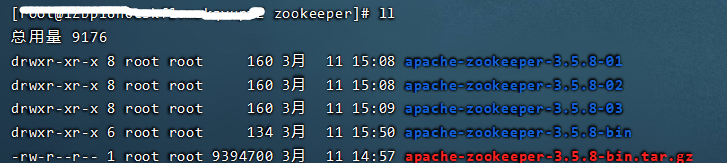
针对 apache-zookeeper-3.5.8-01 的配置操作:
1)、在 apache-zookeeper-3.5.8-01 创建 data01 目录,并在data01目录下设置服务器服务编号。如下所示:
- # 创建myid文件,并写入数字1
- echo 1 >> myid
- # 查看myid文件的内容
- cat myid
2)、在 apache-zookeeper-3.5.8-01 下conf找到 zoo_sample.cfg ,更改为 zoo.cfg
cp zoo_sample.cfg zoo.cfg
zoo.cfg 配置文件处理:
- # The number of milliseconds of each tick
- tickTime=2000
- # The number of ticks that the initial
- # synchronization phase can take
- initLimit=10
- # The number of ticks that can pass between
- # sending a request and getting an acknowledgement
- syncLimit=5
- # the directory where the snapshot is stored.
- # do not use /tmp for storage, /tmp here is just
- # example sakes.
-
- dataDir=/usr/zookeeper/apache-zookeeper-3.5.8-01/data01
-
- # the port at which the clients will connect
-
- clientPort=2181
- admin.serverPort=9091
- quorumListenOnAllIPs=true
-
- # the maximum number of client connections.
- # increase this if you need to handle more clients
- #maxClientCnxns=60
- #
- # Be sure to read the maintenance section of the
- # administrator guide before turning on autopurge.
- #
- # http://zookeeper.apache.org/doc/current/zookeeperAdmin.html#sc_maintenance
- #
- # The number of snapshots to retain in dataDir
- #autopurge.snapRetainCount=3
- # Purge task interval in hours
- # Set to "0" to disable auto purge feature
- #autopurge.purgeInterval=1
-
- server.1=0.0.0.0:2881:3881
- server.2=0.0.0.0:2882:3882
- server.3=0.0.0.0:2883:3883

重点如下图红色圈出的部分:
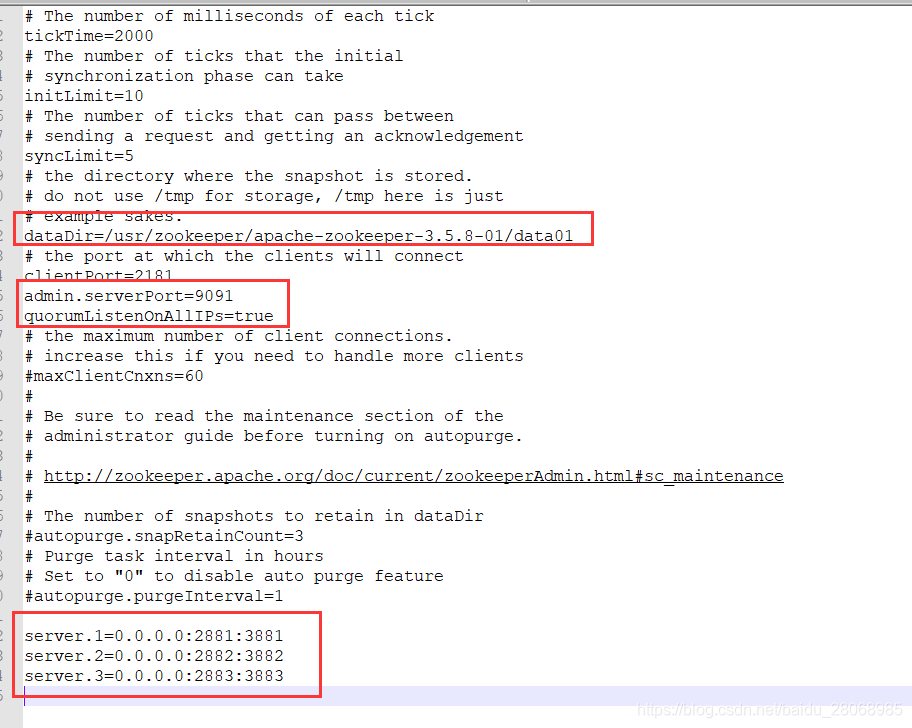
相关配置说明:
①、tickTime:基本事件单元,这个时间是作为Zookeeper服务器之间或客户端与服务器之间维持心跳的时间间隔,每隔tickTime时间就会发送一个心跳;最小 的session过期时间为2倍tickTime
②、dataDir:存储内存中数据库快照的位置,除非另有说明,否则指向数据库更新的事务日志。注意:应该谨慎的选择日志存放的位置,使用专用的日志存储设备能够大大提高系统的性能,如果将日志存储在比较繁忙的存储设备上,那么将会很大程度上影像系统性能。
③、client:监听客户端连接的端口。
④、initLimit:允许follower连接并同步到Leader的初始化连接时间,以tickTime为单位。当初始化连接时间超过该值,则表示连接失败。
⑤、syncLimit:表示Leader与Follower之间发送消息时,请求和应答时间长度。如果follower在设置时间内不能与leader通信,那么此follower将会被丢弃。
⑥、server.A=B:C:D
A:其中 A 是一个数字,表示这个是服务器的编号(myid 文件);
B:是这个服务器的 ip 地址;
C:Leader选举的端口;
D:Zookeeper服务器之间的通信端口。
我们需要修改的第一个是 dataDir ,在指定的位置处创建好目录。
第二个需要新增的是 server.A=B:C:D 配置,其中 A 对应下面我们即将介绍的myid 文件。B是集群的各个IP地址,C:D 是端口配置。
针对 apache-zookeeper-3.5.8-02 、apache-zookeeper-3.5.8-03 的配置操作与 apache-zookeeper-3.5.8-01 操作过程一样.不再描述,此处贴出相关配置:
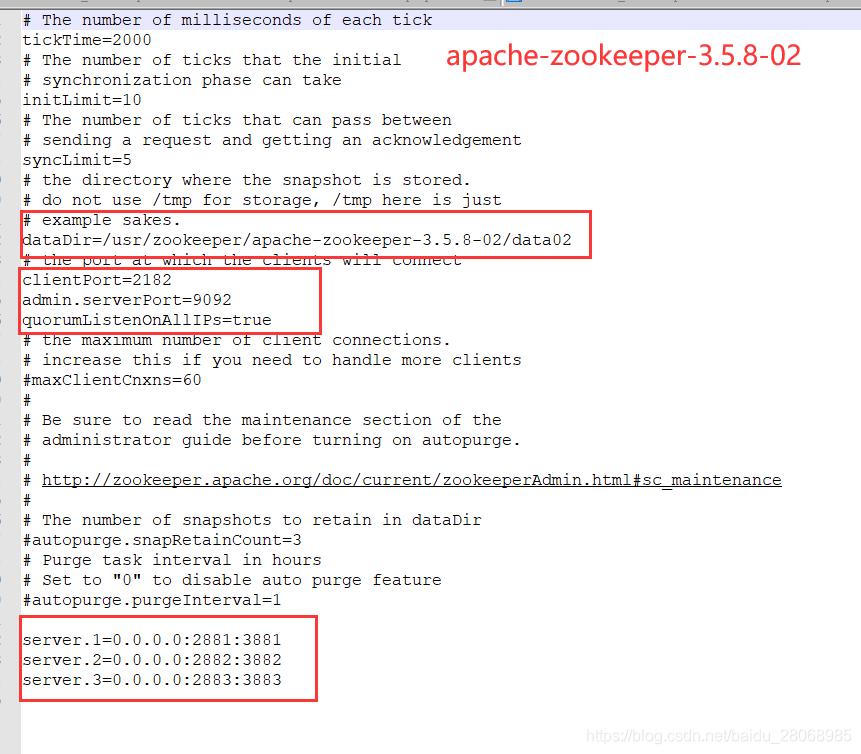
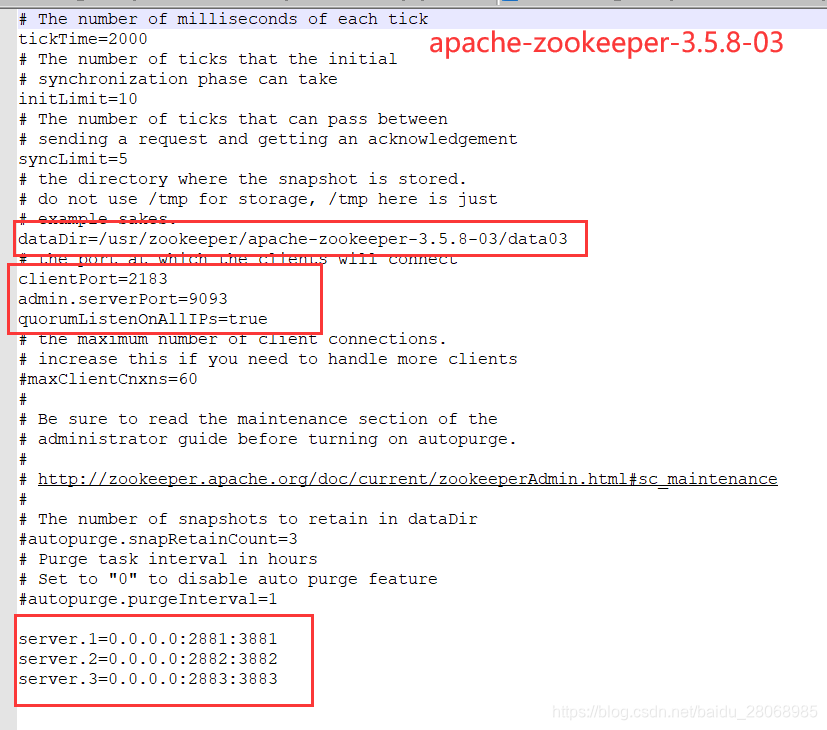
注意:apache-zookeeper-3.5.8-02 的 myid 为 2 、apache-zookeeper-3.5.8-03 的 myid 为 3.
启动命令:
- # 进入bin启动命令
- cd /usr/zookeeper/apache-zookeeper-3.5.8-03/bin
-
- # 启动服务
- ./zkServer.sh start
- # 查看服务状态
- ./zkServer.sh status
启动成功出现:

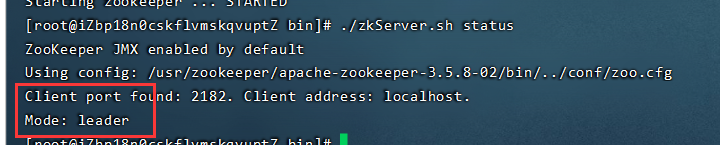

使用client客户端创建节点:进入bin目录下:
- ./zkCli.sh
-
- ## 创建节点
- create /hello 0
- ## 查看节点信息
- ls /
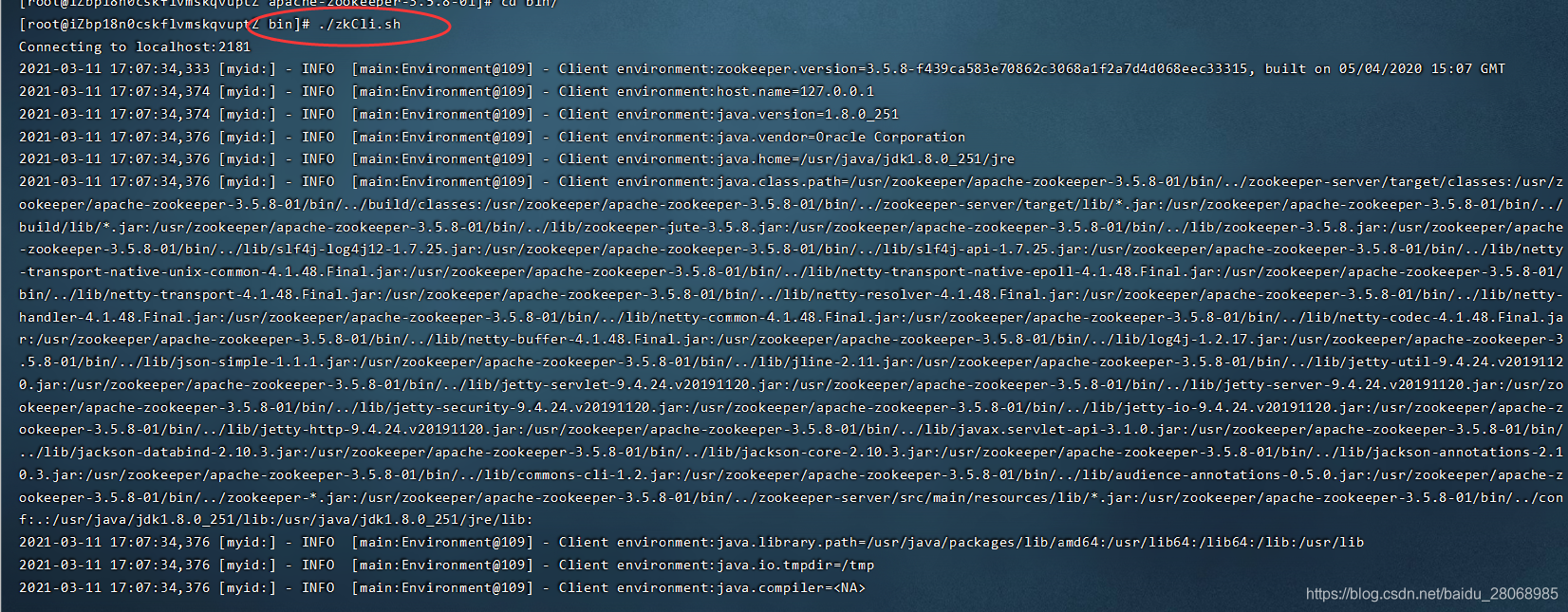

至此, 单服务器zookeeper多节点集群 搭建完毕。
三、问题集合
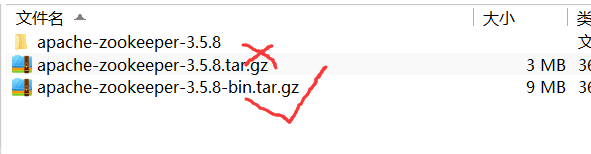
1、 找不到或无法加载主类 org.apache.zookeeper.server.quorum.QuorumPeerMain
原因:从目前的最新版本3.5.5开始,带有bin名称的包才是我们想要的下载可以直接使用的里面有编译后的二进制的包,而之前的普通的tar.gz的包里面是只是源码的包无法直接使用。
2、云服务器操作出现:java.net.BindException: 无法指定被请求的地址 (Bind failed)
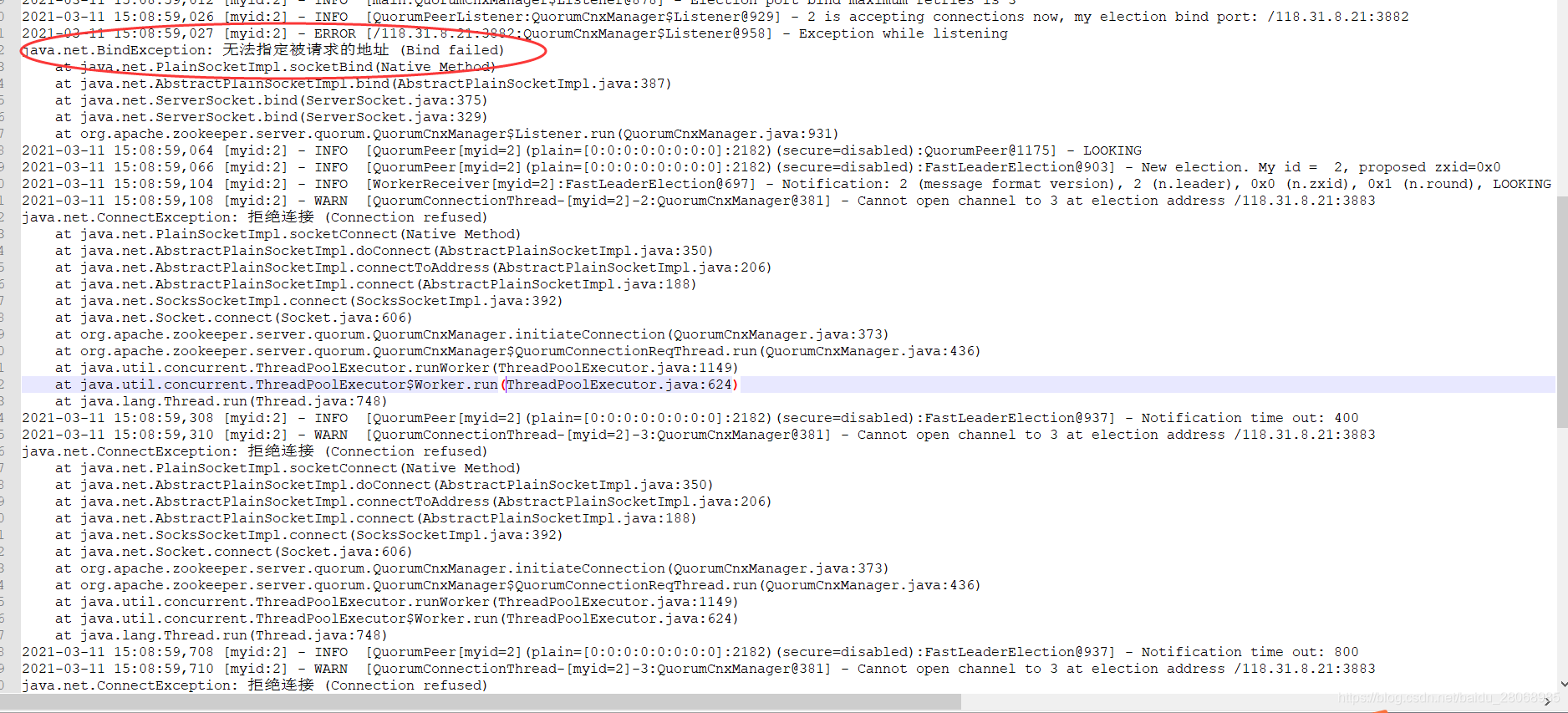
解决方法:在每个Zookeeper节点上的zoo.cfg里面添加上 quorumListenOnAllIPs=true 然后重启所有节点。 原文出处
3、出现警告:Exception causing close of session 0x0: ZooKeeperServer not running
解决方法:找到 zoo.cfg 下 dataDir=/usr/zookeeper/apache-zookeeper-3.5.8-01/data01 的配置,去这个目录删除数据(myid 不删),成功启动Zookeeper。
推荐链接:https://blog.csdn.net/huochen1994/article/details/79288194
4、org.apache.zookeeper.server.admin.AdminServer$AdminServerException: Problem starting AdminServer on address 0.0.0.0, port 8080 and command URL /commands 端口 8080 被占用。
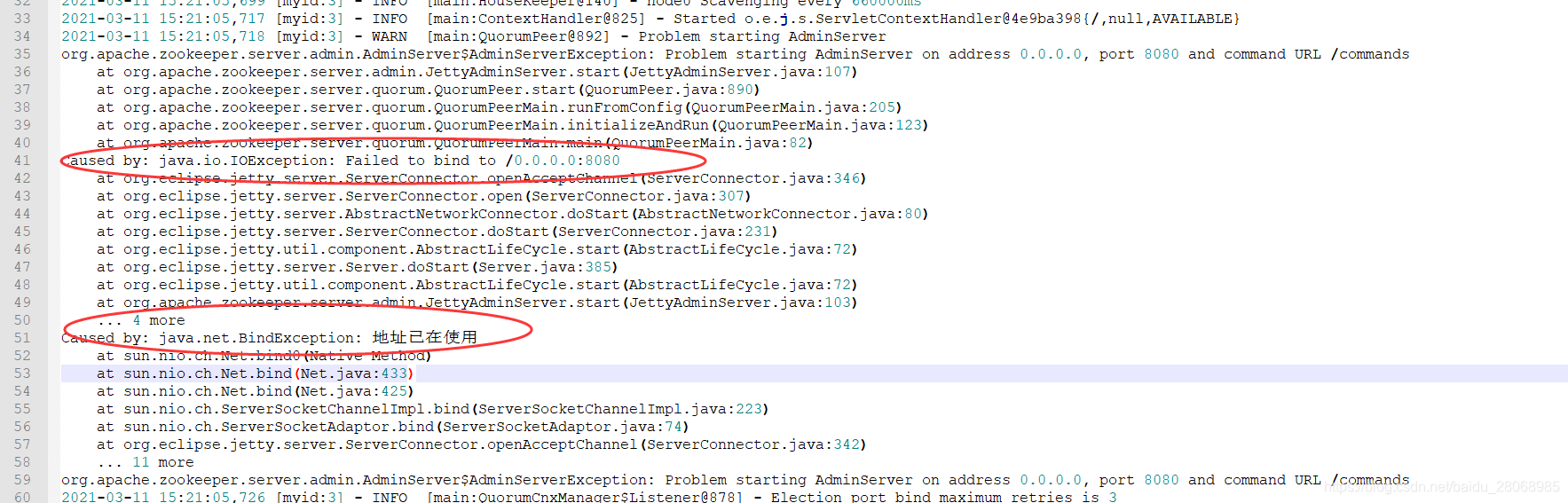
解决方案:在 zoo.cfg 配置文件增加 admin.serverPort=9091 ,旨在调整其他默认的 8080 端口。
5、 zookeeper 启动后,控制台出现:Cannot open channel to 3 at election address /118.31.8.21:3883
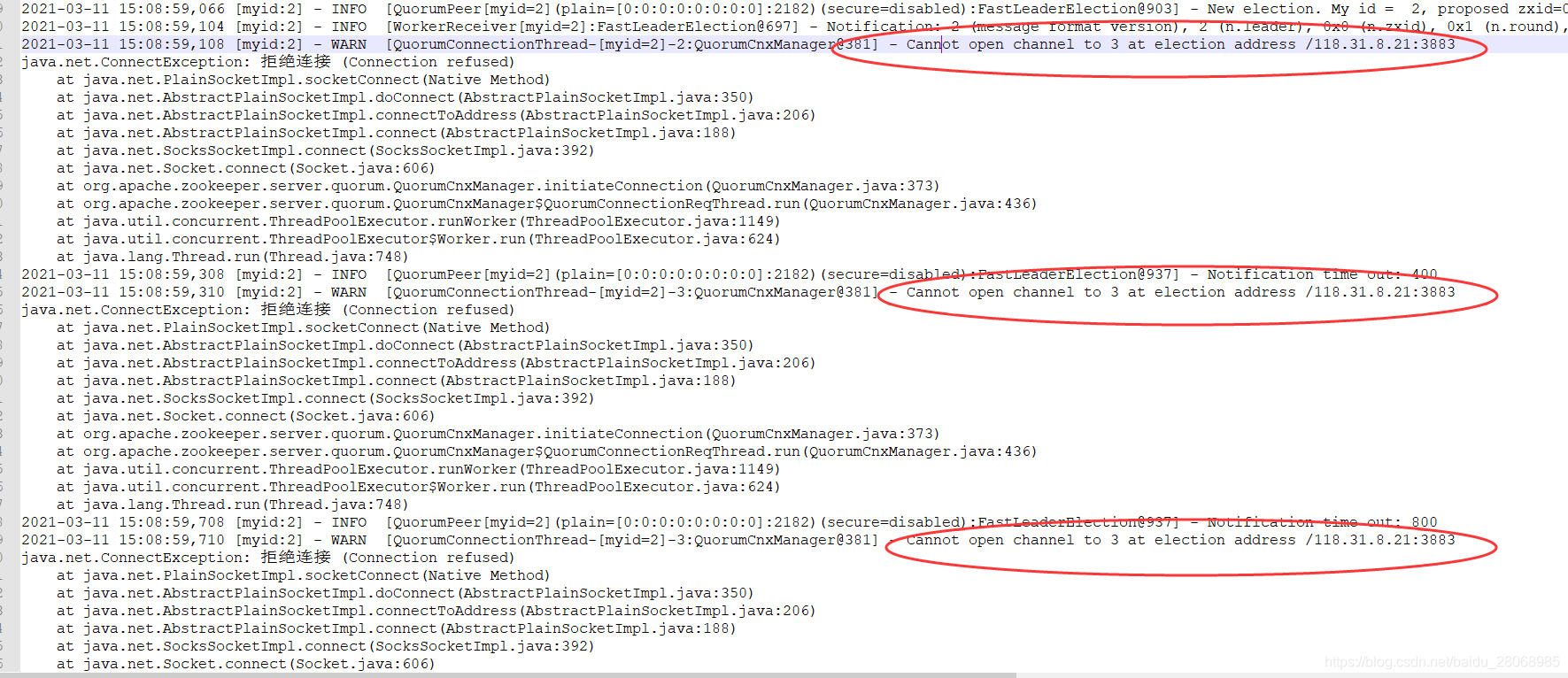
真正的原因:启动的时候因为是分开启动的,所以如果是三台服务器,第一台启动的时候无论如何也连不上第二第三台机器,所以肯定会报连续两个这个错误,以此类推第二台会报一个,第三台不报这个错误…
解决方法: ./zkServer.sh restart 在bin目录下重启zookeeper。
- DruidDataSource通用配置
[详细] -->赞
踩

