
热门标签
热门文章
- 1Flask框架开发博客网站_flask开发的网站有哪些
- 2Kubernetes Ingress诡异的502、503、504等奇葩问题(二)
- 32023十大编程语言及未来展望_编程语言排行榜2010-2023
- 4Kong工作原理 - 健康检查和断路器 - 定义健康和不健康
- 5关于ROS在一个回调函数中处理两个订阅话题消息(多话题回调、多参数回调问题)_ros 服务 回调函数多参数
- 6【送书福利-第二十五期】《机器学习高级实践》
- 7如何区分一个项目是react还react native_怎样查看项目是vue的还是react
- 8MySQL 实现多张无关联表查询数据并分页_mysql将三个表的数据一起查出来分页
- 9python云南昆明旅游景点数据可视化大屏全屏系统设计与实现(django框架)_利用django铺盖整个屏幕
- 10支持上亿物联网终端设备接入的MQTT集群
当前位置: article > 正文
Spring Boot学习之Dubbo+Zookeeper初识_springboot dubbo zookeeper
作者:数据科学创新者 | 2024-02-01 14:19:20
赞
踩
springboot dubbo zookeeper
一 分布式理论基础知识
- 分布式系统是若干独立计算机的集合,这些计算机对于用户来说就像单个相关系统
- 分布式系统是由一组通过网络进行通信、为了完成共同的任务而协调工作的计算机节点组成的系统。
- 分布式系统的出现是为了用廉价的、普通的机器完成单个计算机无法完成的计算、存储任务。
- 其目的是利用更多的机器,处理更多的数据。
- 分布式系统(distributed system)是建立在网络之上的软件系统。
- 首先需要明确的是,只有当单个节点的处理能力无法满足日益增长的计算、存储任务的时候,且硬件的提升(加内存、加磁盘、使用更好的CPU)高昂到得不偿失的时候,应用程序也不能进一步优化的时候,我们才需要考虑分布式系统。
- 因为,分布式系统要解决的问题本身就是和单机系统一样的,而由于分布式系统多节点、通过网络通信的拓扑结构,会引入很多单机系统没有的问题,为了解决这些问题又会引入更多的机制、协议,带来更多的问题。
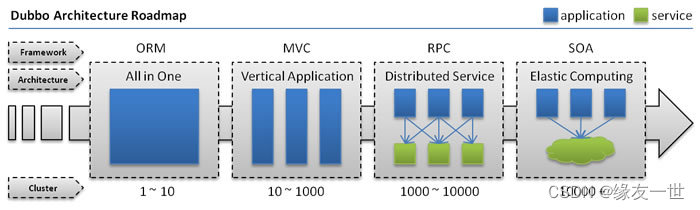
- 分布式服务架构的演进
1.1 单一应用架构
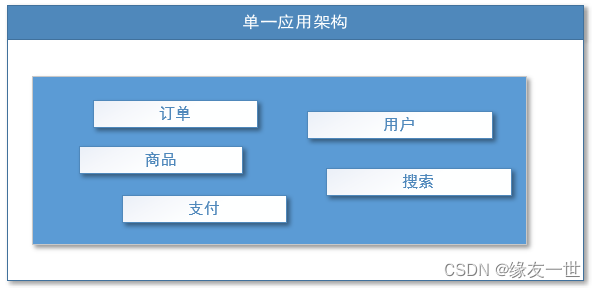
- 关键:用于简化增删改查工作量的数据访问框架(ORM)
- 优点
- 一个应用将所有应用功能都部署在一起,减少成本!
- 缺点
- 不利于维护升级
- 性能拓展不易
- 协同开发困难
1.2 垂直应用架构
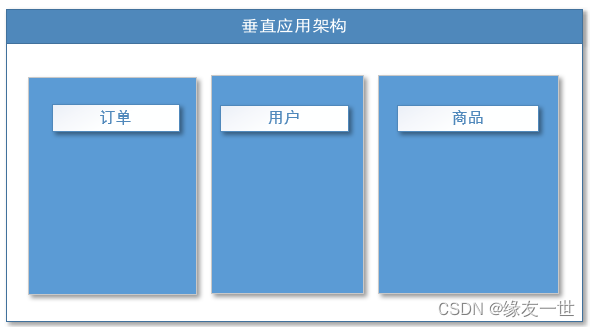
- 关键用于加速前端页面开发的Web框架(MVC)
- 优点
- 通过切分业务来实现各个模块独立部署,降低了维护和部署难度,方便团队管理
- 方便性能扩展,针对性强。
- 缺点:
- 公用模块无法重复利用,开发性的浪费
1.3 分布式服务架构
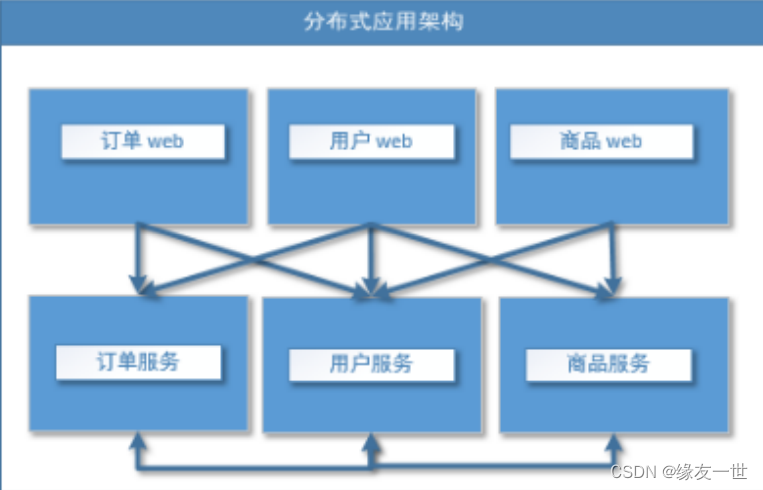
1.4 流动计算架构
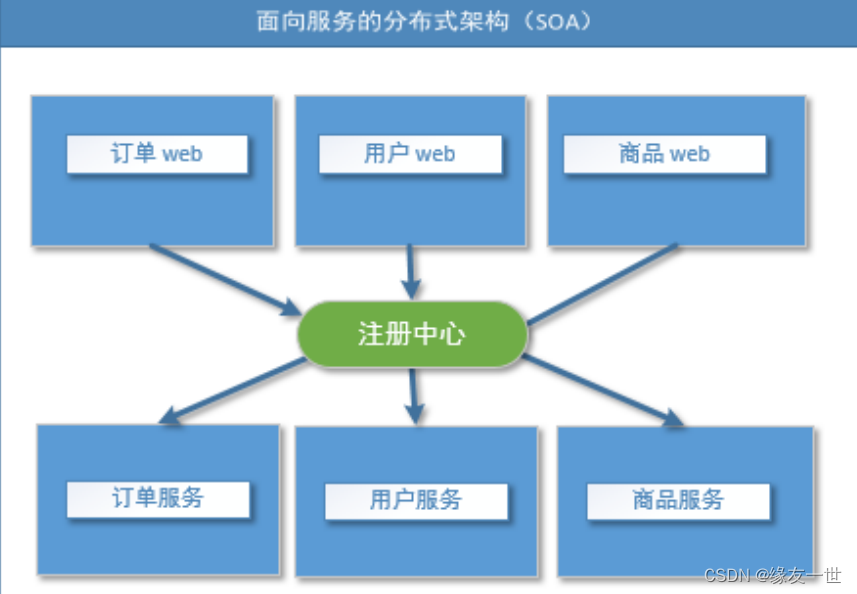
- 关键:提高机器利用率的资源调度和治理中心(SOA)【Service Oriented Architecture】
- 优点
- 提高集群利用率
- 缺点
- 系统与服务的界限模糊的,不利于设计.
- ESB是作为系统与系统之间桥梁,没有统一标准,种类很多,不利于维护.
1.5 PRC[Remote Procedure Call]
- RPC【Remote Procedure Call】是指远程过程调用,是一种进程间通信方式,他是一种技术的思想,而不是规范。
- 它允许程序调用另一个地址空间(通常是共享网络的另一台机器上)的过程或函数,而不用程序员显式编码这个远程调用的细节。【即程序员无论是调用本地的还是远程的函数,本质上编写的调用代码基本相同】
- RPC基本原理
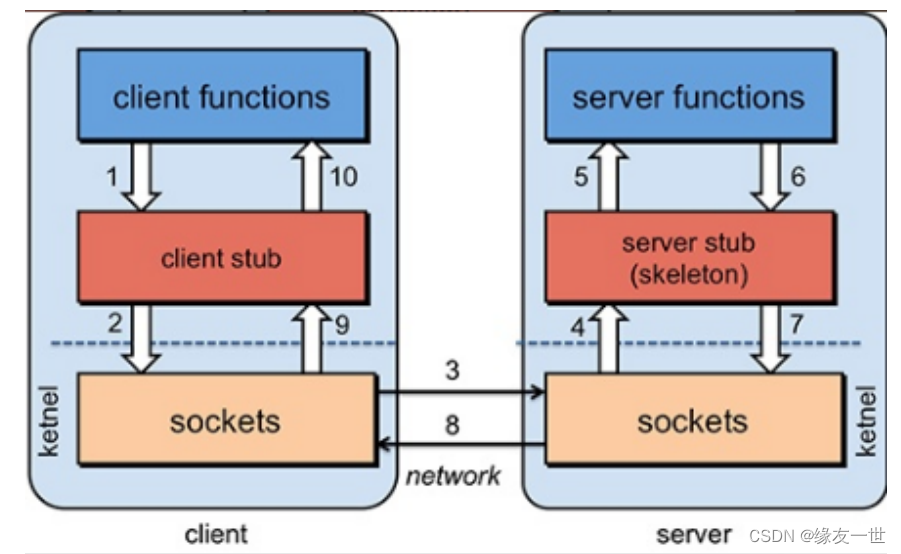
- 步骤解析
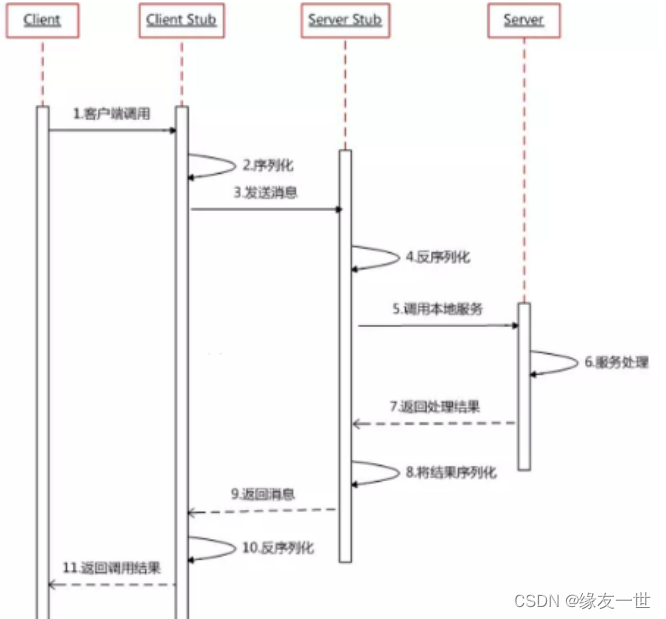
- RPC两个核心模块
- 通讯
- 序列化:数据传输需要转换
二 Dubbo
2.1 Dubbo简介
- Dubbo官网
- Apache Dubbo 是一款高性能、轻量级的开源Java RPC框架
- 它提供了三大核心能力
- 面向接口的远程方法调用
- 智能容错和负载均衡
- 以及服务自动注册和发现。
- Dubbo 基本工作流程

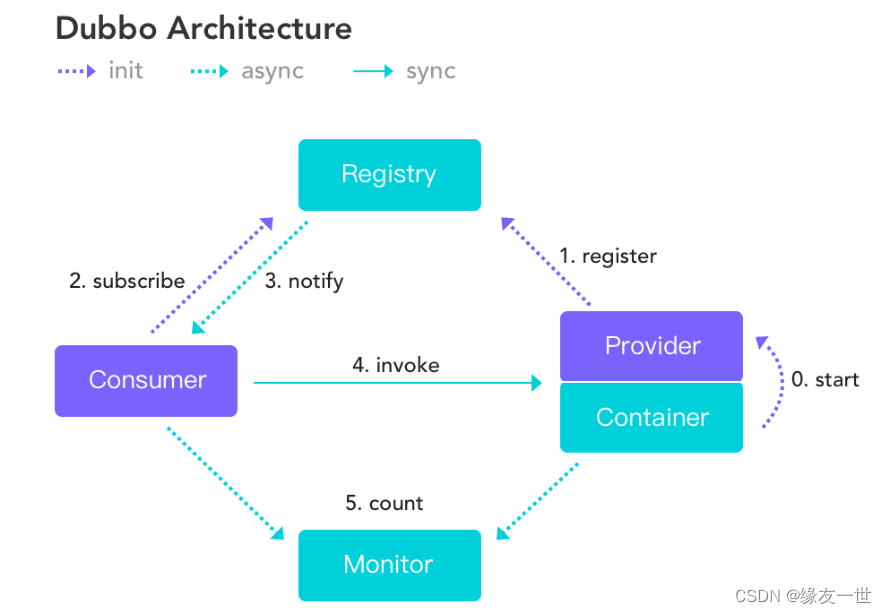
- 服务提供者(Provider):暴露服务的服务提供方,服务提供者在启动时,向注册中心注册自己提供的服务。
- 服务消费者(Consumer): 调用远程服务的服务消费方,服务消费者在启动时,向注册中心订阅自己所需的服务,服务消费者,从提供者地址列表中,基于软负载均衡算法,选一台提供者进行调用,如果调用失败,再选另一台调用。
- 注册中心(Registry):注册中心返回服务提供者地址列表给消费者,如果有变更,注册中心将基于长连接推送变更数据给消费者
- 监控中心(Monitor):服务消费者和提供者,在内存中累计调用次数和调用时间,定时每分钟发送一次统计数据到监控中心
- 调用关系说明
- 服务容器负责启动,加载,运行服务提供者。
- 服务提供者在启动时,向注册中心注册自己提供的服务。
- 服务消费者在启动时,向注册中心订阅自己所需的服务。
- 注册中心返回服务提供者地址列表给消费者,如果有变更,注册中心将基于长连接推送变更数据给消费者。
- 服务消费者,从提供者地址列表中,基于软负载均衡算法,选一台提供者进行调用,如果调用失败,再选另一台调用。
- 服务消费者和提供者,在内存中累计调用次数和调用时间,定时每分钟发送一次统计数据到监控中心
三 Dubbo环境搭建
3.1 Zookeeper简介
- ZooKeeper是一个分布式的,开放源码的分布式应用程序协调服务,是Google的Chubby一个开源的实现,是Hadoop和Hbase的重要组件。它是一个为分布式应用提供一致性服务的软件,提供的功能包括:配置维护、域名服务、分布式同步、组服务等。
- ZooKeeper的目标就是封装好复杂易出错的关键服务,将简单易用的接口和性能高效、功能稳定的系统提供给用户。
- ZooKeeper包含一个简单的原语集,提供Java和C的接口。
3.2 Zookeeper下载与安装
- 使用这个下载地址的版本,可以避免错误三的情况!
- 在bin目录前,输入cmd以管理员运行

- 输入以下命令
zkService .cmd,会出现以下问题

- 双击运行zkService.cmd闪退
3.3 解决问题
问题一:
	错误:找不到或无法加载主类 org.apache.zookeeper.server.quorum.QuorumPeerMain
问题二:
ERROR [main:o.a.z.s.q.QuorumPeerMain@99]
- Invalid config, exiting abnormally org.apache.zookeeper.server.quorum.QuorumPeerConfig$ConfigException:
Error processing C:\environment\apache-zookeeper-3.8.0-bin\apache-zookeeper-3.8.0-bin\bin\..\conf\zoo.cfg
问题三:
ZooKeeper audit is disabled
- 1
- 2
- 3
- 4
- 5
- 6
- 7
- 8
- 编辑zkService.cmd添加
pause命令,查看详细的错误信息
- 双击运行zkService.cmd文件运行,出现错误信息
C:\environment\apache-zookeeper-3.7.1\apache-zookeeper-3.7.1\bin>call "C:\Program Files\Java\jdk1.8.0_131"\bin\java "-Dzookeeper.log.dir=C:\environment\apache-zookeeper-3.7.1\apache-zookeeper-3.7.1\bin\..\logs" "-Dzookeeper.root.logger=INFO,CONSOLE" "-Dzookeeper.log.file=zookeeper-HP-server-DESKTOP-OGQJ662.log" "-XX:+HeapDumpOnOutOfMemoryError" "-XX:OnOutOfMemoryError=cmd /c taskkill /pid %%p /t /f" -cp "C:\environment\apache-zookeeper-3.7.1\apache-zookeeper-3.7.1\bin\..\build\classes; C:\environment\apache-zookeeper-3.7.1\apache-zookeeper-3.7.1\bin\..\build\lib\*; C:\environment\apache-zookeeper-3.7.1\apache-zookeeper-3.7.1\bin\..\*; C:\environment\apache-zookeeper-3.7.1\apache-zookeeper-3.7.1\bin\..\lib\*; C:\environment\apache-zookeeper-3.7.1\apache-zookeeper-3.7.1\bin\..\conf" org.apache.zookeeper.server.quorum.QuorumPeerMain "C:\environment\apache-zookeeper-3.7.1\apache-zookeeper-3.7.1\bin\..\conf\zoo.cfg" 错误: 找不到或无法加载主类 org.apache.zookeeper.server.quorum.QuorumPeerMain- 1
- 2
- 3
- 4
- 5
- 6
- 7
- 8
- 9
- 10
- 11
- 12
- 13
- 14
- 15
3.3.1 错误一的分析和解决
- 问题分析
- 下载的是未编译的 jar 包
- 注:zookeeper 3.5 版本以后,命名就发生了改变,如 apache-zookeeper-3.8.0.tar.gz 这般命名的,都是未编译的,而 apache-zookeeper-3.8.0-bin.tar.gz 这般命名的,才是已编译的包。
- 解决方法
- 重新下载 apache-zookeeper-3.8.0-bin.tar.gz 包,然后解压使用
- 下载完运行zkService.cmd,出现以下错误
2023-01-29 17:02:21,637 [myid:] - INFO  [main:o.a.z.s.q.QuorumPeerConfig@177]
- Reading configuration from: C:\environment\apache-zookeeper-3.8.0-bin\apache-zookeeper-3.8.0-bin\bin\..\conf\zoo.cfg
2023-01-29 17:02:21,640 [myid:] - ERROR [main:o.a.z.s.q.QuorumPeerMain@99]
- Invalid config, exiting abnormally org.apache.zookeeper.server.quorum.QuorumPeerConfig$ConfigException:
Error processing C:\environment\apache-zookeeper-3.8.0-bin\apache-zookeeper-3.8.0-bin\bin\..\conf\zoo.cfg
- 1
- 2
- 3
- 4
- 5
3.3.2 错误二的分析和解决
- 问题分析
- 由上面的错误信息可以看到,程序没有找到
conf文件夹下的zoo.cfg文件
- 由上面的错误信息可以看到,程序没有找到
- 解决方法
- 将
zoo_saple.cfg文件复制一份,重命名为zoo.cfg - 在
zoo.cfg可以看到Zookeeper默认的端口号为:2181
# The number of milliseconds of each tick
tickTime=2000
# The number of ticks that the initial
# synchronization phase can take
initLimit=10
# The number of ticks that can pass between
# sending a request and getting an acknowledgement
syncLimit=5
# the directory where the snapshot is stored.
# do not use /tmp for storage, /tmp here is just
# example sakes.
dataDir=/tmp/zookeeper
# the port at which the clients will connect
clientPort=2181
# the maximum number of client connections.
# increase this if you need to handle more clients
#maxClientCnxns=60
#
# Be sure to read the maintenance section of the
# administrator guide before turning on autopurge.
#
# http://zookeeper.apache.org/doc/current/zookeeperAdmin.html#sc_maintenance
#
# The number of snapshots to retain in dataDir
#autopurge.snapRetainCount=3
# Purge task interval in hours
# Set to "0" to disable auto purge feature
#autopurge.purgeInterval=1

## Metrics Providers
#
# https://prometheus.io Metrics Exporter
#metricsProvider.className=org.apache.zookeeper.metrics.prometheus.PrometheusMetricsProvider
#metricsProvider.httpPort=7000
#metricsProvider.exportJvmInfo=true
- 1
- 2
- 3
- 4
- 5
- 6
- 7
- 8
- 9
- 10
- 11
- 12
- 13
- 14
- 15
- 16
- 17
- 18
- 19
- 20
- 21
- 22
- 23
- 24
- 25
- 26
- 27
- 28
- 29
- 30
- 31
- 32
- 33
- 34
- 35
- 将
- 注意
- dataDir=./ 临时数据存储的目录(可写相对路径)
- clientPort=2181 zookeeper的端口号
3.3.3 错误三的分析和解决
- 然后,快乐地运行
zkService.cmd又又又遇到了错误!
2023-01-29 17:11:11,775 [myid:] - INFO [main:o.a.z.a.ZKAuditProvider@42] - ZooKeeper audit is disabled.
- 1
- 问题分析
- zookeeper新版本启动的过程中,
zookeeper新增的审核日志是默认关闭,所以控制台输出ZooKeeper audit is disabled。 - 标准的修改方式应该是在
zookeeper的配置文件zoo.cfg新增一行audit.enable=true即可
- zookeeper新版本启动的过程中,
- 解决方法
- 修改zkServer.cmd 添加"-Dzookeeper.audit.enable=true"
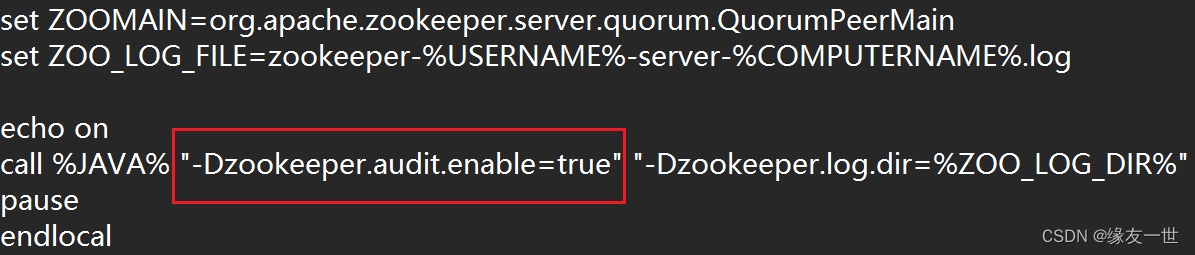
- 修改zkServer.cmd 添加"-Dzookeeper.audit.enable=true"
3.4 zookeeper运行测试
- 在解决完上面的三个问题之后,记得将
zkService.cmd文件中的pause命令删除 - 双击运行
zkService.cmd服务端,在最后看到下面的信息,表明运行成功![myid:] - INFO [main:o.a.z.a.Slf4jAuditLogger@35] - user=HP operation=serverStart result=success- 1
- 双击运行
zkCli.cmd客户端
- 连接成功的效果
- 服务端效果
[myid:] - INFO [SyncThread:0:o.a.z.s.p.FileTxnLog@285] - Creating new log file: log.1- 1
- 客户端效果
WatchedEvent state:SyncConnected type:None path:null [zk: localhost:2181(CONNECTED) 0]- 1
- 2
ls /:列出zookeeper根下保存的所有节点

create –e /yang 123:创建一个/yang节点,值为666

get /yang:获取/yang节点的值

四 安装dubbo-admin【window环境】
4.1 dubbo-admin(有问题没解决)【可跳过】
-
选择使用稳定版本
master版本
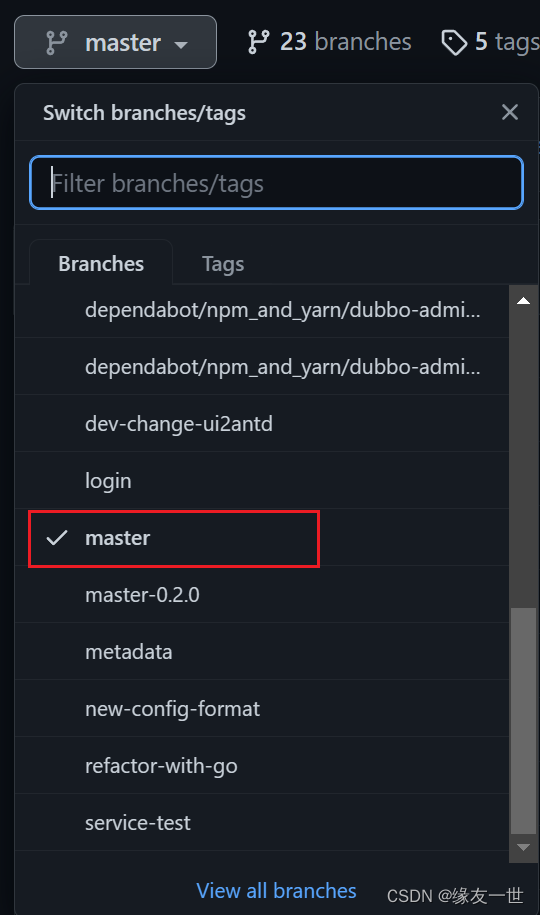
-
遇到问题:按照提示操作即可
- 同时注意将:压缩包的名字进行相应的修改
- 如该错误将需要的文件
node-v9.11.1-win-x64.zip下载下来,然后修改为node-9.11.1-win-x64.zip放到相应的目录下
[INFO] Downloading https://nodejs.org/dist/v9.11.1/node-v9.11.1-win-x64.zip to C:\environment\apache-maven-3.6.3\maven-repo\com\github\eirslett\node\9.11.1\node-9.11.1-win-x64.zip- 1
- 2
-
然后重新运行命令
mvn clean package -Dmaven.test.skip=true进行打包!

-
生成的jar包在
dubbo-admin-master\dubbo-admin-distribution\target目录下 -
执行jar包
java -jar dubbo-admin-0.5.0.jar

-
未开启Zookeeper,所以会出现错误
java.lang.IllegalStateException: java.lang.IllegalStateException: zookeeper not connected
at org.apache.dubbo.config.deploy.DefaultApplicationDeployer.prepareEnvironment(DefaultApplicationDeployer.java:678)
at org.apache.dubbo.config.deploy.DefaultApplicationDeployer.startConfigCenter(DefaultApplicationDeployer.java:261)
at org.apache.dubbo.config.deploy.DefaultApplicationDeployer.initialize(DefaultApplicationDeployer.java:185)
at org.apache.dubbo.config.deploy.DefaultModuleDeployer.prepare(DefaultModuleDeployer.java:470)
at org.apache.dubbo.config.spring.context.DubboConfigApplicationListener.initDubboConfigBeans
(DubboConfigApplicationListener.java:71)
- 1
- 2
- 3
- 4
- 5
- 6
- 7
- 经过连接Zookeeper,发现Dubbo-admin一直出现连接后8080端口占用,立即断开连接的问题
- 所以最终降低了dubbo的版本,操作如下
- 如果有大佬,能够解决此问题!希望能够不吝解惑!!
4.2 dubbo-admin-master-0.2.0【建议食用】
- 进入dubbo-adming-github选择使用
master-0.2.0版本
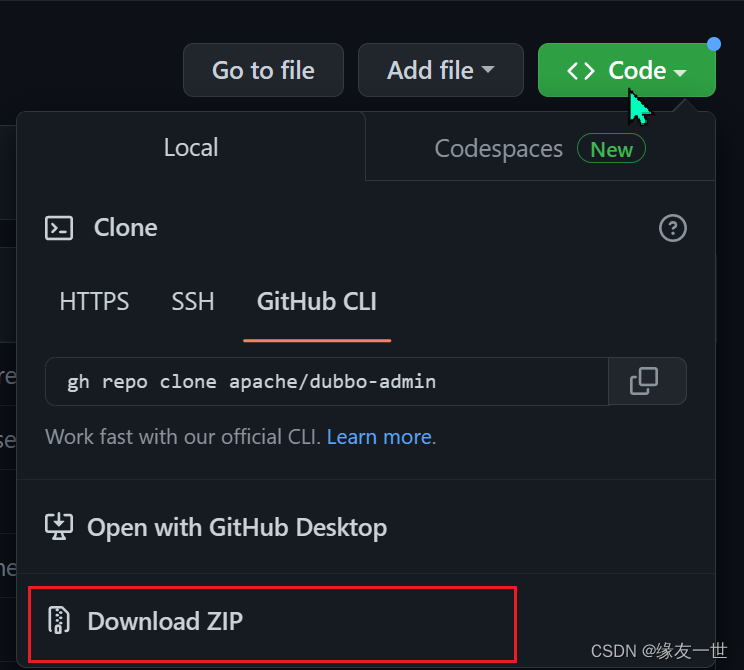
- 解压后,
dubbo-admin\src\main\resources \application.properties中可指定zookeeper地址server.port=7001 spring.velocity.cache=false spring.velocity.charset=UTF-8 spring.velocity.layout-url=/templates/default.vm spring.messages.fallback-to-system-locale=false spring.messages.basename=i18n/message spring.root.password=root spring.guest.password=guest dubbo.registry.address=zookeeper://127.0.0.1:2181- 1
- 2
- 3
- 4
- 5
- 6
- 7
- 8
- 9
- 在
dubbo-admin目录下,使用管理员身份运行命令mvn clean package -Dmaven.test.skip=true进行打包

- 在
dubbo-admin-master-0.2.0\dubbo-admin\target目录下,可以看到生成的jar包
- 在
4.3 测试
- 首先运行Zookeeper【双击zhService.cmd】
- 然后,打开终端进入
dubbo-admin-master-0.2.0\dubbo-admin\target目录下,执行命令java -jar dubbo-admin-0.0.1-SNAPSHOT.jar - 最后,访问
http://localhost:7001/
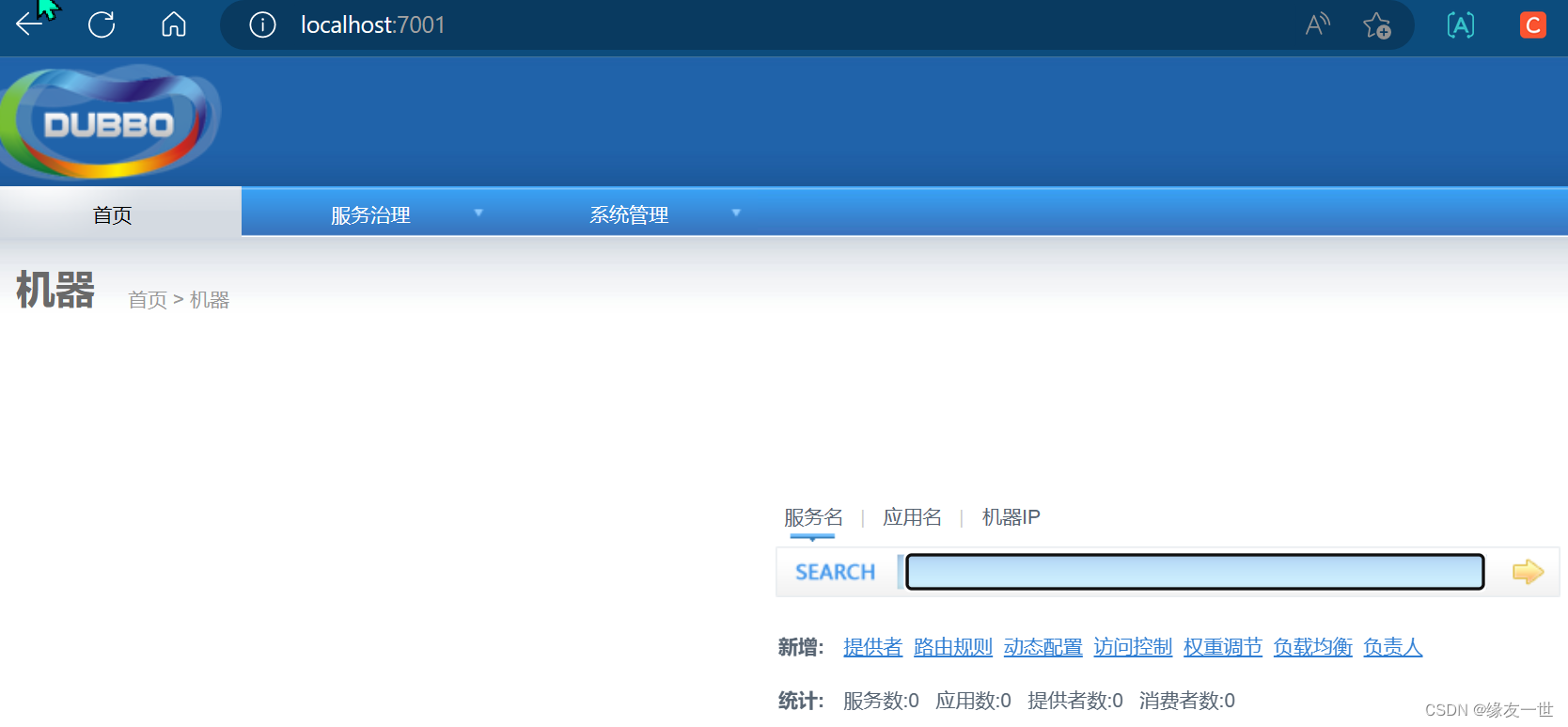
本文内容由网友自发贡献,转载请注明出处:【wpsshop博客】
推荐阅读


相关标签

