
热门标签
热门文章
- 1Ubuntu系统d435i相机驱动与realsense-ros安装_相机驱动之前需要安装ros,安装过程见我之前
- 2【TCP】四次挥手(终止连接)
- 3Ubuntu18.04及以上开机自启动脚本设置方法_ubuntu 1804 kaijiziqid daisudo
- 4YOLOv8实战——安装篇_yolov8安装
- 5Chapter 8 - 2. Congestion Management in TCP Storage Networks
- 6为什么不建议对Intel Realsense的D400 Series和T265进行标定(Calibration)_t265 dynamic calibration
- 7前端学习之——react篇(渲染列表)
- 8学IT毕业后该去哪个城市?哪个岗位薪资高?哪些公司待遇好?_上海 武汉哪个地方更适合计算机行业
- 9iOS 如何将证书和描述文件给其他人进行真机调试(Provisioning profile "描述文件的名字" doesn't include the currently selected devic...
- 10第十届蓝桥杯C++B组题解_第十届蓝桥杯国赛真题c++ b组
当前位置: article > 正文
Dubbo+SpringBoot+ZooKeeper入门操作demo实例_zookeeper springboot demo
作者:code123 | 2024-02-01 14:11:26
赞
踩
zookeeper springboot demo
项目使用zookeeper作为注册中心通过springboot整合dubbo,完成远程调用,做到对dubbo作用的入门,对它的作用和配置大概的了解
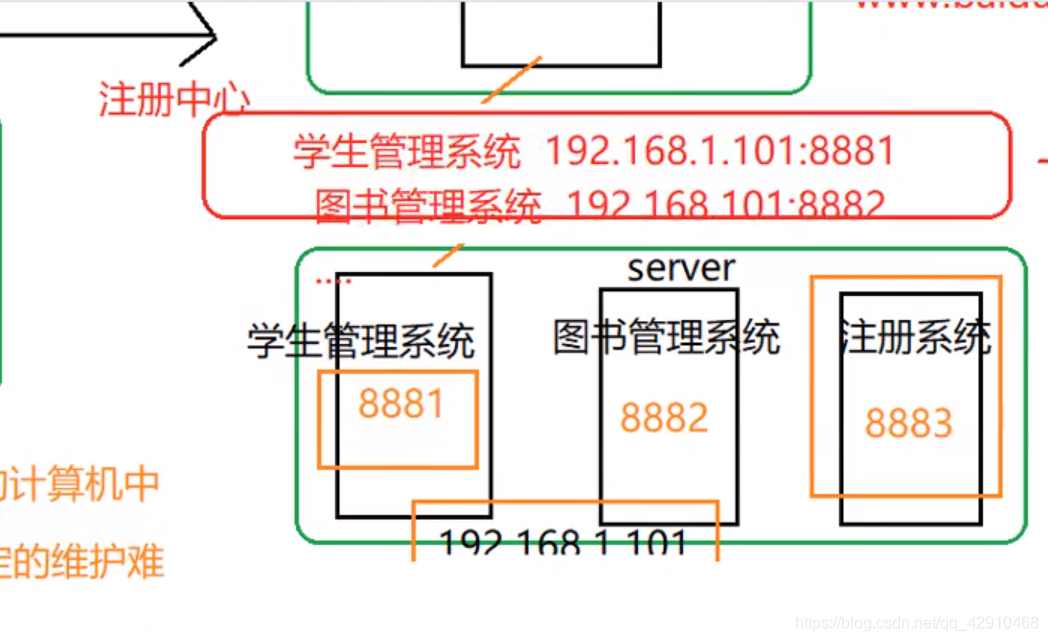
dubbo的演变和作用:最开始的是将项目中所有代码写在一个类中,定位各模块代码时十分麻烦,所以演变为后来的MVC模式,将视图层、业务层、数据库访问层分开,定位清晰。但是这种架构无法解决高并发项目的需求,因为项目都安装在一台计算机上,当访问量大时一台电脑无法满足需求,所以有了rpc远程调用。将前端界面和服务器安装在多台计算机上,服务器计算机有多个端口和多个服务(例如8881学生管理服务,8882图书服务,8883注册服务),这种模式提高了计算机的抗压能力。但当服务器上的端口改变时前端服务调用的地方也需要修改不利于维护,特别是业务复杂时。故有了后面的SOA即面向服务的架构,dubbo就是完美的实践者。实际就是在服务调用和服务提供中间增加一个注册中心,发布服务只需向注册中心注册即可,注册中心记住端口号和对应服务的关系
Provider(服务端):
项目包和文件图:
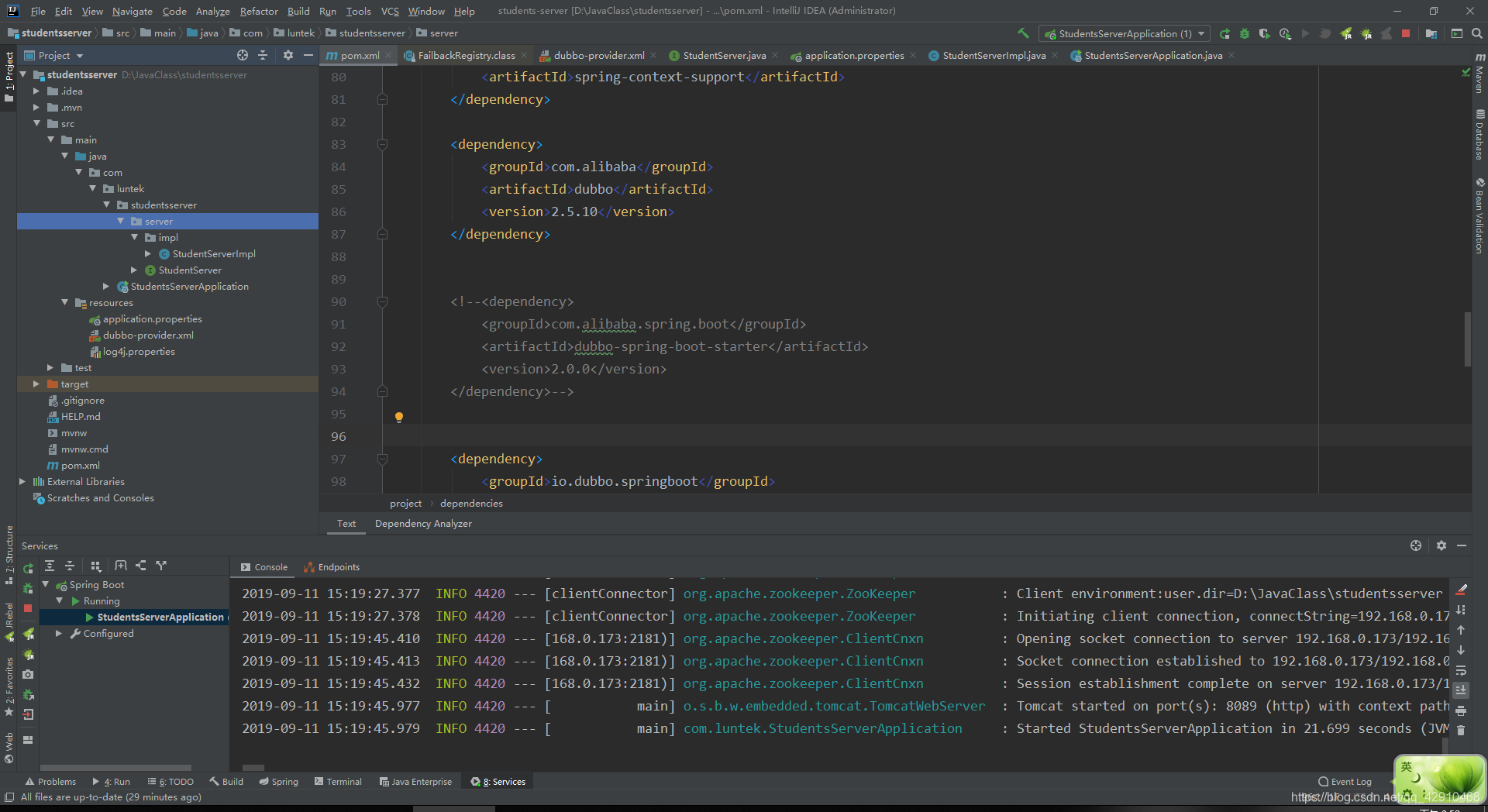
需要注意的点:
- dubbo-provider.xml文件的配置。其中beans的属性中xmlns需要 和我的一样,网上分享了很多版本的配置,很容易报错,注意配置信息的地址问题
<?xml version="1.0" encoding="UTF-8"?>
<beans xmlns="http://www.springframework.org/schema/beans"
       xmlns:xsi="http://www.w3.org/2001/XMLSchema-instance"
       xmlns:dubbo="http://code.alibabatech.com/schema/dubbo"
       xmlns:context="http://www.springframework.org/schema/context"
       xsi:schemaLocation="http://www.springframework.org/schema/beans http://www.springframework.org/schema/beans/spring-beans.xsd http://code.alibabatech.com/schema/dubbo
http://code.alibabatech.com/schema/dubbo/dubbo.xsd http://www.springframework.org/schema/context http://www.springframework.org/schema/context/spring-context.xsd">

    <!-- 服务提供者xml配置文件 -->

    <!-- 应用配置,不要与提供方相同,配置dubbo的应用名称 -->
    <dubbo:application name="students-server" version="2.0"/>

    <!-- 注册中心配置,使用zookeeper注册中心暴露服务地址 -->
    <dubbo:registry protocol="zookeeper" address="zookeeper://192.168.0.173:2181" timeout="60000"/>

    <!--关闭服务消费方所有服务的启动检查。dubbo缺省会在启动时检查依赖的服务是否可用,不可用时会抛出异常,阻止Spring初始化完成。-->
    <dubbo:consumer check="false"/>

    <!-- 使用注解方式暴露接口,会自动扫描package下所有包中dubbo相关的注解,这样就不用在xml中再针对每个服务接口配置dubbo:service interface-->
    <dubbo:annotation package="com.luntek.studentsserver.server.impl"/>

<!--    <dubbo:service interface="com.luntek.studentsserver.server.StudentServer" ref="studentServerImpl"/>-->

    <context:component-scan base-package="com.luntek.studentsserver.server.impl"></context:component-scan>
</beans>

- 1
- 2
- 3
- 4
- 5
- 6
- 7
- 8
- 9
- 10
- 11
- 12
- 13
- 14
- 15
- 16
- 17
- 18
- 19
- 20
- 21
- 22
- 23
- 24
- 25
- 26
- 对外提供的服务实现类需要使用dubbo提供的注解
package com.luntek.studentsserver.server.impl;

import com.alibaba.dubbo.config.annotation.Service;

import com.luntek.studentsserver.server.StudentServer;
@Service //阿里巴巴提供的service注解
public class StudentServerImpl implements StudentServer {
    //dubbo提供的具体服务
    @Override
    public String server(String name) {
        return "server:"+name;
    }
}
- 1
- 2
- 3
- 4
- 5
- 6
- 7
- 8
- 9
- 10
- 11
- 12
- 13
- 14
- pom依赖
<dependencies>

        <!--Web支持-->
        <dependency>
            <groupId>org.springframework.boot</groupId>
            <artifactId>spring-boot-starter-web</artifactId>
        </dependency>

        <dependency>
            <groupId>org.springframework.boot</groupId>
            <artifactId>spring-boot-starter</artifactId>
        </dependency>

        <dependency>
            <groupId>org.projectlombok</groupId>
            <artifactId>lombok</artifactId>
            <optional>true</optional>
        </dependency>
        <dependency>
            <groupId>org.springframework.boot</groupId>
            <artifactId>spring-boot-starter-test</artifactId>
            <scope>test</scope>
        </dependency>

        <dependency>
            <groupId>org.springframework</groupId>
            <artifactId>spring-beans</artifactId>
            <version>${spring.version}</version>
        </dependency>

        <dependency>
            <groupId>org.springframework</groupId>
            <artifactId>spring-context</artifactId>
            <version>${spring.version}</version>
        </dependency>

        <dependency>
            <groupId>org.springframework</groupId>
            <artifactId>spring-webmvc</artifactId>
        </dependency>

        <dependency>
            <groupId>org.springframework</groupId>
            <artifactId>spring-aspects</artifactId>
        </dependency>

        <dependency>
            <groupId>org.springframework</groupId>
            <artifactId>spring-jms</artifactId>
        </dependency>

        <dependency>
            <groupId>commons-logging</groupId>
            <artifactId>commons-logging</artifactId>
            <version>1.1.1</version>
        </dependency>

        <dependency>
            <groupId>org.springframework</groupId>
            <artifactId>spring-context-support</artifactId>
        </dependency>

        <dependency>
            <groupId>com.alibaba</groupId>
            <artifactId>dubbo</artifactId>
            <version>2.5.10</version>
        </dependency>


        <!--<dependency>
            <groupId>com.alibaba.spring.boot</groupId>
            <artifactId>dubbo-spring-boot-starter</artifactId>
            <version>2.0.0</version>
        </dependency>-->


        <dependency>
            <groupId>io.dubbo.springboot</groupId>
            <artifactId>spring-boot-starter-dubbo</artifactId>
            <version>1.0.0</version>
        </dependency>


        <dependency>
            <groupId>org.apache.zookeeper</groupId>
            <artifactId>zookeeper</artifactId>
            <version>3.4.14</version>
        </dependency>

        <dependency>
            <groupId>com.github.sgroschupf</groupId>
            <artifactId>zkclient</artifactId>
            <version>0.1</version>
        </dependency>

        <dependency>
            <groupId>org.javassist</groupId>
            <artifactId>javassist</artifactId>
            <version>3.21.0-GA</version>
        </dependency>


    </dependencies>
- 1
- 2
- 3
- 4
- 5
- 6
- 7
- 8
- 9
- 10
- 11
- 12
- 13
- 14
- 15
- 16
- 17
- 18
- 19
- 20
- 21
- 22
- 23
- 24
- 25
- 26
- 27
- 28
- 29
- 30
- 31
- 32
- 33
- 34
- 35
- 36
- 37
- 38
- 39
- 40
- 41
- 42
- 43
- 44
- 45
- 46
- 47
- 48
- 49
- 50
- 51
- 52
- 53
- 54
- 55
- 56
- 57
- 58
- 59
- 60
- 61
- 62
- 63
- 64
- 65
- 66
- 67
- 68
- 69
- 70
- 71
- 72
- 73
- 74
- 75
- 76
- 77
- 78
- 79
- 80
- 81
- 82
- 83
- 84
- 85
- 86
- 87
- 88
- 89
- 90
- 91
- 92
- 93
- 94
- 95
- 96
- 97
- 98
- 99
- 100
- 101
- 102
- 103
- 104
- 启动类
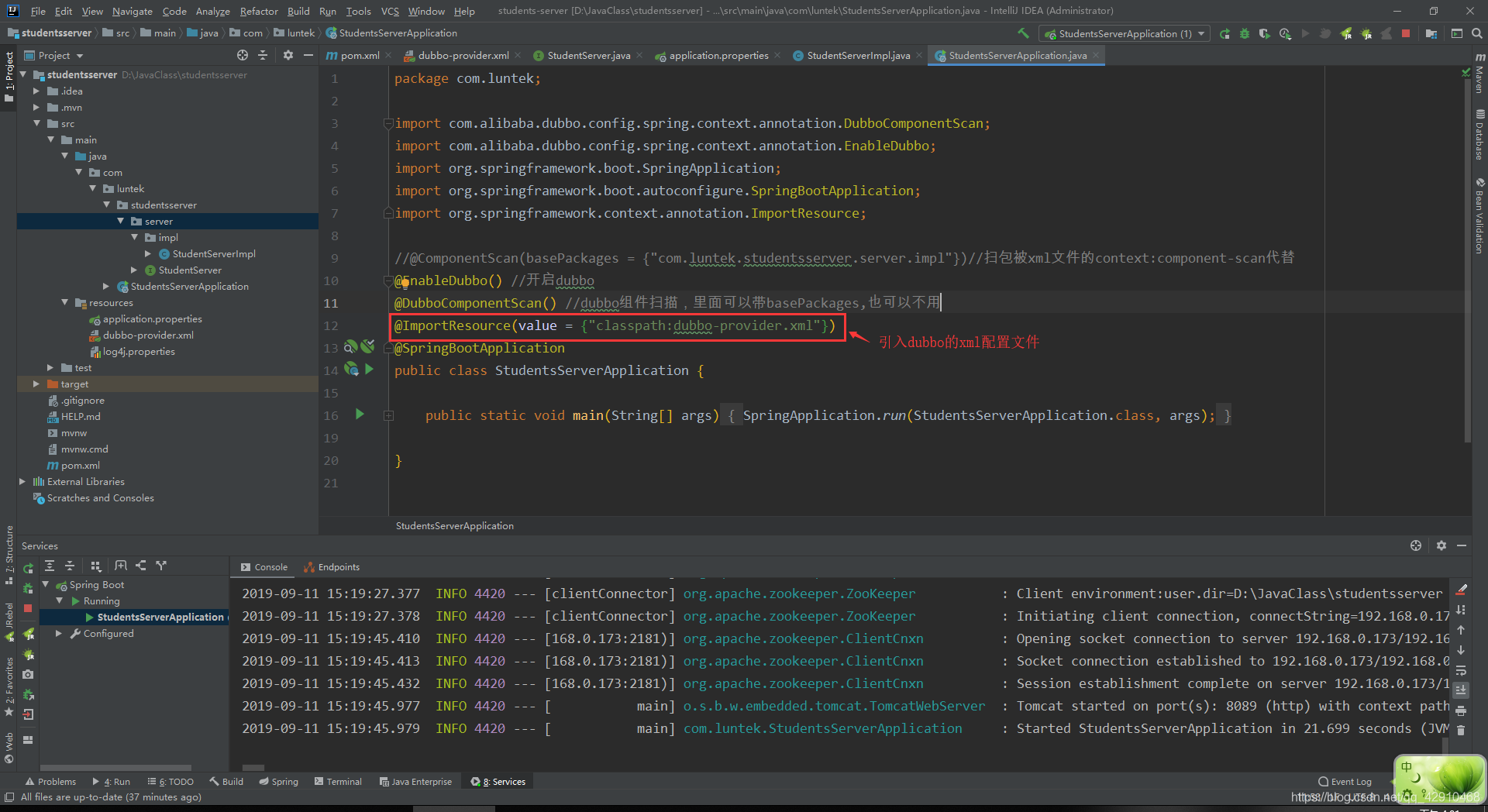
- log4j.properties文件内容,provider和consumer通用
# Configure logging for testing: optionally with log file
log4j.rootLogger=WARN, stdout
# log4j.rootLogger=WARN, stdout, logfile

log4j.appender.stdout=org.apache.log4j.ConsoleAppender
log4j.appender.stdout.layout=org.apache.log4j.PatternLayout
log4j.appender.stdout.layout.ConversionPattern=%d %p [%c] - %m%n

log4j.appender.logfile=org.apache.log4j.FileAppender
log4j.appender.logfile.File=target/spring.log
log4j.appender.logfile.layout=org.apache.log4j.PatternLayout
log4j.appender.logfile.layout.ConversionPattern=%d %p [%c] - %m%n
- 1
- 2
- 3
- 4
- 5
- 6
- 7
- 8
- 9
- 10
- 11
- 12
consumer(消费端)
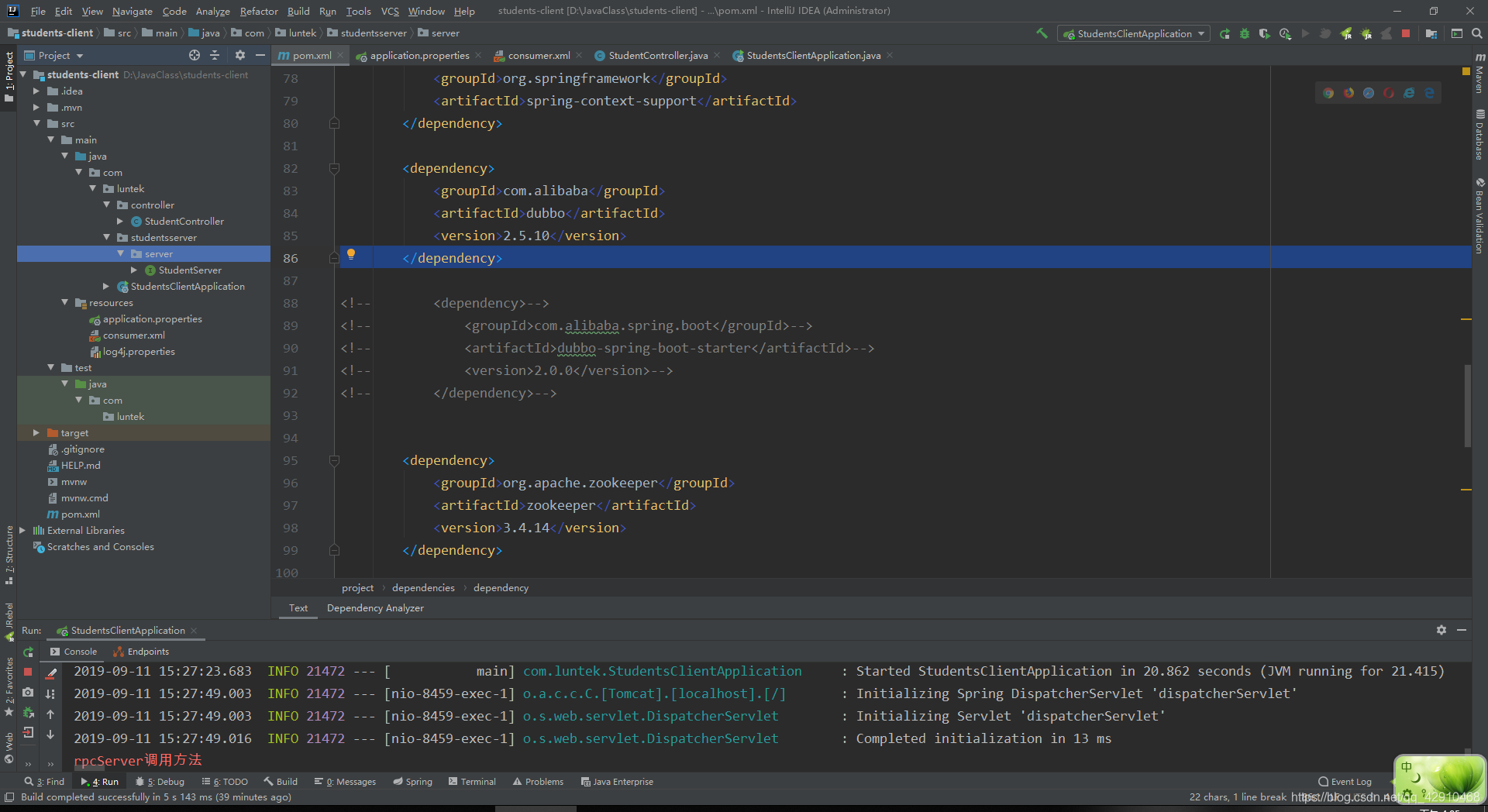
项目目录结构截图:
- pom文件依赖
<dependencies>
        <dependency>
            <groupId>org.springframework.boot</groupId>
            <artifactId>spring-boot-starter</artifactId>
        </dependency>

        <dependency>
            <groupId>org.projectlombok</groupId>
            <artifactId>lombok</artifactId>
            <optional>true</optional>
        </dependency>
        <dependency>
            <groupId>org.springframework.boot</groupId>
            <artifactId>spring-boot-starter-test</artifactId>
            <scope>test</scope>
        </dependency>

        <dependency>
            <groupId>org.springframework</groupId>
            <artifactId>spring-beans</artifactId>
        </dependency>

        <dependency>
            <groupId>org.springframework</groupId>
            <artifactId>spring-context</artifactId>
            <version>${spring.version}</version>
        </dependency>

        <dependency>
            <groupId>org.springframework</groupId>
            <artifactId>spring-webmvc</artifactId>
            <version>${spring.version}</version>
        </dependency>

        <dependency>
            <groupId>org.springframework</groupId>
            <artifactId>spring-aspects</artifactId>
        </dependency>

        <dependency>
            <groupId>org.springframework</groupId>
            <artifactId>spring-jms</artifactId>
        </dependency>

        <!--Web支持-->
        <dependency>
            <groupId>org.springframework.boot</groupId>
            <artifactId>spring-boot-starter-web</artifactId>
        </dependency>

        <dependency>
            <groupId>commons-logging</groupId>
            <artifactId>commons-logging</artifactId>
            <version>1.1.1</version>
        </dependency>

        <dependency>
            <groupId>org.springframework</groupId>
            <artifactId>spring-context-support</artifactId>
        </dependency>

        <dependency>
            <groupId>com.alibaba</groupId>
            <artifactId>dubbo</artifactId>
            <version>2.5.10</version>
        </dependency>

<!--        <dependency>-->
<!--            <groupId>com.alibaba.spring.boot</groupId>-->
<!--            <artifactId>dubbo-spring-boot-starter</artifactId>-->
<!--            <version>2.0.0</version>-->
<!--        </dependency>-->


        <dependency>
            <groupId>org.apache.zookeeper</groupId>
            <artifactId>zookeeper</artifactId>
            <version>3.4.14</version>
        </dependency>

        <dependency>
            <groupId>com.github.sgroschupf</groupId>
            <artifactId>zkclient</artifactId>
            <version>0.1</version>
        </dependency>

        <dependency>
            <groupId>org.javassist</groupId>
            <artifactId>javassist</artifactId>
            <version>3.21.0-GA</version>
        </dependency>
        <dependency>
            <groupId>org.springframework.boot</groupId>
            <artifactId>spring-boot-starter-web</artifactId>
            <version>2.1.8.RELEASE</version>
            <scope>compile</scope>
        </dependency>
    </dependencies>
- 1
- 2
- 3
- 4
- 5
- 6
- 7
- 8
- 9
- 10
- 11
- 12
- 13
- 14
- 15
- 16
- 17
- 18
- 19
- 20
- 21
- 22
- 23
- 24
- 25
- 26
- 27
- 28
- 29
- 30
- 31
- 32
- 33
- 34
- 35
- 36
- 37
- 38
- 39
- 40
- 41
- 42
- 43
- 44
- 45
- 46
- 47
- 48
- 49
- 50
- 51
- 52
- 53
- 54
- 55
- 56
- 57
- 58
- 59
- 60
- 61
- 62
- 63
- 64
- 65
- 66
- 67
- 68
- 69
- 70
- 71
- 72
- 73
- 74
- 75
- 76
- 77
- 78
- 79
- 80
- 81
- 82
- 83
- 84
- 85
- 86
- 87
- 88
- 89
- 90
- 91
- 92
- 93
- 94
- 95
- 96
- 97
- 98
- 99
- consumer.xml文件
<?xml version="1.0" encoding="UTF-8"?>
<beans xmlns="http://www.springframework.org/schema/beans"
       xmlns:xsi="http://www.w3.org/2001/XMLSchema-instance"
       xmlns:dubbo="http://code.alibabatech.com/schema/dubbo"
       xsi:schemaLocation="http://www.springframework.org/schema/beans
                           http://www.springframework.org/schema/beans/spring-beans.xsd
                           http://code.alibabatech.com/schema/dubbo http://code.alibabatech.com/schema/dubbo/dubbo.xsd">
<!--http://code.alibabatech.com/schema/dubbo http://code.alibabatech.com/schema/dubbo/dubbo.xsd-->
    <!-- 应用配置,不要与提供方相同,配置dubbo的应用名称 -->
    <dubbo:application name="students-consumer" version="2.0"/>

    <!-- 注册中心配置,使用zookeeper注册中心暴露服务地址 -->
    <dubbo:registry address="zookeeper://192.168.0.173:2181" timeout="60000"/>

    <!--关闭服务消费方所有服务的启动检查。dubbo缺省会在启动时检查依赖的服务是否可用,不可用时会抛出异常,阻止Spring初始化完成。-->
    <dubbo:consumer check="false"/>

    <!-- 使用注解方式暴露接口,会自动扫描package下所有包中dubbo相关的注解,这样就不用在xml中再针对每个服务接口配置dubbo:service interface-->
    <dubbo:annotation package="com.luntek.controller"/>


<!--    <dubbo:reference id="studentServerImpl" check="false" interface="com.luntek.server.StudentServer" />-->

</beans>
- 1
- 2
- 3
- 4
- 5
- 6
- 7
- 8
- 9
- 10
- 11
- 12
- 13
- 14
- 15
- 16
- 17
- 18
- 19
- 20
- 21
- 22
- 23
- 24
- StudentController内容,该类主要是通过声明当前项目的StudentServer接口,配合@Reference注解将服务端的服务自动转配到当前的接口中
package com.luntek.controller;

import com.alibaba.dubbo.config.annotation.Reference;
import com.luntek.studentsserver.server.StudentServer;
import org.springframework.stereotype.Controller;
import org.springframework.web.bind.annotation.RequestMapping;
import org.springframework.web.bind.annotation.ResponseBody;

/**
 * 客户端的web层,目的是远程调用服务端的StudentServer的server方法
 */
@Controller
@RequestMapping("controller")
public class StudentController {
    @Reference //将远程的studentServer注入到该属性
    private StudentServer server;
    //请求服务端代码
    @ResponseBody
    @RequestMapping("/hello")
    public String rpcServer(){
        System.err.println("rpcServer调用方法");
        return server.server("czw");
    }
}
- 1
- 2
- 3
- 4
- 5
- 6
- 7
- 8
- 9
- 10
- 11
- 12
- 13
- 14
- 15
- 16
- 17
- 18
- 19
- 20
- 21
- 22
- 23
- 24
- 25
- 启动类代码,主要是注意一些注解的使用和扫包
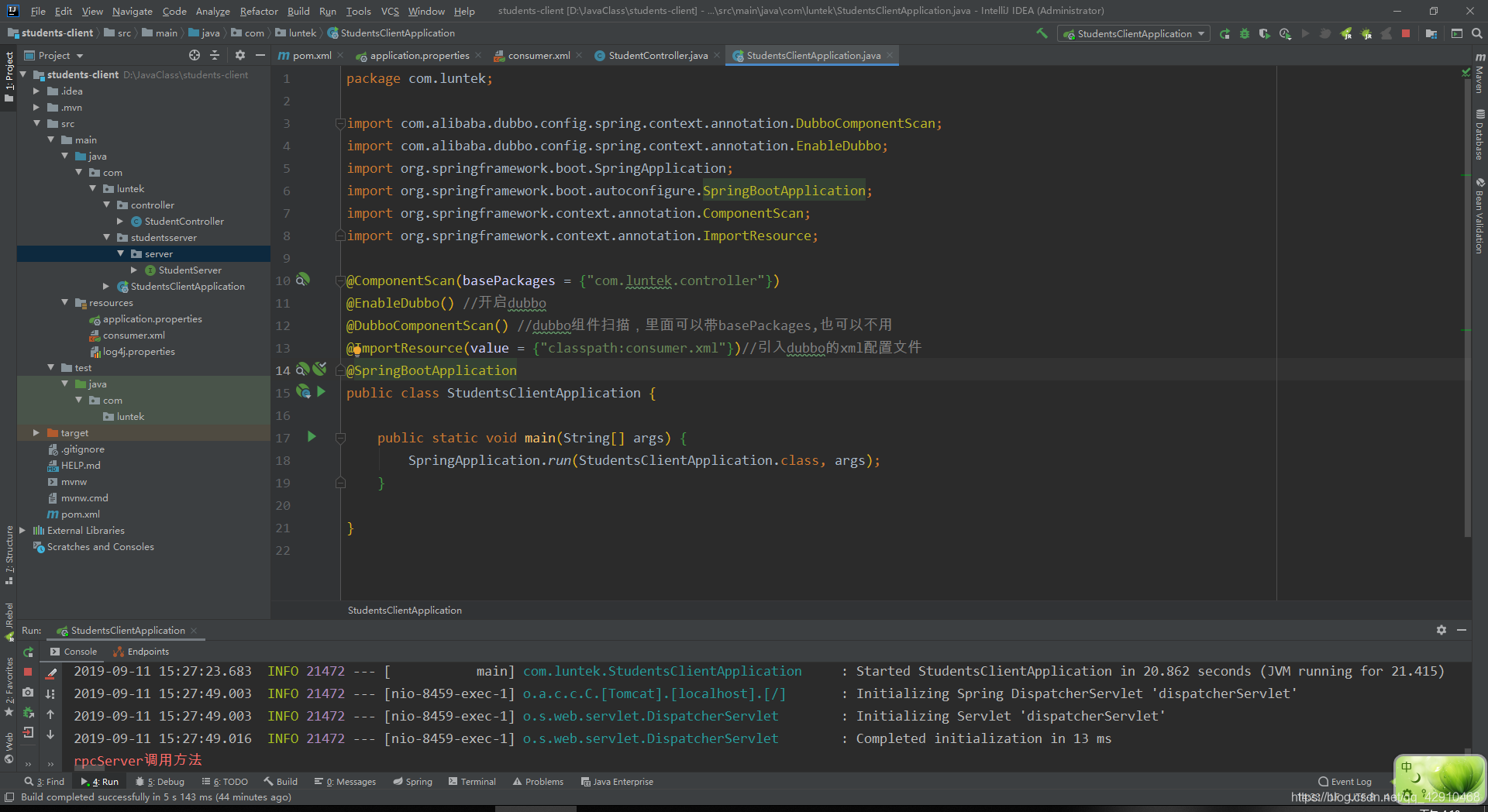
将服务端和客户端配置完成之后先将项目studentsserver启动,再启动student-client项目,无异常的话就没问题
注:消费端声明的接口必须和服务端的接口的全限定名相同否则会有RpcException: No provider available from registry异常
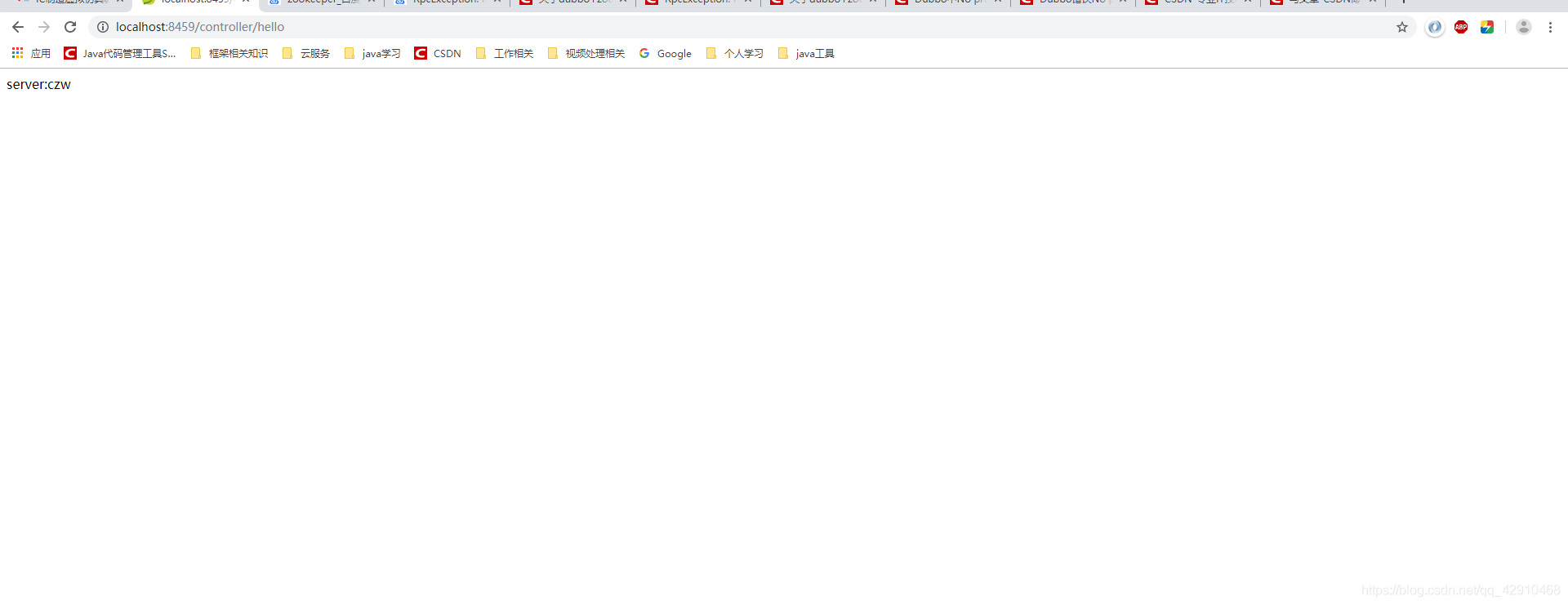
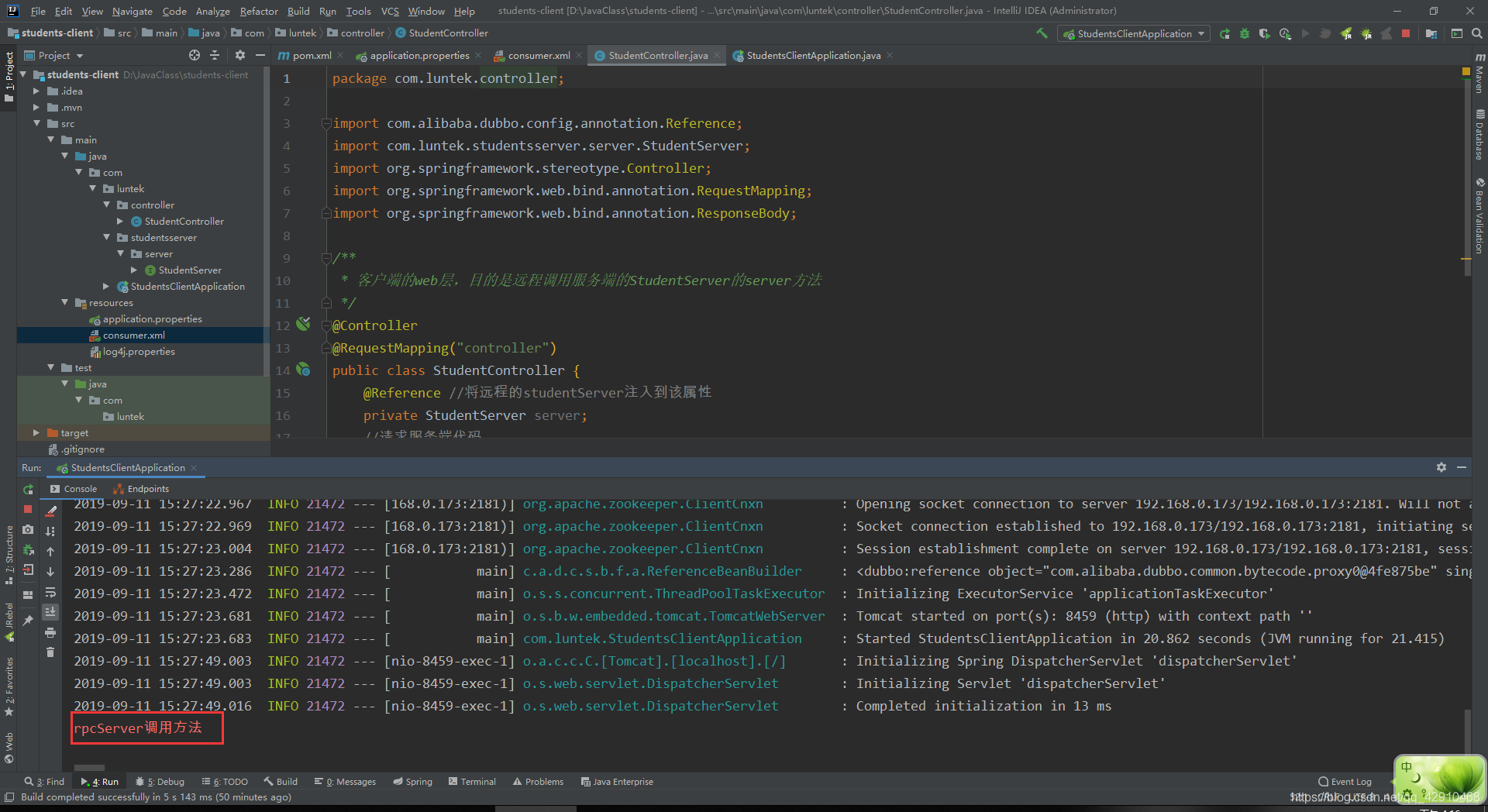
项目启动完成后访问controller中的接口 http://localhost:8459/controller/hello 成功获取调取,消费端打印信息
声明:本文内容由网友自发贡献,不代表【wpsshop博客】立场,版权归原作者所有,本站不承担相应法律责任。如您发现有侵权的内容,请联系我们。转载请注明出处:https://www.wpsshop.cn/article/detail/53980
推荐阅读


相关标签

