
- 1分布式爬虫scrapy-redis所踩过的坑_scrapy_redis的坑
- 2Flask项目实战01_flask项目实例
- 3K8s学习(8)---Pod详解(Pod生命周期)_k8s pod invalid
- 4云计算时代操作系统K8s 之pod 生命周期综述_k8s pod的生命周期
- 5Java8 时间字符串校验是否为对应的日期格式_java判断日期字符串格式
- 6【Docker Desktop】Windows11家庭版安装docker desktop和WSl2(Ubuntu22.04)并完成迁移,配置国内镜像_docker win11配置和使用
- 7Android P 屏保和休眠相关知识
- 8啥是Python之禅
- 9网络游戏防沉迷实名认证系统常见错误_sys req partner auth error
- 1032单片机实现呼吸灯_32呼吸灯
SpringBoot+SpringSecurity+Vue实现动态权限(三)_springsecurity vue 动态权限管
赞
踩
前言
在上一篇完成了Security登录认证和授权过滤器的编写,后端的登录等功能已经实现。这一篇整合前端Vue实现动态菜单功能。前端Vue项目使用脚手架vue-admin-template
搭建前端
# 克隆项目
git clone https://github.com/PanJiaChen/vue-admin-template.git

# 进入项目目录
cd vue-admin-template

# 安装依赖
npm install

# 建议不要直接使用 cnpm 安装以来,会有各种诡异的 bug。可以通过如下操作解决 npm 下载速度慢的问题
npm install --registry=https://registry.npm.taobao.org

# 启动服务
npm run dev
- 1
- 2
- 3
- 4
- 5
- 6
- 7
- 8
- 9
- 10
- 11
- 12
- 13
- 14
安装完成后在router.js文件中删除脚手架原来的路由信息,只留下一些基本的路由。
export const constantRoutes = [
  {
    path: '/login',
    component: () => import('@/views/login/index'),
    hidden: true
  },

  {
    path: '/404',
    component: () => import('@/views/404'),
    hidden: true
  },

  {
    path: '/',
    component: Layout,
    redirect: '/dashboard',
    children: [{
      path: 'dashboard',
      name: 'Dashboard',
      component: () => import('@/views/dashboard/index'),
      meta: { title: '主页', icon: 'dashboard' }
    }]
  },
  // 404 page must be placed at the end !!!
  { path: '*', redirect: '/404', hidden: true }
]

- 1
- 2
- 3
- 4
- 5
- 6
- 7
- 8
- 9
- 10
- 11
- 12
- 13
- 14
- 15
- 16
- 17
- 18
- 19
- 20
- 21
- 22
- 23
- 24
- 25
- 26
- 27
修改登录逻辑
我们需要将原来的登录逻辑和登录接口url的地址修改。首先是在vue.config.js文件中加上代理,使前端项目能够访问到我们的后端接口。
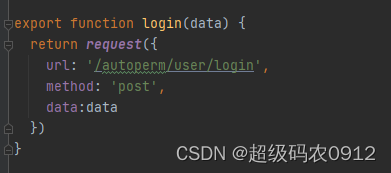
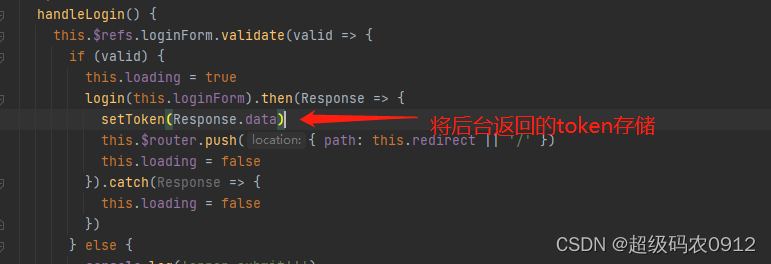
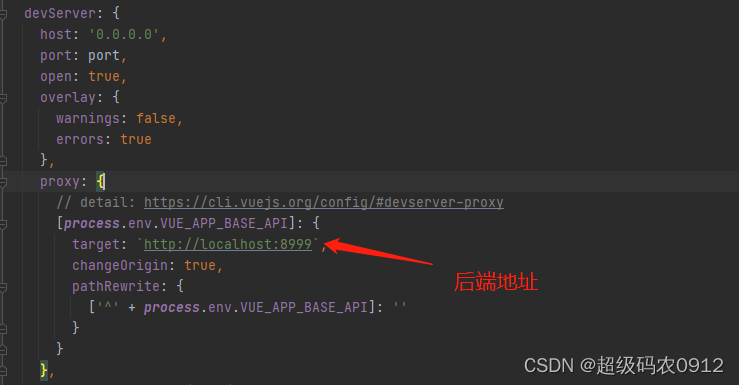 接着找到api/user.js文件中的loginf方法将路径改为我们后台的登录接口,比如我在Security中设置的路径就是**/autoperm/user/login**,请求登录接口后,登录校验成功后台会返回一个token,我们要在邓秋完成后将返回的token存储起来,并且在之后的每次请求都携带。
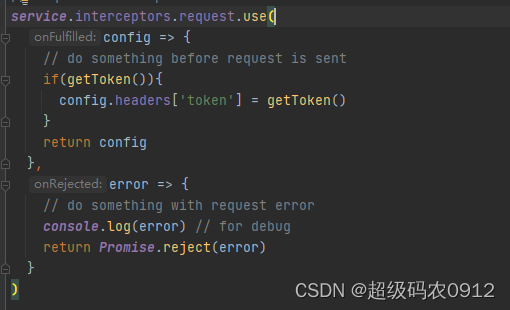
在request.js文件中修改请求拦截器,每次请求前都在请求头中带上token。
测试登录功能
输入错误密码
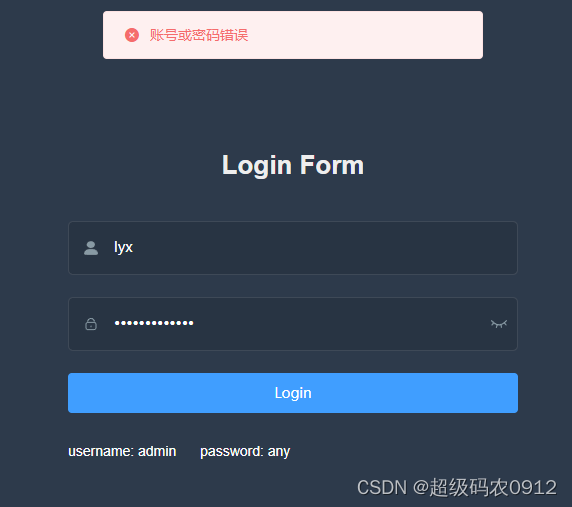
输入正确密码成功进入主页
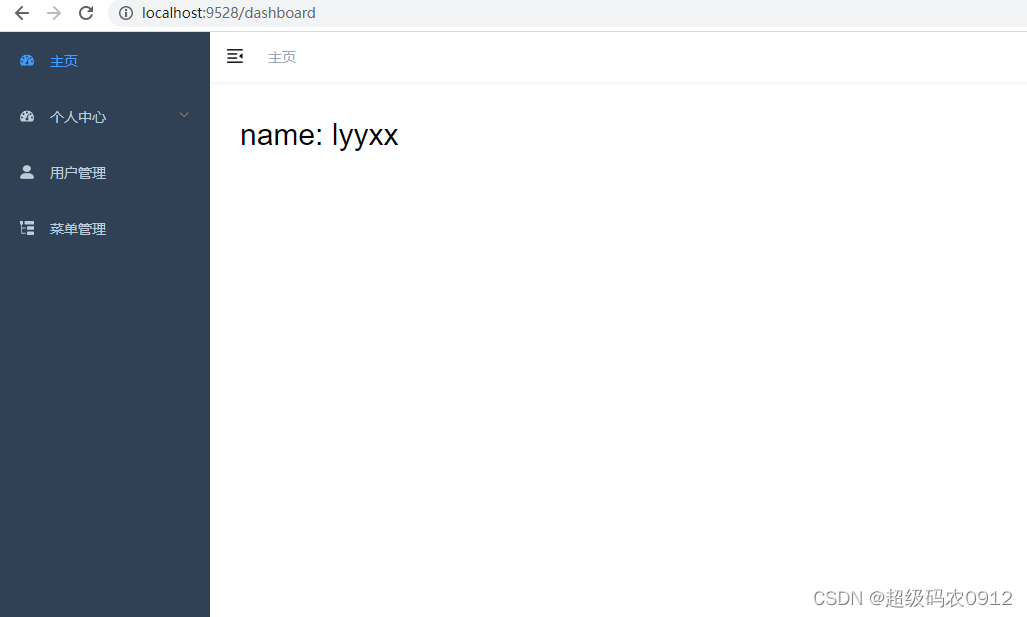
构建菜单列表
后端在请求头中拿到token后获取id,再根据用户id获取菜单列表,把所有菜单查询出来并且筛选出父子菜单以及排序后,构建成前端需要的菜单树。
    /**
     * 构建权限菜单树
     * @param req
     * @return com.lyx.autoperm.utils.R
     * @author 黎勇炫
     * @create 2022/6/21
     * @email 1677685900@qq.com
     */
    @GetMapping("/createRouter")
    public R getRouter(HttpServletRequest req){
        // 获取用户id
        String id = JwtUtils.getMemberIdByJwtToken(req);
        if(StringUtils.isEmpty(id)){
            throw new UserException(UserCodeEnum.TOKEN_NOT_FOUND);
        }
        // 根据角色查询所有的菜单
        List<Permission> permissions = permissionService.queryPermissionsByRoles(id);
        // 构建菜单树
        List<MenuVO> menus = permissionService.buildMenus(permissions);

        return R.ok().setData(menus);
    }
- 1
- 2
- 3
- 4
- 5
- 6
- 7
- 8
- 9
- 10
- 11
- 12
- 13
- 14
- 15
- 16
- 17
- 18
- 19
- 20
- 21
- 22
查询权限列表
    <select id="queryPermissionsDetail" resultType="com.lyx.autoperm.entity.Permission">
        select DISTINCT p.* from L_PERMISSION p,L_ROLE_PERMISSION rp where rp.permission_id = p.id and rp.role_id
            in
        (select r.id from L_USER_ROLE ur,L_ROLE r
            <where>
                ur.role_id = r.id
                <if test="id != null and id !=''">and ur.user_id = #{id}</if>
            </where>)
    </select>
- 1
- 2
- 3
- 4
- 5
- 6
- 7
- 8
- 9
业务层使用java8的stream流快速处理权限集合,只用十几行代码就能筛选出子菜单列表并排序。
    /**
     * 根据用户查询所有的权限菜单详情
     * @param id
     * @return java.util.Set<com.lyx.autoperm.entity.Permission>
     * @author 黎勇炫
     * @create 2022/6/13
     * @email 1677685900@qq.com
     */
    @Override
    public List<Permission> queryPermissionsByRoles(String id) {
        // 查询权限列表
        List<Permission> permissions = permissionMapper.queryPermissionsDetail(id);
        // 遍历权限列表,筛选出一级权限
        List<Permission> perm = permissions.stream().filter(item -> {
            return item.getParentId() == 0;
        }).map(l1 -> {
            l1.setChildren(findChildren(permissions, l1));
            return l1;
        }).sorted((Comparator.comparingInt(o -> (o.getSort() == null ? 0 : o.getSort())))).collect(Collectors.toList());

        return perm;
    }

    /**
     *
     * @param permissions 权限列表
     * @param l1 父权限
     * @return java.util.List<com.lyx.autoperm.entity.Permission>
     * @author 黎勇炫
     * @create 2022/6/25
     * @email 1677685900@qq.com
     */
    private List<Permission> findChildren(List<Permission> permissions, Permission l1) {

        List<Permission> children = permissions.stream().filter(perm -> {
            return perm.getParentId().toString().equals(l1.getId().toString());
        }).sorted((Comparator.comparingInt(o -> (o.getSort() == null ? 0 : o.getSort())))).collect(Collectors.toList());

        return children;
    }
- 1
- 2
- 3
- 4
- 5
- 6
- 7
- 8
- 9
- 10
- 11
- 12
- 13
- 14
- 15
- 16
- 17
- 18
- 19
- 20
- 21
- 22
- 23
- 24
- 25
- 26
- 27
- 28
- 29
- 30
- 31
- 32
- 33
- 34
- 35
- 36
- 37
- 38
- 39
- 40
构建菜单树
拿到正确的菜单列表后,将菜单列表构建成前端需要的菜单树的结构。
    /**
     * 构建前端菜单树
     *
     * @param permissions
     * @return java.util.List<com.lyx.autoperm.entity.vo.MenuVO>
     * @author 黎勇炫
     * @create 2022/6/20
     * @email 1677685900@qq.com
     */
    @Override
    public List<MenuVO> buildMenus(List<Permission> permissions) {
        List<MenuVO> menus = new LinkedList<MenuVO>();
        // 遍历权限列表,构建菜单
        for (Permission item : permissions) {
            MenuVO menu = new MenuVO();
            menu.setHidden(false);
            menu.setPath(item.getPath());
            menu.setComponent(buildComponent(item));item.getType().toString().equals(MenuType.MENU.getCode().toString());
            menu.setMeta(new MetaVO(item.getPermName(), item.getIcon()));
            List<Permission> cMenus = item.getChildren();
            // 如果有子菜单
            if (!CollectionUtils.isEmpty(cMenus) && cMenus.size() > 0 )
            {
                menu.setAlwaysShow(true);
                menu.setRedirect("noRedirect");
                // 递归调用构建子菜单
                menu.setChildren(buildMenus(cMenus));
            }
            else if (item.getParentId().equals(0))
            {
                menu.setMeta(null);
                List<MenuVO> childrenList = new ArrayList<MenuVO>();
                MenuVO children = new MenuVO();
                children.setPath(menu.getPath());
                children.setComponent(menu.getComponent());
                menu.setComponent(ComponentConstant.LAYOUT);
                children.setName(StringUtils.capitalize(menu.getPath()));
                children.setMeta(new MetaVO(item.getPermName(), item.getIcon()));
                childrenList.add(children);
                menu.setChildren(childrenList);
            }
            menus.add(menu);
        }

        return menus;
    }
- 1
- 2
- 3
- 4
- 5
- 6
- 7
- 8
- 9
- 10
- 11
- 12
- 13
- 14
- 15
- 16
- 17
- 18
- 19
- 20
- 21
- 22
- 23
- 24
- 25
- 26
- 27
- 28
- 29
- 30
- 31
- 32
- 33
- 34
- 35
- 36
- 37
- 38
- 39
- 40
- 41
- 42
- 43
- 44
- 45
- 46
前端设置路由
在permission.js的router.beforeEach中拿到菜单树后,调用router.addRoutes方法添加路由
router.beforeEach(async(to, from, next) => {

  // start progress bar
  NProgress.start()

  // set page title
  document.title = getPageTitle(to.meta.title)

  // determine whether the user has logged in
  const hasToken = getToken()

  if (hasToken) {
    if (to.path === '/login') {
      // if is logged in, redirect to the home page
      next({ path: '/' })
      NProgress.done()
    } else {
      const hasGetUserInfo = store.getters.name
      if (hasGetUserInfo) {
        next()
      } else {
        try {
          // get user info
          await store.dispatch('user/getInfo').then(()=>{
            // 发起请求,构建路由和菜单
            store.dispatch('permission/createRoutes').then(menus=>{
              router.addRoutes(menus) // 动态添加可访问路由表
              next({ ...to, replace: true }) // hack方法 确保addRoutes已完成
            })
          })
          next()
        } catch (error) {
          // remove token and go to login page to re-login
          await store.dispatch('user/resetToken')
          Message.error(error || 'Has Error')
          next(`/login?redirect=${to.path}`)
          NProgress.done()
        }
      }
    }
  } else {
    /* has no token*/
    if (whiteList.indexOf(to.path) !== -1) {
      // in the free login whitelist, go directly
      next()
    } else {
      // other pages that do not have permission to access are redirected to the login page.
      next(`/login?redirect=${to.path}`)
      NProgress.done()
    }
  }
})
- 1
- 2
- 3
- 4
- 5
- 6
- 7
- 8
- 9
- 10
- 11
- 12
- 13
- 14
- 15
- 16
- 17
- 18
- 19
- 20
- 21
- 22
- 23
- 24
- 25
- 26
- 27
- 28
- 29
- 30
- 31
- 32
- 33
- 34
- 35
- 36
- 37
- 38
- 39
- 40
- 41
- 42
- 43
- 44
- 45
- 46
- 47
- 48
- 49
- 50
- 51
- 52
src/store/modules/permission.js
import { constantRoutes } from '@/router'
import { getRouters } from '@/api/perm'
import Layout from '@/layout/index'

const state = {
    routes: [],
    addRoutes: [],
    defaultRoutes: [],
    topbarRouters: [],
    sidebarRouters: []
  }

const mutations = {
    SET_ROUTES: (state, routes) => {
      state.addRoutes = routes
      state.routes = constantRoutes.concat(routes)
    },
    SET_DEFAULT_ROUTES: (state, routes) => {
      state.defaultRoutes = constantRoutes.concat(routes)
    },
    SET_TOPBAR_ROUTES: (state, routes) => {
      // 顶部导航菜单默认添加统计报表栏指向首页
      const index = [{
        path: 'index',
        meta: { title: '统计报表', icon: 'dashboard'}
      }]
      state.topbarRouters = routes.concat(index);
    },
    SET_SIDEBAR_ROUTERS: (state, routes) => {
      state.sidebarRouters = routes
    },
  }

const actions= {
    // 生成路由
  createRoutes({ commit }) {
      return new Promise(resolve => {
        // 向后端请求路由数据
        getRouters().then(res => {
          console.log(res)
          const sdata = JSON.parse(JSON.stringify(res.data))
          const rdata = JSON.parse(JSON.stringify(res.data))
          const sidebarRoutes = filterAsyncRouter(sdata)
          const rewriteRoutes = filterAsyncRouter(rdata, false, true)
          rewriteRoutes.push({ path: '*', redirect: '/404', hidden: true })
          commit('SET_ROUTES', rewriteRoutes)
          commit('SET_SIDEBAR_ROUTERS', constantRoutes.concat(sidebarRoutes))
          commit('SET_DEFAULT_ROUTES', sidebarRoutes)
          commit('SET_TOPBAR_ROUTES', sidebarRoutes)
          resolve(rewriteRoutes)
        })
      })
    }
  }


// 遍历后台传来的路由字符串,转换为组件对象
function filterAsyncRouter(asyncRouterMap, lastRouter = false, type = false) {
  return asyncRouterMap.filter(route => {
    if (type && route.children) {
      route.children = filterChildren(route.children)
    }
    if (route.component) {
      // Layout ParentView 组件特殊处理
      if (route.component === 'Layout') {
        route.component = Layout
      } else if (route.component === 'ParentView') {
        route.component = ParentView
      } else if (route.component === 'InnerLink') {
        route.component = InnerLink
      } else {
        console.log(route.component)
        route.component = loadView(route.component)
      }
    }
    if (route.children != null && route.children && route.children.length) {
      route.children = filterAsyncRouter(route.children, route, type)
    } else {
      delete route['children']
      delete route['redirect']
    }
    return true
  })
}

function filterChildren(childrenMap, lastRouter = false) {
  var children = []
  childrenMap.forEach((el, index) => {
    if (el.children && el.children.length) {
      if (el.component === 'ParentView') {
        el.children.forEach(c => {
          c.path = el.path + '/' + c.path
          if (c.children && c.children.length) {
            children = children.concat(filterChildren(c.children, c))
            return
          }
          children.push(c)
        })
        return
      }
    }
    if (lastRouter) {
      el.path = lastRouter.path + '/' + el.path
    }
    children = children.concat(el)
  })
  return children
}

export const loadView = (view) => { // 路由懒加载
  return (resolve) => require([`@/views${view}`], resolve)
}

export default {
  namespaced: true,
  state,
  mutations,
  actions
}
- 1
- 2
- 3
- 4
- 5
- 6
- 7
- 8
- 9
- 10
- 11
- 12
- 13
- 14
- 15
- 16
- 17
- 18
- 19
- 20
- 21
- 22
- 23
- 24
- 25
- 26
- 27
- 28
- 29
- 30
- 31
- 32
- 33
- 34
- 35
- 36
- 37
- 38
- 39
- 40
- 41
- 42
- 43
- 44
- 45
- 46
- 47
- 48
- 49
- 50
- 51
- 52
- 53
- 54
- 55
- 56
- 57
- 58
- 59
- 60
- 61
- 62
- 63
- 64
- 65
- 66
- 67
- 68
- 69
- 70
- 71
- 72
- 73
- 74
- 75
- 76
- 77
- 78
- 79
- 80
- 81
- 82
- 83
- 84
- 85
- 86
- 87
- 88
- 89
- 90
- 91
- 92
- 93
- 94
- 95
- 96
- 97
- 98
- 99
- 100
- 101
- 102
- 103
- 104
- 105
- 106
- 107
- 108
- 109
- 110
- 111
- 112
- 113
- 114
- 115
- 116
- 117
- 118
- 119
- 120
- 121
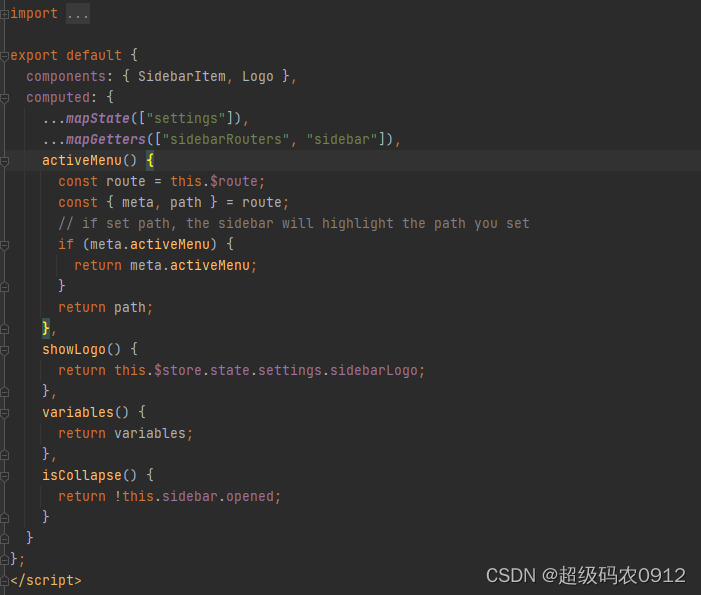
src/layout/components/Sidebar/index.vue
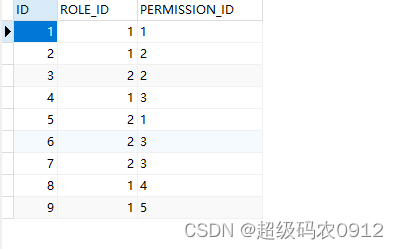
测试动态菜单
数据库中菜单列表以及和角色对应的菜单,我所登录的角色编号是2.

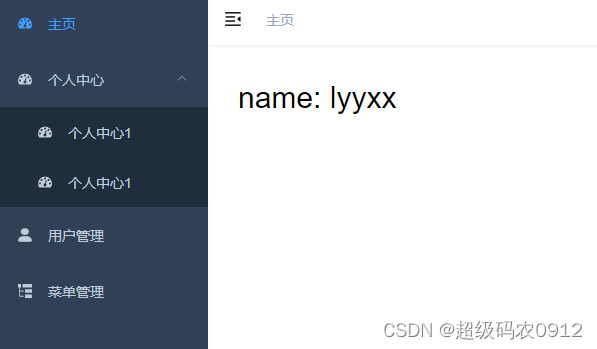
登录成功后的菜单列表,菜单是根据数据库的信息动态生成的。
相关内容
源码地址
SpringBoot+SpringSecurity+Vue实现动态权限(一)
SpringBoot+SpringSecurity+Vue实现动态权限(二)



