
- 1终极解决python安装包时需要Microsoft Visual C++ 14.0的问题_microsoft visual c++ 14.0的安装
- 2基于stm32单片机的红外遥控超声波避障小车_基于stm32的超声波避障小车
- 3为什么要选择react_为什么选择react
- 4iOS开发:打包应用程序_特殊父子20120909
- 5Arduino智能小车——超声波避障_超声波避障模块介绍
- 6【华为OD机试】篮球比赛(python, java, c++, js)_华为od篮球比赛
- 7工业级物联网项目架构设计及实施_.net 工业物联网开发项目
- 8移动硬盘提示由于IO设备错误,无法运行此项请求要怎么办啊
- 9mybatis-plus 中 queryWrapper and与or嵌套_querywrapper or and嵌套
- 10Spring Boot和Spring的区别_spring和springboot
SpringBoot+Spring Security+Vue实现动态权限菜单方案(附源码)
赞
踩
1、前言
在实际开发中,开发任何一套系统,基本都少不了权限管理这一块。这些足以说明权限管理的重要性。其实SpringSecurity去年就学了,一直没有时间整理,用了一年多时间了,给我的印象一直都挺好,实用,安全性高(Security可以对密码进行加密)。而且这一块在实际开发中也的确很重要,所以这里整理了一套基于SpringSecurity的权限管理。
案例代码下面有下载链接。
2、案例技术栈
如果对于SpringSecurity还不了解的话可以先了解一下SpringSecurity安全控件的学习,页面采用的是Bootstrap写的(页面就简单的写了一下,可以根据自己的需求更改),其实后端理解了,前台就是显示作用,大家可以自行更换前台页面显示框架,持久层使用的是Spring-Data-Jpa。
并且对后端持久层和控制器进行了一下小封装,Java持久层和控制器的封装。页面使用的Thymeleaf模板,SpringBoot整合Thymeleaf模板。
数据库设计
1、表关系
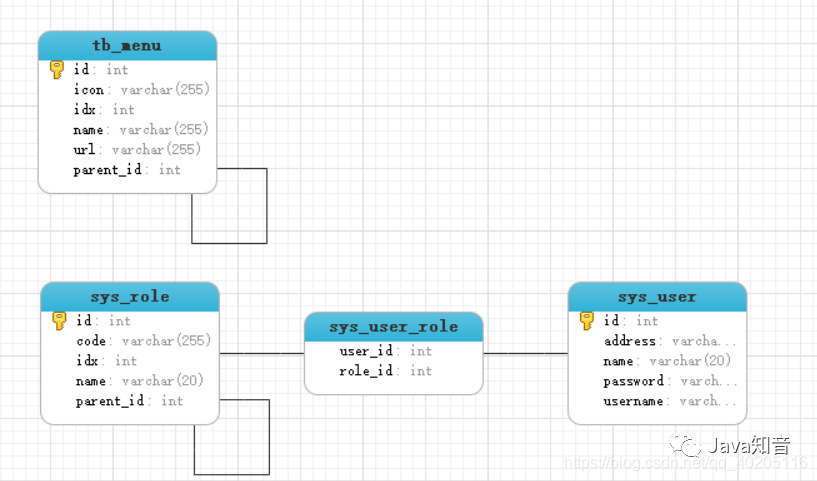
菜单(
TbMenu)=====> 页面上需要显示的所有菜单角色(
SysRole)=====> 角色及角色对应的菜单用户(
SysUser)=====> 用户及用户对应的角色用户和角色中间表(
sys_user_role)====> 用户和角色中间表
2、数据库表结构
菜单表tb_menu
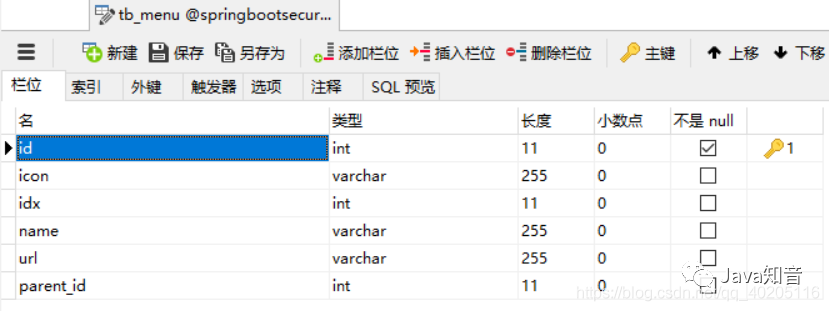
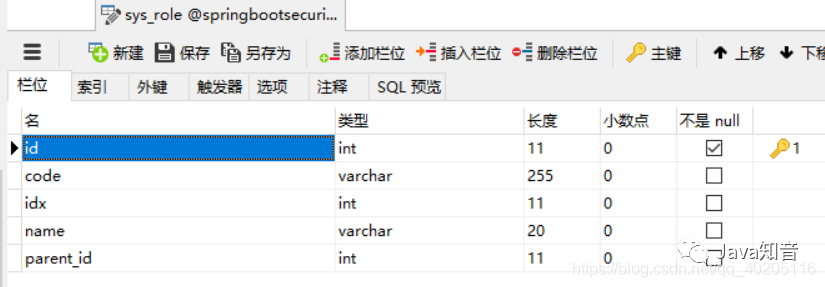
角色及菜单权限表sys_role,其中父节点parent 为null时为角色,不为null时为对应角色的菜单权限。
用户表sys_user
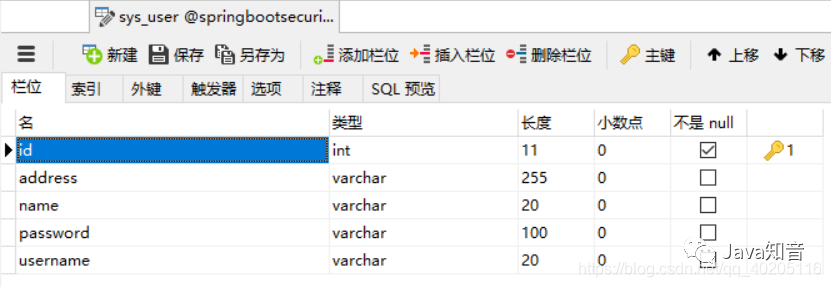
用户和角色多对多关系,用户和角色中间表sys_user_role(有Spring-Data-Jpa自动生成)。
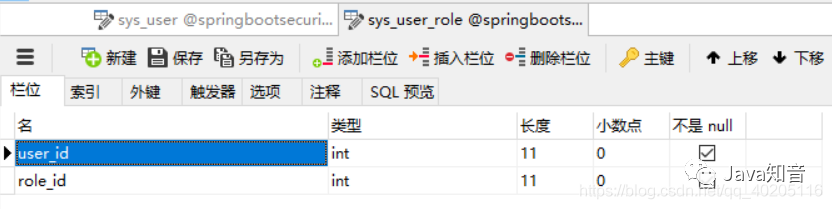
新建项目
1、新建springboot项目
新建springboot项目,在项目中添加SpringSecurity相关Maven依赖,pom.map文件
- <?xml version="1.0" encoding="UTF-8"?>
- <project xmlns="http://maven.apache.org/POM/4.0.0" xmlns:xsi="http://www.w3.org/2001/XMLSchema-instance"
- xsi:schemaLocation="http://maven.apache.org/POM/4.0.0 https://maven.apache.org/xsd/maven-4.0.0.xsd">
- <modelVersion>4.0.0</modelVersion>
- <parent>
- <groupId>org.springframework.boot</groupId>
- <artifactId>spring-boot-starter-parent</artifactId>
- <version>2.2.2.RELEASE</version>
- <relativePath/> <!-- lookup parent from repository -->
- </parent>
- <groupId>com.mcy</groupId>
- <artifactId>springboot-security</artifactId>
- <version>0.0.1-SNAPSHOT</version>
- <name>springboot-security</name>
- <description>Demo project for Spring Boot</description>
-
- <properties>
- <java.version>1.8</java.version>
- </properties>
-
- <dependencies>
- <dependency>
- <groupId>org.springframework.boot</groupId>
- <artifactId>spring-boot-starter-data-jpa</artifactId>
- </dependency>
- <dependency>
- <groupId>org.springframework.boot</groupId>
- <artifactId>spring-boot-starter-security</artifactId>
- </dependency>
- <dependency>
- <groupId>org.springframework.boot</groupId>
- <artifactId>spring-boot-starter-thymeleaf</artifactId>
- </dependency>
- <dependency>
- <groupId>org.springframework.boot</groupId>
- <artifactId>spring-boot-starter-web</artifactId>
- </dependency>
-
- <dependency>
- <groupId>mysql</groupId>
- <artifactId>mysql-connector-java</artifactId>
- <scope>runtime</scope>
- </dependency>
- <dependency>
- <groupId>org.springframework.boot</groupId>
- <artifactId>spring-boot-starter-test</artifactId>
- <scope>test</scope>
- <exclusions>
- <exclusion>
- <groupId>org.junit.vintage</groupId>
- <artifactId>junit-vintage-engine</artifactId>
- </exclusion>
- </exclusions>
- </dependency>
- <dependency>
- <groupId>org.springframework.security</groupId>
- <artifactId>spring-security-test</artifactId>
- <scope>test</scope>
- </dependency>
- <dependency>
- <groupId>org.thymeleaf.extras</groupId>
- <artifactId>thymeleaf-extras-springsecurity5</artifactId>
- </dependency>
- <dependency>
- <groupId>org.springframework.boot</groupId>
- <artifactId>spring-boot-devtools</artifactId>
- <scope>runtime</scope>
- <optional>true</optional>
- </dependency>
- <dependency>
- <groupId>org.webjars.bower</groupId>
- <artifactId>bootstrap-select</artifactId>
- <version>2.0.0-beta1</version>
- </dependency>
- <dependency>
- <groupId>org.webjars</groupId>
- <artifactId>bootbox</artifactId>
- <version>4.4.0</version>
- </dependency>
- </dependencies>
-
- <build>
- <plugins>
- <plugin>
- <groupId>org.springframework.boot</groupId>
- <artifactId>spring-boot-maven-plugin</artifactId>
- </plugin>
- </plugins>
- </build>
-
- </project>

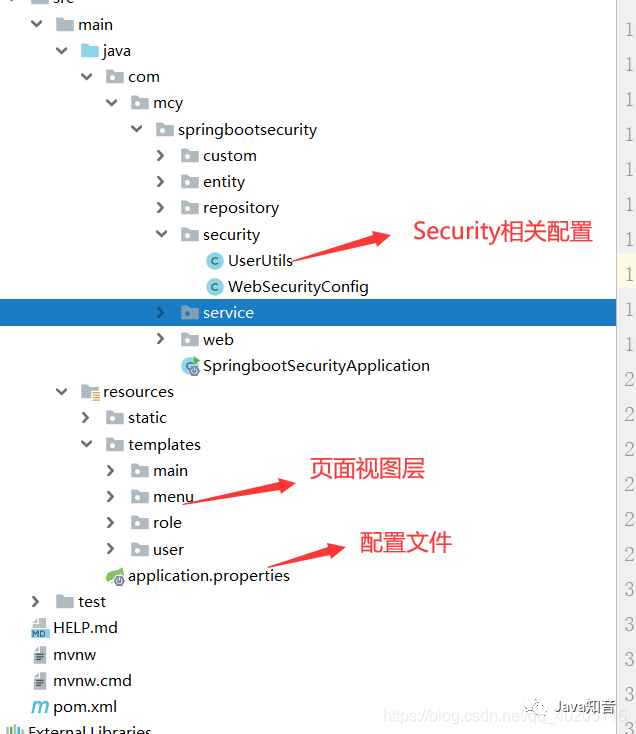
2、项目结构
编写代码
1、编写实体类
菜单表实体类TbMenu,Spring-Data-Jpa可以根据实体类去数据库新建或更新对应的表结构,详情可以访问Spring-Data-Jpa入门:
https://blog.csdn.net/qq_40205116/article/details/103039936
- import com.fasterxml.jackson.annotation.JsonIgnore;
- import com.mcy.springbootsecurity.custom.BaseEntity;
- import org.springframework.data.annotation.CreatedBy;
-
- import javax.persistence.*;
- import java.util.ArrayList;
- import java.util.List;
-
- /**
- * 菜单表
- * @author
- *
- */
- @Entity
- public class TbMenu extends BaseEntity<Integer> {
- private String name;
- private String url;
- private Integer idx;
- @JsonIgnore
- private TbMenu parent;
- @JsonIgnore
- private List<TbMenu> children=new ArrayList<>();
-
- @Column(unique=true)
- public String getName() {
- return name;
- }
-
- public void setName(String name) {
- this.name = name;
- }
-
- public String getUrl() {
- return url;
- }
-
- public void setUrl(String url) {
- this.url = url;
- }
-
- public Integer getIdx() {
- return idx;
- }
-
- public void setIdx(Integer idx) {
- this.idx = idx;
- }
-
- @ManyToOne
- @CreatedBy
- public TbMenu getParent() {
- return parent;
- }
-
- public void setParent(TbMenu parent) {
- this.parent = parent;
- }
-
- @OneToMany(cascade=CascadeType.ALL,mappedBy="parent")
- @OrderBy(value="idx")
- public List<TbMenu> getChildren() {
- return children;
- }
-
- public void setChildren(List<TbMenu> children) {
- this.children = children;
- }
-
- public TbMenu(Integer id) {
- super(id);
- }
-
- public TbMenu(){
- super();
- }
-
- public TbMenu(String name, String url, Integer idx, TbMenu parent, List<TbMenu> children) {
- this.name = name;
- this.url = url;
- this.idx = idx;
- this.parent = parent;
- this.children = children;
- }
-
- public TbMenu(Integer integer, String name, String url, Integer idx, TbMenu parent, List<TbMenu> children) {
- super(integer);
- this.name = name;
- this.url = url;
- this.idx = idx;
- this.parent = parent;
- this.children = children;
- }
-
- @Transient
- public Integer getParentId() {
- return parent==null?null:parent.getId();
- }
- }
表新建好了,下面就是实现增删改查就可以了,实现效果如下。
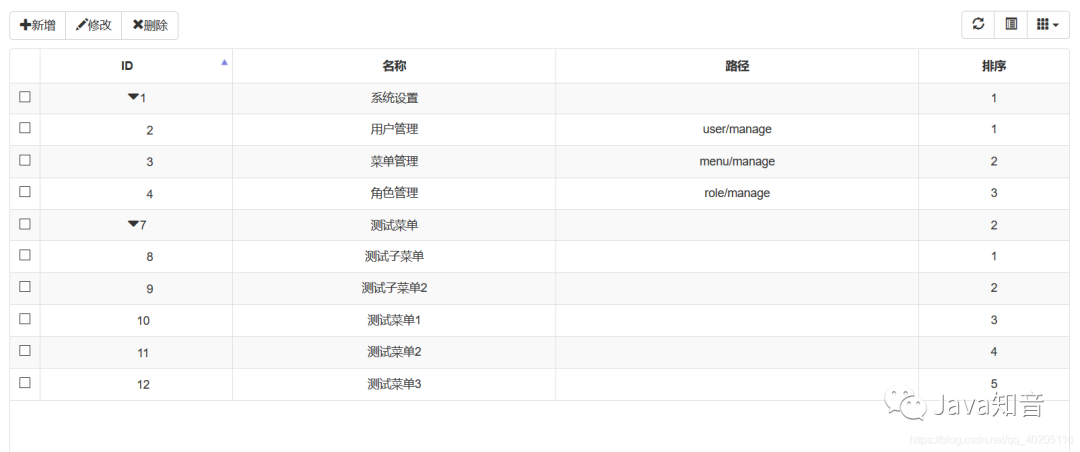
新增和修改菜单。
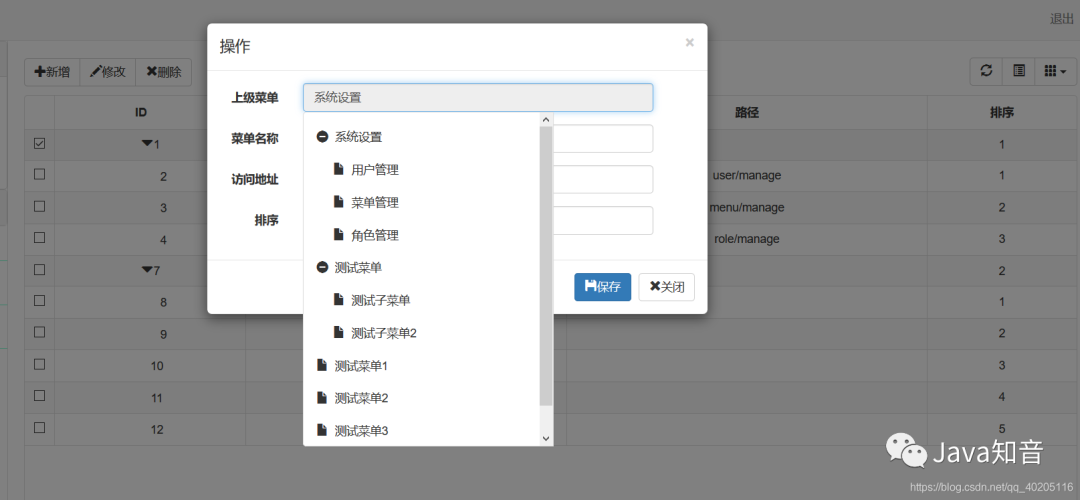
对于Bootstrap的树形表格,可以移步到:BootStrap-bable-treegrid树形表格的使用。
https://blog.csdn.net/qq_40205116/article/details/103740104
菜单管理实现了,下一步就是实现角色及角色对应的权限管理了。
角色及权限表SysRole,parent 为null时为角色,不为null时为权限。
- package com.mcy.springbootsecurity.entity;
-
- import com.fasterxml.jackson.annotation.JsonIgnore;
- import com.mcy.springbootsecurity.custom.BaseEntity;
- import org.springframework.data.annotation.CreatedBy;
- import javax.persistence.*;
- import java.util.ArrayList;
- import java.util.List;
-
- @Entity
- /***
- * 角色及角色对应的菜单权限
- * @author
- *parent 为null时为角色,不为null时为权限
- */
- public class SysRole extends BaseEntity<Integer> {
- private String name; //名称
- private String code; //代码
- @JsonIgnore
- private SysRole parent;
- private Integer idx; //排序
- @JsonIgnore
- private List<SysRole> children = new ArrayList<>();
-
- @Column(length=20)
- public String getName() {
- return name;
- }
-
- public void setName(String name) {
- this.name = name;
- }
-
- public String getCode() {
- return code;
- }
-
- public void setCode(String code) {
- this.code = code;
- }
-
- @ManyToOne
- @CreatedBy
- public SysRole getParent() {
- return parent;
- }
-
- public void setParent(SysRole parent) {
- this.parent = parent;
- }
-
- @OneToMany(cascade=CascadeType.ALL,mappedBy="parent")
- public List<SysRole> getChildren() {
- return children;
- }
-
- public void setChildren(List<SysRole> children) {
- this.children = children;
- }
-
- //获取父节点id
- @Transient
- public Integer getParentId() {
- return parent==null?null:parent.getId();
- }
-
- public Integer getIdx() {
- return idx;
- }
-
- public void setIdx(Integer idx) {
- this.idx = idx;
- }
-
- public SysRole(String name, String code, SysRole parent, Integer idx, List<SysRole> children) {
- this.name = name;
- this.code = code;
- this.parent = parent;
- this.idx = idx;
- this.children = children;
- }
-
- public SysRole(Integer id, String name, String code, SysRole parent, Integer idx, List<SysRole> children) {
- super(id);
- this.name = name;
- this.code = code;
- this.parent = parent;
- this.idx = idx;
- this.children = children;
- }
-
- public SysRole(Integer id) {
- super(id);
- }
-
- public SysRole(){}
- }
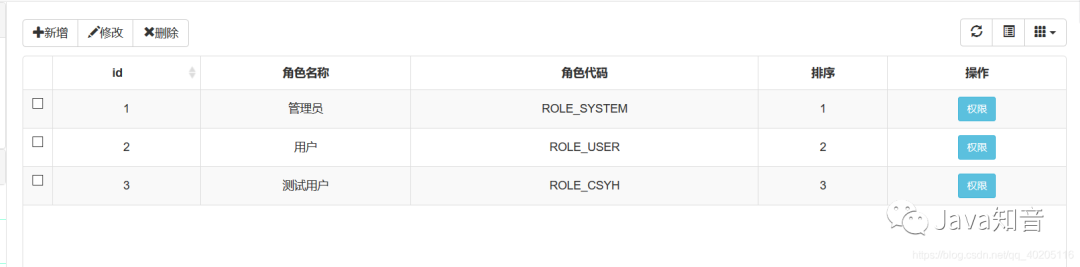
首先需要实现角色管理,之后在角色中添加对应的菜单权限。
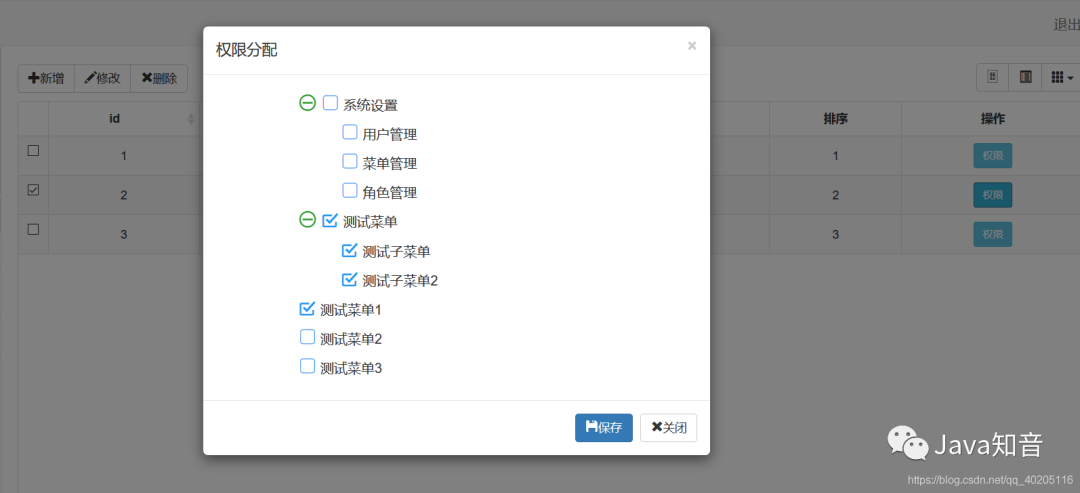
实现效果(也可以和菜单管理一样,用树形表格展示,根据个人需求。这里用的是树形菜单展示的)。
给角色分配权限。
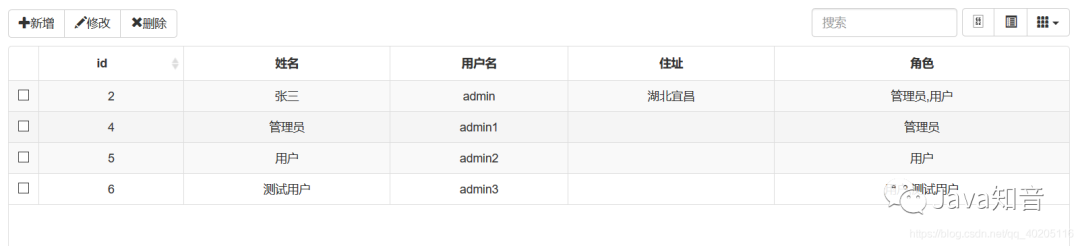
最后实现的就是用户管理了,只需要对添加的用户分配对应的角色就可以了,用户登录时,显示角色对应的权限。
用户表SysUser,继承的BaseEntity类中就一个ID字段。
- import com.fasterxml.jackson.annotation.JsonIgnore;
- import com.mcy.springbootsecurity.custom.BaseEntity;
-
- import javax.persistence.*;
- import java.util.ArrayList;
- import java.util.List;
-
- /**
- * 用户表
- */
- @Entity
- public class SysUser extends BaseEntity<Integer> {
- private String username; //账号
- private String password; //密码
- private String name; //姓名
- private String address; //地址
-
- @JsonIgnore
- private List<SysRole> roles=new ArrayList<>(); //角色
-
- @Column(length=20,unique=true)
- public String getUsername() {
- return username;
- }
- public void setUsername(String username) {
- this.username = username;
- }
-
- @Column(length=100)
- public String getPassword() {
- return password;
- }
- public void setPassword(String password) {
- this.password = password;
- }
-
- @Column(length=20)
- public String getName() {
- return name;
- }
- public void setName(String name) {
- this.name = name;
- }
-
- @ManyToMany(cascade=CascadeType.REFRESH,fetch=FetchType.EAGER)
- @JoinTable(name="sys_user_role",joinColumns=@JoinColumn(name="user_id"),inverseJoinColumns=@JoinColumn(name="role_id"))
- public List<SysRole> getRoles() {
- return roles;
- }
- public void setRoles(List<SysRole> roles) {
- this.roles = roles;
- }
-
- public String getAddress() {
- return address;
- }
-
- public void setAddress(String address) {
- this.address = address;
- }
-
- //角色名称
- @Transient
- public String getRoleNames() {
- String str="";
- for (SysRole role : getRoles()) {
- str+=role.getName()+",";
- }
- if(str.length()>0) {
- str=str.substring(0, str.length()-1);
- }
- return str;
- }
-
- //角色代码
- @Transient
- public String getRoleCodes() {
- String str="";
- for (SysRole role : getRoles()) {
- str+=role.getCode()+",";
- }
- if(str.indexOf(",")>0) {
- str=str.substring(0,str.length()-1);
- }
- return str;
- }
-
- }
用户管理就基本的数据表格,效果如图。
2、Security配置文件
Security相关配置文件,下面两个文件如果看不懂,可以访问SpringSecurity安全控件的学习中有详细讲解。
https://blog.csdn.net/qq_40205116/article/details/103439326
- package com.mcy.springbootsecurity.security;
-
- import com.mcy.springbootsecurity.service.SysUserService;
- import org.springframework.beans.factory.annotation.Autowired;
- import org.springframework.context.annotation.Configuration;
- import org.springframework.security.config.annotation.authentication.builders.AuthenticationManagerBuilder;
- import org.springframework.security.config.annotation.web.builders.HttpSecurity;
- import org.springframework.security.config.annotation.web.configuration.WebSecurityConfigurerAdapter;
- import org.springframework.security.crypto.bcrypt.BCryptPasswordEncoder;
-
- @Configuration
- public class WebSecurityConfig extends WebSecurityConfigurerAdapter {
-
- @Autowired
- private SysUserService userService;
-
- /**
- * 用户认证操作
- * @param auth
- * @throws Exception
- */
- @Override
- protected void configure(AuthenticationManagerBuilder auth) throws Exception {
- //添加用户,并给予权限
- auth.inMemoryAuthentication().withUser("aaa").password("{noop}1234").roles("DIY");
- //设置认证方式
- auth.userDetailsService(userService).passwordEncoder(new BCryptPasswordEncoder());
- }
-
- /**
- * 用户授权操作
- * @param http
- * @throws Exception
- */
- @Override
- protected void configure(HttpSecurity http) throws Exception {
- http.csrf().disable(); //安全器令牌
- http.formLogin()
- //登录请求被拦截
- .loginPage("/login").permitAll()
- //设置默认登录成功跳转页面
- .successForwardUrl("/main")
- .failureUrl("/login?error"); //登录失败的页面
- http.authorizeRequests().antMatchers("/static/**", "/assets/**").permitAll(); //文件下的所有都能访问
- http.authorizeRequests().antMatchers("/webjars/**").permitAll();
- http.logout().logoutUrl("/logout").permitAll(); //退出
- http.authorizeRequests().anyRequest().authenticated(); //除此之外的都必须通过请求验证才能访问
- }
- }
获取登录者相关信息,工具类。
- import com.mcy.springbootsecurity.entity.SysUser;
- import com.mcy.springbootsecurity.service.SysUserService;
- import org.springframework.beans.factory.annotation.Autowired;
- import org.springframework.security.core.GrantedAuthority;
- import org.springframework.security.core.context.SecurityContextHolder;
- import org.springframework.security.core.userdetails.UserDetails;
- import org.springframework.stereotype.Component;
-
- import java.util.ArrayList;
- import java.util.List;
-
- //创建会话,获取当前登录对象
- @Component
- public class UserUtils {
- @Autowired
- private SysUserService userService;
-
- /**
- * 获取当前登录者的信息
- * @return 当前者信息
- */
- public SysUser getUser() {
- //获取当前用户的用户名
- String username = SecurityContextHolder.getContext().getAuthentication().getName();
- SysUser user = userService.findByUsername(username);
- return user;
- }
-
- /**
- * 判断此用户中是否包含roleName菜单权限
- * @param roleName
- * @return
- */
- public Boolean hasRole(String roleName) {
- //获取UserDetails类,
- UserDetails userDetails = (UserDetails) SecurityContextHolder.getContext().getAuthentication().getPrincipal();
- List<String> roleCodes=new ArrayList<>();
- for (GrantedAuthority authority : userDetails.getAuthorities()) {
- //getAuthority()返回用户对应的菜单权限
- roleCodes.add(authority.getAuthority());
- }
- return roleCodes.contains(roleName);
- }
- }
3、动态权限菜单加载相关方法
用户表的SysUserService需要实现UserDetailsService接口,因为在SpringSecurity中配置的相关参数需要是UserDetailsService类的数据。
重写UserDetailsService接口中的loadUserByUsername方法,通过该方法查询对应的用户,返回对象UserDetails是SpringSecurity的一个核心接口。其中定义了一些可以获取用户名,密码,权限等与认证相关信息的方法。
重写的loadUserByUsername方法。
- @Override
- public UserDetails loadUserByUsername(String username) throws UsernameNotFoundException {
- //调用持久层接口findByUsername方法查询用户。
- SysUser user = userRepository.findByUsername(username);
- if(user == null){
- throw new UsernameNotFoundException("用户名不存在");
- }
- //创建List集合,用来保存用户菜单权限,GrantedAuthority对象代表赋予当前用户的权限
- List<GrantedAuthority> authorities = new ArrayList<>();
- //获得当前用户角色集合
- List<SysRole> roles = user.getRoles();
- List<SysRole> haveRoles=new ArrayList<>();
- for (SysRole role : roles) {
- haveRoles.add(role);
- List<SysRole> children = roleService.findByParent(role);
- children.removeAll(haveRoles);
- haveRoles.addAll(children);
- }
- for(SysRole role: haveRoles){
- //将关联对象role的name属性保存为用户的认证权限
- authorities.add(new SimpleGrantedAuthority(role.getName()));
- }
- //此处返回的是org.springframework.security.core.userdetails.User类,该类是SpringSecurity内部的实现
- //org.springframework.security.core.userdetails.User类实现了UserDetails接口
- return new User(user.getUsername(), user.getPassword(), authorities);
- }
所有功能实现了,最后就是根据角色去显示对应的菜单了。
在TbMenuService类中的findAuditMenu方法,查询当前用户所拥有的权限菜单。
- /**
- * 获取用户所拥有的权限对应的菜单项
- * @return
- */
- public List<TbMenu> findAuditMenu() {
- List<TbMenu> menus;
- //判断是否是后门用户
- if(userUtils.hasRole("ROLE_DIY")){
- //查询所有菜单,子菜单可以通过父级菜单的映射得到
- menus = menuRepository.findByParentIsNullOrderByIdx();
- }else{
- //获取此用户对应的菜单权限
- menus = auditMenu(menuRepository.findByParentIsNullOrderByIdx());
- }
- return menus;
- }
-
- //根据用户的菜单权限对菜单进行过滤
- private List<TbMenu> auditMenu(List<TbMenu> menus) {
- List<TbMenu> list = new ArrayList<>();
- for(TbMenu menu: menus){
- String name = menu.getName();
- //判断此用户是否有此菜单权限
- if(userUtils.hasRole(name)){
- list.add(menu);
- //递归判断子菜单
- if(menu.getChildren() != null && !menu.getChildren().isEmpty()) {
- menu.setChildren(auditMenu(menu.getChildren()));
- }
- }
- }
- return list;
- }
在UserUtils工具类中的hasRole方法,判断此用户中是否包含roleName菜单权限。
- public Boolean hasRole(String roleName) {
- //获取UserDetails类,
- UserDetails userDetails = (UserDetails) SecurityContextHolder.getContext().getAuthentication().getPrincipal();
- List<String> roleCodes=new ArrayList<>();
- for (GrantedAuthority authority : userDetails.getAuthorities()) {
- //getAuthority()返回用户对应的菜单权限
- roleCodes.add(authority.getAuthority());
- }
- return roleCodes.contains(roleName);
- }
之后在控制器中返回用户对应的菜单权限,之后在前台页面遍历就可以了。
- @RequestMapping(value = "/main")
- public String main(ModelMap map){
- //加载菜单
- List<TbMenu> menus = menuService.findAuditMenu();
- map.put("menus", menus);
- if (menus.isEmpty()) {
- return "main/main";
- }
- return "main/main1";
- }
4、首页菜单遍历
首页菜单遍历,这里使用的是LayUI菜单,如果其他框架可以自行根据页面标签规律遍历,因为页面使用的是Thymeleaf模板,不是JSP,使用遍历菜单时不是采用的EL表达式,而是使用的Thymeleaf自带的标签表达式。
- <div id="main">
- <div id="main_nav">
- <div class="panel-group" id="accordion" style="margin-bottom: 0;">
- <div th:each="menu, menuStat: ${menus}" th:if="${menu.children.size() != 0 && menu.children != null}" class="panel panel-default">
- <div class="panel-heading">
- <h4 class="panel-title">
- <p data-toggle="collapse" data-parent="#accordion" th:href="|#collapseOne${menuStat.index}|">
- <span th:text="${menu.name}">系统设置</span><span class="caret"></span>
- </p>
- </h4>
- </div>
- <div th:if="${menuStat.first}" th:id="|collapseOne${menuStat.index}|" class="panel-collapse collapse collapse in">
- <div class="panel-body">
- <p th:each="subMenu:${menu.children}" th:src="${subMenu.url}" th:text="${subMenu.name}">菜单管理</p>
- </div>
- </div>
- <div th:if="${!menuStat.first}" th:id="|collapseOne${menuStat.index}|" class="panel-collapse collapse collapse">
- <div class="panel-body">
- <p th:each="subMenu:${menu.children}" th:src="${subMenu.url}" th:text="${subMenu.name}">菜单管理</p>
- </div>
- </div>
- </div>
- </div>
- <div id="nav_p">
- <p th:each="menu:${menus}" th:if="${menu.children.size() == 0}" th:src="${menu.url}" th:text="${menu.name}">成绩管理</p>
- </div>
- </div>
- <div id="main_home">
- 首页内容
- </div>
- </div>
测试应用
1、对应效果展示
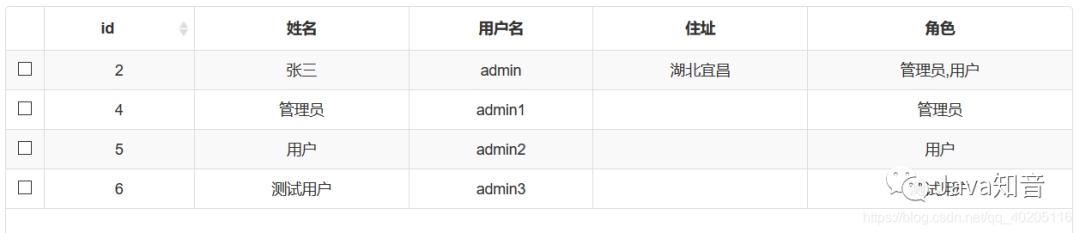
用户数据及对应的角色
管理员对应的菜单权限。
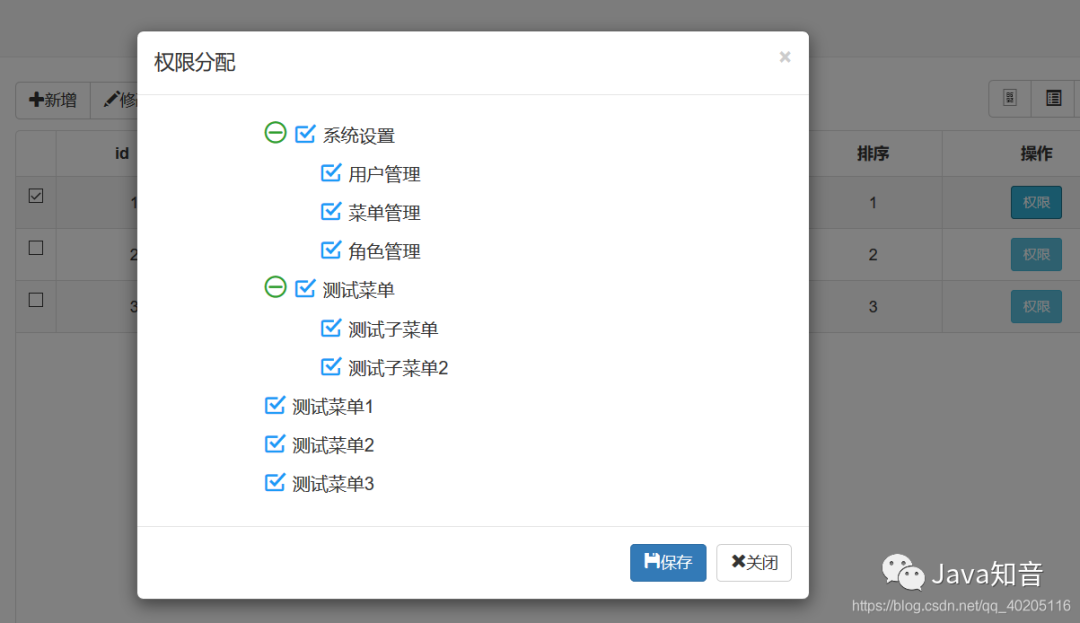
用户角色对应的菜单权限。
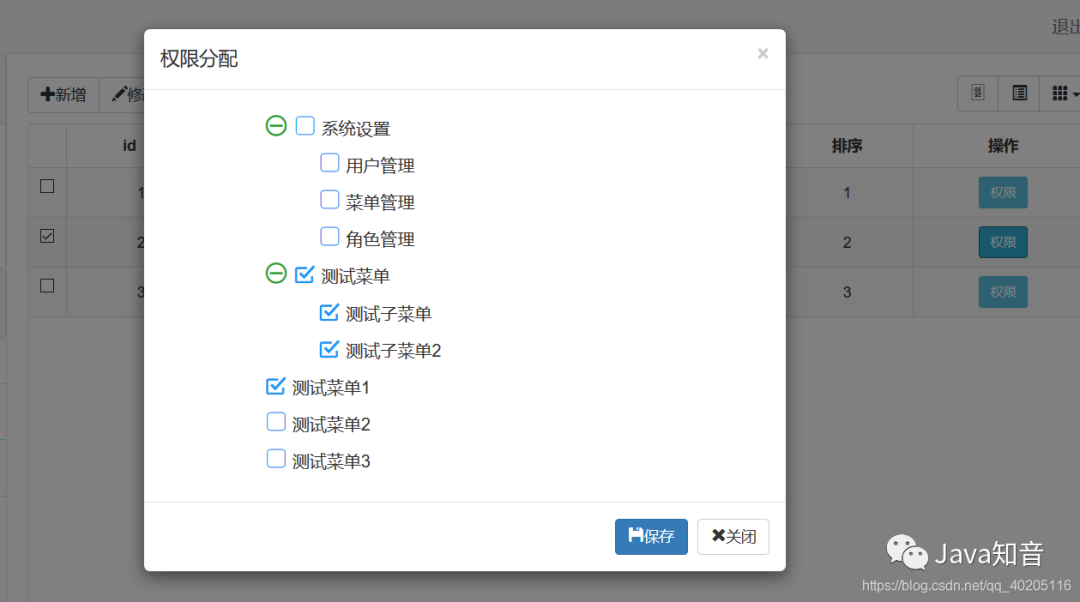
测试用户角色对应的菜单权限。
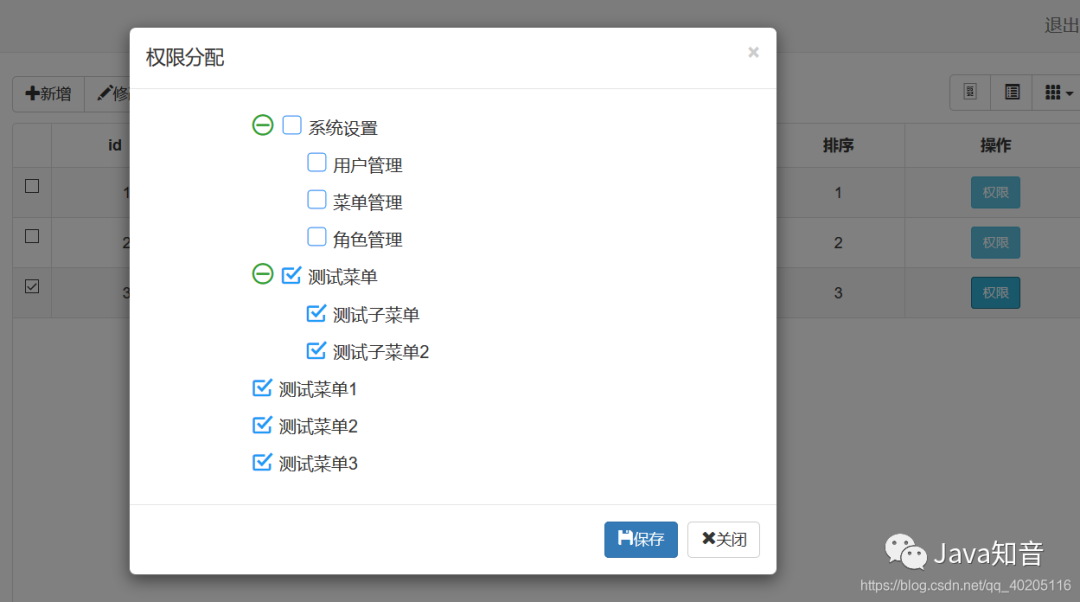
2、测试应用
用户名为admin1有管理员角色的用户登录,菜单显示。
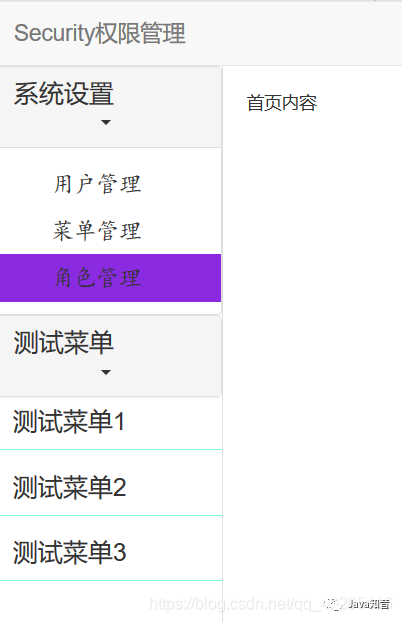
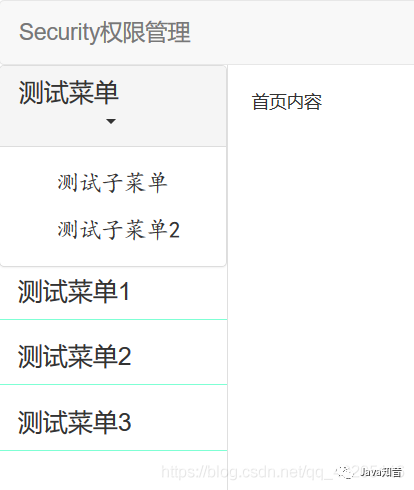
用户名为admin2有用户角色的用户登录,菜单显示。
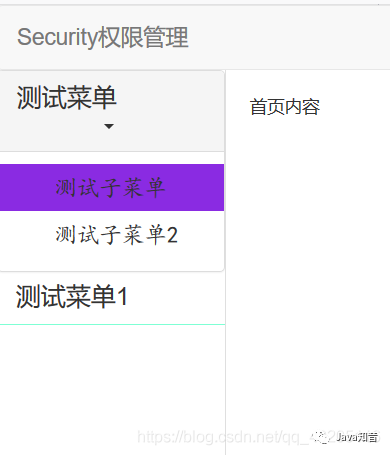
用户名为admin3有测试用户角色的用户登录,菜单显示。
3、案例代码下载
下载地址:https://github.com/machaoyin/SpringBoot-Security



