
热门标签
热门文章
- 1编写一个完整的程序,运行时向用户提问”你考试考了都少分?(0~100)”,接受输入后判断其等级显示出来。规则如下:_你考试考了多少分csdn
- 2试题22 基础练习 龟兔赛跑预测
- 3.net 开发微信公众平台(三)-----发送图文消息_.net 公众号模板消息怎么推送图文内容
- 4Mac系统hosts文件修改方法_mac 更新 host sources
- 52022 Python Windows安装配置教程_server2022系统 安装python
- 6linux screen 环境变量,Linux 中screen命令的安装及其使用
- 7阿里云Centos8.0安装管理配置NFS服务详解_failed to start nfs.service: unit nfs.service not
- 8Java8新特性中常用的去重、交集、差集、排序等功能_java新特性 去重
- 9ubuntu定时运行python_crontab执行定时任务——Linux系统(Ubuntu)定时执行python程序(两种方式)之一...
- 10(详细)用js的生成a标签下载文件、并携带请求头_a标签文件直接设置请求头
当前位置: article > 正文
Vue3+SpringSecurity,用代理服务器解决头疼的跨域问题_spring-security+vue3
作者:代码领袖开发者 | 2024-02-01 13:41:22
赞
踩
spring-security+vue3
本人的前后端项目是这样的:
前端:http://localhost:5173
后端: http://localhost:9001,并且使用了spring security,配置了允许跨域,而且可以实现前后端分离登录。
后端部分代码如下(有的代码是参考了别的大神)
- package com.example.demo.config;
-
- @Configuration
- public class SecurityConfig extends WebSecurityConfigurerAdapter {
-
- @Autowired
- private UserDetailsService userDetailsService;
-
- @Autowired
- private UsersService usersService;
-
- @Autowired
- VerificationCodeFilter verificationCodeFilter;
-
- @Override
- protected void configure(AuthenticationManagerBuilder auth) throws Exception {
- auth.userDetailsService(userDetailsService).passwordEncoder(password());
- }
-
- @Override
- public void configure(WebSecurity web) throws Exception {
- web.ignoring().antMatchers("/assets/**","/js/**","/css/**","/img/**");
- }
-
- @Override
- protected void configure(HttpSecurity http) throws Exception {
- http.addFilterBefore(verificationCodeFilter, UsernamePasswordAuthenticationFilter.class);
- http.authorizeRequests()
- .antMatchers("/sms/system/getVerifiCodeImage", "/v2/api-docs", "/swagger-resources/configuration/ui",
- "/swagger-resources", "/swagger-resources/configuration/security",
- "/swagger-ui.html", "/webjars/**").permitAll()
- .anyRequest().authenticated()
- .and()
-
- // 表单登录
- .formLogin()
- // 登录成功处理(对应流程2)
- .successHandler(new AuthenticationSuccessHandler() {
- @Override
- public void onAuthenticationSuccess(HttpServletRequest request, HttpServletResponse response, Authentication authentication) throws IOException, ServletException {
- Map<String, Object> map = new HashMap<String,Object>();
- String token = usersService.GenerateTokenByUserName(((User)authentication.getPrincipal()).getUsername());
- map.put("token", token);
- response.setContentType("application/json;charset=utf-8");
- response.getWriter().write(
- JSON.toJSONString(Result.ok(map)));
- }
- })
- // 登录失败处理(对应流程3)
- .failureHandler(new AuthenticationFailureHandler() {
- @Override
- public void onAuthenticationFailure(HttpServletRequest request, HttpServletResponse response, AuthenticationException exception) throws IOException, ServletException {
- response.setContentType("application/json;charset=utf-8");
- response.getWriter().write(
- JSON.toJSONString(Result.fail().message("登录失败")));
- }
- })
- .and()
- //登出
- .logout()
- //登出成功处理(对应流程4)
- .logoutSuccessHandler(new LogoutSuccessHandler() {
- @Override
- public void onLogoutSuccess(HttpServletRequest request, HttpServletResponse response, Authentication authentication) throws IOException, ServletException {
- response.setContentType("application/json;charset=utf-8");
- response.getWriter().write(
- JSON.toJSONString(Result.ok()));
- }
- })
- .and()
- //异常处理
- .exceptionHandling()
- //未登录处理(对应流程1)
- .authenticationEntryPoint(new AuthenticationEntryPoint() {
- @Override
- public void commence(HttpServletRequest request, HttpServletResponse response, AuthenticationException authException) throws IOException, ServletException {
- response.setContentType("application/json;charset=utf-8");
- response.getWriter().write(JSON.toJSONString(Result.fail()));
- }
- })
- //没有权限处理(对应流程5)
- .accessDeniedHandler(new AccessDeniedHandler() {
- @Override
- public void handle(HttpServletRequest request, HttpServletResponse response, AccessDeniedException accessDeniedException) throws IOException, ServletException {
- response.setContentType("application/json;charset=utf-8");
- response.getWriter().write(JSON.toJSONString(Result.fail()));
- }
- })
- .and().cors().configurationSource(corsConfigurationSource())
- .and()
- .csrf().disable();
- }
-
-
- @Bean
- PasswordEncoder password(){return new BCryptPasswordEncoder();}
-
- @Bean
- CorsConfigurationSource corsConfigurationSource(){
- CorsConfiguration corsConfiguration = new CorsConfiguration();
- // 允许跨域访问的站点
- corsConfiguration.setAllowedOrigins(Arrays.asList("http://localhost:5173"));
- //允许跨域访问的methods
- corsConfiguration.setAllowedMethods(Arrays.asList("GET","POST"));
- // 允许携带凭证
- corsConfiguration.setAllowCredentials(true);
- UrlBasedCorsConfigurationSource source = new UrlBasedCorsConfigurationSource();
- //对所有URL生效
- source.registerCorsConfiguration("/**",corsConfiguration);
- return source;
- }
- }

VerificationCodeFilter:
- package com.example.demo.Filter;
-
-
- //验证码校验
- @Component
- public class VerificationCodeFilter extends GenericFilter {
- @Override
- public void doFilter(ServletRequest servletRequest, ServletResponse servletResponse, FilterChain filterChain) throws IOException, ServletException {
- HttpServletRequest request = (HttpServletRequest)servletRequest;
- HttpServletResponse response = (HttpServletResponse) servletResponse;
-
- if("POST".equals(request.getMethod()) && "/login".equals(request.getServletPath()))
- {
- HttpSession session = request.getSession();
-
- String sessionVerifiCode = (String)session.getAttribute("verifiCode");
- String loginVerifiCode = request.getParameter("verifiCode");
-
- response.setContentType("application/json;charset=utf-8");
- PrintWriter out = response.getWriter();
-
- if(sessionVerifiCode.equals("")||sessionVerifiCode==null)
- {
- out.write(JSON.toJSONString(Result.fail().message("验证码失效,请刷新后重试")));
- out.flush();
- out.close();
- return;
- }
- else if(!sessionVerifiCode.equalsIgnoreCase(loginVerifiCode))
- {
- out.write(JSON.toJSONString(Result.fail().message("验证码有误,请小心输入后重试")));
- out.flush();
- out.close();
- return;
- }
- else
- {
- session.removeAttribute("verifiCode");
- filterChain.doFilter(request,response);
- }
-
- }
- else
- {
- filterChain.doFilter(request,response);
- }
- }
- }
MyUserDetailsServices:
- package com.example.demo.service.Impl;
-
- @Service("userDetailsService")
- public class MyUserDetailsServices implements UserDetailsService {
- @Autowired
- private UsersMapper usersMapper;
- @Override
- public UserDetails loadUserByUsername(String username) throws UsernameNotFoundException {
- QueryWrapper<Users> wrapper = new QueryWrapper<>();
- wrapper.eq("username", username);
- Users users = usersMapper.selectOne(wrapper);
-
- if(users == null)
- {
- throw new UsernameNotFoundException("用户名不存在");
- }
-
- List<GrantedAuthority> auths =
- AuthorityUtils.commaSeparatedStringToAuthorityList("role");
-
- return new User(users.getUsername(),
- new BCryptPasswordEncoder().encode(users.getPassword()), auths);
- }
- }
前端部分代码:
- axios({
- method: 'post',
- url: 'http://localhost:9001/login',
- headers:{'content-type': 'application/x-www-form-urlencoded'},
- data: qs.stringify({
- username: loginform.username,
- password: loginform.userpassword,
- verifiCode: loginform.verifycode,
- userType: loginform.usertype
- })
- }).then(response => {
- console.log(response);
- if(response.data.code == 200 && response.data.ok)
- {
- sessionStorage.setItem("token",response.data.data.token)
- router.push('/dashboard')
- }
- else{
- ElMessage({
- showClose: true,
- message: response.data.message,
- type: 'warning',
- duration : 1000
- });
- refreshVerifyCode();
- }
- }).catch(function (error) {
- console.log(error);
- refreshVerifyCode();
- });
(因为我们这里是请求'/login'路径,可以通过浏览器直接访问这个URL,可以看到浏览器显示的是一个html页面,所以我们这里需要使用表单提交)
目前的问题是,登录时没有跨域问题,验证码也能正常显示。但是我一旦通过router跳转到其他vue文件,就出现跨域问题,如下图。
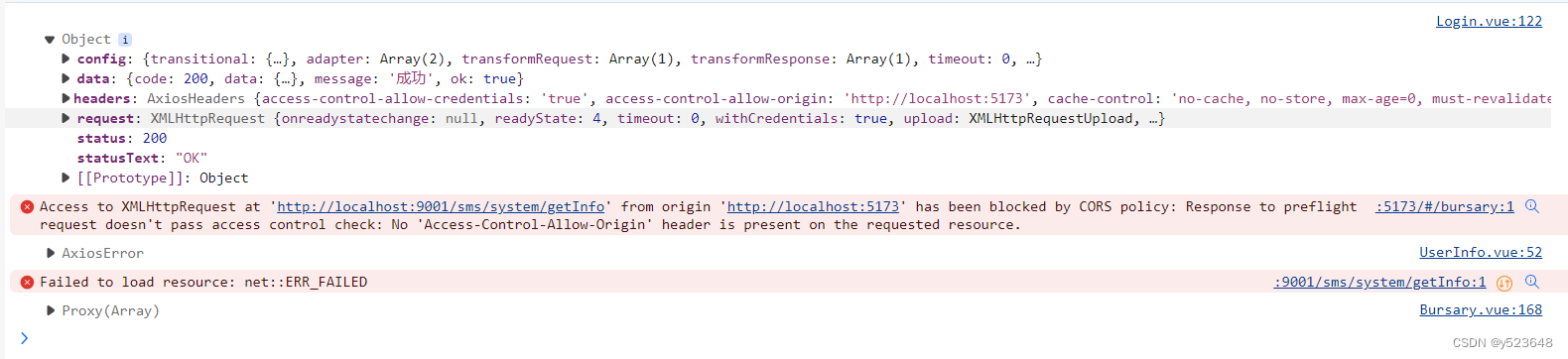
我试着给跳转后需要请求的controller添加@CrossOrigin,仍然解决不了。
抓狂之下,只有死马当活马医,用最后的办法,vue设置代理服务器:
打开vite.config.js文件,
defineConfig里添加如下代码:
- server:
- {
- proxy:{
- '/api':{
- target:'http://localhost:9001',
- changeOrigin:true,
- rewrite: (path)=>path.replace(/^\/api/,'')
- }
- }
- }
然后将前端所有的请求,从http://localhost:9001换成 api:
- axios({
- method: 'post',
- url: '/api/login',
然后,问题解决了~~~

如果你也遇到这操蛋的问题,希望这篇文章能帮助到你
注:后来发现是因为前端有通过header发送token给后端:
headers:{'token': sessionStorage.getItem("token")所以后端只要添加如下代码也可以解决:
corsConfiguration.addAllowedHeader("token");声明:本文内容由网友自发贡献,不代表【wpsshop博客】立场,版权归原作者所有,本站不承担相应法律责任。如您发现有侵权的内容,请联系我们。转载请注明出处:https://www.wpsshop.cn/article/detail/53923
推荐阅读

相关标签

