
热门标签
热门文章
- 1基于JavaWeb实验室预约管理系统(源码+数据库+文档)_实验室预约系统带敲源码csdn下载
- 2Docker概念、安装以及配置镜像加速器_配置docker镜像家属器
- 3ps-------HoloTookit-Unity所有预设体和脚本
- 4基于java在线影院订票系统论文_java 在线电影售票论文
- 5OpenHarmony/HarmonyOS投播组件_harmonyos cast
- 6自回归模型(Autoregressive model)(auto)
- 7C语言中static的用法(修饰局部变量,修饰全局变量,修饰函数)_static在c语言中的用法
- 82024三掌柜赠书活动第五期:从零基础到精通Flutter开发
- 9开源语言大模型演进史:向LLaMA 2看齐_llama opensouce
- 10微信小程序的登录流程_微信小程序登录
当前位置: article > 正文
Windows使用Linux子系统_lxrunoffline.exe
作者:cm456 | 2024-02-01 11:32:34
赞
踩
lxrunoffline.exe
两种安装方法:
完成权限设置+命令行激活+cmd安装打开
-
系统升级到一周年正式版及以上(1607)
-
依次在
设置-更新与安全-针对开发人员选项中,启用"开发人员模式" -
在资源管理器中打开
控制面板\所有控制面板项\程序和功能, 打开启用或关闭 Windows功能, 勾选适用于Linux的Windows子系统(Beta) -
重启电脑
-
命令行运行
lxrun /install /y开始安装
安装速度取决于网络情况,下载的文件在%localappdata%\lxss目录下lxss.tar.gz(181M),解压后大概500M,rootfs目录即为子系统根目录。 -
命令行运行
bash进入Ubuntu
默认使用的root帐号登录,通过指令passwd设置密码。
- 注:本文脚本均在root帐号下操作,因此建议使用root帐号
- 毕竟爱折腾,难免会把子系统环境(lxss目录)玩坏掉,因此干正事前最好先备份下以便快速还原。注意,不要直接右键复制或者打包,可能会导致文件权限丢失的。
xcopy %localappdata%\lxss %localappdata%\lxss.bak /E - 当然,如果你比较任性也可以不执行上一步的备份操作,通过命令行运行
lxrun /uninstall /full轻松卸载子系统,重复上面的步骤即可重装,不过要注意下载速度时好时坏哦。
完成权限设置+命令行激活+应用商城安装
在应用商店中搜索linux,选中箱安装的linux系统进行安装
(注意:安装路径必须是系统安装盘;在设置里修改过新内容保存路径的无效)
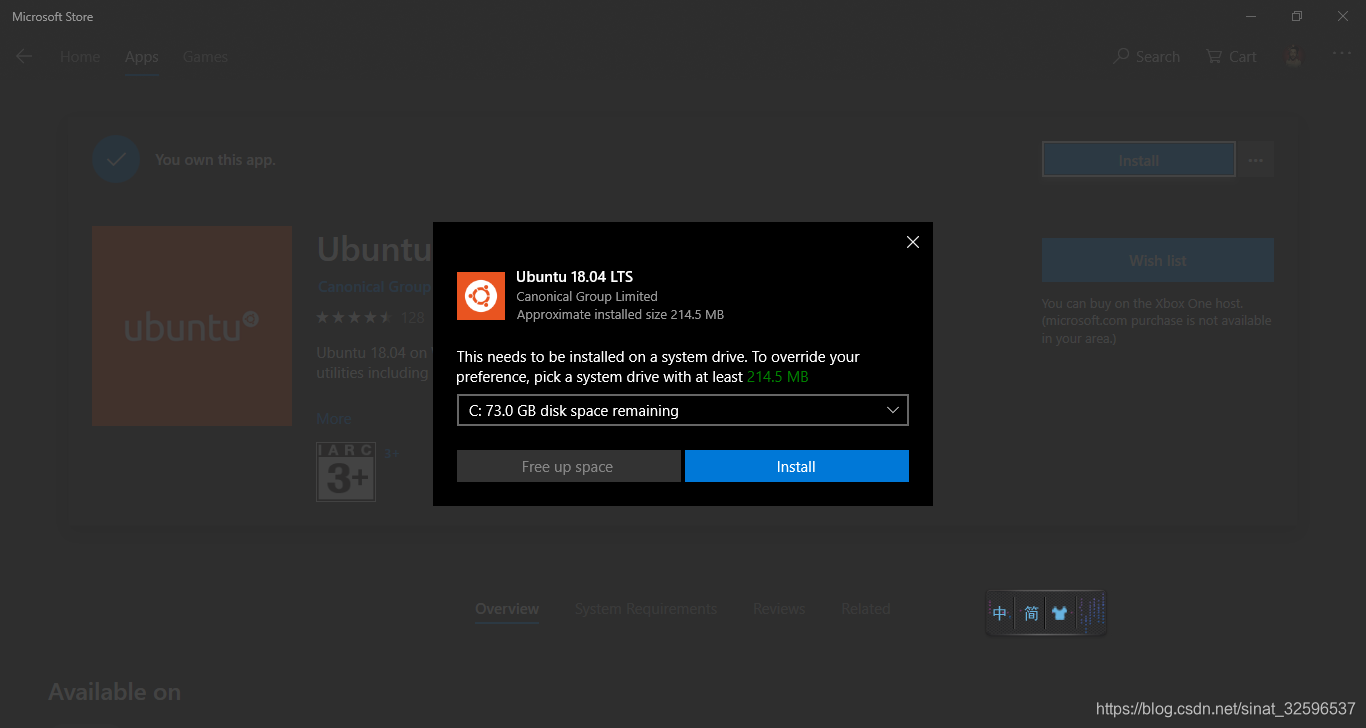
针对第一种安装方法,即只用命令行没有在windows应用商场安装Ubuntu的用户:这时,你的Linux子系统安装路径是:C:\Users\username\AppData\Local\lxss,注意,lxss是系统隐藏文件且是系统文件夹,
针对第二种安装方法,在windows应用商场安装Ubuntu的用户: C:\Users\username\AppData\Local\Packages\CanonicalGroupLimited.Ubuntu18.04onWindows_79rhkp1fndgsc
Linux子系统迁移:
下载 LxRunOffline(点此下载)
查看已经安装的子系统
LxRunOffline list移动子系统到新的目录
LxRunOffline move -n Ubuntu-18.04 -d D:\Ubuntu.windows\installed\Ubuntu查看子系统安装路径
lxrunoffline get-dir -n Ubuntu-18.04安装一个子系统
LxRunOffline i -n Ubuntu-18.04 -d D:\Ubuntu.windows\installed\Ubuntu -s注册一个子系统
LxRunOffline rg -n Ubuntu-18.04 -d D:\Ubuntu.windows\installed\UbuntuLxRunOffline使用说明
- Supported actions are:
- l, list List all installed distributions.
- gd, get-default Get the default distribution, which is used by bash.exe.
- sd, set-default Set the default distribution, which is used by bash.exe.
- i, install Install a new distribution.
- ui, uninstall Uninstall a distribution.
- rg, register Register an existing installation directory.
- ur, unregister Unregister a distribution but not delete the installation directory.
- m, move Move a distribution to a new directory.
- d, duplicate Duplicate an existing distribution in a new directory.
- e, export Export a distribution's filesystem to a .tar.gz file, which can be imported by the "install" command.
- r, run Run a command in a distribution.
- di, get-dir Get the installation directory of a distribution.
- gv, get-version Get the filesystem version of a distribution.
- ge, get-env Get the default environment variables of a distribution.
- se, set-env Set the default environment variables of a distribution.
- ae, add-env Add to the default environment variables of a distribution.
- re, remove-env Remove from the default environment variables of a distribution.
- gu, get-uid Get the UID of the default user of a distribution.
- su, set-uid Set the UID of the default user of a distribution.
- gk, get-kernelcmd Get the default kernel command line of a distribution.
- sk, set-kernelcmd Set the default kernel command line of a distribution.
- gf, get-flags Get some flags of a distribution. See https://docs.microsoft.com/en-us/previous-versions/windows/desktop/api/wslapi/ne-wslapi-wsl_distribution_flags for details.
- sf, set-flags Set some flags of a distribution. See https://docs.microsoft.com/en-us/previous-versions/windows/desktop/api/wslapi/ne-wslapi-wsl_distribution_flags for details.
- s, shortcut Create a shortcut to launch a distribution.
- ec, export-config Export configuration of a distribution to an XML file.
- ic, import-config Import configuration of a distribution from an XML file.
- version Get version information about this LxRunOffline.exe.

支持的操作包括:
- l, list 列出所有已安装的分发版。
- gd, get-default 获取bash.exe使用的默认分发。
- sd, set-default 设置bash.exe使用的默认分发。
- i, install 安装新的分发版。
- ui, uninstall 卸载卸载一个分发。
- rg, register 注册一个现有的安装目录。
- ur, unregister 注销注销分发,但不删除安装目录。
- m, move 将分发移动到新目录。
- d, duplicate 复制复制新目录中的现有分发。
- e, export 导出将分发的文件系统导出到.tar.gz文件,该文件可以通过“install”命令导入。而且。
- r, run 在分发中运行一个命令。
- di, get-dir 获取一个分发版的安装目录。
- gv, get-version 获取分发版的文件系统版本。
- ge, get-env 获取分布的默认环境变量。
- se, set-env 设置分发的默认环境变量。
- ae, add-env 添加到分发的默认环境变量中。
- re, remove-env 从分发的默认环境变量中移除。
- gu, get-uid 获取分发的默认用户的uid。
- su, set-uid 设置分发的默认用户的uid。
- gk, get-kernelcmd 获取分发的默认内核命令行。
- sk, set-kernelcmd 设置分发的默认内核命令行。
- gf, get-flags 得到一些分布的标志。有关详细信息,请参阅https://docs.microsoft.com/en-us/...
- sf, set-flags 设置分发的一些标志。有关详细信息,请参阅https://docs.microsoft.com/en-us/...
- s, shortcut 快捷方式创建启动分发的快捷方式。
- ec, export-config 将分发的配置导出配置导出到XML文件。
- ic, import-config 从XML文件导入分发的配置。
- version version获取有关此lxrunoffline.exe的版本信息。
使用阿里的镜像源:
- # 1.备份原来的数据源配置文件
- cp /etc/apt/sources.list /etc/apt/sources.list_backup
- # 2.编辑数据源配置文件
- vi /etc/apt/sources.list
源路径:
- deb http://mirrors.aliyun.com/ubuntu/ trusty main restricted universe multiverse
- deb http://mirrors.aliyun.com/ubuntu/ trusty-security main restricted universe multiverse
- deb http://mirrors.aliyun.com/ubuntu/ trusty-updates main restricted universe multiverse
- deb http://mirrors.aliyun.com/ubuntu/ trusty-proposed main restricted universe multiverse
- deb http://mirrors.aliyun.com/ubuntu/ trusty-backports main restricted universe multiverse
- deb-src http://mirrors.aliyun.com/ubuntu/ trusty main restricted universe multiverse
- deb-src http://mirrors.aliyun.com/ubuntu/ trusty-security main restricted universe multiverse
- deb-src http://mirrors.aliyun.com/ubuntu/ trusty-updates main restricted universe multiverse
- deb-src http://mirrors.aliyun.com/ubuntu/ trusty-proposed main restricted universe multiverse
- deb-src http://mirrors.aliyun.com/ubuntu/ trusty-backports main restricted universe multiverse
声明:本文内容由网友自发贡献,不代表【wpsshop博客】立场,版权归原作者所有,本站不承担相应法律责任。如您发现有侵权的内容,请联系我们。转载请注明出处:https://www.wpsshop.cn/article/detail/53589
推荐阅读


相关标签

