
热门标签
热门文章
当前位置: article > 正文
使用SVM实现简单的文本分类(自然语言处理)_svm文本分类
作者:数据结构灵魂 | 2024-02-01 10:57:27
赞
踩
svm文本分类
使用SVM实现文本分类(包括SVM项目简单运用,excel表格操作-主要是写入)
备注:
1、前面4步(也就是模型训练,网上有很多文章,大都类似),但是第5步的使用训练好的模型,我浏览了一下网上的内容,很少有相关内容,所以本文重点是第5步。
2、识别结果(也就是机器识别是垃圾还是正常评论的具体结果- -网上大都是只给准确率)是train_pre = svc.predict(train_tfidf),train_pre的内容就是识别结果的集合
准备:
包:sklearn、pickle、xlwt(excel写操作的包)
文件:评论文件(包括正常和垃圾,是自然语言)、停用词文件(简单点的话,就是一些标点符号之类的)
一、SVM项目
基本步骤:
1、读取数据
2、对数据进行处理(停用词、词频和转换成向量、特征选择)- -自然语言处理才需要
3、模型训练
4、保存模型(使用pickle库来序列化保存成pickle文件)
5、使用训练好的模型
1、读取数据
x_train,x_test是训练集和测试集的数据,也就是评论;y_train,y_test是对应的标签,比如是正常评论就是1,垃圾评论就是0;num_normal,num_spam是各自总共的数目
from sklearn.model_selection import train_test_split
# 得到评论,normal_file为存放正常评论的文件,spam_file为存放垃圾评论的文件
x = []
y = []
file1 = open("1.txt", 'r', encoding='utf-8')
lines = file1.readlines()
for line in lines:
    temp = ""
    for db in line.split():
        temp = temp + db + " "
    x.append(temp)
num_normal = len(x)
file2 = open("2.txt", 'r', encoding='utf-8')
lines = file2.readlines()
for line in lines:
    temp = ""
    for db in line.split():
        temp = temp + db + " "
    x.append(temp)
num_spam = len(x) - num_normal
# 得到数据标签
for i in range(num_normal):
    y.append(1)

for i in range(num_spam):
    y.append(0)

x_train, x_test, y_train, y_test = train_test_split(x, y, test_size=0.3)  # 对数据集进行随机划分,训练过程暂时没有使用测试数据

- 1
- 2
- 3
- 4
- 5
- 6
- 7
- 8
- 9
- 10
- 11
- 12
- 13
- 14
- 15
- 16
- 17
- 18
- 19
- 20
- 21
- 22
- 23
- 24
- 25
- 26
- 27
- 28
- 29
- 30
2、对数据进行处理(停用词、词频和转换成向量、特征选择)
from sklearn.feature_extraction.text import CountVectorizer
from sklearn.feature_extraction.text import TfidfTransformer
from sklearn.feature_selection import SelectKBest
from sklearn.feature_selection import chi2
from sklearn.metrics import classification_report

stopword_file = open("stopword.txt", 'r')  # stopword.txt是停用词存储所在的文件
stopword_content = stopword_file.read()
stopword_list = stopword_content.splitlines()
stopword_file.close()

count_vect = CountVectorizer(stop_words=stopword_list, token_pattern=r"(?u)\b\w+\b")
train_count = count_vect.fit_transform(x_train)


"""
tf-idf chi特征选择;类似将自然语言转成机器能识别的向量
"""
tfidf_trainformer = TfidfTransformer()
train_tfidf = tfidf_trainformer.fit_transform(train_count)
select = SelectKBest(chi2, k=20000)
train_tfidf_chi = select.fit_transform(train_tfidf, y_train)
- 1
- 2
- 3
- 4
- 5
- 6
- 7
- 8
- 9
- 10
- 11
- 12
- 13
- 14
- 15
- 16
- 17
- 18
- 19
- 20
- 21
- 22
3、模型训练
from sklearn.svm import SVC
svc = SVC(kernel = 'linear')
svc.fit(train_tfidf, y_train)  # 模型训练
print("train accurancy:",svc.score(train_tfidf, y_train))  # important 准确值
train_pre = svc.predict(train_tfidf)  # 预测值(结果内容是识别的具体值)
print(classification_report(train_pre, y_train))  # 输出分类报告(大概就是准确率、召回率)
- 1
- 2
- 3
- 4
- 5
- 6
4、存储模型
import pickle
with open('svm.pickle', 'wb') as fw:
    pickle.dump(svc, fw)

with open('count_vect.pickle', 'wb') as fw:
    pickle.dump(count_vect, fw)

with open('tfidf_trainformer.pickle', 'wb') as fw:
    pickle.dump(tfidf_trainformer, fw)
- 1
- 2
- 3
- 4
- 5
- 6
- 7
- 8
- 9
5、使用训练好的模型
import pickle

from pandas.tests.io.excel.test_xlwt import xlwt
from sklearn.feature_selection import SelectKBest
from sklearn.feature_selection import chi2
from sklearn.model_selection import train_test_split

"""
读取数据
"""
# 得到评论,normal_file为存放正常评论的文件,spam_file为存放垃圾评论的文件
x = []
y = []
file1 = open("1.txt", 'r', encoding='utf-8')
lines = fi.readlines()
for line in lines:
    temp = ""
    for db in line.split():
        temp = temp + db + " "
    x.append(temp)
num_normal = len(x)
file2 = open("2.txt", 'r', encoding='utf-8')
lines = file2.readlines()
for line in lines:
    temp = ""
    for db in line.split():
        temp = temp + db + " "
    x.append(temp)
num_spam = len(x) - num_normal
# 得到数据标签
for i in range(num_normal):
    y.append(1)

for i in range(num_spam):
    y.append(0)

x_train, x_test, y_train, y_test = train_test_split(x, y, test_size=0.2)  # 随机划分,训练过程暂时没有使用测试数据

"""
读取模型
"""
with open('svm.pickle', 'rb') as svm:
    svm1 = pickle.load(svm)

with open('count_vect.pickle', 'rb') as count_vect:
    count_vect1 = pickle.load(count_vect)

with open('tfidf_trainformer.pickle', 'rb') as tfidf_trainformer:
    tfidf_trainformer1 = pickle.load(tfidf_trainformer)


"""
停用词处理等
"""
test_count = count_vect1.transform(x_test)

"""
特征选择
"""
test_tfidf = tfidf_trainformer1.transform(test_count)
select = SelectKBest(chi2, k=10000)
# test_tfidf_chi = select.transform(test_tfidf)

"""
使用模型识别数据
"""
accurancy = svm1.score(test_tfidf, y_test)
print("accurancy", accurancy)  # 识别准确率
test_pre = svm1.predict(test_tfidf)  # 识别结果,类型是numpy.int32(可以使用int()直接转换成int型),后面通过excel来存储
- 1
- 2
- 3
- 4
- 5
- 6
- 7
- 8
- 9
- 10
- 11
- 12
- 13
- 14
- 15
- 16
- 17
- 18
- 19
- 20
- 21
- 22
- 23
- 24
- 25
- 26
- 27
- 28
- 29
- 30
- 31
- 32
- 33
- 34
- 35
- 36
- 37
- 38
- 39
- 40
- 41
- 42
- 43
- 44
- 45
- 46
- 47
- 48
- 49
- 50
- 51
- 52
- 53
- 54
- 55
- 56
- 57
- 58
- 59
- 60
- 61
- 62
- 63
- 64
- 65
- 66
- 67
- 68
- 69
二、excel表格操作
# 1.创建工作簿
workbook = xlwt.Workbook(encoding='ascii')
# 2.创建表
sheet = workbook.add_sheet('Sheet1')
# 3.写入数据
for index in range(0, lent_p):
    sheet.write(index, 0, int(test_pre[index]))
    sheet.write(index, 1, y_test[index])
# 4.保存文件
workbook.save('data.xls')
- 1
- 2
- 3
- 4
- 5
- 6
- 7
- 8
- 9
- 10
训练模型部分完整代码
from sklearn.metrics import classification_report
from sklearn.model_selection import train_test_split
from sklearn.svm import SVC
import pickle

# 得到评论,normal_file为存放正常评论的文件,spam_file为存放垃圾评论的文件
x = []
y = []
file1 = open("1.txt", 'r', encoding='utf-8')
lines = file1.readlines()
for line in lines:
    temp = ""
    for db in line.split():
        temp = temp + db + " "
    x.append(temp)
num_normal = len(x)
file2 = open("2.txt", 'r', encoding='utf-8')
lines = file2.readlines()
for line in lines:
    temp = ""
    for db in line.split():
        temp = temp + db + " "
    x.append(temp)
num_spam = len(x) - num_normal
# 得到数据标签
for i in range(num_normal):
    y.append(1)

for i in range(num_spam):
    y.append(0)

x_train, x_test, y_train, y_test = train_test_split(x, y, test_size=0.2)  # 随机划分,训练过程暂时没有使用测试数据

from sklearn.feature_extraction.text import CountVectorizer
from sklearn.feature_extraction.text import TfidfTransformer
from sklearn.feature_selection import SelectKBest
from sklearn.feature_selection import chi2

stopword_file = open("stopword.txt", 'r')  # stopwords.txt是停用词存储所在的文件
stopword_content = stopword_file.read()
stopword_list = stopword_content.splitlines()
stopword_file.close()

count_vect = CountVectorizer(stop_words=stopword_list, token_pattern=r"(?u)\b\w+\b")
train_count = count_vect.fit_transform(x_train)


"""
tf-idf chi特征选择;类似将自然语言转成机器能识别的向量
"""
tfidf_trainformer = TfidfTransformer()
train_tfidf = tfidf_trainformer.fit_transform(train_count)
select = SelectKBest(chi2, k=20000)
train_tfidf_chi = select.fit_transform(train_tfidf, y_train)

svc = SVC(kernel = 'linear')
svc.fit(train_tfidf, y_train)  # 模型训练
print("train accurancy:",svc.score(train_tfidf, y_train))  # important 准确值
train_pre = svc.predict(train_tfidf)  # 预测值(结果内容是识别的具体值)
print(classification_report(train_pre, y_train))  # 输出分类报告(大概就是准确率、召回率)

with open('svm.pickle', 'wb') as fw:
    pickle.dump(svc, fw)

with open('count_vect.pickle', 'wb') as fw:
    pickle.dump(count_vect, fw)

with open('tfidf_trainformer.pickle', 'wb') as fw:
    pickle.dump(tfidf_trainformer, fw)
- 1
- 2
- 3
- 4
- 5
- 6
- 7
- 8
- 9
- 10
- 11
- 12
- 13
- 14
- 15
- 16
- 17
- 18
- 19
- 20
- 21
- 22
- 23
- 24
- 25
- 26
- 27
- 28
- 29
- 30
- 31
- 32
- 33
- 34
- 35
- 36
- 37
- 38
- 39
- 40
- 41
- 42
- 43
- 44
- 45
- 46
- 47
- 48
- 49
- 50
- 51
- 52
- 53
- 54
- 55
- 56
- 57
- 58
- 59
- 60
- 61
- 62
- 63
- 64
- 65
- 66
- 67
- 68
- 69
训练结果:
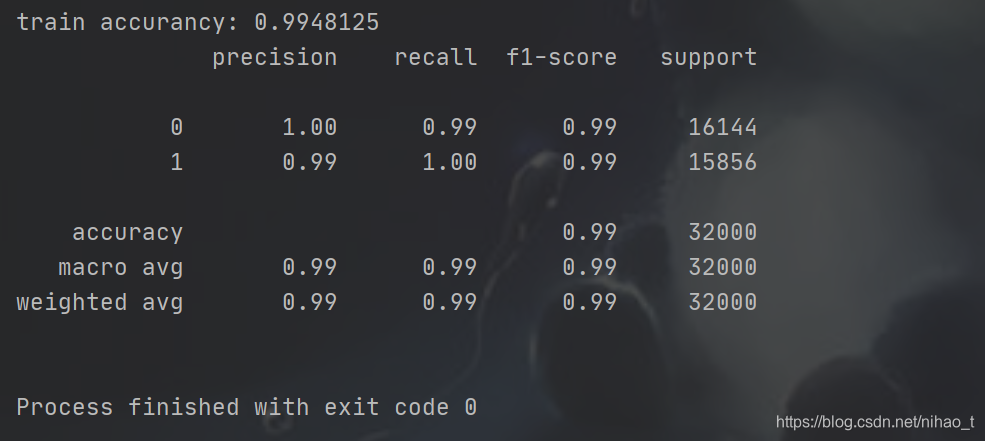
测试部分完整代码
import pickle

from pandas.tests.io.excel.test_xlwt import xlwt
from sklearn.feature_selection import SelectKBest
from sklearn.feature_selection import chi2
from sklearn.model_selection import train_test_split

"""
读取数据
"""
# 得到评论,normal_file为存放正常评论的文件,spam_file为存放垃圾评论的文件
x = []
y = []
file1 = open("1.txt", 'r', encoding='utf-8')
lines = file1.readlines()
for line in lines:
    temp = ""
    for db in line.split():
        temp = temp + db + " "
    x.append(temp)
num_normal = len(x)
file2 = open("2.txt", 'r', encoding='utf-8')
lines = file2.readlines()
for line in lines:
    temp = ""
    for db in line.split():
        temp = temp + db + " "
    x.append(temp)
num_spam = len(x) - num_normal
# 得到数据标签
for i in range(num_normal):
    y.append(1)

for i in range(num_spam):
    y.append(0)

x_train, x_test, y_train, y_test = train_test_split(x, y, test_size=0.2)  # 随机划分,训练过程暂时没有使用测试数据

"""
读取模型
"""
with open('svm.pickle', 'rb') as svm:
    svm1 = pickle.load(svm)

with open('count_vect.pickle', 'rb') as count_vect:
    count_vect1 = pickle.load(count_vect)

with open('tfidf_trainformer.pickle', 'rb') as tfidf_trainformer:
    tfidf_trainformer1 = pickle.load(tfidf_trainformer)


"""
停用词处理等
"""
test_count = count_vect1.transform(x_test)

"""
特征选择
"""
test_tfidf = tfidf_trainformer1.transform(test_count)
select = SelectKBest(chi2, k=10000)
# test_tfidf_chi = select.transform(test_tfidf)

"""
使用模型识别数据
"""
accurancy = svm1.score(test_tfidf, y_test)
print("accurancy", accurancy)  # 识别准确率
test_pre = svm1.predict(test_tfidf)  # 识别结果,类型是numpy.int32(可以使用int()直接转换成int型),后面通过excel来存储
lent_p = len(test_pre)
# 1.创建工作簿
workbook = xlwt.Workbook(encoding='ascii')
# 2.创建表
sheet = workbook.add_sheet('Sheet1')
# 3.写入数据
for index in range(0, lent_p):
    sheet.write(index, 0, int(test_pre[index]))
    sheet.write(index, 1, y_test[index])
# 4.保存文件
workbook.save('data.xls')
- 1
- 2
- 3
- 4
- 5
- 6
- 7
- 8
- 9
- 10
- 11
- 12
- 13
- 14
- 15
- 16
- 17
- 18
- 19
- 20
- 21
- 22
- 23
- 24
- 25
- 26
- 27
- 28
- 29
- 30
- 31
- 32
- 33
- 34
- 35
- 36
- 37
- 38
- 39
- 40
- 41
- 42
- 43
- 44
- 45
- 46
- 47
- 48
- 49
- 50
- 51
- 52
- 53
- 54
- 55
- 56
- 57
- 58
- 59
- 60
- 61
- 62
- 63
- 64
- 65
- 66
- 67
- 68
- 69
- 70
- 71
- 72
- 73
- 74
- 75
- 76
- 77
- 78
- 79
- 80
声明:本文内容由网友自发贡献,不代表【wpsshop博客】立场,版权归原作者所有,本站不承担相应法律责任。如您发现有侵权的内容,请联系我们。转载请注明出处:https://www.wpsshop.cn/article/detail/53419
推荐阅读
- jdk新特性 ...
赞
踩
相关标签

