
热门标签
热门文章
- 1<2>基础知识——路由和数据包转发介绍_转发数据包用到的字段是
- 2Eigen中用于特征值分解的几个类的介绍_eigensolver
- 3【C语言】-想要知道如何获得随机数吗??那还不赶快进来!!!_c语言获取随机数
- 4在eclipse项目中使用maven管理依赖_eclipse怎么使用maven拉取依赖
- 5ECS 7天实践训练营day3-云服务器新手上路_ecs云服务器新手上路
- 6Rxjava 源码解析(三) - Schedulers默认线程池_schedulers.io
- 7Interview之AI:人工智能领域岗位求职面试—人工智能算法工程师知识框架及课程大纲(AI基础之数学基础/数据结构与算法/编程学习基础、ML算法简介、DL算法简介)来理解技术交互流程_微积分、线性代数、概率论、统计、基础编程(含数据结构和算法基础知识)
- 8AIGC提示(prompt)工程之开宗明义篇_aigc poc以及代码提示工程
- 9科大讯飞发布星火认知大模型2.0版——体验实测_marianmtmodel, mariantokenizer
- 10华为正式发布鸿蒙OS操作系统,分布式架构首次用于终端
当前位置: article > 正文
SpringBoot——动态多线程并发定时任务_springboot 多线程并发
作者:程序诗人 | 2024-01-31 23:31:57
赞
踩
springboot 多线程并发
实现定时任务有多种方式,使用spring自带的,继承SchedulingConfigurer的方式。
一、实现
1、启动类
在启动类添加注解@EnableScheduling开启,不然不起用做。
@EnableScheduling
@SpringBootApplication
public class TansciApplication {

    public static void main(String[] args) {
        SpringApplication.run(TansciApplication.class, args);
    }

}
- 1
- 2
- 3
- 4
- 5
- 6
- 7
- 8
- 9
2、新建任务类
添加注解@Component注册到spring的容器中。
package com.tansci.common.task;

import com.tansci.common.constant.Constants;
import com.tansci.domain.system.TaskConfig;
import com.tansci.service.system.TaskContextService;
import lombok.extern.slf4j.Slf4j;
import org.springframework.beans.factory.annotation.Autowired;
import org.springframework.scheduling.annotation.SchedulingConfigurer;
import org.springframework.scheduling.config.CronTask;
import org.springframework.scheduling.config.ScheduledTaskRegistrar;
import org.springframework.stereotype.Component;
import org.springframework.util.StringUtils;

import javax.annotation.PreDestroy;
import java.util.List;
import java.util.Objects;
import java.util.concurrent.ConcurrentHashMap;
import java.util.concurrent.Executors;
import java.util.concurrent.ScheduledFuture;

/**
 * @ClassName: ScheduledTask.java
 * @ClassPath: com.tansci.common.task.ScheduledTask.java
 * @Description: 定时任务
 * @Author: tanyp
 * @Date: 2022/2/25 9:30
 **/
@Slf4j
@Component
public class ScheduledTask implements SchedulingConfigurer {

    private volatile ScheduledTaskRegistrar registrar;

    private final ConcurrentHashMap<String, ScheduledFuture<?>> scheduledFutures = new ConcurrentHashMap<>();

    private final ConcurrentHashMap<String, CronTask> cronTasks = new ConcurrentHashMap<>();

    @Autowired
    private TaskContextService taskContextService;

    @Override
    public void configureTasks(ScheduledTaskRegistrar registrar) {
        registrar.setScheduler(Executors.newScheduledThreadPool(Constants.DEFAULT_THREAD_POOL));
        this.registrar = registrar;
    }

    @PreDestroy
    public void destroy() {
        this.registrar.destroy();
    }

    /**
     * @MonthName: refreshTask
     * @Description: 初始化任务
     * 1、从数据库获取执行任务的集合【TaskConfig】
     * 2、通过调用 【refresh】 方法刷新任务列表
     * 3、每次数据库中的任务发生变化后重新执行【1、2】
     * @Author: tanyp
     * @Date: 2022/2/25 9:42
     * @Param: [tasks]
     * @return: void
     **/
    public void refreshTask(List<TaskConfig> tasks) {
        // 删除已经取消任务
        scheduledFutures.keySet().forEach(key -> {
            if (Objects.isNull(tasks) || tasks.size() == 0) {
                scheduledFutures.get(key).cancel(false);
                scheduledFutures.remove(key);
                cronTasks.remove(key);
                return;
            }
            tasks.forEach(task -> {
                if (!Objects.equals(key, task.getTaskId())) {
                    scheduledFutures.get(key).cancel(false);
                    scheduledFutures.remove(key);
                    cronTasks.remove(key);
                    return;
                }
            });
        });

        // 添加新任务、更改执行规则任务
        tasks.forEach(item -> {
            String expression = item.getExpression();
            // 任务表达式为空则跳过
            if (StringUtils.isEmpty(expression)) {
                return;
            }

            // 任务已存在并且表达式未发生变化则跳过
            if (scheduledFutures.containsKey(item.getTaskId()) && cronTasks.get(item.getTaskId()).getExpression().equals(expression)) {
                return;
            }

            // 任务执行时间发生了变化,则删除该任务
            if (scheduledFutures.containsKey(item.getTaskId())) {
                scheduledFutures.get(item.getTaskId()).cancel(false);
                scheduledFutures.remove(item.getTaskId());
                cronTasks.remove(item.getTaskId());
            }

            CronTask task = new CronTask(new Runnable() {
                @Override
                public void run() {
                    // 执行业务逻辑
                    try {
                        log.info("====执行单个任务,任务ID【{}】执行规则【{}】=======", item.getTaskId(), item.getExpression());
                        taskContextService.execute(item.getCode());
                    } catch (Exception e) {
                        log.error("执行任务异常,异常信息:{}", e);
                    }
                }
            }, expression);
            ScheduledFuture<?> future = registrar.getScheduler().schedule(task.getRunnable(), task.getTrigger());
            cronTasks.put(item.getTaskId(), task);
            scheduledFutures.put(item.getTaskId(), future);
        });
    }

}

- 1
- 2
- 3
- 4
- 5
- 6
- 7
- 8
- 9
- 10
- 11
- 12
- 13
- 14
- 15
- 16
- 17
- 18
- 19
- 20
- 21
- 22
- 23
- 24
- 25
- 26
- 27
- 28
- 29
- 30
- 31
- 32
- 33
- 34
- 35
- 36
- 37
- 38
- 39
- 40
- 41
- 42
- 43
- 44
- 45
- 46
- 47
- 48
- 49
- 50
- 51
- 52
- 53
- 54
- 55
- 56
- 57
- 58
- 59
- 60
- 61
- 62
- 63
- 64
- 65
- 66
- 67
- 68
- 69
- 70
- 71
- 72
- 73
- 74
- 75
- 76
- 77
- 78
- 79
- 80
- 81
- 82
- 83
- 84
- 85
- 86
- 87
- 88
- 89
- 90
- 91
- 92
- 93
- 94
- 95
- 96
- 97
- 98
- 99
- 100
- 101
- 102
- 103
- 104
- 105
- 106
- 107
- 108
- 109
- 110
- 111
- 112
- 113
- 114
- 115
- 116
- 117
- 118
- 119
- 120
3、创建自启动任务类
package com.tansci.common.task;

import com.baomidou.mybatisplus.core.toolkit.Wrappers;
import com.tansci.domain.system.TaskConfig;
import com.tansci.service.system.TaskConfigService;
import lombok.extern.slf4j.Slf4j;
import org.springframework.beans.factory.annotation.Autowired;
import org.springframework.boot.ApplicationArguments;
import org.springframework.boot.ApplicationRunner;
import org.springframework.stereotype.Component;

import java.util.List;

/**
 * @ClassName: TaskApplicationRunner.java
 * @ClassPath: com.tansci.common.task.TaskApplicationRunner.java
 * @Description: 任务自启动配置
 * @Author: tanyp
 * @Date: 2022/2/25 9:43
 **/
@Slf4j
@Component
public class TaskApplicationRunner implements ApplicationRunner {

    @Autowired
    private ScheduledTask scheduledTask;

    @Autowired
    private TaskConfigService taskConfigService;

    @Override
    public void run(ApplicationArguments args) {
        try {
            log.info("================项目启动初始化定时任务====开始===========");
            List<TaskConfig> tasks = taskConfigService.list(Wrappers.<TaskConfig>lambdaQuery().eq(TaskConfig::getStatus, 1));
            log.info("========初始化定时任务数为:{}=========", tasks.size());
            scheduledTask.refreshTask(tasks);
            log.info("================项目启动初始化定时任务====完成==========");
        } catch (Exception e) {
            log.error("================项目启动初始化定时任务====异常:{}", e);
        }
    }

}
- 1
- 2
- 3
- 4
- 5
- 6
- 7
- 8
- 9
- 10
- 11
- 12
- 13
- 14
- 15
- 16
- 17
- 18
- 19
- 20
- 21
- 22
- 23
- 24
- 25
- 26
- 27
- 28
- 29
- 30
- 31
- 32
- 33
- 34
- 35
- 36
- 37
- 38
- 39
- 40
- 41
- 42
- 43
- 44
4、实体
此处省略 Mapper、Service及实现类。
package com.tansci.domain.system;

import com.baomidou.mybatisplus.annotation.IdType;
import com.baomidou.mybatisplus.annotation.TableField;
import com.baomidou.mybatisplus.annotation.TableId;
import com.baomidou.mybatisplus.annotation.TableName;
import com.fasterxml.jackson.annotation.JsonFormat;
import io.swagger.annotations.ApiModel;
import io.swagger.annotations.ApiModelProperty;
import lombok.AllArgsConstructor;
import lombok.Builder;
import lombok.Data;
import lombok.NoArgsConstructor;

import java.time.LocalDateTime;

/**
 * @ClassName: TaskConfig.java
 * @ClassPath: com.tansci.domain.system.TaskConfig.java
 * @Description: 任务配置
 * @Author: tanyp
 * @Date: 2022/2/25 9:35
 **/
@Data
@Builder
@AllArgsConstructor
@NoArgsConstructor
@TableName(value = "task_config")
@ApiModel(value = "任务配置")
public class TaskConfig {

    @ApiModelProperty(value = "主键id")
    @TableId(type = IdType.ASSIGN_UUID)
    private String id;

    @ApiModelProperty(value = "任务服务名称")
    private String code;

    @ApiModelProperty(value = "任务编码")
    private String taskId;

    @ApiModelProperty(value = "任务执行规则时间:cron表达式")
    private String expression;

    @ApiModelProperty(value = "任务名称")
    private String name;

    @ApiModelProperty(value = "状态:0、未启动,1、正常")
    private Integer status;

    @ApiModelProperty(value = "状态")
    @TableField(exist = false)
    private String statusName;

    @ApiModelProperty(value = "创建人")
    private String creater;

    @ApiModelProperty(value = "更新时间")
    @JsonFormat(pattern = "yyyy-MM-dd HH:mm:ss", locale = "zh", timezone = "GMT+8")
    private LocalDateTime updateTime;

    @ApiModelProperty(value = "创建时间")
    @JsonFormat(pattern = "yyyy-MM-dd HH:mm:ss", locale = "zh", timezone = "GMT+8")
    private LocalDateTime createTime;

    @ApiModelProperty(value = "描述")
    private String remarks;

}
- 1
- 2
- 3
- 4
- 5
- 6
- 7
- 8
- 9
- 10
- 11
- 12
- 13
- 14
- 15
- 16
- 17
- 18
- 19
- 20
- 21
- 22
- 23
- 24
- 25
- 26
- 27
- 28
- 29
- 30
- 31
- 32
- 33
- 34
- 35
- 36
- 37
- 38
- 39
- 40
- 41
- 42
- 43
- 44
- 45
- 46
- 47
- 48
- 49
- 50
- 51
- 52
- 53
- 54
- 55
- 56
- 57
- 58
- 59
- 60
- 61
- 62
- 63
- 64
- 65
- 66
- 67
- 68
- 69
5、动态调用任务配置信息
package com.tansci.service.impl.system;

import com.tansci.service.system.TaskContextService;
import com.tansci.service.system.TaskRegisterService;
import lombok.extern.slf4j.Slf4j;
import org.springframework.beans.factory.annotation.Autowired;
import org.springframework.stereotype.Service;

import java.util.Map;

/**
 * @ClassName: TaskContextServiceImpl.java
 * @ClassPath: com.tansci.service.impl.system.TaskContextServiceImpl.java
 * @Description: 动态调用任务配置信息
 * @Author: tanyp
 * @Date: 2022/2/25 10:12
 **/
@Slf4j
@Service
public class TaskContextServiceImpl implements TaskContextService {

    /**
     * 任务注册器
     */
    @Autowired
    private Map<String, TaskRegisterService> componentServices;

    /**
     * @MonthName: execute
     * @Description: 解析器
     * @Author: tanyp
     * @Date: 2022/2/25 10:13
     * @Param: [taskServerName]
     * @return: void
     **/
    @Override
    public void execute(String taskServerName) {
        componentServices.get(taskServerName).register();
    }

}
- 1
- 2
- 3
- 4
- 5
- 6
- 7
- 8
- 9
- 10
- 11
- 12
- 13
- 14
- 15
- 16
- 17
- 18
- 19
- 20
- 21
- 22
- 23
- 24
- 25
- 26
- 27
- 28
- 29
- 30
- 31
- 32
- 33
- 34
- 35
- 36
- 37
- 38
- 39
- 40
- 41
6、任务注册器
package com.tansci.service.system;

/**
 * @ClassName: TaskRegisterService.java
 * @ClassPath: com.tansci.service.system.TaskRegisterService.java
 * @Description: 任务注册器
 * @Author: tanyp
 * @Date: 2022/2/25 10:05
 **/
public interface TaskRegisterService {

    void register();

}
- 1
- 2
- 3
- 4
- 5
- 6
- 7
- 8
- 9
- 10
- 11
- 12
- 13
- 14
7、自定义任务测试
实现 TaskRegisterService 接口,创建业务实现即可。
注意:
@Service("taskTest1Service")是唯一的,对应task_config表中的 code 字段;- expression 的配置为 cron 表达式。
@Slf4j
@Service("taskTest1Service")
public class TaskTest1ServiceImpl implements TaskRegisterService {

    @Override
    public void register() {
        log.info("===========自定义任务测试【TaskTest1ServiceImpl】====【1】=========");
    }
}
- 1
- 2
- 3
- 4
- 5
- 6
- 7
- 8
- 9
@Slf4j
@Service("taskTest2Service")
public class TaskTest2ServiceImpl implements TaskRegisterService {

    @Override
    public void register() {
        log.info("===========自定义任务测试【TaskTest2ServiceImpl】====【3】=========");
    }
}
- 1
- 2
- 3
- 4
- 5
- 6
- 7
- 8
- 9
二、测试
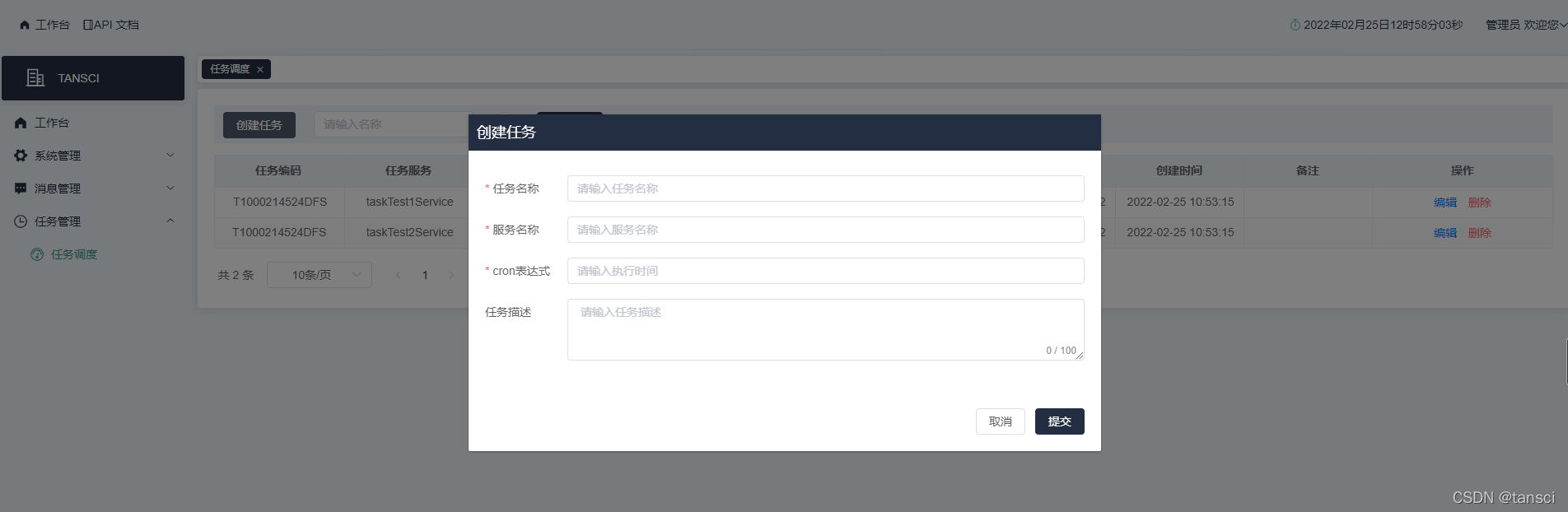
界面配置 taskTest1Service、taskTest2Service,如下:

执行结果:
2022-02-25 12:59:00,007  [pool-2-thread-1] INFO  com.tansci.common.task.ScheduledTask.run 107 - ====执行单个任务,任务ID【T1000214524DFS】执行规则【*/20 * * * * ?】=======
2022-02-25 12:59:00,007  [pool-2-thread-1] INFO  com.tansci.service.impl.system.task.TaskTest1ServiceImpl.register 20 - ===========自定义任务测试【TaskTest1ServiceImpl】====【1】=========
2022-02-25 12:59:20,015  [pool-2-thread-3] INFO  com.tansci.common.task.ScheduledTask.run 107 - ====执行单个任务,任务ID【T1000214524DFS】执行规则【*/20 * * * * ?】=======
2022-02-25 12:59:20,015  [pool-2-thread-3] INFO  com.tansci.service.impl.system.task.TaskTest1ServiceImpl.register 20 - ===========自定义任务测试【TaskTest1ServiceImpl】====【1】=========
2022-02-25 12:59:40,004  [pool-2-thread-3] INFO  com.tansci.common.task.ScheduledTask.run 107 - ====执行单个任务,任务ID【T1000214524DFS】执行规则【*/20 * * * * ?】=======
2022-02-25 12:59:40,004  [pool-2-thread-3] INFO  com.tansci.service.impl.system.task.TaskTest1ServiceImpl.register 20 - ===========自定义任务测试【TaskTest1ServiceImpl】====【1】=========
- 1
- 2
- 3
- 4
- 5
- 6
可以看到初始化的任务都在执行,并且是多线程在执行。
三、cron表达式
corn从左到右(用空格隔开):秒 分 小时 月份中的日期 月份 星期中的日期 年份。
| 字段 | 允许值 | 允许的特殊字符 |
|---|---|---|
| 秒(Seconds) | 0~59的整数 | , - * / |
| 分(Minutes) | 0~59的整数 | , - * / |
| 小时(Hours) | 0~23的整数 | , - * / |
| 日期(DayofMonth) | 1~31的整数 | ,- * ? / L W C |
| 月份(Month) | 1~12的整数或者 JAN-DEC | , - * / |
| 星期(DayofWeek) | 1~7的整数或者 SUN-SAT (1=SUN) | , - * ? / L C # |
| 年(可选,留空)(Year) | 1970~2099 | , - * / |
*:表示匹配该域的任意值。假如在Minutes域使用*, 即表示每分钟都会触发事件。?:只能用在DayofMonth和DayofWeek两个域。-:表示范围。例如在Minutes域使用5-20,表示从5分到20分钟每分钟触发一次/:表示起始时间开始触发,然后每隔固定时间触发一次。,:表示列出枚举值。例如:在Minutes域使用5,20,则意味着在5和20分每分钟触发一次。L:表示最后,只能出现在DayofWeek和DayofMonth域。W:表示有效工作日(周一到周五),只能出现在DayofMonth域,系统将在离指定日期的最近的有效工作日触发事件。LW:这两个字符可以连用,表示在某个月最后一个工作日,即最后一个星期五。#:用于确定每个月第几个星期几,只能出现在DayofMonth域。例如在4#2,表示某月的第二个星期三。
常用表达式例子
0 0 2 1 * ? *表示在每月的1日的凌晨2点调整任务0 15 10 ? * MON-FRI表示周一到周五每天上午10:15执行作业0 15 10 ? 6L 2002-2006表示2002-2006年的每个月的最后一个星期五上午10:15执行作0 0 10,14,16 * * ?每天上午10点,下午2点,4点0 0/30 9-17 * * ?朝九晚五工作时间内每半小时0 0 12 ? * WED表示每个星期三中午12点0 0 12 * * ?每天中午12点触发0 15 10 ? * *每天上午10:15触发0 15 10 * * ?每天上午10:15触发0 15 10 * * ? *每天上午10:15触发0 15 10 * * ? 20052005年的每天上午10:15触发0 * 14 * * ?在每天下午2点到下午2:59期间的每1分钟触发0 0/5 14 * * ?在每天下午2点到下午2:55期间的每5分钟触发0 0/5 14,18 * * ?在每天下午2点到2:55期间和下午6点到6:55期间的每5分钟触发0 0-5 14 * * ?在每天下午2点到下午2:05期间的每1分钟触发0 10,44 14 ? 3 WED每年三月的星期三的下午2:10和2:44触发0 15 10 ? * MON-FRI周一至周五的上午10:15触发0 15 10 15 * ?每月15日上午10:15触发0 15 10 L * ?每月最后一日的上午10:15触发0 15 10 ? * 6L每月的最后一个星期五上午10:15触发0 15 10 ? * 6L 2002-20052002年至2005年的每月的最后一个星期五上午10:15触发0 15 10 ? * 6#3每月的第三个星期五上午10:15触发
四、动态使用方式
1、启动方式有两种:
- 启动项目后,手动调用ScheduledTask.refreshTask(List tasks),并初始化任务列表;
- 使用我测试中的方式,配置项目启动完成后自动调用初始任务的方法,并初始化任务列表。
2、数据初始化
只需要给 List集合赋值并调用refreshTask()方法即可:
- 根据业务需求修改MyTask实体类;
- 这里的初始化数据可以从数据库读取数据赋值给集合;
例如:从mysql读取任务配置表的数据,调用refreshTask()方法。
3、如何动态?
- 修改:修改某一项正在执行的任务规则;
- 添加:添加一项新的任务;
- 删除:停止某一项正在执行的任务。
例如:我们有一张任务配置表,此时进行分别新增一条或多条数据、删除一条或多条数据、改一条数据,只需要完成以上任何一项操作后,重新调用一下refreshTask()方法即可。
怎么重新调用 refreshTask()方法:可以另外启一个任务实时监控任务表的数据变化。
源码
声明:本文内容由网友自发贡献,转载请注明出处:【wpsshop博客】
推荐阅读


相关标签

