
- 1云计算——ACA学习 云计算核心技术_ali云 aca
- 2每日OJ题_位运算③_力扣面试题 01.01. 判定字符是否唯一
- 3win10将Capslock变为Ctrl_用capslock代替ctrl
- 4vue @click.stop阻止冒泡事件的发生
- 5oh-my-posh - 终端个性化工具 - 美化PowerShell / cmd - 好物分享,真香~_oh my posh
- 6Android adb 常用命令及Android权限_adb reverse tcp:8081 tcp:8081
- 7printf函数输出指定位数_printf输出固定位数
- 8re:从0开始的CSS学习之路 8. 浏览器默认样式
- 9大数据的产生背景和发展历史_大数据的时代背景
- 10Qt实现多界面切换(附完整源码)_qt底栏切换页面
SpringBoot多线程,线程池讲解_springboot 多线程池
赞
踩
一、默认线程
当我们开启一个SpringBoot的项目,我们并未设置任何和线程相关的操作,但是我们的程序还是可以执行多个请求。甚至说绝大多数的项目,我们不需要对线程这块做任何操作。
但是如果是单线程的话,它显然满足不了我们系统的需求,所有我们有必要了解一下,它默认的线程情况。
1-1、测试默认线程池
import org.springframework.web.bind.annotation.GetMapping;
import org.springframework.web.bind.annotation.RestController;

@RestController
public class TestController {

    @GetMapping("/test")
    public String fun(){
        System.out.println(Thread.currentThread().getName());
        return "success";
    }
}
- 1
- 2
- 3
- 4
- 5
- 6
- 7
- 8
- 9
- 10
- 11
- 12
打印结果如下:我请求了14次
http-nio-8888-exec-1
http-nio-8888-exec-2
http-nio-8888-exec-3
http-nio-8888-exec-4
http-nio-8888-exec-5
http-nio-8888-exec-8
http-nio-8888-exec-7
http-nio-8888-exec-6
http-nio-8888-exec-9
http-nio-8888-exec-10
http-nio-8888-exec-1
http-nio-8888-exec-2
http-nio-8888-exec-3
http-nio-8888-exec-4
- 1
- 2
- 3
- 4
- 5
- 6
- 7
- 8
- 9
- 10
- 11
- 12
- 13
- 14
可以看到它默认是有10个线程去执行我们的任务的。这个其实就是tomcat的默认线程我们可以在yml/properties里面进行配置
server:
  port: 8888
  tomcat:
    min-spare-threads: 10
    max-threads: 200
- 1
- 2
- 3
- 4
- 5
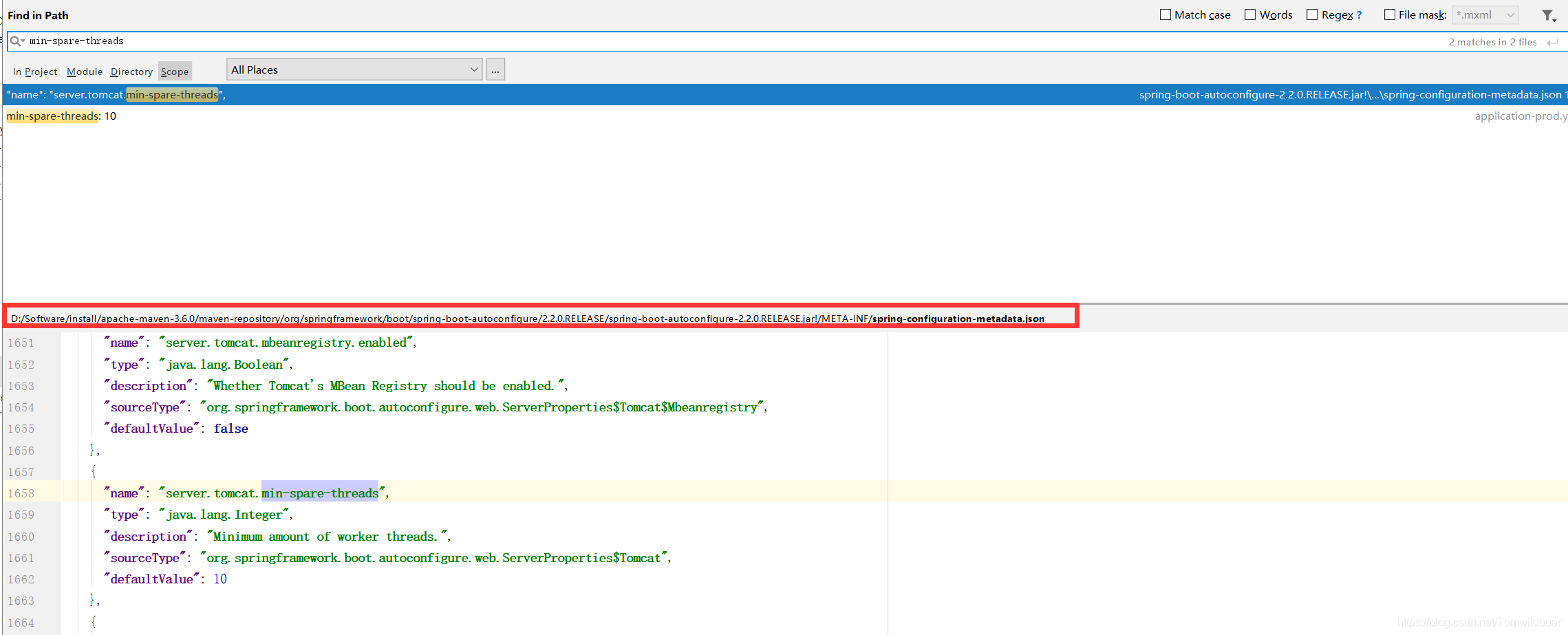
我们可以全局搜索一下这个min-spare-threads,这个json就是Sping的一些默认配置
可以看到里面配置了tomcat默认的线程数是10,最大线程数是200,而对于一般项目来说,这两个数字都已经够用了
1-2、定时任务默认线程
import org.springframework.scheduling.annotation.EnableScheduling;
import org.springframework.scheduling.annotation.Scheduled;
import org.springframework.stereotype.Component;

@Component
@EnableScheduling
public class XdxOne {

    @Scheduled(cron = "*/1 * * * * ?")
    public void testOne() throws Exception {
        System.out.println("one "  + " "+ Thread.currentThread().getName());
    }
}
- 1
- 2
- 3
- 4
- 5
- 6
- 7
- 8
- 9
- 10
- 11
- 12
- 13
打印结果如下:
one  scheduling-1
one  scheduling-1
one  scheduling-1
one  scheduling-1
one  scheduling-1
one  scheduling-1
one  scheduling-1
one  scheduling-1
- 1
- 2
- 3
- 4
- 5
- 6
- 7
- 8
我们也可以在上面那个json里面找到这样的一个配置 默认的定时任务是一个线程去执行的
{
  "name": "spring.task.scheduling.pool.size",
  "type": "java.lang.Integer",
  "description": "Maximum allowed number of threads.",
  "sourceType": "org.springframework.boot.autoconfigure.task.TaskSchedulingProperties$Pool",
  "defaultValue": 1
},
- 1
- 2
- 3
- 4
- 5
- 6
- 7
二、Java线程池核心线程数与最大线程数的区别
原文:https://blog.csdn.net/qq_33323054/article/details/106923732
2-1、线程池策略
corePoolSize:核心线程数;maximunPoolSize:最大线程数
每当有新的任务到线程池时
第一步: 先判断线程池中当前线程数量是否达到了corePoolSize,若未达到,则新建线程运行此任务,且任务结束后将该线程保留在线程池中,不做销毁处理,若当前线程数量已达到corePoolSize,则进入下一步;
第二步:判断工作队列(workQueue)是否已满,未满则将新的任务提交到工作队列中,满了则进入下一步;
第三步: 判断线程池中的线程数量是否达到了maxumunPoolSize,如果未达到,则新建一个工作线程来执行这个任务,如果达到了则使用饱和策略来处理这个任务。注意: 在线程池中的线程数量超过corePoolSize时,每当有线程的空闲时间超过了keepAliveTime,这个线程就会被终止。直到线程池中线程的数量不大于corePoolSize为止。
由第三步可知,在一般情况下,Java线程池中会长期保持corePoolSize个线程。
2-2、饱和策略
当工作队列满且线程个数达到maximunPoolSize后所采取的策略
AbortPolicy:默认策略;新任务提交时直接抛出未检查的异常RejectedExecutionException,该异常可由调用者捕获。
CallerRunsPolicy:既不抛弃任务也不抛出异常,使用调用者所在线程运行新的任务。
DiscardPolicy:丢弃新的任务,且不抛出异常。
DiscardOldestPolicy:调用poll方法丢弃工作队列队头的任务,然后尝试提交新任务
自定义策略:根据用户需要定制。
三、线程异步执行
在SpringBoot里面异步执行的很简单,只需要加上一个注解就行了 @Async
需要先加上开启异步的注解,在任何地方加上都可以。
import org.springframework.boot.SpringApplication;
import org.springframework.boot.autoconfigure.SpringBootApplication;
import org.springframework.scheduling.annotation.EnableAsync;

@SpringBootApplication
@EnableAsync
public class App {
    public static void main(String[] args) {
        SpringApplication.run(App.class, args);
    }
}
- 1
- 2
- 3
- 4
- 5
- 6
- 7
- 8
- 9
- 10
- 11
3-1、加上异步的定时任务执行结果
import org.springframework.scheduling.annotation.Async;
import org.springframework.scheduling.annotation.EnableScheduling;
import org.springframework.scheduling.annotation.Scheduled;
import org.springframework.stereotype.Component;

@Component
@EnableScheduling
@Async
public class XdxOne {

    @Scheduled(cron = "*/1 * * * * ?")
    public void testOne() throws Exception {
        System.out.println("one "  + " "+ Thread.currentThread().getName());
    }
}
- 1
- 2
- 3
- 4
- 5
- 6
- 7
- 8
- 9
- 10
- 11
- 12
- 13
- 14
- 15
异步执行结果
one  task-1
one  task-2
one  task-3
one  task-4
one  task-5
one  task-6
one  task-7
one  task-8
one  task-1
one  task-2
one  task-3
- 1
- 2
- 3
- 4
- 5
- 6
- 7
- 8
- 9
- 10
- 11
3-2、一般任务加上异步
import org.springframework.scheduling.annotation.Async;
import org.springframework.web.bind.annotation.GetMapping;
import org.springframework.web.bind.annotation.RestController;

@RestController
@Async
public class TestController {

    @GetMapping("/test")
    public String fun(){
        System.out.println(Thread.currentThread().getName());
        return "success";
    }
}
- 1
- 2
- 3
- 4
- 5
- 6
- 7
- 8
- 9
- 10
- 11
- 12
- 13
- 14
执行结果
task-1
task-2
task-3
task-4
task-5
task-6
task-7
task-8
task-1
- 1
- 2
- 3
- 4
- 5
- 6
- 7
- 8
- 9
3-3、默认异步线程池
从上面得结果我们可看到,默认的异步线程池的前缀是task-,在SpringBoot2.2.0版本,它的核心线程数是8,这些我们也可以在spring的配置文件里面找到。
{
  "name": "spring.task.execution.pool.core-size",
  "type": "java.lang.Integer",
  "description": "Core number of threads.",
  "sourceType": "org.springframework.boot.autoconfigure.task.TaskExecutionProperties$Pool",
  "defaultValue": 8
},
{
   "name": "spring.task.execution.thread-name-prefix",
   "type": "java.lang.String",
   "description": "Prefix to use for the names of newly created threads.",
   "sourceType": "org.springframework.boot.autoconfigure.task.TaskExecutionProperties",
   "defaultValue": "task-"
 },
- 1
- 2
- 3
- 4
- 5
- 6
- 7
- 8
- 9
- 10
- 11
- 12
- 13
- 14
3-4、自定义线程池
import org.springframework.context.annotation.Bean;
import org.springframework.context.annotation.Configuration;
import org.springframework.scheduling.annotation.EnableAsync;
import org.springframework.scheduling.concurrent.ThreadPoolTaskExecutor;
import java.util.concurrent.ThreadPoolExecutor.CallerRunsPolicy;


@Configuration
@EnableAsync
public class AsyncConfig {

    @Bean(name = "taskExecutor")
    public ThreadPoolTaskExecutor asyncExecutor() {

        ThreadPoolTaskExecutor executor = new ThreadPoolTaskExecutor();
        // 核心线程数
        executor.setCorePoolSize(10);
        // 最大线程数
        executor.setMaxPoolSize(50);
        // 队列最大长度
        executor.setQueueCapacity(1000);
        // 线程池维护线程所允许的空闲时间
        executor.setKeepAliveSeconds(100);
        // 线程前缀
        executor.setThreadNamePrefix("AsyncExecutorThread-");
        // 线程池对拒绝任务(无线程可用)的处理策略
        executor.setRejectedExecutionHandler(new CallerRunsPolicy());
        executor.initialize();
        return executor;
    }
}

- 1
- 2
- 3
- 4
- 5
- 6
- 7
- 8
- 9
- 10
- 11
- 12
- 13
- 14
- 15
- 16
- 17
- 18
- 19
- 20
- 21
- 22
- 23
- 24
- 25
- 26
- 27
- 28
- 29
- 30
- 31
我们创建了上面的线程池后,所有的任务都将使用这个线程池里面的线程(可以通过输出线程名查看)
但是如果我们有多个线程池的时候,这个时候我们可以使用 @Async(“name”) name就是线程池的名字,没有写name的时候默认使用bean为 taskExecutor 的线程池。
因为上面我们bean的名字就是taskExecutor,所以我们的其它操作都不用改变,只需要在代码里面加上上面这个文件即可,再次运行之前的代码,我们发现打印的线程就已经是我们自定义的线程池了。
四、总结
- 默认的任务是使用tomcat默认的线程池去执行,可以在yml/properties里面进行配置。(默认核心线程数:10,最大线程数:200)
- 默认的定时任务是使用一个单线程去执行。
- 我们只需要使用@Async和@EnableAsync就可以开启异步执行。
- 如果没有自定义线程池,将会使用默认的线程池。(SpringBoot的版本不同默认的线程池也不同)
- 如果自定义了线程池,将会使用我们自定义的线程池。默认使用bean为taskExecuto的线程池。



