- 12024年美赛数学建模ABCDEF题思路选题分析_2024美赛思路
- 2Unity5 AssetBundle系列——资源加载卸载以及AssetBundleManifest的使用_unity bundle.loadasset
- 3vue+element ui el-tooltip动态显示隐藏
- 4request详解_request service
- 5人脸对齐--Dense Face Alignment
- 6逆向工程是什么意思(逆向工程是抄袭技术吗)
- 7自动驾驶仿真工具之CARLA简介_carla 论文
- 8在使用 npm install的时候提示node-sass command faile 解决方案_npm install 报错 node-sass
- 9理解深度学习的卷积层nn.Conv2d()、激活层nn.ReLU()、池化层nn.MaxPool2d()
- 10vue离线安装sass的坑_vue-sass 离线安装
JavaWeb配置数据源连接数据库详解(概念详解+多种情况源代码范例+易出错类型)_java web 灵活 在线配置多数据源
赞
踩
- public class DBUtil {
- private static final String URL = "jdbc:mysql://127.0.0.1:3306/jdbcTest?useUnicode=true&characterEncoding=utf-8";
- private static final String USER = "root";
- private static final String PASSWORD = "";
- private static Connection connection = null;
- static {
- try {
- // 第一步,加载驱动,此处加载MySQL驱动,如加载Oracle驱动则输入com.jdbc.driver.OracalDriver
- Class.forName("com.mysql.jdbc.Driver");
- // 第二步,获得数据库连接,请注意这里获得的连接对象类型是java.sql.Connection
- connection = DriverManager.getConnection(URL, USER, PASSWORD);
- } catch (SQLException e) {
- e.printStackTrace();
- } catch (ClassNotFoundException e) {
- e.printStackTrace();
- }
- }
- //获取数据库连接对象的静态方法
- public static Connection getConnection(){
- if(connection != null){
- System.out.println("获得数据库连接!");
- return connection;
- }
- System.out.println("连接失败!");
- return null;
- }
- }

习惯了以硬编码的形式在程序中建立数据库连接,处理完成后就在finally语句块或自定义的关闭连接的方法中调用相关对象的
close方法。对于重视数据库连接数的应用(高并发Web应用)来说,这样做会耗费大量的时间和数据库资源,硬编码的形式也不甚
灵活。从逻辑上考虑,数据库连接的维护理应是独立于程序,以达到解耦的目的。
在Tomcat这个JavaWeb容器(也是Servlet容器)下通过配置DataSource(数据源)对象可以解决上面所述的问题。JDBC
中的javax.sql.DataSource接口负责建立于数据库的连接,程序中直接从数据源中获取数据库连接。DataSource对象由Servlet容器
进行管理。程序在请求数据库连接时,Servlet容器就从连接池中选取空闲连接对象引用返回给程序。这个过程是基于JNDI实现的。
JNDI是一种将对象与名字绑定的技术,对象工厂(org.apache.commons.dbcp.BasicDataSourceFactory)生产对象,外部程序
可以通过名字来获取相应对象的引用。在javax.naming包中提供了Context接口,该接口提供了将对象与名字绑定的方法
bind(String name, Object obj)与通过名字检索对象的方法lookup(String name)。
配置数据源的基本步骤:
1、在META-INF下新建context.xml文件配置<Resource>元素定义数据源。
2、在web.xml中加入<resource-ref>元素引用数据源。
3、在程序中通过Context接口获取数据源对象引用。
1、配置数据源context.xml:
在Java Web应用的META-INF目录下新建一个context.xml配置文件,其中的<Resource>元素用于定义JNDI资源,内容如下:- <Context reloadable="true" >
- <Resource
- name="jdbc/DBname"
- auth="Container"
- type="javax.sql.DataSource"
- maxActive="100" maxIdle="30" maxWait="10000"
- username="root" password=""
- driverClassName="com.mysql.jdbc.Driver"
- url="jdbc:mysql://localhost:3306/DBname?autoReconnect=true"
- />
- </Context>
<Resource>元素的属性说明:
Name:指定Resource资源的JNDI名称;
auth:可选填Container或Application,指定Resource的管理者;
type:指定Resource资源的Java类名;
maxActive:设置数据库连接池中活动状态连接的最大数目,为0则不受限制;
maxIdle:设置数据库连接池中空闲状态连接的最大数目,为0则不受限制;
maxWait:设置数据库连接池中空闲状态连接的最长等待时间,超时则抛出异常,为-1则可无限等待;
username:指定数据库的用户名;
password:指定连接数据库的密码;
driverClassName:指定数据库的JDBC驱动器的Driver实现类名字(这里为MySQL数据库连接);
url:连接数据库的url。
注:可在<CATALINA_HOME>/conf/server.xml 文件中的对应<Host>元素中如上配置<Resource>子元素以供Tomcat容器内的多个Web应用使用。
2、在web.xml配置JNDI资源引用:
Java Web应用中要使用JNDI资源,必须在web.xml中配置对该JNDI资源的引用<resource-ref>元素。内容如下:- <web-app>
- <resource-ref>
- <description>DB Connection</description>
- <res-ref-name>jdbc/DBname </res-ref-name>
- <res-type>javax.sql.DataSource</res-type>
- <res-auth>Container</res-auth>
- </resource-ref>
- </web-app>
<resource-ref>元素的子元素说明:
description:对所引用JNDI资源的描述;
res-ref-name:引用的JNDI资源的名称,与上面<Resource>元素中的name属性一致;
res-type:引用的JNDI资源的类名称,与上面<Resource>元素中的type属性一致;
res-auth:引用资源的管理者,上面<Resource>元素中的auth属性一致;
3、Web应用中使用数据源:
使用DataSource连接数据库,不再用以下方式来建立到数据库的连接了。
- Connection conn = null;
-
- Class.forName("com.mysql.jdbc.Driver");
-
- String dbUrl = "jdbc:mysql://localhost:3306/DBname";
- String dbUser = "root";
- String dbPwd = "";
-
- conn = DriverManager.getConnection(dbUrl, dbUser, dbPwd);
而是使用相对简单些的JNDI资源访问方式lookup方法,如下:
- Context sourceCtx = new InitialContext();
- DataSource ds = (DataSource) sourceCtx.lookup("java:comp/env/jdbc/DBname ");
- conn = ds.getConnection();
注:使用DataSource方式连接数据库,当使用完数据库操作之后调用各种资源对象的close方法时,由Tomcat容器调回这些连接到连接池中进行管理,而不是直接与数据库断开连接。
出错说明与正确运行姿势:
当我们在main()方法或者@Test中测试获取数据源时会抛出如下异常:
javax.naming.NoInitialContextException: Need to specify class name in environment or system property, or as an applet parameter, or in an application resource file: java.naming.factory.initial
出错的原因是:数据源对象时由Servlet容器Tomcat管理的,在main()方法中或@Test测试单元中调用时,并没有经过Servlet,是无法与Servlet容器建立连接的,所以我们应在Servlet中测试(JSP也是Servlet)。
- <%@ page language="java" import="java.util.*" pageEncoding="GB18030"%>
- <%@ page import="java.io.*"%>
- <%@ page import="java.sql.*"%>
- <%@ page import="javax.naming.*"%>
- <%@ page import="javax.sql.*"%>
- <%
- String path = request.getContextPath();
- String basePath = request.getScheme()+"://"+request.getServerName()+":"+request.getServerPort()+path+"/";
- %>
-
- <!DOCTYPE HTML PUBLIC "-//W3C//DTD HTML 4.01 Transitional//EN">
- <html>
- <head>
- <base href="<%=basePath%>">
-
- <title>测试数据源</title>
- <meta http-equiv="pragma" content="no-cache">
- <meta http-equiv="cache-control" content="no-cache">
- <meta http-equiv="expires" content="0">
- <meta http-equiv="keywords" content="keyword1,keyword2,keyword3">
- <meta http-equiv="description" content="This is my page">
- <!--
- <link rel="stylesheet" type="text/css" href="styles.css">
- -->
- </head>
-
- <body>
- <%
- Context context = null;
- DataSource dataSource = null;
- Connection connection = null;
- PreparedStatement preparedStatement = null;
- ResultSet resultSet = null;
- try {
- context = new InitialContext();
- dataSource = (DataSource) context.lookup("java:comp/env/jdbc/test");
- connection = dataSource.getConnection();
- String sqlString = "select * from user";
- preparedStatement = connection.prepareStatement(sqlString);
- resultSet = preparedStatement.executeQuery();
- while(resultSet.next()){
- out.println("<br><br>ID: " + resultSet.getInt("user_id") + "<br>姓名: " + resultSet.getString("user_name") + "<br>性别: " + resultSet.getString("user_sex"));
- }
- resultSet.close();
- preparedStatement.close();
- connection.close();
- } catch (Exception e) {
- e.printStackTrace();
- }
- %>
- </body>
- </html>
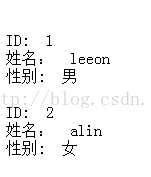
效果如图(获取了test数据库user表的内容):
- <!-- 数据库的连接信息,使用的是数据源的方式jdbc/dbcp/c3p0 -->
- <!-- 配置数据源,将数据源交给spring容器管理 -->
- <bean id="dataSource" class="com.mchange.v2.c3p0.ComboPooledDataSource"
- destroy-method="close">
- <property name="driverClass" value="com.mysql.jdbc.Driver" />
- <property name="jdbcUrl" value="jdbc:mysql:///edusystem" />
- <property name="user" value="root" />
- <property name="password" value="" />
- <!--初始化时获取的连接数,取值应在minPoolSize与maxPoolSize之间。Default: 3 -->
- <property name="initialPoolSize" value="1" />
- <!--连接池中保留的最小连接数。 -->
- <property name="minPoolSize" value="1" />
- <!--连接池中保留的最大连接数。Default: 15 -->
- <property name="maxPoolSize" value="300" />
- <!--最大空闲时间,60秒内未使用则连接被丢弃。若为0则永不丢弃。Default: 0 -->
- <property name="maxIdleTime" value="60" />
- <!--当连接池中的连接耗尽的时候c3p0一次同时获取的连接数。Default: 3 -->
- <property name="acquireIncrement" value="5" />
- <!--每60秒检查所有连接池中的空闲连接。Default: 0 -->
- <property name="idleConnectionTestPeriod" value="60" />
- </bean>