
- 1Educational Codeforces Round 161 (Rated for Div. 2)补题
- 2SpringBoot - @InitBinder注解详解
- 3我的wsl不见了_wsl突然找不到了
- 4MYSQL之错误代码----mysql错误代码与JAVA实现
- 5Ubuntu 20.04 ROS Noetic及Realsense-ROS的安装和多机通信_noetic realsense
- 6JAVA开发(AOP之ProceedingJoinPoint)_proceedingjoinpoint 获取参数
- 7【硬核】源码 + 案例分享 JDK8 新特性中的四大函数式接口_jdk8四大函数
- 8美团BERT的探索和实践 | CSDN原力计划
- 9力扣 707. 设计链表_力扣 设计链表
- 10opencv学习 特征提取
SpringBoot多数据源配置
赞
踩
文章目录
最近项目用到了
spring多数据源配置,恰好看到这篇好文章,特地分享下
点击了解Spring多数据源XML配置
1 SpringBoot分库配置
主要介绍两种整合方式,分别是 springboot+mybatis 使用分包方式整合,和 springboot+druid+mybatisplus 使用注解方式整合
1.1 准备数据
在本地新建两个数据库,名称分别为db1和db2,新建一张user表,表结构如下

CREATE TABLE `user` (
  `id` int(11) NOT NULL AUTO_INCREMENT COMMENT '主键',
  `name` varchar(25) NOT NULL COMMENT '姓名',
  `age` int(2) DEFAULT NULL COMMENT '年龄',
  `sex` tinyint(1) NOT NULL DEFAULT '0' COMMENT '性别:0-男,1-女',
  `addr` varchar(100) DEFAULT NULL COMMENT '地址',
  PRIMARY KEY (`id`)
) ENGINE=InnoDB AUTO_INCREMENT=2 DEFAULT CHARSET=utf8 COMMENT='测试用户表'
- 1
- 2
- 3
- 4
- 5
- 6
- 7
- 8
1.2 springboot+mybatis使用分包方式整合
1.2.1 pom.xml
<?xml version="1.0" encoding="UTF-8"?>
<project xmlns="http://maven.apache.org/POM/4.0.0" xmlns:xsi="http://www.w3.org/2001/XMLSchema-instance"
         xsi:schemaLocation="http://maven.apache.org/POM/4.0.0 https://maven.apache.org/xsd/maven-4.0.0.xsd">
    <modelVersion>4.0.0</modelVersion>
    <parent>
        <groupId>org.springframework.boot</groupId>
        <artifactId>spring-boot-starter-parent</artifactId>
        <version>2.1.9.RELEASE</version>
        <relativePath/> <!-- lookup parent from repository -->
    </parent>
    <groupId>com.example</groupId>
    <artifactId>multipledatasource</artifactId>
    <version>0.0.1-SNAPSHOT</version>
    <name>multipledatasource</name>
    <description>Demo project for Spring Boot</description>

    <properties>
        <java.version>1.8</java.version>
    </properties>

    <dependencies>
        <!-- spring 依赖 -->
        <dependency>
            <groupId>org.springframework.boot</groupId>
            <artifactId>spring-boot-starter-web</artifactId>
        </dependency>
         <!-- mysql 依赖 -->
        <dependency>
            <groupId>org.mybatis.spring.boot</groupId>
            <artifactId>mybatis-spring-boot-starter</artifactId>
            <version>2.1.0</version>
        </dependency>
        <dependency>
            <groupId>mysql</groupId>
            <artifactId>mysql-connector-java</artifactId>
            <scope>runtime</scope>
        </dependency>
        <dependency>
            <groupId>org.projectlombok</groupId>
            <artifactId>lombok</artifactId>
            <optional>true</optional>
        </dependency>
        <dependency>
            <groupId>org.springframework.boot</groupId>
            <artifactId>spring-boot-starter-test</artifactId>
            <scope>test</scope>
        </dependency>
    </dependencies>

    <build>
        <plugins>
            <plugin>
                <groupId>org.springframework.boot</groupId>
                <artifactId>spring-boot-maven-plugin</artifactId>
            </plugin>
        </plugins>
    </build>
</project>

- 1
- 2
- 3
- 4
- 5
- 6
- 7
- 8
- 9
- 10
- 11
- 12
- 13
- 14
- 15
- 16
- 17
- 18
- 19
- 20
- 21
- 22
- 23
- 24
- 25
- 26
- 27
- 28
- 29
- 30
- 31
- 32
- 33
- 34
- 35
- 36
- 37
- 38
- 39
- 40
- 41
- 42
- 43
- 44
- 45
- 46
- 47
- 48
- 49
- 50
- 51
- 52
- 53
- 54
- 55
- 56
- 57
- 58
1.2.2 application.yml 配置文件
server:
  port: 8080 # 启动端口
spring:
  datasource:
    db1: # 数据源1
      jdbc-url: jdbc:mysql://localhost:3306/db1?characterEncoding=utf8&useUnicode=true&useSSL=false&serverTimezone=GMT%2B8
      username: root
      password: root
      driver-class-name: com.mysql.cj.jdbc.Driver
    db2: # 数据源2
      jdbc-url: jdbc:mysql://localhost:3306/db2?characterEncoding=utf8&useUnicode=true&useSSL=false&serverTimezone=GMT%2B8
      username: root
      password: root
      driver-class-name: com.mysql.cj.jdbc.Driver
- 1
- 2
- 3
- 4
- 5
- 6
- 7
- 8
- 9
- 10
- 11
- 12
- 13
- 14
注意事项:
各个版本的 springboot 配置 datasource 时参数有所变化,例如低版本配置数据库 url时使用 url 属性,高版本使用 jdbc-url 属性,请注意区分
1.2.3 连接数据源配置文件
1.2.3.1 连接源配置一
@Configuration
@MapperScan(basePackages = "com.example.multipledatasource.mapper.db1", sqlSessionFactoryRef = "db1SqlSessionFactory")
public class DataSourceConfig1 {

    @Primary // 表示这个数据源是默认数据源, 这个注解必须要加,因为不加的话spring将分不清楚那个为主数据源(默认数据源)
    @Bean("db1DataSource")
    @ConfigurationProperties(prefix = "spring.datasource.db1") //读取application.yml中的配置参数映射成为一个对象
    public DataSource getDb1DataSource(){
        return DataSourceBuilder.create().build();
    }

    @Primary
    @Bean("db1SqlSessionFactory")
    public SqlSessionFactory db1SqlSessionFactory(@Qualifier("db1DataSource") DataSource dataSource) throws Exception {
        SqlSessionFactoryBean bean = new SqlSessionFactoryBean();
        bean.setDataSource(dataSource);
        // mapper的xml形式文件位置必须要配置,不然将报错:no statement (这种错误也可能是mapper的xml中,namespace与项目的路径不一致导致)
        bean.setMapperLocations(new PathMatchingResourcePatternResolver().getResources("classpath*:mapping/db1/*.xml"));
        return bean.getObject();
    }

    @Primary
    @Bean("db1SqlSessionTemplate")
    public SqlSessionTemplate db1SqlSessionTemplate(@Qualifier("db1SqlSessionFactory") SqlSessionFactory sqlSessionFactory){
        return new SqlSessionTemplate(sqlSessionFactory);
    }
}
- 1
- 2
- 3
- 4
- 5
- 6
- 7
- 8
- 9
- 10
- 11
- 12
- 13
- 14
- 15
- 16
- 17
- 18
- 19
- 20
- 21
- 22
- 23
- 24
- 25
- 26
- 27
1.2.3.2 连接源配置二
@Configuration
@MapperScan(basePackages = "com.example.multipledatasource.mapper.db2", sqlSessionFactoryRef = "db2SqlSessionFactory")
public class DataSourceConfig2 {

    @Bean("db2DataSource")
    @ConfigurationProperties(prefix = "spring.datasource.db2")
    public DataSource getDb1DataSource(){
        return DataSourceBuilder.create().build();
    }

    @Bean("db2SqlSessionFactory")
    public SqlSessionFactory db1SqlSessionFactory(@Qualifier("db2DataSource") DataSource dataSource) throws Exception {
        SqlSessionFactoryBean bean = new SqlSessionFactoryBean();
        bean.setDataSource(dataSource);
        bean.setMapperLocations(new PathMatchingResourcePatternResolver().getResources("classpath*:mapping/db2/*.xml"));
        return bean.getObject();
    }

    @Bean("db2SqlSessionTemplate")
    public SqlSessionTemplate db1SqlSessionTemplate(@Qualifier("db2SqlSessionFactory") SqlSessionFactory sqlSessionFactory){
        return new SqlSessionTemplate(sqlSessionFactory);
    }
}
- 1
- 2
- 3
- 4
- 5
- 6
- 7
- 8
- 9
- 10
- 11
- 12
- 13
- 14
- 15
- 16
- 17
- 18
- 19
- 20
- 21
- 22
- 23
1.2.4 项目结构
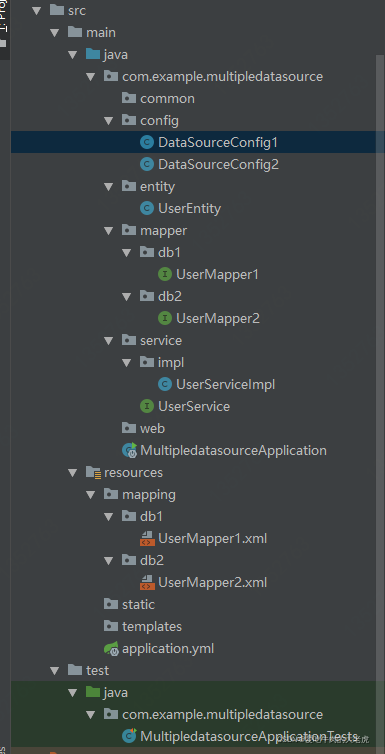
注意事项:
在 service 层中根据不同的业务注入不同的 dao 层
如果是主从复制- -读写分离:比如 db1 中负责增删改,db2 中负责查询。但是需要注意的是负责增删改的数据库必须是主库(master)
1.3 springboot+druid+mybatisplus使用注解整合
1.3.1 pom.xml
<?xml version="1.0" encoding="UTF-8"?>
<project xmlns="http://maven.apache.org/POM/4.0.0" xmlns:xsi="http://www.w3.org/2001/XMLSchema-instance"
        xsi:schemaLocation="http://maven.apache.org/POM/4.0.0 https://maven.apache.org/xsd/maven-4.0.0.xsd">
   <modelVersion>4.0.0</modelVersion>
   <parent>
       <groupId>org.springframework.boot</groupId>
       <artifactId>spring-boot-starter-parent</artifactId>
       <version>2.1.9.RELEASE</version>
       <relativePath/> <!-- lookup parent from repository -->
   </parent>
   <groupId>com.example</groupId>
   <artifactId>mutipledatasource2</artifactId>
   <version>0.0.1-SNAPSHOT</version>
   <name>mutipledatasource2</name>
   <description>Demo project for Spring Boot</description>

   <properties>
       <java.version>1.8</java.version>
   </properties>

   <dependencies>
       <dependency>
           <groupId>org.springframework.boot</groupId>
           <artifactId>spring-boot-starter-web</artifactId>
       </dependency>
       <dependency>
           <groupId>com.baomidou</groupId>
           <artifactId>mybatis-plus-boot-starter</artifactId>
           <version>3.2.0</version>
       </dependency>
       <dependency>
           <groupId>com.baomidou</groupId>
           <artifactId>dynamic-datasource-spring-boot-starter</artifactId>
           <version>2.5.6</version>
       </dependency>
       <dependency>
           <groupId>mysql</groupId>
           <artifactId>mysql-connector-java</artifactId>
           <scope>runtime</scope>
       </dependency>
       <dependency>
           <groupId>com.alibaba</groupId>
           <artifactId>druid-spring-boot-starter</artifactId>
           <version>1.1.20</version>
       </dependency>
       <dependency>
           <groupId>org.projectlombok</groupId>
           <artifactId>lombok</artifactId>
           <optional>true</optional>
       </dependency>
       <dependency>
           <groupId>org.springframework.boot</groupId>
           <artifactId>spring-boot-starter-test</artifactId>
           <scope>test</scope>
       </dependency>
   </dependencies>

   <build>
       <plugins>
           <plugin>
               <groupId>org.springframework.boot</groupId>
               <artifactId>spring-boot-maven-plugin</artifactId>
           </plugin>
       </plugins>
   </build>

   <profiles>
       <profile>
           <id>local1</id>
           <properties>
               <profileActive>local1</profileActive>
           </properties>
           <activation>
               <activeByDefault>true</activeByDefault>
           </activation>
       </profile>
       <profile>
           <id>local2</id>
           <properties>
               <profileActive>local2</profileActive>
           </properties>
       </profile>
   </profiles>
</project>
- 1
- 2
- 3
- 4
- 5
- 6
- 7
- 8
- 9
- 10
- 11
- 12
- 13
- 14
- 15
- 16
- 17
- 18
- 19
- 20
- 21
- 22
- 23
- 24
- 25
- 26
- 27
- 28
- 29
- 30
- 31
- 32
- 33
- 34
- 35
- 36
- 37
- 38
- 39
- 40
- 41
- 42
- 43
- 44
- 45
- 46
- 47
- 48
- 49
- 50
- 51
- 52
- 53
- 54
- 55
- 56
- 57
- 58
- 59
- 60
- 61
- 62
- 63
- 64
- 65
- 66
- 67
- 68
- 69
- 70
- 71
- 72
- 73
- 74
- 75
- 76
- 77
- 78
- 79
- 80
- 81
- 82
- 83
- 84
1.3.2 application.yml 配置文件
server:
  port: 8080
spring:
  datasource:
    dynamic:
      primary: db1 # 配置默认数据库
      datasource:
        db1: # 数据源1配置
          url: jdbc:mysql://localhost:3306/db1?characterEncoding=utf8&useUnicode=true&useSSL=false&serverTimezone=GMT%2B8
          username: root
          password: root
          driver-class-name: com.mysql.cj.jdbc.Driver
        db2: # 数据源2配置
          url: jdbc:mysql://localhost:3306/db2?characterEncoding=utf8&useUnicode=true&useSSL=false&serverTimezone=GMT%2B8
          username: root
          password: root
          driver-class-name: com.mysql.cj.jdbc.Driver
      druid:
        initial-size: 1
        max-active: 20
        min-idle: 1
        max-wait: 60000
  autoconfigure:
    exclude:  com.alibaba.druid.spring.boot.autoconfigure.DruidDataSourceAutoConfigure # 去除druid配置
- 1
- 2
- 3
- 4
- 5
- 6
- 7
- 8
- 9
- 10
- 11
- 12
- 13
- 14
- 15
- 16
- 17
- 18
- 19
- 20
- 21
- 22
- 23
- 24
DruidDataSourceAutoConfigure会注入一个DataSourceWrapper,其会在原生的spring.datasource下找 url, username, password 等。动态数据源 URL 等配置是在 dynamic 下,因此需要排除,否则会报错。排除方式有两种,一种是上述配置文件排除,还有一种可以在项目启动类排除
@SpringBootApplication(exclude = DruidDataSourceAutoConfigure.class)
public class Application {
  public static void main(String[] args) {
    SpringApplication.run(Application.class, args);
  }
}
- 1
- 2
- 3
- 4
- 5
- 6
1.3.3 使用@DS区分数据源
给使用非默认数据源添加注解@DS
@DS可以注解在 方法 上和 类 上,同时存在方法注解优先于类上注解。
注解在 service 实现或 mapper 接口方法上,不要同时在 service 和 mapper 注解
mapper上使用
@DS("db2")
public interface UserMapper extends BaseMapper<User> {
}
- 1
- 2
- 3
service上使用
@Service
@DS("db2")
public class ModelServiceImpl extends ServiceImpl<ModelMapper, Model> implements IModelService {}
- 1
- 2
- 3
方法上使用
@Select("SELECT * FROM user")
@DS("db2")
List<User> selectAll();
- 1
- 2
- 3
转载于:https://www.cnblogs.com/aizen-sousuke/p/11756279.html
1.3.4 @Transaction和@DS问题
点击了解当一起使用@Transaction和@DS时@DS失效问题
1.4 读写分离库
读写分离库使用AbstractRoutingDataSource
AbstractRoutingDataSource类和aop结合,还可以用来作为读写分离库
1.4.1 AbstractRoutingDataSource原理
AbstractRoutingDataSource原理:
Map<Object, Object> targetDataSources保存了所有可能的数据源,key为数据库的key,value为DataSource对象或字符串形式的连接信息Object defaultTargetDataSource保存了默认的数据源,用于找不到具体的数据源时使用afterPropertiesSet()方法
解析targetDataSources数据源信息成<key,DataSource>的形式,保存在Map<Object, DataSource> resolvedDataSources中
将defaultTargetDataSource中的默认数据源信息解析成DataSource对象保存在DataSource resolvedDefaultDataSource中determineCurrentLookupKey()提供给子类重写,指定当前线程使用的具体的数据源的keydetermineTargetDataSource()根据determineCurrentLookupKey()方法返回的key返回数据源DataSouce对象,若没有,则使用默认数据源对象getConnection()根据determineTargetDataSource()返回的数据源,与其建立连接
1.4.2 ThreadLocal工具类
创建一个类用于操作 ThreadLocal,主要是通过get,set,remove方法来获取、设置、删除当前线程对应的数据源。
public class DataSourceContextHolder {
    //此类提供线程局部变量。这些变量不同于它们的正常对应关系是每个线程访问一个线程(通过get、set方法),有自己的独立初始化变量的副本。
    private static final ThreadLocal<String> DATASOURCE_HOLDER = new ThreadLocal<>();
    /**
     * 设置数据源
     */
    public static void setDataSource(String dataSourceName){
        DATASOURCE_HOLDER.set(dataSourceName);
    }
    /**
     * 获取当前线程的数据源
     */
    public static String getDataSource(){
        return DATASOURCE_HOLDER.get();
    }
    /**
     * 删除当前数据源
     */
    public static void removeDataSource(){
        DATASOURCE_HOLDER.remove();
    }
}
- 1
- 2
- 3
- 4
- 5
- 6
- 7
- 8
- 9
- 10
- 11
- 12
- 13
- 14
- 15
- 16
- 17
- 18
- 19
- 20
- 21
- 22
1.4.3 继承AbstractRoutingDataSource
定义一个动态数据源继承 AbstractRoutingDataSource,通过determineCurrentLookupKey方法与上述实现的ThreadLocal类中的get方法进行关联,实现动态切换数据源。
/**
 * @description: 实现动态数据源,根据AbstractRoutingDataSource路由到不同数据源中
 */
public class DynamicDataSource extends AbstractRoutingDataSource {

    public DynamicDataSource(DataSource defaultDataSource,Map<Object, Object> targetDataSources){
        super.setDefaultTargetDataSource(defaultDataSource);
        super.setTargetDataSources(targetDataSources);
    }

    @Override
    protected Object determineCurrentLookupKey() {
        return DataSourceContextHolder.getDataSource();
    }
}
- 1
- 2
- 3
- 4
- 5
- 6
- 7
- 8
- 9
- 10
- 11
- 12
- 13
- 14
- 15
上述代码中,还实现了一个动态数据源类的构造方法,主要是为了设置默认数据源,以及以Map保存的各种目标数据源。其中Map的key是设置的数据源名称,value则是对应的数据源(DataSource)
1.4.4 配置数据源
配置文件
spring:
  datasource:
    type: com.alibaba.druid.pool.DruidDataSource
    druid:
      master:
        url: jdbc:mysql://xxxxxx:3306/test1?characterEncoding=utf-8&allowMultiQueries=true&zeroDateTimeBehavior=convertToNull&useSSL=false
        username: xxxx
        password: xxxx
        driver-class-name: com.mysql.cj.jdbc.Driver
      slave:
        url: jdbc:mysql://xxxxx:3306/test2?characterEncoding=utf-8&allowMultiQueries=true&zeroDateTimeBehavior=convertToNull&useSSL=false
        username: xxxx
        password: xxxx
        driver-class-name: com.mysql.cj.jdbc.Driver
- 1
- 2
- 3
- 4
- 5
- 6
- 7
- 8
- 9
- 10
- 11
- 12
- 13
- 14
配置类
/**
 * @description: 设置数据源
 **/
@Configuration
public class DateSourceConfig {

    @Bean
    @ConfigurationProperties("spring.datasource.druid.master")
    public DataSource masterDataSource(){
        return DruidDataSourceBuilder.create().build();
    }

    @Bean
    @ConfigurationProperties("spring.datasource.druid.slave")
    public DataSource slaveDataSource(){
        return DruidDataSourceBuilder.create().build();
    }

    @Bean(name = "dynamicDataSource")
    @Primary
    public DynamicDataSource createDynamicDataSource(){
        Map<Object,Object> dataSourceMap = new HashMap<>();
        DataSource defaultDataSource = masterDataSource();
        dataSourceMap.put("master",defaultDataSource);
        dataSourceMap.put("slave",slaveDataSource());
        return new DynamicDataSource(defaultDataSource,dataSourceMap);
    }
}
- 1
- 2
- 3
- 4
- 5
- 6
- 7
- 8
- 9
- 10
- 11
- 12
- 13
- 14
- 15
- 16
- 17
- 18
- 19
- 20
- 21
- 22
- 23
- 24
- 25
- 26
- 27
- 28
通过配置类,将配置文件中的配置的数据库信息转换成datasource,并添加到DynamicDataSource中,同时通过@Bean将DynamicDataSource注入Spring中进行管理,后期在进行动态数据源添加时,会用到。
1.4.5 测试
我们创建一个getData的方法,参数就是需要查询数据的数据源名称。
@GetMapping("/getData.do/{datasourceName}")
public String getMasterData(@PathVariable("datasourceName") String datasourceName){
    DataSourceContextHolder.setDataSource(datasourceName);
    TestUser testUser = testUserMapper.selectOne(null);
    DataSourceContextHolder.removeDataSource();
    return testUser.getUserName();
}
- 1
- 2
- 3
- 4
- 5
- 6
- 7
在上述代码中,我们看到DataSourceContextHolder.setDataSource(datasourceName); 来设置了当前线程需要查询的数据库,通过DataSourceContextHolder.removeDataSource(); 来移除当前线程已设置的数据源。
使用过Mybatis-plus动态数据源的小伙伴,应该还记得我们在使用切换数据源时会使用到DynamicDataSourceContextHolder.push(String ds); 和DynamicDataSourceContextHolder.poll(); 这两个方法,翻看源码我们会发现其实就是在使用ThreadLocal时使用了栈,这样的好处就是能使用多数据源嵌套
注:启动程序时,小伙伴不要忘记将SpringBoot自动添加数据源进行排除哦,否则会报循环依赖问题。
@SpringBootApplication(exclude = DataSourceAutoConfiguration.class)
1.4.6 使用自定义注解
在上述中,虽然已经实现了动态切换数据源,但是我们会发现如果涉及到多个业务进行切换数据源的话,我们就需要在每一个实现类中添加这一段代码。假如使用注解来进行优化呢,如下
1.4.6.1 定义注解
我们就用mybatis动态数据源切换的注解:DS,代码如下:
@Target({ElementType.METHOD,ElementType.TYPE})
@Retention(RetentionPolicy.RUNTIME)
@Documented
@Inherited
public @interface DS {
    String value() default "master";
}
- 1
- 2
- 3
- 4
- 5
- 6
- 7
1.4.6.2 实现aop
@Aspect
@Component
@Slf4j
public class DSAspect {

    @Pointcut("@annotation(com.test.dynamic_datasource.dynamic.aop.DS)")
    public void dynamicDataSource(){}

    @Around("dynamicDataSource()")
    public Object datasourceAround(ProceedingJoinPoint point) throws Throwable {
        MethodSignature signature = (MethodSignature)point.getSignature();
        Method method = signature.getMethod();
        DS ds = method.getAnnotation(DS.class);
        if (Objects.nonNull(ds)){
            DataSourceContextHolder.setDataSource(ds.value());
        }
        try {
            return point.proceed();
        } finally {
            DataSourceContextHolder.removeDataSource();
        }
    }
}
- 1
- 2
- 3
- 4
- 5
- 6
- 7
- 8
- 9
- 10
- 11
- 12
- 13
- 14
- 15
- 16
- 17
- 18
- 19
- 20
- 21
- 22
- 23
代码使用了@Around,通过ProceedingJoinPoint获取注解信息,拿到注解传递值,然后设置当前线程的数据源。
1.4.7 动态添加数据源
业务场景 :有时候我们的业务会要求我们从保存有其他数据源的数据库表中添加这些数据源,然后再根据不同的情况切换这些数据源。因此我们需要改造下 DynamicDataSource 来实现动态加载数据源。
1.4.7.1 数据源实体
@Data
@Accessors(chain = true)
public class DataSourceEntity {
    /**
     * 数据库地址
     */
    private String url;
    /**
     * 数据库用户名
     */
    private String userName;
    /**
     * 密码
     */
    private String passWord;
    /**
     * 数据库驱动
     */
    private String driverClassName;
    /**
     * 数据库key,即保存Map中的key
     */
    private String key;
}
- 1
- 2
- 3
- 4
- 5
- 6
- 7
- 8
- 9
- 10
- 11
- 12
- 13
- 14
- 15
- 16
- 17
- 18
- 19
- 20
- 21
- 22
- 23
- 24
实体中定义数据源的一般信息,同时定义一个key用于作为DynamicDataSource中Map中的key
1.4.7.2 修改DynamicDataSource
/**
 * @description: 实现动态数据源,根据AbstractRoutingDataSource路由到不同数据源中
 */
@Slf4j
public class DynamicDataSource extends AbstractRoutingDataSource {

    private final Map<Object,Object> targetDataSourceMap;

    public DynamicDataSource(DataSource defaultDataSource,Map<Object, Object> targetDataSources){
        super.setDefaultTargetDataSource(defaultDataSource);
        super.setTargetDataSources(targetDataSources);
        this.targetDataSourceMap = targetDataSources;
    }

    @Override
    protected Object determineCurrentLookupKey() {
        return DataSourceContextHolder.getDataSource();
    }

    /**
     * 添加数据源信息
     * @param dataSources 数据源实体集合
     * @return 返回添加结果
     */
    public Boolean createDataSource(List<DataSourceEntity> dataSources){
        try {
            if (CollectionUtils.isNotEmpty(dataSources)){
                for (DataSourceEntity ds : dataSources) {
                    //校验数据库是否可以连接
                    Class.forName(ds.getDriverClassName());
                    DriverManager.getConnection(ds.getUrl(),ds.getUserName(),ds.getPassWord());
                    //定义数据源
                    DruidDataSource dataSource = new DruidDataSource();
                    BeanUtils.copyProperties(ds,dataSource);
                    //申请连接时执行validationQuery检测连接是否有效,这里建议配置为TRUE,防止取到的连接不可用
                    dataSource.setTestOnBorrow(true);
                    //建议配置为true,不影响性能,并且保证安全性。
                    //申请连接的时候检测,如果空闲时间大于timeBetweenEvictionRunsMillis,执行validationQuery检测连接是否有效。
                    dataSource.setTestWhileIdle(true);
                    //用来检测连接是否有效的sql,要求是一个查询语句。
                    dataSource.setValidationQuery("select 1 ");
                    dataSource.init();
                    this.targetDataSourceMap.put(ds.getKey(),dataSource);
                }
                super.setTargetDataSources(this.targetDataSourceMap);
                // 将TargetDataSources中的连接信息放入resolvedDataSources管理
                super.afterPropertiesSet();
                return Boolean.TRUE;
            }
        }catch (ClassNotFoundException | SQLException e) {
            log.error("---程序报错---:{}", e.getMessage());
        }
        return Boolean.FALSE;
    }

    /**
     * 校验数据源是否存在
     * @param key 数据源保存的key
     * @return 返回结果,true:存在,false:不存在
     */
    public boolean existsDataSource(String key){
        return Objects.nonNull(this.targetDataSourceMap.get(key));
    }
}
- 1
- 2
- 3
- 4
- 5
- 6
- 7
- 8
- 9
- 10
- 11
- 12
- 13
- 14
- 15
- 16
- 17
- 18
- 19
- 20
- 21
- 22
- 23
- 24
- 25
- 26
- 27
- 28
- 29
- 30
- 31
- 32
- 33
- 34
- 35
- 36
- 37
- 38
- 39
- 40
- 41
- 42
- 43
- 44
- 45
- 46
- 47
- 48
- 49
- 50
- 51
- 52
- 53
- 54
- 55
- 56
- 57
- 58
- 59
- 60
- 61
- 62
- 63
- 64
在改造后的DynamicDataSource中,我们添加可以一个 private final Map<Object,Object> targetDataSourceMap,这个map会在添加数据源的配置文件时将创建的Map数据源信息通过DynamicDataSource构造方法进行初始赋值,即:DateSourceConfig类中的createDynamicDataSource()方法中。
同时我们在该类中添加了一个createDataSource方法,进行数据源的创建,并添加到map中,再通过super.setTargetDataSources(this.targetDataSourceMap);进行目标数据源的重新赋值
1.4.7.3 动态添加数据源
上述代码已经实现了添加数据源的方法,那么我们来模拟通过从数据库表中添加数据源,然后我们通过调用加载数据源的方法将数据源添加进数据源Map中。
在主数据库中定义一个数据库表,用于保存数据库信息。
create table test_db_info(
    id int auto_increment primary key not null comment '主键Id',
    url varchar(255) not null comment '数据库URL',
    username varchar(255) not null comment '用户名',
    password varchar(255) not null comment '密码',
    driver_class_name varchar(255) not null comment '数据库驱动'
    name varchar(255) not null comment '数据库名称'
)
- 1
- 2
- 3
- 4
- 5
- 6
- 7
- 8
为了方便,我们将之前的从库录入到数据库中,修改数据库名称。
insert into test_db_info(url, username, password,driver_class_name, name)
value ('jdbc:mysql://xxxxx:3306/test2?characterEncoding=utf-8&allowMultiQueries=true&zeroDateTimeBehavior=convertToNull&useSSL=false',
       'root','123456','com.mysql.cj.jdbc.Driver','add_slave')
- 1
- 2
- 3
1.4.7.4 启动添加配置
启动SpringBoot时添加数据源:
@Component
public class LoadDataSourceRunner implements CommandLineRunner {
    @Resource
    private DynamicDataSource dynamicDataSource;
    @Resource
    private TestDbInfoMapper testDbInfoMapper;
    @Override
    public void run(String... args) throws Exception {
        List<TestDbInfo> testDbInfos = testDbInfoMapper.selectList(null);
        if (CollectionUtils.isNotEmpty(testDbInfos)) {
            List<DataSourceEntity> ds = new ArrayList<>();
            for (TestDbInfo testDbInfo : testDbInfos) {
                DataSourceEntity sourceEntity = new DataSourceEntity();
                BeanUtils.copyProperties(testDbInfo,sourceEntity);
                sourceEntity.setKey(testDbInfo.getName());
                ds.add(sourceEntity);
            }
            dynamicDataSource.createDataSource(ds);
        }
    }
}
- 1
- 2
- 3
- 4
- 5
- 6
- 7
- 8
- 9
- 10
- 11
- 12
- 13
- 14
- 15
- 16
- 17
- 18
- 19
- 20
- 21



