
热门标签
热门文章
- 1zookeeper总有节点启动失败_xshell开启zookeeper其余结点打不开
- 2使用objdump objcopy查看与修改符号表_objdump 可执行文件 符号
- 3Spring Boot Jpa 的使用(转载)_springboot jpa使用getconnection
- 4华为薪资等级结构表_2020年华为工资等级对照表
- 5利用java filter 实现业务异常拦截 跳转到错误信息提示页面_拦截器过滤error页面
- 6初步探索GraalVM--云原生时代JVM黑科技_graalvm 动态生成字节码
- 7算法5分钟|如何实现整数的数字反转【首尾交换法】_数字翻转算法
- 8openGauss学习笔记-133 openGauss 数据库运维-例行维护-日维护检查项_opengauss数据库怎么查看锁
- 9阿里云服务器镜像怎么选?操作系统版本选择说明_服务器操作系统选什么知乎
- 10深入浅出 Java 虚拟机 · 通往高级 Java 开发的必经之路_java虚拟机定义
当前位置: article > 正文
Druid数据库连接池【阿里巴巴提供,较为重要】_阿里数据库连接池druid依赖包步骤
作者:代码优化者 | 2024-01-31 22:56:07
赞
踩
阿里数据库连接池druid依赖包步骤
Druid连接池使用步骤
1.导包
①druid.jar ②mysql包 ( mysql-connector.jar)
也可以使用maven导入依赖坐标
 <!--druid包-->
    <dependency>
      <groupId>com.alibaba</groupId>
      <artifactId>druid</artifactId>
      <version>1.1.9</version>
    </dependency>
    <!--数据库包-->
    <dependency>
      <groupId>mysql</groupId>
      <artifactId>mysql-connector-java</artifactId>
      <version>5.1.8</version>
    </dependency>
    <!--测试包-->
    <dependency>
      <groupId>junit</groupId>
      <artifactId>junit</artifactId>
      <version>4.12</version>
      <scope>test</scope>
    </dependency>

- 1
- 2
- 3
- 4
- 5
- 6
- 7
- 8
- 9
- 10
- 11
- 12
- 13
- 14
- 15
- 16
- 17
- 18
- 19
2.配置properties文件
XXX.properties
driverClassName=com.mysql.jdbc.Driver
url=jdbc:mysql://127.0.0.1:3306/demo6
username=root
password=123456
#初始化连接数量
initialSize=5
#最大连接数
maxActive=10
#最大等待时间
maxWait=30
- 1
- 2
- 3
- 4
- 5
- 6
- 7
- 8
- 9
- 10
[注意:名称可以任意名称、放任意目录,所以不会自动加载,需要手动加载,不同于c3p0]
3.加载XXX.properties配置文件
Properties properties = new Properties();
//JTest是使用Properties对象的类名。即当前类名称
properties.load(JTest.class.getClassLoader().getResourceAsStream("jdbc.properties"));
- 1
- 2
- 3
4.获取数据库连接池对象
【DruidDataSourceFactory工厂类来获取,参数是properties对象。连接池只有一个,但是池子中可以有多个连接对象】
DataSource dataSource = DruidDataSourceFactory.createDataSource(properties);
- 1
- 2
5.获取连接
Connection connection = dataSource.getConnection();
- 1
6接下来就是正常的获取Statement【PrepareStatement】对象并操作数据库
connection.prepareStatement()
- 1
7.最后要关闭连接【resultSet、prepareStatement、connection】
示例代码
Flower.java
public class Flower {
    private int id;
    private String name;
    private Double price;
    ……
    ……
- 1
- 2
- 3
- 4
- 5
- 6
测试类
import com.alibaba.druid.pool.DruidDataSourceFactory;
import org.junit.Test;

import javax.sql.DataSource;
import java.io.IOException;
import java.sql.Connection;
import java.sql.ResultSet;
import java.sql.Statement;
import java.util.ArrayList;
import java.util.Properties;

public class JTest {
@Test
    public void df() throws Exception {
    Flower f;
    ArrayList<Flower> flowers = new ArrayList<>();
    Properties properties = new Properties();
    try {
    //读取配置文件
        properties.load(JTest.class.getClassLoader().getResourceAsStream("jdbc.properties"));
        //获得数据库连接池对象
        DataSource dataSource = DruidDataSourceFactory.createDataSource(properties);
        //建立连接
        Connection connection = dataSource.getConnection();
        //为了方便使用statement对象
        Statement statement = connection.createStatement();
        ResultSet resultSet = statement.executeQuery("select * from flower");
        while (resultSet.next()){
            flowers.add(new Flower(resultSet.getInt("id"),
                    resultSet.getString("name"),
                    resultSet.getDouble("price")));

        }
        for (Flower fl:flowers
        ) {
            System.out.println(fl.getName());
            System.out.println(fl.getPrice());
        }
    } catch (IOException e) {
        e.printStackTrace();
    }

}
}
- 1
- 2
- 3
- 4
- 5
- 6
- 7
- 8
- 9
- 10
- 11
- 12
- 13
- 14
- 15
- 16
- 17
- 18
- 19
- 20
- 21
- 22
- 23
- 24
- 25
- 26
- 27
- 28
- 29
- 30
- 31
- 32
- 33
- 34
- 35
- 36
- 37
- 38
- 39
- 40
- 41
- 42
- 43
- 44
数据库
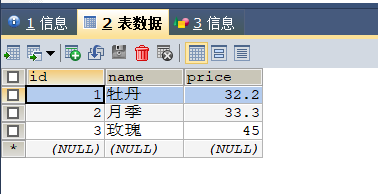
示例结果
牡丹
32.2
月季
33.3
玫瑰
45.0
基于druid封装工具类JDBCUtils.java
注意配置文件的名称
import com.alibaba.druid.pool.DruidDataSourceFactory;

import javax.sql.DataSource;
import java.io.IOException;
import java.sql.Connection;
import java.sql.ResultSet;
import java.sql.SQLException;
import java.sql.Statement;
import java.util.Properties;

/*
Druid连接池的工具类
 */
public class JDBCUtils {
    //1.定义成员变量 DataSource
    private static DataSource ds;
    static {
        //1.加载配置文件
        Properties pro = new Properties();
        try {
            pro.load(JDBCUtils.class.getClassLoader().getResourceAsStream("druid.properties"));
            //获取DataSource
            ds = DruidDataSourceFactory.createDataSource(pro);
        } catch (IOException e) {
            e.printStackTrace();
        } catch (Exception e) {
            e.printStackTrace();
        }
    }
    //获取连接
    public static Connection getConnection() throws SQLException {
        return ds.getConnection();
    }
    //释放资源
    public static void close(Statement stmt,Connection conn){
        if (stmt!=null) {
            try {
                stmt.close();
            } catch (Exception e) {
                System.out.println(e.getMessage());
            }
        }
        if (conn!=null){
            try {
                conn.close();//归还连接
            } catch (Exception e) {
                System.out.println(e.getMessage());
            }
        }
    }
    public static void close(ResultSet rs, Statement stmt, Connection conn){
        if (rs!=null) {
            try {
                rs.close();
            } catch (Exception e) {
                System.out.println(e.getMessage());
            }
        }
        if (stmt!=null) {
            try {
                stmt.close();
            } catch (Exception e) {
                System.out.println(e.getMessage());
            }
        }
        if (conn!=null){
            try {
                conn.close();//归还连接
            } catch (Exception e) {
                System.out.println(e.getMessage());
            }
        }
    }
    //获取连接池
    public static DataSource getDataSource(){
        return ds;
    }
}
- 1
- 2
- 3
- 4
- 5
- 6
- 7
- 8
- 9
- 10
- 11
- 12
- 13
- 14
- 15
- 16
- 17
- 18
- 19
- 20
- 21
- 22
- 23
- 24
- 25
- 26
- 27
- 28
- 29
- 30
- 31
- 32
- 33
- 34
- 35
- 36
- 37
- 38
- 39
- 40
- 41
- 42
- 43
- 44
- 45
- 46
- 47
- 48
- 49
- 50
- 51
- 52
- 53
- 54
- 55
- 56
- 57
- 58
- 59
- 60
- 61
- 62
- 63
- 64
- 65
- 66
- 67
- 68
- 69
- 70
- 71
- 72
- 73
- 74
- 75
- 76
- 77
- 78
- 79
测试jdbcUtist.java工具类
import java.sql.Connection;
import java.sql.PreparedStatement;
import java.sql.SQLException;

//测试工具类
public class DruidTest {
    public static void main(String[] args) throws SQLException {
        //给dept表添加一条记录
        //1.获取连接
        Connection conn = JDBCUtils.getConnection();
        //2.定义sql
        String sql = "insert into dept values(?,?,?)";
        //3.获取邮差对象
        PreparedStatement ps = conn.prepareStatement(sql);
        //4.给?赋值
        ps.setInt(1,50);
        ps.setString(2,"HAHAHAH");
        ps.setString(3,"CHINA");
        //5.执行sql
        ps.executeUpdate();
        JDBCUtils.close(ps,conn);

    }
}
- 1
- 2
- 3
- 4
- 5
- 6
- 7
- 8
- 9
- 10
- 11
- 12
- 13
- 14
- 15
- 16
- 17
- 18
- 19
- 20
- 21
- 22
- 23
- 24
- 25
- 26
工具类借鉴:https://blog.csdn.net/qq_42727102/article/details/102526698
声明:本文内容由网友自发贡献,不代表【wpsshop博客】立场,版权归原作者所有,本站不承担相应法律责任。如您发现有侵权的内容,请联系我们。转载请注明出处:https://www.wpsshop.cn/article/detail/52385
推荐阅读
- DruidDataSource通用配置
[详细] -->赞
踩
相关标签

