- 1html网页设计小作业(个人主页)_个人主页网页设计
- 2『Linux升级路』基础开发工具——make/Makefile篇
- 3一台电脑同时安装多个tomcat服务器教程,window同时安装tomcat7、tomcat8、tomcat9三个服务器教程_安装两个tomcat
- 4Mac OS配置Tomcat服务器教程_mac tomcat
- 5Unable to create process using ‘D:\Anaconda3\python.exe D:\Anaconda3\Scripts\conda-script.py shell.c
- 6如何运行vue项目(超详细图解)_vue项目怎么运行
- 7手把手教你用C语言制作炫酷烟花代码!_c语言炫酷代码
- 8Python玫瑰花
- 9python超详细基础文件操作【建议收藏】
- 10魔百盒M101_晶晨S905L处理器_XR8189无线_鸿蒙开机动画_专用安卓线刷rom固件包
【youcans的深度学习 04】PyTorch入门教程:基础知识_pytorch library
赞
踩
欢迎关注『youcans的深度学习』系列,持续更新中…
【youcans的深度学习 01】安装环境之 miniconda
【youcans的深度学习 02】PyTorch CPU版本安装与环境配置
【youcans的深度学习 03】PyTorch CPU版本安装与环境配置
【youcans的深度学习 04】PyTorch入门教程:基础知识
【youcans的深度学习 05】PyTorch入门教程:快速入门
【youcans的深度学习 04】PyTorch入门教程:基础知识
1. 什么是PyTorch?
正如PyTorch官方文件的介绍,PyTorch不仅是一个基于Python的深度学习库,还是一个科学计算包。
PyTorch科学计算包的特点在于:
- 取代NumPy以使用强大的GPU;
- 为深度学习研究提供极大的灵活性和速度。
PyTorch使用张量Tensor作为核心的数据结构,类似于Numpy数组。随着软件和硬件的快速发展,张量Tensor可以加速各种数学运算。在深度学习中大量执行这些操作时,张量Tensor在速度上具有很大的优势。
PyTorch与Python类似,专注于易用性,只有基本编程能力的初学者都可以在项目中使用深度学习。这也使它成为“初学者首选的深度学习库”。
2. 为什么选择 PyTorch 学习深度学习?
我们在上节介绍PyTorch是“初学者首选的深度学习库”。
基于Python的深度学习库非常丰富,例如广泛流行的Keras、Tensorflow、Caffe、Theano(RIP)等等。PyTorch有什么不同呢?
一个理想的深度学习库应该易于学习和使用,足够灵活,可以用于各种应用程序,高效,以便我们能够处理大量的现实数据集,并且足够准确,即使在输入数据存在不确定性的情况下也能提供正确的结果。
PyTorch在这些方面的表现都非常优秀。“pythonic”的编码风格使其易于学习和使用。GPU加速、对分布式计算和自动梯度计算的支持,对于从正向表达式开始自动执行反向传递非常方便。
虽然Python语言的封装会使程序运行速度慢,但高性能的C++API(libtorch)可以较好地处理这个问题。这使得从研发到生产的过程非常顺利。
让我们看看使用PyTorch应用程序所获得的有趣结果。


如果你对PyTorch感兴趣,这里列出了很多PyTorch项目:【23个PyTorch开源项目(The Top 23 Pytorch Open Source Projects)】。
3. PyTorch Library概览
我们来看看PyTorch项目的基本流程。
下图描述了一个典型的工作流程以及与每个步骤相关的重要模块。
【PyTorch基本流程图】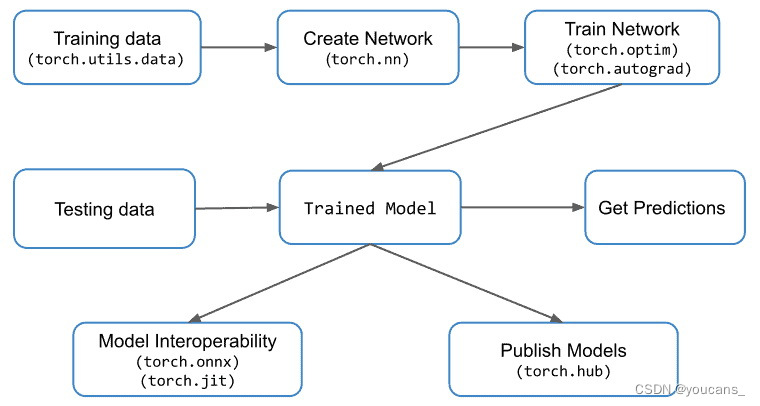
我们将简要地讨论几个重要的PyTorch模块:torch.nn、torch.optim、torch.utils和torch.autograd。
3.1 数据加载与处理
数据加载和处理是深度学习项目的基本需求。
PyTorch的torch.utils.data模块用于实现数据加载和处理,该模块中的两个重要类是数据集Dataset和数据加载器DataLoader。
- 数据集Dataset基于张量(Tensor)数据结构,主要用于自定义数据集。
- 数据加载器DataLoader,用于从用户的大型数据集加载数据,以便对模型进行训练。
如果可以访问多台机器或GPU,也可以使用torch.nn.DataParallel模块和torch.distributed模块进行并行处理或分布式处理。
3.2 建立神经网络
torch.nn模块用于创建神经网络。它提供了所有常见的神经网络层(layer),如全连接层、卷积层、激活函数和损失函数等。
在创建网络架构、准备输入数据之后,就需要更新权重和偏差方法,以便开始训练网络模型。torch.optim模块提供各种参数优化算法,而torch.autograd模块提供计算反向传播的自动微分算法。
3.3 模型推理与兼容性
模型经过训练后,可以用于预测测试集甚至新数据集的输出,这个过程称为模型推理。
PyTorch还提供了TorchScript,可以独立于Python程序来运行模型。这可以认为是一个虚拟机(Virtual Machine),其指令主要针对张量(Tensor)。
使用PyTorch训练好的模型还可以转换为ONNX等格式。ONNX格式允许在MXNet、CNTK、Caffe2等其它深度学习框架中使用PyTorch模型。也可以将ONNX格式的模型转换为Tensorflow格式。
4. 张量(Tensors)介绍
张量是PyTorch中使用的核心数据结构。
张量与Numpy数组类似,只是矩阵的一个特殊名称。如果你熟悉Numpy数组,那么理解和使用PyTorch张量将非常容易。
标量值由0维张量表示,列/行数组使用一维张量表示,二维矩阵使用二维张量表示,依次类推。下面显示了一些不同维度张量的例子,以便可视化和理解。
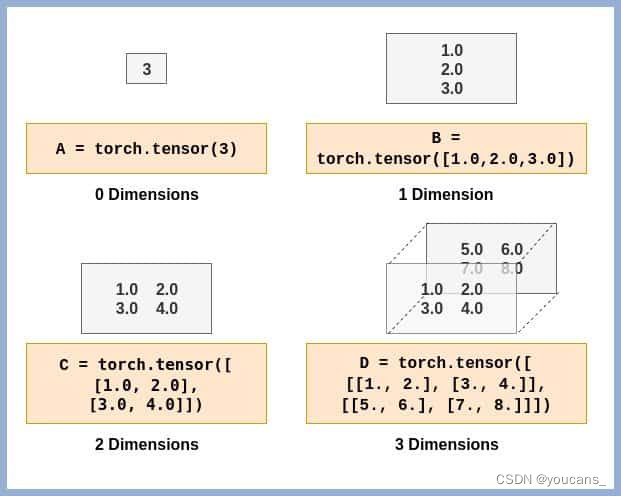
【张量(Tensor)的结构】
在介绍张量之前,我们通过conda命令来安装PyTorch 1.1.0。
conda install -c pytorch pytorch-cpu
该命令将安装PyTorch CPU版本。
5. 创建张量(Tensor)
本节介绍如何创建张量(Tensor)。
首先要导入PyTorch库。接着创建一个全1或全0的一维张量。
import torch

# Create a Tensor with just ones in a column
a = torch.ones(5)

# Print the tensor we created
print(a)

# tensor([1., 1., 1., 1., 1.])

# Create a Tensor with just zeros in a column
b = torch.zeros(5)
print(b)

# tensor([0., 0., 0., 0., 0.])
- 1
- 2
- 3
- 4
- 5
- 6
- 7
- 8
- 9
- 10
- 11
- 12
- 13
- 14
- 15
类似地,创建具有任意值的一维张量,如下所示。
c = torch.tensor([1.0, 2.0, 3.0, 4.0, 5.0])
print(c)

# tensor([1., 2., 3., 4., 5.])
- 1
- 2
- 3
- 4
在上面的例子中我们创建了一维张量,下面的例子将创建更高维度的张量。
d = torch.zeros(3,2)
print(d)

# tensor([[0., 0.],
#        [0., 0.],
#        [0., 0.]])

e = torch.ones(3,2)
print(e)

# tensor([[1., 1.],
#        [1., 1.],
#        [1., 1.]])

f = torch.tensor([[1.0, 2.0],[3.0, 4.0]])
print(f)

# tensor([[1., 2.],
#        [3., 4.]])

# 3D Tensor
g = torch.tensor([[[1., 2.], [3., 4.]], [[5., 6.], [7., 8.]]])
print(g)

# tensor([[[1., 2.],
#         [3., 4.]],
#
#        [[5., 6.],
#         [7., 8.]]])

- 1
- 2
- 3
- 4
- 5
- 6
- 7
- 8
- 9
- 10
- 11
- 12
- 13
- 14
- 15
- 16
- 17
- 18
- 19
- 20
- 21
- 22
- 23
- 24
- 25
- 26
- 27
- 28
- 29
我们可以用.shape方法查看张量的形状。
print(f.shape)
# torch.Size([2, 2])

print(e.shape)
# torch.Size([3, 2])

print(g.shape)
# torch.Size([2, 2, 2])
- 1
- 2
- 3
- 4
- 5
- 6
- 7
- 8
6. 操作张量中的元素
我们已经创建了一些张量,让我们看看如何访问张量中的元素。这与Numpy数组元素的操作是类似的。
首先,让我们看看如何访问1D张量(即向量)中的元素。
# Get element at index 2
print(c[2])

# tensor(3.)
- 1
- 2
- 3
- 4
对于2D或3D张量呢?访问张量中的一个特定元素,我们需要指定等于张量维数的索引。因此对于一维张量c,只需要指定一个索引。
# All indices starting from 0

# Get element at row 1, column 0
print(f[1,0])
# We can also use the following
print(f[1][0])

# tensor(3.)

# Similarly for 3D Tensor
print(g[1,0,0])
print(g[1][0][0])

# tensor(5.)
- 1
- 2
- 3
- 4
- 5
- 6
- 7
- 8
- 9
- 10
- 11
- 12
- 13
- 14
如果要访问2D张量中的一整行,可以用通配符’:’实现,具体语法与Numpy数组的方法相同。
# All elements
print(f[:])

# All elements from index 1 to 2 (inclusive)
print(c[1:3])

# All elements till index 4 (exclusive)
print(c[:4])

# First row
print(f[0,:])

# Second column
print(f[:,1])
- 1
- 2
- 3
- 4
- 5
- 6
- 7
- 8
- 9
- 10
- 11
- 12
- 13
- 14
7. 指定张量元素的数据类型
PyTorch在创建张量时要确定张量元素的数据类型,所有张量元素都使用相同的数据类型。我们可以在创建张量时指定数据类型。
int_tensor = torch.tensor([[1,2,3],[4,5,6]])
print(int_tensor.dtype)

# torch.int64

# What if we changed any one element to floating point number?
int_tensor = torch.tensor([[1,2,3],[4.,5,6]])
print(int_tensor.dtype)

# torch.float32

print(int_tensor)

# tensor([[1., 2., 3.],
#        [4., 5., 6.]])


# This can be overridden as follows
int_tensor = torch.tensor([[1,2,3],[4,5,6]], dtype=torch.int32)
print(int_tensor.dtype)

# torch.int32
print(int_tensor)

# tensor([[1, 2, 3],
#        [4, 5, 6]], dtype=torch.int32)
- 1
- 2
- 3
- 4
- 5
- 6
- 7
- 8
- 9
- 10
- 11
- 12
- 13
- 14
- 15
- 16
- 17
- 18
- 19
- 20
- 21
- 22
- 23
- 24
- 25
- 26
8. 张量(Tensor)与Numpy数组的转换
PyTorch张量与Numpy数组非常相似,这两种数据结构如何相互转换呢?
# import NumPy
import numpy as np

# Tensor to Array
f_numpy = f.numpy()
print(f_numpy)

# array([[1., 2.],
#       [3., 4.]], dtype=float32)

# Array to Tensor
h = np.array([[8,7,6,5],[4,3,2,1]])
h_tensor = torch.from_numpy(h)
print(h_tensor)

# tensor([[8, 7, 6, 5],
#        [4, 3, 2, 1]])
- 1
- 2
- 3
- 4
- 5
- 6
- 7
- 8
- 9
- 10
- 11
- 12
- 13
- 14
- 15
- 16
- 17
9. 张量(Tensor)的算术操作
让我们看看如何对PyTorch张量执行算术运算。
# Create tensor
tensor1 = torch.tensor([[1,2,3],[4,5,6]])
tensor2 = torch.tensor([[-1,2,-3],[4,-5,6]])

# Addition
print(tensor1+tensor2)
# We can also use
print(torch.add(tensor1,tensor2))

# tensor([[ 0,  4,  0],
#        [ 8,  0, 12]])

# Subtraction
print(tensor1-tensor2)
# We can also use
print(torch.sub(tensor1,tensor2))

# tensor([[ 2,  0,  6],
#        [ 0, 10,  0]])

# Multiplication
# Tensor with Scalar
print(tensor1 * 2)
# tensor([[ 2,  4,  6],
#        [ 8, 10, 12]])

# Tensor with another tensor
# Elementwise Multiplication
print(tensor1 * tensor2)
# tensor([[ -1,   4,  -9],
#        [ 16, -25,  36]])

# Matrix multiplication
tensor3 = torch.tensor([[1,2],[3,4],[5,6]])
print(torch.mm(tensor1,tensor3))
# tensor([[22, 28],
#        [49, 64]])

# Division
# Tensor with scalar
print(tensor1/2)
# tensor([[0, 1, 1],
#        [2, 2, 3]])

# Tensor with another tensor
# Elementwise division
print(tensor1/tensor2)
# tensor([[-1,  1, -1],
#        [ 1, -1,  1]])
- 1
- 2
- 3
- 4
- 5
- 6
- 7
- 8
- 9
- 10
- 11
- 12
- 13
- 14
- 15
- 16
- 17
- 18
- 19
- 20
- 21
- 22
- 23
- 24
- 25
- 26
- 27
- 28
- 29
- 30
- 31
- 32
- 33
- 34
- 35
- 36
- 37
- 38
- 39
- 40
- 41
- 42
- 43
- 44
- 45
- 46
- 47
- 48
- 49
10. 张量(Tensor)的存储设备:CPU v/s GPU
PyTorch为CPU和GPU提供了不同的张量实现。每个张量都可以从CPU转移到GPU,以便执行大规模并行、快速的计算。这将使对张量执行的所有操作都将由GPU设备的程序来执行。
如果你的设备不支持访问GPU,你可以在Google Colab上执行这些例程(选择GPU运行)。
我们先看看如何创建GPU设备上的张量。
# Create a tensor for CPU
# This will occupy CPU RAM
tensor_cpu = torch.tensor([[1.0, 2.0], [3.0, 4.0], [5.0, 6.0]], device='cpu')

# Create a tensor for GPU
# This will occupy GPU RAM
tensor_gpu = torch.tensor([[1.0, 2.0], [3.0, 4.0], [5.0, 6.0]], device='cuda')
- 1
- 2
- 3
- 4
- 5
- 6
- 7
如果使用Google Colab,请注意右上角的RAM消耗量。创建tensor_GPU后,GPU RAM消耗量将增大。定义在CPU和GPU设备上的张量进行运算时,也将会分别消耗指定设备所对应的RAM。
# This uses CPU RAM
tensor_cpu = tensor_cpu * 5

# This uses GPU RAM
# Focus on GPU RAM Consumption
tensor_gpu = tensor_gpu * 5
- 1
- 2
- 3
- 4
- 5
- 6
需要注意的是,GPU设备上的张量在操作中没有信息流到CPU(除非我们访问GPU张量)。
当然,我们可以将GPU张量移动到CPU,或者将CPU张量移动到GPU,如下所示。
# Move GPU tensor to CPU
tensor_gpu_cpu = tensor_gpu.to(device='cpu')

# Move CPU tensor to GPU
tensor_cpu_gpu = tensor_cpu.to(device='cuda')
- 1
- 2
- 3
- 4
- 5
简单回顾一下,我们在本文中讨论了PyTorch,它的独特性以及你为什么要学习它。我们还深入讨论了PyTorch的工作流程和PyTorch张量数据类型。
参考文献:
LearnOpenCV: Getting Started with PyTorch
PyTorch Tutorial For Beginners: All the Basics
【本节完】
版权声明:
欢迎关注『youcans的深度学习』系列,转发请注明原文链接:
【youcans的深度学习 04】PyTorch入门教程:基础知识(https://youcans.blog.csdn.net/article/details/129771827)
Copyright 2023 youcans, XUPT
Crated:2023-03-24