
热门标签
热门文章
- 1Java面向对象基础--类的设计及分析问题的方法---用户登录例子
- 2使用Redis官方镜像创建容器找不到配置文件问题解决_没有找到docker拉取redis镜像自带的配置文件
- 3国内代码托管中心-码云_码云官网
- 4如何配置Tomcat Server_tomcat server 配置
- 5深度学习与网络安全:如何应对网络攻击和诈骗_大数据网络安全相关系统项目源码
- 6vue3通过路由控制来实现的权限管理_vue3路由权限控制
- 7git 配置_git config host
- 8Jmeter 01 -概述&线程组
- 92023年软件测试面试题,精选100 道,内附答案_软件测试面试题目100及最佳答案
- 10水滴云丨【官方】Nebulus: “虚拟IPFS网络”_水滴云vp
当前位置: article > 正文
python222网站实战(SpringBoot+SpringSecurity+MybatisPlus+thymeleaf+layui)-自定义帖子管理实现
作者:算法优化者 | 2024-01-31 08:23:52
赞
踩
python222网站实战(SpringBoot+SpringSecurity+MybatisPlus+thymeleaf+layui)-自定义帖子管理实现
锋哥原创的Springboot+Layui python222网站实战:
 https://www.bilibili.com/video/BV1yX4y1a7qM/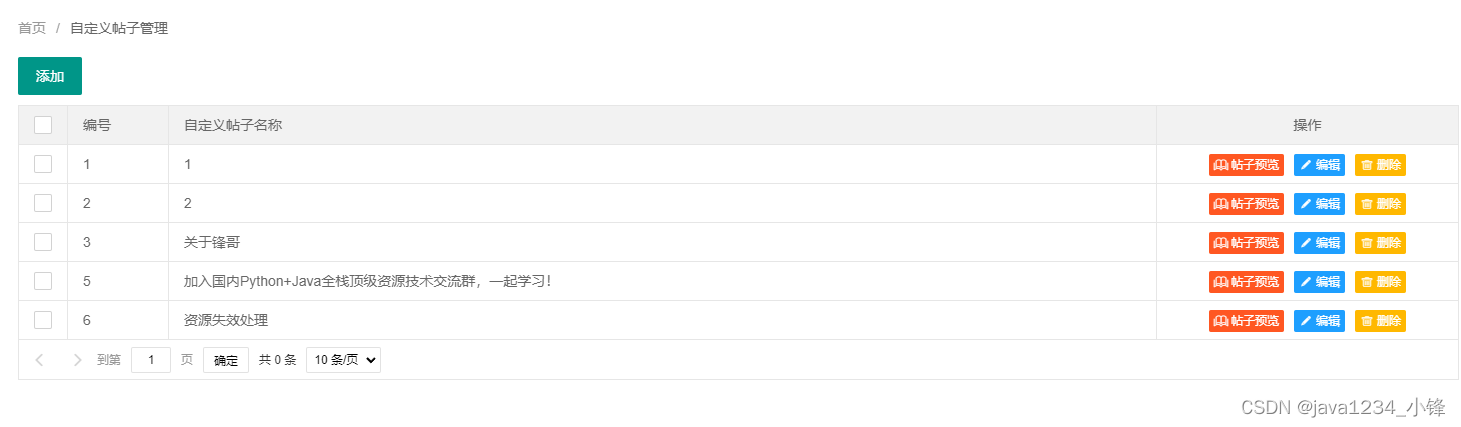
我们有些文章,比如自我介绍帖子,vip课程帖子,这种区别于正常发文文章的帖子,我们可以单独管理,设计成自定义帖子模块。
新建t_post表
- create table `t_post` (
- `id` int (11),
- `title` varchar (600),
- `content` text
- );
- insert into `t_post` (`id`, `title`, `content`) values('2','2',NULL);
- insert into `t_post` (`id`, `title`, `content`) values('3','3','<p>222</p>\n');
- insert into `t_post` (`id`, `title`, `content`) values('5','4测试444','<p>32324444<img alt=\"\" src=\"/articleImages/20230615120852.jpg\" style=\"height:1372px; width:720px\" /></p>\n');
用Mybatis-X生成代码;
新建PostAdminController类:
- package com.python222.controller.admin;
-
- import com.python222.entity.Post;
- import com.python222.service.PostService;
- import org.springframework.beans.factory.annotation.Autowired;
- import org.springframework.web.bind.annotation.RequestMapping;
- import org.springframework.web.bind.annotation.RestController;
-
- import java.util.HashMap;
- import java.util.List;
- import java.util.Map;
-
- /**
- * 管理员-自定义帖子控制器
- * @author python222小锋老师
- * @site www.python222.com
- */
- @RestController
- @RequestMapping(value = "/admin/post")
- public class PostAdminController {
-
- @Autowired
- private PostService postService;
-
- /**
- * 根据条件查询自定义帖子
- * @return
- * @throws Exception
- */
- @RequestMapping(value = "/list")
- public Map<String,Object> list()throws Exception{
- Map<String, Object> resultMap = new HashMap<>();
- List<Post> postList=postService.list();
- resultMap.put("code", 0);
- resultMap.put("data", postList);
- return resultMap;
- }
-
- /**
- * 添加或者修改自定义帖子
- * @param post
- * @return
- */
- @RequestMapping("/save")
- public Map<String,Object> save(Post post){
- if(post.getId()==null){
- postService.save(post);
- }else{
- postService.updateById(post);
- }
- Map<String, Object> resultMap = new HashMap<>();
- resultMap.put("success", true);
- return resultMap;
- }
-
- /**
- * 删除自定义帖子
- * @param id
- * @return
- * @throws Exception
- */
- @RequestMapping("/delete")
- public Map<String,Object> delete(Integer id)throws Exception{
- Map<String, Object> resultMap = new HashMap<>();
- postService.removeById(id);
- resultMap.put("success", true);
- return resultMap;
- }
-
- /**
- * 根据id查询自定义帖子实体
- * @param id
- * @return
- * @throws Exception
- */
- @RequestMapping("/findById")
- public Map<String,Object> findById(Integer id)throws Exception{
- Map<String, Object> resultMap = new HashMap<>();
- Post post=postService.getById(id);
- resultMap.put("post", post);
- resultMap.put("success", true);
- return resultMap;
- }
-
-
-
- }

前端postManage.html
- <!DOCTYPE html>
- <html>
- <head>
- <meta charset="UTF-8">
- <title>自定义帖子管理</title>
- <link rel="stylesheet" href="/static/layui/css/layui.css"></link>
- <link rel="stylesheet" href="/static/css/css.css"></link>
- </head>
- <body>
-
- <div style="padding: 20px">
- <span class="layui-breadcrumb">
- <a>首页</a>
- <a><cite>自定义帖子管理</cite></a>
- </span>
- <div style="padding-top: 20px;">
- <div>
- <div>
- <button class="layui-btn layuiadmin-btn-list" data-type="batchdel" onclick="addPost()">添加</button>
- </div>
- </div>
- <div>
- <table width="100%" id="postListTable" ></table>
- </div>
- </div>
- </div>
-
- <script src="/static/layui/layui.js"></script>
- <script src="/static/js/jquery.js"></script>
- <script src="/static/js/common.js"></script>
- <script type="text/javascript">
-
- layui.use(['element','form','table'], function(){
- var form=layui.form;
- var element = layui.element; //导航的hover效果、二级菜单等功能,需要依赖element模块
- $ = layui.jquery; // 使用jquery
- table = layui.table;
-
- table.render({
- elem: '#postListTable'
- ,url:'/admin/post/list'
- ,cols: [[
- {type:'checkbox'}
- ,{field:'id', width:100,title: '编号'}
- ,{field:'title', title: '自定义帖子名称'}
- ,{field:'action', width:300, title: '操作',align:'center',templet:formatAction}
- ]]
- ,page: true
- });
-
-
- });
-
-
- function deleteOne(id){
- layer.confirm('您确定要删除这条记录吗?', {
- title:"系统提示"
- ,btn: ['确定','取消'] //按钮
- }, function(){
- layer.closeAll('dialog');
- $.post("/admin/post/delete",{"id":id},function(result){
- if(result.success){
- layer.msg("删除成功!");
- table.reload("postListTable",{});
- }else{
- layer.msg("删除失败,请联系管理员!");
- }
- },"json");
- }, function(){
-
- });
- }
-
- function addPost(){
- layer.open({
- type: 2,
- title: '添加自定义帖子',
- area: ['1000px', '730px'],
- content: '/admin/savePost.html' //iframe的url
- });
- }
-
- function modifyPost(id){
- layer.open({
- type: 2,
- title: '修改自定义帖子',
- area: ['1000px', '730px'],
- content: '/admin/savePost.html?id='+id //iframe的url
- });
- }
-
-
- function formatAction(d){
- return "<a class='layui-btn layui-btn-danger layui-btn-xs' target='_blank' href='/post/"+d.id+"'><i class='layui-icon layui-icon-read'></i>帖子预览</a><button class='layui-btn layui-btn-normal layui-btn-xs' onclick='modifyPost("+d.id+")'><i class='layui-icon layui-icon-edit'></i>编辑</button><button class='layui-btn layui-btn-warm layui-btn-xs' onclick='deleteOne("+d.id+")'><i class='layui-icon layui-icon-delete' ></i>删除</button>";
- }
-
-
-
- </script>
- </body>
- </html>
再新建一个savePost.html
- <!DOCTYPE html>
- <html>
- <head>
- <meta charset="UTF-8">
- <title>添加或者修改自定义帖子</title>
- <link rel="stylesheet" href="/static/layui/css/layui.css"></link>
- <style type="text/css">
-
- table tr td{
- padding: 10px;
- }
-
- </style>
- </head>
- <body>
- <div style="padding: 20px">
- <form method="post">
- <table>
- <tr>
- <td>标题:</td>
- <td><input type="text" autocomplete="off" id="title" name="title" class="layui-input" style="width: 360px"/></td>
- </tr>
- <tr>
- <td valign="top">内容:</td>
- <td>
- <textarea type="text" class="ckeditor" id="content" name="content" class="layui-input" ></textarea>
- </td>
- </tr>
- <tr>
- <td><button class="layui-btn" onclick="submitData();return false;">提交</button></td>
- <td><font id="errorInfo" color="red"></font></td>
- </tr>
- </table>
- </form>
- </div>
- <script src="/static/ckeditor/ckeditor.js"></script>
- <script src="/static/layui/layui.js"></script>
- <script src="/static/js/jquery.js"></script>
- <script src="/static/js/common.js"></script>
- <script type="text/javascript">
-
- layui.use(['form'], function(){
-
- });
-
- function submitData(){
- var title=$("#title").val().trim();
- var content=CKEDITOR.instances.content.getData();
- if(title=="") {
- $("#errorInfo").text("请输入自定义帖子标题!");
- $("#name").focus();
- return false;
- }
- if(content=="") {
- $("#errorInfo").text("请输入自定义帖子内容!");
- $("#url").focus();
- return false;
- }
- var id=getQueryVariable("id");
- if(id){
- $.post("/admin/post/save",{id:id,title:title,content:content},function(result){
- if(result.success){
- layer.alert('修改成功!',function () {
- parent.reloadPage();
- });
-
- }else{
- $("#errorInfo").text(result.errorInfo);
- }
- },"json");
- }else{
- $.post("/admin/post/save",{title:title,content:content},function(result){
- if(result.success){
- layer.alert('添加成功!',function () {
- parent.reloadPage();
- });
- }else{
- $("#errorInfo").text(result.errorInfo);
- }
- },"json");
- }
- }
-
-
-
- function getQueryVariable(variable){
- var query = window.location.search.substring(1);
- var vars = query.split("&");
- for (var i=0;i<vars.length;i++) {
- var pair = vars[i].split("=");
- if(pair[0] == variable){return pair[1];}
- }
- return(false);
- }
-
- $(function(){
-
- var id=getQueryVariable("id");
-
- if(id){
- $.post("/admin/post/findById",{id:id},function(result){
- if(result.success){
- var post=result.post;
- $("#title").val(post.title);
- CKEDITOR.instances.content.setData(post.content);
- }else{
- layer.alert("服务器加载有问题,请联系管理员!");
- }
- },"json");
- }
- });
-
-
- </script>
- </body>
- </html>
自定义帖子详情查看:
新建PostController类:
- package com.python222.controller;
-
- import com.python222.entity.Post;
- import com.python222.service.PostService;
- import org.springframework.beans.factory.annotation.Autowired;
- import org.springframework.stereotype.Controller;
- import org.springframework.web.bind.annotation.PathVariable;
- import org.springframework.web.bind.annotation.RequestMapping;
- import org.springframework.web.servlet.ModelAndView;
-
- /**
- * 自定义帖子控制器
- * @author python222小锋老师
- * @site www.python222.com
- */
- @Controller
- @RequestMapping("/post")
- public class PostController {
-
- @Autowired
- private PostService postService;
-
- /**
- * 根据id查询自定义帖子详细信息
- * @param id
- * @return
- * @throws Exception
- */
- @RequestMapping("/{id}")
- public ModelAndView view(@PathVariable("id")Integer id)throws Exception{
- ModelAndView mav=new ModelAndView();
- Post post = postService.getById(id);
- mav.setViewName("post");
- mav.addObject("post",post);
- return mav;
- }
-
- }
前端新建模板post.html
- <!DOCTYPE html>
- <html xmlns:th="http://www.thymeleaf.org">
- <head>
- <meta http-equiv="Content-Type" content="text/html; charset=utf-8" />
- <title th:text="${post.title}+'-'+${application.propertyMap['k1']}"></title>
- <meta name="keywords" th:content="${post.title}">
- <meta name="description" th:content="${post.title}">
- <link href="/systemImages/favicon.ico" rel="SHORTCUT ICON">
- <link rel="stylesheet" href="/static/layui/css/layui.css"/>
- <link rel="stylesheet" href="/static/css/css.css"/>
- <link rel="stylesheet" type="text/css" href="/static/css/normalize.css" />
- <link rel="stylesheet" href="/static/css/font-awesome.min.css">
-
-
-
- </head>
- <body>
-
- <div class="header_top" th:include="common/head::#h" />
-
- <div class="header" th:include="common/menu::#m" />
-
- <div class="main_wrapper">
- <div class="w1220 article_content">
- <div class="title" th:text="${post.title}"></div>
- <div class="content" th:utext="${post.content}"></div>
- </div>
- </div>
-
-
- <div class="footer" th:include="common/footer::#f" />
-
-
- </body>
- </html>
声明:本文内容由网友自发贡献,不代表【wpsshop博客】立场,版权归原作者所有,本站不承担相应法律责任。如您发现有侵权的内容,请联系我们。转载请注明出处:https://www.wpsshop.cn/article/detail/49988
推荐阅读

相关标签

