
热门标签
热门文章
- 1类的C语言模拟实现_c实现类
- 2Kubernetes的Pod生命周期_phase=success
- 39 个实用的 VSCode 扩展插件,让你的开发工作更轻松
- 4免费使用GPT-4的N种方法_gpt4免费安装使用
- 5Docker仓库
- 6HarmonyOS学习路之开发篇—设备管理(设置项)
- 7Ubuntu 18.04安装docker-compose_ubuntu 1804 apt docker docker-compose install
- 8【华为od机试】约瑟夫问题-Python3_蓝球(5v5)比赛,每个球员拥有一个战斗力,每个队伍所有球员战斗力之和薇该队伍的总
- 9深度学习中RGB影像图的直方图均衡化python代码and对图片中指定部分做基于掩模的特定区域直方图均衡化
- 10软件工程 学生信息管理系统 结构化的需求分析_学生信息管理系统软件工程
当前位置: article > 正文
SpringSecurity入门
作者:数据结构灵魂 | 2024-01-30 21:02:43
赞
踩
SpringSecurity入门
目录
一、概述
(一)SpringSecurity 框架简介
Spring 是非常流行和成功的 Java 应用开发框架,Spring Security 正是 Spring 家族中的成员。Spring Security 基于 Spring 框架,提供了一套 Web 应用安全性的完整解决方案。
正如你可能知道的关于安全方面的两个主要区域是“
认证
”和“
授权
”(或者访问控制),一般来说,Web 应用的安全性包括
用户认证(Authentication)和用户授权
(Authorization)
两个部分,这两点也是 Spring Security 重要核心功能。
(1)用户认证指的是:验证某个用户是否为系统中的合法主体,也就是说用户能否访问该系统。用户认证一般要求用户提供用户名和密码。系统通过校验用户名和密码来完成认证过程。
通俗点说就是系统认为用户是否能登录
(2)用户授权指的是验证某个用户是否有权限执行某个操作。在一个系统中,不同用户所具有的权限是不同的。比如对一个文件来说,有的用户只能进行读取,而有的用户可以进行修改。一般来说,系统会为不同的用户分配不同的角色,而每个角色则对应一系列的权限。
通俗点讲就是系统判断用户是否有权限去做某些事情。
SpringSecurity 特点:
- 和 Spring 无缝整合。
- 全面的权限控制。
- 专门为 Web 开发而设计。
- 旧版本不能脱离 Web 环境使用。
- 新版本对整个框架进行了分层抽取,分成了核心模块和 Web 模块。单独引入核心模块就可以脱离 Web 环境。
- 重量级。
(二)Shiro
Apache 旗下的轻量级权限控制框架。

特点:
- 轻量级。Shiro 主张的理念是把复杂的事情变简单。针对对性能有更高要求的互联网应用有更好表现。
- 通用性。
- 好处:不局限于 Web 环境,可以脱离 Web 环境使用。
- 缺陷:在 Web 环境下一些特定的需求需要手动编写代码定制。
Spring Security 是 Spring 家族中的一个安全管理框架,实际上,在 Spring Boot 出现之前,Spring Security 就已经发展了多年了,但是使用的并不多,安全管理这个领域,一直是 Shiro 的天下。
相对于 Shiro,在 SSM 中整合 Spring Security 都是比较麻烦的操作,所以,Spring Security 虽然功能比 Shiro 强大,但是使用反而没有 Shiro 多(Shiro 虽然功能没有Spring Security 多,但是对于大部分项目而言,Shiro 也够用了)。
自从有了 Spring Boot 之后,Spring Boot 对于 Spring Security 提供了自动化配置方案,可以使用更少的配置来使用 Spring Security。
因此,一般来说,常见的安全管理技术栈的组合是这样的:
- SSM + Shiro
- Spring Boot/Spring Cloud + Spring Security
以上只是一个推荐的组合而已,如果单纯从技术上来说,无论怎么组合,都是可以运行
的。
(三)模块划分

二、初体验
创建springboot项目,版本为2.1.1.RELEASE,引入依赖
- <dependency>
- <groupId>org.springframework.boot</groupId>
- <artifactId>spring-boot-starter-web</artifactId>
- </dependency>
-
- <dependency>
- <groupId>org.springframework.boot</groupId>
- <artifactId>spring-boot-starter-security</artifactId>
- </dependency>
编写Controller
- @RestController
- @RequestMapping("/test")
- public class HelloController {
-
- @GetMapping("/hello")
- public String test() {
- return "hello, security";
- }
- }
修改启动端口
- server:
- port: 8111
启动项目,访问/test/hello,发现调整到了/login,也就是需要SpringSecurity的认证。需要用户名和密码,用户名默认为user,密码在控制台


以上就是SpringSecurity初体验
三、基本原理
SpringSecurity
本质是一个过滤器链:
- org.springframework.security.web.context.request.async.WebAsyncManagerIntegrationFil
- ter
- org.springframework.security.web.context.SecurityContextPersistenceFilter
- org.springframework.security.web.header.HeaderWriterFilter
- org.springframework.security.web.csrf.CsrfFilter
- org.springframework.security.web.authentication.logout.LogoutFilter
- org.springframework.security.web.authentication.UsernamePasswordAuthenticationFilter
- org.springframework.security.web.authentication.ui.DefaultLoginPageGeneratingFilter
- org.springframework.security.web.authentication.ui.DefaultLogoutPageGeneratingFilter
- org.springframework.security.web.savedrequest.RequestCacheAwareFilter
- org.springframework.security.web.servletapi.SecurityContextHolderAwareRequestFilter
- org.springframework.security.web.authentication.AnonymousAuthenticationFilter
- org.springframework.security.web.session.SessionManagementFilter
- org.springframework.security.web.access.ExceptionTranslationFilter
- org.springframework.security.web.access.intercept.FilterSecurityInterceptor
比较重要的有三个过滤器:
FilterSecurityInterceptor
:是一个方法级的权限过滤器
,
基本位于过滤链的最底部。
ExceptionTranslationFilter
:是个异常过滤器,用来处理在认证授权过程中抛出的异常。
UsernamePasswordAuthenticationFilter
:对
/login
的
POST
请求做拦截,校验表单中用户名,密码。
四、两个重要接口
(一)UserDetailsService 接口讲解
当什么也没有配置的时候,账号和密码是由
Spring Security
定义生成的。而在实际项目中账号和密码都是从数据库中查询出来的。 所以我们要通过自定义逻辑控制认证逻辑。
如果需要自定义逻辑时,只需要实现
UserDetailsService
接口即可。接口定义如下:
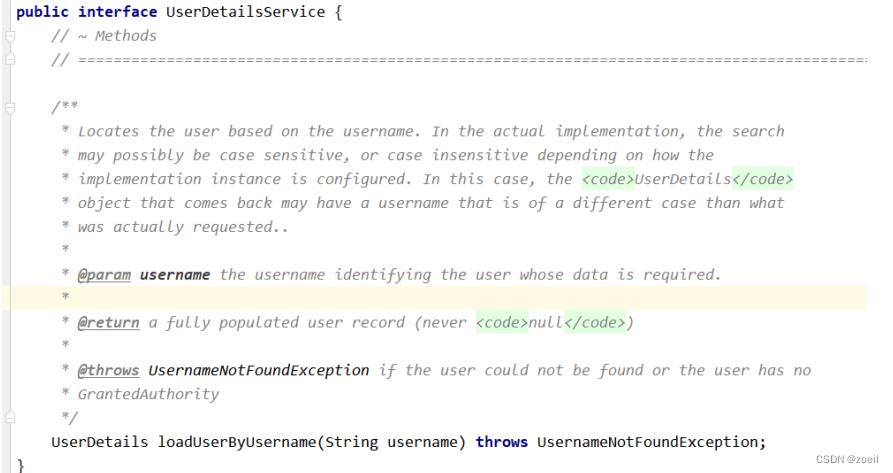
只有一个loadUserByUsername方法,
返回值 UserDetails :是系统默认的用户“主体”
方法参数 username :表示用户名。此值是客户端表单传递过来的数据。默认情况下必须叫 username,否则无法接收。

以后我们只需要使用 User 这个实体类即可!

(二)PasswordEncoder 接口讲解
- // 表示把参数按照特定的解析规则进行解析
- String encode(CharSequence rawPassword);
- // 表示验证从存储中获取的编码密码与编码后提交的原始密码是否匹配。如果密码匹配,则返回 true;如果不匹配,则返回 false。第一个参数表示需要被解析的密码。第二个参数表示存储的密码。
- boolean matches(CharSequence rawPassword, String encodedPassword);
- // 表示如果解析的密码能够再次进行解析且达到更安全的结果则返回 true,否则返回false。默认返回false。
- default boolean upgradeEncoding(String encodedPassword) {
- return false;
- }
接口实现类

BCryptPasswordEncoder
是
Spring Security
官方推荐的密码解析器,平时多使用这个解析器。
BCryptPasswordEncoder
是对
bcrypt
强散列方法的具体实现。是基于
Hash
算法实现的单向加密。可以通过 strength
控制加密强度,默认
10。
演示
- @Test
- public void test01(){
- // 创建密码解析器
- BCryptPasswordEncoder bCryptPasswordEncoder = new BCryptPasswordEncoder();
- // 对密码进行加密
- String atguigu = bCryptPasswordEncoder.encode("atguigu");
- // 打印加密之后的数据
- System.out.println("加密之后数据:\t"+atguigu);
- //判断原字符加密后和加密之前是否匹配
- boolean result = bCryptPasswordEncoder.matches("atguigu", atguigu);
- // 打印比较结果
- System.out.println("比较结果:\t"+result);
- }
声明:本文内容由网友自发贡献,不代表【wpsshop博客】立场,版权归原作者所有,本站不承担相应法律责任。如您发现有侵权的内容,请联系我们。转载请注明出处:https://www.wpsshop.cn/article/detail/49496
推荐阅读
![[ 云计算 | AWS 实践 ] 使用 Java 更新现有 Amazon S3 对象](https://img-blog.csdnimg.cn/direct/f6b4b45ef01445aa9a147e7c5f1a8f15.png?x-oss-process=image/resize,m_fixed,h_300,image/format,png)



相关标签

