
热门标签
热门文章
- 1Spring整合ZooKeeper基础使用介绍_spring coordinate zookeeper
- 26.两两交换链表中的节点_头节点怎么和第一个节点互换
- 3H盘显示由于IO设备错误,无法运行此项请求要如何办啊_位置不可用 无法访问 h:。 由于i/0 设备错误,无法运行此项请求
- 4使用GraalVM native-image 编译SpringBoot3全过程_native-image使用
- 5Gerrit的使用_needs code-review label
- 6java mongo分页
- 7RealSense二次开发
- 8多调度创建调度线程池_taskregistrar.setscheduler
- 9使用GraalVM 构建 Spring Boot 3.0 原生可执行文件_graalvm springboot
- 10一些常用linux命令_linux命令大全详解pdf
当前位置: article > 正文
Linux学习笔记7——umask函数_hy.txt
作者:代码吟游诗人 | 2024-01-30 20:49:10
赞
踩
hy.txt
- #include<sys/stat.h>
- mode_t umask(mode_t cmask);
这个函数的功能比较奇葩,他实际上是规定了创建文件时哪些功能是不能用的,即便你创建时赋予了这个功能,他也将其无视。具体来说,如果umask中设置了“用户读”,则你创建的任何文件必然没有“用户读”权限,哪怕你在open或creat的时候明文表示你需要“用户读”权限。
举例如下:
- #include <stdio.h>
- #include <stdlib.h>
- #include <memory.h>
- #include <sys/stat.h>
- #include <unistd.h>
- #include <fcntl.h>
-
- void err_sys(char *);
- void err_sys(char *err_txt)
- {
- printf("%s\n",err_txt);
- exit(1);
- }
-
- int main(int argc, char* argv[])
- {
- //4.9 umask 文件模式创建屏蔽字
- printf("old umask = %d\n", umask(0));
- if(creat("jxl.txt", S_IRUSR) < 0)
- err_sys("creat error for jxl.txt");
-
- umask(S_IRUSR);
- if(creat("hy.txt", S_IRUSR) < 0)
- err_sys("creat error for hy.txt");
-
- exit (0);
- }

创建jxl.txt前将umask清零,表示没有任何权限被屏蔽,然后以“用户读”的方式创建文件
创建hy.txt前将umask的“用户读”置位,实际上代表屏蔽“用户读”权限,然后再以“用户读”的方式创建文件
执行结果如下:
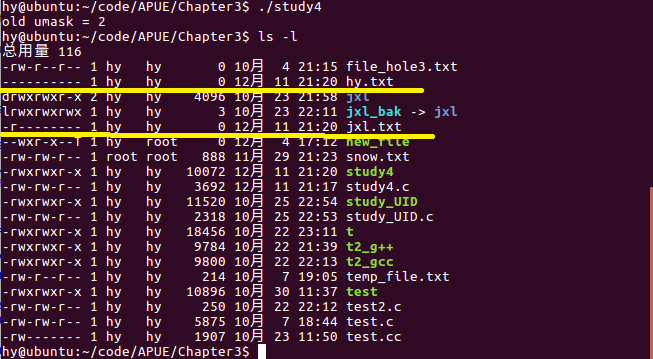
程序打印出了系统默认的umask值,为2,代表系统默认不开放“其他写”权限。
jxl.txt的权限没有被限制,所以最终其按照我们的设定获得了“用户读”权限
hy.txt由于屏蔽了“用户写”,但是又按照“用户写”来创建文件,最终导致其没有获得任何权限。
注意:
更改进程的文件模式创建屏蔽字,并不影响其父进程的文件模式创建屏蔽字。
声明:本文内容由网友自发贡献,不代表【wpsshop博客】立场,版权归原作者所有,本站不承担相应法律责任。如您发现有侵权的内容,请联系我们。转载请注明出处:https://www.wpsshop.cn/article/detail/49390
推荐阅读

相关标签

