
热门标签
热门文章
- 1基于python flask茶叶网站数据大屏设计与实现,可以做期末课程设计或者毕业设计
- 2MySQL 5.7 服务端 错误码 (机翻)_er_error_on_close
- 3云计算-运维笔记_type="ethernet
- 4Unity Shader零基础入门1:纯色物体_unity3d物体没有白色
- 5从 Amazon Connect 全球云呼叫中心服务 SSO 构建流程
- 6CSAPP Bomb lab(内含答案)_bomblab所有答案总结
- 7Java高并发解决方案_java高并发解决方案技术
- 8Windows主机中构建适用于K8S Operator开发环境_k8s windows搭建
- 9【笔记】LeetCode字符串匹配_leetcode 字符串匹配
- 10一个心塞的手忙脚乱的项目结束后的总结_项目结束各奔天涯
当前位置: article > 正文
Vue中使用vxe-table组件分页查询,多页选择数据回显,分页记录保存选中的数据_vxe-table分页
作者:程序诗人 | 2024-01-30 20:26:20
赞
踩
vxe-table分页
官方示例:vxe-table v3 https://vxetable.cn/v3/#/table/advanced/page
当表格中需要渲染的数据量比较大,有几万几十万条数据时,在前端分页将会非常慢,建议将当前页码和每页数量传递个后端,后端分好后给前端渲染。
后端查询SQL时,通过limit 和offset 查询分页:
sql += ` limit ${pageSize} offset ${pageSize * (currentPage - 1)} `后端除了返回要显示的页数据外,通常还要传递总数量total:
- router.get('/', async (ctx, next) => {
- let { task_info, state, currentPage, pageSize, check_host_name_alias, need_update_tile, priority, check_progress, download_progress, downloadfialdcount, check_faild_count } = ctx.request.query
- let sql = `select * from (
- SELECT
- SUBSTRING (task_info, 1, 11) as task_info_substring,
- ( SELECT NAME FROM downloaduser WHERE machine_code = T.check_host_name ) AS "check_host_name_alias",
- ( SELECT NAME FROM downloaduser WHERE machine_code = T.download_host_name ) AS "download_host_name_alias",
- ( CASE T.STATE WHEN 1 THEN now( ) - T.check_start_time ELSE T.check_end_time - T.check_start_time END ) AS "check_use_time",
- ( CASE T.STATE WHEN 4 THEN now( ) - T.download_start_time ELSE T.download_end_time - T.check_start_time END ) AS "download_use_time",
- *
- FROM
- task T ) t2 where 1=1`
- if (task_info) {
- // console.log("task_info:", task_info)
- let task_info_arr = task_info.split("\n")
-
-
- sql += ` and t2.task_info_substring in (${format_arr_to_str(task_info_arr)})`
- }
- if (state) {
- sql += ` and state = ${state}`
- }
- if (need_update_tile) {
- sql += ` and need_update_tile like '%${need_update_tile}%'`
- }
-
- // sql += ' order by task_info asc'
- // 多字段排序
- // if (priority) {
- // sql += ` ,priority ${priority}`
- // }
-
- if (priority) {
- sql += ` order by priority ${priority}`
- }
- let data_count = await db.query(`select count(*) from (${sql}) t_temp`);//满足条件的记录总数
- let total = parseInt(data_count.rows[0].count)
-
- sql += ` limit ${pageSize} offset ${pageSize * (currentPage - 1)} `
- // console.log("sql:", sql)
- let data = await db.query(sql);
- ctx.body = {
- code: 0,
- message: "success",
- data: { ...data, total }
- }
- })

注意:这里查询总数量时,是用的`select count(*) from (${sql}) t_temp` ,这样查询速度比较快。如果全表查询,再返回查出的rows.length,这样速度会很慢
对于多页选择,需要指定row-id=“主键字段”和:checkbox-config="{ reserve: true }"
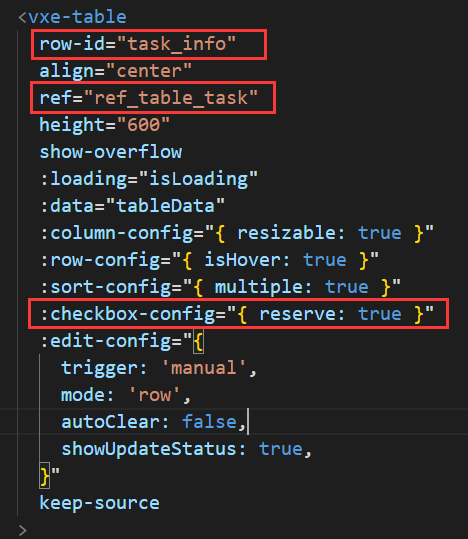
获取当前页选中的行数据:调用 this.$refs.ref_table_task.getCheckboxRecords()
获取当前页以外选中的行数据:调用 this.$refs.ref_table_task.getCheckboxReserveRecords()
注意:经测试,每页最多选中500行左右,否则在切换回选中的页时会非常卡
给表格列表添加序号
每一页的第一条序号都是1:(默认)
<vxe-column type="seq" width="60" fixed="left"></vxe-column>如果想让分页后序号不从1开始 ,而是逐渐累加,操作如下:
- const pageInfo = ref({
- currentPage: 1,
- pageSize: 10,
- pageTotal: 20,
- })
-
- // 配置显示序号
- const seqConfig = reactive({
- seqMethod({ rowIndex }) {
- return (pageInfo.value.currentPage - 1) * pageInfo.value.pageSize + rowIndex + 1
- }
- })

声明:本文内容由网友自发贡献,不代表【wpsshop博客】立场,版权归原作者所有,本站不承担相应法律责任。如您发现有侵权的内容,请联系我们。转载请注明出处:https://www.wpsshop.cn/article/detail/49191
推荐阅读
相关标签

