
热门标签
热门文章
- 1win10安装docker教程、常见问题和原理总结_windows10安装docker
- 2基于Django的程序测试_基于django的多种语言程序测试
- 3JSP项目进度管理系统myeclipse开发mysql数据库web结构java编程_工程进度数据库设计
- 4pygame学习(二)——绘制线条、圆、矩形等图案
- 503 iproute2简介_debian 安装iproute
- 6计算机图形处理原理,【技术】数字图像处理的原理与应用
- 7k8s从入门到实践
- 8Go 类型转换与别名_go 语言定义结构体别名后类型不能转化
- 9图像分割算法中的图论分割_基于图论的图像分割
- 10将elasticsearch数据存储到excel中
当前位置: article > 正文
Linux Centos 7查看文件内容_centos7查看文件内容
作者:代码创新者 | 2024-01-30 20:26:13
赞
踩
centos7查看文件内容
目录
一、linux CentOS7常用查看文件内容的指令
1.1、概述
- cat 由第一行开始显示文件内容
- tac 从最后一行开始显示,可以看出 tac 是 cat 的倒着写!
- nl 显示的时候,顺道输出行号!
- more 一页一页的显示文件内容
- less 与 more 类似,但是比 more 更好的是,他可以往前翻页!
- head 只看头几行
- tail 只看尾巴几行
1.2、查看指令文档
man cat
1.3、cat指令
- [user@localhost ~]$ cat -E --help
- 用法:cat [选项]... [文件]...
- 将[文件]或标准输入组合输出到标准输出。
-
- -A, --show-all 等于-vET
- -b, --number-nonblank 对非空输出行编号
- -e 等于-vE
- -E, --show-ends 在每行结束处显示"$"
- -n, --number 对输出的所有行编号
- -s, --squeeze-blank 不输出多行空行
- -t 与-vT 等价
- -T, --show-tabs 将跳格字符显示为^I
- -u (被忽略)
- -v, --show-nonprinting 使用^ 和M- 引用,除了LFD和 TAB 之外
- --help 显示此帮助信息并退出
- --version 显示版本信息并退出
-
- 如果没有指定文件,或者文件为"-",则从标准输入读取。
-
- 示例:
- cat f - g 先输出f 的内容,然后输出标准输入的内容,最后输出g 的内容。
- cat 将标准输入的内容复制到标准输出。
-
- GNU coreutils online help: <http://www.gnu.org/software/coreutils/>
- 请向<http://translationproject.org/team/zh_CN.html> 报告cat 的翻译错误
- 要获取完整文档,请运行:info coreutils 'cat invocation'
- [user@localhost ~]$
1.3.1、语法
cat [OPTION]... [FILE]...
查看issue文件内容
- [root@localhost user]# cat /etc/issue
- \S
- Kernel \r on an \m
- -A, --show-all 显示所有,可列出一些特殊字符而不是空白而已
- -b, --number-nonblank 列出行号,仅针对非空白行做行号显示,空白行不标行号
- -e equivalent to -vE
- -E, --show-ends 将结尾的断行字节 $ 显示出来
- -n, --number 列印出行号,连同空白行也会有行号,与 -b 的选项不同
- -s, --squeeze-blank
- -t equivalent to -vT
- -T, --show-tabs 将 [tab] 按键以 ^I 显示出来;
- -u (ignored)
- -v, --show-nonprinting 列出一些看不出来的特殊字
1.3.2、cat指令文档
- CAT(1) User Commands CAT(1)
-
- NAME
- cat - concatenate files and print on the standard output
-
- SYNOPSIS
- cat [OPTION]... [FILE]...
-
- DESCRIPTION
- Concatenate FILE(s), or standard input, to standard output.
-
- -A, --show-all
- equivalent to -vET
-
- -b, --number-nonblank
- number nonempty output lines, overrides -n
-
- -e equivalent to -vE
-
- -E, --show-ends
- display $ at end of each line
-
- -n, --number
- number all output lines
- -s, --squeeze-blank
- suppress repeated empty output lines
-
- -t equivalent to -vT
-
- -T, --show-tabs
- display TAB characters as ^I
-
- -u (ignored)
-
- -v, --show-nonprinting
- use ^ and M- notation, except for LFD and TAB
-
- --help display this help and exit
-
- --version
- output version information and exit
-
- With no FILE, or when FILE is -, read standard input.
-
- EXAMPLES
- cat f - g
- Output f's contents, then standard input, then g's contents.
- cat Copy standard input to standard output.
-
- GNU coreutils online help: <http://www.gnu.org/software/coreutils/> Report cat translation bugs to <http://transla‐
- tionproject.org/team/>
-
- AUTHOR
- Written by Torbjorn Granlund and Richard M. Stallman.
-
- COPYRIGHT
- Copyright © 2013 Free Software Foundation, Inc. License GPLv3+: GNU GPL version 3 or later
- <http://gnu.org/licenses/gpl.html>.
- This is free software: you are free to change and redistribute it. There is NO WARRANTY, to the extent permitted by
- law.
-
- SEE ALSO
- tac(1)
-
- The full documentation for cat is maintained as a Texinfo manual. If the info and cat programs are properly
- installed at your site, the command
- info coreutils 'cat invocation'
-
- should give you access to the complete manual.
-
- GNU coreutils 8.22 November 2020 CAT(1)
-
-
-
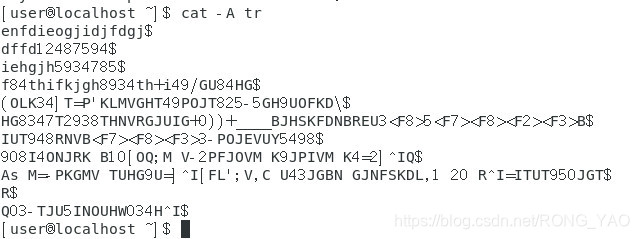
1.3.2、cat -A
由第一行开始显示文件内容
1.3.3、cat -b
列出行号,仅针对非空白行做行号显示,空白行不标行号
- [user@localhost ~]$ cat -b tr
- 1 enfdieogjidjfdgj
- 2 dffd12487594
- 3 iehgjh5934785
- 4 f84thifkjgh8934th+i49/GU84HG
- 5 (OLK34]T=P'KLMVGHT49POJT825-5GH9UOFKD\
- 6 HG8347T2938THNVRGJUIG+0))+____BJHSKFDNBREU3<F8>5<F7><F8><F2><F3>B
- 7 IUT948RNVB<F7><F8><F3>3-POJEVUY5498
- 8 908I4ONJRK B10[OQ;M V-2PFJOVM K9JPIVM K4=2] Q
- 9 As M=-PKGMV TUHG9U=] [FL';V,C U43JGBN GJNFSKDL,1 20 R =ITUT950JGT
- 10 R
- 11 Q03-TJU5INOUHW034H
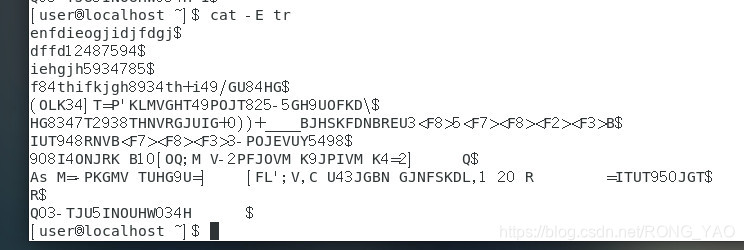
1.3.4、cat -E
-E, --show-ends 将结尾的断行字节 $ 显示出来
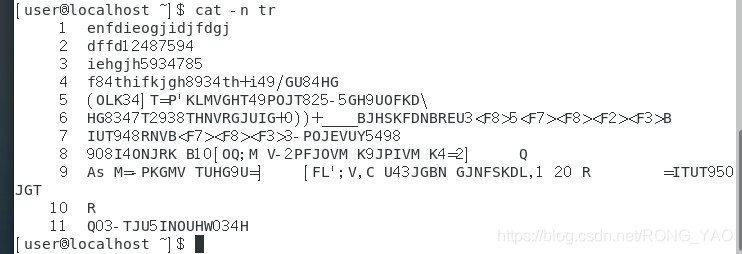
1.3.5、cat -n
-n, --number 列印出行号,连同空白行也会有行号,与 -b 的选项不同
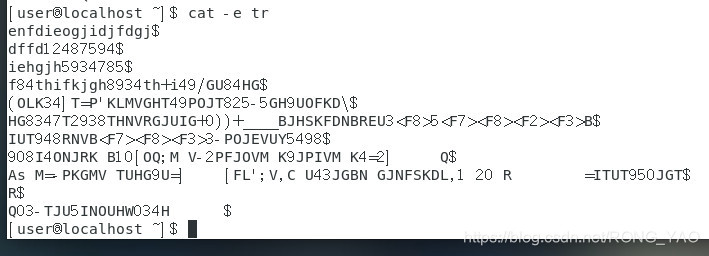
1.3.6、cat -e
1.3.7、cat -s
- enfdieogjidjfdgj
- dffd12487594
- iehgjh5934785
- f84thifkjgh8934th+i49/GU84HG
- (OLK34]T=P'KLMVGHT49POJT825-5GH9UOFKD\
- HG8347T2938THNVRGJUIG+0))+____BJHSKFDNBREU3<F8>5<F7><F8><F2><F3>B
- IUT948RNVB<F7><F8><F3>3-POJEVUY5498
- 908I4ONJRK B10[OQ;M V-2PFJOVM K9JPIVM K4=2] Q
- As M=-PKGMV TUHG9U=] [FL';V,C U43JGBN GJNFSKDL,1 20 R =ITUT950JGT
- R
- Q03-TJU5INOUHW034H
1.3.8、cat -t
- [user@localhost ~]$ cat -t tr
- enfdieogjidjfdgj
- dffd12487594
- iehgjh5934785
- f84thifkjgh8934th+i49/GU84HG
- (OLK34]T=P'KLMVGHT49POJT825-5GH9UOFKD\
- HG8347T2938THNVRGJUIG+0))+____BJHSKFDNBREU3<F8>5<F7><F8><F2><F3>B
- IUT948RNVB<F7><F8><F3>3-POJEVUY5498
- 908I4ONJRK B10[OQ;M V-2PFJOVM K9JPIVM K4=2]^IQ
- As M=-PKGMV TUHG9U=]^I[FL';V,C U43JGBN GJNFSKDL,1 20 R^I=ITUT950JGT
- R
- Q03-TJU5INOUHW034H^I
1.3.9、cat -T
将 [tab] 按键以 ^I 显示出来;
- [user@localhost ~]$ cat -T tr
- enfdieogjidjfdgj
- dffd12487594
- iehgjh5934785
- f84thifkjgh8934th+i49/GU84HG
- (OLK34]T=P'KLMVGHT49POJT825-5GH9UOFKD\
- HG8347T2938THNVRGJUIG+0))+____BJHSKFDNBREU3<F8>5<F7><F8><F2><F3>B
- IUT948RNVB<F7><F8><F3>3-POJEVUY5498
- 908I4ONJRK B10[OQ;M V-2PFJOVM K9JPIVM K4=2]^IQ
- As M=-PKGMV TUHG9U=]^I[FL';V,C U43JGBN GJNFSKDL,1 20 R^I=ITUT950JGT
- R
- Q03-TJU5INOUHW034H^I
- [user@localhost ~]$
1.3.10、cat -u (ignored)
- user@localhost ~]$ cat -u tr
- enfdieogjidjfdgj
- dffd12487594
- iehgjh5934785
- f84thifkjgh8934th+i49/GU84HG
- (OLK34]T=P'KLMVGHT49POJT825-5GH9UOFKD\
- HG8347T2938THNVRGJUIG+0))+____BJHSKFDNBREU3<F8>5<F7><F8><F2><F3>B
- IUT948RNVB<F7><F8><F3>3-POJEVUY5498
- 908I4ONJRK B10[OQ;M V-2PFJOVM K9JPIVM K4=2] Q
- As M=-PKGMV TUHG9U=] [FL';V,C U43JGBN GJNFSKDL,1 20 R =ITUT950JGT
- R
- Q03-TJU5INOUHW034H
1.3.11、cat -v
列出一些看不出来的特殊字
- [user@localhost ~]$ cat -v tr
- enfdieogjidjfdgj
- dffd12487594
- iehgjh5934785
- f84thifkjgh8934th+i49/GU84HG
- (OLK34]T=P'KLMVGHT49POJT825-5GH9UOFKD\
- HG8347T2938THNVRGJUIG+0))+____BJHSKFDNBREU3<F8>5<F7><F8><F2><F3>B
- IUT948RNVB<F7><F8><F3>3-POJEVUY5498
- 908I4ONJRK B10[OQ;M V-2PFJOVM K9JPIVM K4=2] Q
- As M=-PKGMV TUHG9U=] [FL';V,C U43JGBN GJNFSKDL,1 20 R =ITUT950JGT
- R
二、tac 文件内容从最后一行开始显示
tac与cat命令刚好相反,文件内容从最后一行开始显示,可以看出 tac 是 cat 的倒着写
- [user@localhost ~]$ tac tr
- Q03-TJU5INOUHW034H
- R
- As M=-PKGMV TUHG9U=] [FL';V,C U43JGBN GJNFSKDL,1 20 R =ITUT950JGT
- 908I4ONJRK B10[OQ;M V-2PFJOVM K9JPIVM K4=2] Q
- IUT948RNVB<F7><F8><F3>3-POJEVUY5498
- HG8347T2938THNVRGJUIG+0))+____BJHSKFDNBREU3<F8>5<F7><F8><F2><F3>B
- (OLK34]T=P'KLMVGHT49POJT825-5GH9UOFKD\
- f84thifkjgh8934th+i49/GU84HG
- iehgjh5934785
- dffd12487594
- enfdieogjidjfdgj
- [user@localhost ~]$
三、nl 显示行号
nl [-bnw] 文件选项与参数:
- -b :指定行号指定的方式,主要有两种:
-b a :表示不论是否为空行,也同样列出行号(类似 cat -n);
-b t :如果有空行,空的那一行不要列出行号(默认值); - -n :列出行号表示的方法,主要有三种:
-n ln :行号在荧幕的最左方显示;
-n rn :行号在自己栏位的最右方显示,且不加 0 ;
-n rz :行号在自己栏位的最右方显示,且加 0 ; - -w :行号栏位的占用的位数。
3.1、nl --help
- [user@localhost ~]$ nl --help
- 用法:nl [选项]... [文件]...
- Write each FILE to standard output, with line numbers added.
- With no FILE, or when FILE is -, read standard input.
-
- Mandatory arguments to long options are mandatory for short options too.
- -b, --body-numbering=样式 使用指定样式编号文件的正文行目
- -d, --section-delimiter=CC 使用指定的CC 分割逻辑页数
- -f, --footer-numbering=样式 使用指定样式编号文件的页脚行目
- -h, --header-numbering=样式 使用指定样式编号文件的页眉行目
- -i, --page-increment=数值 设置每一行遍历后的自动递增值
- -l, --join-blank-lines=数值 设置数值为多少的若干空行被视作一行
- -n, --number-format=格式 根据指定格式插入行号
- -p, --no-renumber 在逻辑页数切换时不将行号值复位
- -s, --number-separator=字符串 可能的话在行号后添加字符串
- -v, --starting-line-number=数字 每个逻辑页上的第一行的行号
- -w, --number-width=数字 为行号使用指定的栏数
- --help 显示此帮助信息并退出
- --version 显示版本信息并退出
-
- 默认的选项设置是-v1 -i1 -l1 -sTAB -w6 -nrn -hn -bt -fn。CC 是用于分隔
- 逻辑页数的两个分界符,其中缺失的第二个字符暗含了":",如果您要指定"\",
- 请输入"\\"。可用的样式如下:
-
- a 对所有行编号
- t 对非空行编号
- n 不编行号
- pBRE 只对符合正则表达式BRE 的行编号
-
- FORMAT 是下列之一:
-
- ln 左对齐,空格不用0 填充
- rn 右对齐,空格不用0 填充
- rz 右对齐,空格用0 填充
-
-
- GNU coreutils online help: <http://www.gnu.org/software/coreutils/>
- 请向<http://translationproject.org/team/zh_CN.html> 报告nl 的翻译错误
- 要获取完整文档,请运行:info coreutils 'nl invocation'
- [user@localhost ~]$
3.2、应用
- [user@localhost ~]$ nl tr
- 1 enfdieogjidjfdgj
- 2 dffd12487594
- 3 iehgjh5934785
- 4 f84thifkjgh8934th+i49/GU84HG
- 5 (OLK34]T=P'KLMVGHT49POJT825-5GH9UOFKD\
- 6 HG8347T2938THNVRGJUIG+0))+____BJHSKFDNBREU3<F8>5<F7><F8><F2><F3>B
- 7 IUT948RNVB<F7><F8><F3>3-POJEVUY5498
- 8 908I4ONJRK B10[OQ;M V-2PFJOVM K9JPIVM K4=2] Q
- 9 As M=-PKGMV TUHG9U=] [FL';V,C U43JGBN GJNFSKDL,1 20 R =ITUT950JGT
- 10 R
- 11 Q03-TJU5INOUHW034H
- [user@localhost ~]$
四、more 一页一页的翻动
more 这个程序的运行过程中,你有几个按键可以按的:
- 空白键 (space):代表向下翻一页;
- Enter :代表向下翻『一行』;
- /字串 :代表在这个显示的内容当中,向下搜寻『字串』这个关键字;
- :f :立刻显示出档名以及目前显示的行数;
- q :代表立刻离开 more ,不再显示该文件内容。
- b 或 [ctrl]-b :代表往回翻页,不过这动作只对文件有用,对管线无用。
4.1、more --help
- more: 未知选项 -help
- 用法:more [选项] 文件...
-
- 选项:
- -d 显示帮助,而不是响铃
- -f 统计逻辑行数而不是屏幕行数
- -l 抑制换页(form feed)后的暂停
- -p 不滚屏,清屏并显示文本
- -c 不滚屏,显示文本并清理行尾
- -u 抑制下划线
- -s 将多个空行压缩为一行
- -NUM 指定每屏显示的行数为 NUM
- +NUM 从文件第 NUM 行开始显示
- +/STRING 从匹配搜索字符串 STRING 的文件位置开始显示
- -V 输出版本信息并退出
- [user@localhost ~]$
4.2、应用
- [user@localhost ~]$ more tr
- enfdieogjidjfdgj
- dffd12487594
- iehgjh5934785
- f84thifkjgh8934th+i49/GU84HG
- (OLK34]T=P'KLMVGHT49POJT825-5GH9UOFKD\
- HG8347T2938THNVRGJUIG+0))+____BJHSKFDNBREU3<F8>5<F7><F8><F2><F3>B
- IUT948RNVB<F7><F8><F3>3-POJEVUY5498
- 908I4ONJRK B10[OQ;M V-2PFJOVM K9JPIVM K4=2] Q
- As M=-PKGMV TUHG9U=] [FL';V,C U43JGBN GJNFSKDL,1 20 R =ITUT950JGT
- R
- Q03-TJU5INOUHW034H
五、less 一页一页翻滚
5.1、less --help
- SUMMARY OF LESS COMMANDS
-
- Commands marked with * may be preceded by a number, N.
- Notes in parentheses indicate the behavior if N is given.
- A key preceded by a caret indicates the Ctrl key; thus ^K is ctrl-K.
-
- h H Display this help.
- q :q Q :Q ZZ Exit.
- ---------------------------------------------------------------------------
-
- MOVING
-
- e ^E j ^N CR * Forward one line (or N lines).
- y ^Y k ^K ^P * Backward one line (or N lines).
- f ^F ^V SPACE * Forward one window (or N lines).
- b ^B ESC-v * Backward one window (or N lines).
- z * Forward one window (and set window to N).
- w * Backward one window (and set window to N).
- ESC-SPACE * Forward one window, but don't stop at end-of-file.
- d ^D * Forward one half-window (and set half-window to N).
- u ^U * Backward one half-window (and set half-window to N).
- ESC-) RightArrow * Left one half screen width (or N positions).
- ESC-( LeftArrow * Right one half screen width (or N positions).
- F Forward forever; like "tail -f".
- r ^R ^L Repaint screen.
- R Repaint screen, discarding buffered input.
- ---------------------------------------------------
- Default "window" is the screen height.
- Default "half-window" is half of the screen height.
- ---------------------------------------------------------------------------
- SEARCHING
- /pattern * Search forward for (N-th) matching line.
- ?pattern * Search backward for (N-th) matching line.
- n * Repeat previous search (for N-th occurrence).
- N * Repeat previous search in reverse direction.
- ESC-n * Repeat previous search, spanning files.
- ESC-N * Repeat previous search, reverse dir. & spanning files.
- ESC-u Undo (toggle) search highlighting.
- &pattern * Display only matching lines
- ---------------------------------------------------
- A search pattern may be preceded by one or more of:
- ^N or ! Search for NON-matching lines.
- ^E or * Search multiple files (pass thru END OF FILE).
- ^F or @ Start search at FIRST file (for /) or last file (for ?).
- ^K Highlight matches, but don't move (KEEP position).
- ^R Don't use REGULAR EXPRESSIONS.
- ---------------------------------------------------------------------------
- JUMPING
- g < ESC-< * Go to first line in file (or line N).
- G > ESC-> * Go to last line in file (or line N).
- p % * Go to beginning of file (or N percent into file).
- t * Go to the (N-th) next tag.
- T * Go to the (N-th) previous tag.
- { ( [ * Find close bracket } ) ].
- } ) ] * Find open bracket { ( [.
- ESC-^F <c1> <c2> * Find close bracket <c2>.
- ESC-^B <c1> <c2> * Find open bracket <c1>
- ---------------------------------------------------
- Each "find close bracket" command goes forward to the close bracket
- matching m<letter> Mark the current position with <letter>.
- '<letter> Go to a previously marked position.
- '' Go to the previous position.
- ^X^X Same as '.
- ---------------------------------------------------
- A mark is any upper-case or lower-case letter.
- Certain marks are predefined:
- ^ means beginning of the file
- $ means end of the file
- ---------------------------------------------------------------------------
- CHANGING FILES
- :e [file] Examine a new file.
- ^X^V Same as :e.
- :n * Examine the (N-th) next file from the command line.
- :p * Examine the (N-th) previous file from the command line.
- :x * Examine the first (or N-th) file from the command line.
- :d Delete the current file from the command line list.
- = ^G :f Print current file name.
- ---------------------------------------------------------------------------
- the (N-th) open bracket in the top line.
- MISCELLANEOUS COMMANDS
- -<flag> Toggle a command line option [see OPTIONS below].
- --<name> Toggle a command line option, by name.
- _<flag> Display the setting of a command line option.
- __<name> Display the setting of an option, by name.
- +cmd Execute the less cmd each time a new file is examined.
- !command Execute the shell command with $SHELL.
- |Xcommand Pipe file between current pos & mark X to shell command.
- v Edit the current file with $VISUAL or $EDITOR.
- V Print version number of "less".
- ---------------------------------------------------------------------------
- OPTIONS
- Most options may be changed either on the command line,
- or from within less by using the - or -- command.
- Options may be given in one of two forms: either a single
- character preceded by a -, or a name preceded by --.
- -? ........ --help
- -a ........ --search-skip-screen
- Search skips current screen.
- -A ........ --SEARCH-SKIP-SCREEN
- Search starts just after target line.
- -b [N] .... --buffers=[N]
- Number of buffers.
- -B ........ --auto-buffers
- Don't automatically allocate buffers for pipes.
- -c -C .... --clear-screen --CLEAR-SCREEN
- Repaint by clearing rather than scrolling.
- -d ........ --dumb
- Dumb terminal.
- -D [xn.n] . --color=xn.n
- Set screen colors. (MS-DOS only)
- -e -E .... --quit-at-eof --QUIT-AT-EOF
- Quit at end of file.
- -f ........ --force
- Force open non-regular files.
- -F ........ --quit-if-one-screen
- Quit if entire file fits on first screen.
- -g ........ --hilite-search
- Display help (from command line).
-
- -G ........ --HILITE-SEARCH
- Don't highlight any matches for searches.
- --old-bot
- Revert to the old bottom of screen behavior.
- -h [N] .... --max-back-scroll=[N]
- Backward scroll limit.
- -i ........ --ignore-case
- Ignore case in searches that do not contain uppercase.
- -I ........ --IGNORE-CASE
- Ignore case in all searches.
- -j [N] .... --jump-target=[N]
- Screen position of target lines.
- -J ........ --status-column
- Display a status column at left edge of screen.
- -k [file] . --lesskey-file=[file]
- Use a lesskey file.
- -K --quit-on-intr
- Exit less in response to ctrl-C.
- -L ........ --no-lessopen
- Ignore the LESSOPEN environment variable.
- -m -M .... --long-prompt --LONG-PROMPT
- Set prompt style.
- -n ........ --line-numbers
- -N ........ --LINE-NUMBERS
- Use line numbers.
- -o [file] . --log-file=[file]
- Copy to log file (standard input only).
- -O [file] . --LOG-FILE=[file]
- Copy to log file (unconditionally overwrite).
- -p [pattern] --pattern=[pattern]
- Start at pattern (from command line).
- -P [prompt] --prompt=[prompt]
- Define new prompt.
- -q -Q .... --quiet --QUIET --silent --SILENT
- Quiet the terminal bell.
- -r -R .... --raw-control-chars --RAW-CONTROL-CHARS
- Output "raw" control characters.
- -s ........ --squeeze-blank-lines
- Squeeze multiple blank lines.
- -S ........ --chop-long-lines
- Chop (truncate) long lines rather than wrapping.
- -t [tag] .. --tag=[tag]
- Find a tag.
- -T [tagsfile] --tag-file=[tagsfile]
- Use an alternate tags file.
- -u -U .... --underline-special --UNDERLINE-SPECIAL
- -V ........ --version
- Display the version number of "less".
- -w ........ --hilite-unread
- Highlight first new line after forward-screen.
- -W ........ --HILITE-UNREAD
- Highlight first new line after any forward movement.
- -x [N[,...]] --tabs=[N[,...]]
- Set tab stops.
- -X ........ --no-init
- Don't use termcap init/deinit strings.
- -y [N] .... --max-forw-scroll=[N]
- Forward scroll limit.
- -z [N] .... --window=[N]
- Set size of window.
- -" [c[c]] . --quotes=[c[c]]
- Set shell quote characters.
- -~ ........ --tilde
- Don't display tildes after end of file.
- -# [N] .... --shift=[N]
- Horizontal scroll amount (0 = one half screen width)
- ........ --no-keypad
- Don't send termcap keypad init/deinit strings.
- ........ --follow-name
- The F command changes files if the input file is renamed.
- ........ --use-backslash
- Subsequent options use backslash as escape char.
- ---------------------------------------------------------------------------
- LINE EDITING
- These keys can be used to edit text being entered
- on the "command line" at the bottom of the screen.
- RightArrow ESC-l Move cursor right one character.
- LeftArrow ESC-h Move cursor left one character.
- ctrl-RightArrow ESC-RightArrow ESC-w Move cursor right one word.
- ctrl-LeftArrow ESC-LeftArrow ESC-b Move cursor left one word.
- HOME ESC-0 Move cursor to start of line.
- END ESC-$ Move cursor to end of line.
5.2、应用
- enfdieogjidjfdgj
- dffd12487594
- iehgjh5934785
- f84thifkjgh8934th+i49/GU84HG
- (OLK34]T=P'KLMVGHT49POJT825-5GH9UOFKD\
- HG8347T2938THNVRGJUIG+0))+____BJHSKFDNBREU3<F8>5<F7><F8><F2><F3>B
- IUT948RNVB<F7><F8><F3>3-POJEVUY5498
- 908I4ONJRK B10[OQ;M V-2PFJOVM K9JPIVM K4=2] Q
- As M=-PKGMV TUHG9U=] [FL';V,C U43JGBN GJNFSKDL,1 20 R =ITUT950JGT
- R
- Q03-TJU5INOUHW034H
- ~
- ~
- ~
- ~
- ~
- ~
- ~
- ~
- ~
- ~
- ~
- ~
- (END)
六、head 取出文件前面几行
语法:
head [-n number] 文件 选项与参数:- -n :后面接数字,代表显示几行的意思
-
默认的情况中,显示前面 10 行!若要显示前 20 行,就得要这样:
6.1、head --help
- [user@localhost ~]$ head --help
- 用法:head [选项]... [文件]...
- Print the first 10 lines of each FILE to standard output.
- With more than one FILE, precede each with a header giving the file name.
- With no FILE, or when FILE is -, read standard input.
-
- Mandatory arguments to long options are mandatory for short options too.
- -c, --bytes=[-]K print the first K bytes of each file;
- with the leading '-', print all but the last
- K bytes of each file
- -n, --lines=[-]K print the first K lines instead of the first 10;
- with the leading '-', print all but the last
- K lines of each file
- -q, --quiet, --silent 不显示包含给定文件名的文件头
- -v, --verbose 总是显示包含给定文件名的文件头
- --help 显示此帮助信息并退出
- --version 显示版本信息并退出
-
- K 后面可以跟乘号:
- b 512, kB 1000, K 1024, MB 1000*1000, M 1024*1024,
- GB 1000*1000*1000, G 1024*1024*1024, 对于T, P, E, Z, Y 同样适用。
-
- GNU coreutils online help: <http://www.gnu.org/software/coreutils/>
- 请向<http://translationproject.org/team/zh_CN.html> 报告head 的翻译错误
- 要获取完整文档,请运行:info coreutils 'head invocation'
- [user@localhost ~]$
6.2、应用
- [user@localhost ~]$ head tr
- enfdieogjidjfdgj
- dffd12487594
- iehgjh5934785
- f84thifkjgh8934th+i49/GU84HG
- (OLK34]T=P'KLMVGHT49POJT825-5GH9UOFKD\
- HG8347T2938THNVRGJUIG+0))+____BJHSKFDNBREU3<F8>5<F7><F8><F2><F3>B
- IUT948RNVB<F7><F8><F3>3-POJEVUY5498
- 908I4ONJRK B10[OQ;M V-2PFJOVM K9JPIVM K4=2] Q
- As M=-PKGMV TUHG9U=] [FL';V,C U43JGBN GJNFSKDL,1 20 R =ITUT950JGT
- R
七、tail 取出文件后面几行
语法:
tail [-n number] 文件
选项与参数:
- -n :后面接数字,代表显示几行的意思
- -f :表示持续侦测后面所接的档名,要等到按下[ctrl]-c才会结束tail的侦测
7.1、tail --help
- [user@localhost ~]$ head --help
- 用法:head [选项]... [文件]...
- Print the first 10 lines of each FILE to standard output.
- With more than one FILE, precede each with a header giving the file name.
- With no FILE, or when FILE is -, read standard input.
-
- Mandatory arguments to long options are mandatory for short options too.
- -c, --bytes=[-]K print the first K bytes of each file;
- with the leading '-', print all but the last
- K bytes of each file
- -n, --lines=[-]K print the first K lines instead of the first 10;
- with the leading '-', print all but the last
- K lines of each file
- -q, --quiet, --silent 不显示包含给定文件名的文件头
- -v, --verbose 总是显示包含给定文件名的文件头
- --help 显示此帮助信息并退出
- --version 显示版本信息并退出
-
- K 后面可以跟乘号:
- b 512, kB 1000, K 1024, MB 1000*1000, M 1024*1024,
- GB 1000*1000*1000, G 1024*1024*1024, 对于T, P, E, Z, Y 同样适用。
-
- GNU coreutils online help: <http://www.gnu.org/software/coreutils/>
- 请向<http://translationproject.org/team/zh_CN.html> 报告head 的翻译错误
- 要获取完整文档,请运行:info coreutils 'head invocation'
- [user@localhost ~]$ head tr
- enfdieogjidjfdgj
- dffd12487594
- iehgjh5934785
- f84thifkjgh8934th+i49/GU84HG
- (OLK34]T=P'KLMVGHT49POJT825-5GH9UOFKD\
- HG8347T2938THNVRGJUIG+0))+____BJHSKFDNBREU3<F8>5<F7><F8><F2><F3>B
- IUT948RNVB<F7><F8><F3>3-POJEVUY5498
- 908I4ONJRK B10[OQ;M V-2PFJOVM K9JPIVM K4=2] Q
- As M=-PKGMV TUHG9U=] [FL';V,C U43JGBN GJNFSKDL,1 20 R =ITUT950JGT
- R
- [user@localhost ~]$ tail --help
- 用法:tail [选项]... [文件]...
- Print the last 10 lines of each FILE to standard output.
- With more than one FILE, precede each with a header giving the file name.
- With no FILE, or when FILE is -, read standard input.
-
- Mandatory arguments to long options are mandatory for short options too.
- -c, --bytes=K output the last K bytes; or use -c +K to output
- bytes starting with the Kth of each file
- -f, --follow[={name|descriptor}]
- output appended data as the file grows;
- an absent option argument means 'descriptor'
- -F same as --follow=name --retry
- -n, --lines=K output the last K lines, instead of the last 10;
- or use -n +K to output starting with the Kth
- --max-unchanged-stats=N
- with --follow=name, reopen a FILE which has not
- changed size after N (default 5) iterations
- to see if it has been unlinked or renamed
- (this is the usual case of rotated log files);
- with inotify, this option is rarely useful
- --pid=PID with -f, terminate after process ID, PID dies
- -q, --quiet, --silent never output headers giving file names
- --retry keep trying to open a file if it is inaccessible
- -s, --sleep-interval=N with -f, sleep for approximately N seconds
- (default 1.0) between iterations;
- with inotify and --pid=P, check process P at
- least once every N seconds
- -v, --verbose always output headers giving file names
- --help 显示此帮助信息并退出
- --version 显示版本信息并退出
-
- If the first character of K (the number of bytes or lines) is a '+',
- print beginning with the Kth item from the start of each file, otherwise,
- print the last K items in the file. K may have a multiplier suffix:
- b 512, kB 1000, K 1024, MB 1000*1000, M 1024*1024,
- GB 1000*1000*1000, G 1024*1024*1024, and so on for T, P, E, Z, Y.
-
- 如果您希望即时追查一个文件的有效名称而非描述内容(例如循环日志),默认
- 的程序动作并不如您所愿。在这种场合可以使用--follow=name 选项,它会使
- tail 定期追踪打开给定名称的文件,以确认它是否被删除或被其它某些程序重新创建过。
-
- GNU coreutils online help: <http://www.gnu.org/software/coreutils/>
- 请向<http://translationproject.org/team/zh_CN.html> 报告tail 的翻译错误
- 要获取完整文档,请运行:info coreutils 'tail invocation'
- [user@localhost ~]$
7.2、应用
- [user@localhost ~]$ tail -n 3 tr
- As M=-PKGMV TUHG9U=] [FL';V,C U43JGBN GJNFSKDL,1 20 R =ITUT950JGT
- R
- Q03-TJU5INOUHW034H
- [user@localhost ~]$ tail -n 1 tr
- Q03-TJU5INOUHW034H
声明:本文内容由网友自发贡献,不代表【wpsshop博客】立场,版权归原作者所有,本站不承担相应法律责任。如您发现有侵权的内容,请联系我们。转载请注明出处:https://www.wpsshop.cn/article/detail/49188
推荐阅读
相关标签

