常见的开源监控软件
- cacti、nagios、zabbix、smokeping、open-falcon
- cacti、smokeping偏向于基础监控,成图非常漂亮
- cacti、nagios、zabbix服务端监控中心,需要php环境支持,其中zabbix和cacti都需要mysql作为数据存储,nagios不用存储历史数据,注重服务或者监控项的状态,zabbix会获取服务或者监控项目的数据,会把数据记录到数据库里,从而可以成图
- open-falcon为小米公司开发,开源后受到诸多大公司和运维工程师的追捧,适合大企业,滴滴、360、新浪微博、京东等大公司在使用这款监控软件,值得研究
zabbix 监控介绍
-
C/S架构,基于C++开发,监控中心支持web界面配置和管理
-
单个server节点可以支持上万台客户端
-
5个组件
- zabbix-server 监控中心,接收客户端上报信息,负责配置、统计、操作数据
- 数据存储 存放数据,比如mysql
- web界面 也叫web UI,在web界面下操作配置是zabbix简单易用的主要原因
- zabbix-proxy 可选组件,它可以代替zabbix-server的功能,减轻server的压力
- zabbix-agent 客户端软件,负责采集各个监控服务或项目的数据,并上报
监控流程图
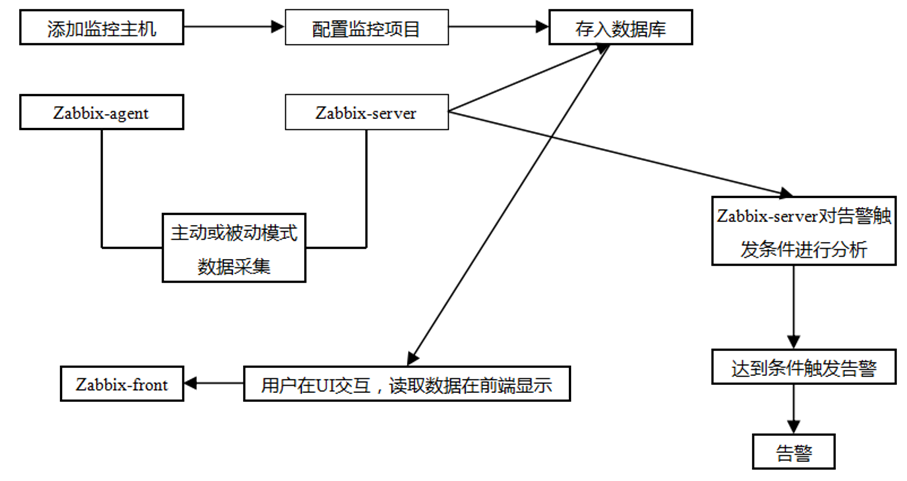
安装zabbix
在两台机器上安装,一台是服务端(test-a:192.168.77.134),一台是客户端(centos0:192.168.77.129)。
第一步,服务端安装zabbix,导入数据,启动服务
- [root@test-a ~]# wget https://repo.zabbix.com/zabbix/3.4/rhel/7/x86_64/zabbix-release-3.4-2.el7.noarch.rpm # 下载不下来,就通过浏览器下载后上传
- [root@test-a ~]# rpm -ivh zabbix-release-3.4-2.el7.noarch.rpm # 安装rpm
- warning: zabbix-release-3.4-2.el7.noarch.rpm: Header V4 RSA/SHA512 Signature, key ID a14fe591: NOKEY
- Preparing... ################################# [100%]
- Updating / installing...
- 1:zabbix-release-3.4-2.el7 ################################# [100%]
-
- [root@test-a ~]# yum install -y zabbix-agent zabbix-get zabbix-server-mysql zabbix-web zabbix-web-mysql # 安装相关的工具包
- # zabbix-agent 客户端工具
- # zabbix-get 服务端工具,获取客户端收集的相关监控数据
- # zabbix-server-mysql 服务端工具,和mysql相关的工具
- # zabbix-web 服务端工具,监控展示网页工具
- # zabbix-web-mysql 服务端工具,网页与mysql相关的工具
-
- # 创建zabbix的mysql库及用户,并导入初始数据
- [root@test-a ~]# ps aux|grep mysql
- root 2234 0.0 0.1 115436 1728 ? S 08:46 0:00 /bin/sh /usr/local/mysql/bin/mysqd_safe --datadir=/data/mysql --pid-file=/usr/local/mysql/mysqld.pid
- mysql 2463 0.1 18.4 1117940 186076 ? Sl 08:46 0:02 /usr/local/mysql/bin/mysqld --basedir=/usr/local/mysql --datadir=/data/mysql --plugin-dir=/usr/local/mysql/lib/plugin --user=mysql --log-error=/usr/local/mysql/db.err --pid-file=/usr/local/mysql/mysqld.pid --socket=/usr/local/mysqlmysql.sock --port=3306
- root 2777 0.0 0.0 112704 972 pts/0 S+ 09:12 0:00 grep --color=auto mysql
- # mysql 的配置需要添加character-set-server = utf8,使支持中文
- [root@test-a ~]# mysql -uroot -p
- Enter password:
- Welcome to the MySQL monitor. Commands end with ; or \g.
- Your MySQL connection id is 3
- Server version: 5.7.23-log MySQL Community Server (GPL)
-
- Copyright (c) 2000, 2018, Oracle and/or its affiliates. All rights reserved.
-
- Oracle is a registered trademark of Oracle Corporation and/or its
- affiliates. Other names may be trademarks of their respective
- owners.
-
- Type 'help;' or '\h' for help. Type '\c' to clear the current input statement.
-
- mysql> create database zabbix character set utf8; -- 创建库
- Query OK, 1 row affected (0.04 sec)
-
- mysql> grant all on zabbix.* to 'zabbix'@'127.0.0.1' identified by 'test111'; -- 添加用户及授权
- Query OK, 0 rows affected, 1 warning (0.30 sec)
-
- mysql> quit
- Bye
- [root@test-a ~]# cd /usr/share/doc/zabbix-server-mysql-3.4.15/
- [root@test-a zabbix-server-mysql-3.4.15]# ls
- AUTHORS ChangeLog COPYING create.sql.gz NEWS README
- [root@test-a zabbix-server-mysql-3.4.15]# cp create.sql.gz create.sql.gz.default # 备份一下
- [root@test-a zabbix-server-mysql-3.4.15]# gzip -d create.sql.gz # 解压
- [root@test-a zabbix-server-mysql-3.4.15]# ls
- AUTHORS ChangeLog COPYING create.sql create.sql.gz.default NEWS README
- [root@test-a zabbix-server-mysql-3.4.15]# mysql -uroot -ptest111 zabbix < create.sql # 导入数据,需要几秒导入
- mysql: [Warning] Using a password on the command line interface can be insecure.
-
-
- [root@test-a ~]# vim /etc/zabbix/zabbix_server.conf # 配置DBHost=127.0.0.1 和 DBPassword=test111,就是刚授权的ip及密码
- [root@test-a ~]# systemctl start zabbix-server
- [root@test-a ~]# ps -aux|grep zabbix
- zabbix 3164 45.5 0.3 254608 4036 ? R 09:35 0:00 /usr/sbin/zabbix_server -c /etc/zabbix/zabbix_server.conf
- zabbix 3167 0.0 0.2 254608 2316 ? S 09:35 0:00 /usr/sbin/zabbix_server: configuration syncer [waiting 60 sec for processes]
- zabbix 3168 0.0 0.2 254608 2320 ? S 09:35 0:00 /usr/sbin/zabbix_server: alerter [connecting to the database]
- zabbix 3169 0.0 0.2 254608 2320 ? S 09:35 0:00 /usr/sbin/zabbix_server: alerter [connecting to the database]
- zabbix 3170 0.0 0.2 254608 2320 ? S 09:35 0:00 /usr/sbin/zabbix_server: alerter [connecting to the database]
- zabbix 3171 0.0 0.2 254608 2316 ? S 09:35 0:00 /usr/sbin/zabbix_server: housekeeper [startup idle for 30 minutes]
- zabbix 3172 0.5 0.2 254608 2548 ? S 09:35 0:00 /usr/sbin/zabbix_server: timer #1 [processed 0 triggers, 0 events in 0.000000 sec, 0 maintenances in 0.000000 sec, idle 8 sec]
- zabbix 3173 0.0 0.2 254604 2644 ? S 09:35 0:00 /usr/sbin/zabbix_server: http poller #1 [got 0 values in 0.104076 sec, idle 5 sec]
- zabbix 3174 6.0 0.3 358328 3916 ? D 09:35 0:00 /usr/sbin/zabbix_server -c /etc/zabbix/zabbix_server.conf
- zabbix 3175 2.0 0.2 254604 2644 ? S 09:35 0:00 /usr/sbin/zabbix_server: history syncer #1 [synced 0 items in 0.000042 sec, idle 1 sec]
- zabbix 3177 0.0 0.2 254604 2644 ? S 09:35 0:00 /usr/sbin/zabbix_server: history syncer #2 [synced 0 items in 0.000040 sec, idle 1 sec]
- zabbix 3179 0.0 0.2 254604 2644 ? S 09:35 0:00 /usr/sbin/zabbix_server: history syncer #3 [synced 0 items in 0.000029 sec, idle 1 sec]
- zabbix 3181 2.0 0.2 254604 2644 ? S 09:35 0:00 /usr/sbin/zabbix_server: history syncer #4 [synced 0 items in 0.000024 sec, idle 1 sec]
- zabbix 3183 2.0 0.3 254608 3576 ? S 09:35 0:00 /usr/sbin/zabbix_server: escalator #1 [processed 0 escalations in 0.051954 sec, idle 3 sec]
- zabbix 3185 3.0 0.3 254608 3580 ? S 09:35 0:00 /usr/sbin/zabbix_server: proxy poller #1 [exchanged data with 0 proxies in 0.000584 sec, idle 5 sec]
- zabbix 3187 0.0 0.2 254608 2408 ? S 09:35 0:00 /usr/sbin/zabbix_server: self-monitoring [processed data in 0.000440 sec, idle 1 sec]
- zabbix 3188 0.0 0.2 254608 2552 ? S 09:35 0:00 /usr/sbin/zabbix_server: task manager [started, idle 1 sec]
- zabbix 3189 0.0 0.3 358328 3916 ? R 09:35 0:00 /usr/sbin/zabbix_server -c /etc/zabbix/zabbix_server.conf
- zabbix 3191 0.0 0.3 358328 3916 ? D 09:35 0:00 /usr/sbin/zabbix_server -c /etc/zabbix/zabbix_server.conf
- root 3193 0.0 0.0 112704 972 pts/0 S+ 09:35 0:00 grep --color=auto zabbix
- [root@test-a ~]# netstat -ntlp # 查看zabbix的监听端口: 10051 说明启动成功,如果启动报错了,根据日志(/var/log/zabbix/zabbix_server.log)解决问题
- Active Internet connections (only servers)
- Proto Recv-Q Send-Q Local Address Foreign Address State PID/Program name
- tcp 0 0 127.0.0.1:25 0.0.0.0:* LISTEN 2465/master
- tcp 0 0 0.0.0.0:2049 0.0.0.0:* LISTEN -
- tcp 0 0 0.0.0.0:10051 0.0.0.0:* LISTEN 3164/zabbix_server
- tcp 0 0 0.0.0.0:111 0.0.0.0:* LISTEN 1/systemd
- tcp 0 0 0.0.0.0:44016 0.0.0.0:* LISTEN -
- tcp 0 0 0.0.0.0:20048 0.0.0.0:* LISTEN 1313/rpc.mountd
- tcp 0 0 0.0.0.0:56497 0.0.0.0:* LISTEN 1231/rpc.statd
- tcp 0 0 0.0.0.0:22 0.0.0.0:* LISTEN 1214/sshd
- tcp6 0 0 ::1:25 :::* LISTEN 2465/master
- tcp6 0 0 :::51514 :::* LISTEN 1231/rpc.statd
- tcp6 0 0 :::2049 :::* LISTEN -
- tcp6 0 0 :::10051 :::* LISTEN 3164/zabbix_server
- tcp6 0 0 :::55049 :::* LISTEN -
- tcp6 0 0 :::3306 :::* LISTEN 2463/mysqld
- tcp6 0 0 :::111 :::* LISTEN 1/systemd
- tcp6 0 0 :::80 :::* LISTEN 2999/httpd
- tcp6 0 0 :::20048 :::* LISTEN 1313/rpc.mountd
- tcp6 0 0 :::22 :::* LISTEN 1214/sshd

第二步,网页配置(server-ip/zabbix)
访问 http://192.168.77.134/zabbix,会出来安装界面
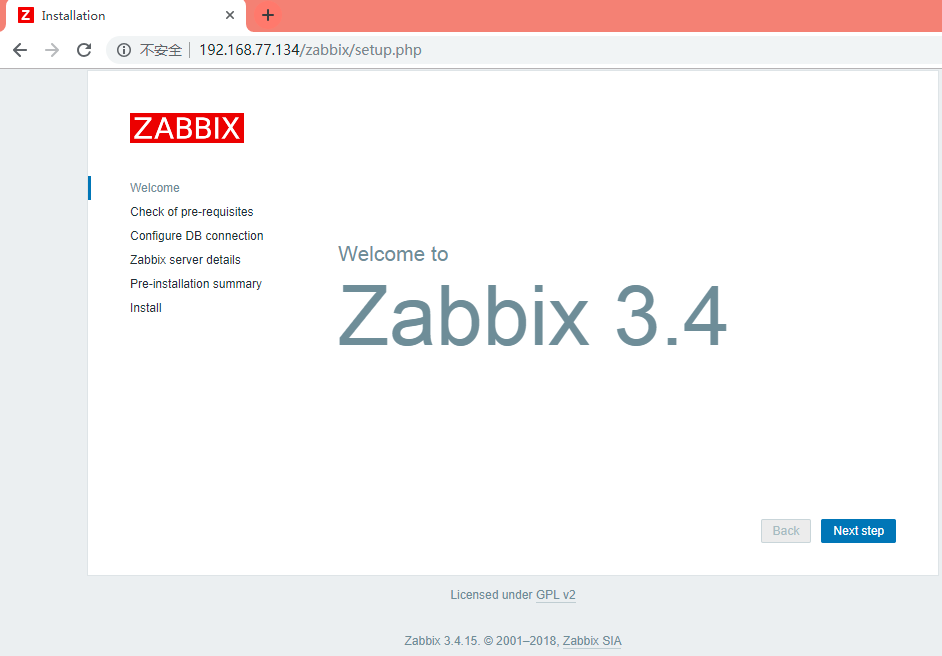
点击 next step,会发现有红色提示,那是因为php没有配置时区,早/etc/php.ini中配置date.timezone = Asia/Shanghai后,重启apache,重新刷新网页就没有提示了
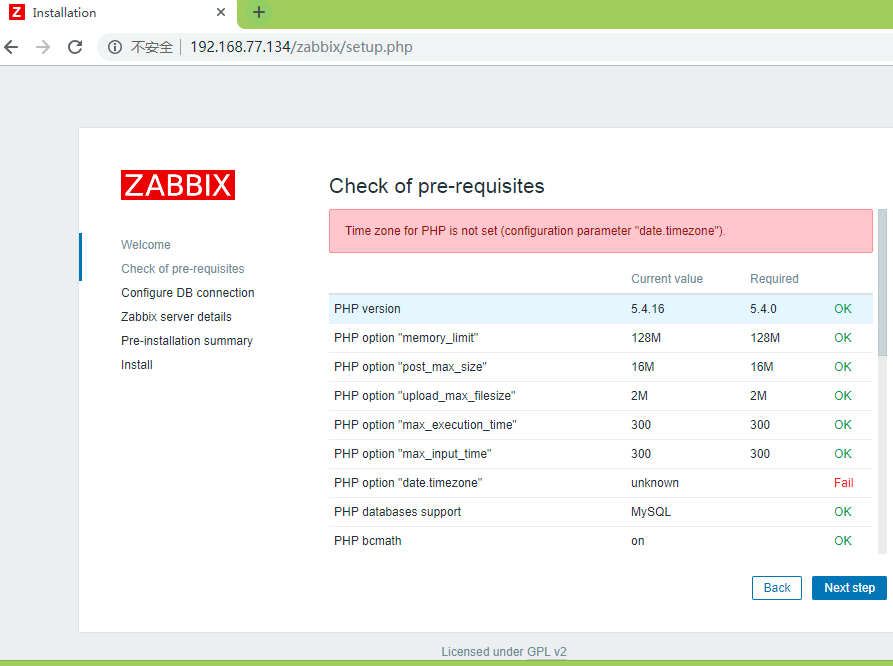
然后输入mysql相关配置,点击next step安装完成啦
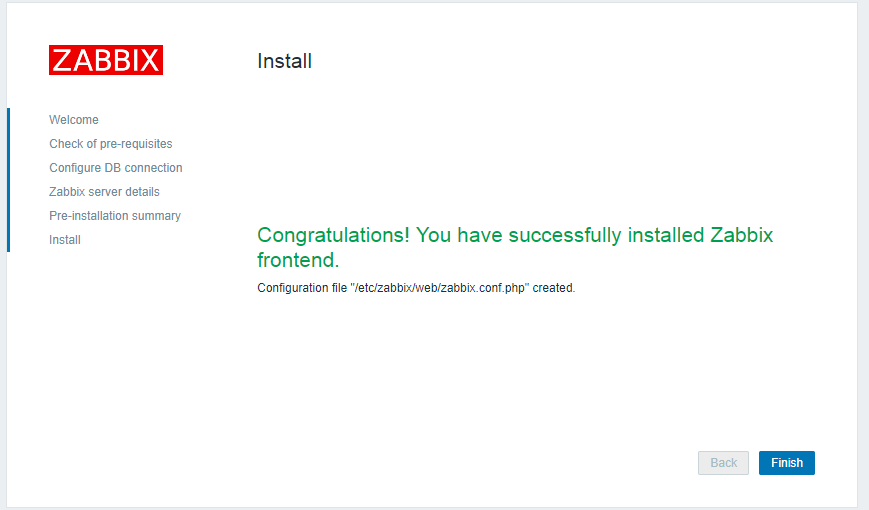
到登录页面输入默认账户admin,密码zabbix,登录
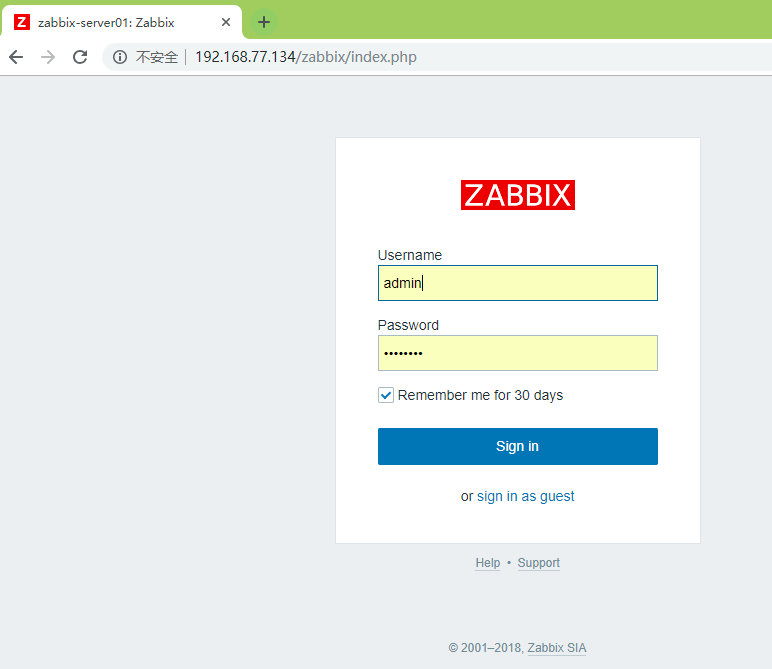
登录成功后,首先更改密码和系统语言
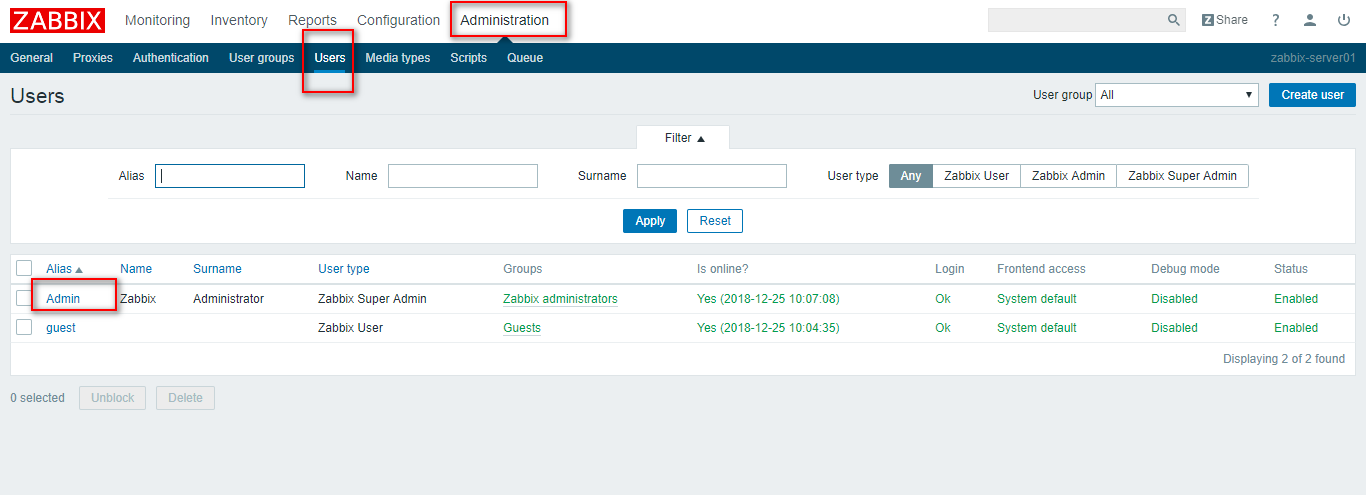
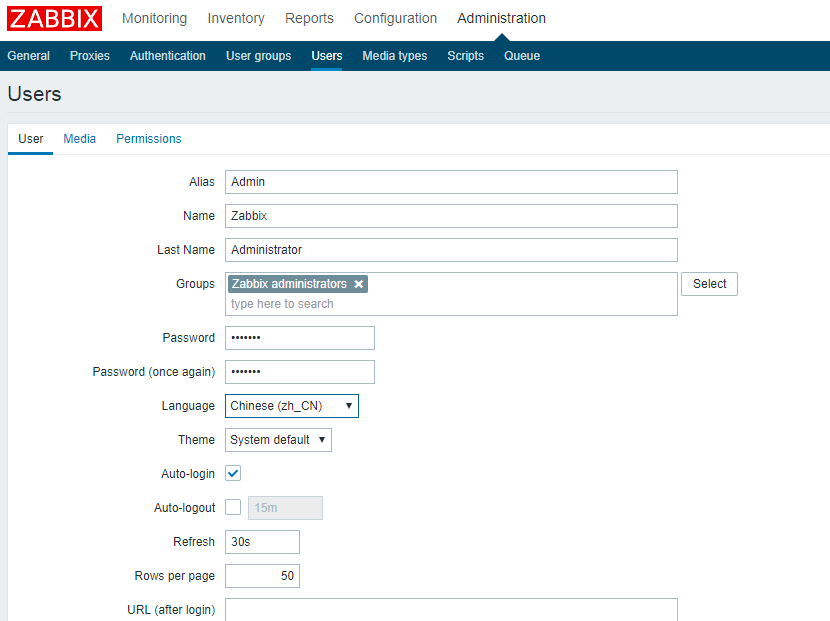
点Change password进行密码替换,下面的Language选择Chinese 
刷新主页
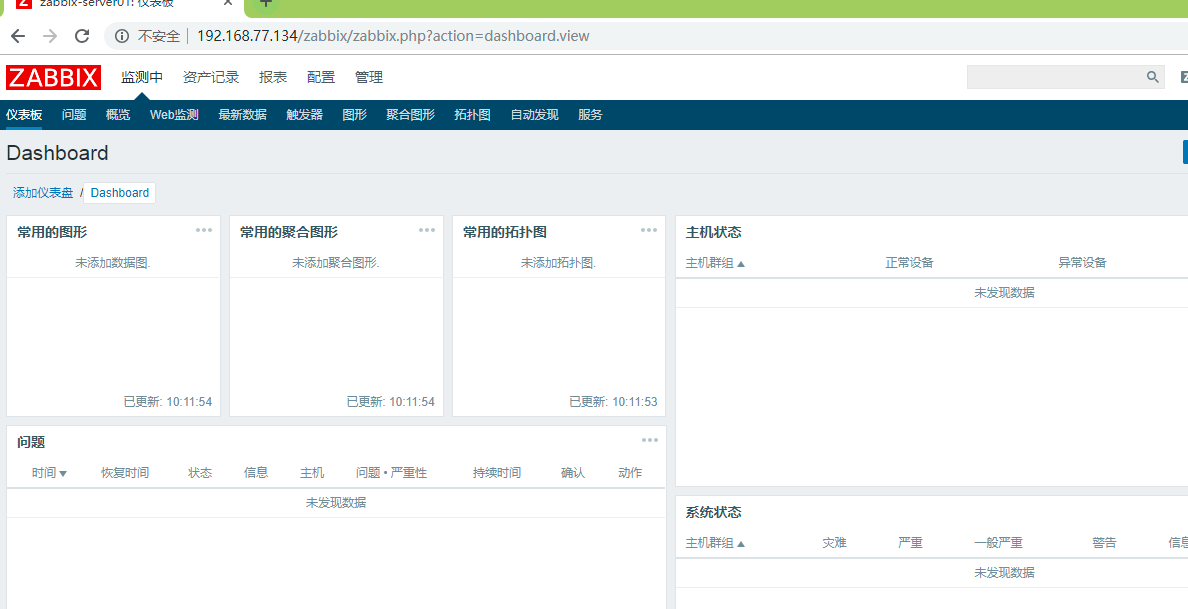
zabbix服务名
第三步,客户端安装及配置启动
- [root@centos0 ~]# rpm -ivh zabbix-release-3.4-2.el7.noarch.rpm
- 警告:zabbix-release-3.4-2.el7.noarch.rpm: 头V4 RSA/SHA512 Signature, 密钥 ID a14fe591: NOKEY
- 准备中... ################################# [100%]
- 正在升级/安装...
- 1:zabbix-release-3.4-2.el7 ################################# [100%]
- [root@centos0 ~]# yum install -y zabbix-agent
- [root@centos0 ~]# vim /etc/zabbix/zabbix_agentd.conf # 更改Server, ServerActive为对应的zabbix服务器IP, Hostname为对应的zabbix服务名称(不是主机名,web工具安装时配置的,不记得了可以在web里去找)
-
- [root@centos0 ~]# systemctl start zabbix-agent
- [root@centos0 ~]# netstat -ntlp # 监听的端口是10050
- Active Internet connections (only servers)
- Proto Recv-Q Send-Q Local Address Foreign Address State PID/Program name
- tcp 0 0 127.0.0.1:25 0.0.0.0:* LISTEN 3550/master
- tcp 0 0 0.0.0.0:10050 0.0.0.0:* LISTEN 3989/zabbix_agentd
- tcp 0 0 0.0.0.0:111 0.0.0.0:* LISTEN 1/systemd
- tcp 0 0 0.0.0.0:22 0.0.0.0:* LISTEN 2599/sshd
- tcp6 0 0 ::1:25 :::* LISTEN 3550/master
- tcp6 0 0 :::10050 :::* LISTEN 3989/zabbix_agentd
- tcp6 0 0 :::111 :::* LISTEN 1/systemd
- tcp6 0 0 :::22 :::* LISTEN 2599/sshd
忘记了Zabbix web工具admin密码如何处理
进入mysql,选择zabbix库及users表,更改对应用户的密码即可,
- [root@test-a logs]# mysql -uroot -p
- Enter password:
- Welcome to the MySQL monitor. Commands end with ; or \g.
- Your MySQL connection id is 331
- Server version: 5.7.23-log MySQL Community Server (GPL)
-
- Copyright (c) 2000, 2018, Oracle and/or its affiliates. All rights reserved.
-
- Oracle is a registered trademark of Oracle Corporation and/or its
- affiliates. Other names may be trademarks of their respective
- owners.
-
- Type 'help;' or '\h' for help. Type '\c' to clear the current input statement.
-
- mysql> use zabbix;
- Reading table information for completion of table and column names
- You can turn off this feature to get a quicker startup with -A
-
- Database changed
-
- mysql> desc users;
- +----------------+---------------------+------+-----+---------+-------+
- | Field | Type | Null | Key | Default | Extra |
- +----------------+---------------------+------+-----+---------+-------+
- | userid | bigint(20) unsigned | NO | PRI | NULL | |
- | alias | varchar(100) | NO | UNI | | |
- | name | varchar(100) | NO | | | |
- | surname | varchar(100) | NO | | | |
- | passwd | char(32) | NO | | | |
- | url | varchar(255) | NO | | | |
- | autologin | int(11) | NO | | 0 | |
- | autologout | varchar(32) | NO | | 15m | |
- | lang | varchar(5) | NO | | en_GB | |
- | refresh | varchar(32) | NO | | 30s | |
- | type | int(11) | NO | | 1 | |
- | theme | varchar(128) | NO | | default | |
- | attempt_failed | int(11) | NO | | 0 | |
- | attempt_ip | varchar(39) | NO | | | |
- | attempt_clock | int(11) | NO | | 0 | |
- | rows_per_page | int(11) | NO | | 50 | |
- +----------------+---------------------+------+-----+---------+-------+
- 16 rows in set (0.31 sec)
-
- mysql> update users set passwd=md5('test111') where alias='Admin'; # 设置新密码为test111
- Query OK, 0 rows affected (0.10 sec)
- Rows matched: 1 Changed: 0 Warnings: 0
-