
热门标签
热门文章
- 1我就不信这些 npm 指令你全知道_npm 如何kill
- 2Spring Boot笔记-拦截器相关(用户权限方面)_interceptor拦截器初步赋子不同类型用户权限
- 3ONLYOFFICE:兼顾协作与安全的开源办公套件
- 41.2 金融数据处理_qstock get_data
- 5【qstock量化】动态交互数据可视化_qstock.data.trade
- 6Spring Boot Thymeleaf 中文乱码_spring boot thymleaf 中文 显示 \u
- 7convertToWorldSpace convertToNodeSpace_converttoworldspace converttonodespace
- 8日志处理--Logo4Net与文件的并发处理_log4net 多线程
- 9mysqldump介绍及使用_mysqldump 表
- 10DoTween全解析(入门篇)
当前位置: article > 正文
mysql8.0.17 win7免安装版_win10 mysql8 error
作者:代码创新者 | 2024-01-30 19:01:13
赞
踩
win10 mysql8 error
下载地址https://dev.mysql.com/downloads/mysql/
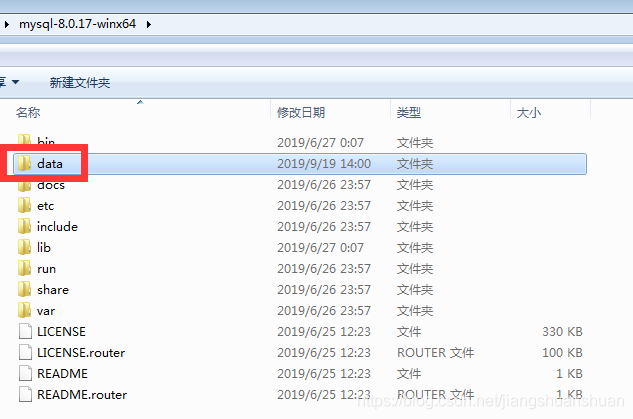
解压后新建data
!!!不需要my.ini
安装mysql
D:\tools\mysql-8.0.17-winx64\bin>mysqld --initialize-insecure

D:\tools\mysql-8.0.17-winx64\bin>mysql -u root -p
Enter password:
ERROR 2003 (HY000): Can't connect to MySQL server on 'localhost' (10061)

D:\tools\mysql-8.0.17-winx64\bin>net start mysql
服务名无效。

请键入 NET HELPMSG 2185 以获得更多的帮助。


D:\tools\mysql-8.0.17-winx64\bin>mysqld --install
Service successfully installed.

D:\tools\mysql-8.0.17-winx64\bin>net start mysql
MySQL 服务正在启动 ......
MySQL 服务已经启动成功。


D:\tools\mysql-8.0.17-winx64\bin>mysql -u root -p
Enter password:
Welcome to the MySQL monitor.  Commands end with ; or \g.
Your MySQL connection id is 8
Server version: 8.0.17 MySQL Community Server - GPL

Copyright (c) 2000, 2019, Oracle and/or its affiliates. All rights reserved.

Oracle is a registered trademark of Oracle Corporation and/or its
affiliates. Other names may be trademarks of their respective
owners.

Type 'help;' or '\h' for help. Type '\c' to clear the current input statement.

mysql>

- 1
- 2
- 3
- 4
- 5
- 6
- 7
- 8
- 9
- 10
- 11
- 12
- 13
- 14
- 15
- 16
- 17
- 18
- 19
- 20
- 21
- 22
- 23
- 24
- 25
- 26
- 27
- 28
- 29
- 30
- 31
- 32
- 33
- 34
- 35
声明:本文内容由网友自发贡献,不代表【wpsshop博客】立场,版权归原作者所有,本站不承担相应法律责任。如您发现有侵权的内容,请联系我们。转载请注明出处:https://www.wpsshop.cn/article/detail/48151
推荐阅读

相关标签

