
热门标签
热门文章
- 1《尚硅谷数据结构》-归并排序_归并排序尚硅谷
- 2Windows如何后台运行bat文件(没有命令提示符框)
- 3Pytest插件pytest-selenium-让自动化测试更简洁
- 4Windows JAR包的启动脚本_windows jar包启动脚本
- 5windows 进程列表_imagename 表示进程的名称
- 6C++实现数字翻转算法及其应用_c++数字反转
- 7kafka tool下载安装和使用
- 8【HCIA】虚拟化技术介绍_全虚拟化 半虚拟化 硬件辅助虚拟化
- 9JS 小程序 Vue 2022年最全面试题!持续更新_用户交互的部分。 的技术,将 是负责应用程序中处理
- 10基于Python开发ChatGPT应用_chatgpt python
当前位置: article > 正文
服务器管理平台(6)- Utils
作者:代码独立开发者 | 2024-01-30 18:54:13
赞
踩
服务器管理平台(6)- Utils
Utils
- 本篇为服务器管理平台的结篇,讲述一些必要的Util,如钉钉告警、安全加密、远程登录等功能的实现
1、钉钉告警
1.1、SQL配置告警规则
| 字段名称 | 字段类型 | 解释 |
| Id | int | 自增ID |
| Table | string | 监测表名 |
| Metric | string | 监测指标 |
| Template | string | 告警模版 |
| Frequency | string | 告警频率 |
| Threshold | string | 指标阈值 |
| CreatedAt | timestamp | 创建时间 |
| UpdatedAt | timestamp | 修改时间 |
1.2、Shell定时轮询
## 打开定时任务配置文件

crontab -e

## 指定每个工作日上午11:10定时执行脚本,并把执行脚本的日志写入文件 result.log

10 11 * * 1,2,3,4,5 sh [alert.sh](http://alert.sh) > result.log
- 1
- 2
- 3
- 4
- 5
- 6
- 7
1.3、核心功能函数
const openUrl = "https://oapi.dingtalk.com/robot/send?access_token=43e4ad2bcbbef692c7652b9eecca6fd51a0db9e544edcb579640e78f71259006"

// NotifyHandler NotifyHandler
type NotifyHandler struct {
	web.BaseHandler
}

// POST method
func (NotifyHandler) POST(ctx *web.Context) {
	//1.根据POST表单拼接SQL
	var rules []model.AlertRule
	rules, err := model.GetRules()
	if err != nil {
		ctx.JSON("Describe AlertRule", 101, err)
		return
	}
	//2. 查询记录匹配告警模版
	for _, rule := range rules {
		switch rule.Table {
		case "es_logicaldisk":
			threshold, err := strconv.Atoi(rule.Threshold)
			if err != nil {
				ctx.JSON("Describe AlertRule Threshold ,table es_logicaldisk", 101, err)
				return
			}
			disks, err := model.GetDiskInfo(threshold)
			if err != nil {
				ctx.JSON("Describe GetDiskInfo Fail", 101, err)
				return
			}
			if len(disks) != 0 {
				for _, disk := range disks {
					alarmStr := fmt.Sprintf("时间: %s\n告警标题:逻辑磁盘容量超出%v\n业务IP:%v\n序列号:%v\n磁盘:%v使用百分比%v",
						time.Now().Format("2006-01-02 15:04:05"), rule.Threshold, disk.BusinessIp, disk.SN, disk.Filesystem, disk.UsePercent)
					err := notify.SendDingCh(openUrl, alarmStr)
					if err != nil {
						ctx.JSON("Describe LogicalDisk", 101, err)
						return
					}
				}
			}
		case "es_logininfo":
			logins, err := model.GetLoginInfo()
			if err != nil {
				ctx.JSON("Describe GetLoginInfo Fail", 101, err)
				return
			}
			if len(logins) != 0 {
				for _, login := range logins {
					alarmStr := fmt.Sprintf("时间: %s\n告警标题:超过30天未登录\n业务IP:%v\n序列号:%v\n上次登录时间:%v\n,距今间隔:%v",
						time.Now().Format("2006-01-02 15:04:05"), login.BusinessIp, login.SN, login.StartTime, login.Interval)
					err := notify.SendDingCh(openUrl, alarmStr)
					if err != nil {
						ctx.JSON("Describe LoginInfo", 101, err)
						return
					}
				}
			}
		}

	}

	ctx.JSON(fmt.Sprintf("ALL Alert Info Already send"), 0, nil)
}

- 1
- 2
- 3
- 4
- 5
- 6
- 7
- 8
- 9
- 10
- 11
- 12
- 13
- 14
- 15
- 16
- 17
- 18
- 19
- 20
- 21
- 22
- 23
- 24
- 25
- 26
- 27
- 28
- 29
- 30
- 31
- 32
- 33
- 34
- 35
- 36
- 37
- 38
- 39
- 40
- 41
- 42
- 43
- 44
- 45
- 46
- 47
- 48
- 49
- 50
- 51
- 52
- 53
- 54
- 55
- 56
- 57
- 58
- 59
- 60
- 61
- 62
- 63
- 64
- 65
1.4、结果验证

2、数据安全加密
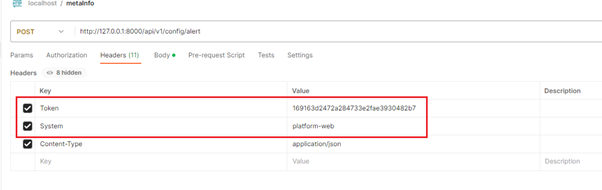
2.1、Token鉴权
- 根据web访问来源平台,分配不同Token进行鉴权识别,不同Token标识不同平台,权限不同,如web链接访问无删除权限
2.2、权限分级及加密存储
- 平台账户分级,不同权限可访问界面不同

- 账户密码加密存储

3、远程登录
3.1、Ansible实现
- 安装
## 安装Ansible
    yum install -y ansible
    yum install -y sshpass

### 修改配置,忽略告警
    vim /etc/ansible/ansible.cfg

    [defaults]

host_key_checking = False # 第一次远程ssh主机需要将机器指纹添加到known_hosts,此设置忽略该步骤
    command_warnings=False  #忽略ansible执行命令的告警信息
    deprecation_warnings=False

### 增加test用户组
    vim /etc/ansible/hosts

    [test]
    127.0.0.1 ansible_ssh_user=root ansible_ssh_port=22 ansible_ssh_pass=xxx

### 执行命令,验证功能
  ansible test -m shell -a 'lspci'

## 批量机器登录 + 执行shell命令
1. ip列表写入ip_list.ini
2. 执行脚本
    sh auto_ssh.sh $Password
- 1
- 2
- 3
- 4
- 5
- 6
- 7
- 8
- 9
- 10
- 11
- 12
- 13
- 14
- 15
- 16
- 17
- 18
- 19
- 20
- 21
- 22
- 23
- 24
- 25
- 26
- auto_ssh.sh
#!/bin/bash

if [ -s ./result.ini ] ; then
    > result.ini
fi

Password=$1
sed -i '/ansible_ssh/d' /etc/ansible/hosts

# 添加机器信息
for Ip in $(cat ip_list.ini)
  do

      Username="root"
      echo -e "$Ip ansible_ssh_user=$Username ansible_ssh_port=22 ansible_ssh_pass=$Password" >> /etc/ansible/hosts

  done

# [test]用户组 执行命令
ansible test -m shell -a 'lspci' > result.ini
echo "All Hosts Ansible Done , please check result.ini ! ! !"
- 1
- 2
- 3
- 4
- 5
- 6
- 7
- 8
- 9
- 10
- 11
- 12
- 13
- 14
- 15
- 16
- 17
- 18
- 19
- 20
- 21
3.2、Expect实现
- 安装
## 安装expect
  yum install -y expect

## 单台机器登录
  sh login.sh $Ip $Pwd

## 单台机器登录 + 执行shell命令
1. 执行命令写入execute_cmd.ini
2. 执行脚本
  sh cmd_login.sh $Ip $Pwd

## 批量机器登录 + 执行shell命令
1. ip列表加入ip_list.ini
2. 执行命令写入execute_cmd.ini
3. 执行脚本
sh list_cmd_login.sh $Pwd
- 1
- 2
- 3
- 4
- 5
- 6
- 7
- 8
- 9
- 10
- 11
- 12
- 13
- 14
- 15
- 16
- auto_ssh.sh
#!/usr/bin/expect

set user "root"
set host [lindex $argv 0]
set port "22"
set password [lindex $argv 1]

spawn ssh -p$port $user@$host
expect {
     "*yes/no" { send "yes\r"; exp_continue }
     "*assword:" { send "${password}\r" }
        }
interact
- 1
- 2
- 3
- 4
- 5
- 6
- 7
- 8
- 9
- 10
- 11
- 12
- 13
End
- 欢迎关注,感谢支持!

声明:本文内容由网友自发贡献,不代表【wpsshop博客】立场,版权归原作者所有,本站不承担相应法律责任。如您发现有侵权的内容,请联系我们。转载请注明出处:https://www.wpsshop.cn/article/detail/48054
推荐阅读
相关标签

