
热门标签
热门文章
- 1一台电脑同时安装多个tomcat服务器教程,window同时安装tomcat7、tomcat8、tomcat9三个服务器教程_安装两个tomcat
- 2在本机搭建自己的ftp服务器--最简单的方法(详细教程)_ftp服务器怎么搭建
- 3Python玫瑰花
- 4如何检查Python中OpenCV的版本_如何查看opencv版本
- 5【Ambari】Python调用Rest API 获取YARN HA状态信息并发送钉钉告警
- 6Python web实战之Django的文件上传和处理详解_django上传
- 7【Python 零基础入门】Pandas
- 8[segment-anything]使用onnxruntime部署sam模型,速度提高30倍!
- 9详细教程:Stegsolve的下载,jdk的下载、安装以及环境的配置_stegsolve下载
- 10【2023】Windows11安装Linux子系统(Ubuntu22.04LTS)+安装ROS_wsl安装ros
当前位置: article > 正文
2021-03-21_见缝插针带码
作者:程序质量控制师 | 2024-01-30 18:44:40
赞
踩
见缝插针带码
见缝插针完整版代码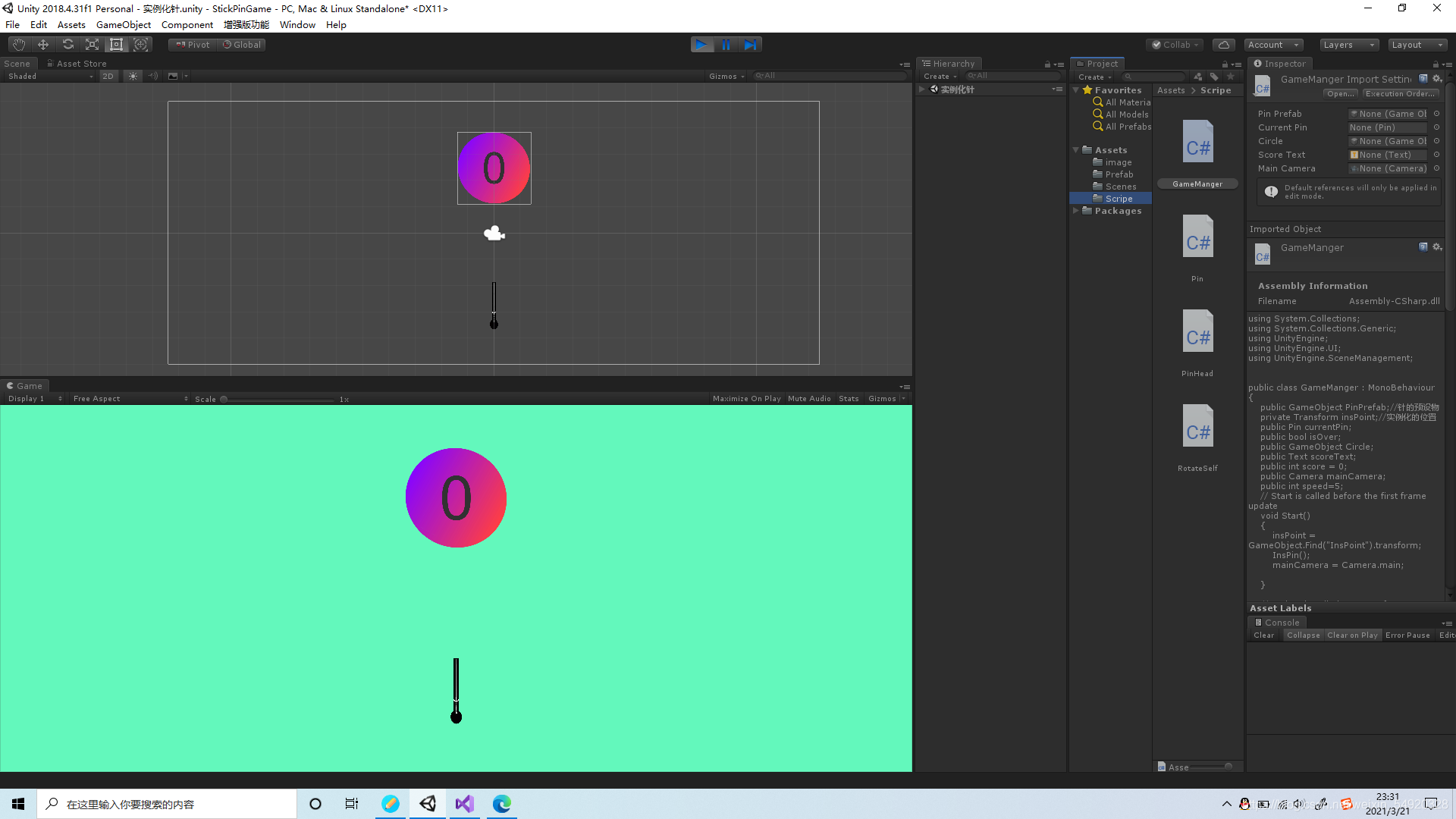
在这个小游戏中我用了4个脚本代码其中有 GameManger, Pin, PinHead ,RotateSelf。
GameManger:游戏管理的代码其中有针的预设物.针的实例化.显示分数的文本以及获取鼠标的点击等代码
using System.Collections;
using System.Collections.Generic;
using UnityEngine;
using UnityEngine.UI;
using UnityEngine.SceneManagement;


public class GameManger : MonoBehaviour
{
    public GameObject PinPrefab;//针的预设物
    private Transform insPoint;//实例化的位置
    public Pin currentPin;
    public bool isOver;
    public GameObject Circle;
    public Text scoreText;
    public int score = 0;
    public Camera mainCamera;
    public int speed=5;
    // Start is called before the first frame update
    void Start()
    {
        insPoint = GameObject.Find("InsPoint").transform;
        InsPin();
        mainCamera = Camera.main;

    }

    // Update is called once per frame
    void Update()
    {
        if (isOver) return;
        //0----鼠标左键  1----鼠标右键   2----鼠标中键
        if(Input.GetMouseButtonDown(0))
        {
            score++;
            scoreText.text = score.ToString();
            currentPin.StartFiy();
            InsPin();
        }

    }
    //实例化针

    void InsPin() {
        currentPin= GameObject.Instantiate(PinPrefab, insPoint.position, PinPrefab.transform.rotation).GetComponent< Pin >();
    }

    public void GameOver()
    {
        if (isOver) return;
        Circle.GetComponent<RotateSelf>().enabled = false;
        StartCoroutine(GameOverAnimation());
        isOver = true;
    }
    IEnumerator GameOverAnimation()  {
            while (true)
            {
                mainCamera.backgroundColor = Color.Lerp(mainCamera.backgroundColor, Color.red, speed * Time.deltaTime);
                mainCamera.orthographicSize = Mathf.Lerp(mainCamera.orthographicSize, 4, speed *Time. deltaTime);
                if (Mathf.Abs(mainCamera.orthographicSize-4)<0.01)
                {
                    break;

                }
                yield return 0;
            }
            yield return new WaitForSeconds(1);
            SceneManager.LoadScene(SceneManager.GetActiveScene().buildIndex);
        }

}

- 1
- 2
- 3
- 4
- 5
- 6
- 7
- 8
- 9
- 10
- 11
- 12
- 13
- 14
- 15
- 16
- 17
- 18
- 19
- 20
- 21
- 22
- 23
- 24
- 25
- 26
- 27
- 28
- 29
- 30
- 31
- 32
- 33
- 34
- 35
- 36
- 37
- 38
- 39
- 40
- 41
- 42
- 43
- 44
- 45
- 46
- 47
- 48
- 49
- 50
- 51
- 52
- 53
- 54
- 55
- 56
- 57
- 58
- 59
- 60
- 61
- 62
- 63
- 64
- 65
- 66
- 67
- 68
- 69
- 70
- 71
- 72
Pin:就是关于游戏中针的代码,其中包括针的飞行速度主要的是对于针什么时候飞怎么飞做的判断。
public class Pin : MonoBehaviour
{
    public bool isReah=false;
    public bool isFiy = false;
    private Transform startPoint;
    private Transform circlePos;
    public float speed = 8;
    private Vector3 endPoint;


    // Start is called before the first frame update
    void Start()
    {
        startPoint = GameObject.Find("StartPoint").transform;
        circlePos = GameObject.Find("Circle").transform;
        endPoint = circlePos.position;
        endPoint.y -= 1.7f;

    }

    // Update is called once per frame
    void Update()
    {
        if (isFiy == false)
        {
            if (isReah == false)
            {
                transform.position = Vector3.MoveTowards(transform.position, startPoint.position, speed * Time.deltaTime);
                if (Vector3.Distance(transform.position, startPoint.position) < 0.05f)
                {
                    isReah = true;

                }
            }

        }
        else
        {
            transform.position = Vector3.MoveTowards(transform.position, endPoint, speed * Time.deltaTime);
            if (Vector3.Distance(transform.position, endPoint) < 0.05)
            {
                isFiy = false;
                transform.parent = circlePos;
            }
        }
    }
    public void StartFiy()
    {
        isFiy = true;
        isReah = true;
    }
}
- 1
- 2
- 3
- 4
- 5
- 6
- 7
- 8
- 9
- 10
- 11
- 12
- 13
- 14
- 15
- 16
- 17
- 18
- 19
- 20
- 21
- 22
- 23
- 24
- 25
- 26
- 27
- 28
- 29
- 30
- 31
- 32
- 33
- 34
- 35
- 36
- 37
- 38
- 39
- 40
- 41
- 42
- 43
- 44
- 45
- 46
- 47
- 48
- 49
- 50
- 51
- 52
- 53
PinHead :是针头碰撞的代码
using System.Collections;
using System.Collections.Generic;
using UnityEngine;

public class PinHead : MonoBehaviour
{
    private void OnTriggerEnter2D(Collider2D collision)
    {
        if (collision.tag == "PinHead")
        {
            GameObject.Find("GameManger").GetComponent<GameManger>().GameOver();
        }
    }
}
- 1
- 2
- 3
- 4
- 5
- 6
- 7
- 8
- 9
- 10
- 11
- 12
- 13
- 14
RotateSelf:因为是2D所以这个脚本是让圆以Z轴旋转的代码`
using System.Collections;
using System.Collections.Generic;
using UnityEngine;

public class RotateSelf: MonoBehaviour
{
    public float speed = 100;
    // Start is called before the first frame update
    void Start()
    {

    }

    // Update is called once per frame
    void Update()
    {
        transform.Rotate(new Vector3(0, 0, -speed * Time.deltaTime));

    }
}
- 1
- 2
- 3
- 4
- 5
- 6
- 7
- 8
- 9
- 10
- 11
- 12
- 13
- 14
- 15
- 16
- 17
- 18
- 19
- 20
- 21
完成后游戏的效果 *## 注:代码均有老师代领完成
声明:本文内容由网友自发贡献,转载请注明出处:【wpsshop博客】
推荐阅读
相关标签

