- 1基于ssm个性化旅游攻略定制系统设计与实现+jsp论文
- 2VMware或virtualbox虚拟机虚拟网卡缺失解决办法_vmware虚拟机网卡不见了
- 3Python中的yield详细解释_python yield的作用
- 4使用ruff改进python项目的质量_ruff配置
- 5[足式机器人]Part2 Dr. CAN学习笔记- Kalman Filter卡尔曼滤波器Ch05-1+2
- 6Flink第一章:环境搭建_flink环境搭建
- 7Python-Flask-ajax-接口无响应/跨域问题-(strict-origin-when-cross-origin)_flask strict-origin-when-cross-origin
- 8设计模式三(原型模式)
- 9Linux——管理网络_linux ip link
- 10springboot+vue+Elementui社区小区人员出入登记管理系统ljssk_springboot + vue实现登记系统
基于本地仓库搭建nexus私服_nexus 免费版本部署
赞
踩
1. 前言
在公司里运行工程代码顺风顺水,离职后,你可能有公司的部分代码,但是打开工程,满屏标红,看着是不是很难受?有没有办法不标红呢?当然是有的,只需要搭建自己的私服即可,慢慢看完下面你就知道怎么做了。
2. nexus安装
从nexus官网下载一个免费版本的tar:https://www.sonatype.com/products/repository-oss-download,需要填写公司邮箱才能下载。
下载完成后,解压nexus-3.37.0-01-mac.tgz并启动nexus。终端显示:Starting nexus,表示启动成功
/Users/jessin/Downloads/nexus-3.37.0-01-mac/nexus-3.37.0-01/bin/nexus start
- 1
- 2
访问:http://localhost:8081/,即可看到nexus启动,本人把匿名账号给关闭了:

由于maven中央仓库太慢了,这里配置一些国内的仓库代理加速访问,优先使用国内仓库代理获取外网jar。登陆管理员admin账号后(http://localhost:8081/#admin/repository/repositories
),配置阿里和华为云仓库,这里是proxy类型的仓库。
- 阿里:https://maven.aliyun.com/repository/public
- 华为:https://mirrors.huaweicloud.com/repository/maven/
注意nexus中有三种类型的仓库:
- proxy, 代理仓库,数据从代理接口获取,这里阿里、华为、中央仓库均是外网代理仓库。
- hosted,私服仓库,也就是自己部署的release和snapshot包,nexus默认创建了两个仓库:maven-releases和maven-snapshots.
- group,组合仓库,可以将proxy/hosted类型仓库组合成自己的仓库,有先后顺序,nexus默认创建了maven-public作为组合仓库。
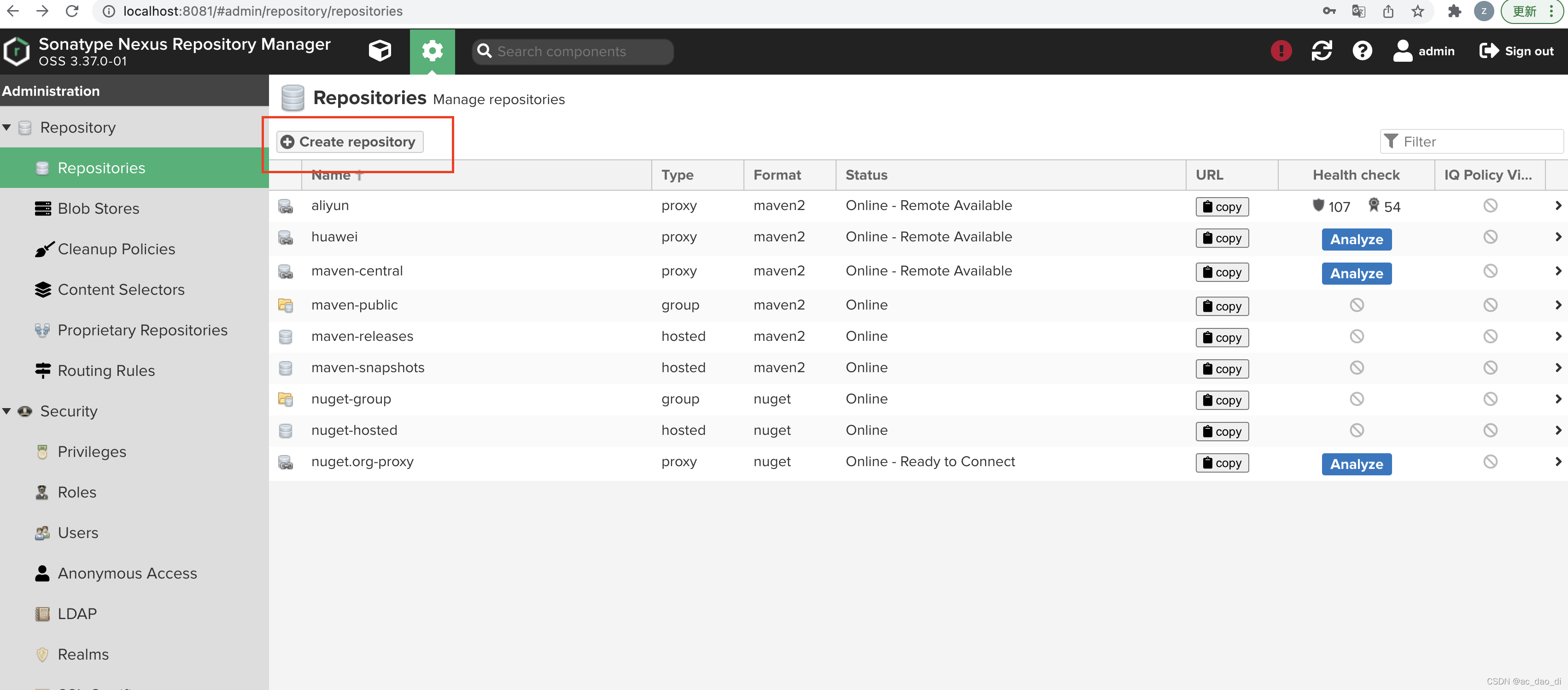


添加到maven_public仓库中:

使用私服,需要修改maven settings.xml配置,将所有的jar查询均拦截为走私服地址:
<?xml version="1.0" encoding="UTF-8"?>
<settings xmlns="http://maven.apache.org/SETTINGS/1.0.0"
          xmlns:xsi="http://www.w3.org/2001/XMLSchema-instance" xsi:schemaLocation="http://maven.apache.org/SETTINGS/1.0.0 http://maven.apache.org/xsd/settings-1.0.0.xsd">

<localRepository>/Users/jessin/Documents/Documents/Program/tmp_localRepository</localRepository>
  <mirrors>

        <mirror>
            <!--This sends everything else to /public -->
            <id>nexus</id>
            <mirrorOf>*</mirrorOf>
            <url>http://localhost:8081/repository/maven-public/</url>
        </mirror>
    </mirrors>
    <servers>
        <server>
            <id>nexus</id>
            <username>admin</username>
            <password>nexus登陆密码</password>
        </server>
    </servers>
</settings>

- 1
- 2
- 3
- 4
- 5
- 6
- 7
- 8
- 9
- 10
- 11
- 12
- 13
- 14
- 15
- 16
- 17
- 18
- 19
- 20
- 21
- 22
- 23
3. 上传单个jar到私服
方法一:nexus界面上传jar:

方法二:基于maven deploy-file插件上传到nexus
参数原理
-DpomFile 指定jar的坐标,不然需要自己指定-DgroupId/artifactId/version
-Dfile. 指定上传的jar路径
-DrepositoryId 指定nexus id主要用于定位上传需要的用户名和密码,跟maven settings.xml中server id保持一致即可。
-Durl url必须是一个hosted类型的仓库,不能是proxy/group类型,否则会报405。一般是maven-releases/maven-snapshots,也可以自己新建一个hosted 仓库。
/Users/jessin/Downloads/apache-maven-3.8.1/bin/mvn deploy:deploy-file -DpomFile=/Users/jessin/Documents/Documents/Program/localRepository/com/practice/jessin/abcp.api/1.0.22/abcp.api-1.0.22.pom -Dfile=/Users/jessin/Documents/Documents/Program/localRepository/com/practice/jessin/abcp.api/1.0.22/abcp.api-1.0.22.jar -DrepositoryId=nexus -Durl=http://localhost:8081/nexus/content/repositories/maven-releases
- 1
参考:
https://www.cnblogs.com/sos-blue/p/5833239.html
4. 批量脚本
对于本地仓库,有大量的jar需要上传,依靠界面上传费时费力,需要有一个批量的脚本。
而本地仓库中既有poml类型的jar,有 release jar和snapshot jar,如果全部上传到maven-release必然会报错,因为release仓库不允许上传snapshot包,批量脚本需要考虑这种情形。而且,如果一个jar包有关联的source源码包,我们也期望能够关联起来并上传到私服,方便后续查看源码。另外整个本地仓库除了之前公司自己的jar,还有其他公网仓库的jar,公网仓库的jar随时随地可以获取到,但是私有仓库的jar就不一定了,这里支持按照关键字(groupId)过滤某些jar并上传到私服。
因此,批量脚本需要实现如下功能点:
- 将本地仓库中路径含有keyword的jar全部过滤出来上传
- release上传到maven-releases仓库
- snapshot上传到maven-snaphsot仓库,
- 只有pom文件的只上传pom到maven-releases仓库
- 如果有source包可以关联上。
见仓库:https://github.com/jessin20161124/mybash
#!/bin/sh

# Reference: http://roboojack.blogspot.in/2014/12/bulk-upload-your-local-maven-artifacts.html

if [ "$#" -ne 4 ] || ! [ -d "$1" ]; then
    echo "Usage:"
    echo "       bash run.sh <repoRootFolder> <repositoryId> <repositoryUrl>"
    echo ""
    echo ""
    echo "       Where..."
    echo "       repoRootFolder: The folder containing the repository tree."
    echo "                       Ensure you move the repository outside of ~/.m2 folder"
    echo "                       or whatever is configured in settings.xml"
    echo "       repositoryId:   The repositoryId from the <server> configured for the repositoryUrl in settings.xml."
    echo "                       Ensure that you have configured username and password in settings.xml."
    echo "       repositoryUrl:  The URL of the repository where you want to upload the files."
    echo "       keyword:  The keyword of the path where you want to filter the files."
    exit 1
fi

while read -r line ; do
	if ! [[ $line =~ $4 ]]; then
		continue
	fi
	url=$3
	if [[ $line =~ SNAPSHOT ]]; then
           #for snaphost ,replace with snapshot repository
	   url=${url/%releases/snapshots}
	   echo $url
	fi
    	echo "Processing file $line"

    pomLocation=${line/./}
    pomLocation=$PWD${pomLocation/jar/pom}
    jarLocation=${line/./}
    jarLocation=$PWD${jarLocation/pom/jar}
    sourceLocation=${line/./}
    sourceLocation=$PWD${sourceLocation/.pom/-sources.jar}
#    echo $pomLocation
 #   echo $jarLocation
#echo $sourceLocation
    if [[ -e $jarLocation ]] && [[ -e $sourceLocation ]]; then
	echo "both exist"
    /Users/jessin/Downloads/apache-maven-3.8.1/bin/mvn deploy:deploy-file -DpomFile=$pomLocation -Dfile=$jarLocation -Dsources=$sourceLocation  -DrepositoryId=$2 -Durl=$url
    elif [[ -e $jarLocation ]]; then

	echo "jar exist"
    /Users/jessin/Downloads/apache-maven-3.8.1/bin/mvn deploy:deploy-file -DpomFile=$pomLocation -Dfile=$jarLocation  -DrepositoryId=$2 -Durl=$url
    elif [[ -e $sourceLocation ]]; then

	echo "source exist"
    /Users/jessin/Downloads/apache-maven-3.8.1/bin/mvn deploy:deploy-file -DpomFile=$pomLocation -Dsources=$sourceLocation  -DrepositoryId=$2 -Durl=$url
    else

	echo "pom exist"
    /Users/jessin/Downloads/apache-maven-3.8.1/bin/mvn deploy:deploy-file -DpomFile=$pomLocation -Dfile=$pomLocation  -DrepositoryId=$2 -Durl=$url
    fi
done < <(find $1 -name "*.pom")
- 1
- 2
- 3
- 4
- 5
- 6
- 7
- 8
- 9
- 10
- 11
- 12
- 13
- 14
- 15
- 16
- 17
- 18
- 19
- 20
- 21
- 22
- 23
- 24
- 25
- 26
- 27
- 28
- 29
- 30
- 31
- 32
- 33
- 34
- 35
- 36
- 37
- 38
- 39
- 40
- 41
- 42
- 43
- 44
- 45
- 46
- 47
- 48
- 49
- 50
- 51
- 52
- 53
- 54
- 55
- 56
- 57
- 58
运行命令如下,需要注意上传的仓库与本地maven的仓库区分开来,不被扫描到,最好单独拷贝一个目录出来,否则可能报错,因为deploy过程中会先install到本地。
bash upload.sh ./Documents/Documents/Program/localRepository nexus http://localhost:8081/repository/maven-releases jarslink-api
- 1
上传源码包后,就算离职了,也可以正常查看前司老代码了。。
5. nexus docker镜像
将所有jar上传到docker nexus,下次可以直接部署,无需重新构建nexus啦。