
热门标签
热门文章
- 1查看Linux系统内核、发行版、cpu、磁盘、内存、网络、端口使用信息_凤凰内核本地端口
- 2python读取pdf里的文字、图片以及图片里的文字_python 读pdf中图片
- 3安装MongoDB报错Verify that you have sufficient privileges to start system services
- 4Golang MQTT使用教程_goland整合mqtt使用init函数运行
- 5Linux之进程间通信(管道)
- 6动态图和静态图_x0动态图后x 式
- 7体验字节跳动豆包、百度文心一言和阿里云通义千问AI生成中国内地女演员和歌手刘涛biography
- 8苹果计划 2028 年推出无人驾驶汽车;微软开始开发小型语言模型;周鸿祎谈AI
- 9数学建模-多目标规划
- 10Flink Kafka Connector介绍和使用(DataStream and Table)_flink keyby kafka分区 connectedstream
当前位置: article > 正文
基于粤嵌gec6818开发板嵌入式开发电子相册,音乐播放,视频播放,2048游戏_6818电子相册
作者:算法设计者 | 2024-01-30 18:28:05
赞
踩
6818电子相册
一、功能与要求
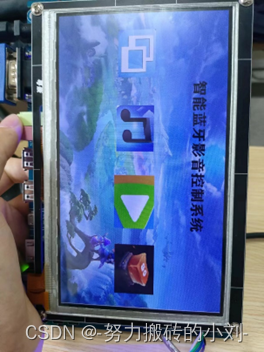
实现功能:本系统需要使用粤嵌的GEC-6818开发板设计一款娱乐影音系统,其中包括图片显示(相册)、音乐播放、视频播放,游戏四个部分,在每个部分内部,具有操控各个部分的功能触摸按键。本系统还应具有蓝牙远程操控功能。
具体要求:对使用者具有良好的可视交互体验,可自由切换各个模块。在图片模块里面,能够点击左右两侧来切换上一张和下一张图片,退出相册显示主屏幕;在音乐模块里面,能够点击屏幕进行播放/暂停/退出;在视频模块中,点击屏幕进行播放/暂停/快进/快退/音量加/音量减/退出。所有模块还应具有退出至菜单的功能。这些交互除了需要通过触摸屏幕完成,也还应通过蓝牙进行远程操作。
演示视频
【基于粤嵌gec6818开发板嵌入式开发电子相册,音乐播放,视频播放,2048游戏】
(二)软件设计
电子相册功能程序如下:
- 准备图片素材:1.bmp,2.bmp,3.bmp,img1.bmp。
- 头文件、设置变量和定义函数,关键代码如下:
  #include <stdio.h>
#include <sys/types.h>
#include <sys/stat.h>
#include <fcntl.h>
#include <unistd.h>
#include <sys/mman.h>
#include <linux/input.h>
#include <stdlib.h>
#include <string.h>
#include <termios.h>

//打开触摸屏设备文件
void open_ts();
//关闭触摸屏设备文件
void close_ts();
//获取坐标
void get_xy(int *x,int *y);
//打开LCD设备文件
void open_lcd();
//关闭LCD设备文件
void close_lcd();
//显示某张大小的图片某个位置
int show_bmp(char *pic_path,int x,int y,int w,int h);
//相册
void photo();
//音乐
void music();
//视频
void video();
void guan();
//蓝牙控制照片
void photo1();
//蓝牙控制音频
void music1();
//蓝牙控制视频
void video1();
//全局变量
int ts_fd;
int lcd_fd;
unsigned *FB;
int pos_x,pos_y;

int fd_fifo;

- 1
- 2
- 3
- 4
- 5
- 6
- 7
- 8
- 9
- 10
- 11
- 12
- 13
- 14
- 15
- 16
- 17
- 18
- 19
- 20
- 21
- 22
- 23
- 24
- 25
- 26
- 27
- 28
- 29
- 30
- 31
- 32
- 33
- 34
- 35
- 36
- 37
- 38
- 39
- 40
- 41
- 42
- 43
- 获取坐标,读取坐标信息,存储到信息结构体,产生阻塞,等待用户触摸屏幕,关键代码如下:
//获取坐标
void get_xy(int *x,int *y)
{
    //读取坐标信息,存储到信息结构体
    struct input_event ts_buf;
    int x_read = 0;
    int y_read = 0;
    int pre = -1;
    while (1)
    {
        //产生阻塞,等待用户触摸屏幕
        read(ts_fd,&ts_buf,sizeof(ts_buf));
        if(ts_buf.type  == EV_ABS && ts_buf.code == ABS_X)
        {
            *x = ts_buf.value;
            x_read = 1;
        }
        else if(ts_buf.type  == EV_ABS && ts_buf.code == ABS_Y)
        {
            *y = ts_buf.value;
            y_read = 1;
        }
        else if(ts_buf.type  == EV_KEY && ts_buf.code == BTN_TOUCH)
        {
            pre = ts_buf.value;
        }
        if (x_read == 1 && y_read == 1 && pre == 0 )
        {
            *x = *x*800/1024;
            *y = *y*480/600;
            break;
        }
    }
}
- 1
- 2
- 3
- 4
- 5
- 6
- 7
- 8
- 9
- 10
- 11
- 12
- 13
- 14
- 15
- 16
- 17
- 18
- 19
- 20
- 21
- 22
- 23
- 24
- 25
- 26
- 27
- 28
- 29
- 30
- 31
- 32
- 33
- 34
- 完成show_bmp函数,实现显示某张大小的图片某个位置,关键代码如下:
//显示某张大小的图片某个位置
int show_bmp(char *pic_path,int x,int y,int w,int h)
{

    //映射新的显存
    unsigned *new_FB = FB + (x+y*800);
	//打开BMP图片文件
    int bmp_fd = open(pic_path,O_RDWR);
	//读取BMP中RGB数据
    //先将BMP图片的文件头14个字节和信息头40个字节读取到bmp_info
    unsigned char bmp_info[54]={0};
    read(bmp_fd,bmp_info,sizeof(bmp_info));
    unsigned char bmp_buf[3*w*h];
    read(bmp_fd,bmp_buf,sizeof(bmp_buf));
    unsigned int lcd_buf[w*h];
    for(int i = 0; i<w*h; i++)
    {
        lcd_buf[i] = bmp_buf[i*3] <<  0 | bmp_buf[i*3+1] << 8 | bmp_buf[i*3+2] << 16 | 0x00 << 24;
    }

    //图片上下颠倒
    int n,m;
    unsigned int lcd_buf1[w*h];
    for (m = 0; m < h; m++)
    {
        for(n = 0; n < w; n++)
        {
            lcd_buf1[n+m*w] = lcd_buf[n+(h-1-m)*w];
        }
    }
	//将aRGB写入到LCD屏中
    for (m = 0; m < h; m++)
    {
        for(n = 0; n < w; n++)
        {
            *(new_FB+n+m*800) = lcd_buf1[n+m*w];
        }
    }
    close(bmp_fd);
}
5.	完成Photo1()函数,实现蓝牙控制电子相册功能,实现相册展示,关键代码如下:
//蓝牙控制相册
void photo1(){
	// 1.访问串口3
    int fd = open("/dev/ttySAC3", O_RDWR | O_NOCTTY);

    // 2.配置串口3参数
    init_tty(fd);

    char buf[10] = {0};
    int ret;

	int current_photo = 1;  // 记录当前显示的照片编号,初始值为1。
    char bmp_path[20];		//字符串数组,用于存储照片的路径
    int switch_x = 700;   // 切换按钮的右边x 坐标
    int switch_y = 200;   // 切换按钮的右边 y 坐标
    int switch_width = 100;   // 切换按钮的宽度
    int switch_height = 50;   // 切换按钮的高度

	int left_switch_x = 0;   // 左边切换按钮的左边 x 坐标
    int left_switch_y = 200;   // 左边切换按钮的右边 y 坐标
    int left_switch_width = 100;   // 左边切换按钮的宽度
    int left_switch_height = 50;   // 左边切换按钮的高度

    while (1)
    {

		//使用当前照片编号动态构建照片路径,并将结果存储在bmp_path字符串中
        sprintf(bmp_path, "./%d.bmp", current_photo);
		//调用一个名为show_bmp的函数,显示指定路径的照片在屏幕上。
        show_bmp(bmp_path, 0, 0, 800, 480);

        // 读数据
        ret = read(fd, buf, 10);
        if (ret == -1)
        {
            perror("read error");
            return -1;
        }
        // 对比
        if (0 == strcmp(buf, "on"))
        {
            printf("下一张图片\n");
			current_photo++;
            if (current_photo > 3)
            {
                current_photo = 1;
            }
        }
        else if (0 == strcmp(buf, "off"))
        {
			printf("退出相册\n");
            show_bmp("./img1.bmp", 0, 0, 800, 480);
            break;
        }else if (0 == strcmp(buf, "back"))
        {
			current_photo--;
            if (current_photo < 1)
            {
                current_photo = 3;
            }
        }
        write(fd, buf, strlen(buf));
        // 清空buf
        bzero(buf, 10);
    }
}
- 1
- 2
- 3
- 4
- 5
- 6
- 7
- 8
- 9
- 10
- 11
- 12
- 13
- 14
- 15
- 16
- 17
- 18
- 19
- 20
- 21
- 22
- 23
- 24
- 25
- 26
- 27
- 28
- 29
- 30
- 31
- 32
- 33
- 34
- 35
- 36
- 37
- 38
- 39
- 40
- 41
- 42
- 43
- 44
- 45
- 46
- 47
- 48
- 49
- 50
- 51
- 52
- 53
- 54
- 55
- 56
- 57
- 58
- 59
- 60
- 61
- 62
- 63
- 64
- 65
- 66
- 67
- 68
- 69
- 70
- 71
- 72
- 73
- 74
- 75
- 76
- 77
- 78
- 79
- 80
- 81
- 82
- 83
- 84
- 85
- 86
- 87
- 88
- 89
- 90
- 91
- 92
- 93
- 94
- 95
- 96
- 97
- 98
- 99
- 100
- 101
- 102
- 103
- 104
- 105
- 106
- 107
音频播放功能代码如下:
- 准备音乐素材:jay.mp3,yy.mp3
- 头文字,设置变量、定义函数。
#include <stdio.h>
#include <sys/types.h>
#include <sys/stat.h>
#include <fcntl.h>
#include <unistd.h>
#include <sys/mman.h>
#include <linux/input.h>
#include <stdlib.h>
#include <string.h>
#include <termios.h>

//打开触摸屏设备文件
void open_ts();
//关闭触摸屏设备文件
void close_ts();
//获取坐标
void get_xy(int *x,int *y);
//打开LCD设备文件
void open_lcd();
//关闭LCD设备文件
void close_lcd();
//显示某张大小的图片某个位置
int show_bmp(char *pic_path,int x,int y,int w,int h);
//相册
void photo();
//音乐
void music();
//视频
void video();
void guan();
//蓝牙控制照片
void photo1();
//蓝牙控制音频
void music1();
//蓝牙控制视频
void video1();
//全局变量
int ts_fd;
int lcd_fd;
unsigned *FB;
int pos_x,pos_y;
int fd_fifo;
- 1
- 2
- 3
- 4
- 5
- 6
- 7
- 8
- 9
- 10
- 11
- 12
- 13
- 14
- 15
- 16
- 17
- 18
- 19
- 20
- 21
- 22
- 23
- 24
- 25
- 26
- 27
- 28
- 29
- 30
- 31
- 32
- 33
- 34
- 35
- 36
- 37
- 38
- 39
- 40
- 41
- 42
- 音频模块
//音频
void music(){
	int current_track = 0;
	int switch_x = 700;
    int switch_y = 200;
    int switch_width = 100;
    int switch_height = 50;
	int left_switch_x = 0;
    int left_switch_y = 200;
    int left_switch_width = 100;
    int left_switch_height = 50;

    const char* mu[] = {
        "jay.mp3",
        "yy.mp3",

    };

    char command[50];
    sprintf(command, "madplay %s &", mu[current_track]);

    while(1){
        get_xy(&pos_x, &pos_y);
		system("madplay jay.mp3 &");
		if (pos_x > 700 && pos_x < 800 && pos_y > 0 && pos_y < 50)
        {
            printf("退出音乐\n");
            show_bmp("./img1.bmp", 0, 0, 800, 480);
            break;
        }
        if (pos_x > switch_x && pos_x < switch_x + switch_width && pos_y > switch_y && pos_y < switch_y + switch_height)
        {
			printf("下一首\n");
            current_track++;
			if (current_track > 2) {
				current_track = 0;
			}
        }
		 if (pos_x > left_switch_x && pos_x < left_switch_x + left_switch_width && pos_y > left_switch_y && pos_y < left_switch_y + left_switch_height)
        {
            printf("上一首\n");
            current_track--;
			if (current_track < 0) {
				current_track = 2;
			}
        }

		 if (pos_x > 95 && pos_x < 245 && pos_y > 255 && pos_y < 405)
        {
            printf("暂停\n");
            system("killall -19 madplay");
        }

		 if (pos_x > 500 && pos_x < 600 && pos_y > 255 && pos_y < 405)
        {
            printf("继续\n");
            system("killall -18 madplay");
        }

		 if (pos_x > 700 && pos_x < 800 && pos_y > 400 && pos_y < 480)
        {
            printf("终止\n");
            system("killall -9 madplay");
        }
	}
}
- 1
- 2
- 3
- 4
- 5
- 6
- 7
- 8
- 9
- 10
- 11
- 12
- 13
- 14
- 15
- 16
- 17
- 18
- 19
- 20
- 21
- 22
- 23
- 24
- 25
- 26
- 27
- 28
- 29
- 30
- 31
- 32
- 33
- 34
- 35
- 36
- 37
- 38
- 39
- 40
- 41
- 42
- 43
- 44
- 45
- 46
- 47
- 48
- 49
- 50
- 51
- 52
- 53
- 54
- 55
- 56
- 57
- 58
- 59
- 60
- 61
- 62
- 63
- 64
- 65
- 66
- 蓝牙控制音频
//蓝牙控制音乐
void music1(){
	// 1.访问串口3
    int fd = open("/dev/ttySAC3", O_RDWR | O_NOCTTY);
    // 2.配置串口3参数
    init_tty(fd);

    char buf[10] = {0};
    int ret;
show_bmp("./music.bmp", 0, 0, 800, 480);
	int current_track = 0; // 当前播放的音频文件索引
	int switch_x = 700;   // 切换按钮的右边x 坐标
    int switch_y = 200;   // 切换按钮的右边 y 坐标
    int switch_width = 100;   // 切换按钮的宽度
    int switch_height = 50;   // 切换按钮的高度
	int left_switch_x = 0;   // 左边切换按钮的左边 x 坐标
    int left_switch_y = 200;   // 左边切换按钮的右边 y 坐标
    int left_switch_width = 100;   // 左边切换按钮的宽度
    int left_switch_height = 50;   // 左边切换按钮的高度

	 // 音频文件列表
    const char* mu[] = {
        "jay.mp3",
        "yy.mp3"
    };
	// 拼接当前音频文件的路径
    char command[50];
    sprintf(command, "madplay %s &", mu[current_track]);
	system("madplay jay.mp3 &"); // 后台播放
    while (1)
    {

        // 读数据
        ret = read(fd, buf, 10);
        if (ret == -1)
        {
            perror("read error");
            return -1;
        }
        // 对比
        if (0 == strcmp(buf, "1"))
        {
            printf("退出音乐\n");
            show_bmp("./img1.bmp", 0, 0, 800, 480);
            break;
        }
        else if (0 == strcmp(buf, "2"))
        {
            printf("下一首\n");
            current_track++;
			if (current_track > 2) {
				current_track = 0; // 切换到第一首音频文件
			}
        }else if (0 == strcmp(buf, "3"))
        {
            printf("上一首\n");
            current_track--;
			if (current_track < 0) {
				current_track = 2; // 切换到最后一首音频文件
			}
        }else if (0 == strcmp(buf, "4"))
        {
            printf("上一首\n");
            current_track--;
			if (current_track < 0) {
				current_track = 2; // 切换到最后一首音频文件
			}
        }else if (0 == strcmp(buf, "5"))
        {
           printf("暂停\n");
           system("killall -19 madplay"); // 暂停音乐播放
        }else if (0 == strcmp(buf, "6"))
        {
            printf("继续\n");
            system("killall -18 madplay"); // 继续音乐播放
        }else if (0 == strcmp(buf, "7"))
        {
            printf("终止\n");
            system("killall -9 madplay"); // 继续音乐播放
        }
        write(fd, buf, strlen(buf));
        // 清空buf
        bzero(buf, 10);
    }
}
- 1
- 2
- 3
- 4
- 5
- 6
- 7
- 8
- 9
- 10
- 11
- 12
- 13
- 14
- 15
- 16
- 17
- 18
- 19
- 20
- 21
- 22
- 23
- 24
- 25
- 26
- 27
- 28
- 29
- 30
- 31
- 32
- 33
- 34
- 35
- 36
- 37
- 38
- 39
- 40
- 41
- 42
- 43
- 44
- 45
- 46
- 47
- 48
- 49
- 50
- 51
- 52
- 53
- 54
- 55
- 56
- 57
- 58
- 59
- 60
- 61
- 62
- 63
- 64
- 65
- 66
- 67
- 68
- 69
- 70
- 71
- 72
- 73
- 74
- 75
- 76
- 77
- 78
- 79
- 80
- 81
- 82
- 83
- 84
- 85
5.视频部分核心代码如下:
int init_tty(int fd)
{
    struct termios old_flags, new_flags;
    // 清空new_flags
    bzero(&new_flags, sizeof(new_flags));
    // 1. 获取旧的属性
    tcgetattr(fd, &old_flags);
    // 2. 设置原始模式
    cfmakeraw(&new_flags);
    // 3. 激活本地连接CLOCAL与接收使能CREAD的选项
    new_flags.c_cflag |= CLOCAL | CREAD;
    // 4. 设置波特率
    cfsetispeed(&new_flags, B9600);
    cfsetospeed(&new_flags, B9600);
    // 5. 设置数据位位8位
    // 清空原有的数据位
    new_flags.c_cflag &= ~CSIZE;
    new_flags.c_cflag |= CS8;

    // 6. 设置奇偶校验位
    new_flags.c_cflag &= ~PARENB;

    // 7. 设置一位停止位
    new_flags.c_cflag &= ~CSTOPB;

    // 8. 设置等待时间,最少接收字符个数
    new_flags.c_cc[VTIME] = 0;
    new_flags.c_cc[VMIN] = 1;

    // 9. 清空串口缓冲区
    tcflush(fd, TCIFLUSH);

    // 10. 设置串口的属性到文件中
    tcsetattr(fd, TCSANOW, &new_flags);

    return 0;
}
//蓝牙控制视频
void video1(){
 system("mplayer -slave -quiet -input file=/fifo -geometry 0:0 -zoom -x 800 -y 400 1.mp4 &");
	sleep(1);
	// 1.访问串口3
    int fd = open("/dev/ttySAC3", O_RDWR | O_NOCTTY);

    // 2.配置串口3参数
    init_tty(fd);

    char buf[10] = {0};
    int ret;

	system("mplayer -slave -quiet -input file=/fifo -geometry 0:0 -zoom -x 800 -y 400 1.mp4 &");
	sleep(1);

    while (1)
    {
        // 读数据
        ret = read(fd, buf, 10);
        if (ret == -1)
        {
            perror("read error");
            return -1;
        }
        // 对比
        if (0 == strcmp(buf, "1"))
        {
            printf("暂停 继续!\n");
		    Send_Cmd("pause\n");
        }
        else if (0 == strcmp(buf, "2"))
        {
            printf("音量+\n");
		    Send_Cmd("volume +10\n");
        }
		else if (0 == strcmp(buf, "3"))
        {
            printf("音量-\n");
		    Send_Cmd("volume -10\n");
        }
		else if (0 == strcmp(buf, "4"))
        {
            printf("快进!\n");
			Send_Cmd("seek +10\n");
        }
		else if (0 == strcmp(buf, "5"))
        {
            printf("快退!\n");
			Send_Cmd("seek -10\n");
        }
		else if (0 == strcmp(buf, "6"))
        {
            system("killall -9 mplayer");
			printf("退出视频\n");
            show_bmp("./img1.bmp",0,0,800,480);
            break;
        }
        write(fd, buf, strlen(buf));
        // 清空buf
        bzero(buf, 10);
	}
}
//视频
void video()
{
    system("mplayer -slave -quiet -input file=/fifo -geometry 0:0 -zoom -x 800 -y 400 1.mp4 &");
	sleep(1);
    //show_bmp("13.bmp",0,0,800,480);
    while(1)
    {
        get_xy(&pos_x, &pos_y);
        //判断坐标位置
        if(pos_x>241 && pos_x<440 && pos_y>400 && pos_y<480)
        {
            printf("暂停 继续!\n");
		    Send_Cmd("pause\n");
        }
		if(pos_x>0 && pos_x<120 && pos_y>400 && pos_y<480)
		{
		    printf("音量+\n");
		    Send_Cmd("volume +10\n");
		}
		if(pos_x>121 && pos_x<240 && pos_y>400 && pos_y<480)
		{
		    printf("音量-\n");
		    Send_Cmd("volume -10\n");
		}
		if(pos_x>441 && pos_x<560 && pos_y>400 && pos_y<480)
		{
			printf("快进!\n");
			Send_Cmd("seek +10\n");
		}
		if(pos_x>561 && pos_x<680 && pos_y>400 && pos_y<480)
		{
			printf("快退!\n");
			Send_Cmd("seek -10\n");
		}
		if(pos_x>681 && pos_x<799 && pos_y>400 && pos_y<480)
        {
            system("killall -9 mplayer");
            break;
        }
    }
}

void guan(){
	if(access("/fifo",F_OK))// 默认管道文件创建在根目录  F_OK:判断是否存在
	{
		//如果没有创建
		mkfifo("/fifo",777); //创建管道文件函数

	}
	fd_fifo = open("/fifo",O_RDWR);
	if(fd_fifo == -1)
	{
		printf("创建管道文件失败!\n");
		return -1;

	}
}

int Send_Cmd(char *cmd)//写入管道文件
{
	write(fd_fifo,cmd,strlen(cmd));

	return 0;
}
- 1
- 2
- 3
- 4
- 5
- 6
- 7
- 8
- 9
- 10
- 11
- 12
- 13
- 14
- 15
- 16
- 17
- 18
- 19
- 20
- 21
- 22
- 23
- 24
- 25
- 26
- 27
- 28
- 29
- 30
- 31
- 32
- 33
- 34
- 35
- 36
- 37
- 38
- 39
- 40
- 41
- 42
- 43
- 44
- 45
- 46
- 47
- 48
- 49
- 50
- 51
- 52
- 53
- 54
- 55
- 56
- 57
- 58
- 59
- 60
- 61
- 62
- 63
- 64
- 65
- 66
- 67
- 68
- 69
- 70
- 71
- 72
- 73
- 74
- 75
- 76
- 77
- 78
- 79
- 80
- 81
- 82
- 83
- 84
- 85
- 86
- 87
- 88
- 89
- 90
- 91
- 92
- 93
- 94
- 95
- 96
- 97
- 98
- 99
- 100
- 101
- 102
- 103
- 104
- 105
- 106
- 107
- 108
- 109
- 110
- 111
- 112
- 113
- 114
- 115
- 116
- 117
- 118
- 119
- 120
- 121
- 122
- 123
- 124
- 125
- 126
- 127
- 128
- 129
- 130
- 131
- 132
- 133
- 134
- 135
- 136
- 137
- 138
- 139
- 140
- 141
- 142
- 143
- 144
- 145
- 146
- 147
- 148
- 149
- 150
- 151
- 152
- 153
- 154
- 155
- 156
- 157
- 158
- 159
- 160
- 161
- 162
- 163
- 164
- 165
三 实物展示
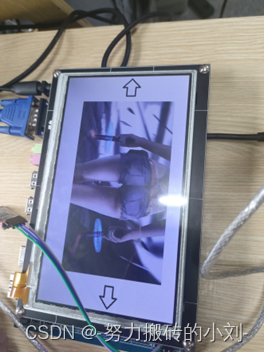
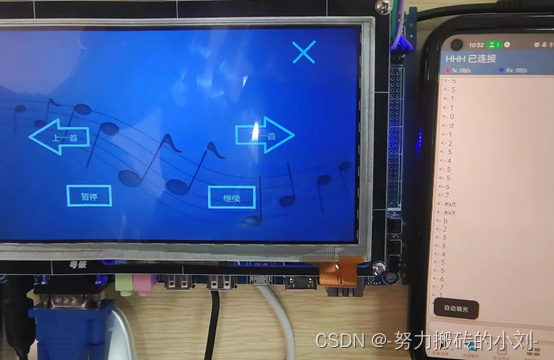
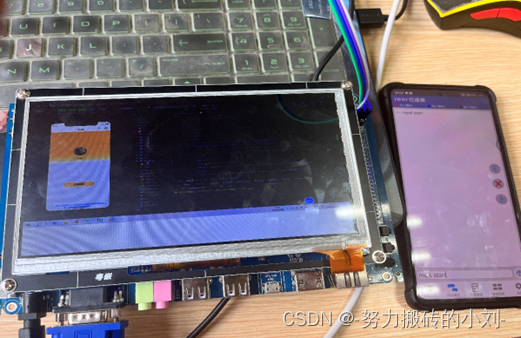

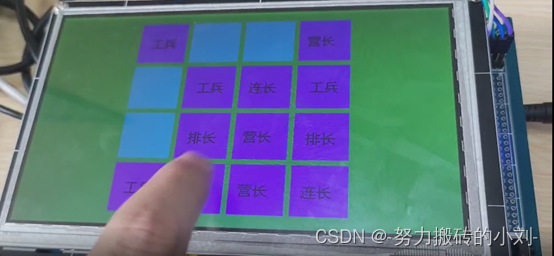
需要源码和答辩PPT的私信我
本文内容由网友自发贡献,转载请注明出处:【wpsshop博客】
推荐阅读

相关标签

