- 1shuqian_ee18cc
- 2大创项目推荐 题目:基于深度学习的人脸表情识别 - 卷积神经网络 大创项目推荐 代码
- 3Flink 常用的 Source 和 Sink Connectors 介绍_flink sink connector
- 4还不会使用gitee/gitHub版本控制?_gitee推送未受版本控制的文件
- 5Blog.objects.filter()反查外键,django数据库models中的跨表查询,相当于sql的join_objects.filter外键
- 6ORACLE 11g进程_waiting for detached processes 'vktm' to terminate
- 7scrapy和scrapy-redis项目中遇到的错误解决方法_scrapy-redis爬完之后没反应
- 8非线性规划问题求解(举例)_求解约束非线性规划划问题常见方法
- 9哔哩哔哩分区视频详细信息爬取(三连、播放量、标签)等_怎么根据bv号获得b站视频分类
- 10matlab遗传算法工具箱的使用_maxstallgenerations
粤嵌Linux GEC6818开发板实现电子相册_linux电子相册
赞
踩
前言
最近学校要求使用粤嵌的开发板实现电子相册,具体的功能要有点击特定的区域实现上一张、下一张、自动播放图片、黑屏退出应用程序、左右滑动切换图片相关功能。其中涉及到的知识点也比较多(文件IO、内存映射、触摸屏、bmp图片格式、进程、线程创建和同步、字符串操作等)。为理清思路和复习去年学的Linux C应用编程知识,特写下此文进行回顾和总结。
先看看效果
粤嵌Linux GEC6818开发板实现电子相册
整个工程文件和使用到的图片在下方链接
门牙会稍息 / 粤嵌GEC 6818开发板实现简易电子相册和音乐播放器 · GitCode
一:内存映射
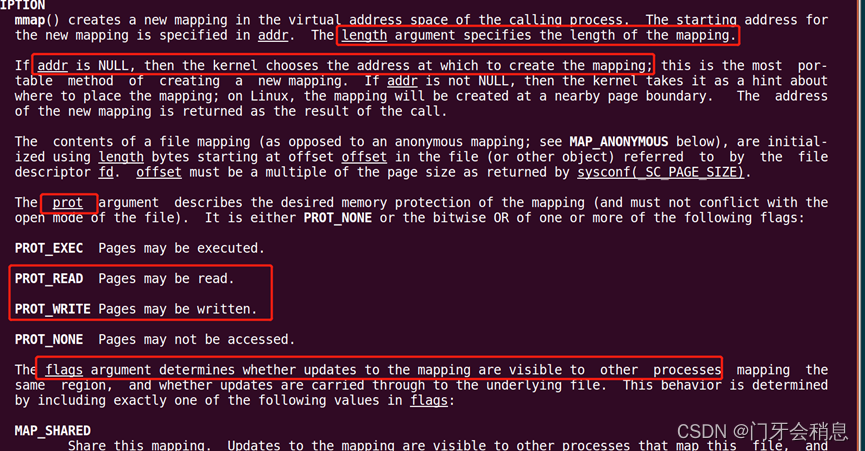
存储映射 I/O(memory-mapped I/O)是一种基于内存区域的高级 I/O 操作,它能将一个文件映射到进程地址空间中的一块内存区域中,当从这段内存中读数据时,就相当于读文件中的数据(对文件进行 read 操作),将数据写入这段内存时,则相当于将数据直接写入文件中(对文件进行 write 操作)。用到的两个函数是mmap和munmap,函数原型如下:

简言之addr设置为NULL的话内核会自动找一内存空间,大小就是length,粤嵌的屏是800*480的,所以length就是800*480*4,4代表一个像素点由四字节构成(ARGB),port参数设为PROT_READ、PROT_WRITE就是可读可写,flags描述的是映射区的属性。
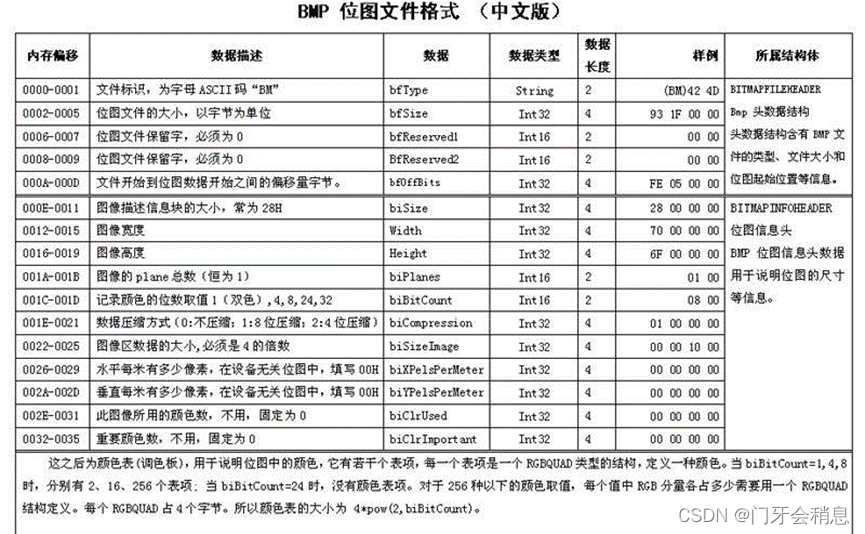
二:BMP格式图片
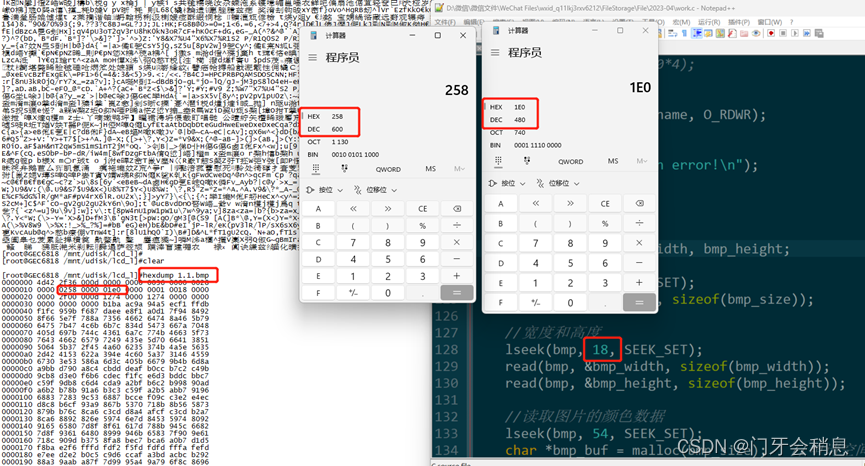
用hexdump查看一下bmp图片的数据(高度和宽度)
LCD屏显示BMP格式图片的函数
- /**
- *lcd屏显示bmp格式图片函数
- *@param pathname 图片名字
- *@param x0 图片在LCD上显示的x起点坐标
- *@param y0 图片在LCD上显示的y起点坐标
- *@return 函数返回值
- */
- int lcd_show_bmp(char *pathname, int x0, int y0)
- {
- //1、打开设备文件
- int lcd = open("/dev/fb0", O_RDWR);
- if(-1 == lcd)
- {
- printf("lcd open error!\n");
- return -2;
- }
-
- //2、内存映射
- char *ptr = (char *)mmap(NULL, 800*480*4, PROT_READ|PROT_WRITE,
- MAP_SHARED, lcd, 0);
- if(NULL == ptr)
- {
- printf("mmap error!\n");
- return -3;
- }
- //清除背景色
- //bzero(ptr, 800*480*4);
-
- //打开图片
- int bmp = open(pathname, O_RDWR);
- if(-1 == bmp)
- {
- printf("bmp open error!\n");
- return -2;
- }
-
- //读取图片相关信息
- int bmp_size, bmp_width, bmp_height;
- //大小
- lseek(bmp, 2, SEEK_SET);
- read(bmp, &bmp_size, sizeof(bmp_size));
-
- //宽度和高度
- lseek(bmp, 18, SEEK_SET);
- read(bmp, &bmp_width, sizeof(bmp_width));
- read(bmp, &bmp_height, sizeof(bmp_height));
-
- //读取图片的颜色数据
- lseek(bmp, 54, SEEK_SET);
- char *bmp_buf = malloc(bmp_size); //申请空间
- read(bmp, bmp_buf, bmp_width*bmp_height*3);
-
-
- //对颜色数据进行处理(上下颠倒以及数据混乱)
- int bmp_sum = 0;
- int lcd_sum = 0;
- for(int y=0; y+y0<480 && y<bmp_height; y++)
- {
- for(int x=0; x+x0<800 && x<bmp_width; x++)
- {
- bmp_sum = 3*(x+((bmp_height-1-y)*bmp_width));
- lcd_sum = 4*(800*(y+y0)+x+x0);
-
- //等号的坐标属于lcd屏幕, 等号的右边是bmp图像数据
- ptr[lcd_sum+0] = bmp_buf[bmp_sum+0]; //蓝色数据
- ptr[lcd_sum+1] = bmp_buf[bmp_sum+1]; //绿色数据
- ptr[lcd_sum+2] = bmp_buf[bmp_sum+2]; //红色数据
- ptr[lcd_sum+3] = bmp_buf[bmp_sum+3]; //透明度数据
- }
- //usleep(1);
- }
- //释放相关资源
- munmap(ptr, 800*480*4);
- free(bmp_buf);
- //3、关闭文件
- close(lcd);
- close(bmp);
- }

三:input_event接收触摸屏上报值
用hexdump命令查看触摸屏上报值


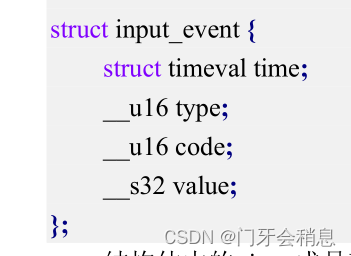
此实验用到input子系统中的type、code(下面的图片来源Linux内核中的input.h文件)

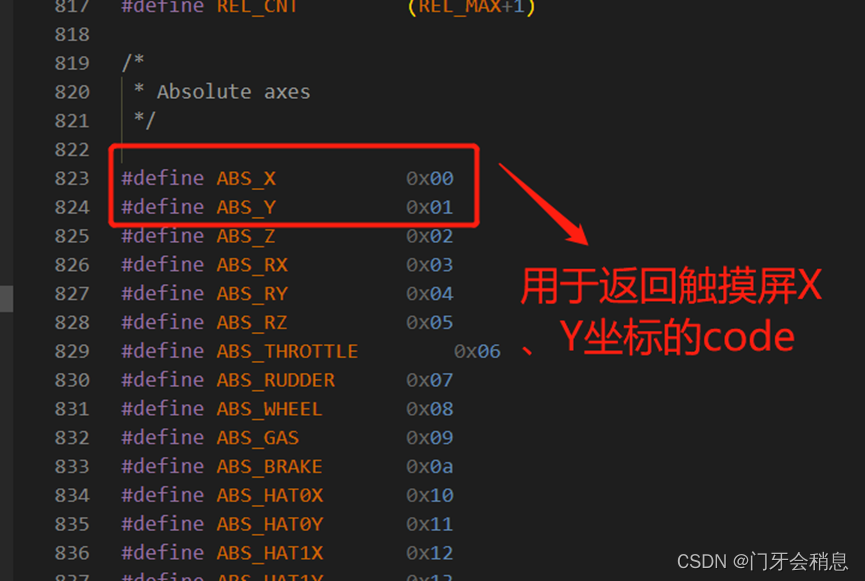
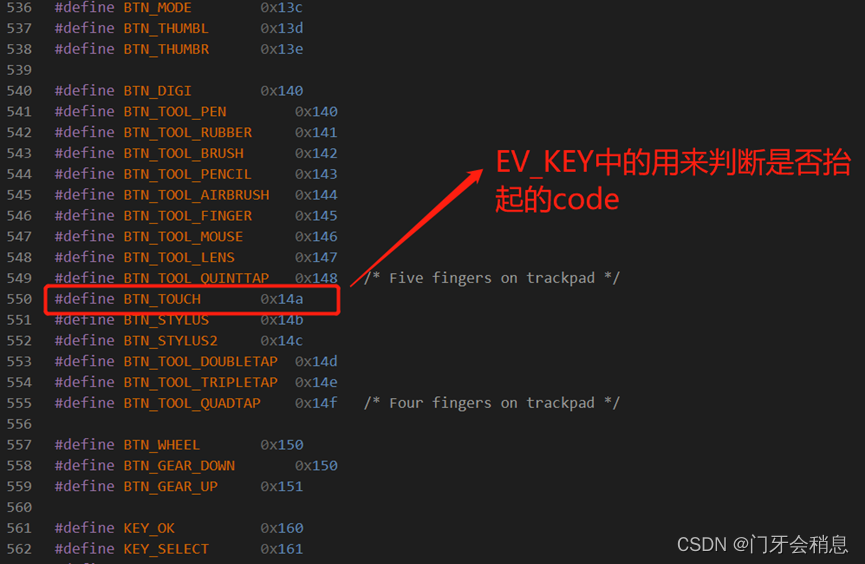
获取触摸屏坐标返回值函数
- /**
- *获取触摸屏坐标返回值函数
- *param NULL
- *return NULL
- */
- void get_touch()
- {
- //打开设备文件
- int touch_fd = open("/dev/input/event0", O_RDONLY);
- if(-1 == touch_fd)
- {
- printf("event0 open error!\n");
- }
-
- while(1)
- {
- read(touch_fd, &ts, sizeof(ts));
- //获取X、Y坐标
- if(EV_ABS == ts.type) //判断是否为触摸屏事件
- {
- if(ABS_X == ts.code)//判断是否为x轴数据
- {
- ts_x = ts.value;
- flag_x = 1;
- }
- else if(ABS_Y == ts.code) //判断是否为y轴数据
- {
- ts_y = ts.value;
- flag_y = 1;
- }
- }
-
- if(EV_KEY == ts.type)
- {
- //刚触碰的坐标/长按时
- if(ts.code == BTN_TOUCH && ts.value == 1)
- {
- old_x = ts_x;
- first_press_flag = 1;
- }
- }
-
- if(flag_x == 1 && flag_y == 1 && first_press_flag == 1)
- {
- flag_x = 0;
- flag_y = 0;
- pthread_mutex_lock(&mutex);
- flag_x_y = 1;
- //黑色底板才需要执行如下操作
- ts_x = ts_x*800/1024;
- ts_y = ts_y*480/600;
- pthread_mutex_unlock(&mutex);
- pthread_cond_signal(&cond);
- //break;
- }
-
- if(EV_KEY == ts.type)
- {
- //松开
- if(ts.code == BTN_TOUCH && ts.value == 0)
- {
- //从左到右的滑动
- if(((ts_x > old_x) && (ts_x - old_x > 150) && (ts_x < 600)))
- {
- right_left_slide_flag = 1;
- slider_right = 1;
- old_x = 300;
- }
- //从右到左的滑动
- else if(((old_x > ts_x) && (old_x - ts_x > 150) && (old_x < 600)))
- {
-
- right_left_slide_flag = 1;
- slider_left = 1;
- old_x = 300;
- }
- }
- }
-
- }
- //4、关闭文件
- close(touch_fd);
- }
四:创建线程,处理触摸屏坐标数据
阻塞式 I/O 的优点在于能够提升 CPU 的处理效率,当自身条件不满足时,进入阻塞状态,交出 CPU资源,将 CPU 资源让给别人使用;而非阻塞式则是抓紧利用 CPU 资源,譬如不断地去轮训,这样就会导致该程序占用了非常高的 CPU 使用率!我这里是想获得触摸点坐标之后再做相关的操作,当没有按下触摸屏的时候,相关线程就会阻塞挂起,节约资源,线程同步中使用互斥锁和条件变量就可以实现。
左右滑动线程处理函数:
- void *right_left_slide_func(void *arg)
- {
- printf("enter right_left_slide_func\r\n");
- while(1){
- if(right_left_slide_flag == 1){
- if(slider_left == 1){
- touch_flag--;
- if(touch_flag <= 0)
- touch_flag = BMP_MAX_NUMBER;
- lcd_show_bmp(bmp_path[touch_flag - 1], 0, 0);
- slider_left = 0;
- right_left_slide_flag == 0;
- }
- else if(slider_right == 1){
- touch_flag++;
- if(touch_flag > BMP_MAX_NUMBER)
- touch_flag = 1;
- lcd_show_bmp(bmp_path[touch_flag - 1], 0, 0);
- slider_right = 0;
- right_left_slide_flag == 0;
- }
- right_left_slide_flag == 0;
- }
- }
- }
右侧选项框线程处理函数:
- void *area_switch(void *arg)
- {
- printf("enter area_switch\r\n");
- while(1){
- pthread_mutex_lock(&mutex);
-
- while(flag_x_y == 0)
- pthread_cond_wait(&cond, &mutex);
- while(flag_x_y == 1){
- //上一张
- if((ts_y > 0 && ts_y < 120) && (ts_x > 600))
- {
- touch_flag--;
- if(touch_flag <= 0)
- touch_flag = BMP_MAX_NUMBER;
-
- lcd_show_bmp(bmp_path[touch_flag - 1], 0, 0);
- ts_x = 0;
- ts_y = 0;
- }
- //下一张
- else if((ts_y > 120 && ts_y < 240) && (ts_x > 600))
- {
- touch_flag++;
- if(touch_flag > BMP_MAX_NUMBER)
- touch_flag = 1;
-
- lcd_show_bmp(bmp_path[touch_flag - 1], 0, 0);
- ts_x = 0;
- ts_y = 0;
- }
- //幻灯片
- else if((ts_y > 240 && ts_y < 360) && (ts_x > 600))
- {
- printf("click slider photo\r\n");
- if(slider_flag == 0){
- slider_flag = 1;
- }
- else{
- slider_flag = 0;
- }
- printf("slider_flag = %d\r\n", slider_flag);
- ts_x = 0;
- ts_y = 0;
- }
- //息屏
- else if((ts_y > 360 && ts_y < 480) && (ts_x > 600))
- {
- char command[] = "kill -9 ";
- char str[10];
- sprintf(str, "%d", pid);
- strcat(command, str);
- printf("command = %s\r\n", command);
- //方式一:显示一张黑色的图片
- lcd_show_bmp("black.bmp", 0, 0);
- system(command);
- }
- else{
- flag_x_y = 0;
- break;
- }
- flag_x_y = 0;
- }
-
- pthread_mutex_unlock(&mutex);
- }
-
- }
自动播放图片线程处理函数:
- void *slider_func(void *arg)
- {
- printf("enter slider_func : %d\r\n", pthread_self());
- while(1){
- if(slider_flag == 1){
- printf("enter slider_func\r\n");
- touch_flag++;
- if(touch_flag > BMP_MAX_NUMBER)
- touch_flag = 1;
- lcd_show_bmp(bmp_path[touch_flag - 1], 0, 0);
- sleep(1);
- }
- }
- }
五:Main函数
main函数就是一些线程、互斥锁、条件变量的创建和回收
- int main()
- {
- lcd_show_bmp("choice.bmp", 600, 0);
- lcd_show_bmp(bmp_path[touch_flag - 1], 0, 0);
- pthread_t tid, tid_area_switch, tid_right_left_slide;
- int ret = 0;
-
- pthread_create(&tid, NULL, slider_func, NULL);
- pthread_create(&tid_area_switch, NULL, area_switch, NULL);
- pthread_create(&tid_right_left_slide, NULL, right_left_slide_func, NULL);
-
- pthread_mutex_init(&mutex, NULL);
- pthread_cond_init(&cond, NULL);
-
- printf("main thread = %ld\r\n", pthread_self());
- pid = getpid();
- printf("pid = %d\r\n", pid);
-
- while(1){
- get_touch();
- }
-
-
- pthread_join(tid, NULL);
- pthread_join(tid_area_switch, NULL);
- pthread_join(tid_right_left_slide, NULL);
- pthread_cond_destroy(&cond);
- exit(0);
-
- }
六:完整代码
- #include <stdio.h>
- #include <fcntl.h>
- #include <sys/stat.h>
- #include <sys/types.h>
- #include <unistd.h>
- #include <string.h>
- #include <sys/mman.h>
- #include <stdlib.h>
- #include <linux/input.h>
- #include <pthread.h>
- #include <unistd.h>
-
- #define BMP_MAX_NUMBER 4
-
- char bmp_path[4][100] = {"1.1.bmp", "1.2.bmp", "1.3.bmp", "1.4.bmp"};
- int slider_flag = 0;
- pid_t pid;
- pthread_mutex_t mutex;
- pthread_cond_t cond;
- //自定义函数:LCD屏幕显示bmp图片
- //pathname:需要打开的图片路径
- //x0:存放图片显示的x轴起点
- //y0:存放图片显示的y轴起点
- int lcd_show_bmp(char *pathname, int x0, int y0)
- {
- //1、打开设备文件
- int lcd = open("/dev/fb0", O_RDWR);
- if(-1 == lcd)
- {
- printf("lcd open error!\n");
- return -2;
- }
-
- //2、内存映射
- char *ptr = (char *)mmap(NULL, 800*480*4, PROT_READ|PROT_WRITE,
- MAP_SHARED, lcd, 0);
- if(NULL == ptr)
- {
- printf("mmap error!\n");
- return -3;
- }
- //清除背景色
- //bzero(ptr, 800*480*4);
-
- //打开图片
- int bmp = open(pathname, O_RDWR);
- if(-1 == bmp)
- {
- printf("bmp open error!\n");
- return -2;
- }
-
- //读取图片相关信息
- int bmp_size, bmp_width, bmp_height;
- //大小
- lseek(bmp, 2, SEEK_SET);
- read(bmp, &bmp_size, sizeof(bmp_size));
-
- //宽度和高度
- lseek(bmp, 18, SEEK_SET);
- read(bmp, &bmp_width, sizeof(bmp_width));
- read(bmp, &bmp_height, sizeof(bmp_height));
-
- //读取图片的颜色数据
- lseek(bmp, 54, SEEK_SET);
- char *bmp_buf = malloc(bmp_size); //申请空间
- read(bmp, bmp_buf, bmp_width*bmp_height*3);
-
-
- //对颜色数据进行处理(上下颠倒以及数据混乱)
- int bmp_sum = 0;
- int lcd_sum = 0;
- for(int y=0; y+y0<480 && y<bmp_height; y++)
- {
- for(int x=0; x+x0<800 && x<bmp_width; x++)
- {
- bmp_sum = 3*(x+((bmp_height-1-y)*bmp_width));
- lcd_sum = 4*(800*(y+y0)+x+x0);
-
- //等号的坐标属于lcd屏幕, 等号的右边是bmp图像数据
- ptr[lcd_sum+0] = bmp_buf[bmp_sum+0]; //蓝色数据
- ptr[lcd_sum+1] = bmp_buf[bmp_sum+1]; //绿色数据
- ptr[lcd_sum+2] = bmp_buf[bmp_sum+2]; //红色数据
- ptr[lcd_sum+3] = bmp_buf[bmp_sum+3]; //透明度数据
- }
- //usleep(1);
- }
-
- munmap(ptr, 800*480*4);
- free(bmp_buf);
- //3、关闭文件
- close(lcd);
- close(bmp);
- }
-
-
- int touch_flag = 1;
- int ts_x, ts_y;
- int old_x = 300;
- int slider_left = 0;
- int slider_right = 0;
- int flag_x_y = 0;
- int right_left_slide_flag = 0;
- struct input_event ts;
- int flag_x = 0, flag_y = 0, first_press_flag = 0;
- //获取触摸屏坐标
- //自定义函数:获取触摸屏的坐标
- void get_touch()
- {
- //1、打开设备文件
- int touch_fd = open("/dev/input/event0", O_RDONLY);
- if(-1 == touch_fd)
- {
- printf("event0 open error!\n");
- }
-
- while(1)
- {
- read(touch_fd, &ts, sizeof(ts));
- //3、分析数据
- if(EV_ABS == ts.type) //判断是否为触摸屏事件
- {
- if(ABS_X == ts.code)//判断是否为x轴数据
- {
- ts_x = ts.value;
- flag_x = 1;
- }
- else if(ABS_Y == ts.code) //判断是否为y轴数据
- {
- ts_y = ts.value;
- flag_y = 1;
- }
- }
-
- if(EV_KEY == ts.type)
- {
- //刚触碰的坐标/长按时
- if(ts.code == BTN_TOUCH && ts.value == 1)
- {
- old_x = ts_x;
- first_press_flag = 1;
- }
- }
-
- if(flag_x == 1 && flag_y == 1 && first_press_flag == 1)
- {
- flag_x = 0;
- flag_y = 0;
- pthread_mutex_lock(&mutex);
- flag_x_y = 1;
- //黑色底板才需要执行如下操作
- ts_x = ts_x*800/1024;
- ts_y = ts_y*480/600;
- pthread_mutex_unlock(&mutex);
- pthread_cond_signal(&cond);
- //break;
- }
-
- if(EV_KEY == ts.type)
- {
- //松开
- if(ts.code == BTN_TOUCH && ts.value == 0)
- {
- //从左到右的滑动
- if(((ts_x > old_x) && (ts_x - old_x > 150) && (ts_x < 600)))
- {
- right_left_slide_flag = 1;
- slider_right = 1;
- old_x = 300;
- }
- //从右到左的滑动
- else if(((old_x > ts_x) && (old_x - ts_x > 150) && (old_x < 600)))
- {
-
- right_left_slide_flag = 1;
- slider_left = 1;
- old_x = 300;
- }
- }
- }
-
-
-
- }
- //4、关闭文件
- close(touch_fd);
- }
-
- void *right_left_slide_func(void *arg)
- {
- printf("enter right_left_slide_func\r\n");
- while(1){
- if(right_left_slide_flag == 1){
- if(slider_left == 1){
- touch_flag--;
- if(touch_flag <= 0)
- touch_flag = BMP_MAX_NUMBER;
- lcd_show_bmp(bmp_path[touch_flag - 1], 0, 0);
- slider_left = 0;
- right_left_slide_flag == 0;
- }
- else if(slider_right == 1){
- touch_flag++;
- if(touch_flag > BMP_MAX_NUMBER)
- touch_flag = 1;
- lcd_show_bmp(bmp_path[touch_flag - 1], 0, 0);
- slider_right = 0;
- right_left_slide_flag == 0;
- }
- right_left_slide_flag == 0;
- }
- }
- }
-
- void *area_switch(void *arg)
- {
- printf("enter area_switch\r\n");
- while(1){
- pthread_mutex_lock(&mutex);
-
- while(flag_x_y == 0)
- pthread_cond_wait(&cond, &mutex);
- while(flag_x_y == 1){
- //上一张
- if((ts_y > 0 && ts_y < 120) && (ts_x > 600))
- {
- touch_flag--;
- if(touch_flag <= 0)
- touch_flag = BMP_MAX_NUMBER;
-
- lcd_show_bmp(bmp_path[touch_flag - 1], 0, 0);
- ts_x = 0;
- ts_y = 0;
- }
- //下一张
- else if((ts_y > 120 && ts_y < 240) && (ts_x > 600))
- {
- touch_flag++;
- if(touch_flag > BMP_MAX_NUMBER)
- touch_flag = 1;
-
- lcd_show_bmp(bmp_path[touch_flag - 1], 0, 0);
- ts_x = 0;
- ts_y = 0;
- }
- //幻灯片
- else if((ts_y > 240 && ts_y < 360) && (ts_x > 600))
- {
- printf("click slider photo\r\n");
- if(slider_flag == 0){
- slider_flag = 1;
- }
- else{
- slider_flag = 0;
- }
- printf("slider_flag = %d\r\n", slider_flag);
- ts_x = 0;
- ts_y = 0;
- }
- //息屏
- else if((ts_y > 360 && ts_y < 480) && (ts_x > 600))
- {
- char command[] = "kill -9 ";
- char str[10];
- sprintf(str, "%d", pid);
- strcat(command, str);
- printf("command = %s\r\n", command);
- //方式一:显示一张黑色的图片
- lcd_show_bmp("black.bmp", 0, 0);
- system(command);
- }
- else{
- flag_x_y = 0;
- break;
- }
- flag_x_y = 0;
- }
-
- pthread_mutex_unlock(&mutex);
- }
-
- }
-
-
- void *slider_func(void *arg)
- {
- printf("enter slider_func : %d\r\n", pthread_self());
- while(1){
- if(slider_flag == 1){
- printf("enter slider_func\r\n");
- touch_flag++;
- if(touch_flag > BMP_MAX_NUMBER)
- touch_flag = 1;
- lcd_show_bmp(bmp_path[touch_flag - 1], 0, 0);
- sleep(1);
- }
- }
- }
-
-
- int main()
- {
- lcd_show_bmp("choice.bmp", 600, 0);
- lcd_show_bmp(bmp_path[touch_flag - 1], 0, 0);
- pthread_t tid, tid_area_switch, tid_right_left_slide;
- int ret = 0;
-
- pthread_create(&tid, NULL, slider_func, NULL);
- pthread_create(&tid_area_switch, NULL, area_switch, NULL);
- pthread_create(&tid_right_left_slide, NULL, right_left_slide_func, NULL);
-
- pthread_mutex_init(&mutex, NULL);
- pthread_cond_init(&cond, NULL);
-
- printf("main thread = %ld\r\n", pthread_self());
- pid = getpid();
- printf("pid = %d\r\n", pid);
-
- while(1){
- get_touch();
- }
-
-
- pthread_join(tid, NULL);
- pthread_join(tid_area_switch, NULL);
- pthread_join(tid_right_left_slide, NULL);
- pthread_cond_destroy(&cond);
- exit(0);
-
- }
-
-
-
总结
以上就是本文的全部内容, 希望能够帮助到你。