- 1docker desktop 阿里云镜像加速_docker desktop 加速
- 2全国职业院校技能大赛-GZ037工业互联网集成应用赛项-赛题3~4_山东省技改提级职业技能竞赛工业互联网标识解析赛项
- 3华为OD机试真题-执行时长-2023年OD统一考试(C卷)
- 4【华为鸿蒙系统学习】- HarmonyOS4.0开发|自学篇_harmonyos4.0 pdf
- 5批量上传本地Maven仓库jar包到Nexus私服_nexus的包批量上传
- 6用GitHub Copilot在Vs Code里快速写代码,最详细使用教程_github copilot vscode
- 7opencv中的Mat与数组互转_cv::mat 指向一个buffer
- 8第十一届蓝桥杯省赛第一场真题【Python】_elsess
- 9HarmonyOS从基础到实战-高性能华为在线答题元服务_arkts在ts的基础上主要扩展了如下能力
- 10SVM支持向量机的多输入单输出预测模型
SpringBoot 2.0集成MySQL+mybatis+Druid配置_springboot如何配置mybatis,使用mysql和druid框架
赞
踩
本文采用的springboot版本为2.1.4,mybatis版本为1.3.2,Druid版本为1.1.10
springboot项目骨架生成不在赘述,idea可以用spring initializr生成,或者直接到spring官网https://start.spring.io生成,下载之后导入到idea中。
1.引入jar包,pom文件如下:
- <?xml version="1.0" encoding="UTF-8"?>
- <project xmlns="http://maven.apache.org/POM/4.0.0" xmlns:xsi="http://www.w3.org/2001/XMLSchema-instance"
- xsi:schemaLocation="http://maven.apache.org/POM/4.0.0 http://maven.apache.org/xsd/maven-4.0.0.xsd">
- <modelVersion>4.0.0</modelVersion>
- <parent>
- <groupId>org.springframework.boot</groupId>
- <artifactId>spring-boot-starter-parent</artifactId>
- <version>2.1.4.RELEASE</version>
- <relativePath/> <!-- lookup parent from repository -->
- </parent>
- <groupId>com.example</groupId>
- <artifactId>springbucks</artifactId>
- <version>0.0.1-SNAPSHOT</version>
- <name>springbucks</name>
- <description>Demo project for Spring Boot</description>
-
- <properties>
- <java.version>1.8</java.version>
- </properties>
-
- <dependencies>
-
- <!--打开监控-->
- <dependency>
- <groupId>org.springframework.boot</groupId>
- <artifactId>spring-boot-starter-actuator</artifactId>
- </dependency>
- <dependency>
- <groupId>org.springframework.boot</groupId>
- <artifactId>spring-boot-starter-jdbc</artifactId>
- </dependency>
- <dependency>
- <groupId>org.springframework.boot</groupId>
- <artifactId>spring-boot-starter-web</artifactId>
- </dependency>
-
- <dependency>
- <groupId>org.mybatis.spring.boot</groupId>
- <artifactId>mybatis-spring-boot-starter</artifactId>
- <version>1.3.2</version>
- </dependency>
- <dependency>
- <groupId>mysql</groupId>
- <artifactId>mysql-connector-java</artifactId>
- <scope>runtime</scope>
- </dependency>
-
- <!-- druid数据源 -->
- <!-- https://mvnrepository.com/artifact/com.alibaba/druid -->
- <dependency>
- <groupId>com.alibaba</groupId>
- <artifactId>druid-spring-boot-starter</artifactId>
- <version>1.1.10</version>
- </dependency>
-
- <dependency>
- <groupId>org.projectlombok</groupId>
- <artifactId>lombok</artifactId>
- <optional>true</optional>
- </dependency>
- <dependency>
- <groupId>org.springframework.boot</groupId>
- <artifactId>spring-boot-starter-test</artifactId>
- <scope>test</scope>
- </dependency>
- </dependencies>
-
- <build>
- <plugins>
- <plugin>
- <groupId>org.springframework.boot</groupId>
- <artifactId>spring-boot-maven-plugin</artifactId>
- </plugin>
- </plugins>
- </build>
-
- </project>

pom中引入了actuator监控、druid、mybatis、lombok、mysql等依赖
2.application.yml配置如下:
- server:
- port: 8088
- spring:
- application:
- name: spring-bucks
- datasource:
- druid:
- driver-class-name: com.mysql.cj.jdbc.Driver
- url: jdbc:mysql://localhost/demo?characterEncoding=UTF-8&useSSL=false
- username: developer
- password: developer12321
- filters: stat,wall
- initial-size: 3
- min-idle: 1
- max-active: 20
- test-on-borrow: false
- test-on-return: false
- test-while-idle: true
- validation-query: select 'x'
- max-wait: 6000
- pool-prepared-statements: true
- time-between-eviction-runs-millis: 60000
- min-evictable-idle-time-millis: 60000
- web-stat-filter:
- enabled: true
- url-pattern: "/*"
- stat-view-servlet:
- enabled: true
- url-pattern: /druid/*
- reset-enable: false
- login-username: admin
- login-password: admin
- mybatis:
- configuration:
- map-underscore-to-camel-case: true
- type-handlers-package: com.example.springbucks.handler
- type-aliases-package: com.example.springbucks.model
- mapper-locations: classpath:mappers/*.xml
- logging:
- level:
- com:
- example:
- springbucks:
- dao: debug
-
- management:
- endpoints:
- web:
- exposure:
- include: "*"
druid各项配置建议参考durid官方文档https://github.com/alibaba/druid/wiki
这里重点说几个mybatis的配置
map-underscore-to-camel-case: true
这项配置可以实现数据库表字段和类变量名的自动映射,例如列名create_time会自动映射到字段名createTime,省去写ResultMap的麻烦,这里建议大家开发时都能遵守一定的规范,可以提高效率
type-aliases-package: com.example.springbucks.model
大家知道在mapper文件中写ParameterType和ResultType时必须是全包名,很不便利,这个配置只需要写实体类的别名就行了,但是在实体类上要加入注解。如下,在mapper中,com.example.springbucks.model.Coffee可以直接用coffee代替
- package com.example.springbucks.model;
-
- import lombok.*;
- import lombok.experimental.Accessors;
- import org.apache.ibatis.type.Alias;
- import org.joda.money.Money;
- import org.springframework.data.mongodb.core.mapping.Document;
-
- import java.io.Serializable;
-
- /**
- * @author Gary
- * @className Coffee
- * @description TODO
- * @date 2019-04-13 19:06
- **/
-
- @Document
- @Data
- @ToString(callSuper = true)
- @EqualsAndHashCode(callSuper = false)
- @NoArgsConstructor
- @AllArgsConstructor
- @Accessors(chain = true)
- @Alias("coffee")
- public class Coffee extends BaseModel implements Serializable {
-
- private String name;
-
- private Money price;
-
- }
- <select id="search" parameterType="coffee" resultType="coffee">
- SELECT
- *
- FROM
- t_coffee t
- <where>
- <if test="name != null and name != ''">
- AND t.NAME LIKE LOWER( '%${name}%' )
- </if>
- <if test="price != null">
- AND t.price = #{price}
- </if>
- ORDER BY id
- </where>
- </select>
mapper-locations: classpath:mappers/*.xml
指定mapper文件的路径
3.启动类配置
@MapperScan("com.example.springbucks.dao")启动类加入@MapperScan注解之后,spring会到相应的包下面扫描,不需要在每个dao接口里加@Mapper注解
4.dao
- package com.example.springbucks.dao;
-
- import com.example.springbucks.model.Coffee;
- import org.apache.ibatis.annotations.*;
- import org.apache.ibatis.session.RowBounds;
-
- import java.util.List;
-
- /**
- * TODO
- *
- * @author Gary
- *
- * @date 2019-04-13 19:24
- */
- public interface CoffeeDao {
-
- /**
- * @description: 新增coffee
- * @author Gary
- * @param coffee
- *
- * @return java.lang.Long
- * @date 2019-04-07 20:59
- */
- @Insert("insert into t_coffee (name, price, create_time, update_time) " +
- "values (#{name}, #{price}, now(), now())")
- @Options(useGeneratedKeys = true)
- Long save(Coffee coffee);
-
- /**
- * 根据id查询coffee
- * @description:
- * @author Gary
- * @param id
- *
- * @return com.example.mybatisdemo.model.Coffee
- * @date 2019-04-07 20:59
- */
- @Select("select * from t_coffee where id = #{id}")
- @Results({
- @Result(id = true, column = "id", property = "id")
- })
- Coffee findById(Long id);
-
- /**
- * 分页查询
- *
- * @description: TODO
- * @author Gary
- * @param rowBounds
- *
- * @return java.util.List<com.example.mybatisdemo.model.Coffee>
- * @date 2019-04-07 21:13
- */
- @Select("select * from t_coffee order by id")
- List<Coffee> findAllWithRowBounds(RowBounds rowBounds);
-
- List<Coffee> search(Coffee coffee);
-
- }
- <?xml version="1.0" encoding="UTF-8"?>
- <!DOCTYPE mapper PUBLIC "-//mybatis.org//DTD Mapper 3.0//EN" "http://mybatis.org/dtd/mybatis-3-mapper.dtd">
- <mapper namespace="com.example.springbucks.dao.CoffeeDao">
-
- <select id="search" parameterType="coffee" resultType="coffee">
- SELECT
- *
- FROM
- t_coffee t
- <where>
- <if test="name != null and name != ''">
- AND t.NAME LIKE LOWER( '%${name}%' )
- </if>
- <if test="price != null">
- AND t.price = #{price}
- </if>
- ORDER BY id
- </where>
- </select>
-
- </mapper>
5.service
- package com.example.springbucks.service;
-
- import com.example.springbucks.model.Coffee;
- import org.apache.ibatis.annotations.Param;
-
- import java.util.List;
-
- /**
- * @author Gary
- * @className CoffeeService
- * @description TODO
- * @date 2019-04-13 19:16
- **/
- public interface CoffeeService {
-
- Long save(Coffee coffee);
-
- Coffee findById(Long id);
-
- List<Coffee> findAllByPage(@Param("pageNum") int pageNum,
- @Param("pageSize") int pageSize);
-
- List<Coffee> search(Coffee coffee);
-
- }
- package com.example.springbucks.service.impl;
-
- import com.example.springbucks.dao.CoffeeDao;
- import com.example.springbucks.model.Coffee;
- import com.example.springbucks.service.CoffeeService;
- import org.apache.ibatis.session.RowBounds;
- import org.springframework.beans.factory.annotation.Autowired;
- import org.springframework.stereotype.Service;
-
- import java.util.List;
-
- /**
- * @author Gary
- * @className CoffeeServiceImpl
- * @description TODO
- * @date 2019-04-13 19:25
- **/
- @Service("coffeeService")
- public class CoffeeServiceImpl implements CoffeeService {
-
- @Autowired
- private CoffeeDao coffeeDao;
-
- @Override
- public Long save(Coffee coffee) {
- return coffeeDao.save(coffee);
- }
-
- @Override
- public Coffee findById(Long id) {
- return coffeeDao.findById(id);
- }
-
- @Override
- public List<Coffee> findAllByPage(int pageNum, int pageSize) {
- RowBounds rowBounds = new RowBounds(pageNum, pageSize);
- return coffeeDao.findAllWithRowBounds(rowBounds);
- }
-
- @Override
- public List<Coffee> search(Coffee coffee) {
- return coffeeDao.search(coffee);
- }
-
- }
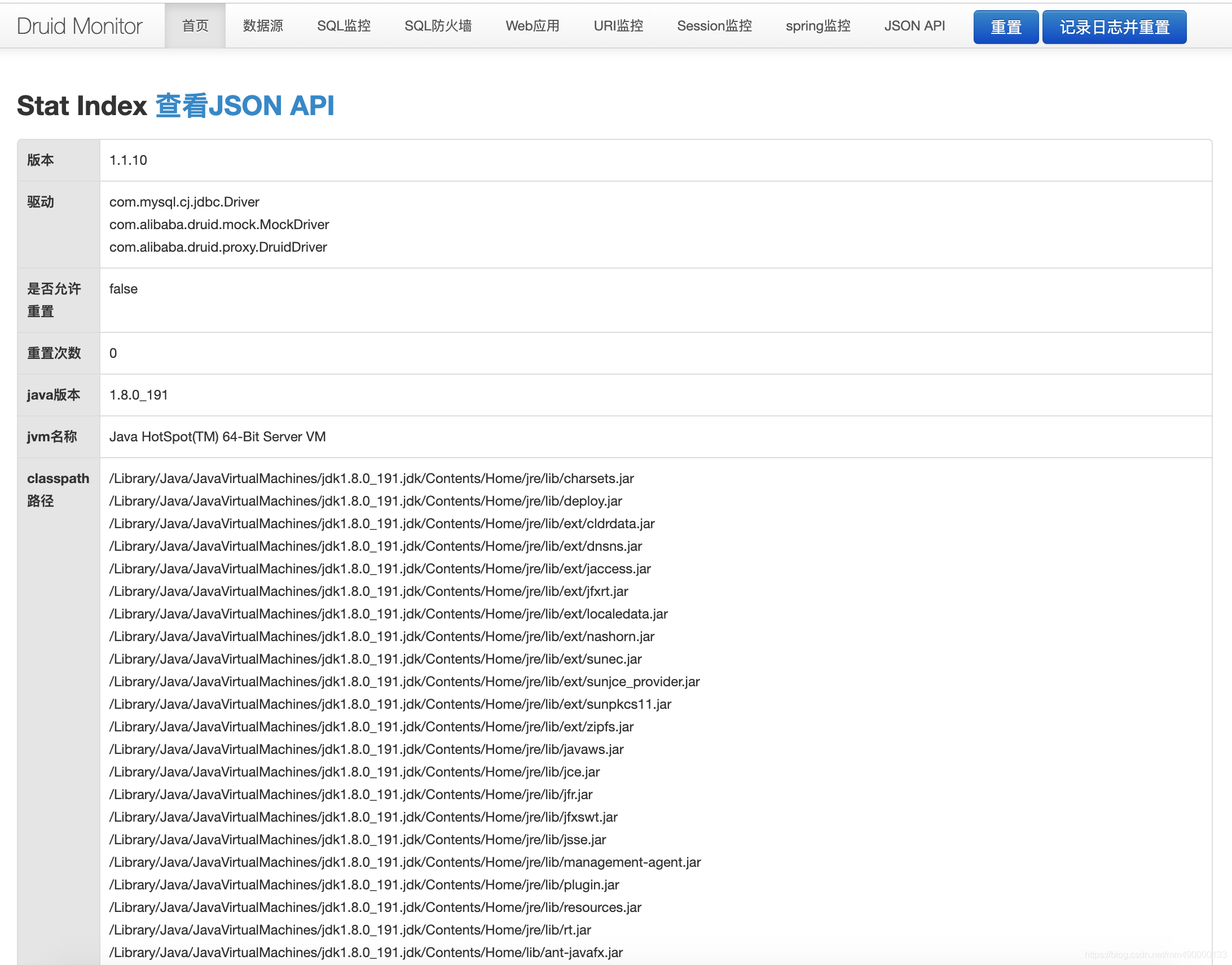
6.启动项目之后可到http://localhost:8088/druid/login.html页面查看druid的相关信息