
热门标签
热门文章
- 1Android App开发基础(2)—— App的工程结构
- 2"新年快乐"的多语言版本
- 3mac上安装docker并运行kubernetes_mac docker 运行 kubernetesui/dashboard 默认端口
- 4音频格式之AAC:(2)AAC封装格式ADIF,ADTS,LATM,extradata及AAC ES存储格式
- 5windows docker desktop配置国内镜像仓库_docker desktop 国内镜像
- 6Java面试——缓存_什么是缓存区间
- 7nohup 执行mysql命令_Linux nohup命令:后台命令脱离终端运行
- 8【QueryWrappery用法】_new querrywrapper<>().ne
- 9用python制作简单节日贺卡_生日贺卡python
- 10C语言总结(第2章算法——程序的灵魂 第3章最简单的C程序设计——顺序程序设计 第4章选择结构程序设计)_一个物体从 100m的高空自由落下,编写程序计算并输出它到达地面所需的时间和它
当前位置: article > 正文
Android 为图片加图片水印和文字水印. 复制即用,阅读即懂_android createwatermaskrightbottom
作者:思考机器5 | 2024-01-30 00:05:45
赞
踩
android createwatermaskrightbottom
为防止客户的身份证图片流失,防止他人盗用,所以我们的身份证可能需要用到给身份证图片加水印
文章最后会给出demo下载地址
老规矩,线上效果图:
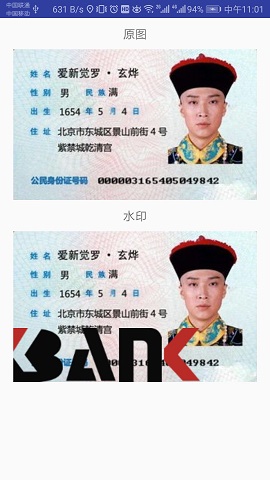
1.首先是我们的图片工具类
-
- import android.content.Context;
- import android.graphics.Bitmap;
- import android.graphics.Canvas;
- import android.graphics.Matrix;
- import android.graphics.Paint;
- import android.graphics.Rect;
-
- /**
- * 图片工具类
- *
- */
- public class ImageUtil {
-
- /**
- * 设置水印图片在左上角
- * @param context
- * @param src
- * 前者为原图,后者为水印图片
- * @return
- */
- public static Bitmap createWaterMaskLeftTop(
- Context context, Bitmap src, Bitmap watermark,
- int paddingLeft, int paddingTop) {
- return createWaterMaskBitmap(src, watermark,
- dp2px(context, paddingLeft), dp2px(context, paddingTop));
- }
-
- private static Bitmap createWaterMaskBitmap(Bitmap src, Bitmap watermark,
- int paddingLeft, int paddingTop) {
- if (src == null) {
- return null;
- }
- int width = src.getWidth();
- int height = src.getHeight();
- //创建一个bitmap
- Bitmap newb = Bitmap.createBitmap(width, height, Bitmap.Config.ARGB_8888);// 创建一个新的和SRC长度宽度一样的位图
- //将该图片作为画布
- Canvas canvas = new Canvas(newb);
- //在画布 0,0坐标上开始绘制原始图片
- canvas.drawBitmap(src, 0, 0, null);
- //在画布上绘制水印图片
- canvas.drawBitmap(watermark, paddingLeft, paddingTop, null);
- // 保存
- canvas.save(Canvas.ALL_SAVE_FLAG);
- // 存储
- canvas.restore();
- return newb;
- }
-
- /**
- * 设置水印图片在右下角
- * @param Context
- * @param src
- * @param watermark
- * @param paddingRight
- * @param paddingBottom
- * @return
- */
- public static Bitmap createWaterMaskRightBottom(
- Context context, Bitmap src, Bitmap watermark,
- int paddingRight, int paddingBottom) {
- return createWaterMaskBitmap(src, watermark,
- src.getWidth() - watermark.getWidth() - dp2px(context, paddingRight),
- src.getHeight() - watermark.getHeight() - dp2px(context, paddingBottom));
- }
-
- /**
- * 设置水印图片到右上角
- * @param context
- * @param src
- * @param watermark
- * @param paddingRight
- * @param paddingTop
- * @return
- */
- public static Bitmap createWaterMaskRightTop(
- Context context, Bitmap src, Bitmap watermark,
- int paddingRight, int paddingTop) {
- return createWaterMaskBitmap( src, watermark,
- src.getWidth() - watermark.getWidth() - dp2px(context, paddingRight),
- dp2px(context, paddingTop));
- }
-
- /**
- * 设置水印图片到左下角
- * @param context
- * @param src
- * @param watermark
- * @param paddingLeft
- * @param paddingBottom
- * @return
- */
- public static Bitmap createWaterMaskLeftBottom(
- Context context, Bitmap src, Bitmap watermark,
- int paddingLeft, int paddingBottom) {
- return createWaterMaskBitmap(src, watermark, dp2px(context, paddingLeft),
- src.getHeight() - watermark.getHeight() - dp2px(context, paddingBottom));
- }
-
- /**
- * 设置水印图片到中间
- * @param context
- * @param src
- * @param watermark
- * @return
- */
- public static Bitmap createWaterMaskCenter(Bitmap src, Bitmap watermark) {
- return createWaterMaskBitmap(src, watermark,
- (src.getWidth() - watermark.getWidth()) / 2,
- (src.getHeight() - watermark.getHeight()) / 2);
- }
-
- /**
- * 给图片添加文字到左上角
- * @param context
- * @param bitmap
- * @param text
- * @return
- */
- public static Bitmap drawTextToLeftTop(Context context, Bitmap bitmap, String text,
- int size, int color, int paddingLeft, int paddingTop) {
- Paint paint = new Paint(Paint.ANTI_ALIAS_FLAG);
- paint.setColor(color);
- paint.setTextSize(dp2px(context, size));
- Rect bounds = new Rect();
- paint.getTextBounds(text, 0, text.length(), bounds);
- return drawTextToBitmap(context, bitmap, text, paint, bounds,
- dp2px(context, paddingLeft),
- dp2px(context, paddingTop) + bounds.height());
- }
-
- /**
- * 绘制文字到右下角
- * @param context
- * @param bitmap
- * @param text
- * @param size
- * @param color
- * @param paddingBottom
- * @param paddingRight
- * @return
- */
- public static Bitmap drawTextToRightBottom(Context context, Bitmap bitmap, String text,
- int size, int color, int paddingRight, int paddingBottom) {
- Paint paint = new Paint(Paint.ANTI_ALIAS_FLAG);
- paint.setColor(color);
- paint.setTextSize(dp2px(context, size));
- Rect bounds = new Rect();
- paint.getTextBounds(text, 0, text.length(), bounds);
- return drawTextToBitmap(context, bitmap, text, paint, bounds,
- bitmap.getWidth() - bounds.width() - dp2px(context, paddingRight),
- bitmap.getHeight() - dp2px(context, paddingBottom));
- }
-
- /**
- * 绘制文字到右上方
- * @param context
- * @param bitmap
- * @param text
- * @param size
- * @param color
- * @param paddingRight
- * @param paddingTop
- * @return
- */
- public static Bitmap drawTextToRightTop(Context context, Bitmap bitmap, String text,
- int size, int color, int paddingRight, int paddingTop) {
- Paint paint = new Paint(Paint.ANTI_ALIAS_FLAG);
- paint.setColor(color);
- paint.setTextSize(dp2px(context, size));
- Rect bounds = new Rect();
- paint.getTextBounds(text, 0, text.length(), bounds);
- return drawTextToBitmap(context, bitmap, text, paint, bounds,
- bitmap.getWidth() - bounds.width() - dp2px(context, paddingRight),
- dp2px(context, paddingTop) + bounds.height());
- }
-
- /**
- * 绘制文字到左下方
- * @param context
- * @param bitmap
- * @param text
- * @param size
- * @param color
- * @param paddingLeft
- * @param paddingBottom
- * @return
- */
- public static Bitmap drawTextToLeftBottom(Context context, Bitmap bitmap, String text,
- int size, int color, int paddingLeft, int paddingBottom) {
- Paint paint = new Paint(Paint.ANTI_ALIAS_FLAG);
- paint.setColor(color);
- paint.setTextSize(dp2px(context, size));
- Rect bounds = new Rect();
- paint.getTextBounds(text, 0, text.length(), bounds);
- return drawTextToBitmap(context, bitmap, text, paint, bounds,
- dp2px(context, paddingLeft),
- bitmap.getHeight() - dp2px(context, paddingBottom));
- }
-
- /**
- * 绘制文字到中间
- * @param context
- * @param bitmap
- * @param text
- * @param size
- * @param color
- * @return
- */
- public static Bitmap drawTextToCenter(Context context, Bitmap bitmap, String text,
- int size, int color) {
- Paint paint = new Paint(Paint.ANTI_ALIAS_FLAG);
- paint.setColor(color);
- paint.setTextSize(dp2px(context, size));
- Rect bounds = new Rect();
- paint.getTextBounds(text, 0, text.length(), bounds);
- return drawTextToBitmap(context, bitmap, text, paint, bounds,
- (bitmap.getWidth() - bounds.width()) / 2,
- (bitmap.getHeight() + bounds.height()) / 2);
- }
-
- //图片上绘制文字
- private static Bitmap drawTextToBitmap(Context context, Bitmap bitmap, String text,
- Paint paint, Rect bounds, int paddingLeft, int paddingTop) {
- android.graphics.Bitmap.Config bitmapConfig = bitmap.getConfig();
-
- paint.setDither(true); // 获取跟清晰的图像采样
- paint.setFilterBitmap(true);// 过滤一些
- if (bitmapConfig == null) {
- bitmapConfig = android.graphics.Bitmap.Config.ARGB_8888;
- }
- bitmap = bitmap.copy(bitmapConfig, true);
- Canvas canvas = new Canvas(bitmap);
-
- canvas.drawText(text, paddingLeft, paddingTop, paint);
- return bitmap;
- }
-
- /**
- * 缩放图片
- * @param src
- * @param w
- * @param h
- * @return
- */
- public static Bitmap scaleWithWH(Bitmap src, double w, double h) {
- if (w == 0 || h == 0 || src == null) {
- return src;
- } else {
- // 记录src的宽高
- int width = src.getWidth();
- int height = src.getHeight();
- // 创建一个matrix容器
- Matrix matrix = new Matrix();
- // 计算缩放比例
- float scaleWidth = (float) (w / width);
- float scaleHeight = (float) (h / height);
- // 开始缩放
- matrix.postScale(scaleWidth, scaleHeight);
- // 创建缩放后的图片
- return Bitmap.createBitmap(src, 0, 0, width, height, matrix, true);
- }
- }
-
- /**
- * dip转pix
- * @param context
- * @param dp
- * @return
- */
- public static int dp2px(Context context, float dp) {
- final float scale = context.getResources().getDisplayMetrics().density;
- return (int) (dp * scale + 0.5f);
- }
- }

2.然后是布局文件
- <LinearLayout xmlns:android="http://schemas.android.com/apk/res/android"
- xmlns:tools="http://schemas.android.com/tools"
- android:layout_width="match_parent"
- android:layout_height="match_parent"
- android:orientation="vertical">
-
- <TextView
- android:layout_margin="10dp"
- android:gravity="center"
- android:id="@+id/sour_pic_title"
- android:layout_width="match_parent"
- android:layout_height="wrap_content"
- android:text="原图" />
-
- <ImageView
- android:id="@+id/sour_pic"
- android:layout_width="match_parent"
- android:layout_height="wrap_content"
- android:scaleType="centerInside"/>
-
- <TextView
- android:layout_margin="10dp"
- android:gravity="center"
- android:id="@+id/watermark_pic_title"
- android:layout_width="match_parent"
- android:layout_height="wrap_content"
- android:text="水印" />
-
- <ImageView
- android:id="@+id/wartermark_pic"
- android:layout_width="match_parent"
- android:layout_height="wrap_content"
- android:scaleType="centerInside"/>
- </LinearLayout>
3.最后是我们的MainActivity
-
- import android.app.Activity;
- import android.graphics.Bitmap;
- import android.graphics.BitmapFactory;
- import android.graphics.Color;
- import android.os.Bundle;
- import android.widget.ImageView;
-
- import com.watermark.ImageUtil;
- import com.watermark.R;
- public class MainActivity extends Activity {
-
- private ImageView mSourImage;
- private ImageView mWartermarkImage;
-
- @Override
- protected void onCreate(Bundle savedInstanceState) {
- super.onCreate(savedInstanceState);
- setContentView(R.layout.activity_main);
-
- initView();
- }
-
- private void initView(){
- mSourImage = (ImageView) findViewById(R.id.sour_pic);
- mWartermarkImage = (ImageView) findViewById(R.id.wartermark_pic);
- Bitmap idCardBitmap = BitmapFactory.decodeResource(getResources(), R.drawable.idcard);
- Bitmap logoBitmap = BitmapFactory.decodeResource(getResources(), R.drawable.icon_logo);
-
- mSourImage.setImageBitmap(idCardBitmap);
- // Bitmap watermarkBitmap = ImageUtil.createWaterMaskCenter(idCardBitmap, logoBitmap);
- Bitmap watermarkBitmap = ImageUtil.createWaterMaskLeftBottom(this, idCardBitmap, logoBitmap, 0, 0);
- // watermarkBitmap = ImageUtil.createWaterMaskRightBottom(this, watermarkBitmap, waterBitmap, 0, 0);
- // watermarkBitmap = ImageUtil.createWaterMaskLeftTop(this, watermarkBitmap, waterBitmap, 0, 0);
- // watermarkBitmap = ImageUtil.createWaterMaskRightTop(this, watermarkBitmap, waterBitmap, 0, 0);
- mWartermarkImage.setImageBitmap(watermarkBitmap);
-
- // Bitmap textBitmap = ImageUtil.drawTextToLeftTop(this, watermarkBitmap, "左上角", 16, Color.RED, 0, 0);
- // textBitmap = ImageUtil.drawTextToRightBottom(this, textBitmap, "右下角", 16, Color.RED, 0, 0);
- // textBitmap = ImageUtil.drawTextToRightTop(this, textBitmap, "右上角", 16, Color.RED, 0, 0);
- // textBitmap = ImageUtil.drawTextToLeftBottom(this, textBitmap, "左下角", 16, Color.RED, 0, 0);
- // textBitmap = ImageUtil.drawTextToCenter(this, textBitmap, "中间", 16, Color.RED);
-
- // mWartermarkImage.setImageBitmap(textBitmap);
- }
- }
4.文章下载地址:
声明:本文内容由网友自发贡献,不代表【wpsshop博客】立场,版权归原作者所有,本站不承担相应法律责任。如您发现有侵权的内容,请联系我们。转载请注明出处:https://www.wpsshop.cn/article/detail/45701
推荐阅读
![Android Termux安装MySQL,并使用cpolar实现公网安全远程连接[内网穿透]](https://img-blog.csdnimg.cn/fabd1c92d58f4f5b8946e9b8f6b49f50.jpeg?x-oss-process=image/resize,m_fixed,h_300,image/format,png)


相关标签

