
热门标签
热门文章
- 1DNA - AI辅助问答笔记检索系统
- 2粉丝提问:区块链与大数据开发读研方向怎么选?_区块链研究方向
- 3数学建模—评价模型—灰色关联度分析Vs灰色综合评价_灰色评价
- 4OpenHamony开发笔记一:在HarmonyOS虚拟机上运行openharmony工程
- 5《硬件设计指南-从器件认知到手机基带设计》正式上市!
- 6python控制Windows桌面程序自动化模块uiautomation_uiautomation.windowcontrol(
- 7HomeAssistant添加HACS插件并实现公网控制米家,HomeKit等智能家居_homeassistant接入米家
- 8100天精通Python(可视化篇)——第104天:Pyecharts绘制多种炫酷象形柱状图参数说明+代码实战
- 9C-语言每日刷题
- 10【Redis刨析】知识图谱的构建与实现
当前位置: article > 正文
Android图片添加水印_android 图片加自定义水印
作者:AI数据结构灵魂 | 2024-01-30 00:02:19
赞
踩
android 图片加自定义水印
最终效果
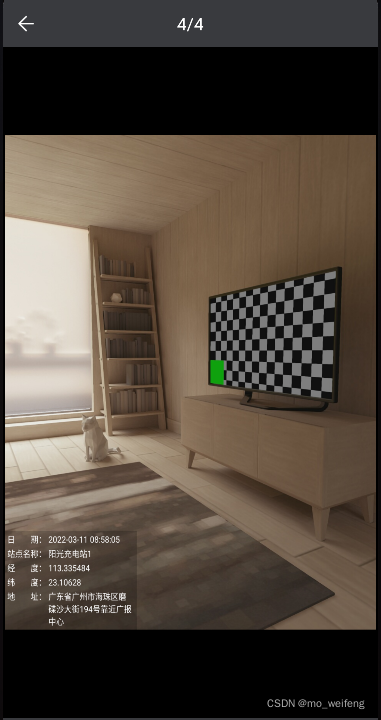
参考https://github.com/echoMu/WaterMaskDemo https://github.com/echoMu/WaterMaskDemo
首先要自定义左下角的view
WaterMaskView
- import android.content.Context;
- import android.util.AttributeSet;
- import android.view.LayoutInflater;
- import android.widget.RelativeLayout;
- import android.widget.TextView;
- import com.enneagon.net.R;
-
-
- /**
- * 自定义水印view
- */
- public class WaterMaskView extends RelativeLayout {
-
- private TextView tv_date;
- private TextView tv_stationName;
- private TextView tv_long;
- private TextView tv_lat;
- private TextView tv_address;
-
- private TextView tv_date2;
- private TextView tv_stationName2;
- private TextView tv_long2;
- private TextView tv_lat2;
- private TextView tv_address2;
-
-
- public WaterMaskView(Context context) {
- this(context, null);
- }
-
- public WaterMaskView(Context context, AttributeSet attrs) {
- super(context, attrs);
- LayoutInflater.from(context).inflate(R.layout.layout_watermask, this, true);
- tv_date = (TextView) findViewById(R.id.tv_date);
- tv_stationName = (TextView) findViewById(R.id.tv_stationName);
- tv_long = (TextView) findViewById(R.id.tv_long);
- tv_lat = (TextView) findViewById(R.id.tv_lat);
- tv_address = (TextView) findViewById(R.id.tv_address);
-
- tv_date2 = (TextView) findViewById(R.id.tv_date2);
- tv_stationName2 = (TextView) findViewById(R.id.tv_stationName2);
- tv_long2 = (TextView) findViewById(R.id.tv_long2);
- tv_lat2 = (TextView) findViewById(R.id.tv_lat2);
- tv_address2 = (TextView) findViewById(R.id.tv_address2);
-
- }
-
- public void setInfoDate(String content) {
- tv_date.setText(content);
- tv_date2.setText(content);
- }
-
- public void setInfoAddress(String content) {
- tv_address.setText(content);
- tv_address2.setText(content);
- }
-
- public void setInfoLat(String content) {
- tv_lat.setText(content);
- tv_lat2.setText(content);
- }
-
- public void setInfoLon(String content) {
- tv_long.setText(content);
- tv_long2.setText(content);
- }
-
- public void setInfoStationName(String content) {
- tv_stationName.setText(content);
- tv_stationName2.setText(content);
- }
-
- }

layout_watermask.xml
- <?xml version="1.0" encoding="utf-8"?>
- <RelativeLayout xmlns:android="http://schemas.android.com/apk/res/android"
- xmlns:tools="http://schemas.android.com/tools"
- android:layout_width="wrap_content"
- android:layout_height="wrap_content">
-
- <LinearLayout
- android:paddingRight="4dp"
- android:layout_width="220dp"
- android:layout_height="wrap_content"
- android:alpha="0.4"
- android:background="@color/black"
- android:orientation="vertical"
- android:paddingTop="4dp"
- android:paddingLeft="4dp"
- android:paddingBottom="4dp">
-
- <LinearLayout
- android:layout_width="wrap_content"
- android:layout_height="wrap_content"
- android:orientation="horizontal">
-
- <TextView
- android:layout_width="wrap_content"
- android:layout_height="wrap_content"
- android:text="日"
- android:textColor="@color/white"
- android:textSize="14sp"
- android:visibility="invisible" />
-
- <TextView
- android:layout_width="wrap_content"
- android:layout_height="wrap_content"
- android:text="占"
- android:textColor="@color/white"
- android:textSize="14sp"
- android:visibility="invisible" />
-
- <TextView
- android:layout_width="wrap_content"
- android:layout_height="wrap_content"
- android:text="占"
- android:textColor="@color/white"
- android:textSize="14sp"
- android:visibility="invisible" />
-
- <TextView
- android:layout_width="wrap_content"
- android:layout_height="wrap_content"
- android:text="期:"
- android:textColor="@color/white"
- android:textSize="14sp"
- android:visibility="invisible" />
-
- <TextView
- android:id="@+id/tv_date2"
- android:layout_width="wrap_content"
- android:layout_height="wrap_content"
- android:layout_marginLeft="4dp"
- android:textColor="@color/white"
- android:textSize="14sp"
- android:visibility="invisible"
- tools:text="2021-07-12 00:00:00" />
- </LinearLayout>
-
- <LinearLayout
- android:layout_width="wrap_content"
- android:layout_height="wrap_content"
- android:layout_marginTop="4dp"
- android:orientation="horizontal">
-
- <TextView
- android:layout_width="wrap_content"
- android:layout_height="wrap_content"
-
- android:text="站点名称:"
- android:textColor="@color/white"
- android:textSize="14sp"
- android:visibility="invisible" />
-
- <TextView
- android:id="@+id/tv_stationName2"
- android:layout_width="wrap_content"
- android:layout_height="wrap_content"
- android:layout_marginLeft="4dp"
- android:textColor="@color/white"
- android:textSize="14sp"
- android:visibility="invisible"
- tools:text="xxx站点" />
- </LinearLayout>
-
- <LinearLayout
- android:layout_width="wrap_content"
- android:layout_height="wrap_content"
- android:layout_marginTop="4dp"
- android:orientation="horizontal">
-
- <TextView
- android:layout_width="wrap_content"
- android:layout_height="wrap_content"
-
- android:text="经"
- android:textColor="@color/white"
- android:textSize="14sp"
- android:visibility="invisible" />
-
- <TextView
- android:layout_width="wrap_content"
- android:layout_height="wrap_content"
-
- android:text="占"
- android:textColor="@color/white"
- android:textSize="14sp"
- android:visibility="invisible" />
-
- <TextView
- android:layout_width="wrap_content"
- android:layout_height="wrap_content"
-
- android:text="占"
- android:textColor="@color/white"
- android:textSize="14sp"
- android:visibility="invisible" />
-
- <TextView
- android:layout_width="wrap_content"
- android:layout_height="wrap_content"
-
- android:text="度:"
- android:textColor="@color/white"
- android:textSize="14sp"
- android:visibility="invisible" />
-
- <TextView
- android:id="@+id/tv_long2"
- android:layout_width="wrap_content"
- android:layout_height="wrap_content"
- android:layout_marginLeft="4dp"
- android:textColor="@color/white"
- android:textSize="14sp"
- android:visibility="invisible"
- tools:text="333333" />
- </LinearLayout>
-
- <LinearLayout
- android:layout_width="wrap_content"
- android:layout_height="wrap_content"
- android:layout_marginTop="4dp"
- android:orientation="horizontal">
-
- <TextView
- android:layout_width="wrap_content"
- android:layout_height="wrap_content"
-
- android:text="纬"
- android:textColor="@color/white"
- android:textSize="14sp"
- android:visibility="invisible" />
-
- <TextView
- android:layout_width="wrap_content"
- android:layout_height="wrap_content"
-
- android:text="占"
- android:textColor="@color/white"
- android:textSize="14sp"
- android:visibility="invisible" />
-
- <TextView
- android:layout_width="wrap_content"
- android:layout_height="wrap_content"
-
- android:text="占"
- android:textColor="@color/white"
- android:textSize="14sp"
- android:visibility="invisible" />
-
- <TextView
- android:layout_width="wrap_content"
- android:layout_height="wrap_content"
-
- android:text="度:"
- android:textColor="@color/white"
- android:textSize="14sp"
- android:visibility="invisible" />
-
- <TextView
- android:id="@+id/tv_lat2"
- android:layout_width="wrap_content"
- android:layout_height="wrap_content"
- android:layout_marginLeft="4dp"
- android:textColor="@color/white"
- android:textSize="14sp"
- android:visibility="invisible"
- tools:text="1" />
- </LinearLayout>
-
- <LinearLayout
- android:layout_width="wrap_content"
- android:layout_height="wrap_content"
- android:layout_marginTop="4dp"
- android:orientation="horizontal">
-
- <TextView
- android:layout_width="wrap_content"
- android:layout_height="wrap_content"
-
- android:text="地"
- android:textColor="@color/white"
- android:textSize="14sp"
- android:visibility="invisible" />
-
- <TextView
- android:layout_width="wrap_content"
- android:layout_height="wrap_content"
-
- android:text="占"
- android:textColor="@color/white"
- android:textSize="14sp"
- android:visibility="invisible" />
-
- <TextView
- android:layout_width="wrap_content"
- android:layout_height="wrap_content"
-
- android:text="占"
- android:textColor="@color/white"
- android:textSize="14sp"
- android:visibility="invisible" />
-
- <TextView
- android:layout_width="wrap_content"
- android:layout_height="wrap_content"
-
- android:text="址:"
- android:textColor="@color/white"
- android:textSize="14sp"
- android:visibility="invisible" />
-
- <TextView
- android:id="@+id/tv_address2"
- android:layout_width="wrap_content"
- android:layout_height="wrap_content"
- android:layout_marginLeft="4dp"
- android:textColor="@color/white"
- android:textSize="14sp"
- android:visibility="invisible"
- tools:text="1234" />
- </LinearLayout>
- </LinearLayout>
-
- <LinearLayout
- android:layout_width="220dp"
- android:layout_height="wrap_content"
- android:orientation="vertical"
- android:paddingLeft="4dp"
- android:paddingTop="4dp"
- android:paddingRight="4dp"
- android:paddingBottom="4dp">
-
-
- <LinearLayout
- android:layout_width="wrap_content"
- android:layout_height="wrap_content"
- android:orientation="horizontal">
-
- <TextView
- android:layout_width="wrap_content"
- android:layout_height="wrap_content"
-
- android:text="日"
- android:textColor="@color/white"
- android:textSize="14sp" />
-
- <TextView
- android:layout_width="wrap_content"
- android:layout_height="wrap_content"
-
- android:text="占"
- android:textColor="@color/white"
- android:textSize="14sp"
- android:visibility="invisible" />
-
- <TextView
- android:layout_width="wrap_content"
- android:layout_height="wrap_content"
-
- android:text="占"
- android:textColor="@color/white"
- android:textSize="14sp"
- android:visibility="invisible" />
-
- <TextView
- android:layout_width="wrap_content"
- android:layout_height="wrap_content"
-
- android:text="期:"
- android:textColor="@color/white"
- android:textSize="14sp" />
-
- <TextView
- android:id="@+id/tv_date"
- android:layout_width="wrap_content"
- android:layout_height="wrap_content"
- android:layout_marginLeft="4dp"
- android:textColor="@color/white"
- android:textSize="14sp"
- tools:text="2021-07-12 00:00:00" />
- </LinearLayout>
-
- <LinearLayout
- android:layout_width="wrap_content"
- android:layout_height="wrap_content"
- android:layout_marginTop="4dp"
- android:orientation="horizontal">
-
- <TextView
- android:layout_width="wrap_content"
- android:layout_height="wrap_content"
-
- android:text="站点名称:"
- android:textColor="@color/white"
- android:textSize="14sp" />
-
- <TextView
- android:id="@+id/tv_stationName"
- android:layout_width="wrap_content"
- android:layout_height="wrap_content"
- android:layout_marginLeft="4dp"
- android:textColor="@color/white"
- android:textSize="14sp"
- tools:text="xxx站点" />
- </LinearLayout>
-
- <LinearLayout
- android:layout_width="wrap_content"
- android:layout_height="wrap_content"
- android:layout_marginTop="4dp"
- android:orientation="horizontal">
-
- <TextView
- android:layout_width="wrap_content"
- android:layout_height="wrap_content"
-
- android:text="经"
- android:textColor="@color/white"
- android:textSize="14sp" />
-
- <TextView
- android:layout_width="wrap_content"
- android:layout_height="wrap_content"
-
- android:text="占"
- android:textColor="@color/white"
- android:textSize="14sp"
- android:visibility="invisible" />
-
- <TextView
- android:layout_width="wrap_content"
- android:layout_height="wrap_content"
-
- android:text="占"
- android:textColor="@color/white"
- android:textSize="14sp"
- android:visibility="invisible" />
-
- <TextView
- android:layout_width="wrap_content"
- android:layout_height="wrap_content"
-
- android:text="度:"
- android:textColor="@color/white"
- android:textSize="14sp" />
-
- <TextView
- android:id="@+id/tv_long"
- android:layout_width="wrap_content"
- android:layout_height="wrap_content"
- android:layout_marginLeft="4dp"
- android:textColor="@color/white"
- android:textSize="14sp"
- tools:text="333333" />
- </LinearLayout>
-
- <LinearLayout
- android:layout_width="wrap_content"
- android:layout_height="wrap_content"
- android:layout_marginTop="4dp"
- android:orientation="horizontal">
-
- <TextView
- android:layout_width="wrap_content"
- android:layout_height="wrap_content"
-
- android:text="纬"
- android:textColor="@color/white"
- android:textSize="14sp" />
-
- <TextView
- android:layout_width="wrap_content"
- android:layout_height="wrap_content"
-
- android:text="占"
- android:textColor="@color/white"
- android:textSize="14sp"
- android:visibility="invisible" />
-
- <TextView
- android:layout_width="wrap_content"
- android:layout_height="wrap_content"
-
- android:text="占"
- android:textColor="@color/white"
- android:textSize="14sp"
- android:visibility="invisible" />
-
- <TextView
- android:layout_width="wrap_content"
- android:layout_height="wrap_content"
-
- android:text="度:"
- android:textColor="@color/white"
- android:textSize="14sp" />
-
- <TextView
- android:id="@+id/tv_lat"
- android:layout_width="wrap_content"
- android:layout_height="wrap_content"
- android:layout_marginLeft="4dp"
- android:textColor="@color/white"
- android:textSize="14sp"
- tools:text="11F" />
- </LinearLayout>
-
- <LinearLayout
- android:layout_width="wrap_content"
- android:layout_height="wrap_content"
- android:layout_marginTop="4dp"
- android:orientation="horizontal">
-
- <TextView
- android:layout_width="wrap_content"
- android:layout_height="wrap_content"
-
- android:text="地"
- android:textColor="@color/white"
- android:textSize="14sp" />
-
- <TextView
- android:layout_width="wrap_content"
- android:layout_height="wrap_content"
-
- android:text="占"
- android:textColor="@color/white"
- android:textSize="14sp"
- android:visibility="invisible" />
-
- <TextView
- android:layout_width="wrap_content"
- android:layout_height="wrap_content"
-
- android:text="占"
- android:textColor="@color/white"
- android:textSize="14sp"
- android:visibility="invisible" />
-
- <TextView
- android:layout_width="wrap_content"
- android:layout_height="wrap_content"
-
- android:text="址:"
- android:textColor="@color/white"
- android:textSize="14sp" />
-
- <TextView
- android:id="@+id/tv_address"
- android:layout_width="wrap_content"
- android:layout_height="wrap_content"
- android:layout_marginLeft="4dp"
- android:textColor="@color/white"
- android:textSize="14sp"
- tools:text="1234" />
- </LinearLayout>
- </LinearLayout>
- </RelativeLayout>
接着是水印工具类
WaterMaskUtil
- import android.content.Context;
- import android.graphics.Bitmap;
- import android.graphics.Canvas;
- import android.graphics.Matrix;
- import android.graphics.Paint;
- import android.graphics.Rect;
- import android.view.View;
-
- /**
- * <pre>
- * author : echoMu
- * e-mail :
- * time : 2017/07/12
- * desc :
- * version:
- * </pre>
- */
- public class WaterMaskUtil {
- /**
- * 设置水印图片在左上角
- * @param src
- * @param watermark
- * @param paddingLeft
- * @param paddingTop
- * @return
- */
- public static Bitmap createWaterMaskLeftTop(
- Context context, Bitmap src, Bitmap watermark,
- int paddingLeft, int paddingTop) {
- return createWaterMaskBitmap(src, watermark,
- dp2px(context, paddingLeft), dp2px(context, paddingTop));
- }
-
- /**
- * 设置水印图片在右下角
- * @param src
- * @param watermark
- * @param paddingRight
- * @param paddingBottom
- * @return
- */
- public static Bitmap createWaterMaskRightBottom(
- Context context, Bitmap src, Bitmap watermark,
- int paddingRight, int paddingBottom) {
- return createWaterMaskBitmap(src, watermark,
- src.getWidth() - watermark.getWidth() - dp2px(context, paddingRight),
- src.getHeight() - watermark.getHeight() - dp2px(context, paddingBottom));
- }
-
- /**
- * 设置水印图片到右上角
- * @param src
- * @param watermark
- * @param paddingRight
- * @param paddingTop
- * @return
- */
- public static Bitmap createWaterMaskRightTop(
- Context context, Bitmap src, Bitmap watermark,
- int paddingRight, int paddingTop) {
- return createWaterMaskBitmap( src, watermark,
- src.getWidth() - watermark.getWidth() - dp2px(context, paddingRight),
- dp2px(context, paddingTop));
- }
-
- /**
- * 设置水印图片到左下角
- * @param src
- * @param watermark
- * @param paddingLeft
- * @param paddingBottom
- * @return
- */
- public static Bitmap createWaterMaskLeftBottom(
- Context context, Bitmap src, Bitmap watermark,
- int paddingLeft, int paddingBottom) {
- return createWaterMaskBitmap(src, watermark, dp2px(context, paddingLeft),
- src.getHeight() - watermark.getHeight() - dp2px(context, paddingBottom));
- }
-
- /**
- * 设置水印图片到中间
- * @param src
- * @param watermark
- * @return
- */
- public static Bitmap createWaterMaskCenter(Bitmap src, Bitmap watermark) {
- return createWaterMaskBitmap(src, watermark,
- (src.getWidth() - watermark.getWidth()) / 2,
- (src.getHeight() - watermark.getHeight()) / 2);
- }
-
- /**
- * 绘制水印图片
- * @param src 原图
- * @param watermark 水印
- * @param paddingLeft
- * @param paddingTop
- * @return
- */
- private static Bitmap createWaterMaskBitmap(Bitmap src, Bitmap watermark,
- int paddingLeft, int paddingTop) {
- if (src == null) {
- return null;
- }
- int width = src.getWidth();
- int height = src.getHeight();
- //创建一个bitmap
- Bitmap newb = Bitmap.createBitmap(width, height, Bitmap.Config.ARGB_8888);// 创建一个新的和SRC长度宽度一样的位图
- //将该图片作为画布
- Canvas canvas = new Canvas(newb);
- //在画布 0,0坐标上开始绘制原始图片
- canvas.drawBitmap(src, 0, 0, null);
- //在画布上绘制水印图片
- canvas.drawBitmap(watermark, paddingLeft, paddingTop, null);
- // 保存
- canvas.save();
- // canvas.save(Canvas.ALL_SAVE_FLAG);
- // 存储
- canvas.restore();
- return newb;
- }
-
- /**
- * 给图片添加文字到左上角
- * @param context
- * @param bitmap
- * @param text
- * @return
- */
- public static Bitmap drawTextToLeftTop(Context context, Bitmap bitmap, String text,
- int size, int color, int paddingLeft, int paddingTop) {
- Paint paint = new Paint(Paint.ANTI_ALIAS_FLAG);
- paint.setColor(color);
- paint.setTextSize(dp2px(context, size));
- Rect bounds = new Rect();
- paint.getTextBounds(text, 0, text.length(), bounds);
- return drawTextToBitmap(context, bitmap, text, paint, bounds,
- dp2px(context, paddingLeft),
- dp2px(context, paddingTop) + bounds.height());
- }
-
- /**
- * 绘制文字到右下角
- * @param context
- * @param bitmap
- * @param text
- * @param size
- * @param color
- * @param paddingRight
- * @param paddingBottom
- * @return
- */
- public static Bitmap drawTextToRightBottom(Context context, Bitmap bitmap, String text,
- int size, int color, int paddingRight, int paddingBottom) {
- Paint paint = new Paint(Paint.ANTI_ALIAS_FLAG);
- paint.setColor(color);
- paint.setTextSize(dp2px(context, size));
- Rect bounds = new Rect();
- paint.getTextBounds(text, 0, text.length(), bounds);
- return drawTextToBitmap(context, bitmap, text, paint, bounds,
- bitmap.getWidth() - bounds.width() - dp2px(context, paddingRight),
- bitmap.getHeight() - dp2px(context, paddingBottom));
- }
-
- /**
- * 绘制文字到右上方
- * @param context
- * @param bitmap
- * @param text
- * @param size
- * @param color
- * @param paddingRight
- * @param paddingTop
- * @return
- */
- public static Bitmap drawTextToRightTop(Context context, Bitmap bitmap, String text,
- int size, int color, int paddingRight, int paddingTop) {
- Paint paint = new Paint(Paint.ANTI_ALIAS_FLAG);
- paint.setColor(color);
- paint.setTextSize(dp2px(context, size));
- Rect bounds = new Rect();
- paint.getTextBounds(text, 0, text.length(), bounds);
- return drawTextToBitmap(context, bitmap, text, paint, bounds,
- bitmap.getWidth() - bounds.width() - dp2px(context, paddingRight),
- dp2px(context, paddingTop) + bounds.height());
- }
-
- /**
- * 绘制文字到左下方
- * @param context
- * @param bitmap
- * @param text
- * @param size
- * @param color
- * @param paddingLeft
- * @param paddingBottom
- * @return
- */
- public static Bitmap drawTextToLeftBottom(Context context, Bitmap bitmap, String text,
- int size, int color, int paddingLeft, int paddingBottom) {
- Paint paint = new Paint(Paint.ANTI_ALIAS_FLAG);
- paint.setColor(color);
- paint.setTextSize(dp2px(context, size));
- Rect bounds = new Rect();
- paint.getTextBounds(text, 0, text.length(), bounds);
- return drawTextToBitmap(context, bitmap, text, paint, bounds,
- dp2px(context, paddingLeft),
- bitmap.getHeight() - dp2px(context, paddingBottom+2));
- }
-
- /**
- * 绘制文字到中间
- * @param context
- * @param bitmap
- * @param text
- * @param size
- * @param color
- * @return
- */
- public static Bitmap drawTextToCenter(Context context, Bitmap bitmap, String text,
- int size, int color) {
- Paint paint = new Paint(Paint.ANTI_ALIAS_FLAG);
- paint.setColor(color);
- paint.setTextSize(dp2px(context, size));
- Rect bounds = new Rect();
- paint.getTextBounds(text, 0, text.length(), bounds);
- return drawTextToBitmap(context, bitmap, text, paint, bounds,
- (bitmap.getWidth() - bounds.width()) / 2,
- (bitmap.getHeight() + bounds.height()) / 2);
- }
-
- //图片上绘制文字
- private static Bitmap drawTextToBitmap(Context context, Bitmap bitmap, String text,
- Paint paint, Rect bounds, int paddingLeft, int paddingTop) {
- Bitmap.Config bitmapConfig = bitmap.getConfig();
-
- paint.setDither(true); // 获取跟清晰的图像采样
- paint.setFilterBitmap(true);// 过滤一些
- if (bitmapConfig == null) {
- bitmapConfig = Bitmap.Config.ARGB_8888;
- }
- bitmap = bitmap.copy(bitmapConfig, true);
- Canvas canvas = new Canvas(bitmap);
-
- // canvas.drawText(text, paddingLeft, paddingTop, paint);
- drawMultiLineText(text, paddingLeft, paddingTop, paint,canvas);
- return bitmap;
- }
-
- private static void drawMultiLineText(String str, float x, float y, Paint paint,
- Canvas canvas) {
- String[] lines = str.split("\n");
- float txtSize = -paint.ascent() + paint.descent();
-
- if (paint.getStyle() == Paint.Style.FILL_AND_STROKE
- || paint.getStyle() == Paint.Style.STROKE) {
- txtSize += paint.getStrokeWidth(); // add stroke width to the text
- }
- float lineSpace = txtSize * 0.1f; // default line spacing
- for (int i = 0; i < lines.length; ++i) {
- canvas.drawText(lines[i], x, y + (txtSize + lineSpace) * i, paint);
- }
- }
-
- /**
- * 缩放图片
- * @param src
- * @param w
- * @param h
- * @return
- */
- public static Bitmap scaleWithWH(Bitmap src, double w, double h) {
- if (w == 0 || h == 0 || src == null) {
- return src;
- } else {
- // 记录src的宽高
- int width = src.getWidth();
- int height = src.getHeight();
- // 创建一个matrix容器
- Matrix matrix = new Matrix();
- // 计算缩放比例
- float scaleWidth = (float) (w / width);
- float scaleHeight = (float) (h / height);
- // 开始缩放
- matrix.postScale(scaleWidth, scaleHeight);
- // 创建缩放后的图片
- return Bitmap.createBitmap(src, 0, 0, width, height, matrix, true);
- }
- }
-
- /**
- * dip转pix
- * @param context
- * @param dp
- * @return
- */
- public static int dp2px(Context context, float dp) {
- final float scale = context.getResources().getDisplayMetrics().density;
- return (int) (dp * scale + 0.5f);
- }
-
- /**
- * 将一个view转换为Bitmap
- * @param view
- * @return
- */
- public static Bitmap convertViewToBitmap(View view){
- view.measure(View.MeasureSpec.makeMeasureSpec(0, View.MeasureSpec.UNSPECIFIED), View.MeasureSpec.makeMeasureSpec(0, View.MeasureSpec.UNSPECIFIED));
- view.layout(0, 0, view.getMeasuredWidth(), view.getMeasuredHeight());
- view.buildDrawingCache();
- Bitmap bitmap = view.getDrawingCache();
- return bitmap;
- }
-
- /**
- * 缩放Bitmap图片
- *
- */
- public static Bitmap zoomBitmap(Bitmap bitmap, int width, int height) {
-
- int w = bitmap.getWidth();
- int h = bitmap.getHeight();
- Matrix matrix = new Matrix();
- float scaleWidth = ((float) width / w);
- float scaleHeight = ((float) height / h);
- matrix.postScale(scaleWidth, scaleHeight);// 利用矩阵进行缩放不会造成内存溢出
- Bitmap newbmp = Bitmap.createBitmap(bitmap, 0, 0, w, h, matrix, true);
-
- return newbmp;
- }
-
- }
使用方式:
1、获取图片的URL,然后转成bitmap
Bitmap sourBitmap = BitmapFactory.decodeFile(fileUrl);2、添加水印,并转为Bitmap
- //默认设置水印位置在左下
- Bitmap WaterBitmap = saveWaterMask(context, 3, sourBitmap,lng, lat, address, stationName);
-
- /**
- * @param position 左上为0,顺时针算起
- */
- private static Bitmap saveWaterMask(Context context, int position, Bitmap sourBitmap,String lng, String lat, String address, String stationName) {
- WaterMaskView waterMaskView = new WaterMaskView(context);
- RelativeLayout.LayoutParams params = new RelativeLayout.LayoutParams(RelativeLayout.LayoutParams.WRAP_CONTENT, RelativeLayout.LayoutParams.WRAP_CONTENT);
- waterMaskView.setLayoutParams(params);
- // waterMaskView.setCompanyText(address);
- // waterMaskView.setInfoText(stationName);
- String time = TimeUtils.getCurrentTimeInString();
- waterMaskView.setInfoDate(time);
- waterMaskView.setInfoAddress(address);
- waterMaskView.setInfoLat(lat);
- waterMaskView.setInfoLon(lng);
- waterMaskView.setInfoStationName(stationName);
-
- Bitmap waterBitmap = WaterMaskUtil.convertViewToBitmap(waterMaskView);
-
- //根据原图处理要生成的水印的宽高
- float width = sourBitmap.getWidth();
- float height = sourBitmap.getHeight();
- float be = width / height;
-
- if ((float) 16 / 9 >= be && be >= (float) 4 / 3) {
- //在图片比例区间内16;9~4:3内,将生成的水印bitmap设置为原图宽高各自的1/5
- waterBitmap = WaterMaskUtil.zoomBitmap(waterBitmap, (int) width / 5, (int) height / 5);
- } else if (be > (float) 16 / 9) {
- //生成4:3的水印
- waterBitmap = WaterMaskUtil.zoomBitmap(waterBitmap, (int) width / 5, (int) width * 3 / 20);
- } else if (be < (float) 4 / 3) {
- //生成4:3的水印
- waterBitmap = WaterMaskUtil.zoomBitmap(waterBitmap, (int) height * 4 / 15, (int) height / 5);
- }
- Bitmap watermarkBitmap = null;
- switch (position) {
- case 0:
- watermarkBitmap = WaterMaskUtil.createWaterMaskLeftTop(context, sourBitmap, waterBitmap, 0, 0);
- break;
- case 1:
- watermarkBitmap = WaterMaskUtil.createWaterMaskRightTop(context, sourBitmap, waterBitmap, 0, 0);
- break;
- case 2:
- watermarkBitmap = WaterMaskUtil.createWaterMaskRightBottom(context, sourBitmap, waterBitmap, 0, 0);
- break;
- case 3:
- watermarkBitmap = WaterMaskUtil.createWaterMaskLeftBottom(context, sourBitmap, waterBitmap, 0, 0);
- break;
- }
- return watermarkBitmap;
-
- }
3、将Bitmap保存到手机,获取文件URL,最后将文件上传到服务器
- //保存图片
- String fileName = "IMG_" + new Date().getTime() + RandomUtil.getRandom(10000) + ".png";
- String targetFileUrl = saveBitmap(context, WaterBitmap, fileName);
- private static String saveBitmap(Context context, Bitmap mBitmap, String name) {
-
- String appName = context.getResources().getString(R.string.app_name);
-
- String folder = Environment.getExternalStorageDirectory()
- + File.separator + appName + File.separator + "photo";
-
- LogUtils.i("folder=" + folder);
-
- File folderFile = new File(folder);
-
- if (!folderFile.exists()) {
- boolean isSuccess = folderFile.mkdirs();
- LogUtils.i("创建文件夹路径是否成功=" + isSuccess);
- }
-
- String target = folder + File.separator + name;
- LogUtils.i("target=" + target);
-
- File targetFile = new File(target);
-
- try {
- targetFile.createNewFile();
- } catch (IOException e) {
- LogUtils.e("在保存图片时出错:" + e.toString());
- }
-
- FileOutputStream fOut = null;
- try {
- fOut = new FileOutputStream(targetFile);
- } catch (FileNotFoundException e) {
- e.printStackTrace();
- }
- mBitmap.compress(Bitmap.CompressFormat.PNG, 100, fOut);
- try {
- fOut.flush();
- } catch (IOException e) {
- e.printStackTrace();
- }
- try {
- fOut.close();
- } catch (IOException e) {
- e.printStackTrace();
- }
-
- return target;
- }
声明:本文内容由网友自发贡献,不代表【wpsshop博客】立场,版权归原作者所有,本站不承担相应法律责任。如您发现有侵权的内容,请联系我们。转载请注明出处:https://www.wpsshop.cn/article/detail/45695?site
推荐阅读
![Android Termux安装MySQL,并使用cpolar实现公网安全远程连接[内网穿透]](https://img-blog.csdnimg.cn/fabd1c92d58f4f5b8946e9b8f6b49f50.jpeg?x-oss-process=image/resize,m_fixed,h_300,image/format,png)


相关标签

