
- 1[附源码]Java计算机毕业设计SSM航空订票系统
- 2Spring boot Druid 多数据源JDBC和注解事务_mybatisplus druid多数据源
- 3GitHub打不开解决办法
- 4python获取app信息的库_python爬取 “得到” App 电子书信息
- 5【SQL】一文详解嵌入式SQL(建议收藏)_嵌入式sql编程
- 6零基础手把手教你如何使用Laf免费玩转Midjourney
- 7安全模型和业务安全体系_ipdrr 安全模型
- 8零基础入门:使用Python pyWinAuto自动化你的Windows任务_windows pyton automatic
- 9QProgressBar+中间显示文本
- 10你必须要掌握的大数据计算技术,都在这了
【高效视频处理】BMF 项目安装与老视频修复体验全流程及总结
赞
踩
一、BMF简介
BMF(Babit Multimedia Framework)是字节跳动开发的跨平台、多语言、可定制的多媒体处理框架。经过 4 年多的测试和改进,BMF 已经过量身定制,能够熟练地应对我们现实生产环境中的挑战。目前广泛应用于字节跳动的视频串流、直播转码、云剪辑和移动前/后处理场景。该框架每天处理超过 20 亿个视频。
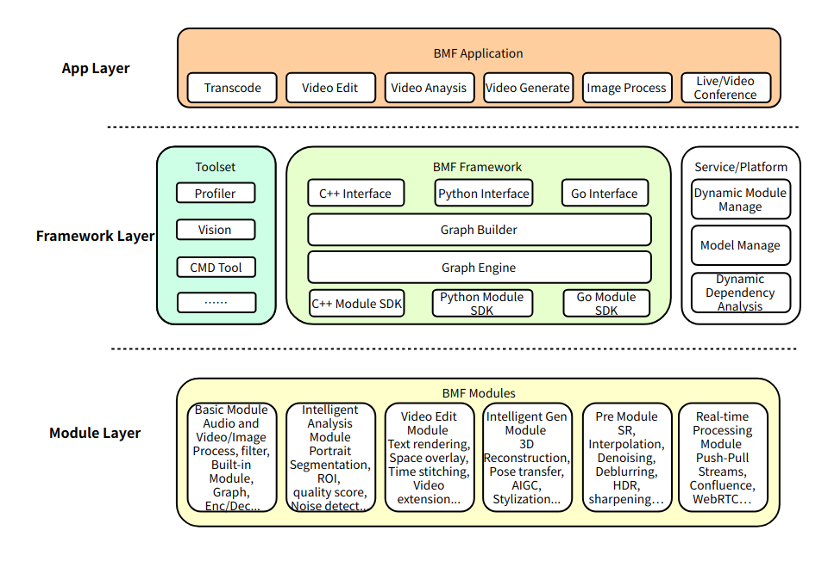
官方仓库地址为:https://github.com/BabitMF/bmf?tab=readme-ov-file
二、BMF初体验
2.1、安装方式
1️⃣、pip安装
首先要确保本机已经安装了Python,然后使用pip install BabitMF安装BabitMF,安装过程中其会帮你同时安装依赖包,显示successfully安装即为成功:

2️⃣、源码编译安装
首先我们使用git clone命令克隆BMF源码git clone https://github.com/BabitMF/bmf bmf,克隆完成后,项目的文件结构如下:
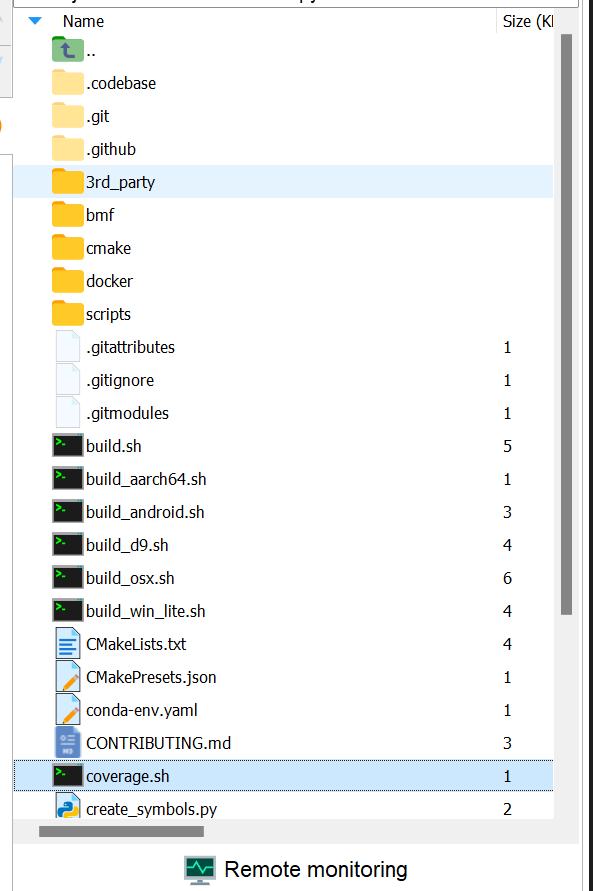
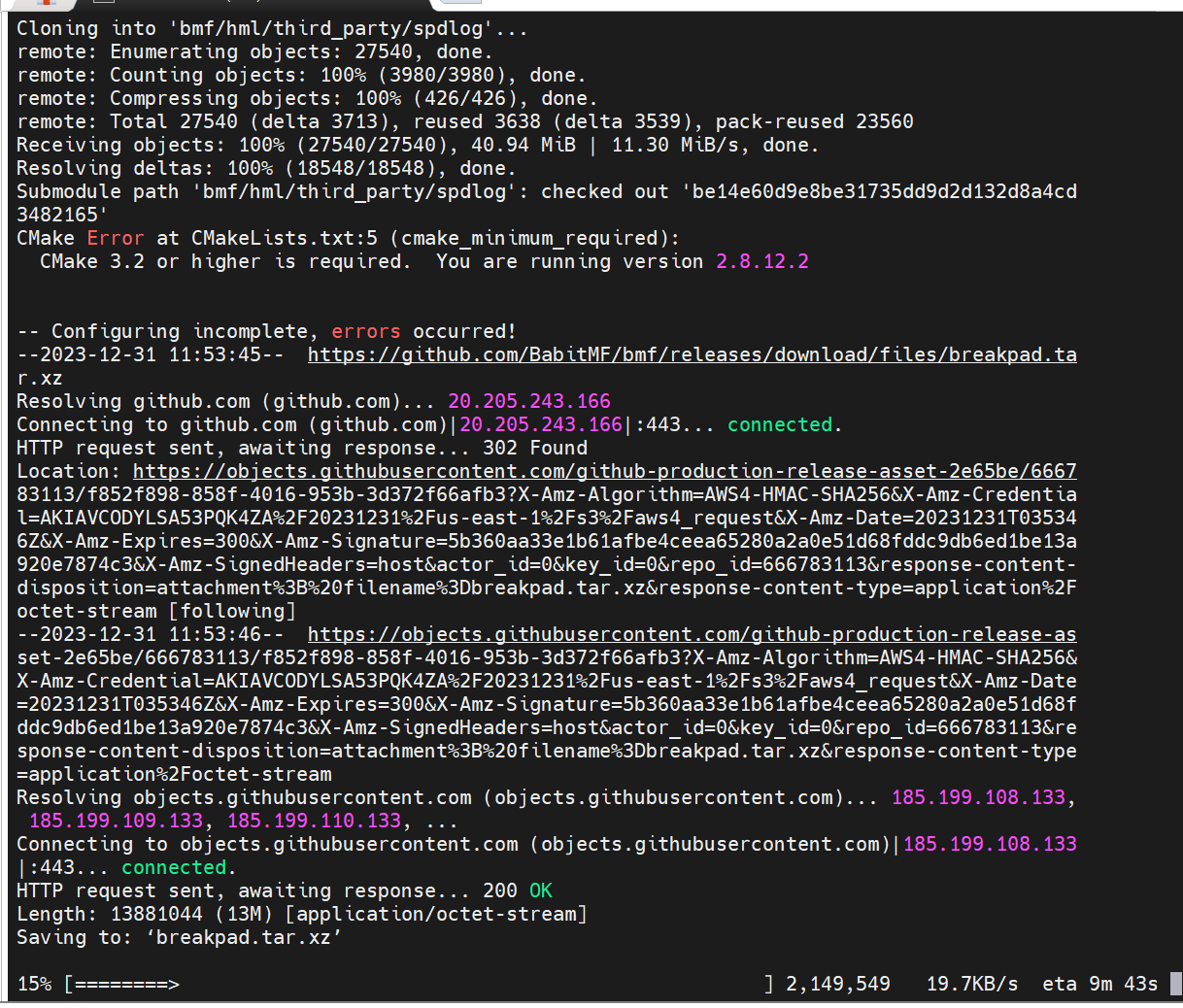
使用重终端命令cd进入bmf项目目录,然后输入./build.sh开始构建,构建可能会持续5到15分钟:
2.2、初步体验
1️⃣、创建Graph
import bmf
graph = bmf.graph()
video = graph.decode({
     "input_path": input_video_path //输入视频的本地目录地址
})
bmf.encode(
     video['video'],
     video['audio'],
     {
         "output_path": output_path,//输出视频的本地目录地址
         "video_params": {
             "codec": "h264",
             "width": 320,
             "height": 240,
             "crf": 23,
             "preset": "very fast"
         },
         "audio_params": {
             "codec": "aac",
             "bit_rate": 128000,
             "sample_rate": 44100,
             "channels": 2
         }
     }
).run()

- 1
- 2
- 3
- 4
- 5
- 6
- 7
- 8
- 9
- 10
- 11
- 12
- 13
- 14
- 15
- 16
- 17
- 18
- 19
- 20
- 21
- 22
- 23
- 24
- 25
Graph是bmf中最基础的一个概念,使用graph.decode和encode可以对视频进行解码和编码,这里首先使用import bmf导入模块,然后使用graph = bmf.graph() 创建了一个graph对象,然后video = graph.decode({“input_path”: input_video_path}) 使用创建的图形对象对输入视频进行解码。解码后,video对象包含了解码后的视频数据和相关信息。bmf.encode(…).run() 是对解码后的视频进行编码,其中
视频参数包括:
- “codec”: “h264” - 视频编码器为H.264。
- “width”: 320 - 视频宽度为320像素。
- “height”: 240 - 视频高度为240像素。
- “crf”: 23 - 视频质量控制参数,值越低质量越高。
音频参数包括:
- “codec”: “aac” - 音频编码器为AAC。
- “bit_rate”: 128000 - 音频比特率为128,000 bps。
- “sample_rate”: 44100 - 音频采样率为44.1 kHz。
- “channels”: 2 - 音频通道数为2(立体声)。“preset”: “very fast” - 编码速度预设为"very fast"。
2️⃣、创建Pipeline
同时,BMF提供构建一个视频处理的Pipeline,通过串联不同的同步模块来实现视频处理的流程:
- 构建同步模块:首先调用bmf_sync.sync_module接口创建四个bmf模块(c_ffmpeg_decoder、c_ffmpeg_filter(Scale)、c_ffmpeg_filter(volume)、c_ffmpeg_encoder)。然后,它不断循环地从输入视频中读取视频流,逐帧解码,并首先将其发送到缩放过滤模块,将视频缩放到320x250的分辨率。然后,获取处理后的视频帧,发送至音量过滤模块进行一次音量调节。最后,视频被发送到编码器模块进行视频编码并保存为文件。
- 构建管道:调用了 bmf_sync.process 接口,直接执行同步模块的处理过程,将输入数据包提供给模块进行处理,并返回处理后的结果和任务完成的时间戳。
- 管道循环:不断调用 bmf_sync.process 来处理视频和音频帧。使用 decoder 模块处理输入数据。得到 frames 字典,其中包含了不同通道的视频或音频帧。如果有下一帧需要处理,分别根据通道编号(0 或 1)判断是否有帧数据,然后使用 scale 或 volume 模块进行相应的处理,最后将处理后的帧数据传递给 encoder 模块继续处理。
其核心代码如下:
import bmf
from bmf import bmf_sync, Packet
input_video_path = "./big_bunny_10s_30fps.mp4"
output_path = "./video.mp4"

def bmf.builder.bmf_sync.sync_module (
   name,
   option,
   input_streams,
   output_streams
)
def bmf.builder.bmf_sync.process (
  module,
  pkts_dict
)

# create sync modules
decoder = bmf_sync.sync_module("c_ffmpeg_decoder", {"input_path": input_video_path}, [], [0, 1])
scale = bmf_sync.sync_module("c_ffmpeg_filter", {
    "name": "scale",
    "para": "320, 250"
}, [0], [0])
volume = bmf_sync.sync_module("c_ffmpeg_filter", {
    "name": "volume",
    "para": "volume=3"
}, [0], [0])
encoder = bmf_sync.sync_module("c_ffmpeg_encoder", {
    "output_path": output_path
}, [0, 1], [])

while True:
    frames, _ = bmf_sync.process(decoder, None)
    has_next = False
    for key in frames:
        if len(frames[key]) > 0:
            has_next = True
            break
    if not has_next:
        bmf_sync.send_eof(encoder)
        break
    if 0 in frames.keys() and len(frames[0]) > 0:
        frames, _ = bmf_sync.process(scale, {0: frames[0]})
        bmf_sync.process(encoder, {0: frames[0]})
    if 1 in frames.keys() and len(frames[1]) > 0:
        frames, _ = bmf_sync.process(volume, {0: frames[1]})
        bmf_sync.process(encoder, {1: frames[0]})
- 1
- 2
- 3
- 4
- 5
- 6
- 7
- 8
- 9
- 10
- 11
- 12
- 13
- 14
- 15
- 16
- 17
- 18
- 19
- 20
- 21
- 22
- 23
- 24
- 25
- 26
- 27
- 28
- 29
- 30
- 31
- 32
- 33
- 34
- 35
- 36
- 37
- 38
- 39
- 40
- 41
- 42
- 43
- 44
- 45
- 46
- 47
2.3、老视频修复体验
熟悉了基础的BMF操作后,我们可以体验一下BMF修复老视频的demo,官方为我们提供了一个写好的colab的notebook:https://colab.research.google.com/github/BabitMF/bmf/blob/master/bmf/demo/colorization_python/deoldify_demo_colab.ipynb
点击进入链接,连接到Colab的资源,申请T4资源,申请成功后如下所示:

然后点击代码执行程序-全部运行:
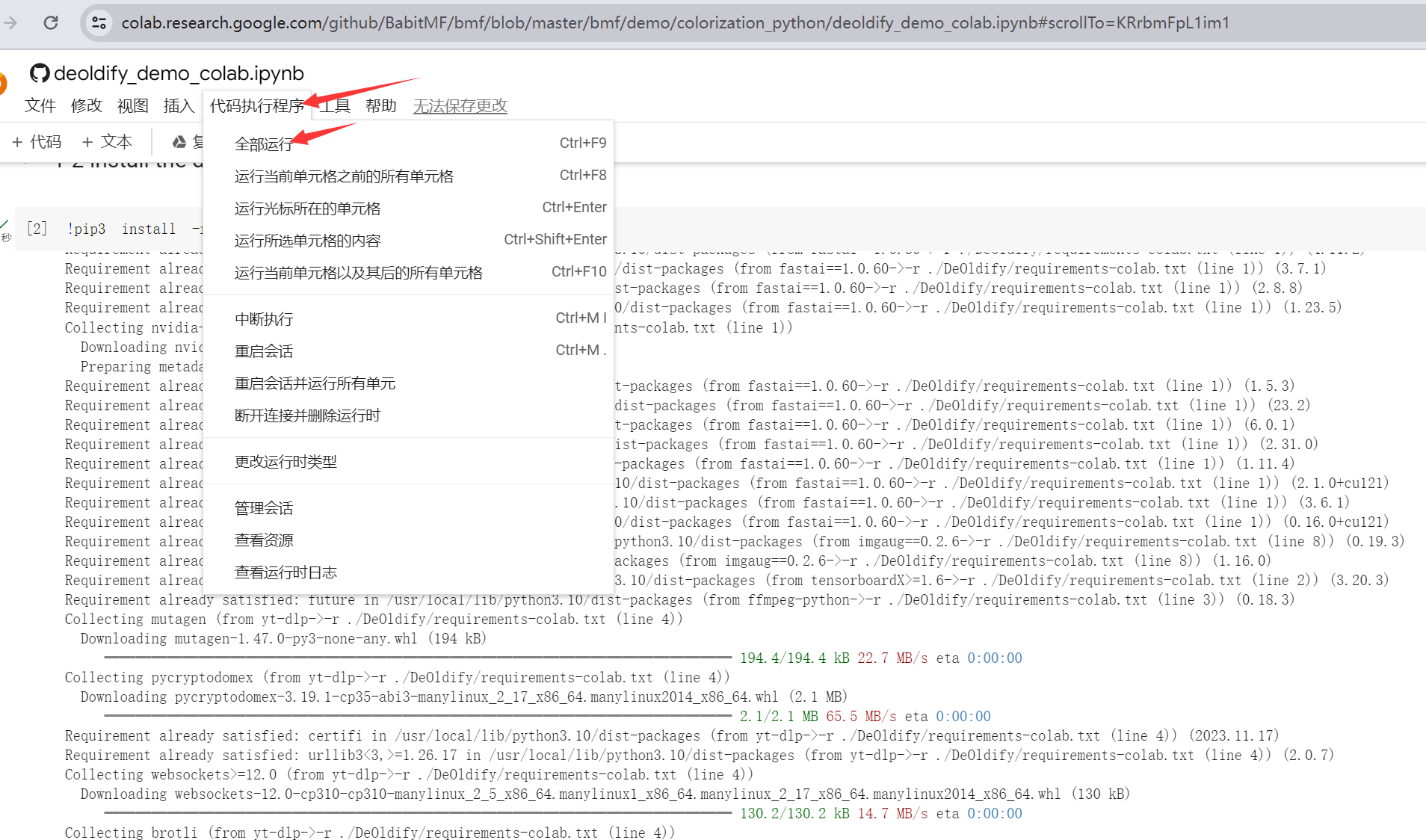
运行流程首先会克隆老视频修复的git仓库,然后安装对应的依赖和工具:
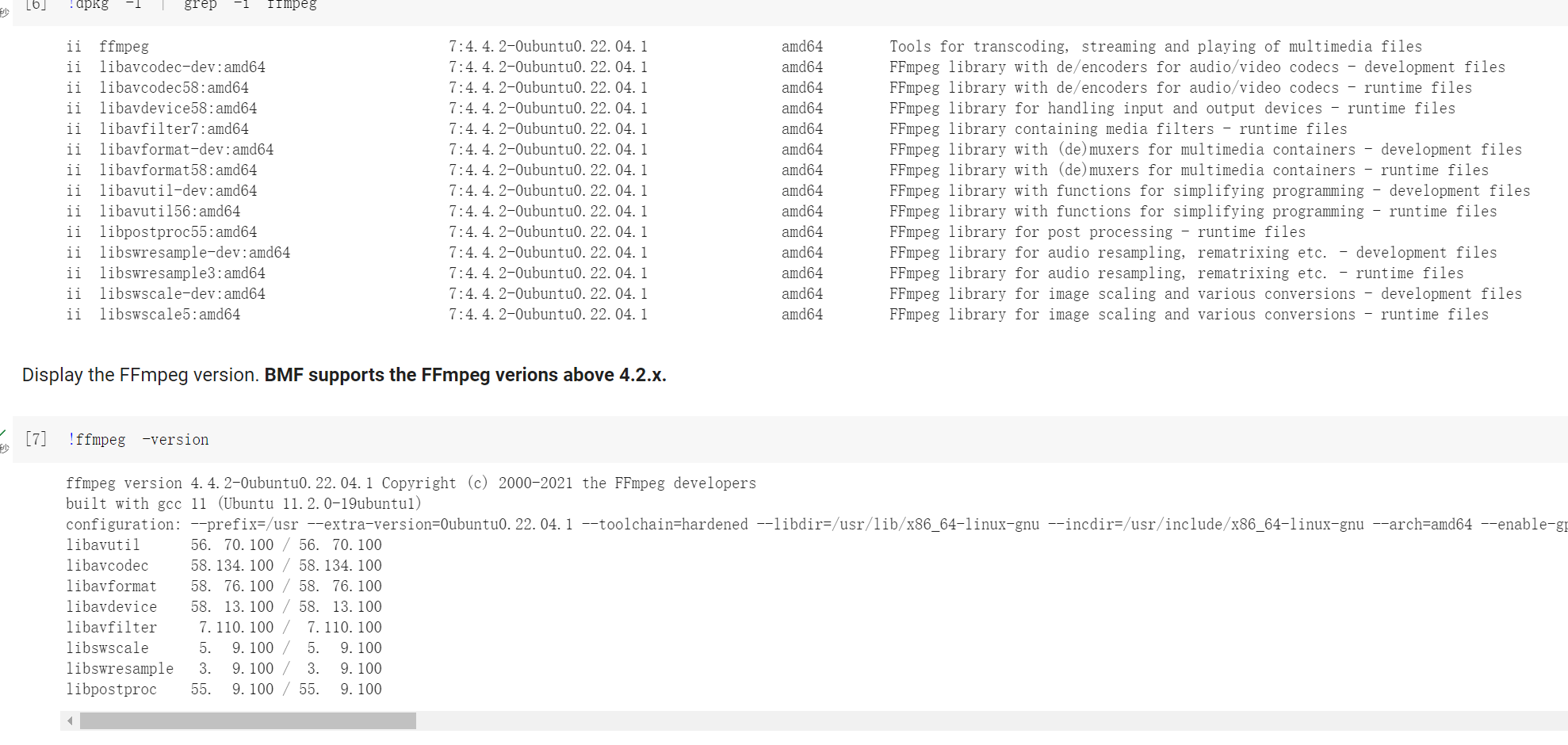
其通过构建一个 BMF 模块,使用 DeOldify 算法对黑白视频进行颜色化处理。核心代码如下:
class py_deoldify_module(bmf.Module):
    def __init__(self, node, option=None):
        print(f'py_deoldify_module init ...')
        self.node_ = node
        self.option_ = option
        print(option)
        warnings.filterwarnings("ignore", category=UserWarning, message=".*?Your .*? set is empty.*?")

        #NOTE:  This must be the first call in order to work properly!
        #choices:  CPU, GPU0...GPU7
        device.set(device=DeviceId.GPU0)

        if not torch.cuda.is_available():
            print('warning: GPU is not available, the computation is going to be very slow...')

        weight_path=Path('/content/DeOldify')
        if option and 'model_path' in option.keys():
            model_path = option['model_path']
            if not model_path:
                print(f'model_path={model_path}')
                weight_path=Path(model_path)

        self.colorizer = get_stable_video_colorizer(weight_path)
        self.idx = 0

        print(f'py_deoldify_module init successfully...')


    def process(self, task):
        # iterate through all input queues to the module
        idx = self.idx

        for (input_id, input_queue) in task.get_inputs().items():
            # get output queue
            output_queue = task.get_outputs()[input_id]

            while not input_queue.empty():
                # get the earliest packet from queue
                packet = input_queue.get()

                # handle EOF
                if packet.timestamp == Timestamp.EOF:
                    output_queue.put(Packet.generate_eof_packet())
                    task.timestamp = Timestamp.DONE

                # process packet if not empty
                if packet.timestamp != Timestamp.UNSET and packet.is_(VideoFrame):

                    vf = packet.get(VideoFrame)
                    rgb = mp.PixelInfo(mp.kPF_RGB24)
                    np_vf = vf.reformat(rgb).frame().plane(0).numpy()

                    # numpy to PIL
                    image = Image.fromarray(np_vf.astype('uint8'), 'RGB')

                    colored_image = self.colorizer.colorize_single_frame_from_image(image)

                    if not colored_image:
                        print(f'Fail to process the input image with idx = {idx}')
                        continue

                    if debug:
                        input_name = f'video/bmf_raw/frame_{idx}.png'
                        print(f'input_name = {input_name}')
                        image.save(input_name)

                        output_name = f'video/bmf_out/frame_{idx}.png'
                        print(f'output_name = {output_name}')
                        colored_image.save(output_name)

                    self.idx = idx + 1
                    out_frame_np = np.array(colored_image)
                    rgb = mp.PixelInfo(mp.kPF_RGB24)
                    frame = mp.Frame(mp.from_numpy(out_frame_np), rgb)

                    out_frame = VideoFrame(frame)
                    out_frame.pts = vf.pts
                    out_frame.time_base = vf.time_base

                    pkt = Packet(out_frame)
                    pkt.timestamp = out_frame.pts

                    output_queue.put(pkt)


        return ProcessResult.OK
- 1
- 2
- 3
- 4
- 5
- 6
- 7
- 8
- 9
- 10
- 11
- 12
- 13
- 14
- 15
- 16
- 17
- 18
- 19
- 20
- 21
- 22
- 23
- 24
- 25
- 26
- 27
- 28
- 29
- 30
- 31
- 32
- 33
- 34
- 35
- 36
- 37
- 38
- 39
- 40
- 41
- 42
- 43
- 44
- 45
- 46
- 47
- 48
- 49
- 50
- 51
- 52
- 53
- 54
- 55
- 56
- 57
- 58
- 59
- 60
- 61
- 62
- 63
- 64
- 65
- 66
- 67
- 68
- 69
- 70
- 71
- 72
- 73
- 74
- 75
- 76
- 77
- 78
- 79
- 80
- 81
- 82
- 83
- 84
- 85
- 86
模型构建好之后,在2-2这里,可以修改相关的参数,其中:input_video_path是输入视频路径,output_video_path是输出彩色视频路径。model_weight_path是在步骤1-3中下载模型权重的路径(仅体验的话不用管这个参数)。
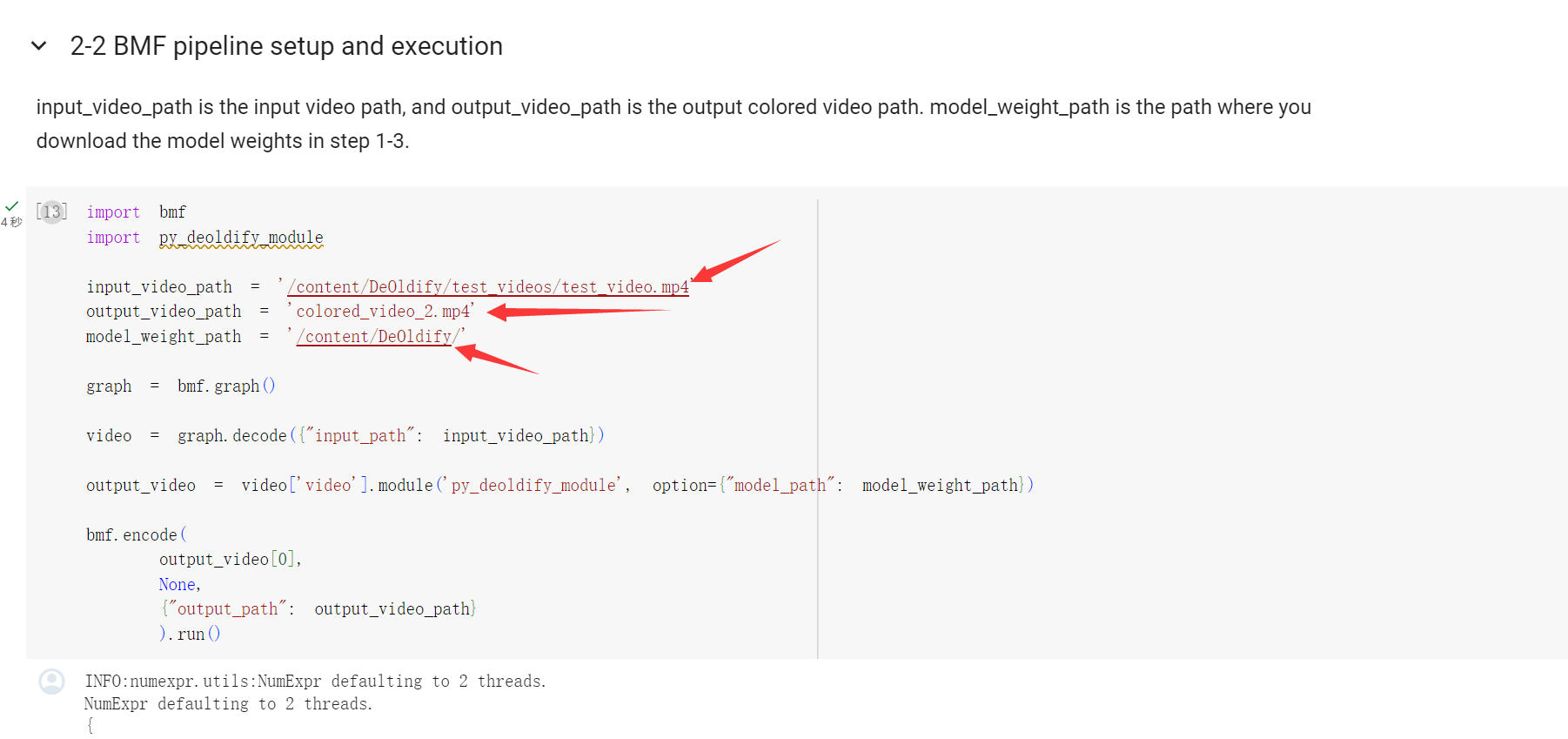
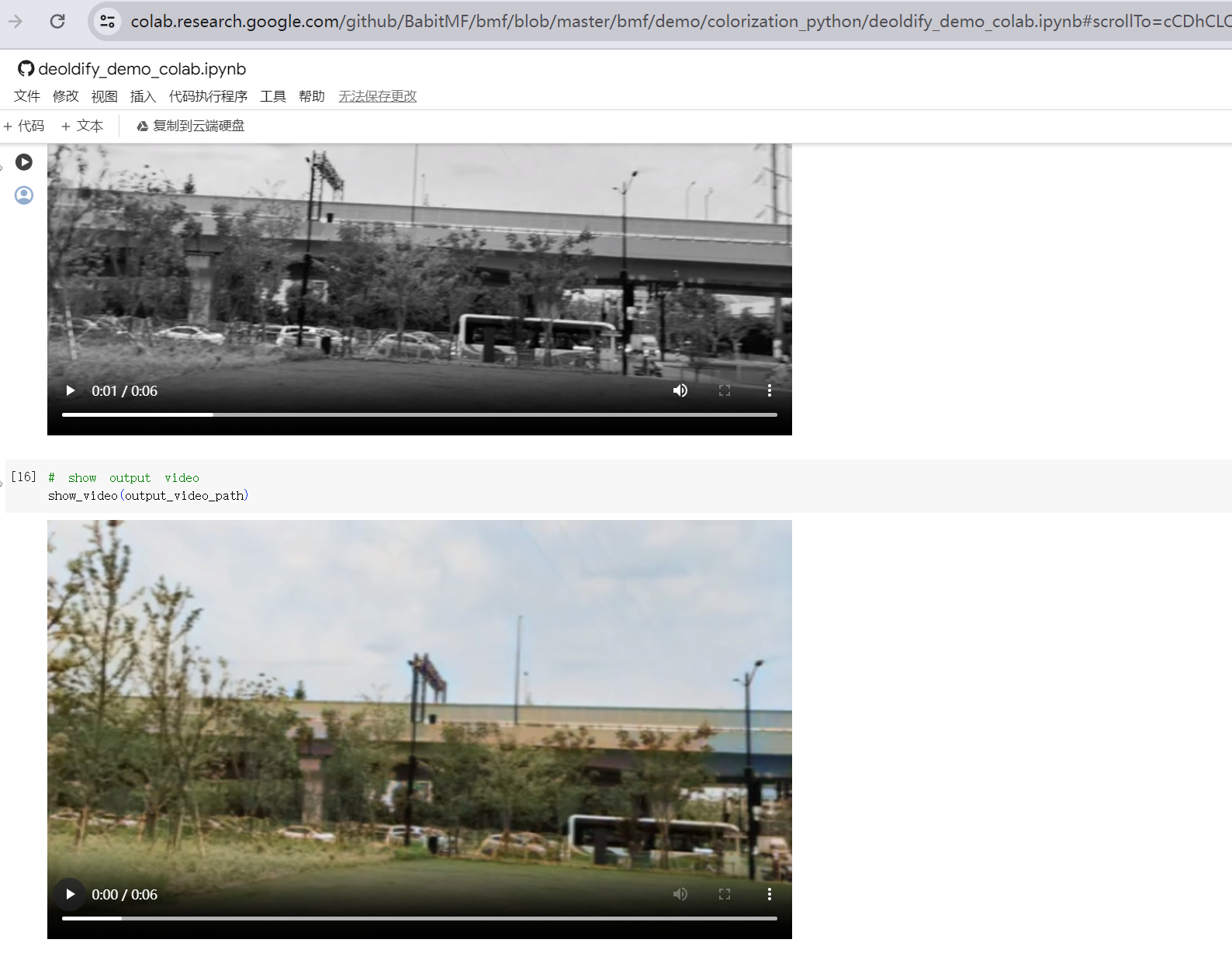
等待片刻后,就能输出对应的老视频修复结果了:
三、BMF体验总结
3.1、优点
通过以上实践体验,总的来讲,BMF通过提供简洁易用的跨语言接口、灵活的调度和扩展性,以 graph/pipeline 的方式构建高性能的多媒体处理链路,以模块化的方式动态扩展、管理和复用视频处理,非常适合运用在视频转码、视频抽帧、视频增强、视频分析、视频插帧、视频编辑、视频会议、VR 等领域,其具有:
1、跨平台兼容性:BMF广泛支持多个操作系统,包括Linux、Windows和Mac OS,并且经过优化以适应x86和ARM CPU架构,确保在不同平台上的高效运行。
2、多语言支持:BMF提供Python、Go和C++ API,为开发人员提供了使用首选编程语言进行开发的灵活性,使项目更易于使用。
3、高效数据处理:BMF提供了无缝的数据格式转换,涵盖了流行框架(FFmpeg/Numpy/PyTorch/OpenCV/TensorRT)。这包括硬件设备(CPU/GPU)之间的转换,以及色彩空间和像素格式的高效转换,为项目提供高度灵活性和效率。
3.2、缺点
1、ARM GPU支持受限:官方暂不支持ARM GPU架构。
2、文档较少:目前仅有官方文档和极少数论坛文章可供参考。
3、社区活跃度不足:目前社区相对不够活跃,遇到问题时可能难以获得及时的帮助和反馈。
最后
Copyright © 2003-2013 www.wpsshop.cn 版权所有,并保留所有权利。

