
热门标签
热门文章
- 1Ubuntu下安装Python环境_sudo apt-get install python2需要密码如何处理
- 2GraalVM Native Image学习记笔_graalvm native images
- 3realsense相机内参获取_pyrealsense2 获取相机内参数
- 4超详细 STM32移植RT_thread 以及RT-Thread介绍_stm32 f401移植 rt thread 标准版本
- 52024-2-6-复习作业
- 6关系型数据库架构介绍及主流应用场景_无共享master和有共享master区别
- 7国有商业银行拓展中间业务的现状及对策探讨(曾峰)_现代商业银行的盈利越来越依赖于中间业务的拓展
- 8项目经理,千万不要在这时候跳槽_市政项目经理业绩跳槽还能用吗
- 9Django 用户认证
- 10数学建模-优劣解距离法(TOPSIS)_优劣解距离法应用领域
当前位置: article > 正文
C#实现带光标的截图
作者:编程领航者 | 2024-01-29 21:14:28
赞
踩
C#实现带光标的截图
1,目的:
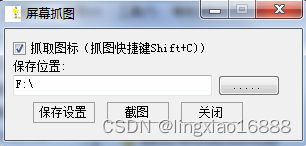
- 可通过热键实现带光标与不带光标两种模式的截图。
2,知识点:
- 快捷键的注册与注销。
- [DllImport("user32.dll", SetLastError = true)]
- public static extern bool RegisterHotKey(IntPtr hWnd, int id, KeyModifiers fsModifiers, Keys vk);
-
- [DllImport("user32.dll", SetLastError = true)]
- public static extern bool UnregisterHotKey(IntPtr hWnd, int id);
-
- 光标信息的获取,光标图标的复制。
- [DllImport("user32.dll")]
- public static extern IntPtr CopyIcon(IntPtr hIcon);
- [DllImport("user32.dll", EntryPoint = "GetCursorInfo")]
- public static extern bool GetCursorInfo(ref CURSORINFO cInfo);
- [DllImport("user32.dll", EntryPoint = "GetIconInfo")]
- public static extern bool GetIconInfo(IntPtr hIcon, out ICONINFO iInfo);
- 对配置文件(ini文件)的读写。
- [DllImport("kernel32")]
- public static extern long WritePrivateProfileString(string section, string key, string val, string filePath);
- [DllImport("kernel32")]
- public static extern int GetPrivateProfileString(string section, string key, string def, StringBuilder retval, int size, string filePath);
- 系统消息的重写。(Message相关链接:Message类的Msg属性所关联的所有ID_msg=0x001a-CSDN博客)
- protected override void WndProc(ref Message m)
- {
- //WM_HOTKEY=0x0312,热键关联的消息ID
- const int WM_HOTKEY = 0x0312;
- //按快捷键
- switch (m.Msg)
- {
- case WM_HOTKEY:
- switch (m.WParam.ToInt32())
- {
- case 81: //按下的是Shift+F
- string ss = "";
- CaptureImage(ref ss);
- break;
- }
- break;
- }
- base.WndProc(ref m);
- }

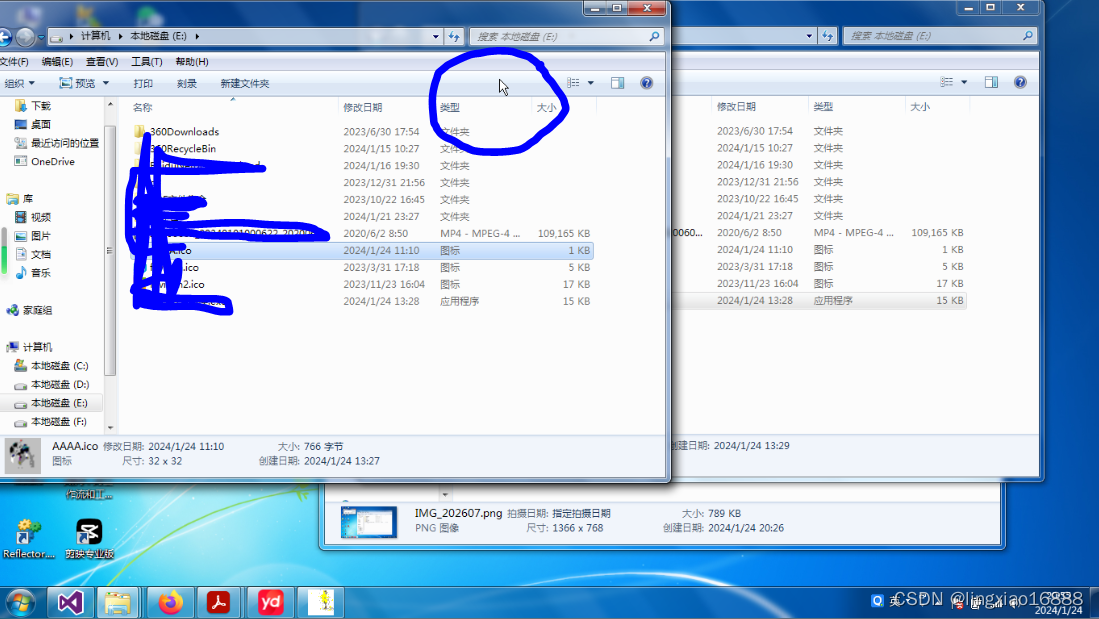
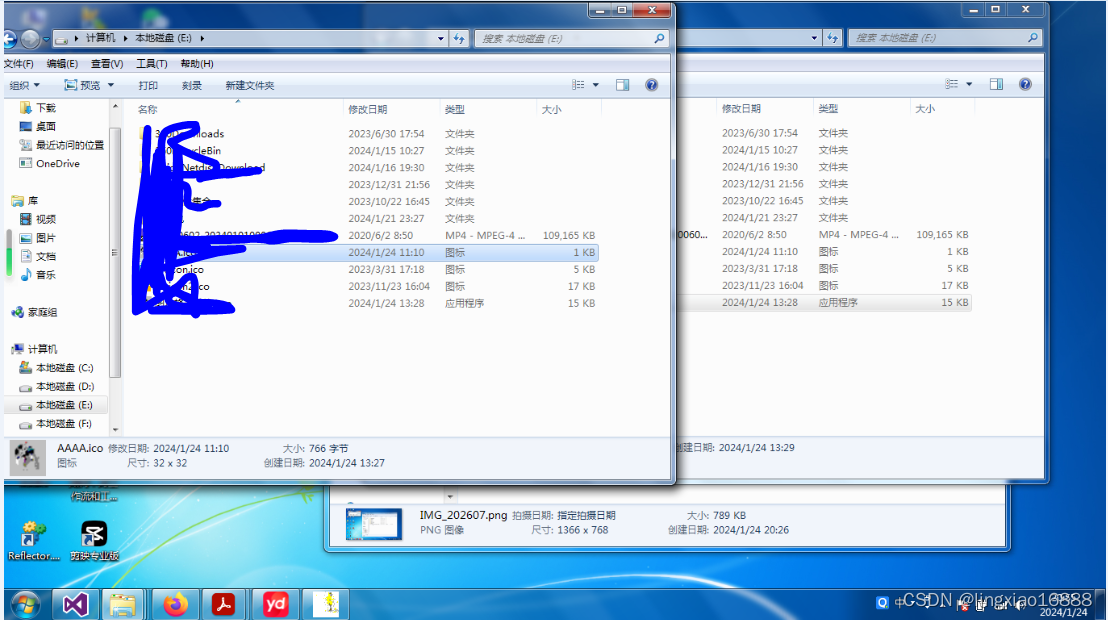
3,效果展示:
- 带图标效果:
- 无图标效果
4代码:
- public partial class Form1 : Form
- {
- public Form1()
- {
- InitializeComponent();
- }
- bool isCaptureIcon = false;
- string savePath;
- private void Form1_Load(object sender, EventArgs e)
- {
- //判断是否存在配置文件如果不存在则创建,如果存在则读取
- string configPath = Path.GetFullPath("../../config.ini");
- if (File.Exists(configPath))
- {
- savePath = ReadFromINI(configPath, "Configuration", "Location");
- string str = ReadFromINI(configPath, "Configuration", "CaptureIcon");
- bool result;
- if (bool.TryParse(str, out result))
- {
- isCaptureIcon = result;
- }
- else
- {
- isCaptureIcon = false;
- }
- }
- else
- {
- File.Create(configPath);
- isCaptureIcon = false;
- }
- if (string.IsNullOrEmpty(savePath))
- {
- //获取当前启动位置的盘
- string startLocation = Application.StartupPath;
- string defaultLocation = Directory.GetDirectoryRoot(startLocation);
- savePath = defaultLocation;
- }
- textBox1.Text = savePath;
- checkBox1.Checked = isCaptureIcon;
- //进行热键注册
- APIHelper.RegisterHotKey(this.Handle, 81, KeyModifiers.Shift, Keys.C);
- }
- //设置截图存储路径
- private void btnOpenF_Click(object sender, EventArgs e)
- {
- using (FolderBrowserDialog fbd = new FolderBrowserDialog())
- {
- if (fbd.ShowDialog() == DialogResult.OK)
- {
- savePath = textBox1.Text = fbd.SelectedPath;
- }
- }
- }
- //保存配置
- private void btnSave_Click(object sender, EventArgs e)
- {
- string iniPath = Path.GetFullPath("../../config.ini");
- if (!File.Exists(iniPath))
- {
- File.Create(iniPath);
- }
- WriteToINI(iniPath, "Configuration", "Location", textBox1.Text);
- WriteToINI(iniPath, "Configuration", "CaptureIcon", isCaptureIcon.ToString());
- MessageBox.Show("已保存", "信息", MessageBoxButtons.OK, MessageBoxIcon.Information);
- }
-
- private void checkBox1_CheckedChanged(object sender, EventArgs e)
- {
- isCaptureIcon = checkBox1.Checked;
- }
- private void Form1_FormClosing(object sender, FormClosingEventArgs e)
- {
- //热键注销
- APIHelper.UnregisterHotKey(this.Handle, 81);
- }
-
- //隐藏窗口
- private void btnHide_Click(object sender, EventArgs e)
- {
- this.Hide();
-
- }
- private void btnCapture_Click(object sender, EventArgs e)
- {
- string filePath = "";
- if (CaptureImage(ref filePath))
- {
- MessageBox.Show("已截图:" + filePath);
- }
- else
- {
- MessageBox.Show("截图失败");
- }
- }
- //双击图标显示窗口
- private void notifyIcon1_DoubleClick(object sender, EventArgs e)
- {
- this.Show();
- this.WindowState = FormWindowState.Normal;
- this.Activate();
- }
- private void toolStripExit_Click(object sender, EventArgs e)
- {
- APIHelper.UnregisterHotKey(this.Handle, 81);
- Application.Exit();
- }
- private void toolStripShow_Click(object sender, EventArgs e)
- {
- this.Visible = true;
- }
- //对接收的消息进行重写
- protected override void WndProc(ref Message m)
- {
- //WM_HOTKEY=0x0312,热键关联的消息ID
- const int WM_HOTKEY = 0x0312;
- //按快捷键
- switch (m.Msg)
- {
- case WM_HOTKEY:
- switch (m.WParam.ToInt32())
- {
- case 81: //按下的是Shift+F
- string ss = "";
- CaptureImage(ref ss);
- break;
- }
- break;
- }
- base.WndProc(ref m);
- }
- bool CaptureImage(ref string filePath)
- {
- Bitmap img;
- if (!isCaptureIcon)
- {
- img = CaptureNoCursor();
- string imgDir = Path.Combine(savePath, "Image", "NoCursor");
- if (!Directory.Exists(imgDir))
- {
- Directory.CreateDirectory(imgDir);
- }
- string fileName = "IMG_" + DateTime.Now.ToString("HHmmss") + ".png";
- filePath = Path.Combine(imgDir, fileName);
-
- }
- else
- {
- img = CaptureCursor();
- string imgDir = Path.Combine(savePath, "Image", "Cursor");
- if (!Directory.Exists(imgDir))
- {
- Directory.CreateDirectory(imgDir);
- }
- string fileName = "IMG_" + DateTime.Now.ToString("HHmmss") + ".png";
- filePath = Path.Combine(imgDir, fileName);
- }
- if (img != null)
- {
- img.Save(filePath, System.Drawing.Imaging.ImageFormat.Png);
- return true;
- }
- else
- {
- return false;
- }
- }
- /// <summary>
- /// 不含光标的截图
- /// </summary>
- /// <returns></returns>
- Bitmap CaptureNoCursor()
- {
- //获取屏幕尺寸
- int width = APIHelper.GetSystemMetrics(0);
- int height = APIHelper.GetSystemMetrics(1);
- //创建图片
- Bitmap img = new Bitmap(width, height);
- using (Graphics g = Graphics.FromImage(img))
- {
- g.SmoothingMode = System.Drawing.Drawing2D.SmoothingMode.HighQuality;
- g.InterpolationMode = System.Drawing.Drawing2D.InterpolationMode.HighQualityBicubic;
- g.CopyFromScreen(new Point(0, 0), new Point(0, 0), new Size(width, height));
- }
- return img;
- }
- /// <summary>
- /// 包含光标的截图
- /// </summary>
- /// <returns></returns>
- Bitmap CaptureCursor()
- {
- //获取光标信息
- CURSORINFO cursor = new CURSORINFO();
- cursor.cbSize = Marshal.SizeOf(cursor);
- if (APIHelper.GetCursorInfo(ref cursor))
- {
- //flags==1时光标处于显示中
- if (cursor.flags == 1)
- {
- ICONINFO iconinfo;
-
- //复制光标
- IntPtr hwn = APIHelper.CopyIcon(cursor.hCursor);
- //获取光标信息
- if (APIHelper.GetIconInfo(hwn, out iconinfo))
- {
- Icon icon = Icon.FromHandle(hwn);
- Point iconScreenPoint = new Point(cursor.ptScreenPos.X - iconinfo.xHotspot, cursor.ptScreenPos.Y - iconinfo.yHotspot);
- //获取屏幕尺寸
- int width = Screen.PrimaryScreen.Bounds.Width;
- int height = Screen.PrimaryScreen.Bounds.Height;
- //创建图片
- Bitmap img = new Bitmap(width, height);
- using (Graphics g = Graphics.FromImage(img))
- {
- g.SmoothingMode = System.Drawing.Drawing2D.SmoothingMode.HighQuality;
- g.InterpolationMode = System.Drawing.Drawing2D.InterpolationMode.HighQualityBicubic;
- g.CopyFromScreen(new Point(0, 0), new Point(0, 0), new Size(width, height));
- g.DrawIcon(icon, iconScreenPoint.X, iconScreenPoint.Y);
- }
- return img;
- }
-
- }
- }
-
- return null;
-
- }
-
- public static string ReadFromINI(string filePath, string rootValue, string key, string defValue = "")
- {
- StringBuilder sb = new StringBuilder(1024);
- APIHelper.GetPrivateProfileString(rootValue, key, defValue, sb, 1024, filePath);
- return sb.ToString();
- }
- public static void WriteToINI(string filePath, string rootValue, string key, string newVal)
- {
- APIHelper.WritePrivateProfileString(rootValue, key, newVal, filePath);
- }
- }
- /// <summary>
- /// 有关图标或光标的信息
- /// </summary>
- [StructLayout(LayoutKind.Sequential)]
- struct ICONINFO
- {
- /// <summary>
- /// 指定此结构是定义图标还是游标。 值为 TRUE 指定图标; FALSE 指定游标。
- /// </summary>
- public bool fIcon;
- /// <summary>
- /// 光标热点的 x 坐标。 如果此结构定义了图标,则热点始终位于图标的中心,并且忽略此成员。
- /// </summary>
- public Int32 xHotspot;
- /// <summary>
- /// 光标热点的 y 坐标。 如果此结构定义了图标,则热点始终位于图标的中心,并且忽略此成员。
- /// </summary>
- public Int32 yHotspot;
- /// <summary>
- /// 单色掩码 位图图标的句柄。
- /// </summary>
- public IntPtr hbmMask;
- /// <summary>
- /// 图标颜色 位图的句柄。
- /// </summary>
- public IntPtr hbmColor;
- }
- /// <summary>
- /// 全局游标信息
- /// </summary>
- [StructLayout(LayoutKind.Sequential)]
- struct CURSORINFO
- {
- /// <summary>
- /// 结构大小(以字节为单位)。 调用方必须将此设置为 sizeof(CURSORINFO)。
- /// </summary>
- public Int32 cbSize;
- /// <summary>
- /// 游标状态。 此参数的取值可为下列值之一:0:光标处于隐藏。1:光标处于显示。2:Windows 8:取消光标。 此标志指示系统未绘制光标,因为用户是通过触摸或笔而不是鼠标提供输入。
- /// </summary>
- public Int32 flags;
- /// <summary>
- /// 光标的句柄。
- /// </summary>
- public IntPtr hCursor;
- /// <summary>
- /// 接收光标的屏幕坐标的结构。
- /// </summary>
- public Point ptScreenPos;
- }
- [Flags()]
- public enum KeyModifiers
- {
- None = 0,
- Alt = 1,
- Ctrl = 2,
- Shift = 4,
- WindowsKey = 8
- }
- class APIHelper
- {
- /// <summary>
- /// 获取与windows环境有关的信息
- /// </summary>
- /// <param name="mVal">指定获取信息</param>
- /// <returns></returns>
- [DllImport("user32.dll")]
- public static extern int GetSystemMetrics(int mVal);
- /// <summary>
- /// 获取指定图标或者鼠标的一个副本
- /// </summary>
- /// <param name="hIcon">欲复制的图标或指针的句柄</param>
- /// <returns></returns>
- [DllImport("user32.dll")]
- public static extern IntPtr CopyIcon(IntPtr hIcon);
- [DllImport("user32.dll", EntryPoint = "GetCursorInfo")]
- public static extern bool GetCursorInfo(ref CURSORINFO cInfo);
- [DllImport("user32.dll", EntryPoint = "GetIconInfo")]
- public static extern bool GetIconInfo(IntPtr hIcon, out ICONINFO iInfo);
- [DllImport("kernel32")]
- public static extern long WritePrivateProfileString(string section, string key, string val, string filePath);
- [DllImport("kernel32")]
- public static extern int GetPrivateProfileString(string section, string key, string def, StringBuilder retval, int size, string filePath);
- /// <summary>
- /// 热键注册
- /// </summary>
- /// <param name="hWnd">要定义热键的窗口的句柄 </param>
- /// <param name="id">定义热键ID(不能与其它ID重复) </param>
- /// <param name="fsModifiers">标识热键是否在按Alt、Ctrl、Shift、Windows等键时才会生效 </param>
- /// <param name="vk">定义热键的内容 </param>
- /// <returns>如果函数执行成功,返回值不为0。如果函数执行失败,返回值为0。要得到扩展错误信息,调用GetLastError。</returns>
- [DllImport("user32.dll", SetLastError = true)]
- public static extern bool RegisterHotKey(IntPtr hWnd, int id, KeyModifiers fsModifiers, Keys vk);
- /// <summary>
- /// 热键注销
- /// </summary>
- /// <param name="hWnd">要取消热键的窗口的句柄 </param>
- /// <param name="id">要取消热键的ID </param>
- /// <returns></returns>
- [DllImport("user32.dll", SetLastError = true)]
- public static extern bool UnregisterHotKey(IntPtr hWnd, int id);
- /// <summary>
- /// 从INI文件中读取数据
- /// </summary>
- /// <param name="filePath">INI文件的全路径</param>
- /// <param name="rootValue">根节点值,例如根节点[ConnectString]的值为:ConnectString</param>
- /// <param name="key">根节点下的键</param>
- /// <param name="defValue">当标记值未设定或不存在时的默认值</param>
- /// <returns></returns>
-
- }
声明:本文内容由网友自发贡献,不代表【wpsshop博客】立场,版权归原作者所有,本站不承担相应法律责任。如您发现有侵权的内容,请联系我们。转载请注明出处:https://www.wpsshop.cn/article/detail/45167
推荐阅读
相关标签

