
热门标签
热门文章
- 1Python中的条件语句if-elif-if用法_python if elif elif
- 2一文教你如何处理高并发
- 32024美赛数学建模C题思路&源码
- 4【云原生】Docker基于Dockerfile多级构建,实现缩小镜像体积
- 5Python爬虫【二】爬取PC网页版“微博辟谣”账号内容(selenium同步单线程)_爬虫跳过 微博登录页面
- 6若依RuoYi框架数据库权限控制表解析_ruoyi用户表是哪个
- 7操作系统基础篇_段页式管理中,怎样访问内存,取得某一条数据或指令
- 8Anaconda3\Scripts\activate.bat 不是内部或外部命令,也不是可运行的程序的问题处理方法_c:\users\huawei\anaconda3\scripts\activate.bat' 不是
- 9TypeScript学习笔记1-TS环境搭建
- 10okhttp3使用详解_okhttp3 使用
当前位置: article > 正文
C#中使用Newtonsoft.Json序列化和反序列化自定义类对象_newtonjson反序列化 自动创建类
作者:编程探险家 | 2024-01-29 21:09:56
赞
踩
newtonjson反序列化 自动创建类
在C#中序列化和反序列化自定义的类对象是比较容易的,比如像下面的一个Customer类,
private class Customer
{
    public string CustomerName { get; set; }
    public string Email { get; set; }
    public int Age { get; set; }
    public decimal TotalSales { get; set; }
    public DateTime FinalPurchaseDate { get; set; }
}
- 1
- 2
- 3
- 4
- 5
- 6
- 7
- 8
在Windows10系统中使用VS2017创建一个基于C#控制台的.Net控制台应用程序JsonExample01,
然后使用NuGet安装Newtonsoft.Json的包,
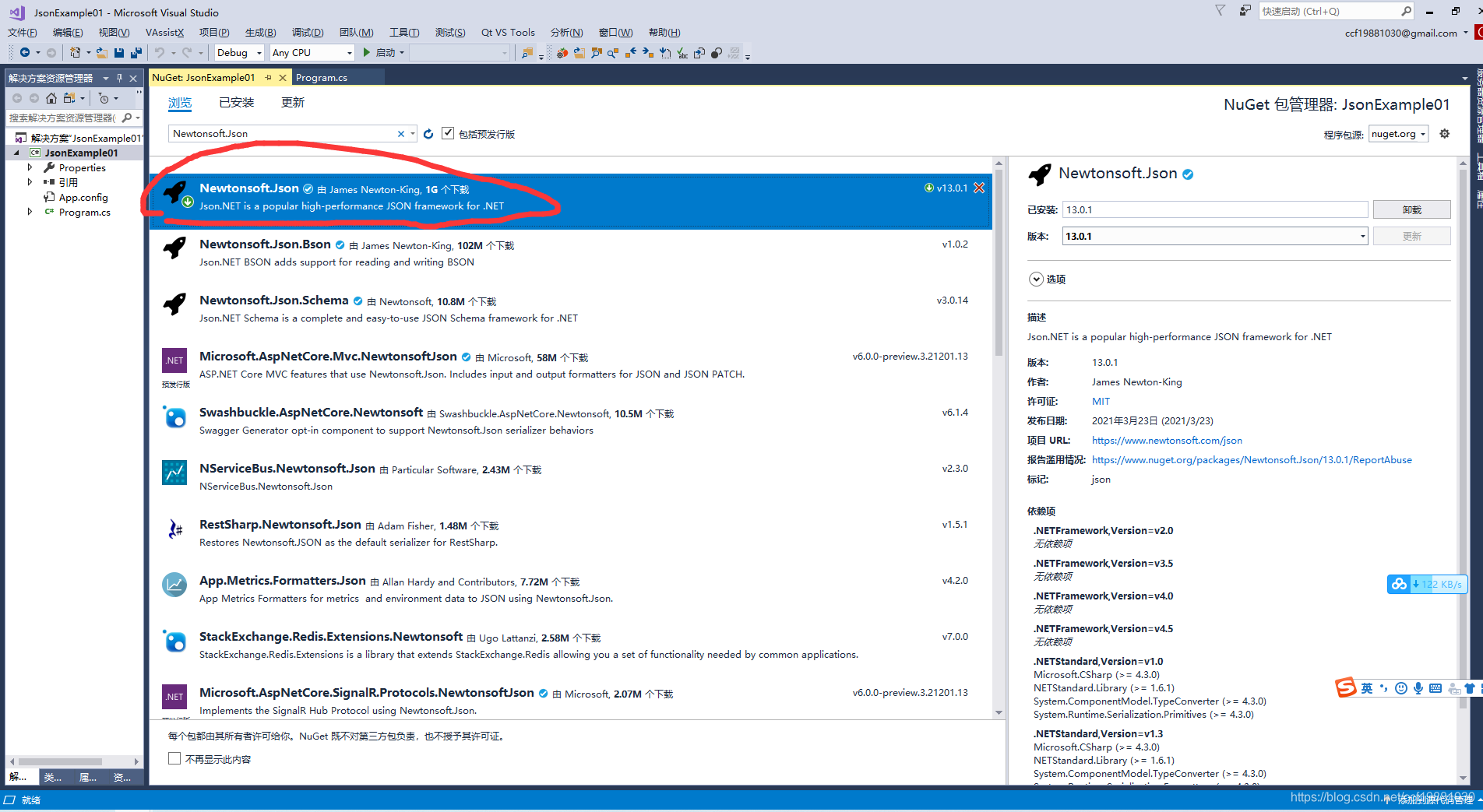
下面是相关的C#测试代码:
using Newtonsoft.Json;
using System;
using System.Collections.Generic;
using System.Linq;
using System.Text;
using System.Threading.Tasks;

namespace JsonExample01
{
    class Program
    {
        static void Main(string[] args)
        {
            var customers = new List<Customer>
            {
                new Customer
                {
                    CustomerName = "John",
                    Age = 33,
                    Email = "john@gmail.com",
                    TotalSales = 4000,
                    FinalPurchaseDate = new DateTime(2021, 3, 29)
                },
                new Customer
                {
                    CustomerName = "George",
                    Age = 32,
                    Email = "george@gmail.com",
                    TotalSales = 6000,
                    FinalPurchaseDate = new DateTime(2021, 3, 29)
                },
                new Customer
                {
                    CustomerName = "Peter",
                    Age = 28,
                    Email = "john@gmail.com",
                    TotalSales = 2000,
                    FinalPurchaseDate = new DateTime(2021, 1, 10)
                }
            };

            var customer = new Customer
            {
                CustomerName = "Peter",
                Age = 28,
                Email = "john@gmail.com",
                TotalSales = 2000,
                FinalPurchaseDate = new DateTime(2021, 1, 10)
            };

            var customerJson1 = JsonConvert.SerializeObject(customer);
            Console.WriteLine(customerJson1);

            var customerListJson2 = JsonConvert.SerializeObject(customers);
            Console.WriteLine(customerListJson2);

            //var strJson1 = "{\"CustomerName\":\"Peter\",\"Email\":\"john@gmail.com\",\"Age\":28,\"TotalSales\":2000.0,\"FinalPurchaseDate\":\"2021-01-10T00:00:00\"}";
            //var customer2 = JsonConvert.DeserializeObject<Customer>(strJson1);

            //var strJson = "[{\"CustomerName\":\"John\",\"Email\":\"john@gmail.com\",\"Age\":33,\"TotalSales\":4000.0,\"FinalPurchaseDate\":\"2021-03-29T00:00:00\"},{\"CustomerName\":\"George\",\"Email\":\"george@gmail.com\",\"Age\":32,\"TotalSales\":6000.0,\"FinalPurchaseDate\":\"2021-03-29T00:00:00\"},{\"CustomerName\":\"Peter\",\"Email\":\"john@gmail.com\",\"Age\":28,\"TotalSales\":2000.0,\"FinalPurchaseDate\":\"2021-01-10T00:00:00\"}]";
            //var customerList2 = JsonConvert.DeserializeObject<List<Customer>>(strJson);

            var strJson1 = "{\"customer_name\":\"Peter\",\"email\":\"john@gmail.com\",\"age\":28,\"total_sales\":2000.0,\"final_purchase_date\":\"2021-01-10T00:00:00\"}";
            var customer2 = JsonConvert.DeserializeObject<Customer>(strJson1);

            var strJson = "[{\"customer_name\":\"John\",\"email\":\"john@gmail.com\",\"age\":33,\"total_sales\":4000.0,\"final_purchase_date\":\"2021-03-29T00:00:00\"},{\"customer_name\":\"George\",\"email\":\"george@gmail.com\",\"age\":32,\"total_sales\":6000.0,\"final_purchase_date\":\"2021-03-29T00:00:00\"},{\"customer_name\":\"Peter\",\"email\":\"john@gmail.com\",\"age\":28,\"total_sales\":2000.0,\"final_purchase_date\":\"2021-01-10T00:00:00\"}]";
            var customerList2 = JsonConvert.DeserializeObject<List<Customer>>(strJson);

            Console.ReadKey();
        }

        [Serializable]
        private class Customer
        {
            [JsonProperty("customer_name")]
            public string CustomerName { get; set; }
            [JsonProperty("email")]
            public string Email { get; set; }
            [JsonProperty("age")]
            public int Age { get; set; }
            [JsonProperty("total_sales")]
            public decimal TotalSales { get; set; }
            [JsonProperty("final_purchase_date")]
            public DateTime FinalPurchaseDate { get; set; }
        }
    }


}

- 1
- 2
- 3
- 4
- 5
- 6
- 7
- 8
- 9
- 10
- 11
- 12
- 13
- 14
- 15
- 16
- 17
- 18
- 19
- 20
- 21
- 22
- 23
- 24
- 25
- 26
- 27
- 28
- 29
- 30
- 31
- 32
- 33
- 34
- 35
- 36
- 37
- 38
- 39
- 40
- 41
- 42
- 43
- 44
- 45
- 46
- 47
- 48
- 49
- 50
- 51
- 52
- 53
- 54
- 55
- 56
- 57
- 58
- 59
- 60
- 61
- 62
- 63
- 64
- 65
- 66
- 67
- 68
- 69
- 70
- 71
- 72
- 73
- 74
- 75
- 76
- 77
- 78
- 79
- 80
- 81
- 82
- 83
- 84
- 85
- 86
- 87
- 88
- 89
- 90
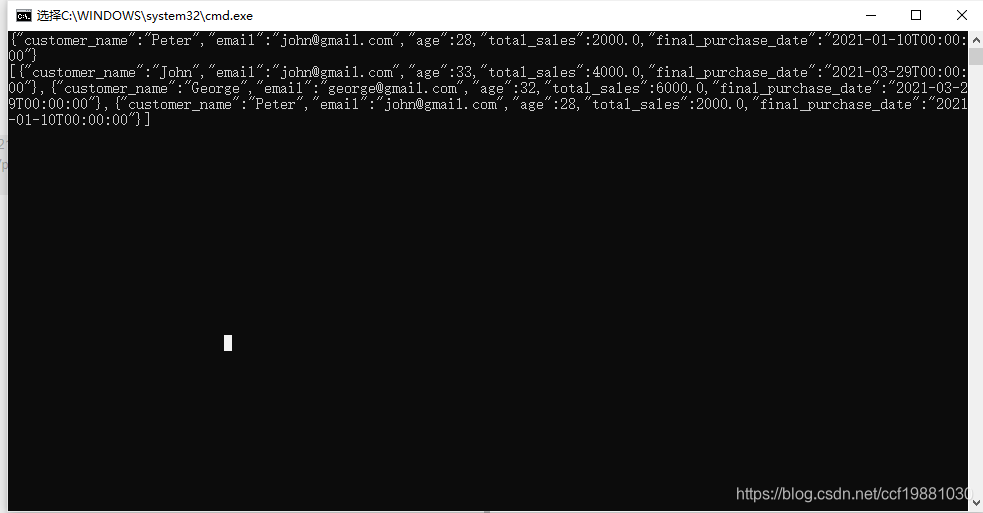
运行结果如下图所示:
声明:本文内容由网友自发贡献,不代表【wpsshop博客】立场,版权归原作者所有,本站不承担相应法律责任。如您发现有侵权的内容,请联系我们。转载请注明出处:https://www.wpsshop.cn/article/detail/45120
推荐阅读
相关标签

