
热门标签
热门文章
- 1【微信小程序开发】学习小程序的模块化开发(自定义组件和分包加载)
- 2深度解析用户画像标签体系构建方法
- 3android studio 连接安卓手机/鸿蒙手机教程_android studio 鸿蒙
- 45月22日比特币披萨日,今天你吃披萨了吗?
- 5HarmonyOS播放视频及音乐
- 6k8s中如何使用gpu、gpu资源讲解、nvidia gpu驱动安装
- 7ISFP型人格的优势和劣势分析(mbti性格测试)_mbti职业性格测试isfp计算机
- 8动态规划高频问题
- 9AI 时代,程序员无需焦虑 | 《服务端开发:技术、方法与实用解决方案》(文末送书福利4.0)
- 10mysql食堂系统E R图_食堂管理系统E-R图.doc
当前位置: article > 正文
页面跳转倒计时_通过window的延时调用方法和location的href属性,在页面中进行倒计时,时间到之后页
作者:键盘狂人 | 2024-01-29 21:06:15
赞
踩
通过window的延时调用方法和location的href属性,在页面中进行倒计时,时间到之后页
当我们支付完成时,会有一个成功支付的跳转页面,这时就会有一个跳转倒计时,倒计时结束后会跳转到指定页面。
效果
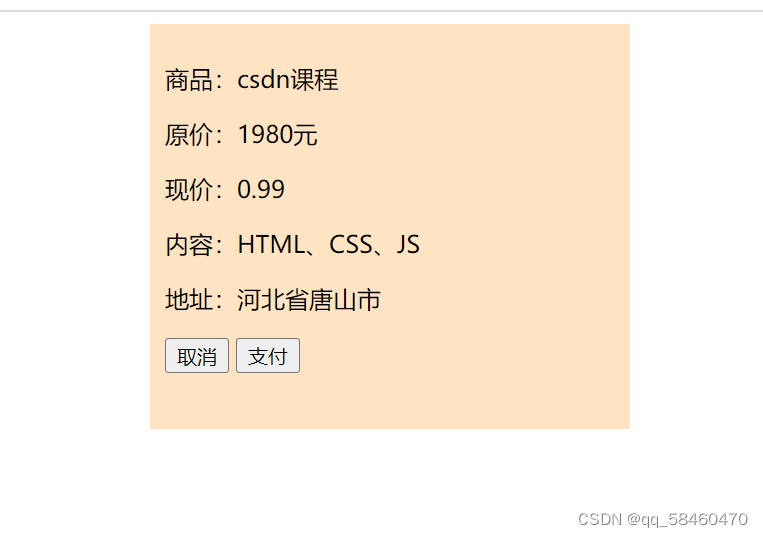
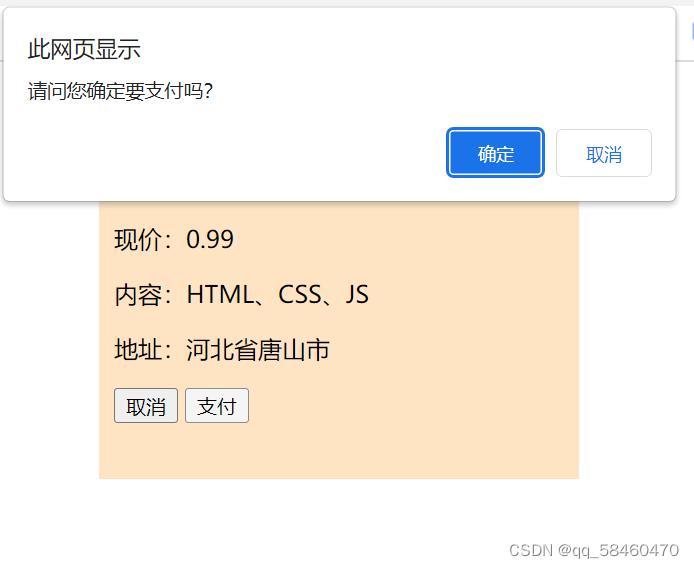

完成此效果的代码如下
支付页面的代码
- <!DOCTYPE html>
- <html lang="en">
- <head>
- <meta charset="UTF-8">
- <meta http-equiv="X-UA-Compatible" content="IE=edge">
- <meta name="viewport" content="width=device-width, initial-scale=1.0">
- <title>首页</title>
- <style>
- form{
- height: 250px;
- width: 300px;
- background-color: bisque;
- margin: 0 auto;
- padding: 10px;
- }
- </style>
- </head>
- <body>
- <form>
- <p>商品:csdn课程</p>
- <p>原价:1980元</p>
- <p>现价:0.99</p>
- <p>内容:HTML、CSS、JS</p>
- <p>地址:河北省唐山市</p>
- <button>取消</button>
- <button>支付</button>
- </form>
- <script> //是否确认支付的提示框
- document.getElementsByTagName('button')[1].onclick = function(){
- let re = window.confirm('请问您确定要支付吗?');
- if(re){
- location.href = './succ.html';
- }
- }
- </script>
- </body>
- </html>

跳转后的倒计时页面代码
- <!DOCTYPE html>
- <html lang="en">
- <head>
- <meta charset="UTF-8">
- <meta http-equiv="X-UA-Compatible" content="IE=edge">
- <meta name="viewport" content="width=device-width, initial-scale=1.0">
- <title>支付成功</title>
- <style>
- span{
- font-size: 5em;
- color: aquamarine;
- }
- div{
- height: 250px;
- width: 300px;
- margin: 0 auto;
- }
- </style>
- </head>
- <body>
- <div>
- <h2>恭喜你支付成功</h2>
- <span id="sp">5</span>秒后自动返回首页面<br>
- <button>立即返回</button>
- </div>
- <script>
- window.onload = function(){
- let timer = 5;
- setInterval(() => {
- timer--;
- document.getElementById('sp').innerText = timer;
- if(timer==0){
- location.href = './跳转页面倒计时.html';
- }
- }, 1000);
- }
- document.getElementsByTagName('button')[0].onclick = function(){
- location.href = './跳转页面倒计时.html';
- }
-
- </script>
- </body>
- </html>
window.onload = function(){
let timer = 5;
setInterval(() => {
timer--;
document.getElementById('sp').innerText = timer; //倒计时与span中文本相联系
if(timer==0){
location.href = './跳转页面倒计时.html';
}
}, 1000);
}
此部分JavaScript代码为倒计时,也是关键部分。
声明:本文内容由网友自发贡献,不代表【wpsshop博客】立场,版权归原作者所有,本站不承担相应法律责任。如您发现有侵权的内容,请联系我们。转载请注明出处:https://www.wpsshop.cn/article/detail/45077
推荐阅读

相关标签

