
热门标签
热门文章
- 1【C++入门】(纯)虚函数和多态、抽象类、接口_c++ 多态,虚函数 接口详解
- 2ORB-SLAM策略思考之RANSAC
- 3《硬件设计指南-从器件认知到手机基带设计》正式上市!
- 432个关于FPGA的学习网站_verilog刷题网站
- 5Python Selenium3 自动化测试实战:构建高效测试项目_selenium3.0平台级自动化测试框架综合实战
- 6【软考】系统集成项目管理工程师【总】_软考中级系统集成项目管理工程师
- 7STM32F103C8T6+LD3320语音识别模块智能灯控
- 8java小项目——点餐系统_java点餐系统
- 9考研机试 三元组
- 10嵌入式培训机构四个月实训课程笔记(完整版)-Linux ARM平台编程第一天-嵌入式系统概述(物联技术666)
当前位置: article > 正文
代码+视频,手把手教你R语言ggrcs包绘制限制立方样条图+阈值效应分析_r语言限制立方样条如何找阈值
作者:数据结构灵魂 | 2024-01-29 19:26:00
赞
踩
r语言限制立方样条如何找阈值
ggrcs包用于绘制限制立方样条图,目前ggrcs包已经升级到3.5版本了,本人出一个规范的教程和视频,包含有代码,供大家参考。
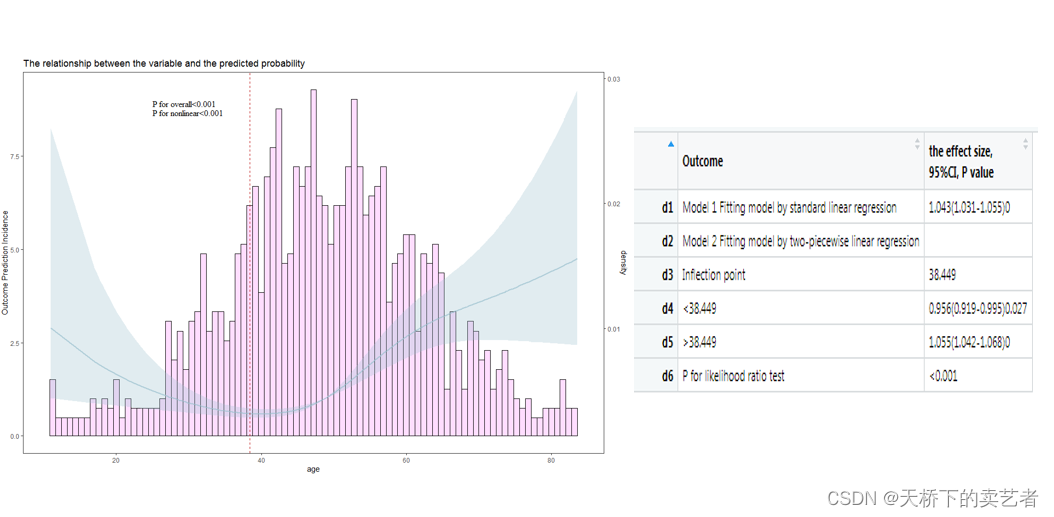
代码+视频,手把手教你R语言ggrcs包绘制限制立方样条图+阈值效应分析
library(ggrcs)
library(rms)
library(ggplot2)
library(scales)
library(cowplot)

dt<-smoke
dd<-datadist(dt)
options(datadist='dd')
fit<- cph(Surv(time,status==1) ~ rcs(age,4)+gender, x=TRUE, y=TRUE,data=dt)

ggrcs(data=dt,fit=fit,x="age")

#改变柱子颜色
ggrcs(data=dt,fit=fit,x="age",histcol="blue")

#改变柱子宽度,默认是0.8
ggrcs(data=dt,fit=fit,x="age",histcol="blue",histbinwidth=1)

#改变可信区间颜色
ggrcs(data=dt,fit=fit,x="age",histcol="blue",histbinwidth=1,ribcol="green")

#改变可信区间透明度,
ggrcs(data=dt,fit=fit,x="age",histcol="blue",histbinwidth=1,ribcol="green",ribalpha=0.5)

#更改X轴和Y轴和标题内容
ggrcs(data=dt,fit=fit,x="age",histcol="blue",
      histbinwidth=1,ribcol="green",ribalpha=0.5,xlab ="年龄",ylab="吸烟概率",title ="年龄和吸烟概率关系")

#关掉左轴
ggrcs(data=dt,fit=fit,x="age",histcol="blue",
      histbinwidth=1,ribcol="green",ribalpha=0.5,xlab ="年龄",ylab="吸烟概率",
      title ="年龄和吸烟概率关系",lift=F)
#双组
ggrcs(data=dt,fit=fit,x="age",group="gender")

#自定义颜色
ggrcs(data=dt,fit=fit,x="age",group="gender",groupcol=c("red","blue"),histbinwidth=1)

#更改左轴名字
ggrcs(data=dt,fit=fit,x="age",group="gender",
      groupcol=c("red","blue"),histbinwidth=1,ribalpha=0.5,xlab ="年龄",
      ylab="吸烟HR",title ="年龄和吸烟概率关系",liftname="概率密度")

#调整字体位置
ggrcs(data=dt,fit=fit,x="age",group="gender",
      groupcol=c("red","blue"),histbinwidth=1,ribalpha=0.5,xlab ="年龄",
      ylab="吸烟HR",title ="年龄和吸烟概率关系",px=10,py=18)

#风格定制  深海绿+黄金1
ggrcs(data=dt,fit=fit,x="age",group="gender",colset = "A")

###########逻辑回归
library(foreign)
be <- read.spss("E:/r/test/Breast cancer survival agec.sav",
                use.value.labels=F, to.data.frame=T)
be <- na.omit(be)
be$ln_yesno<-as.factor(be$ln_yesno)
dd <- datadist(be)
options(datadist='dd')
fit <-lrm(status ~ rcs(age, 4)+ln_yesno,data=be)
ggrcs(data=be,fit=fit,x="age")
ggrcs(data=be,fit=fit,x="age",histbinwidth=1)
ggrcs(data=be,fit=fit,x="age",group="ln_yesno",histbinwidth=1)

##########线性回归
library(foreign)
be <- read.spss("E:/r/test/ozone.sav",
                use.value.labels=F, to.data.frame=T)  #????
be$variables2<-sample(0:1,size=330,replace=TRUE)
be$variables2<-as.factor(be$variables2)
dd <- datadist(be)
options(datadist='dd')
fit<-ols(ozon ~rcs(temp, 4)+dpg+variables2,data=be)
ggrcs(data=be,fit=fit,x="temp",histbinwidth=1)
ggrcs(data=be,fit=fit,x="temp",group="variables2",histbinwidth=1)
ggrcs(data=be,fit=fit,x="temp",group="variables2",histbinwidth=1,
      groupcol=c("red","blue"),bordercol="green")

##############singlercs
singlercs(data=dt,fit=fit,x="age")
singlercs(data=dt,fit=fit,x="age",group="gender")

#########
source("E:/r/test/cut.tab1.3.R")
fit<- cph(Surv(time,status==1) ~ rcs(age,4)+gender, x=TRUE, y=TRUE,data=dt)
fit1 <-coxph(Surv(time,status==1) ~ age,data=dt)
out<-cut.tab(fit1,"age",dt)

p<-ggrcs(data=dt,fit=fit,x="age")
p+geom_vline(aes(xintercept=38.449),colour="#BB0000", linetype="dashed")

- 1
- 2
- 3
- 4
- 5
- 6
- 7
- 8
- 9
- 10
- 11
- 12
- 13
- 14
- 15
- 16
- 17
- 18
- 19
- 20
- 21
- 22
- 23
- 24
- 25
- 26
- 27
- 28
- 29
- 30
- 31
- 32
- 33
- 34
- 35
- 36
- 37
- 38
- 39
- 40
- 41
- 42
- 43
- 44
- 45
- 46
- 47
- 48
- 49
- 50
- 51
- 52
- 53
- 54
- 55
- 56
- 57
- 58
- 59
- 60
- 61
- 62
- 63
- 64
- 65
- 66
- 67
- 68
- 69
- 70
- 71
- 72
- 73
- 74
- 75
- 76
- 77
- 78
- 79
- 80
- 81
- 82
- 83
- 84
- 85
- 86
- 87
- 88
- 89
- 90
- 91
- 92
本文内容由网友自发贡献,转载请注明出处:https://www.wpsshop.cn/article/detail/44518
推荐阅读
相关标签

