
热门标签
热门文章
- 1SpringBoot进行自然语言处理,利用Hanlp进行文本情感分析
- 2Python代码雨
- 3yolov7改进系列_改进yolo
- 4鸿蒙OS2.0添加加密门禁卡进入卡包_鸿蒙系统新建空白门禁卡
- 52023 亚马逊云科技 re:lnvent 大会探秘: Amazon Connect 全渠道云联络中心
- 6Windows server——部署web服务_windows一键部署web环境
- 7大数据与云计算——部署Hadoop集群并运行MapReduce集群案例(超级详细!)_在hadoop上运行mapreduce
- 8【软考-中级】系统集成项目管理工程师-计算题_系统集成项目管理工程师计算题
- 9VOC/YOLO/COCO数据集格式转换及LabelImg/Labelme/精灵标注助手Colabeler标注工具介绍_coco数据集标注工具
- 10Ubuntu如何使用宝塔面板部署开源论坛HadSky并结合内网穿透远程访问?
当前位置: article > 正文
powershell 批量解压带密码的ZIP文件_powershell extract-passwordzip
作者:编程探险家 | 2024-01-29 17:35:59
赞
踩
powershell extract-passwordzip
01 前言
某天,有人问能不能批量解压N个带密码的ZIP文件(密码各不一样),一个一个解压太麻烦。想了一下,应该可以,那就搞起来。
02 正文
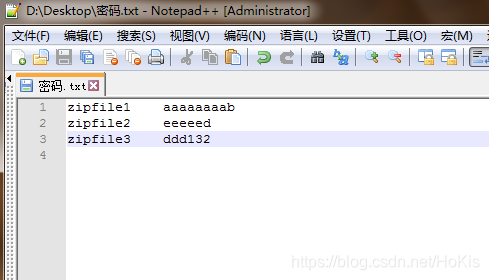
1、准备密码文件
格式要求:
1、文件编码为ASCII(一般系统默认)
2、包含两列:第一列为文件名(不带后缀,默认会加.zip后缀),第二列为对应的解压密码。中间以空格或TAB隔开。
如图:
2、准备DLL
解压工具很多,此处用Ionic.Zip.dll。找不到下载链接的可以到这下载。下载完成后最好放在与下文的脚本同一目录下。
3、执行脚本
代码如下:
<#
# 2018-11-20  By Hokis
# 说明:
# 第一个输入:密码文件(命名为:密码.txt)所在位置。可以直接确定跳过,则默认 密码.txt 文件与当前脚本是在同一路径下
# 第二个输入:压缩文件所在位置。可以直接确定跳过,则默认 压缩文件 与当前脚本是在同一路径下
#>
#提示
$ws = New-Object -ComObject WScript.Shell
#输入
$pwdPath = Read-Host -Prompt "请输入密码文件(密码.txt)所在路径:"
#留空则默认当前路径
$gl = Get-Location
if(-not $pwdPath){
    $pwdPath = $gl.Path.ToString()
}
#载入dll
[System.Reflection.Assembly]::LoadFrom($gl.Path.ToString()+"\Ionic.Zip.dll") >$null
#判断是否存在
if(-not (Test-Path ($pwdPath + "\密码.txt"))){
    $n1=$ws.popup("找不到文件:密码.txt !",0,"提示",0 + 64)
}
else{
    $souPath = Read-Host -Prompt "请输入待解压的zip文件所在路径:"
    if(-not $souPath){
        $souPath = $gl.Path.ToString()
    }
    $savePath = $souPath + "\解压"
    if(-not (Test-Path $savePath)){
        mkdir $savePath >$null
    }

    # 读取带密码文件内容
    $lines = Get-Content -Path ($pwdPath + "\密码.txt")
    #按行读取
    foreach ($line in $lines){
        #分隔文件名和密码
        $items = [regex]::split($line, '[\s]+')
        if ($items.Length -gt 1)
        {
            #拼接zip文件全路径
            $SourceFile = $souPath + "\" + $items[0] + ".zip"
            #进行解压
            $zip = [Ionic.Zip.ZipFile]::Read($SourceFile)
            $zip.Password = $items[1]
            $zip.ExtractExistingFile= [Ionic.Zip.ExtractExistingFileAction]::OverwriteSilently #覆盖文件
            $zip.ExtractAll($savePath)
            $zip = $null
        }
    }
    #完成
    $ws.popup("解压完成!",0,"提示",0 + 64) | out-null
}
$gl = $null
$ws = $null

- 1
- 2
- 3
- 4
- 5
- 6
- 7
- 8
- 9
- 10
- 11
- 12
- 13
- 14
- 15
- 16
- 17
- 18
- 19
- 20
- 21
- 22
- 23
- 24
- 25
- 26
- 27
- 28
- 29
- 30
- 31
- 32
- 33
- 34
- 35
- 36
- 37
- 38
- 39
- 40
- 41
- 42
- 43
- 44
- 45
- 46
- 47
- 48
- 49
- 50
- 51
- 52
- 53
- 54
代码另存为.ps1,右键,“使用Powershell运行”即可,根据提示输入必要的参数。如不能运行,参考【此处】解决。
执行完成后,会在当前脚本的目录生成一个叫解压的文件夹,里面即所有的解压结果。
03 后记
如果本地装有支持命令行形式的解压软件(如WinRAR),调用一下也是可以的,就不必下载额外的DLL。
04 更新
- 2020-06-03
- 处理文件名中的中文乱码问题
- 压缩
powershell代码成一行,方便存为.bat,双击即可调用
@echo off
rem 第一个输入:密码文件(命名为:密码.txt)所在位置。可以直接确定跳过,则默认 密码.txt 文件与当前脚本是在同一路径下
rem 第二个输入:压缩文件所在位置。可以直接确定跳过,则默认 压缩文件 与当前脚本是在同一路径下
cd /d %~dp0
powershell.exe -command "$ws=New-Object -ComObject WScript.Shell;$pwdPath=Read-Host -Prompt '请输入密码文件(密码.txt)所在路径:';$gl=Get-Location;if(-not $pwdPath){$pwdPath=$gl.Path.ToString();}[System.Reflection.Assembly]::LoadFrom($gl.Path.ToString()+'\Ionic.Zip.dll')>$null;if(-not (Test-Path ($pwdPath+'\密码.txt'))){$n1=$ws.popup('找不到文件:密码.txt !',0,'提示',0+64);}else{$souPath=Read-Host -Prompt '请输入待解压的zip文件所在路径:';if(-not $souPath){$souPath=$gl.Path.ToString();};$savePath=$souPath+'\解压';if(-not (Test-Path $savePath)){mkdir $savePath>$null;};$lines=Get-Content -Path ($pwdPath+'\密码.txt');foreach($line in $lines){$items=[regex]::split($line,'[\s]+');if($items.Length -gt 1){$SourceFile=$souPath+'\'+$items[0]+'.zip';$ro=new-object Ionic.Zip.ReadOptions;$ro.Encoding=[System.Text.Encoding]::Default;$zip=[Ionic.Zip.ZipFile]::Read($SourceFile,$ro);$zip.Password=$items[1];$zip.ExtractExistingFile=[Ionic.Zip.ExtractExistingFileAction]::OverwriteSilently;$zip.ExtractAll($savePath);$zip=$null;}};$ws.popup('解压完成!',0,'提示',0+64)|out-null;};$gl=$null;$ws=$null;"
pause
- 1
- 2
- 3
- 4
- 5
- 6
注意要将
Ionic.Zip.dll放在与脚本同一目录下
声明:本文内容由网友自发贡献,不代表【wpsshop博客】立场,版权归原作者所有,本站不承担相应法律责任。如您发现有侵权的内容,请联系我们。转载请注明出处:https://www.wpsshop.cn/article/detail/43849
推荐阅读

Copyright © 2003-2013 www.wpsshop.cn 版权所有,并保留所有权利。

