
热门标签
热门文章
- 1小程序实现微信登录Java后端(一)--前端实现_java小程序自动登录
- 2Arduino超声波智能循迹避障小车简易教程_arduino小车超声波
- 3【Linux】 OpenSSH_9.3p1 升级到 OpenSSH_9.3p2(亲测无问题,建议收藏)_linux 安装ssh9.3p2
- 4自动完成文本框AutoCompleteTextView
- 5蓝桥杯 平面切分(欧拉定理)_蓝桥杯平面切分
- 6python七段数码管10秒倒计时_python实现七段数码管和倒计时效果
- 7Leetcode算法——26、有序数组去重_leetcode list去重
- 8Tensorflow可以做什么----谷歌大牛告诉你_tensorflow能做什么
- 9Albert: A lite bert for self-supervised learning of language representations (Albert)
- 10软件测试最新复习【太原理工大学】_软件测试能排除软件中潜藏的错误吗
当前位置: article > 正文
vue实现左右伸缩(el-drawer自定义位置展开收缩)_vue抽屉效果展开收起
作者:思考机器4 | 2024-01-29 14:23:32
赞
踩
vue抽屉效果展开收起
实现需求
页面内容是左右布局,需求想让左侧内容可收缩,然后展示完全右侧内容。本来想着写原生的css+v-show动态判断即可,后来想到了element组件库有抽屉(el-drawer),顺便想尝试一下是否能自定义抽屉展开的位置,所以有了这篇文章。
实现效果
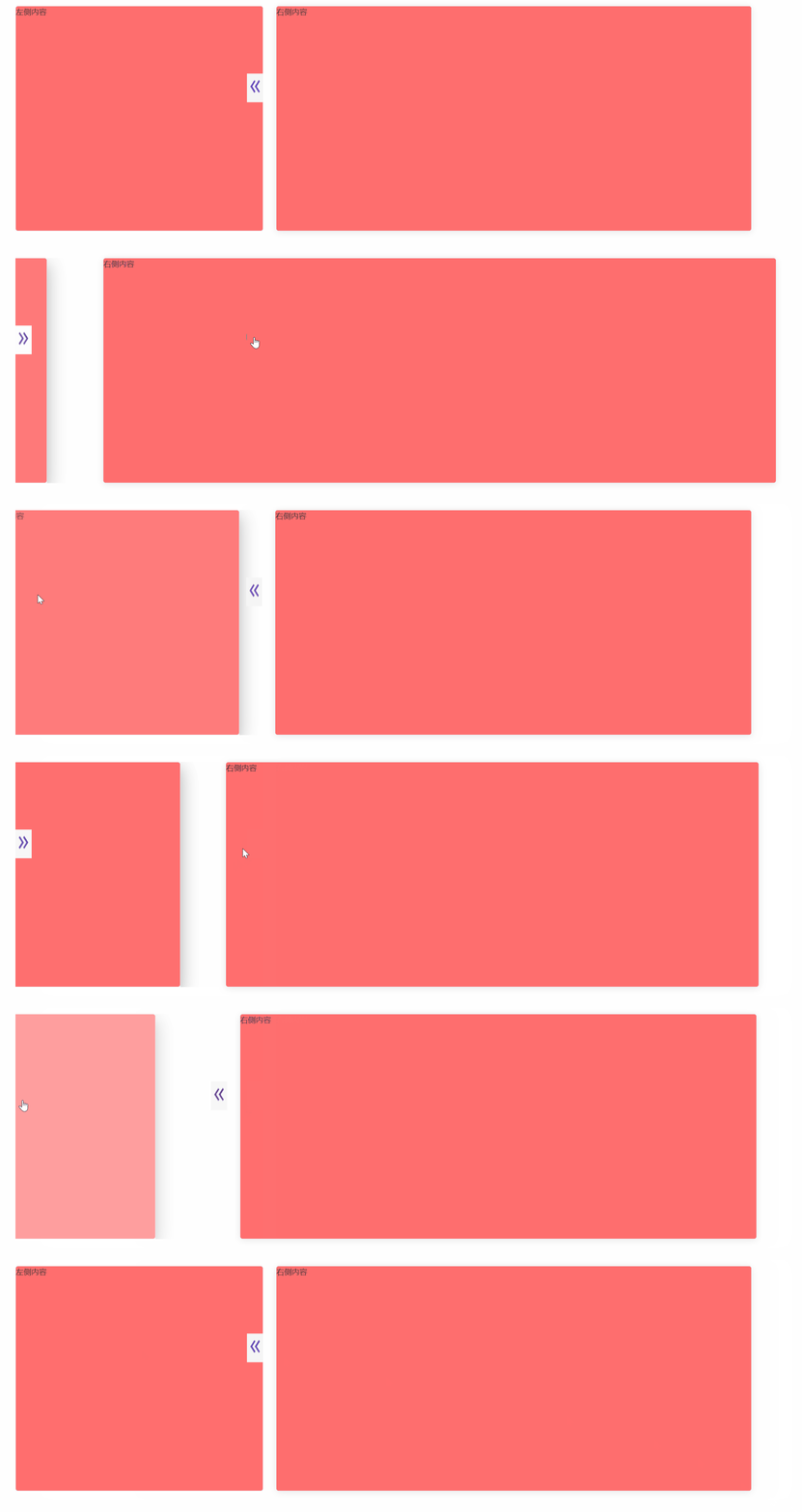
自定义抽屉(el-drawer)展开位置
<template>
  <div>
  	<el-row style="margin-top: 1%" :gutter="20">
      <!-- 左侧 列表 -->
      <el-col style="height: 350px;" :span="span" :class="[span != '8' ? 'span1' : 'span1']">
        <div style="position: relative; width: 100%; height: 100%">
          <el-drawer
            class="drawerClass"
            style="position: absolute"
            :append-to-body="false"
            :modal="false"
            :show-close="false"
            :wrapperClosable="false"
            size="100%"
            :visible.sync="drawer"
            direction="ltr"
          >
            <el-card class="box-card" style="position: relative">
              <div>左侧内容</div>
            </el-card>
          </el-drawer>
          <div
            style="
              position: absolute;
              z-index: 999999999;
              cursor: pointer;
              top: 30%;
            "
            :class="[drawer ? 'imgright' : 'imgright1']"
            @click="clickImg"
          >
            <img
              v-show="!drawer"
              style="height: 40px; width: 25px"
              :src="require('@/assets/image/zhankai.png')"
              alt=""
            />
            <img
              v-show="drawer"
              style="height: 40px; width: 25px"
              :src="require('@/assets/image/shousuo.png')"
              alt=""
            />
          </div>
        </div>
      </el-col>
      <!-- 右侧 用户列表 -->
      <el-col :span="span1" :class="[span1 != '15' ? 'span1' : 'span1']">
        <el-card class="box-card">
          <div>右侧内容</div>
        </el-card>
      </el-col>
    </el-row>
  </div>
</template>

- 1
- 2
- 3
- 4
- 5
- 6
- 7
- 8
- 9
- 10
- 11
- 12
- 13
- 14
- 15
- 16
- 17
- 18
- 19
- 20
- 21
- 22
- 23
- 24
- 25
- 26
- 27
- 28
- 29
- 30
- 31
- 32
- 33
- 34
- 35
- 36
- 37
- 38
- 39
- 40
- 41
- 42
- 43
- 44
- 45
- 46
- 47
- 48
- 49
- 50
- 51
- 52
- 53
- 54
- 55
实现原理
给el-drawer父级标签添加position: relative;
el-drawer属性调整:
:append-to-body=“false” 遮罩层是否插入至 body 元素上,
:modal=“false” 是否需要遮罩层
:show-close=“false” 是否显示关闭按钮
:wrapperClosable=“false” 点击遮罩层是否可以关闭 Drawer
js方法,点击的时候抽屉伸缩展开,并且给左侧右侧内容对应的宽度
export default {
  data() {
    return {
      span: 8,
      span1: 15,
      drawer: true,
    };
  },
  methods: {
    clickImg() {
      this.drawer = !this.drawer;
      if (this.drawer) {
        this.span = 8;
        this.span1 = 15;
      } else {
        this.span = 1;
        this.span1 = 23;
      }
    },
  },
};
- 1
- 2
- 3
- 4
- 5
- 6
- 7
- 8
- 9
- 10
- 11
- 12
- 13
- 14
- 15
- 16
- 17
- 18
- 19
- 20
- 21
<style lang="scss" scoped>
.span1 {
  transition: all 0.2s;
}
.imgright {
  right: 0;
  background-color: #f5f5f5;
  transition: all 0.2s;
}
.imgright1 {
  left: 0;
  background-color: #fff;
  transition: all 0.2s;
}
.drawerClass ::v-deep .el-drawer__container .el-drawer .el-drawer__header {
  display: none;
}
</style>
- 1
- 2
- 3
- 4
- 5
- 6
- 7
- 8
- 9
- 10
- 11
- 12
- 13
- 14
- 15
- 16
- 17
- 18
以上只是尝试抽屉是否能自定义位置伸缩展开。当然有更简单的方法写个css动态判断宽度即可
第二种方法
    <el-row style="margin-top: 1%">

      <div style="display: flex; align-items: center">
         <!-- 左侧 列表 -->
        <div :class="[drawer ? 'left' : 'left1']">
          <el-card class="box-card">
            <div>左侧内容</div>
          </el-card>
        </div>
         <!-- 折叠展开图片-->
        <div
          style="cursor: pointer; width: 5%"
          :class="[drawer ? 'imgright' : 'imgright1']"
          @click="clickImg"
        >
          <img
            v-show="!drawer"
            style="height: 40px; width: 25px"
            :src="require('@/assets/image/zhankai.png')"
          />
          <img
            v-show="drawer"
            style="height: 40px; width: 25px"
            :src="require('@/assets/image/shousuo.png')"
          />
        </div>
           <!-- 右侧 用户列表 -->
        <div :class="[drawer ? 'right' : 'right1']">
          <el-card class="box-card">
            <div>右侧内容</div>
          </el-card>
        </div>
      </div>
    </el-row>
- 1
- 2
- 3
- 4
- 5
- 6
- 7
- 8
- 9
- 10
- 11
- 12
- 13
- 14
- 15
- 16
- 17
- 18
- 19
- 20
- 21
- 22
- 23
- 24
- 25
- 26
- 27
- 28
- 29
- 30
- 31
- 32
- 33
- 34
 methods: {
    clickImg() {
      this.drawer = !this.drawer;
    },
  },
- 1
- 2
- 3
- 4
- 5
.left {
  width: 35%;
  transition: all 0.2s;
}
.left1 {
  width: 0%;
  transition: all 0.2s;
}
.right {
  width: 65%;
  transition: all 0.2s;
}
.right1 {
  width: 95%;
  transition: all 0.2s;
}
.box-card {
  height: 350px;
  background-color: #ff6e6e;
}
- 1
- 2
- 3
- 4
- 5
- 6
- 7
- 8
- 9
- 10
- 11
- 12
- 13
- 14
- 15
- 16
- 17
- 18
- 19
- 20
- 21
声明:本文内容由网友自发贡献,不代表【wpsshop博客】立场,版权归原作者所有,本站不承担相应法律责任。如您发现有侵权的内容,请联系我们。转载请注明出处:https://www.wpsshop.cn/article/detail/43217?site
推荐阅读


相关标签

