
热门标签
热门文章
- 1从零学习Linux操作系统 第二十二部分 企业域名解析服务的部署及安全优化
- 2Python实现PDF文件转表格_python plumber table
- 3Git起步-安装与配置_gitforce
- 45G NR Rel16 两步接入/2-step RACH
- 5史上最全的Linux常用命令汇总(超全面!超详细!)收藏这一篇就够了!
- 6Intel RealSense D435i:ROS接口相关配置和启动参数的进一步学习_d435启动画面有线
- 7Android面试常见问题总结_systemui面试
- 8Android音频系统之音频基础_估计知道这个定律的人比较少,它是音频系统中计算声音大小的一个重要依据。从严格
- 9MySQL的batch模式_mysql batch
- 10Tomcat中部署Web应用的四种方式_tomcat配置web项目
当前位置: article > 正文
golang学习之go fyne GUI编程
作者:代码创作者 | 2024-01-29 12:31:27
赞
踩
go fyne
fyne 是 Go 语言编写的跨平台的 UI 库。
官方地址https://fyne.io/ 。
git地址https://github.com/fyne-io/fyne
一、fyne 项目搭建
1、fyne初始化
新建项目目录 fyne
go mod init fyne
- 1
2、fyne依赖安装
go get fyne.io/fyne/v2
- 1
go mod tidy
- 1
3、gcc安装
fyne包含c/c++代码需要gcc编译,下载TDM-GCC,安装成功后默认设置了环境变量。
二、Hello World
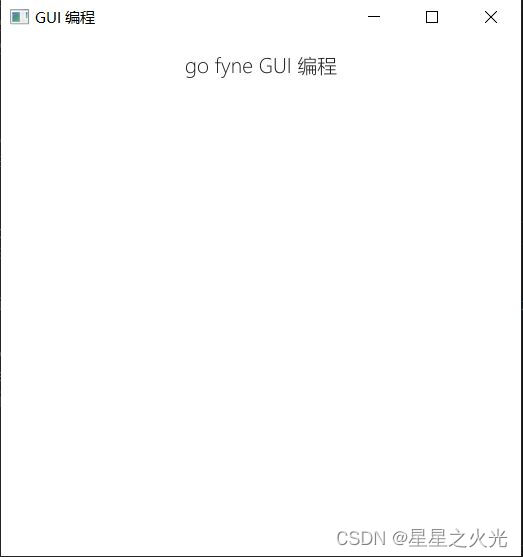
fyne默认没有中文字体,中文乱码。从系统目录C:\Windows\Fonts拷贝中文字体到fyne开发目录,并设置fyne字体 fyne_font。
package main

import (
	"os"

	"fyne.io/fyne/v2"
	"fyne.io/fyne/v2/app"
	"fyne.io/fyne/v2/widget"
)

func main() {
	// 设置中文字体,不然中文乱码
	os.Setenv("FYNE_FONT", "msyhl.ttc")
	a := app.New()
	//创建一个窗口
	w := a.NewWindow("gui编程")
	//设置窗口内显示内容,需要中文字体
	w.SetContent(widget.NewLabel("go GUI 编程"))
	// 设置窗口大小
	w.Resize(fyne.NewSize(400, 400))
	// 窗口居中
	w.CenterOnScreen()
	//展示窗口 并运行程序
	w.ShowAndRun()
}

- 1
- 2
- 3
- 4
- 5
- 6
- 7
- 8
- 9
- 10
- 11
- 12
- 13
- 14
- 15
- 16
- 17
- 18
- 19
- 20
- 21
- 22
- 23
- 24
- 25
go run main.go
三、fyne 时钟
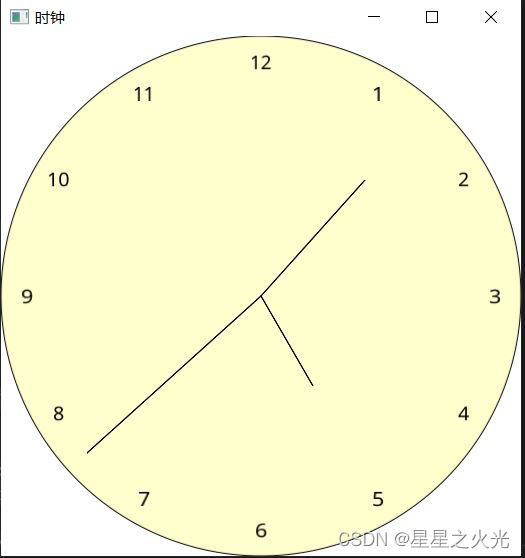
fyne 绘制图像界面时钟
package main

import (
	"fmt"
	"image/color"
	"math"
	"time"

	"fyne.io/fyne/v2"
	"fyne.io/fyne/v2/app"
	"fyne.io/fyne/v2/canvas"
	"fyne.io/fyne/v2/container"
)

const (
	secondHandLenth float64 = 180.0
	minuteHandLenth float64 = 120.0
	hourHandLenth   float64 = 80.0
)

func main() {
	clockApp := app.New()
	window := clockApp.NewWindow("时钟")
	window.SetPadded(false)

	yellow := color.RGBA{R: 0xff, G: 0xff, B: 0xcc, A: 0xff}
	circle := canvas.NewCircle(yellow)
	circle.StrokeWidth = 1
	circle.StrokeColor = color.Black
	// 圆所在正方形的左上角坐标
	circle.Position1.X = 0
	circle.Position1.Y = 0
	// 圆所在正方形的右下角坐标
	circle.Position2.X = 400
	circle.Position2.Y = 400
	layout := container.NewWithoutLayout(circle)

// 刻度
	for i := 1; i <= 12; i++ {
		scale := canvas.NewText(fmt.Sprint(i), color.Black)
		scale.Alignment = fyne.TextAlignCenter
		size := scale.MinSize()
		// 根据字体大小计算刻度位置偏移量
		h := size.Height / 2
		//w := size.Width

		// 移动刻度至合适位置
		scale.Move(fyne.NewPos(getX(i*5, secondHandLenth), getY(i*5, secondHandLenth)-h))
		layout.Add(scale)
	}

	now := time.Now()

	second := now.Second()
	secondHand := drawPointer(second, secondHandLenth)
	layout.Add(secondHand)

	minute := now.Minute()
	minuteHand := drawPointer(minute, minuteHandLenth)
	layout.Add(minuteHand)

	hour := now.Hour() * 5
	hourHand := drawPointer(hour, hourHandLenth)
	layout.Add(hourHand)

	window.SetContent(layout)

	go func() {
		for {
			time.Sleep(1 * time.Second)
			now := time.Now()

			second := now.Second()
			secondHand.Position2.X = getX(second, secondHandLenth)
			secondHand.Position2.Y = getY(second, secondHandLenth)
			secondHand.Refresh()

			minute := now.Minute()
			minuteHand.Position2.X = getX(minute, minuteHandLenth)
			minuteHand.Position2.Y = getY(minute, minuteHandLenth)
			minuteHand.Refresh()

			hour := now.Hour() * 5
			hourHand.Position2.X = getX(hour, hourHandLenth)
			hourHand.Position2.Y = getY(hour, hourHandLenth)
			hourHand.Refresh()
		}
	}()

	window.Resize(fyne.NewSize(400, 400))
	window.CenterOnScreen()
	window.ShowAndRun()
}
// 绘制时钟指针
func drawPointer(second int, pointerLen float64) *canvas.Line {
	pointerHand := canvas.NewLine(color.Black)
	pointerHand.Position1.X = 200
	pointerHand.Position1.Y = 200
	pointerHand.Position2.X = getX(second, pointerLen)
	pointerHand.Position2.Y = getY(second, pointerLen)

	return pointerHand
}

func getX(second int, pointerLen float64) float32 {
	return float32(200 + pointerLen*math.Cos(float64((math.Pi/float64(30))*float64(second)-(math.Pi/2))))
}

func getY(second int, pointerLen float64) float32 {
	return float32(200 + pointerLen*math.Sin(float64((math.Pi/float64(30))*float64(second)-(math.Pi/2))))
}
- 1
- 2
- 3
- 4
- 5
- 6
- 7
- 8
- 9
- 10
- 11
- 12
- 13
- 14
- 15
- 16
- 17
- 18
- 19
- 20
- 21
- 22
- 23
- 24
- 25
- 26
- 27
- 28
- 29
- 30
- 31
- 32
- 33
- 34
- 35
- 36
- 37
- 38
- 39
- 40
- 41
- 42
- 43
- 44
- 45
- 46
- 47
- 48
- 49
- 50
- 51
- 52
- 53
- 54
- 55
- 56
- 57
- 58
- 59
- 60
- 61
- 62
- 63
- 64
- 65
- 66
- 67
- 68
- 69
- 70
- 71
- 72
- 73
- 74
- 75
- 76
- 77
- 78
- 79
- 80
- 81
- 82
- 83
- 84
- 85
- 86
- 87
- 88
- 89
- 90
- 91
- 92
- 93
- 94
- 95
- 96
- 97
- 98
- 99
- 100
- 101
- 102
- 103
- 104
- 105
- 106
- 107
- 108
- 109
- 110
- 111
运行结果如下图所示:
声明:本文内容由网友自发贡献,不代表【wpsshop博客】立场,版权归原作者所有,本站不承担相应法律责任。如您发现有侵权的内容,请联系我们。转载请注明出处:https://www.wpsshop.cn/article/detail/42962
推荐阅读

相关标签

