
热门标签
热门文章
- 1【C语言】魔方阵的实现(最全)_魔方阵c语言程序设计
- 2很好的推荐书籍
- 3【工具使用】——MSF使用_MSF中kiwi(mimikatz)模块的使用_load kiwi
- 4单片机能运行操作系统吗?_单片机操作系统
- 556. 合并区间 - 力扣(LeetCode)
- 6Golang:监听binlog日志_golang监听binlog
- 7【全文】狼叔:如何正确的学习Node.js
- 8常用经典SQL语句大全完整版--详解+实例
- 9【Copilot】登录报错 Extension activation failed: “No auth flow succeeded.“(VSCode)
- 10因果推断7--深度因果模型综述(个人笔记)
当前位置: article > 正文
2021烟花-新年快乐-Python_用python 新年快乐代码
作者:思考机器4 | 2024-01-29 10:40:43
赞
踩
用python 新年快乐代码
目录
前言
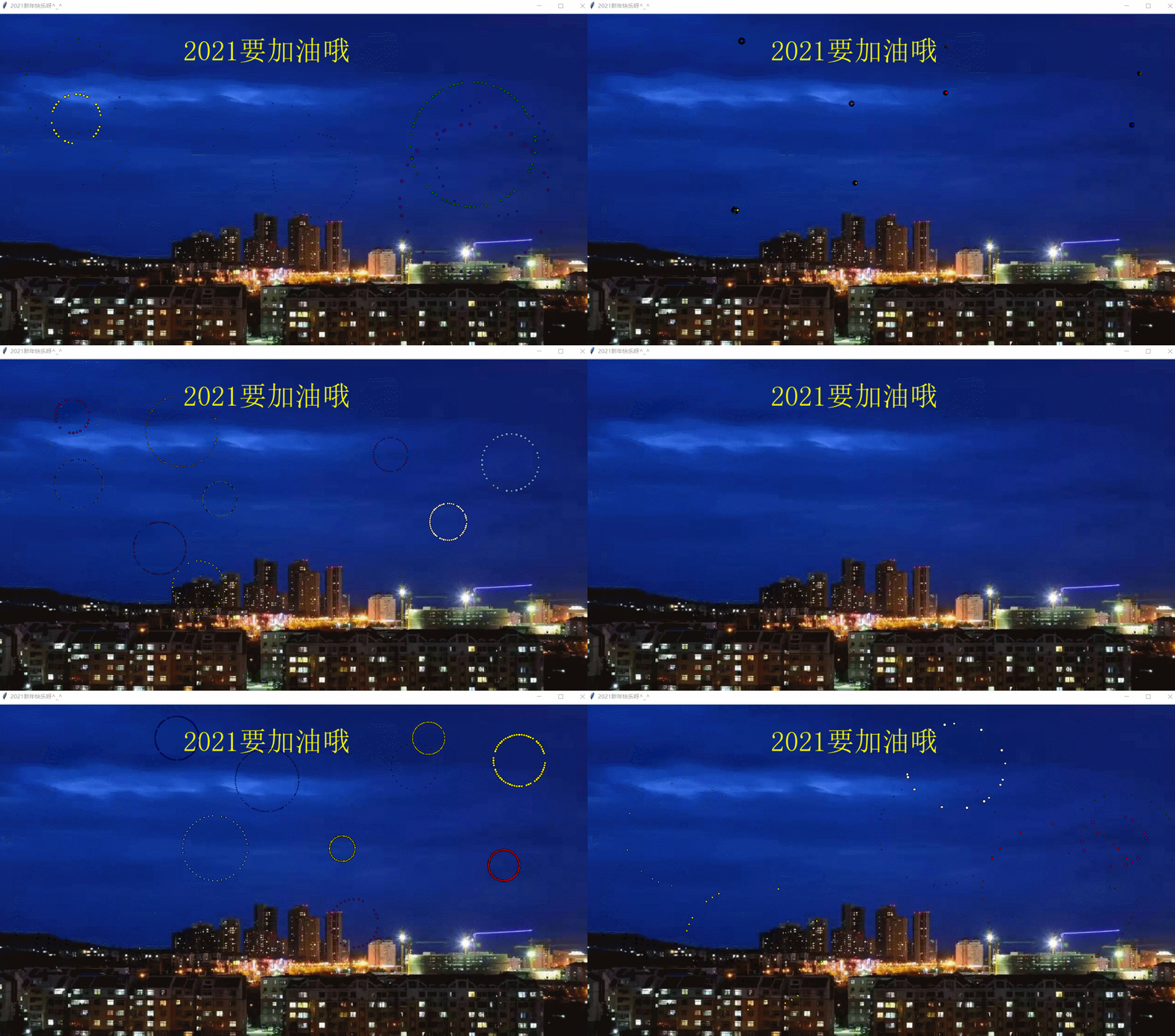
昨天微信更新了版本,增加了烟花的表情,有XM同学提出建议,运用python编程实现烟花的效果。正值2021春节到来之际,祝大家2021春节愉快,祝我们的祖国繁荣昌盛!
Gif制作:https://en.softonic.com/best/free-to-play-games/?utm_source=wakeup
一.知识介绍
1.tkinter:这个小项目的主角,是一个python图形模块。且Python3已经自带了该模块,不用另外安装。它有点像java中的swing图形模块(由众多组件集成,组件通过创建实例添加,组件通过坐标定位在窗口上)。
2.PIL:Python Imaging Library,是Python平台的图像处理标准模块。在Python3也是自带的,在这个项目中用于背景图片的导入。
3.time:相信这个模块大家都不会陌生,导入它用来控制烟花的绽放,坠落及消失时间。
4.random:随机数模块,用于生成烟花随机坐标点,随机绽放速度,随机消失时间。
5.math:这个模块大家应该也很熟悉了,导入它的目的是使烟花绽放的粒子以一定角度散开。
二.完整代码
- # -*- coding: utf-8 -*-
- """
- Spyder Editor
- This is a temporary script file.
- """
-
- '''
- FIREWORKS SIMULATION WITH TKINTER
- *self-containing code
- *to run: simply type python simple.py in your console
- *compatible with both Python 2 and Python 3
- *Dependencies: tkinter, Pillow (only for background image)
- *The design is based on high school physics, with some small twists only for aesthetics purpose
- '''
- import tkinter as tk
- # from tkinter import messagebox
- # from tkinter import PhotoImage
- from PIL import Image, ImageTk ,ImageDraw
- from time import time, sleep
- from random import choice, uniform, randint
- from math import sin, cos, radians
- from PIL import ImageFont
-
- # gravity, act as our constant g, you can experiment by changing it
- GRAVITY = 0.05
- # list of color, can choose randomly or use as a queue (FIFO)
- colors = ['red', 'blue', 'yellow', 'white', 'green', 'orange', 'purple',
- 'red', 'blue', 'yellow', 'white', 'green', 'orange', 'purple','seagreen', 'indigo', 'cornflowerblue']
-
-
- '''
- Generic class for particles
- particles are emitted almost randomly on the sky, forming a round of circle (a star) before falling and getting removed
- from canvas
- Attributes:
- - id: identifier of a particular particle in a star
- - x, y: x,y-coordinate of a star (point of explosion)
- - vx, vy: speed of particle in x, y coordinate
- - total: total number of particle in a star
- - age: how long has the particle last on canvas
- - color: self-explantory
- - cv: canvas
- - lifespan: how long a particle will last on canvas
- '''
-
-
- class part:
- def __init__(self, cv, idx, total, explosion_speed, x=0., y=0., vx=0., vy=0., size=2., color='red', lifespan=2,
- **kwargs):
- self.id = idx
- self.x = x
- self.y = y
- self.initial_speed = explosion_speed
- self.vx = vx
- self.vy = vy
- self.total = total
- self.age = 0
- self.color = color
- self.cv = cv
- self.cid = self.cv.create_oval(
- x - size, y - size, x + size,
- y + size, fill=self.color)
- self.lifespan = lifespan
-
- def update(self, dt):
- self.age += dt
-
- # particle expansions
- if self.alive() and self.expand():
- move_x = cos(radians(self.id * 360 / self.total)) * self.initial_speed
- move_y = sin(radians(self.id * 360 / self.total)) * self.initial_speed
- self.cv.move(self.cid, move_x, move_y)
- self.vx = move_x / (float(dt) * 1000)
-
- # falling down in projectile motion
- elif self.alive():
- move_x = cos(radians(self.id * 360 / self.total))
- # we technically don't need to update x, y because move will do the job
- self.cv.move(self.cid, self.vx + move_x, self.vy + GRAVITY * dt)
- self.vy += GRAVITY * dt
-
- # remove article if it is over the lifespan
- elif self.cid is not None:
- cv.delete(self.cid)
- self.cid = None
-
- # define time frame for expansion
- def expand(self):
- return self.age <= 1.2
-
- # check if particle is still alive in lifespan
- def alive(self):
- return self.age <= self.lifespan
-
-
- '''
- Firework simulation loop:
- Recursively call to repeatedly emit new fireworks on canvas
- a list of list (list of stars, each of which is a list of particles)
- is created and drawn on canvas at every call,
- via update protocol inside each 'part' object
- '''
-
-
- def simulate(cv):
- t = time()
- explode_points = []
- wait_time = randint(10, 100)
-
- numb_explode = randint(6, 10)
- # create list of list of all particles in all simultaneous explosion
- # 创建一个所有粒子同时扩大的二维列表
- for point in range(numb_explode):
- objects = []
- x_cordi = randint(50, 1250)
- y_cordi = randint(50, 500)
- # 烟花降落的速度
- speed = uniform(1, 4)
- size = uniform(0.5, 3)
- color = choice(colors)
- explosion_speed = uniform(1.5, 6)
- total_particles = randint(20, 100)
- for i in range(1, total_particles):
- r = part(cv, idx=i, total=total_particles, explosion_speed=explosion_speed, x=x_cordi, y=y_cordi,
- vx=speed, vy=speed, color=color, size=size, lifespan=uniform(0.6, 1.75))
- objects.append(r)
- explode_points.append(objects)
-
- total_time = .0
- # keeps undate within a timeframe of 1.8 second
- while total_time < 1.8:
- sleep(0.01)
- tnew = time()
- t, dt = tnew, tnew - t
- for point in explode_points:
- for item in point:
- item.update(dt)
- cv.update()
- total_time += dt
- # recursive call to continue adding new explosion on canvas
- root.after(wait_time, simulate, cv)
-
-
- def close(*ignore):
- """Stops simulation loop and closes the window."""
- global root
- root.quit()
-
-
- if __name__ == '__main__':
-
-
- root = tk.Toplevel()
- root.title("2021新年快乐呀^_^")
-
- cv = tk.Canvas(root, height=854, width=1280)
-
-
- # use a nice background image
- # image = Image.open("image1.jpg")
- # photo = ImageTk.PhotoImage(image)
- #
- #设置字体,如果没有,也可以不设置
- font = ImageFont.truetype("C:\\Windows\\Fonts\\simsun.ttc",60) #现在是宋体
- #打开底版图片
- image=Image.open("image1.jpg")
- # 在图片上添加文字 1
- draw = ImageDraw.Draw(image)
- draw.text((400, 50),"2021要加油哦",fill = "yellow",font=font)
- # draw = ImageDraw.Draw(image)
- photo = ImageTk.PhotoImage(image)
-
-
- cv.create_image(0, 0, image=photo, anchor='nw')
- cv.pack()
-
- root.protocol("WM_DELETE_WINDOW", close)
-
- root.after(100, simulate, cv)
-
- root.mainloop()

三 参考文献
- 代码参考链接:https://github.com/tuangauss/DataScienceProjects/blob/master/Python/fireworks.py
- python 图片上添加文字:https://blog.csdn.net/dyyay521/article/details/102546637
- 【解决问题】Python-Error:image "pyimage1" doesn't exist:https://blog.csdn.net/weixin_44436677/article/details/105498762
声明:本文内容由网友自发贡献,不代表【wpsshop博客】立场,版权归原作者所有,本站不承担相应法律责任。如您发现有侵权的内容,请联系我们。转载请注明出处:https://www.wpsshop.cn/article/detail/42707
推荐阅读


相关标签

