
热门标签
热门文章
- 1【期中考试-整数反转】_给出一个32位的有符号整数n,请将该数进行反转(正负符号不变,其余数字反转)。 反转
- 2【实验】交换机及VLAN的三层配置_一个vlan10的数据帧从sw1进sw3出,请分别简述两交换机连接端口为access与trunk状况
- 3c#与java的区别_c# java对比
- 4字节跳动技术支持面试小记
- 5基于Python的HTTP隧道安全性分析:魔法背后的锁与钥匙
- 6NOIP/CSP算法竞赛对拍四步曲(windows + NOILinux2.0环境)详细举例_csp 对拍
- 7码云Pages搭建个人静态网站之旅_码云托管静态网页
- 8Git切换远程仓库地址三种方法_git 切换 origin
- 9daily-question-02(前端每日一题02)
- 10情感分类之数据处理_情感分类输出 de csv
当前位置: article > 正文
部署Yolov5模型到jetson nano上_build cuda_10.2_r440.tc440_70.29663091_0
作者:程序自动化专家 | 2024-01-28 23:21:03
赞
踩
build cuda_10.2_r440.tc440_70.29663091_0
nvcc -V- ljx@ljx-desktop:~/pycuda2/tensorrtx-yolov5-v5.0/yolov5$ nvcc -V
- nvcc: NVIDIA (R) Cuda compiler driver
- Copyright (c) 2005-2021 NVIDIA Corporation
- Built on Sun_Feb_28_22:34:44_PST_2021
- Cuda compilation tools, release 10.2, V10.2.300
- Build cuda_10.2_r440.TC440_70.29663091_0
- ljx@ljx-desktop:~/pycuda2/tensorrtx-yolov5-v5.0/yolov5$
- cd /usr/src/cudnn_samples_v8/mnistCUDNN
- sudo make
- sudo chmod a+x mnistCUDNN
- ./mnistCUDNN
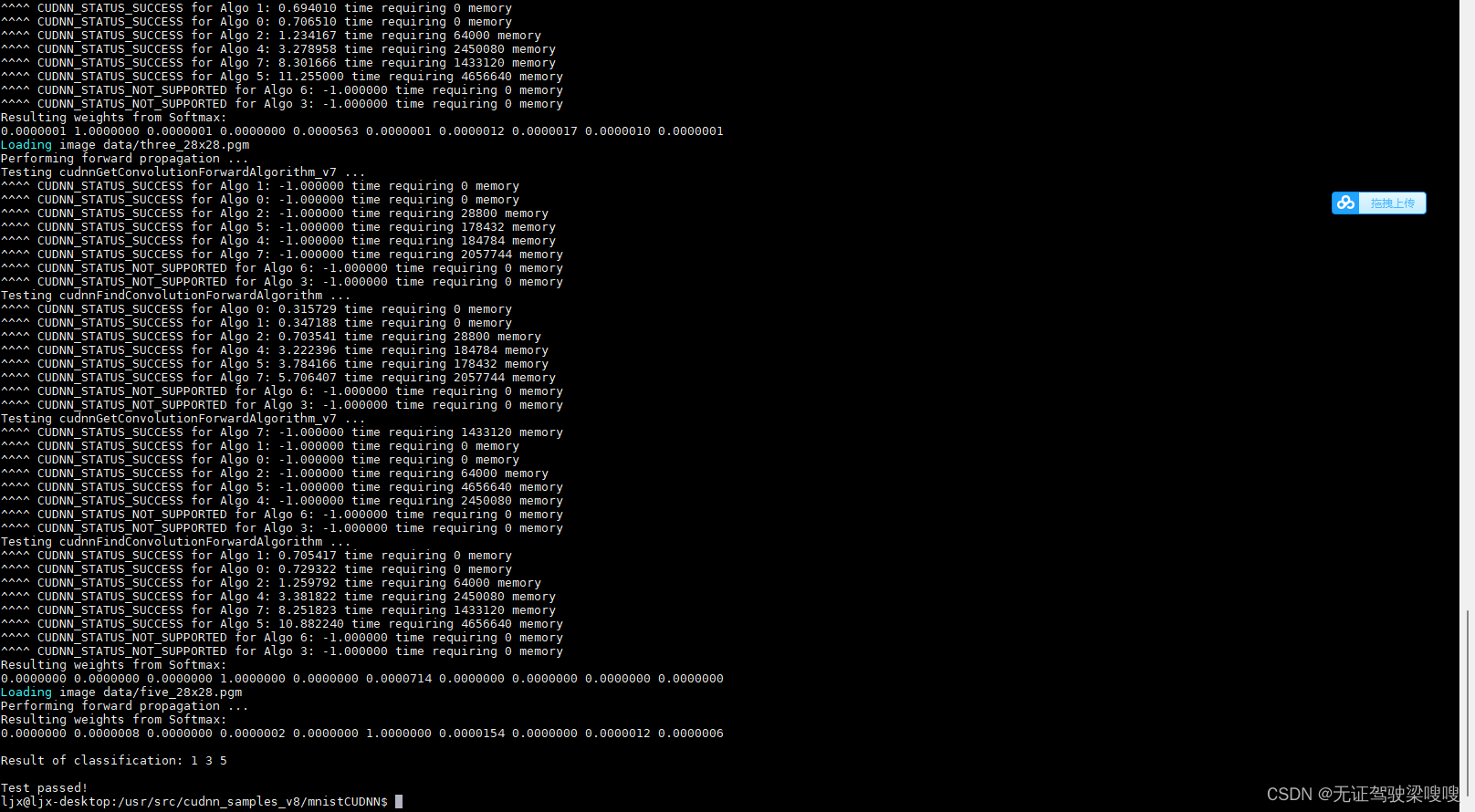
sudo apt-get install python3-pip python3-dev1.安装方法之前的文章有这里举个例子
sudo apt-get install libhdf5-serial-dev hdf5-toolspip3 install --extra-index-url https://developer.download.nvidia.com/compute/redist/jp/v46 tensorflow-gpu==2.6.0+nv19.3 --user2.检测方法举两个例子
- ljx@ljx-desktop:~/pycuda2/pycuda-2021.1$ python3
- Python 3.6.9 (default, Dec 8 2021, 21:08:43)
- [GCC 8.4.0] on linux
- Type "help", "copyright", "credits" or "license" for more information.
- >>> import torchvision
- >>> print(torchvision.__version__)
- 0.11.1
- >>> import tensorflow as tf
- >>> a = tf.constant(1.)
- 2022-02-21 21:25:38.178350: I tensorflow/stream_executor/cuda/cuda_gpu_executor.cc:1017] ARM64 does not support NUMA - returning NUMA node zero
- 2022-02-21 21:25:38.179671: I tensorflow/stream_executor/cuda/cuda_gpu_executor.cc:1017] ARM64 does not support NUMA - returning NUMA node zero
- 2022-02-21 21:25:38.180036: I tensorflow/stream_executor/cuda/cuda_gpu_executor.cc:1017] ARM64 does not support NUMA - returning NUMA node zero
- 2022-02-21 21:25:38.194555: I tensorflow/stream_executor/cuda/cuda_gpu_executor.cc:1017] ARM64 does not support NUMA - returning NUMA node zero
- 2022-02-21 21:25:38.196004: I tensorflow/stream_executor/cuda/cuda_gpu_executor.cc:1017] ARM64 does not support NUMA - returning NUMA node zero
- 2022-02-21 21:25:38.197011: I tensorflow/stream_executor/cuda/cuda_gpu_executor.cc:1017] ARM64 does not support NUMA - returning NUMA node zero
- 2022-02-21 21:26:58.812460: I tensorflow/stream_executor/cuda/cuda_gpu_executor.cc:1017] ARM64 does not support NUMA - returning NUMA node zero
- 2022-02-21 21:26:58.873885: I tensorflow/stream_executor/cuda/cuda_gpu_executor.cc:1017] ARM64 does not support NUMA - returning NUMA node zero
- 2022-02-21 21:26:58.909564: I tensorflow/stream_executor/cuda/cuda_gpu_executor.cc:1017] ARM64 does not support NUMA - returning NUMA node zero
- 2022-02-21 21:26:59.039953: I tensorflow/core/common_runtime/gpu/gpu_device.cc:1510] Created device /job:localhost/replica:0/task:0/device:GPU:0 with 41 MB memory: -> device: 0, name: NVIDIA Tegra X1, pci bus id: 0000:00:00.0, compute capability: 5.3
- >>> import os
- >>> os.environ['TF_CPP_MIN_LOG_LEVEL'] = '2'
- >>> a = tf.constant(1.)
- >>> b = tf.constant(2.)
- >>> print(a+b)
- tf.Tensor(3.0, shape=(), dtype=float32)
- >>> print('GPU:', tf.test.is_gpu_available())
- WARNING:tensorflow:From <stdin>:1: is_gpu_available (from tensorflow.python.framework.test_util) is deprecated and will be removed in a future version.
- Instructions for updating:
- Use `tf.config.list_physical_devices('GPU')` instead.
- 2022-02-21 21:32:15.515633: I tensorflow/stream_executor/cuda/cuda_gpu_executor.cc:1017] ARM64 does not support NUMA - returning NUMA node zero
- 2022-02-21 21:32:15.517432: I tensorflow/stream_executor/cuda/cuda_gpu_executor.cc:1017] ARM64 does not support NUMA - returning NUMA node zero
- 2022-02-21 21:32:15.518313: I tensorflow/stream_executor/cuda/cuda_gpu_executor.cc:1017] ARM64 does not support NUMA - returning NUMA node zero
- 2022-02-21 21:32:15.527565: I tensorflow/stream_executor/cuda/cuda_gpu_executor.cc:1017] ARM64 does not support NUMA - returning NUMA node zero
- 2022-02-21 21:32:15.528595: I tensorflow/stream_executor/cuda/cuda_gpu_executor.cc:1017] ARM64 does not support NUMA - returning NUMA node zero
- 2022-02-21 21:32:15.529327: I tensorflow/core/common_runtime/gpu/gpu_device.cc:1510] Created device /device:GPU:0 with 41 MB memory: -> device: 0, name: NVIDIA Tegra X1, pci bus id: 0000:00:00.0, compute capability: 5.3
- GPU: True
- >>>

- ljx@ljx-desktop:~/pycuda2$ cat demo3.py
- import tensorflow as tf
-
- tf.compat.v1.disable_eager_execution()
- with tf.device('/cpu:0'):
- a = tf.constant([1.0,2.0,3.0],shape=[3],name='a')
- b = tf.constant([1.0,2.0,3.0],shape=[3],name='b')
- with tf.device('/gpu:1'):
- c = a+b
-
- sess = tf.compat.v1.Session(config=tf.compat.v1.ConfigProto(allow_soft_placement=True,log_device_placement=True))
- sess.run(tf.compat.v1.global_variables_initializer())
- print(sess.run(c))
- ljx@ljx-desktop:~/pycuda2$ python3 demo3.py
- 2022-02-24 13:36:43.842123: I tensorflow/stream_executor/cuda/cuda_gpu_executor.cc:1017] ARM64 does not support NUMA - returning NUMA node zero
- 2022-02-24 13:36:45.249622: I tensorflow/stream_executor/cuda/cuda_gpu_executor.cc:1017] ARM64 does not support NUMA - returning NUMA node zero
- 2022-02-24 13:36:45.251626: I tensorflow/stream_executor/cuda/cuda_gpu_executor.cc:1017] ARM64 does not support NUMA - returning NUMA node zero
- 2022-02-24 13:38:19.897324: I tensorflow/stream_executor/cuda/cuda_gpu_executor.cc:1017] ARM64 does not support NUMA - returning NUMA node zero
- 2022-02-24 13:38:20.908341: I tensorflow/stream_executor/cuda/cuda_gpu_executor.cc:1017] ARM64 does not support NUMA - returning NUMA node zero
- 2022-02-24 13:38:20.941767: I tensorflow/stream_executor/cuda/cuda_gpu_executor.cc:1017] ARM64 does not support NUMA - returning NUMA node zero
- 2022-02-24 13:38:21.589736: I tensorflow/core/common_runtime/gpu/gpu_device.cc:1510] Created device /job:localhost/replica:0/task:0/device:GPU:0 with 39 MB memory: -> device: 0, name: NVIDIA Tegra X1, pci bus id: 0000:00:00.0, compute capability: 5.3
- 2022-02-24 13:38:22.835843: I tensorflow/core/common_runtime/direct_session.cc:361] Device mapping:
- /job:localhost/replica:0/task:0/device:GPU:0 -> device: 0, name: NVIDIA Tegra X1, pci bus id: 0000:00:00.0, compute capability: 5.3
-
- add: (AddV2): /job:localhost/replica:0/task:0/device:GPU:0
- 2022-02-24 13:38:28.950709: I tensorflow/core/common_runtime/placer.cc:114] add: (AddV2): /job:localhost/replica:0/task:0/device:GPU:0
- init: (NoOp): /job:localhost/replica:0/task:0/device:GPU:0
- 2022-02-24 13:38:28.988627: I tensorflow/core/common_runtime/placer.cc:114] init: (NoOp): /job:localhost/replica:0/task:0/device:GPU:0
- a: (Const): /job:localhost/replica:0/task:0/device:CPU:0
- 2022-02-24 13:38:28.988931: I tensorflow/core/common_runtime/placer.cc:114] a: (Const): /job:localhost/replica:0/task:0/device:CPU:0
- b: (Const): /job:localhost/replica:0/task:0/device:CPU:0
- 2022-02-24 13:38:28.989207: I tensorflow/core/common_runtime/placer.cc:114] b: (Const): /job:localhost/replica:0/task:0/device:CPU:0
- [2. 4. 6.]
官方解决方案【链接】
不想去看的话,直接下载这个链接的源码,同下步骤进行安装即可
- tar zxvf pycuda-2021.1.tar.gz
- cd pycuda-2021.1/
- python3 configure.py --cuda-root=/usr/local/cuda-10.2
- sudo python3 setup.py install
demo测试
- ljx@ljx-desktop:~/pycuda2$ python3 demo2.py
- [[ 19.436962 39.908886 20.68723 ... -8.1019335 -15.546103
- -17.154585 ]
- [-19.714169 -0.6291714 9.462954 ... -15.174974 -4.1439514
- 18.460089 ]
- [-17.491064 -34.86578 -12.999788 ... -17.18811 10.867537
- 0.05436563]
- ...
- [ 45.716812 -32.27492 -0.5752983 ... -31.032787 -4.8378153
- 7.907672 ]
- [ 6.989045 -13.123575 -2.8372145 ... 21.856476 5.0534296
- -15.905795 ]
- [ 17.042442 0.354123 -7.9831614 ... -11.882836 20.23512
- -19.761951 ]]
- [[ 19.436964 39.908894 20.687223 ... -8.101934 -15.54609
- -17.154581 ]
- [-19.71417 -0.62916106 9.46296 ... -15.174983 -4.1439533
- 18.460089 ]
- [-17.491072 -34.86579 -12.999789 ... -17.188126 10.867537
- 0.05437115]
- ...
- [ 45.716824 -32.27491 -0.57529545 ... -31.03278 -4.8378134
- 7.907671 ]
- [ 6.989043 -13.123584 -2.8372157 ... 21.856468 5.053428
- -15.905798 ]
- [ 17.042446 0.35412684 -7.98316 ... -11.882843 20.23511
- -19.761948 ]]
- ljx@ljx-desktop:~/pycuda2$ cat demo2.py
- import numpy as np
- import pycuda.autoinit
- import pycuda.driver as cuda
- from pycuda.compiler import SourceModule
-
-
- mod = SourceModule("""
- #define BLOCK_SIZE 16
- typedef struct {
- int width;
- int height;
- int stride;
- int __padding; //为了和64位的elements指针对齐
- float* elements;
- } Matrix;
- // 读取矩阵元素
- __device__ float GetElement(const Matrix A, int row, int col)
- {
- return A.elements[row * A.stride + col];
- }
- // 赋值矩阵元素
- __device__ void SetElement(Matrix A, int row, int col, float value)
- {
- A.elements[row * A.stride + col] = value;
- }
- // 获取 16x16 的子矩阵
- __device__ Matrix GetSubMatrix(Matrix A, int row, int col)
- {
- Matrix Asub;
- Asub.width = BLOCK_SIZE;
- Asub.height = BLOCK_SIZE;
- Asub.stride = A.stride;
- Asub.elements = &A.elements[A.stride * BLOCK_SIZE * row + BLOCK_SIZE * col];
- return Asub;
- }
- __global__ void matrix_mul(Matrix *A, Matrix *B, Matrix *C)
- {
- int blockRow = blockIdx.y;
- int blockCol = blockIdx.x;
- int row = threadIdx.y;
- int col = threadIdx.x;
- Matrix Csub = GetSubMatrix(*C, blockRow, blockCol);
- // 每个线程通过累加Cvalue计算Csub的一个值
- float Cvalue = 0;
- // 为了计算Csub遍历所有需要的Asub和Bsub
- for (int m = 0; m < (A->width / BLOCK_SIZE); ++m)
- {
- Matrix Asub = GetSubMatrix(*A, blockRow, m);
- Matrix Bsub = GetSubMatrix(*B, m, blockCol);
- __shared__ float As[BLOCK_SIZE][BLOCK_SIZE];
- __shared__ float Bs[BLOCK_SIZE][BLOCK_SIZE];
- As[row][col] = GetElement(Asub, row, col);
- Bs[row][col] = GetElement(Bsub, row, col);
- __syncthreads();
- for (int e = 0; e < BLOCK_SIZE; ++e)
- Cvalue += As[row][e] * Bs[e][col];
- __syncthreads();
- }
- SetElement(Csub, row, col, Cvalue);
- }
- """)
-
-
- class MatrixStruct(object):
- def __init__(self, array):
- self._cptr = None
-
- self.shape, self.dtype = array.shape, array.dtype
- self.width = np.int32(self.shape[1])
- self.height = np.int32(self.shape[0])
- self.stride = self.width
- self.elements = cuda.to_device(array) # 分配内存并拷贝数组数据至device,返回其地址
-
- def send_to_gpu(self):
- self._cptr = cuda.mem_alloc(self.nbytes()) # 分配一个C结构体所占的内存
- cuda.memcpy_htod(int(self._cptr), self.width.tobytes()) # 拷贝数据至device,下同
- cuda.memcpy_htod(int(self._cptr)+4, self.height.tobytes())
- cuda.memcpy_htod(int(self._cptr)+8, self.stride.tobytes())
- cuda.memcpy_htod(int(self._cptr)+16, np.intp(int(self.elements)).tobytes())
-
- def get_from_gpu(self):
- return cuda.from_device(self.elements, self.shape, self.dtype) # 从device取回数组数据
-
- def nbytes(self):
- return self.width.nbytes * 4 + np.intp(0).nbytes
-
-
- a = np.random.randn(400,400).astype(np.float32)
- b = np.random.randn(400,400).astype(np.float32)
- c = np.zeros_like(a)
-
- A = MatrixStruct(a)
- B = MatrixStruct(b)
- C = MatrixStruct(c)
- A.send_to_gpu()
- B.send_to_gpu()
- C.send_to_gpu()
-
- matrix_mul = mod.get_function("matrix_mul")
- matrix_mul(A._cptr, B._cptr, C._cptr, block=(16,16,1), grid=(25,25))
- result = C.get_from_gpu()
- print(np.dot(a,b))
- print(result)
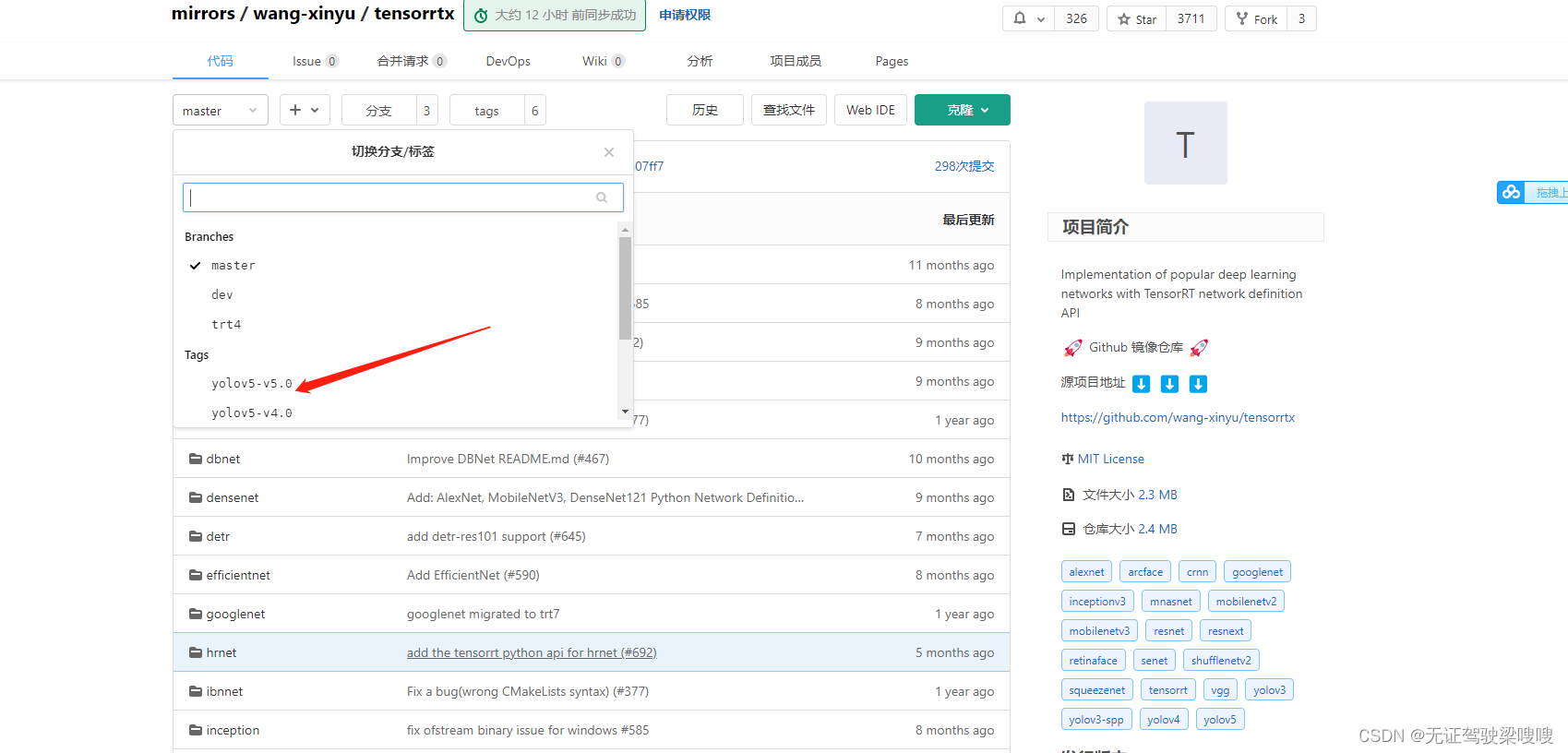
进入tensorrtx的官网,下载你训练时对应的yolov5的版本,点击左上角的master-->tags-->yolov5
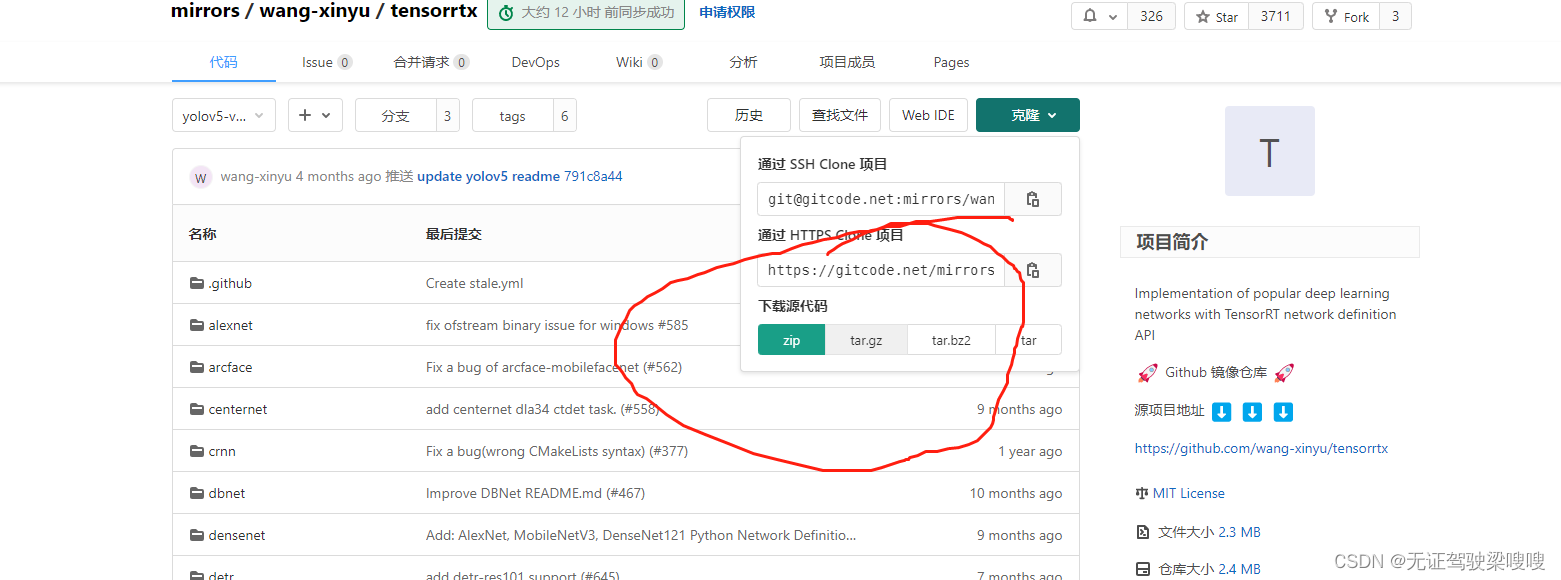
下载完成后,来到下载目录下,输入以下命令解压,我这里是v5.0版本
unzip tensorrtx-yolov5-v5.0.zip把之前训练的模型生成的wts权重文件放到tensorrtx的yolov5文件夹中
没有wts文件只是想体验强大的jetson nano的同学可以先下载一下五类垃圾分类权重文件https://blog.csdn.net/xiaoyuan2157
链接: https://pan.baidu.com/s/1nciB7Xn1vXj9ZfBAoj39Bw 提取码: r74h
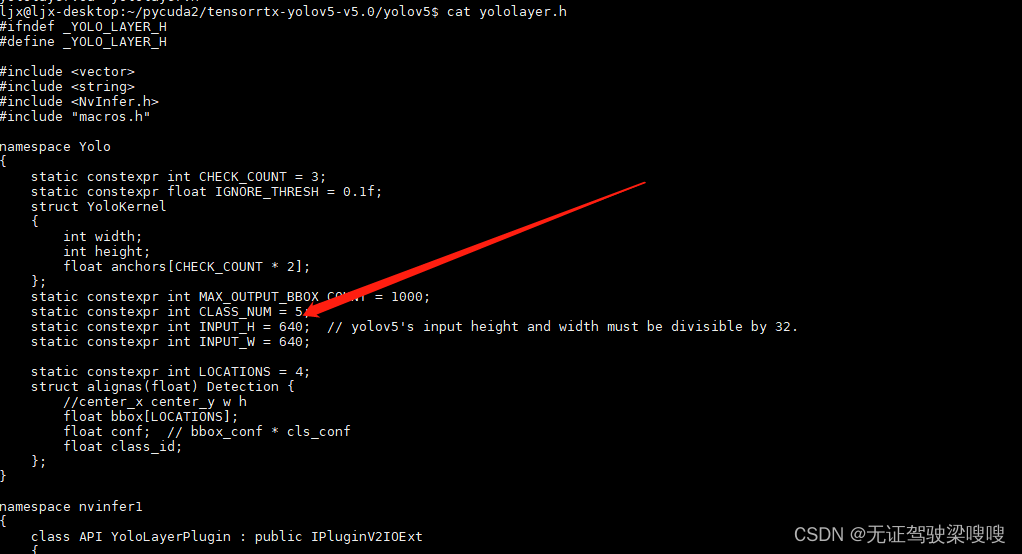
来到tensorrtx的yolov5文件夹,打开yololayer.h的代码,修改CLASS_NUM
创建进入文件夹build并cmake ..
- mkdir build
- cd build
- cmake ..
- make
生成引擎文件
sudo ./yolov5 -s ../best.wts best.engine s 这一段模型引擎生成的命令解释如下
sudo ./yolov5 -s/ [.wts文件路径] [.engine文件名称] [s/m/l/x/s6/m6/l6/x6 or c/c6 gd gw]
稍作等待后,出现Build engine successfully!表示生成完成,这时build文件夹里面会多出一个best.engine文件
根据官方的yolov5_trt改的代码来测试一下
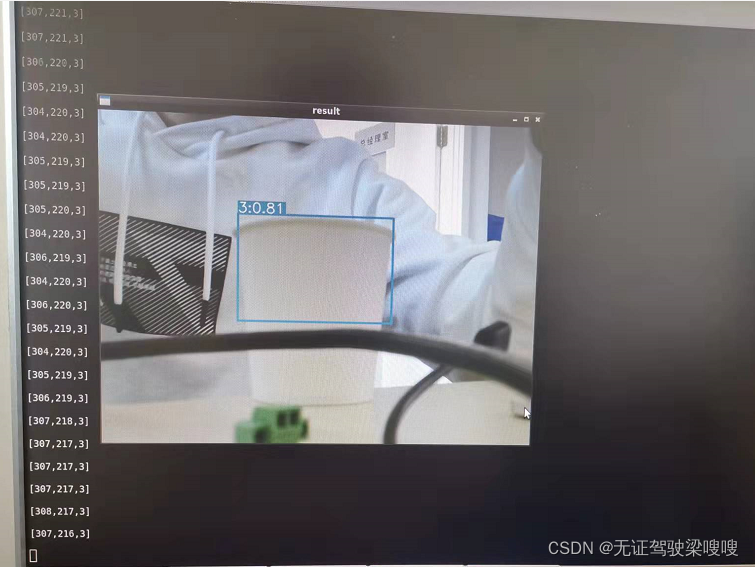
- ljx@ljx-desktop:~/pycuda2/tensorrtx-yolov5-v5.0/yolov5$ cat yolov5_trt2.py
- """
- # Yolov5 基于pytorch,修改起来更加方便快捷;
- # yolov5自带anchor生成器,自动为你的数据集生成最优化的anchor;
- # yolov5的整体AP比yolov4更高。
- """
- import ctypes
- import os
- import random
- import sys
- import threading
- import time
- # 安装串口函数库 sudo pip3 install pyserial
- import serial
- import serial as se # 导入串口库,这里是用于串口通信的库,需要在命令行输入
- #pip3 install pyserial
- import cv2
- import numpy as np # 构造ndarray对象
- import pycuda.autoinit
- import pycuda.driver as cuda
- import tensorrt as trt
- from time import sleep
-
-
- # from jetcam.csi_camera import CSICamera
- # import torch
- # import torchvision#在nano上安装这两个库是有些麻烦的特别是torchvision。
-
- INPUT_W = 640
- INPUT_H = 640
- CONF_THRESH = 0.8 # 概率阈值
- IOU_THRESHOLD = 0.1
-
-
- # 定义画框函数
- def plot_one_box(x, img, color=None, label=None, line_thickness=None):
- '''
- description: Plots one bounding box on image img,
- this function comes from YoLov5 project.
- param:
- x: a box likes [x1,y1,x2,y2]
- img: a opencv image object
- label: str
- line_thickness: int
- return:
- no return
- '''
-
- # img, result_boxes, result_scores, result_classid = yolov5_wrapper.infer(img)
- # img = draw_boxes(img, result_boxes, result_scores, result_classid)
- tl = (
- line_thickness or round(0.002 * (img.shape[0] + img.shape[1]) / 2) + 1
- ) # line/font thickness
- color = color or [random.randint(0, 255) for _ in range(3)]
- c1, c2 = (int(x[0]), int(x[1])), (int(x[2]), int(x[3]))
- cv2.rectangle(img, c1, c2, color, thickness=tl, lineType=cv2.LINE_AA)
- # print("left:(" + str(c1[0]) + "," + str(c1[1]) +")","right:(" + str(c2[0]) + "," + str(c2[1])+ ")")
- a = int(c1[0])
- b = int(c2[0])
- c = int(c1[1])
- d = int(c2[1])
- x1 = (b + a) / 2
-
- x = int(x1)
- y1 = (d + c) / 2
- y = int(y1)
- r = label[2:6] #rate
- sleep(0.0009)
- c =str(label[0]) #class
-
- if label:
- tf = max(tl - 1, 1) # font thickness
- t_size = cv2.getTextSize(label, 0, fontScale=tl / 3, thickness=tf)[0]
- c2 = c1[0] + t_size[0], c1[1] - t_size[1] - 3
- cv2.rectangle(img, c1, c2, color, -1, cv2.LINE_AA) # filled
- cv2.putText(
- img,
- label,
- (c1[0], c1[1] - 2),
- 0,
- tl / 3,
- [225, 255, 255],
- thickness=tf,
- lineType=cv2.LINE_AA,
- )
- return x, y
-
-
- # 画框函数
- def draw_boxes(image_raw, result_boxes, result_scores, result_classid):
- max_scores = -1
- max_index = -1
- max_x,max_y = -1,-1
- for i in range(len(result_boxes)):
- box = result_boxes[i]
- x, y = plot_one_box(
- box,
- image_raw,
- label="{}:{:.2f}".format(
- categories[int(result_classid[i])], result_scores[i]
- )
- )
- # print(result_classid[i])
- # se.write((str(x) + ',' + str(y) + ',' + str(result_classid[i]) + '\r\n').encode())
- # global max_score
- if result_boxes.all() > max_scores:
- max_scores = result_scores[i]
- max_index = i
- max_x, max_y = x, y
-
- if max_scores != -1:
- c = int(result_classid[max_index])
- output_str = ('[' + str(x) + ',' + str(y) + ',' +str(c) + ']'+'\r\n')
- print(output_str)
- se.write(output_str.encode())
- sleep(0.0009)
-
- return image_raw
-
-
- # yolov5模型转到TensorRT中推理
- # 定义yolov5转trt的类 start
- class YoLov5TRT(object):
- """
- description: A YOLOv5 class that warps TensorRT ops, preprocess and postprocess ops.
- """
-
- def __init__(self, engine_file_path):
- # Create a Context on this device,
- self.ctx = cuda.Device(0).make_context()
- stream = cuda.Stream()
- TRT_LOGGER = trt.Logger(trt.Logger.INFO)
- runtime = trt.Runtime(TRT_LOGGER)
-
- # Deserialize the engine from file
- with open(engine_file_path, "rb") as f:
- engine = runtime.deserialize_cuda_engine(f.read())
- context = engine.create_execution_context()
-
- host_inputs = []
- cuda_inputs = []
- host_outputs = []
- cuda_outputs = []
- bindings = []
-
- for binding in engine:
- size = trt.volume(engine.get_binding_shape(binding)) * engine.max_batch_size
- dtype = trt.nptype(engine.get_binding_dtype(binding))
- # Allocate host and device buffers
- host_mem = cuda.pagelocked_empty(size, dtype)
- cuda_mem = cuda.mem_alloc(host_mem.nbytes)
- # Append the device buffer to device bindings.
- bindings.append(int(cuda_mem))
- # Append to the appropriate list.
- if engine.binding_is_input(binding):
- host_inputs.append(host_mem)
- cuda_inputs.append(cuda_mem)
- else:
- host_outputs.append(host_mem)
- cuda_outputs.append(cuda_mem)
-
- # Store
- self.stream = stream
- self.context = context
- self.engine = engine
- self.host_inputs = host_inputs
- self.cuda_inputs = cuda_inputs
- self.host_outputs = host_outputs
- self.cuda_outputs = cuda_outputs
- self.bindings = bindings
-
- # 释放引擎,释放GPU显存,释放CUDA流
- def __del__(self):
- print("delete object to release memory")
-
- def infer(self, input_image_path):
- threading.Thread.__init__(self)
- # Make self the active context, pushing it on top of the context stack.
- self.ctx.push()
- # Restore
- stream = self.stream
- context = self.context
- engine = self.engine
- host_inputs = self.host_inputs
- cuda_inputs = self.cuda_inputs
- host_outputs = self.host_outputs
- cuda_outputs = self.cuda_outputs
- bindings = self.bindings
- # Do image preprocess
- input_image, image_raw, origin_h, origin_w = self.preprocess_image(
- input_image_path
- )
- # Copy input image to host buffer
- np.copyto(host_inputs[0], input_image.ravel())
- start = time.time()
- # Transfer input data to the GPU.
- cuda.memcpy_htod_async(cuda_inputs[0], host_inputs[0], stream)
- # Run inference.
- context.execute_async(bindings=bindings, stream_handle=stream.handle)
- # Transfer predictions back from the GPU.
- cuda.memcpy_dtoh_async(host_outputs[0], cuda_outputs[0], stream)
- # Synchronize the stream
- stream.synchronize()
- end = time.time()
- # Remove any context from the top of the context stack, deactivating it.
- self.ctx.pop()
- # Here we use the first row of output in that batch_size = 1
- output = host_outputs[0]
- # Do postprocess
- result_boxes, result_scores, result_classid = self.post_process(
- output, origin_h, origin_w
- )
-
-
- return image_raw, result_boxes, result_scores, result_classid
-
- def destroy(self):
- # Remove any context from the top of the context stack, deactivating it.
- self.ctx.pop()
-
- def preprocess_image(self, image_raw):
- """
- description: Read an image from image path, convert it to RGB,
- resize and pad it to target size, normalize to [0,1],
- transform to NCHW format.
- param:
- input_image_path: str, image path
- return:
- image: the processed image
- image_raw: the original image
- h: original height
- w: original width
- """
- h, w, c = image_raw.shape
- image = cv2.cvtColor(image_raw, cv2.COLOR_BGR2RGB)
- # Calculate widht and height and paddings
- r_w = INPUT_W / w
- r_h = INPUT_H / h
- if r_h > r_w:
- tw = INPUT_W
- th = int(r_w * h)
- tx1 = tx2 = 0
- ty1 = int((INPUT_H - th) / 2)
- ty2 = INPUT_H - th - ty1
- else:
- tw = int(r_h * w)
- th = INPUT_H
- tx1 = int((INPUT_W - tw) / 2)
- tx2 = INPUT_W - tw - tx1
- ty1 = ty2 = 0
- # Resize the image with long side while maintaining ratio
- image = cv2.resize(image, (tw, th))
- # Pad the short side with (128,128,128)
- image = cv2.copyMakeBorder(
- image, ty1, ty2, tx1, tx2, cv2.BORDER_CONSTANT, (128, 128, 128)
- )
- image = image.astype(np.float32)
- # Normalize to [0,1]
- image /= 255.0
- # HWC to CHW format:
- image = np.transpose(image, [2, 0, 1])
- # CHW to NCHW format
- image = np.expand_dims(image, axis=0)
- # Convert the image to row-major order, also known as "C order":
- image = np.ascontiguousarray(image)
- return image, image_raw, h, w
-
- def xywh2xyxy(self, origin_h, origin_w, x):
- """
- description: Convert nx4 boxes from [x, y, w, h] to [x1, y1, x2, y2] where xy1=top-left, xy2=bottom-right
- param:
- origin_h: height of original image
- origin_w: width of original image
- x: A boxes tensor, each row is a box [center_x, center_y, w, h]
- return:
- y: A boxes tensor, each row is a box [x1, y1, x2, y2]
- """
- y = np.zeros_like(x)
- # y = torch.zeros_like(x) if isinstance(x, torch.Tensor) else np.zeros_like(x)
- r_w = INPUT_W / origin_w
- r_h = INPUT_H / origin_h
- if r_h > r_w:
- y[:, 0] = x[:, 0] - x[:, 2] / 2
- y[:, 2] = x[:, 0] + x[:, 2] / 2
- y[:, 1] = x[:, 1] - x[:, 3] / 2 - (INPUT_H - r_w * origin_h) / 2
- y[:, 3] = x[:, 1] + x[:, 3] / 2 - (INPUT_H - r_w * origin_h) / 2
- y /= r_w
- else:
- y[:, 0] = x[:, 0] - x[:, 2] / 2 - (INPUT_W - r_h * origin_w) / 2
- y[:, 2] = x[:, 0] + x[:, 2] / 2 - (INPUT_W - r_h * origin_w) / 2
- y[:, 1] = x[:, 1] - x[:, 3] / 2
- y[:, 3] = x[:, 1] + x[:, 3] / 2
- y /= r_h
-
- return y
-
- # 往YoLov5TRT这个类中加入一个方法,此处是用numpy的方式实现nms
- def nms(self, boxes, scores, iou_threshold=IOU_THRESHOLD): # 非极大值抑制,是目标检测框架中的后处理模块
- # 空间距离结合并交比(IOU)完成聚类划分
- x1 = boxes[:, 0]
- y1 = boxes[:, 1]
- x2 = boxes[:, 2]
- y2 = boxes[:, 3]
- areas = (y2 - y1 + 1) * (x2 - x1 + 1)
- scores = scores
- keep = []
- index = scores.argsort()[::-1]
- while index.size > 0:
- i = index[0] # every time the first is the biggst, and add it directly
- keep.append(i)
-
- x11 = np.maximum(x1[i], x1[index[1:]]) # calculate the points of overlap
- y11 = np.maximum(y1[i], y1[index[1:]])
- x22 = np.minimum(x2[i], x2[index[1:]])
- y22 = np.minimum(y2[i], y2[index[1:]])
-
- w = np.maximum(0, x22 - x11 + 1) # the weights of overlap
- h = np.maximum(0, y22 - y11 + 1) # the height of overlap
-
- overlaps = w * h
- ious = overlaps / (areas[i] + areas[index[1:]] - overlaps)
-
- idx = np.where(ious <= iou_threshold)[0]
- index = index[idx + 1] # because index start from 1
- # print(overlaps)
- # print(x1)
- # sleep(1)
-
- return keep
-
- # 把nms的结果赋值给indices变量,改写post_process函数
- def post_process(self, output, origin_h, origin_w):
- """
- description: postprocess the prediction
- param:
- output: A tensor likes [num_boxes,cx,cy,w,h,conf,cls_id, cx,cy,w,h,conf,cls_id, ...]
- origin_h: height of original image
- origin_w: width of original image
- return:
- result_boxes: finally boxes, a boxes tensor, each row is a box [x1, y1, x2, y2]
- result_scores: finally scores, a tensor, each element is the score correspoing to box
- result_classid: finally classid, a tensor, each element is the classid correspoing to box
- """
- # Get the num of boxes detected
- num = int(output[0])
- # Reshape to a two dimentional ndarray
- pred = np.reshape(output[1:], (-1, 6))[:num, :]
- # to a torch Tensor
- # pred = torch.Tensor(pred).cuda()#去掉这行,用torchvision库中的nms方法来完成非极大值抑制。
- # Get the boxes
- boxes = pred[:, :4]
- # Get the scores
- scores = pred[:, 4]
- # Get the classid
- classid = pred[:, 5]
- # Choose those boxes that score > CONF_THRESH
- si = scores > CONF_THRESH
- boxes = boxes[si, :]
- scores = scores[si]
- classid = classid[si]
- # Trandform bbox from [center_x, center_y, w, h] to [x1, y1, x2, y2]
- boxes = self.xywh2xyxy(origin_h, origin_w, boxes)
- # Do nms
- # 去掉cpu方法,因为ndarray没有这个方法
- # indices = torchvision.ops.nms(boxes, scores, iou_threshold=IOU_THRESHOLD).cpu()
- # result_boxes = boxes[indices, :].cpu()
- # result_scores = scores[indices].cpu()
- # result_classid = classid[indices].cpu()
-
- indices = self.nms(boxes, scores, IOU_THRESHOLD)
- result_boxes = boxes[indices, :]
- result_scores = scores[indices]
- result_classid = classid[indices]
- # print(result_boxes)
- # print(result_classid)
-
- return result_boxes, result_scores, result_classid
-
-
- class myThread(threading.Thread):
- def __init__(self, func, args):
- threading.Thread.__init__(self)
- self.func = func
- self.args = args
-
- def run(self):
- self.func(*self.args)
-
-
- # 摄像头检测
- def detect_camera(camera, yolov5_wrapper):
- # def detect_camera(x,camera, yolov5_wrapper):
- count = 0
-
- # 开始循环检测
- while True:
- # img = camera.read()#CSI摄像头
- ret, img = camera.read() # usb摄像头用这个
- img, result_boxes, result_scores, result_classid = yolov5_wrapper.infer(img)
- img = draw_boxes(img, result_boxes, result_scores, result_classid)
-
- count = count + 1
-
- cv2.imshow("result", img) # 显示结果
- if cv2.waitKey(1) == ord('q'):
- break
-
-
- # 定义摄像头函数
- def main_camera():
- camera = cv2.VideoCapture(0) # usb摄像头用这个
- # camera = CSICamera(capture_device=0, width=640, height=480)
- # load custom plugins
- camera.set(3, 640)
- camera.set(4, 480)
- PLUGIN_LIBRARY = "build/libmyplugins.so"
- ctypes.CDLL(PLUGIN_LIBRARY)
- engine_file_path = "build/yolov5s.engine"
-
- # YoLov5TRT instance
- yolov5_wrapper = YoLov5TRT(engine_file_path)
- print("start detection!")
- detect_camera(camera, yolov5_wrapper)
- # camera.release() # 使用cv方法打开摄像头才需要这句
- cv2.destroyAllWindows()
- print("\nfinish!")
-
-
- if __name__ == "__main__":
- # load custom plugins 修改成你build出来的引擎的相对路径
- PLUGIN_LIBRARY = "build/libmyplugins.so"
- ctypes.CDLL(PLUGIN_LIBRARY)
- engine_file_path = "build/yolov5s.engine"
- se = serial.Serial('/dev/ttyTHS1', 115200, timeout=0.5) # 设置使用的引脚、波特率和超时时间 8接R,10接T
- # load coco labels
-
- # categories = ['battery', 'orange', 'bottle', 'paper_cup', 'spitball'] # 垃圾种类
- categories = ['0', '1', '2', '3', '4'] # 垃圾种类
-
-
- main_camera()
都是按照大佬们的博客复制学习的,真尴尬哈哈
声明:本文内容由网友自发贡献,不代表【wpsshop博客】立场,版权归原作者所有,本站不承担相应法律责任。如您发现有侵权的内容,请联系我们。转载请注明出处:https://www.wpsshop.cn/article/detail/42164?site
推荐阅读
相关标签

