
热门标签
热门文章
- 1Elasticsearch 创建、更新、删除文档、处理冲突_elasticsearchrepository更新
- 2linux/Ubuntu系统上安装mysql数据库(附图详解)
- 3FFMPEG数据结构_ffopgtg
- 4AssertionError: Torch not compiled with CUDA enabled【pycharm/python3/pip】
- 5Docker Compose 命令详解_dockercompose命令详解
- 6adb常用命令总结_adb shell dumpsys activity
- 7Git进阶:修改上次提交 git commit --amend_git amend修改再次提交
- 8a标签下载功能(同域和跨域)_a标签跨域下载
- 9STM32CubeMX(5)—— STM32利用PWM控制42步进电机_pwm四路输出控制步进电机正反转
- 10STM32 PWM实现呼吸灯_stm32点呼吸灯
当前位置: article > 正文
spring boot学习第八篇:操作elastic search的索引和索引中的数据
作者:编程革命者 | 2024-01-26 11:31:31
赞
踩
spring boot学习第八篇:操作elastic search的索引和索引中的数据
前提说明:已经安装好了elastic search 7.x版本,我的es版本是7.11.1
1、 pom.xml文件内容如下:
- <?xml version="1.0" encoding="UTF-8"?>
- <project xmlns="http://maven.apache.org/POM/4.0.0" xmlns:xsi="http://www.w3.org/2001/XMLSchema-instance"
- xsi:schemaLocation="http://maven.apache.org/POM/4.0.0 https://maven.apache.org/xsd/maven-4.0.0.xsd">
- <modelVersion>4.0.0</modelVersion>
- <parent>
- <groupId>org.springframework.boot</groupId>
- <artifactId>spring-boot-starter-parent</artifactId>
- <version>2.6.4</version>
- <relativePath/> <!-- lookup parent from repository -->
- </parent>
- <groupId>com.hmblogs</groupId>
- <artifactId>hmblogs</artifactId>
- <version>0.0.1-SNAPSHOT</version>
- <name>hmblogs</name>
- <description>hmblogs</description>
- <properties>
- <java.version>8</java.version>
- <druid.version>1.2.8</druid.version>
- <log4jdbc.version>1.16</log4jdbc.version>
- <es.version>7.9.2</es.version>
- </properties>
- <dependencies>
- <!-- druid数据源驱动 -->
- <dependency>
- <groupId>com.alibaba</groupId>
- <artifactId>druid-spring-boot-starter</artifactId>
- <version>${druid.version}</version>
- </dependency>
-
- <dependency>
- <groupId>org.springframework.boot</groupId>
- <artifactId>spring-boot-starter</artifactId>
- </dependency>
-
- <dependency>
- <groupId>org.springframework.boot</groupId>
- <artifactId>spring-boot-starter-test</artifactId>
- <scope>test</scope>
- </dependency>
-
- <!-- mybatis -->
- <dependency>
- <groupId>com.baomidou</groupId>
- <artifactId>mybatis-plus-boot-starter</artifactId>
- <version>3.5.3.1</version>
- </dependency>
-
- <dependency>
- <groupId>org.springframework.boot</groupId>
- <artifactId>spring-boot-starter-web</artifactId>
- </dependency>
-
- <dependency>
- <groupId>org.springframework.boot</groupId>
- <artifactId>spring-boot-starter-test</artifactId>
- </dependency>
-
- <dependency>
- <groupId>org.projectlombok</groupId>
- <artifactId>lombok</artifactId>
- <optional>true</optional>
- </dependency>
-
- <!--Mysql依赖包-->
- <dependency>
- <groupId>mysql</groupId>
- <artifactId>mysql-connector-java</artifactId>
- <scope>runtime</scope>
- </dependency>
-
- <!--lombok插件-->
- <dependency>
- <groupId>org.projectlombok</groupId>
- <artifactId>lombok</artifactId>
- <optional>true</optional>
- </dependency>
-
- <!--监控sql日志-->
- <dependency>
- <groupId>org.bgee.log4jdbc-log4j2</groupId>
- <artifactId>log4jdbc-log4j2-jdbc4.1</artifactId>
- <version>${log4jdbc.version}</version>
- </dependency>
-
- <dependency>
- <groupId>com.alibaba</groupId>
- <artifactId>fastjson</artifactId>
- <version>1.2.9</version>
- </dependency>
-
- <dependency>
- <groupId>redis.clients</groupId>
- <artifactId>jedis</artifactId>
- </dependency>
-
- <dependency>
- <groupId>org.apache.kafka</groupId>
- <artifactId>kafka-clients</artifactId>
-
- </dependency>
-
- <dependency>
- <groupId>org.springframework.kafka</groupId>
- <artifactId>spring-kafka</artifactId>
-
- </dependency>
-
- <!-- high client-->
- <dependency>
- <groupId>org.elasticsearch.client</groupId>
- <artifactId>elasticsearch-rest-high-level-client</artifactId>
- <version>${es.version}</version>
- <exclusions>
- <exclusion>
- <groupId>org.elasticsearch</groupId>
- <artifactId>elasticsearch</artifactId>
- </exclusion>
- <exclusion>
- <groupId>org.elasticsearch.client</groupId>
- <artifactId>elasticsearch-rest-client</artifactId>
- </exclusion>
- </exclusions>
- </dependency>
-
- <!-- rest-high-level-client 依赖如下2个jar -->
- <dependency>
- <groupId>org.elasticsearch</groupId>
- <artifactId>elasticsearch</artifactId>
- <version>${es.version}</version>
- </dependency>
- <dependency>
- <groupId>org.elasticsearch.client</groupId>
- <artifactId>elasticsearch-rest-client</artifactId>
- <version>${es.version}</version>
- </dependency>
- <dependency>
- <groupId>junit</groupId>
- <artifactId>junit</artifactId>
- </dependency>
-
- </dependencies>
-
- <build>
- <plugins>
- <plugin>
- <groupId>org.springframework.boot</groupId>
- <artifactId>spring-boot-maven-plugin</artifactId>
- </plugin>
- </plugins>
- </build>
-
- </project>

2、application.yml文件内容如下:
- server:
- port: 8081
- servlet.context-path: /
-
- #配置数据源
- spring:
- datasource:
- druid:
- db-type: com.alibaba.druid.pool.DruidDataSource
- driverClassName: net.sf.log4jdbc.sql.jdbcapi.DriverSpy
- url: jdbc:log4jdbc:mysql://${DB_HOST:localhost}:${DB_PORT:3306}/${DB_NAME:eladmin}?serverTimezone=Asia/Shanghai&characterEncoding=utf8&useSSL=false
- username: ${DB_USER:root}
- password: ${DB_PWD:123456}
- redis:
- host: localhost
- port: 6379
- password: heming
- database: 10
-
- es:
- host: 43.138.0.199
- port: 9200
- scheme: http
3、BackendApplication.java文件内容如下:
- package com.hmblogs.backend;
-
- import org.springframework.boot.SpringApplication;
- import org.springframework.boot.autoconfigure.SpringBootApplication;
-
- @SpringBootApplication
- public class BackendApplication {
-
- public static void main(String[] args) {
- SpringApplication.run(BackendApplication.class, args);
- }
-
- }
4、测试验证,ElasticsearchClientTest.java文件内容如下:
-
- import com.alibaba.fastjson.JSONObject;
- import com.hmblogs.backend.entity.Users;
- import lombok.extern.slf4j.Slf4j;
- import org.elasticsearch.action.admin.indices.delete.DeleteIndexRequest;
- import org.elasticsearch.action.bulk.BulkRequest;
- import org.elasticsearch.action.bulk.BulkResponse;
- import org.elasticsearch.action.delete.DeleteRequest;
- import org.elasticsearch.action.delete.DeleteResponse;
- import org.elasticsearch.action.index.IndexRequest;
- import org.elasticsearch.action.index.IndexResponse;
- import org.elasticsearch.action.search.SearchRequest;
- import org.elasticsearch.action.search.SearchResponse;
- import org.elasticsearch.action.support.master.AcknowledgedResponse;
- import org.elasticsearch.action.update.UpdateRequest;
- import org.elasticsearch.action.update.UpdateResponse;
- import org.elasticsearch.client.RequestOptions;
- import org.elasticsearch.client.RestHighLevelClient;
- import org.elasticsearch.client.indices.CreateIndexRequest;
- import org.elasticsearch.client.indices.CreateIndexResponse;
- import org.elasticsearch.client.indices.GetIndexRequest;
- import org.elasticsearch.common.xcontent.XContentType;
- import org.elasticsearch.index.query.*;
- import org.elasticsearch.search.SearchHit;
- import org.elasticsearch.search.SearchHits;
- import org.elasticsearch.search.builder.SearchSourceBuilder;
- import org.junit.Test;
- import org.junit.runner.RunWith;
- import org.springframework.beans.factory.annotation.Autowired;
- import org.springframework.boot.test.context.SpringBootTest;
- import org.springframework.stereotype.Component;
- import org.springframework.test.context.junit4.SpringRunner;
-
- import java.io.IOException;
- import java.util.ArrayList;
- import java.util.HashMap;
- import java.util.List;
- import java.util.Map;
-
- @Slf4j
- //@Component
- @RunWith(SpringRunner.class)
- @SpringBootTest
- public class ElasticsearchClientTest {
- @Autowired
- private RestHighLevelClient client;
-
- String index = "users";
-
- /**
- * 创建索引
- *
- * @throws IOException
- */
- @Test
- public void createIndex() throws IOException {
- CreateIndexRequest indexRequest = new CreateIndexRequest(index);
- CreateIndexResponse response = client.indices()
- .create(indexRequest, RequestOptions.DEFAULT);
- log.info("创建索引:"+response.isAcknowledged());
- }
-
- /**
- * 判断索引是否存在
- *
- * @throws IOException
- */
- @Test
- public void indexExists() throws IOException {
- GetIndexRequest request = new GetIndexRequest(index);
- boolean exists = client.indices().exists(request, RequestOptions.DEFAULT);
- log.info("索引是否存在:"+exists);
- }
-
- /**
- * 添加文档
- *
- * @throws IOException
- */
- @Test
- public void addDoc() throws IOException {
- IndexRequest request = new IndexRequest(index);
- String source = JSONObject.toJSONString(new Users(10000, "逍遥", 30));
- // 手动设置id
- // request.id("10000");
- request.source(source, XContentType.JSON);
- IndexResponse response = client.index(request, RequestOptions.DEFAULT);
- log.info("添加文档:"+response.getResult());
- }
-
-
- /**
- * 批量添加文档
- */
- @Test
- public void batchAddDoc() throws IOException {
- BulkRequest bulkRequest = new BulkRequest();
- List<IndexRequest> requests = generateRequests();
- for (IndexRequest indexRequest : requests) {
- bulkRequest.add(indexRequest);
- }
- BulkResponse responses = client.bulk(bulkRequest, RequestOptions.DEFAULT);
- log.info("批量添加结果:"+!responses.hasFailures());
- }
-
- public List<IndexRequest> generateRequests() {
- List<IndexRequest> requests = new ArrayList<>();
- requests.add(generateNewsRequest(1, "小明", 22));
- requests.add(generateNewsRequest(2, "隔壁老王", 30));
- requests.add(generateNewsRequest(3, "lily", 25));
- return requests;
- }
-
- public IndexRequest generateNewsRequest(Integer id, String name, Integer age) {
- IndexRequest indexRequest = new IndexRequest(index);
- String source = JSONObject.toJSONString(new Users(id, name, age));
- indexRequest.source(source, XContentType.JSON);
- return indexRequest;
- }
-
- /**
- * 更新文档
- *
- * @throws IOException
- */
- @Test
- public void updateDoc() throws IOException {
- UpdateRequest updateRequest = new UpdateRequest(index, "AmxCP40BM8-M0To1vOET");
- Map<String, Object> params = new HashMap<>();
- params.put("id", "1");
- params.put("name", "逍遥");
- params.put("age", 33);
- params.put("hobby", "唱歌,跳舞,网上冲浪,看电影,旅行");
- updateRequest.doc(params);
- UpdateResponse response = client.update(updateRequest, RequestOptions.DEFAULT);
- log.info("修改文档结果:"+response.getResult());
- }
-
- /**
- * 搜索
- *
- * @throws IOException
- */
- @Test
- public void search() throws IOException {
- SearchRequest request = new SearchRequest(index);
- SearchSourceBuilder builder = new SearchSourceBuilder();
- BoolQueryBuilder boolQueryBuilder = new BoolQueryBuilder();
- boolQueryBuilder
- .must(new RangeQueryBuilder("age").from(20).to(30))
- .must(new TermQueryBuilder("id", 3));
- builder.query(boolQueryBuilder);
- request.source(builder);
- log.info("搜索语句为: " + request.source().toString());
- SearchResponse search = client.search(request, RequestOptions.DEFAULT);
- log.info("搜索结果为:"+search);
- SearchHits hits = search.getHits();
- SearchHit[] hitsArr = hits.getHits();
- for (SearchHit documentFields : hitsArr) {
- log.info(documentFields.getSourceAsString());
- }
- }
-
-
- @Test
- public void search2() {
- SearchSourceBuilder sourceBuilder = new SearchSourceBuilder();
- sourceBuilder.from(0);
- sourceBuilder.size(10);
- sourceBuilder.fetchSource(new String[]{"name", "age"}, new String[]{});
- MatchQueryBuilder matchQueryBuilder = QueryBuilders.matchQuery("hobby", "唱歌,跳舞,网上冲浪,看电影,旅行");
- TermQueryBuilder termQueryBuilder = QueryBuilders.termQuery("name", "逍遥");
- RangeQueryBuilder rangeQueryBuilder = QueryBuilders.rangeQuery("age");
- rangeQueryBuilder.gte(20);
- rangeQueryBuilder.lte(40);
- BoolQueryBuilder boolBuilder = QueryBuilders.boolQuery();
- boolBuilder.must(matchQueryBuilder);
- boolBuilder.must(termQueryBuilder);
- boolBuilder.must(rangeQueryBuilder);
- sourceBuilder.query(boolBuilder);
- SearchRequest searchRequest = new SearchRequest(index);
- searchRequest.source(sourceBuilder);
- try {
- log.info("搜索语句为: " + searchRequest.source().toString());
- SearchResponse search = client.search(searchRequest, RequestOptions.DEFAULT);
- log.info("搜索结果为:"+search);
- SearchHits hits = search.getHits();
- SearchHit[] hitsArr = hits.getHits();
- for (SearchHit documentFields : hitsArr) {
- log.info(documentFields.getSourceAsString());
- }
- } catch (IOException e) {
- log.error("搜索报错:{}",e);
- }
- }
-
- /**
- * 删除文档
- * @throws IOException
- */
- @Test
- public void deleteDoc() throws IOException {
- DeleteRequest deleteRequest = new DeleteRequest(index, "3g8vP40Bi8WQ8ue06wWd");
- DeleteResponse response = client.delete(deleteRequest, RequestOptions.DEFAULT);
- log.info("删除结果为:"+response.getResult());
- }
-
- /**
- * 删除索引
- * @throws IOException
- */
- @Test
- public void deleteIndex() throws IOException {
- DeleteIndexRequest request = new DeleteIndexRequest(index);
- AcknowledgedResponse response = client.indices()
- .delete(request, RequestOptions.DEFAULT);
- log.info("删除索引结果为:"+response.isAcknowledged());
- }
-
- }
每个方法的作用见注释说明,
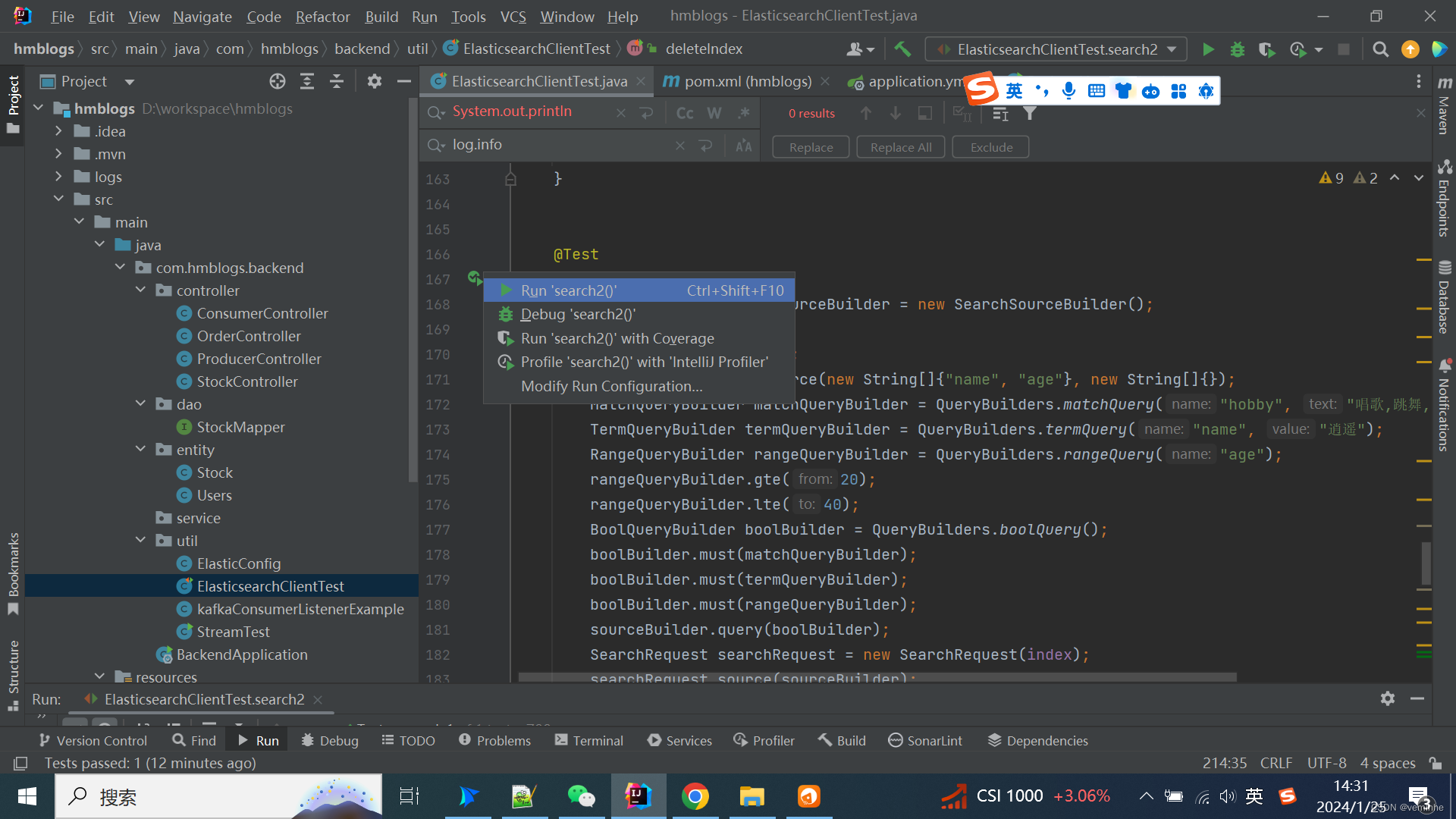
这里点击Run search2()
然后查看console的log,验证OK
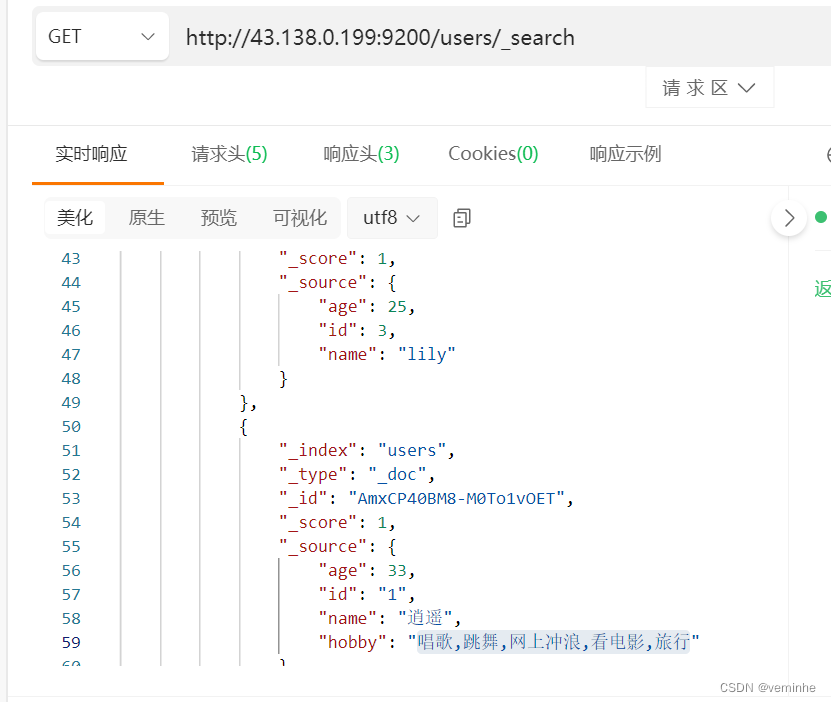
这样写代码,还是不够灵活,能不能执行自定义的SQL或者DSL语句,这样就可以不用去想办法看下Builder那些类对象怎么设置了。
其实,要想实现这样的效果,就是调用http接口而已
RestTemplateUtil.java文件内容如下:
-
- import org.springframework.beans.factory.annotation.Autowired;
- import org.springframework.http.HttpEntity;
- import org.springframework.http.HttpHeaders;
- import org.springframework.http.MediaType;
- import org.springframework.stereotype.Component;
- import org.springframework.web.client.RestTemplate;
-
- import java.util.HashMap;
- import java.util.Map;
-
- @Component
- public class RestTemplateUtil {
-
- @Autowired
- private RestTemplate restTemplate;
-
- public String post(String url,Map map){
- // 设置请求头属性
- HttpHeaders httpHeaders = new HttpHeaders();
- httpHeaders.setContentType(MediaType.APPLICATION_JSON);
- HttpEntity httpEntity = new HttpEntity(map, httpHeaders);
- String results = restTemplate.postForObject(url, httpEntity, String.class);
- return results;
- }
- }
ElasticsearchClientSqlDslTest.java类文件内容如下:
-
- import lombok.extern.slf4j.Slf4j;
- import org.junit.Test;
- import org.junit.runner.RunWith;
- import org.springframework.beans.factory.annotation.Autowired;
- import org.springframework.boot.test.context.SpringBootTest;
- import org.springframework.test.context.junit4.SpringRunner;
-
- import java.util.HashMap;
- import java.util.Map;
-
- @Slf4j
- //@Component
- @RunWith(SpringRunner.class)
- @SpringBootTest
- public class ElasticsearchClientSqlDslTest {
-
- @Autowired
- private RestTemplateUtil restTemplateUtil;
-
- @Test
- public void complexQueryEsData() {
- // 请求参数
- Map map = new HashMap<>();
- map.put("query", "SELECT id,name,age FROM users order by name desc limit 6");
- String url = "http://43.138.0.199:9200/_sql?format=json";
- String studentData = restTemplateUtil.post(url, map);
- log.info("studentData:"+studentData);
- }
- }
执行后,查出了数据,console如下截图:
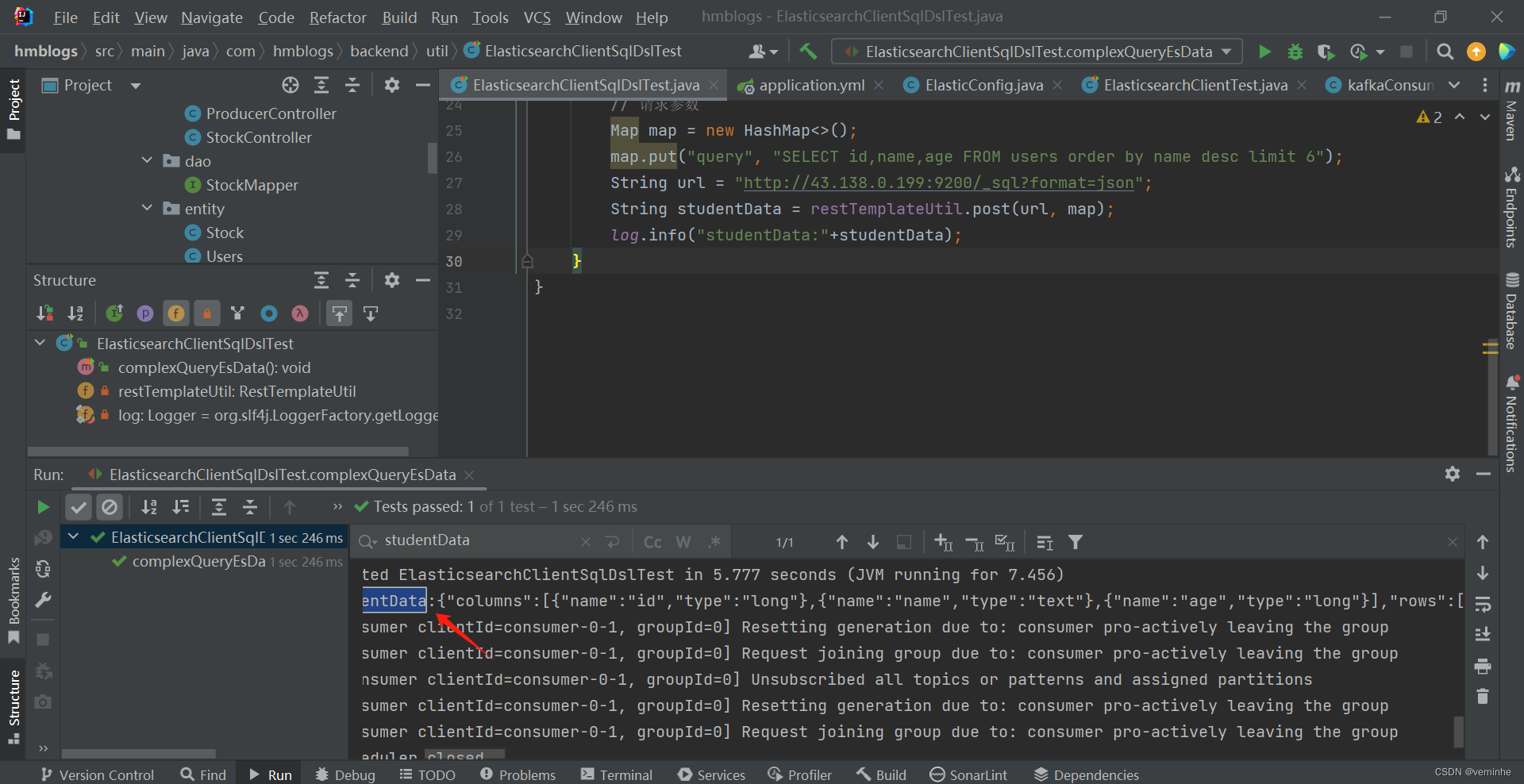
返回数据如下:
{"columns":[{"name":"id","type":"long"},{"name":"name","type":"text"},{"name":"age","type":"long"}],"rows":[[2,"隔壁老王",30],[1,"逍遥",33],[1,"小明",22],[3,"lily",25]]}
声明:本文内容由网友自发贡献,不代表【wpsshop博客】立场,版权归原作者所有,本站不承担相应法律责任。如您发现有侵权的内容,请联系我们。转载请注明出处:https://www.wpsshop.cn/article/detail/42008
推荐阅读

相关标签

