
- 12021最新版SpringBoot 速记
- 2一个 SpringBoot 项目能处理多少请求?_springboot单线程能处理多少个请求
- 3QueryWrapper的详细使用方法_querywrapper 分页
- 4openGL之API学习(七十五)opengl扩展GL_EXT_gpu_shader4
- 5怎么让linux支持yum,如何安装和使用'yum-utils'来维护Yum并提高其性能
- 6学生信息管理系统(数据库设计)_学生信息管理系统数据库设计
- 7SpringBoot 内置 Tomcat 线程数优化配置_spring boot tomcat配置线程池
- 8centos7查看资源占用情况命令_centos7 根据进程号查询目录的空间使用情况
- 9恶意代码行为_常见恶意代码列举有哪些
- 10Windows搭建Emby媒体库服务器,无公网IP远程访问本地影音文件_emby看电脑资源
R2DBC-响应式数据库
赞
踩
简单查询
基于全异步,响应式,消息驱动
用法:
1.导入驱动:导入连接池(r2dbc-pool),导入驱动(r2dbc-mysql)
2. 使用驱动提供的api操作
pom.xml
<properties>
	<r2dbc-mysql.version>1.0.5</r2dbc-mysql.version>
</properties>

    <dependencies>
        <dependency>
            <groupId>io.asyncer</groupId>
            <artifactId>r2dbc-mysql</artifactId>
            <version>${r2dbc-mysql.version}</version>
        </dependency>

        <dependency>
            <groupId>org.springframework.boot</groupId>
            <artifactId>spring-boot-starter-test</artifactId>
            <scope>test</scope>
        </dependency>
    </dependencies>

- 1
- 2
- 3
- 4
- 5
- 6
- 7
- 8
- 9
- 10
- 11
- 12
- 13
- 14
- 15
- 16
- 17
单元测试
    @Test
   public void testGetConnection() throws Exception{
       //1.获取连接工厂
       MySqlConnectionConfiguration config = MySqlConnectionConfiguration.builder()
               .host("123.57.132.54")
               .username("root")
               .password("zyl000419")
               .database("index_demo")
               .build();
       MySqlConnectionFactory factory = MySqlConnectionFactory.from(config);

       //2.获取到连接,发送sql
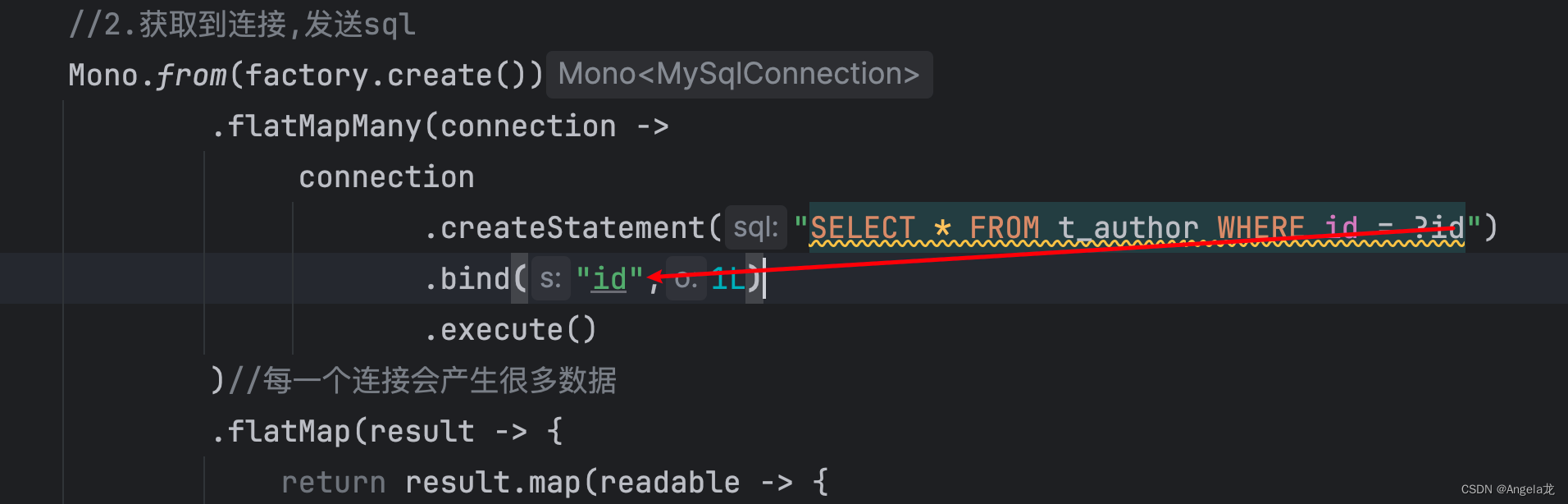
       Mono.from(factory.create())
               .flatMapMany(connection ->
                    connection
                           .createStatement("SELECT * FROM t_author WHERE id = ?id")
                           .bind("id",1L)
                           .execute()
               )//每一个连接会产生很多数据(result)
               .flatMap(result -> {
                   return result.map(readable -> {
                       Long id = readable.get("id", Long.class);
                       String name = readable.get("name", String.class);
                       return new Author(id,name);
                   });
               })
               .subscribe(System.out::println);

       System.in.read();
   }
- 1
- 2
- 3
- 4
- 5
- 6
- 7
- 8
- 9
- 10
- 11
- 12
- 13
- 14
- 15
- 16
- 17
- 18
- 19
- 20
- 21
- 22
- 23
- 24
- 25
- 26
- 27
- 28
- 29
- 30
参数赋值
spring data r2dbc-整合与自动配置
SpringBoot对r2dbc自动配置
R2dbcAutoConfiguration:主要配置连接工厂,连接池
R2dbcDataAutoConfiguration:
r2dbcEntityTemplate:操作数据库的响应式客户端,提供crud Api数据类型映射关系,转换器
自定义R2dbcCustomConversions转换器组件
数据类型 int -> integer; varchar->string
R2dbcRepositoriesAutoConfiguration:开启springboot声明式接口方式的crud
spring data 提供了基础的crud接口,不用写任何实现的情况下,可以直接具有crud功能
R2dbcTransactionManager:事物管理
导入相关依赖
        <dependency>
            <groupId>org.springframework.boot</groupId>
            <artifactId>spring-boot-starter-webflux</artifactId>
        </dependency>

        <dependency>
            <groupId>org.springframework.data</groupId>
			<artifactId>spring-data-r2dbc</artifactId>
        </dependency>
- 1
- 2
- 3
- 4
- 5
- 6
- 7
- 8
- 9
编写application.yml配置
调整日志级别,打印sql语句
spring:
  r2dbc:
    url: r2dbc:mysql://your_host:3306
    username: root
    password: your_password
    name: your_database
logging:
  level:
    org.springframework.r2dbc: debug
- 1
- 2
- 3
- 4
- 5
- 6
- 7
- 8
- 9
database client & r2dbcEntityTemplate api
创建数据库映射实体
@Data
@AllArgsConstructor
@NoArgsConstructor
@Table("t_author")
public class Author {

    private Long id;
    private String name;

}
- 1
- 2
- 3
- 4
- 5
- 6
- 7
- 8
- 9
- 10
R2dbcEntityTemplate: crudApi,join操作不好做
    @Autowired
    private R2dbcEntityTemplate template;

    @Test
    public void testR2dbcEntityTemplate() throws Exception{
        //1.构造查询条件
        Criteria criteria = Criteria.empty()
                .and("id").is(1L)
                .and("name").is("zyl");
        //2.封装为查询对象
        Query query = Query.query(criteria);
        template.select(query, Author.class)
                .subscribe(System.out::println);
        System.in.read();
    }
- 1
- 2
- 3
- 4
- 5
- 6
- 7
- 8
- 9
- 10
- 11
- 12
- 13
- 14
- 15
DatabaseClient:数据库客户端,贴近底层,join操作好做
    @Autowired
    private DatabaseClient databaseClient;

    @Test
    public void testJoin() throws IOException {
        databaseClient.sql("SELECT  * FROM t_author WHERE id = ?id")
                .bind("id",1L)
                .fetch()
                .all()
                .map(map -> {
                    String id = String.valueOf(map.get("id"));
                    String name = String.valueOf(map.get("name"));
                    return new Author(Long.valueOf(id), name);
                })
                .subscribe(System.out::println);
        System.in.read();
    }
- 1
- 2
- 3
- 4
- 5
- 6
- 7
- 8
- 9
- 10
- 11
- 12
- 13
- 14
- 15
- 16
- 17
spring data r2dbc
开启r2dbc仓库功能,jpa
@EnableR2dbcRepositories
@Configuration
public class R2dbcConfig {


}
- 1
- 2
- 3
- 4
- 5
- 6
1.写Repositories接口,默认继承一些crud方法
QBC: Query By Ctiteric
QBE: Query By Example
@Repository
public interface AuthorRepositories extends R2dbcRepository<Author,Long> {

}
- 1
- 2
- 3
- 4
测试:
复杂调价查询:
1.QBE Api(不推荐)
2.自定义方法
3.自定义sql
repositeries起名有提示,按sql起名
@Repository
public interface AuthorRepositories extends R2dbcRepository<Author,Long> {

    /**
     * where id in ? and name like ?
     */
    Flux<Author> findAllByIdInAndNameLike(Collection<Long> ids, String name);
}
- 1
- 2
- 3
- 4
- 5
- 6
- 7
- 8
测试复杂查询
    @Test
    public void testRepositories() throws IOException {
        authorRepositories.findAll()
                .subscribe(System.out::println);
        authorRepositories.findAllByIdInAndNameLike(List.of(1L),"z%")
                        .subscribe(System.out::println);
        System.in.read();
    }
- 1
- 2
- 3
- 4
- 5
- 6
- 7
- 8
控制台打印sql
SELECT t_author.id, t_author.name
FROM t_author
WHERE t_author.id IN (?) AND (t_author.name LIKE ?)
- 1
- 2
- 3
缺点:仅限单表crud
测试多表复杂查询
自定义注解@Query(),指定sql语句
1-1查询:一个图书有一个作者
1-n查询:一个作者写了多本图书
实体类Book
@Data
@Table("t_book")
public class Book {

    @Id
    private Long id;
    private String title;
    private Long authorId;
    private LocalDateTime publishTime;

}
- 1
- 2
- 3
- 4
- 5
- 6
- 7
- 8
- 9
- 10
- 11
repositorues
@Repository
public interface BookRepositories extends R2dbcRepository<Book,Long> {

    @Query("SELECT book.title,author.name " +
            "FROM index_demo.t_book book " +
            "LEFT JOIN index_demo.t_author author " +
            "ON book.author_id = author.id " +
            "WHERE book.id = :bookId")
    Mono<Book> findBookAndAuthor(Long bookId);
}
- 1
- 2
- 3
- 4
- 5
- 6
- 7
- 8
- 9
- 10
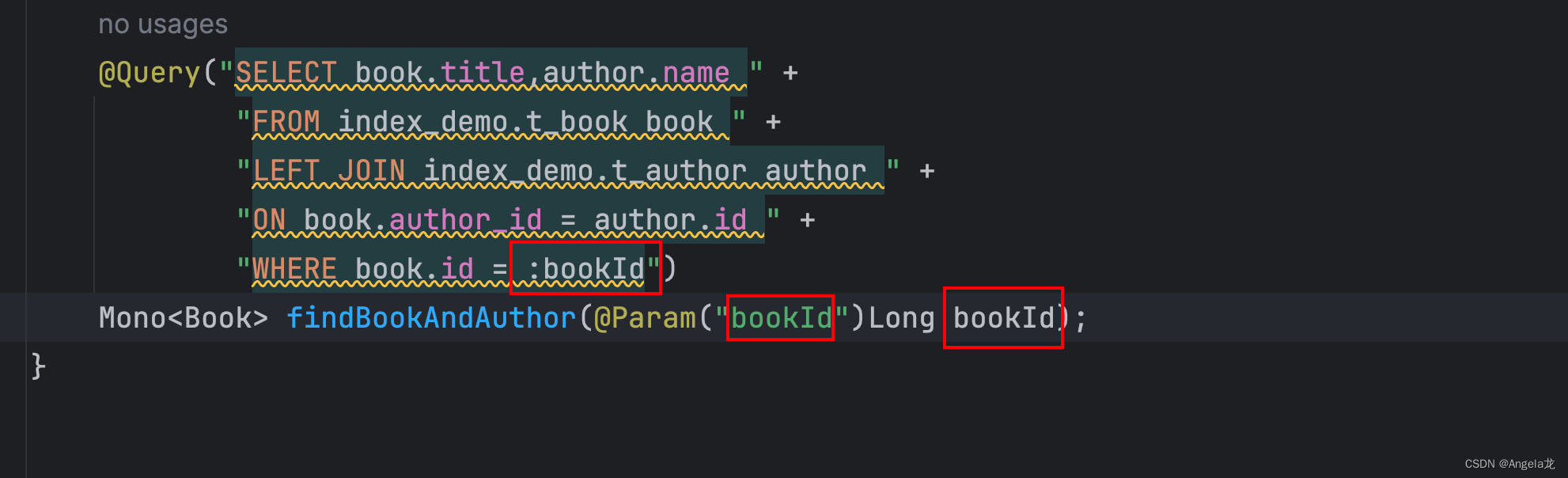
绑定查询参数:
自定义结果转换器
@ReadingConverter//读取数据库数据时,把row->book
public class BookConverter implements Converter<Row, Book> {
    @Override
    public Book convert(Row source) {
         if (ObjectUtils.isEmpty(source)) {
            return new Book();
        }
        String title = source.get("title", String.class);
        String authorName = source.get("name", String.class);
        Book book = new Book();
        Author author = new Author();
        author.setName(authorName);
        book.setAuthor(author);
        book.setTitle(title);
        return book;
    }
}
- 1
- 2
- 3
- 4
- 5
- 6
- 7
- 8
- 9
- 10
- 11
- 12
- 13
- 14
- 15
- 16
- 17
配置自定义类型转换器
@EnableR2dbcRepositories
@Configuration
public class R2dbcConfig {

    /**
     * 将自己定义的转换器加入进去
     */
    @Bean
    @ConditionalOnMissingBean
    public R2dbcCustomConversions conversions () {
        return R2dbcCustomConversions.of(MySqlDialect.INSTANCE,new BookConverter());
    }

}
- 1
- 2
- 3
- 4
- 5
- 6
- 7
- 8
- 9
- 10
- 11
- 12
- 13
- 14
测试
    @Test
    public void testQueryMulti() throws Exception{
        bookRepositories.findBookAndAuthor(1L)
                .subscribe(System.out::println);
        System.in.read();
    }
- 1
- 2
- 3
- 4
- 5
- 6
总结:
1.spring data R2DBC 基础的CRUD用R2dbcRepository 提供好了
2.自定义复杂的sql(单表):@Query()
3.多表查询复杂结果集合:DatabaseClient自定义sql,自定义结果封装
@Query+自定义converter实现结果封装
自定义转换器问题:对以前crud产生影响
Converter<Row,Book>:把数据库每一行row,转换成book
工作时机:spring data发现方法签名只要是返回Book,利用自定义转换器工作
所有对Book结果封装都使用转换器,包括单表查询
解决方法1:新VO+新的Repositories+自定义类型转换器
BookauthorVO
@Data
public class BookAuthorVO {

    private Long id;
    private String title;
    private Long authorId;
    private LocalDateTime publishTime;

    private Author author;//每一本书有唯一作者
}
- 1
- 2
- 3
- 4
- 5
- 6
- 7
- 8
- 9
- 10
自定义BookAuthorRepositories
@Repository
public interface BookAuthorRepositories extends R2dbcRepository<BookAuthorVO,Long> {

    @Query("SELECT book.title,author.name " +
            "FROM index_demo.t_book book " +
            "LEFT JOIN index_demo.t_author author " +
            "ON book.author_id = author.id " +
            "WHERE book.id = :bookId")
    Mono<Book> findBookAndAuthor(@Param("bookId")Long bookId);
}
- 1
- 2
- 3
- 4
- 5
- 6
- 7
- 8
- 9
- 10
自定义BookAuthor转换器
@ReadingConverter//读取数据库数据时,把row->book
public class BookAuthorConverter implements Converter<Row, BookAuthorVO> {
    @Override
    public BookAuthorVO convert(Row source) {
        if (ObjectUtils.isEmpty(source)) {
            return new BookAuthorVO();
        }
        String title = source.get("title", String.class);
        String authorName = source.get("name", String.class);
        BookAuthorVO book = new BookAuthorVO();
        Author author = new Author();
        author.setName(authorName);
        book.setAuthor(author);
        book.setTitle(title);
        return book;
    }
}
- 1
- 2
- 3
- 4
- 5
- 6
- 7
- 8
- 9
- 10
- 11
- 12
- 13
- 14
- 15
- 16
- 17
解决方法2:自定义转换器中增加判断
source.getMetaData.contains(“”)
让converter兼容更多表结构(推荐!!!)
@ReadingConverter//读取数据库数据时,把row->book
public class BookAuthorConverter implements Converter<Row, BookAuthorVO> {
    @Override
    public BookAuthorVO convert(Row source) {
        if (ObjectUtils.isEmpty(source)) {
            return new BookAuthorVO();
        }
        String title = source.get("title", String.class);
        BookAuthorVO book = new BookAuthorVO();
        book.setTitle(title);
        if (source.getMetadata().contains("name")) {
            String authorName = source.get("name", String.class);
            Author author = new Author();
            author.setName(authorName);
            book.setAuthor(author);
        }
        return book;
    }
}
- 1
- 2
- 3
- 4
- 5
- 6
- 7
- 8
- 9
- 10
- 11
- 12
- 13
- 14
- 15
- 16
- 17
- 18
- 19
经验:
1-1/1-n都需要自定义结果集
spring data R2dbc:自定义converter指定结果封装
mybatis:自定义resultMap标签来封装
BufferUntilChanged操作
如果下一个判定值,比起上一个发生了变化,就开一个新buffer保存
如果没有变化,就保存到原buffer中
前提:数据已经提前排好序
groupBy:允许乱序
作者有很多图书. 1:n
sql
SELECT author.name,author.id,book.title
FROM index_demo.t_author author
LEFT JOIN index_demo.t_book book
ON author.id = book.author_id
WHERE author.id = 1;
- 1
- 2
- 3
- 4
- 5
测试
    @Test
    public void testAuthorBookTest() throws Exception {
        databaseClient.sql("SELECT author.name,author.id,book.title " +
                        "FROM index_demo.t_author author " +
                        "LEFT JOIN index_demo.t_book book " +
                        "ON author.id = book.author_id " +
                        "WHERE author.id = ?id")
                .bind("id", 1L)
                .fetch()
                .all()
                .bufferUntilChanged(rowMap -> Long.parseLong(String.valueOf(rowMap.get("id"))))
                //id发生变化,重新分组,若是对象比较,需重写equals()方法
                .map(list -> {
                    if (CollectionUtils.isEmpty(list)) {
                        return Collections.emptyList();
                    }
                    List<Book> bookList = list.stream()
                            .map(item -> {
                                String title = String.valueOf(item.get("title"));
                                return Book.builder()
                                        .title(title)
                                        .build();
                            })
                            .toList();
                    return Author.builder()
                            .id(Long.valueOf(String.valueOf(list.get(0).get("id"))))
                            .name(String.valueOf(list.get(0).get("name")))
                            .bookList(bookList);
                })
                .subscribe(System.out::println);
        System.in.read();
    }
- 1
- 2
- 3
- 4
- 5
- 6
- 7
- 8
- 9
- 10
- 11
- 12
- 13
- 14
- 15
- 16
- 17
- 18
- 19
- 20
- 21
- 22
- 23
- 24
- 25
- 26
- 27
- 28
- 29
- 30
- 31
- 32


