
热门标签
热门文章
- 1【Jetson】通过操作 Rosmaster 使用 Python 语言快速熟悉并操作小车_python通过tcp协议与无人车小车建立通信rosmaster
- 2粤嵌电子相册项目 代码分享_粤嵌电子相册代码
- 3APT(Advanced Persistent Threat高级持续性威胁)——网络安全_网络安全中什么叫apt
- 4Unity Shader零基础入门1:纯色物体_unity3d物体没有白色
- 5第三章 接口和API设计
- 6【C语言】动态内存管理之4个内存函数`malloc`,`free`,`calloc`和`realloc`深度了解
- 7基于LM2596和ESP32的数控直流电源_lm2569数控电源
- 8【U3D】播放器设置(PlayerSettings)
- 9.sh文件执行方式_运行.sh 文件显示要选着打开方式
- 10全覆盖路径规划——ccpp
当前位置: article > 正文
helm 安装ingress nginx 4.5.2_helm安装ingress-nginx修改配置文件
作者:算法优化者 | 2024-01-17 09:06:47
赞
踩
helm安装ingress-nginx修改配置文件
目录
前期准备
ingress-nginx-4.5.2.tgz:ingress nginx安装包
helm-v3.11.1-linux-amd64.tar.gz: helm 工具
lvs集群
开始安装
1.下载安装包和helm工具
- ingress ingress 安装包
- github地址:https://github.com/kubernetes/ingress-nginx/releases/download/helm-chart-4.5.2/ingress-nginx-4.5.2.tgz
- wget -P /opt/k8s-install/ http://10.120.175.36/ingress-nginx-4.5.2.tgz #我将安装包放在了内网
-
- helm 工具包
- wget -P /opt/k8s-install/ http://10.120.175.36/helm-v3.11.1-linux-amd64.tar.gz
2. 解压文件并配置helm
- 解压并改名
- cd /opt/k8s-install/
- tar -xf ingress-nginx-4.5.2.tgz
- mv ingress-nginx ingress-yidian-inc-nginx1
-
- 解压helm
- tar xf helm-v3.11.1-linux-amd64.tar.gz
- mv linux-amd64/helm /bin/
-
- 测试
- [root@l-shake-k8s-master1 package]$ helm version
- version.BuildInfo{Version:"v3.11.1", GitCommit:"293b50c65d4d56187cd4e2f390f0ada46b4c4737", GitTreeState:"clean", GoVersion:"go1.18.10"}
3. 修改nginx配置文件(只记录修改的部分)
修改values文件
vim /opt/k8s-install/ingress-nginx/ingress-yidian-inc-nginx1/values.yaml
- registry: harbor-sh.yidian-inc.com #修改为自己的私有仓库地址
- image: ingress-nginx/controller #镜像路径和名称
-
- tag: "v1.6.4" #镜像tag
-
- #digest: sha256:15be4666c53052484dd2992efacf2f50ea77a78ae8aa21ccd91af6baaa7ea22f #注释掉
-
- hostNetwork: true
-
- priorityClassName: high-priority
-
- config: #增加优化配置项,实际有很多参数都有默认参数,根据实际情况进行修改
- # nginx 与 client 保 持 的 一 个 长 连 接 能 处 理 的 请 求 数 量 , 默 认 100, 高 并 发 场 景 建 议 调 高 。
- # 参 考 : https://kubernetes.github.io/ingress-nginx/user-guide/nginx-configuration/configmap/#keep-alive-requests
- keep-alive-requests: "10000"
- # nginx 与 upstream 保 持 长 连 接 的 最 大 空 闲 连 接 数 (不 是 最 大 连 接 数 ), 默 认 32, 在 高 并 发 下 场 景 下 调 大 , 避 免 频 繁 建 连 导 致 TIME_WAIT 飙 升 。
- # 参 考 : https://kubernetes.github.io/ingress-nginx/user-guide/nginx-configuration/configmap/#upstream-keepalive-connections
- upstream-keepalive-connections: "200"
- # 每 个 worker 进 程 可 以 打 开 的 最 大 连 接 数 , 默 认 16384。
- # 参 考 : https://kubernetes.github.io/ingress-nginx/user-guide/nginx-configuration/configmap/#max-worker-connections
- max-worker-connections: "65536"
- #每 个 work可 以 打 开 的 最 大 文 件 数 , 默 认 0.
- #参 考 : http://nginx.org/en/docs/ngx_core_module.html#worker_rlimit_nofile
- max-worker-open-files: "655350"
- #参 考 : http://nginx.org/en/docs/ngx_core_module.html#worker_cpu_affinity
- worker-cpu-affinity: "auto"
- #参 考 : http://nginx.org/en/docs/ngx_core_module.html#worker_processes
- worker-processes: "auto"
- #参 考 :
- server-tokens: "false"
- # http://nginx.org/en/docs/http/ngx_http_core_module.html#default_type
- default-type: "application/octet-stream"
- #https://kubernetes.github.io/ingress-nginx/user-guide/nginx-configuration/configmap/#custom-http-errors
- #custom-http-errors: "503,504"
- #log
- access-log-path: "/var/log/nginx/nginx-access.log"
- error-log-path: "/var/log/nginx/nginx-error.log"
- #全 局 禁 用 308重 定 向
- ssl-redirect: "false"
- #禁 用 geoip
- use-geoip: "false"
- server-name-hash-bucket-size: "128"
- client-body-timeout: "60"
- client-header-buffer-size: "8k"
- large-client-header-buffers: "4 32k"
- proxy-body-size: "256m"
- client-body-buffer-size: "128k"
- http2-max-concurrent-streams: "64"
- http2-max-field-size: "16k"
- keep-alive: "30"
- proxy-connect-timeout: "15"
- proxy-send-timeout: "60"
- proxy-read-timeout: "60"
- proxy-buffer-size: "128k"
- proxy-buffers-number: "32"
- proxy-headers-hash-max-size: "51200"
- proxy-headers-hash-bucket-size: "6400"
- proxy-next-upstream: "error timeout http_500 http_502 http_503 http_504"
- use-gzip: "true"
- gzip-min-length: "1000"
- gzip-level: "1"
- gzip-types: "text/plain application/x-javascript text/css application/xml application/json"
- ssl-protocols: "TLSv1 TLSv1.1 TLSv1.2"
- ssl-ciphers: "ECDHE-RSA-AES128-GCM-SHA256:AES256+EECDH:AES256+EDH"
- ssl-buffer-size: "16k"
- ssl-session-cache: "true"
- ssl-session-timeout: "5m"
- ssl-dh-param: "/etc/nginx/pem/dhparam.pem"
- log-format-upstream: "$time_local|$hostname|$remote_addr|$upstream_addr|$request_time|$upstream_response_time|$upstream_connect_time|$status|$upstream_status|-|$bytes_sent|$body_bytes_sent|-|$request|$http_user_agent|$http_refere
- r|^_^|$scheme|$request_method|$request_id|-|^_^|-|$cookie_jsessionid"
-
- dnsPolicy: ClusterFirstWithHostNet #在k8s的网络中解析service name
-
- ingressClassResource:
- # -- Name of the ingressClass
- name: ingress-yidian-inc-nginx1 #ingress Class名称
-
- ingressClass: ingress-yidian-inc-nginx1
-
- kind: DaemonSet #DaemonSet方式部署
-
- #一定要修改,不然就会出现一个控制器管理多组nginx 代理层,配置都会创建多份(ingress nginx的个数),也会导致controller有瓶颈风险
- controllerValue: "k8s.io/ingress-yidian-inc-nginx1"
-
- nodeSelector: #设置部署nginx 匹配标签
- kubernetes.io/os: linux
- ingress-yidian-inc-nginx1: "true"
-
- patch:
- enabled: true
- image:
- registry: harbor-sh.yidian-inc.com
- image: ingress-nginx/kube-webhook-certgen
-
- tag: v1.6.4
- #digest: sha256:39c5b2e3310dc4264d638ad28d9d1d96c4cbb2b2dcfb52368fe4e3c63f61e10f #注释掉

设置优先级
nginx-controller-priority.yaml
- apiVersion: scheduling.k8s.io/v1
- kind: PriorityClass
- metadata:
- name: high-priority
- value: 1000000000
- globalDefault: false
- description: "This priority class should be used for nginx-ingress-controller service pods only."
kubectl apply -f nginx-controller-priority.yaml4. 安装ingress nginx
给节点打标签
- kubectl label node 10.120.129.10 ingress-yidian-inc-nginx1=true
- kubectl label node 10.120.129.11 ingress-yidian-inc-nginx1=true
- 安装ingress nginx
- helm install ingress-yidian-inc-nginx1 -f values.yaml -n ingress-yidian-inc-nginx1 .
- 执行后会出现如下提示
- [root@l-shake-k8s-master1 ingress-yidian-inc-nginx1]$ helm install ingress-yidian-inc-nginx1 -f values.yaml -n ingress-yidian-inc-nginx1 .
-
-
- NAME: ingress-yidian-inc-nginx1
- LAST DEPLOYED: Mon Mar 6 11:03:24 2023
- NAMESPACE: ingress-yidian-inc-nginx1
- STATUS: deployed
- REVISION: 1
- TEST SUITE: None
- NOTES:
- The ingress-nginx controller has been installed.
- It may take a few minutes for the LoadBalancer IP to be available.
- You can watch the status by running 'kubectl --namespace ingress-yidian-inc-nginx1 get services -o wide -w ingress-yidian-inc-nginx1-ingress-nginx-controller'
-
- An example Ingress that makes use of the controller:
- apiVersion: networking.k8s.io/v1
- kind: Ingress
- metadata:
- name: example
- namespace: foo
- spec:
- ingressClassName: ingress-yidian-inc-nginx1
- rules:
- - host: www.example.com
- http:
- paths:
- - pathType: Prefix
- backend:
- service:
- name: exampleService
- port:
- number: 80
- path: /
- # This section is only required if TLS is to be enabled for the Ingress
- tls:
- - hosts:
- - www.example.com
- secretName: example-tls
-
- If TLS is enabled for the Ingress, a Secret containing the certificate and key must also be provided:
-
- apiVersion: v1
- kind: Secret
- metadata:
- name: example-tls
- namespace: foo
- data:
- tls.crt:
- tls.key:
- type: kubernetes.io/tls
-
-
- [root@l-shake-k8s-master1 ingress-yidian-inc-nginx1]$ kubectl get ingressclasses.networking.k8s.io
- NAME CONTROLLER PARAMETERS AGE
- ingress-yidian-inc-nginx1 k8s.io/ingress-nginx 113m
-
-
- ingress nginx 卸载
- helm uninstall ingress-yidian-inc-nginx1 -n ingress-yidian-inc-nginx1
5. 测试
kubectl apply -f nginx.yaml- apiVersion: apps/v1
- kind: Deployment
- metadata:
- name: my-deploy-nginx
- namespace: default
- spec:
- replicas: 2
- selector:
- matchLabels:
- app: mynginx
- template:
- metadata:
- labels:
- app: mynginx
- spec:
- containers:
- - name: mynginx
- image: harbor-sh.yidian-inc.com/kubernetes-1.26.1/nginx
- ports:
- - containerPort: 80
- ---
- kind: Service
- apiVersion: v1
- metadata:
- name: myservice
- namespace: default
- spec:
- ports:
- - protocol: TCP
- port: 80
- targetPort: 80
- selector:
- app: mynginx
- type: ClusterIP
- ---
- apiVersion: networking.k8s.io/v1
- kind: Ingress
- metadata:
- name: mynginx
- namespace: default # 指 定 ingress的 命 名 空 间 , 害 怕 与 其 它 Pod IP冲 突
- spec:
- ingressClassName: "ingress-yidian-inc-nginx1" #在 部 署 ingress-nginx时 , valume.yaml文 件 中 定 义 的
- rules:
- - host: sunwenbo-nginx.yidian-inc.com
- http:
- paths:
- - path: /
- pathType: Prefix
- backend:
- service:
- name: myservice
- port:
- number: 80
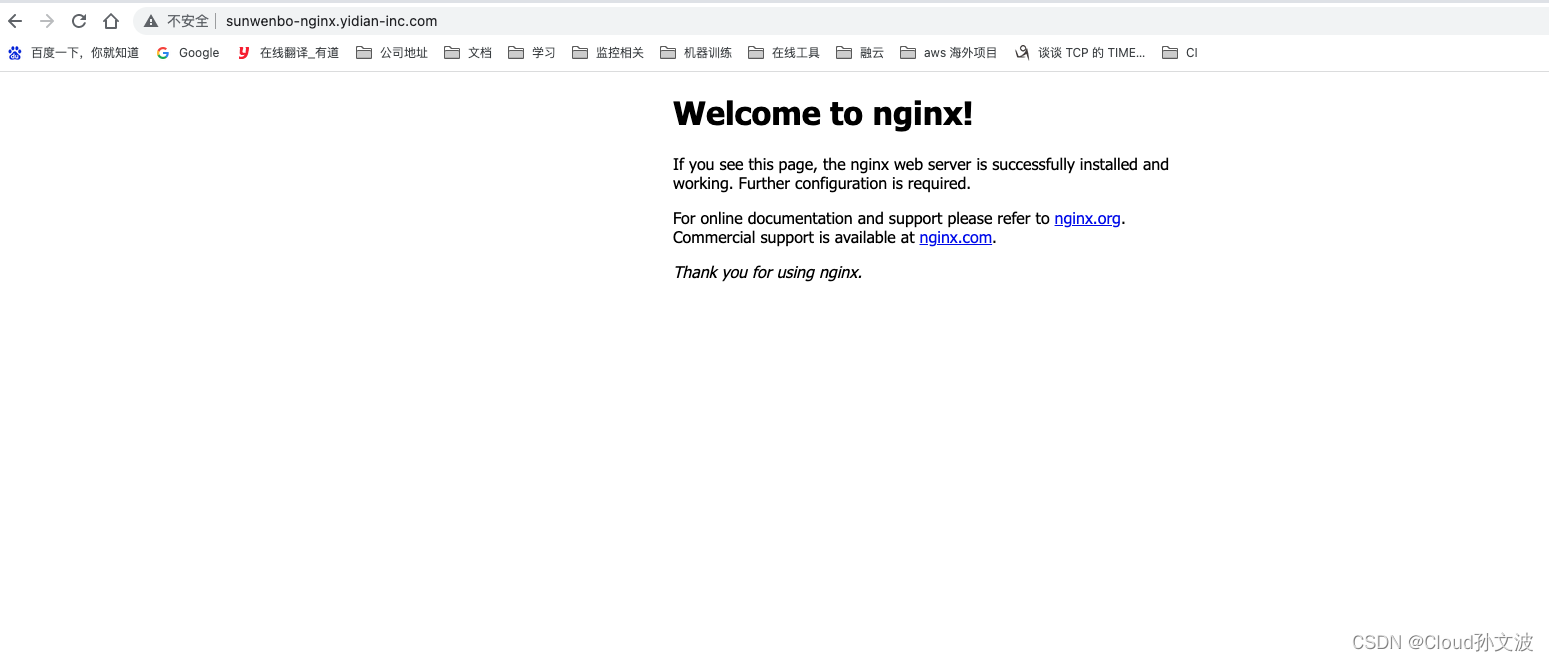
绑定hosts进行访问测试
声明:本文内容由网友自发贡献,不代表【wpsshop博客】立场,版权归原作者所有,本站不承担相应法律责任。如您发现有侵权的内容,请联系我们。转载请注明出处:https://www.wpsshop.cn/article/detail/40735
推荐阅读
相关标签

