
热门标签
热门文章
- 1Ubuntu 设置开机自启服务_ubuntu开机自启动
- 2Diffusion Models专栏文章汇总:入门与实战_cyclediffusion
- 3iOS 自动打包如何配置配置打包证书和profile provision文件【脚本方式配置】
- 4高并发的简单处理方式
- 5java开发工程师p2级别_Java程序员等级怎么划分?
- 6“Tomcat最大支持多少个请求”_tomcat最多处理多少并发
- 7Oracle12c之Sqlplus命令行窗口基本使用
- 8docker 环境安装 基础_网络安装docker所需的基础环境,截图如下:
- 9解决mongo 端口占用问题_[initandlisten] detected unclean shutdown - /opt/m
- 10JS下载文件的三种方法_window.download
当前位置: article > 正文
GMap.NET 使用教程【2】_gmapcontrol关闭
作者:数据可视化灵魂 | 2024-01-16 14:53:51
赞
踩
gmapcontrol关闭
1、GMap体系详解
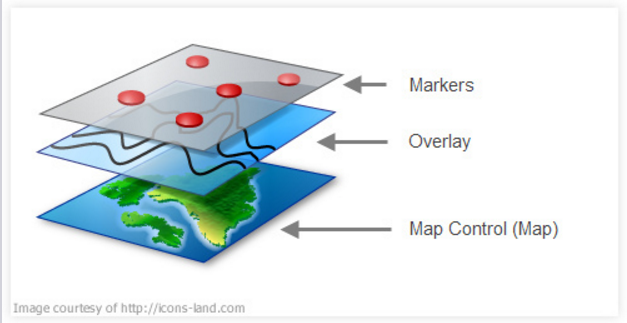
- What is the map control (GMapControl)? This is the control which renders the map.
- What is an Overlay (GMapOverlay)? This is a layer on top of the map control. You can have several layers on top of a map, each layer representing, say, a route with stops, a list of stores etc.
- What are Markers (GMapMarker)? These are the points on a layer, each representing a specific geo location (Lat,Lon) e.g. each drop point on a route.
- What is a route (GMapRoute)? This is the path or direction between two or more poin
2、c# 使用GMap 实现具体的功能(加载地图、放大、缩小、鹰眼、添加点线面、自定义marker、截图、下载缓存)
注:添加GMap.NET.Core.dll 和 GMap.NET.WindowsForms.dll文件,引用后使用GMap的控件。
2.1 加载地图
这里直接调用了SuperMap iServer REST服务。调用第三方地图服务参考 http://www.cnblogs.com/luxiaoxun/p/3364107.html
2.2 放大、缩小地图
- private void tsbZoomIn_Click(object sender, EventArgs e)
- {
- this.mapControl1.Zoom += 1;
- }
-
- private void tsbZoomOut_Click(object sender, EventArgs e)
- {
- this.mapControl1.Zoom -= 1;
- }
-
- //定义的地图控件缩放变化后对应的事件
-
- private void mapControl1_OnMapZoomChanged()
- {
- double zoom = this.mapControl1.Zoom - Convert.ToDouble(5);
- this.mapControl2.Zoom = zoom; //设置地图缩放大小
-
- }

2.3 鹰眼
需要2个地图控件,同时缩放、移动,实现联动的效果。

gMapControl1 事件设置代码:
- private bool Mapleft1 = false;
- private void gMapControl1_MouseDown(object sender, MouseEventArgs e)
- {
- if (e.Button == MouseButtons.Left)
- {
- Mapleft1 = true;
- }
- }
-
- private void gMapControl1_MouseUp(object sender, MouseEventArgs e)
- {
- if (e.Button == MouseButtons.Left)
- {
- Mapleft1 = false;
- }
- }
-
- private void gMapControl1_OnPositionChanged(PointLatLng point)
- {
- if (Mapleft1)
- {
- this.gMapControl2.Position = point; //设置小地图中心点
- }
- }
- private void gMapControl1_OnMapZoomChanged()
- {
- double zoom = this.gMapControl1.Zoom - Convert.ToDouble(5);
- this.gMapControl2.Zoom = zoom; //设置地图缩放大小
- }
gMapControl2 事件设置代码:
- private bool Mapleft2 = false;
- private void gMapControl2_MouseMove(object sender, MouseEventArgs e)
- {
- lastPosition1 = this.gMapControl1.FromLocalToLatLng(e.X, e.Y);
- }
-
- private void gMapControl2_MouseUp(object sender, MouseEventArgs e)
- {
- if (e.Button==MouseButtons.Left)
- {
- Mapleft2 = false;
- }
- }
-
- private void gMapControl2_MouseDown(object sender, MouseEventArgs e)
- {
- if (e.Button == MouseButtons.Left)
- {
- this.gMapControl1.Position = lastPosition1; //鼠标单击设置gMapControl1.中心点
- Mapleft2 = true;
- }
- }
-
- private void gMapControl2_OnPositionChanged(PointLatLng point)
- {
- if (Mapleft2)
- {
- this.gMapControl1.Position = point; //设置gMapControl1中心点
- }
- }
2.4 添加点线面
以添加点对象为例:
- IAction _editAddAlarmAction = null;
-
- //添加告警源
- private void tsbAddAlarm_Click_1(object sender, EventArgs e)
- {
- if (_editAddAlarmAction == null)
- {
- _editAddAlarmAction = new AddAlarmAction();
- }
- this.mapControl1.CurrentAction = _editAddAlarmAction;
- ToolCheckChanged((sender as ToolStripItem).Name);
- }
- public class AddAlarmAction : Action
- {
-
- List<Feature> targetFeatures = null;
-
- private GMapControl _gMapControl = null;
- private GMapOverlay markerOverlay = new GMapOverlay("addalarm");
- private bool _start = false;
- List<PointLatLng> _points = null;
- List<Point2D> _point2Ds = new List<Point2D>();
- private string _mapUrl = string.Empty;
- private string _mapName = string.Empty;
- Map _map = null;
-
- public override void OnLoad(GMapControl gMapControl)
- {
- _gMapControl = gMapControl;
- _gMapControl.Overlays.Add(markerOverlay);
- _points = new List<PointLatLng>();
- _start = false;
- this._mapUrl = ((SuperMapProvider)gMapControl.MapProvider).ServiceUrl;
- this._mapName = ((SuperMapProvider)gMapControl.MapProvider).MapName;
- this._map = new Map(this._mapUrl);
- }
- public override void OnMapMouseDown(object sender, MouseEventArgs e)
- {
- PointLatLng currentPoint = this._gMapControl.FromLocalToLatLng(e.X, e.Y);
- double mercatorX, mercatorY;
- Helper.LonLat2Mercator(currentPoint.Lng, currentPoint.Lat, out mercatorX, out mercatorY);
- Point2D point2D = new Point2D(mercatorX, mercatorY);
-
- _point2Ds.Add(point2D);
- _points.Add(currentPoint);
- if (_start)
- {
- GMapMarker marker = new GMapMarkerImage(currentPoint, new Bitmap("C:\\Users\\yaohui\\Desktop\\iClient-for-DotNet-master\\iClient-for-DotNet-master\\Demo\\demo.winform\\Resources\\sign-warning-icon.png"));
- markerOverlay.Markers.Add(marker);
- marker.ToolTipText = "告警源编号:";
- marker.ToolTip.Fill = Brushes.Blue;
- marker.ToolTip.Foreground = Brushes.White;
- marker.ToolTip.Stroke = Pens.Black;
- marker.ToolTip.TextPadding = new Size(20, 20);
- marker.ToolTipMode = MarkerTooltipMode.OnMouseOver;
- }
- _start = true;
-
- }
- public override void OnMapMouseDoubleClick(object sender, MouseEventArgs e)
- {
- if (!_start) return;
- PointLatLng currentPoint = this._gMapControl.FromLocalToLatLng(e.X, e.Y);
- double mercatorX, mercatorY;
- Helper.LonLat2Mercator(currentPoint.Lng, currentPoint.Lat, out mercatorX, out mercatorY);
- Point2D point2D = new Point2D(mercatorX, mercatorY);
- markerOverlay.Markers.Clear();
- _points.Clear();
- _point2Ds.Clear();
- _start = false;
- }
-
- }
2.5 自定义marker
通过继承gmap的marker类,进行扩展:(这里添加了符号高亮的画笔)
- using GMap.NET.WindowsForms;
- using System;
- using System.Collections.Generic;
- using System.Drawing;
- using System.Linq;
- using System.Text;
- using System.Windows.Forms;
-
-
-
- namespace gmap.demo.winform
- {
- class GMapMarkerImage : GMapMarker
- {
- private Image image;
- public Image Image
- {
- get
- {
- return image;
- }
- set
- {
- image = value;
- if (image != null)
- {
- this.Size = new Size(image.Width, image.Height);
- }
- }
- }
-
- public bool IsHighlight = true;
- public Pen HighlightPen
- {
- set;
- get;
- }
-
- public Pen FlashPen
- {
- set;
- get;
- }
- public Pen OutPen
- {
- get;
- set;
- }
- private Timer flashTimer = new Timer();
-
- private int radius;
- private int flashRadius;
-
- public GMapMarkerImage(GMap.NET.PointLatLng p, Image image)
- : base(p)
- {
- Size = new System.Drawing.Size(image.Width, image.Height);
- Offset = new System.Drawing.Point(-Size.Width / 2, -Size.Height / 2);
- Image = image;
- HighlightPen = new System.Drawing.Pen(Brushes.Red, 2);
- radius = Size.Width >= Size.Height ? Size.Width : Size.Height;
- flashTimer.Interval = 10;
- flashTimer.Tick += new EventHandler(flashTimer_Tick);
- }
-
- void flashTimer_Tick(object sender, EventArgs e)
- {
- if (FlashPen == null)
- {
- FlashPen = new Pen(Brushes.Red, 3);
- flashRadius = radius;
- }
- else
- {
- flashRadius += radius / 4;
- if (flashRadius >= 2 * radius)
- {
- flashRadius = radius;
- FlashPen.Color = Color.FromArgb(255, Color.Red);
- }
- else
- {
- Random rand = new Random();
- int alpha = rand.Next(255);
- FlashPen.Color = Color.FromArgb(alpha, Color.Red);
- }
- }
- }
- //this.Overlay.Control.Refresh();
- //this.mapControl1.Refresh();
-
- public void StartFlash()
- {
- flashTimer.Start();
- }
- public void StopFlash()
- {
- flashTimer.Stop();
- if (FlashPen != null)
- {
- FlashPen.Dispose();
- FlashPen = null;
- }
- }
- //this.mapControl1.Refresh();
-
- public override void OnRender(Graphics g)
- {
- if (image == null)
- return;
-
- Rectangle rect = new Rectangle(LocalPosition.X, LocalPosition.Y, Size.Width, Size.Height);
- g.DrawImage(image, rect);
-
- if (IsMouseOver && IsHighlight)
- {
- g.DrawRectangle(HighlightPen, rect);
- }
-
- if (FlashPen != null)
- {
- g.DrawEllipse(FlashPen,
- new Rectangle(LocalPosition.X - flashRadius / 2 + Size.Width / 2, LocalPosition.Y - flashRadius / 2 + Size.Height / 2, flashRadius, flashRadius));
- }
- }
- //public override void Dispose()
- //{
- // if (HighlightPen != null)
- // {
- // HighlightPen.Dispose();
- // HighlightPen = null;
- // }
- // if (FlashPen != null)
- // {
- // FlashPen.Dispose();
- // FlashPen = null;
- // }
- //}
- }
- }
2.6 截图
- //地图保存为图片
- private void toolStripButton6_Click(object sender, EventArgs e)
- {
- try
- {
- using (SaveFileDialog dialog = new SaveFileDialog())
- {
- dialog.Filter = "PNG (*.png)|*.png";
- dialog.FileName = "GMap.NET image";
- Image image = this.mapControl1.ToImage();
- if (image != null)
- {
- using (image)
- {
- if (dialog.ShowDialog() == DialogResult.OK)
- {
- string fileName = dialog.FileName;
- if (!fileName.EndsWith(".png", StringComparison.OrdinalIgnoreCase))
- {
- fileName += ".png";
- }
- image.Save(fileName);
- MessageBox.Show("图片已保存: " + dialog.FileName, "GMap.NET", MessageBoxButtons.OK, MessageBoxIcon.Asterisk);
- }
- }
- }
- }
- }
- catch (Exception exception)
- {
- MessageBox.Show("图片保存失败: " + exception.Message, "GMap.NET", MessageBoxButtons.OK, MessageBoxIcon.Hand);
- }
- }
2.7 保存缓存
- //保存缓存
- private void toolStripButton7_Click(object sender, EventArgs e)
- {
- if (this.mapControl1.ShowExportDialog() == true)
- {
- //this.gMapControl1.ShowTileGridLines = true;//显示瓦片,也就是显示方格
- this.mapControl1.ReloadMap();
- }
- }
3、iclient for .net 模拟B/S实现报警闪烁demo展示

4、参考
http://www.cnblogs.com/luxiaoxun/p/3494756.html
http://blog.csdn.net/sunsun1203/article/details/53816464
http://www.cnblogs.com/luxiaoxun/p/3475355.html
http://blog.sina.com.cn/s/blog_819100560101dgng.html
原文链接:https://www.cnblogs.com/yaohuimo/p/6255396.html
感谢博主!
声明:本文内容由网友自发贡献,不代表【wpsshop博客】立场,版权归原作者所有,本站不承担相应法律责任。如您发现有侵权的内容,请联系我们。转载请注明出处:https://www.wpsshop.cn/article/detail/40419
推荐阅读

相关标签

