
热门标签
热门文章
- 1【爬虫实战】用Python采集任意小红书笔记下的评论,爬了10000多条,含二级评论!_python 爬取小红书
- 2数据结构奇妙旅程之栈和队列
- 3前端开发新趋势:Web3、区块链和虚拟现实
- 42023年总结的web前端学习路线分享(学习导读)
- 52023年最新Java八股文面试题,面试应该是够用了(吊打面试官)
- 6云原生架构的核心技术(微服务、DevOps、容器云、Service Mesh、Serverless、声明式API)
- 7【Docker】深入理解Docker:一种革新性的容器技术
- 8Python江西南昌二手房源爬虫数据可视化分析大屏全屏系统 开题报告
- 9理解Web3公链共识算法的原理与机制
- 10Apollo开放平台9.0让自动驾驶开发者轻松上手_apollo9.0
当前位置: article > 正文
C# WinForm开发 GMap离线地图_c# 地图
作者:思考机器 | 2024-01-16 14:51:45
赞
踩
c# 地图
一、概述
- GMap.NET是一个强大、免费、跨平台、开源的.NET控件,它在Windows Forms和WPF环境中能够通过Google, Yahoo!, Bing, OpenStreetMap, ArcGIS, Pergo, SigPac等实现路径规划、地理编码以及地图展示功能,并支持缓存和运行在Mobile环境中。
二、步骤
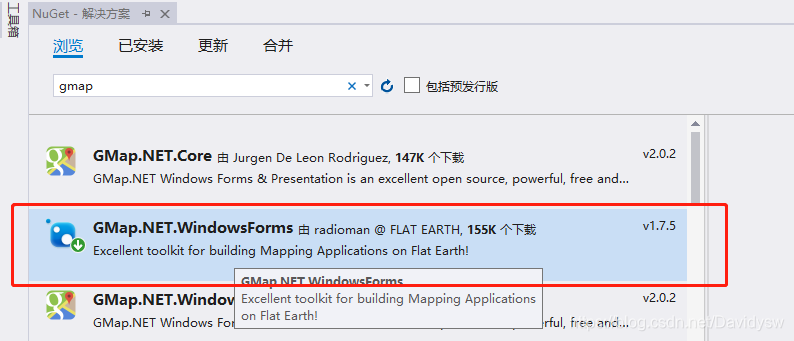
1、Visual Studio添加GMap引用
- 右键工程->管理NuGet包->下载安装GMap.NET.WindowsForms
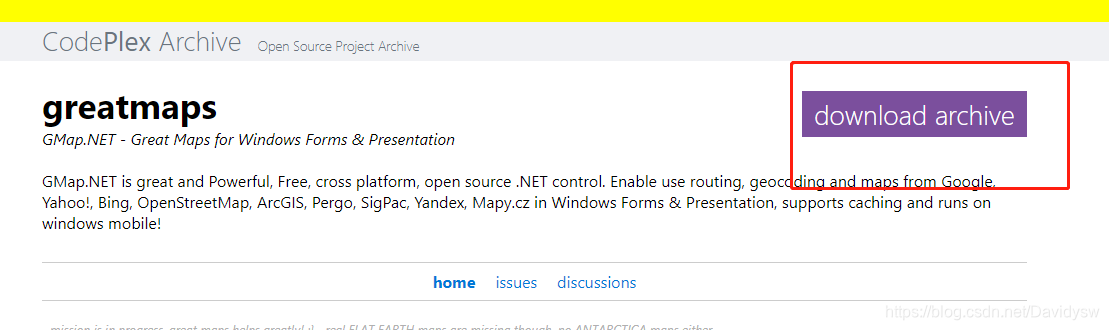
2、下载GMap Demo
包含GMap源码以及地图下载器(用于生成GMDB格式离线地图文件)
下载地址:https://archive.codeplex.com/?p=greatmaps
3、使用GMap Demo下载离线地图
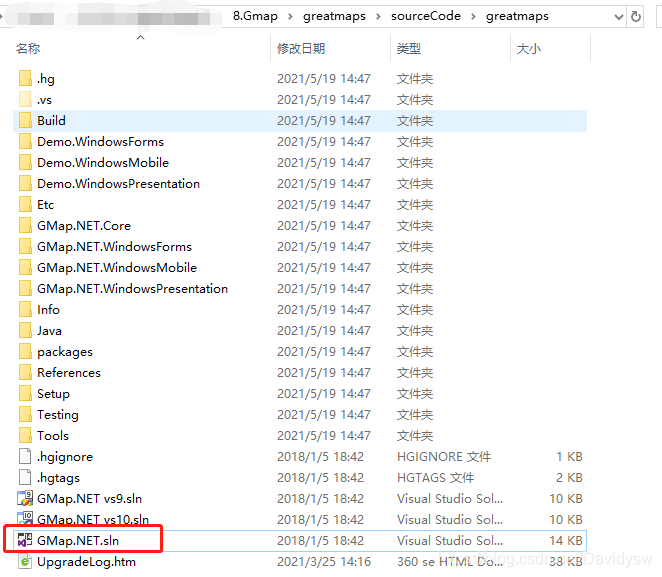
- (1)打开demo工程
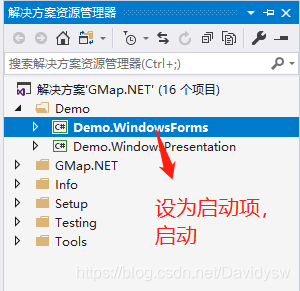
- (2)启动demo,连接网络,选择地图类型,很多地图服务器是链接不上的,选一个能连接上的地图。
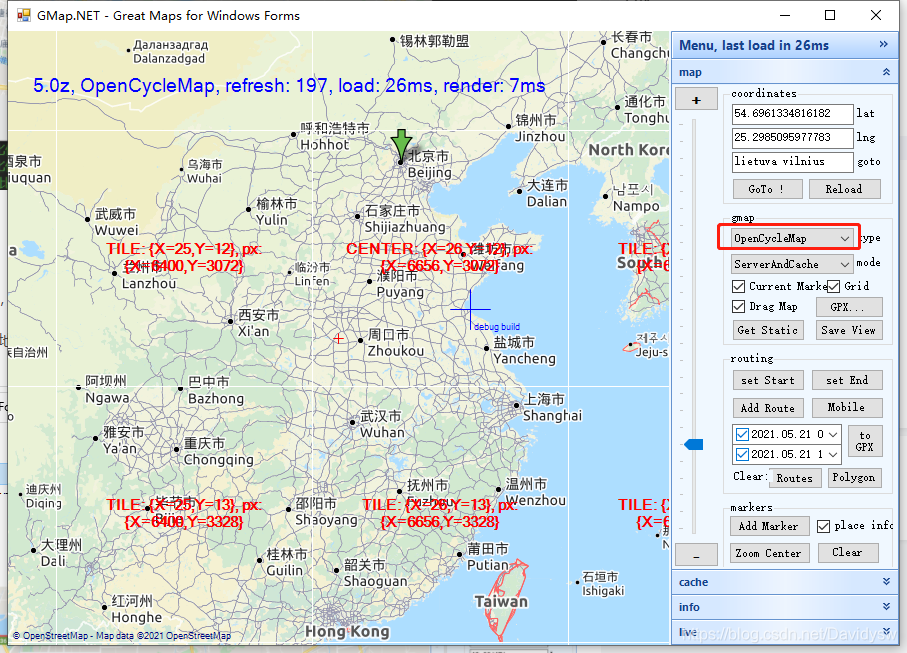
- (3)按住alt,鼠标左键框选需要下载的地图
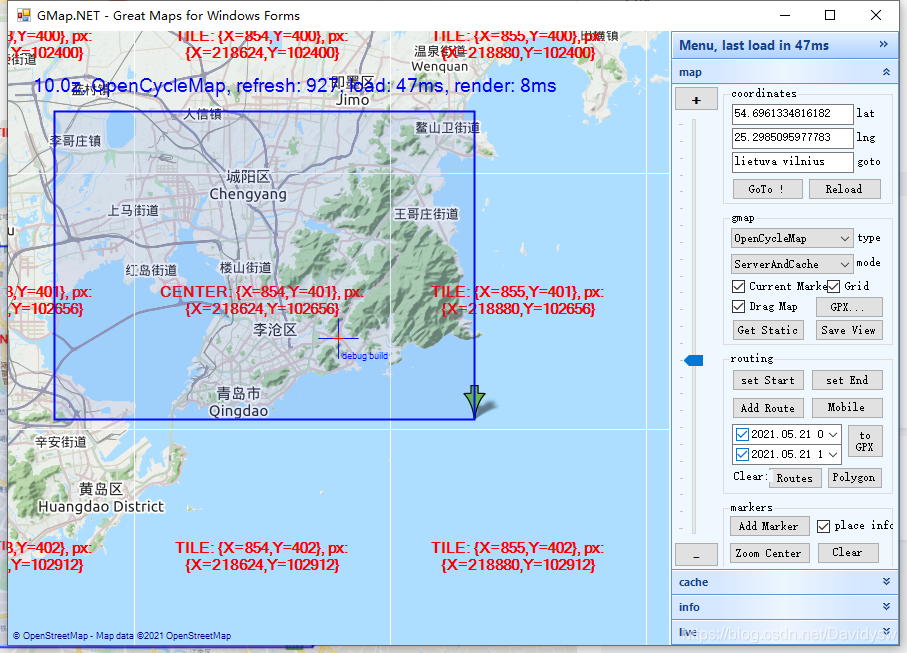
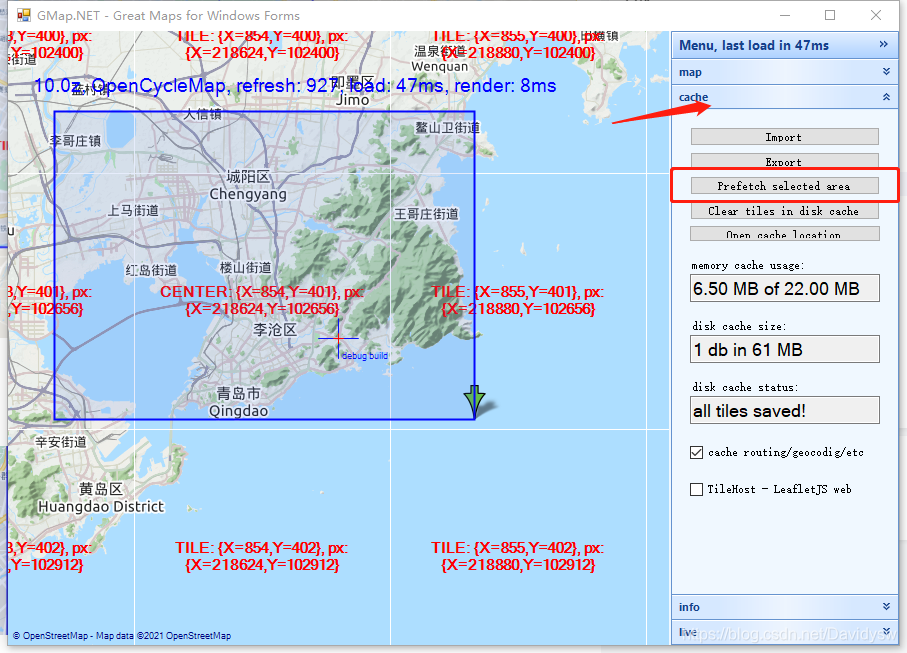
-(4)右侧菜单栏点击cache->Prefetch selected area,确定这个选定区域
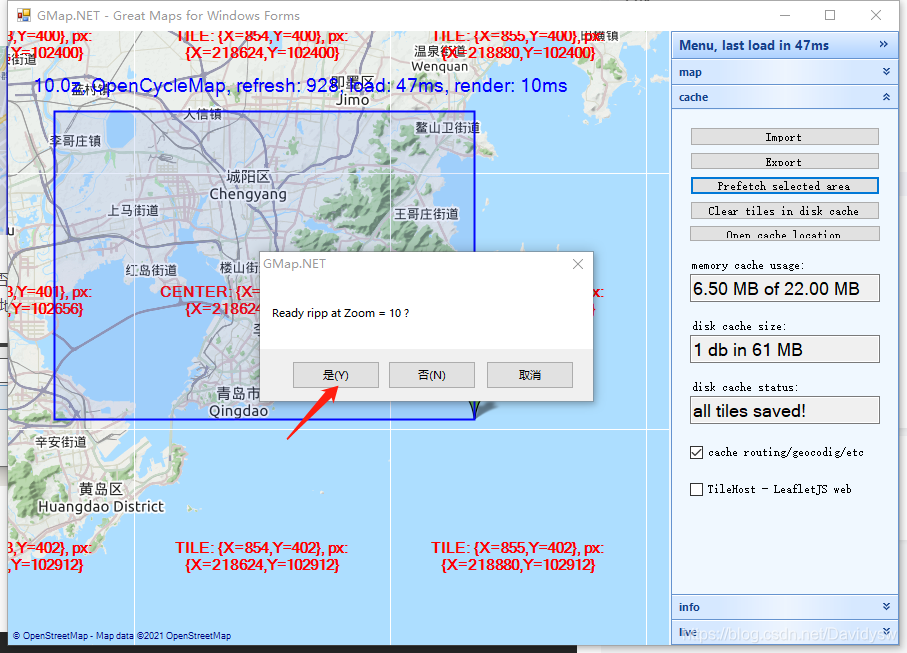
- (5)会出现提示 是否截取Zoom级别为10的地图;点击“是”。这里是为了确定下载哪部分变焦的地图,选择“是”就会下载对应Zoom的地图内容,选择下载的Zoom越多,地图占用存储空间约大,根据需要选择,一般选择截取<15做个测试就够用了,否则下载时间会很长,不需要的选择“否”。
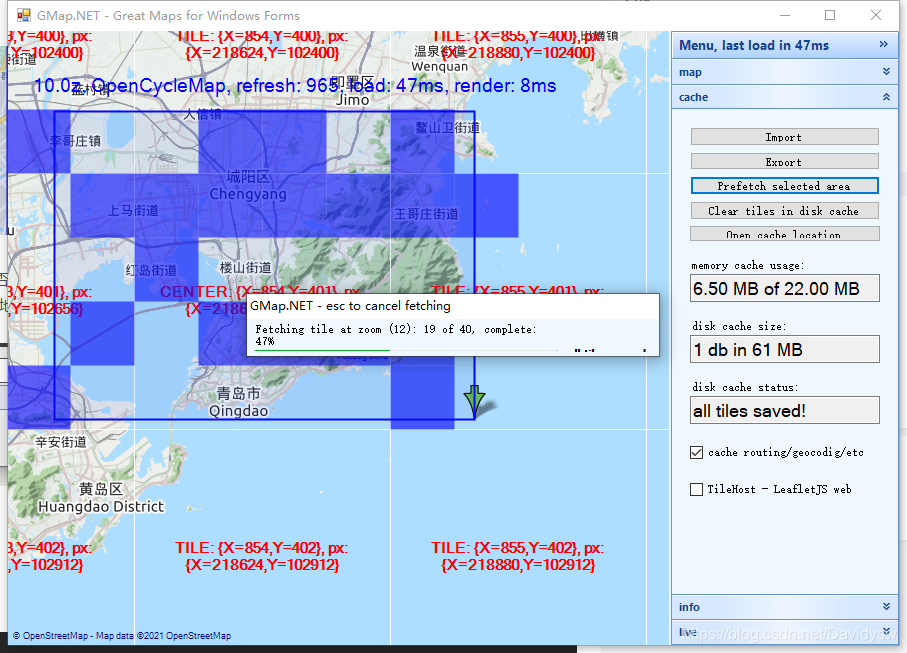
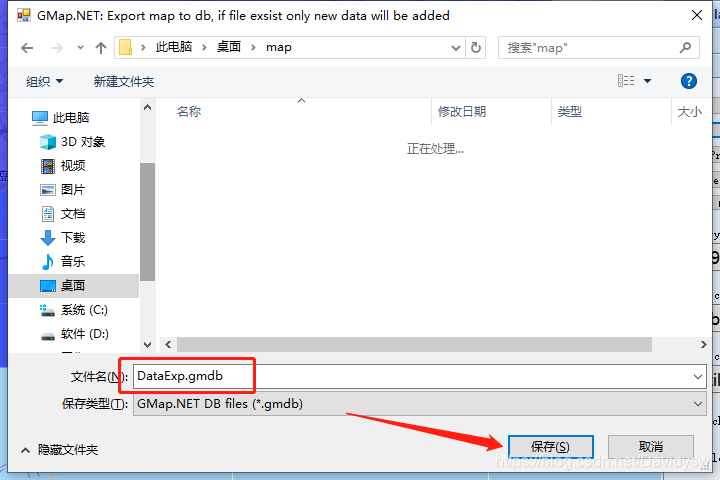
- (6)点击cache->Export导出gmdb文件。
4、创建Winform程序导入地图
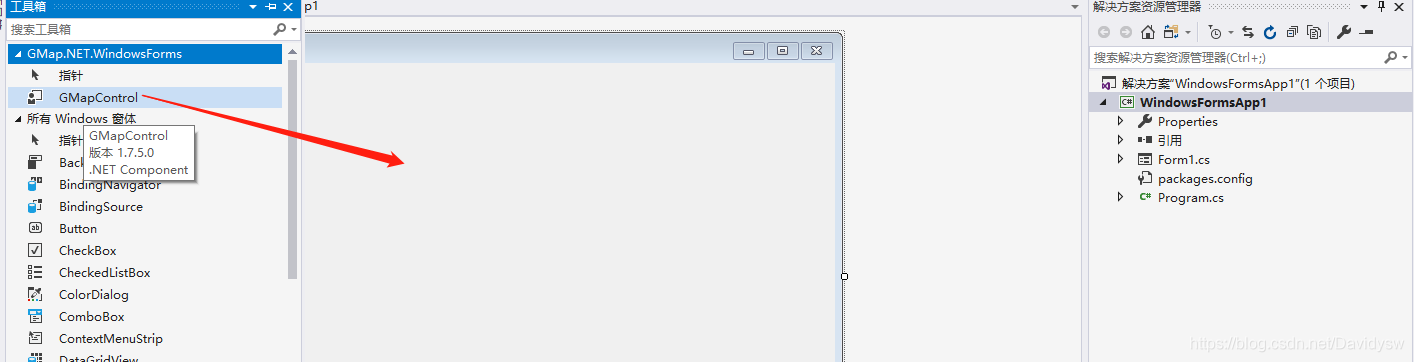
- (1)右键重新生成一下解决方案,确保将Gmap的控件添加到工具箱了, 拖动控件GMapControl到Form1中
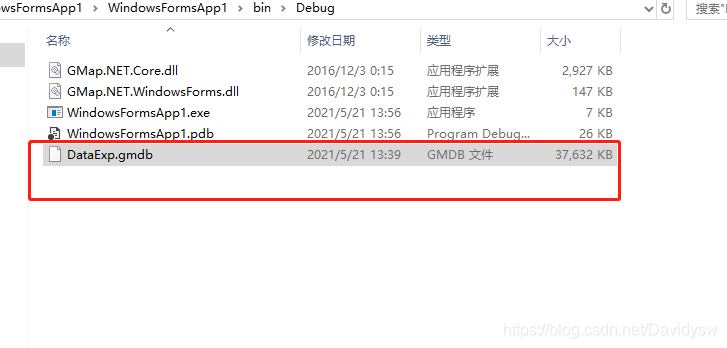
- (2)地图文件放在Debug文件夹中(或自定义路径)
- (3)添加代码,导入地图
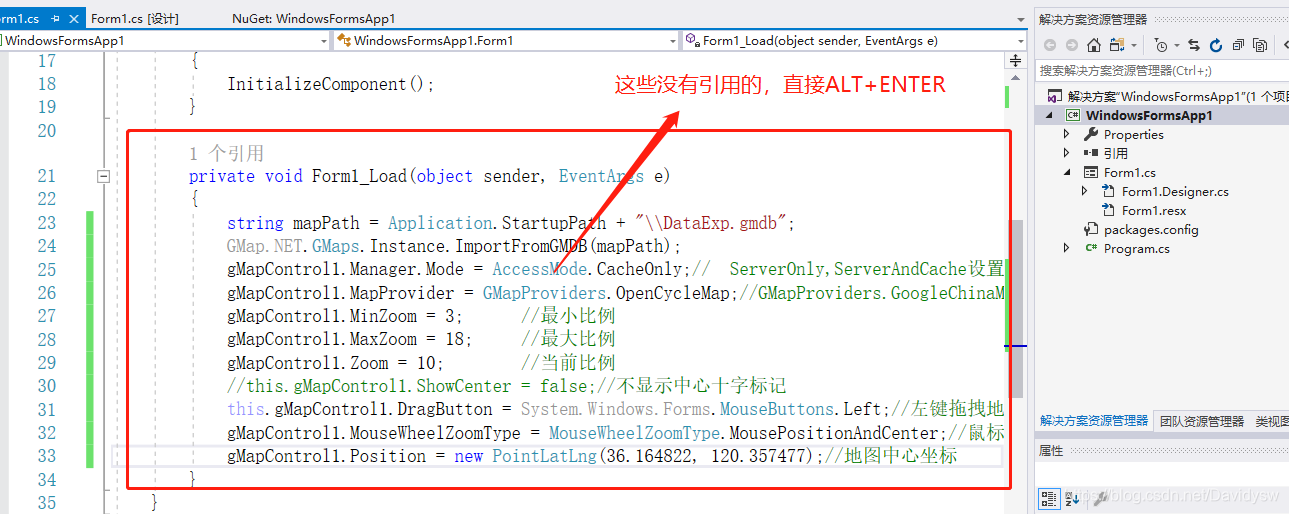
        private void Form1_Load(object sender, EventArgs e)
        {
            string mapPath = Application.StartupPath + "\\DataExp.gmdb";
            GMap.NET.GMaps.Instance.ImportFromGMDB(mapPath);
            gMapControl1.Manager.Mode = AccessMode.CacheOnly;//  ServerOnly,ServerAndCache设置从服务器和缓存中获取地图数据
            gMapControl1.MapProvider = GMapProviders.OpenCycleMap;//GMapProviders.GoogleChinaMap;   //谷歌中国地图
            gMapControl1.MinZoom = 3;      //最小比例
            gMapControl1.MaxZoom = 18;     //最大比例
            gMapControl1.Zoom = 10;        //当前比例
            //this.gMapControl1.ShowCenter = false;//不显示中心十字标记
            this.gMapControl1.DragButton = System.Windows.Forms.MouseButtons.Left;//左键拖拽地图
            gMapControl1.MouseWheelZoomType = MouseWheelZoomType.MousePositionAndCenter;//鼠标缩放模式
            gMapControl1.Position = new PointLatLng(36.164822, 120.357477);//地图中心坐标
        }
- 1
- 2
- 3
- 4
- 5
- 6
- 7
- 8
- 9
- 10
- 11
- 12
- 13
- 14
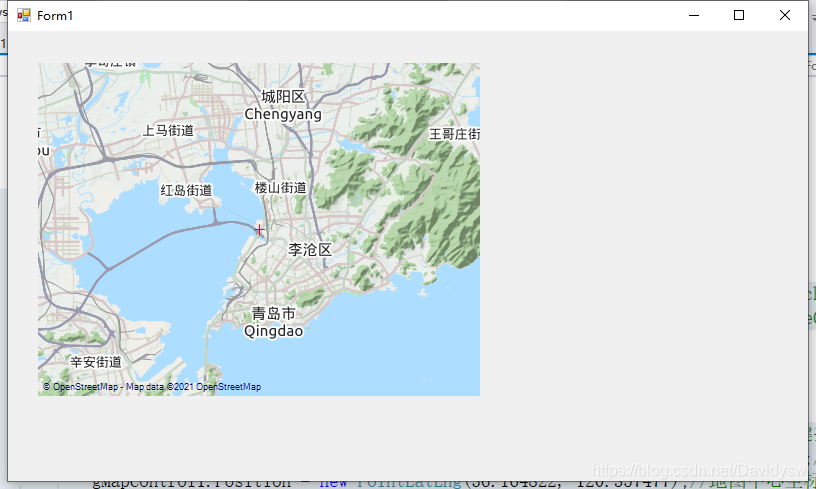
5、Winform程序 在地图上画标记
- 在地图上画东西,首先需要创建一个图层(函数中没有引用的,直接ALT+ENTER自动添加引用)
public static GMapOverlay OverlayMarker;//放在全局使用
- 1
OverlayMarker = new GMapOverlay("OverlayMarker"); //创建一个名为“OverlayMarker”的图层
this.gMapControl1.Overlays.Add(OverlayMarker);
- 1
- 2
- 绘制标记的函数
        public void DrawMarker(GMapOverlay overlay, double lat, double lng)
        {
            //创建一个名为“overlay”的图层
            //GMapOverlay overlay = new GMapOverlay("overlay");

            //创建标记,并设置位置及样式
            GMapMarker marker = new GMarkerGoogle(new PointLatLng(lat, lng), GMarkerGoogleType.blue_small);
            //将标记添加到图层
            overlay.Markers.Add(marker);
            //将图层添加到地图
            this.gMapControl1.Overlays.Add(overlay);

            //鼠标标记点提示框ToolTip
            marker.ToolTip = new GMapToolTip(marker);
            //Brush tooltipBackColor = new SolidBrush(Color.Transparent);//颜色获取,可用于填充背景
            marker.ToolTipText = "实时坐标";
            marker.ToolTip.Font = new Font("微软雅黑", 11);
            marker.ToolTip.Fill = new SolidBrush(Color.FromArgb(100, Color.Black));
            marker.ToolTip.Foreground = Brushes.White;
            marker.ToolTip.TextPadding = new Size(20, 20);
            //marker.ToolTipMode= MarkerTooltipMode.Always;//标注一直显示
            marker.ToolTip.Offset = new System.Drawing.Point(marker.Offset.X - (int)((float)marker.ToolTipText.Length / 2) * 15, marker.Offset.Y + 28);//显示位置

        }

- 1
- 2
- 3
- 4
- 5
- 6
- 7
- 8
- 9
- 10
- 11
- 12
- 13
- 14
- 15
- 16
- 17
- 18
- 19
- 20
- 21
- 22
- 23
- 24
- 在控件中测试的函数
		public static GMapOverlay OverlayMarker;//放在全局使用

        private void Form1_Load(object sender, EventArgs e)
        {
            string mapPath = Application.StartupPath + "\\DataExp.gmdb";
            GMap.NET.GMaps.Instance.ImportFromGMDB(mapPath);
            gMapControl1.Manager.Mode = AccessMode.CacheOnly;//  ServerOnly,ServerAndCache设置从服务器和缓存中获取地图数据
            gMapControl1.MapProvider = GMapProviders.OpenCycleMap;//GMapProviders.GoogleChinaMap;   //谷歌中国地图
            gMapControl1.MinZoom = 3;      //最小比例
            gMapControl1.MaxZoom = 18;     //最大比例
            gMapControl1.Zoom = 10;        //当前比例
            //this.gMapControl1.ShowCenter = false;//不显示中心十字标记
            this.gMapControl1.DragButton = System.Windows.Forms.MouseButtons.Left;//左键拖拽地图
            gMapControl1.MouseWheelZoomType = MouseWheelZoomType.MousePositionAndCenter;//鼠标缩放模式
            gMapControl1.Position = new PointLatLng(36.164822, 120.357477);//地图中心坐标

            OverlayMarker = new GMapOverlay("OverlayMarker"); //创建一个名为“OverlayMarker”的图层
            this.gMapControl1.Overlays.Add(OverlayMarker);

            //添加标记
            DrawMarker(OverlayMarker, 36.164822, 120.357477);
        }
- 1
- 2
- 3
- 4
- 5
- 6
- 7
- 8
- 9
- 10
- 11
- 12
- 13
- 14
- 15
- 16
- 17
- 18
- 19
- 20
- 21
- 22
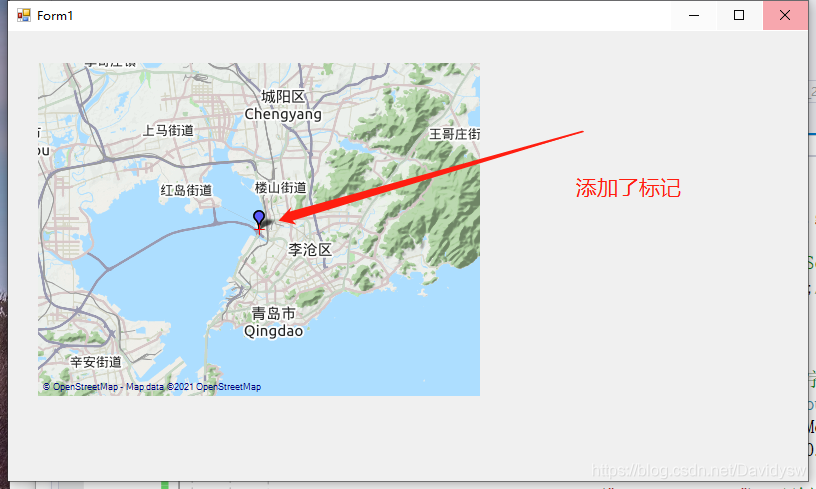
6、Winform程序 在地图上画多边形
- 画多边形的函数
        public static void DrawPolygons(GMapOverlay overlay, double lat1, double lng1, double lat2, double lng2, double lat3, double lng3, double lat4, double lng4)
        {
            //GMapOverlay polygons = new GMapOverlay("polygons");
            // 多边形的顶点
            List<PointLatLng> points = new List<PointLatLng>();
            points.Add(new PointLatLng(lat1, lng1));
            points.Add(new PointLatLng(lat2, lng2));
            points.Add(new PointLatLng(lat3, lng3));
            points.Add(new PointLatLng(lat4, lng4));

            GMapPolygon polygon = new GMapPolygon(points, "名字");
            polygon.Fill = new SolidBrush(Color.FromArgb(50, Color.Red));
            polygon.Stroke = new Pen(Color.Red, 1);
            overlay.Polygons.Add(polygon);
        }
- 1
- 2
- 3
- 4
- 5
- 6
- 7
- 8
- 9
- 10
- 11
- 12
- 13
- 14
- 15
- 测试代码
        public static GMapOverlay OverlayMarker;//放在全局使用
        private void Form1_Load(object sender, EventArgs e)
        {
            string mapPath = Application.StartupPath + "\\DataExp.gmdb";
            GMap.NET.GMaps.Instance.ImportFromGMDB(mapPath);
            gMapControl1.Manager.Mode = AccessMode.CacheOnly;//  ServerOnly,ServerAndCache设置从服务器和缓存中获取地图数据
            gMapControl1.MapProvider = GMapProviders.OpenCycleMap;//GMapProviders.GoogleChinaMap;   //谷歌中国地图
            gMapControl1.MinZoom = 3;      //最小比例
            gMapControl1.MaxZoom = 18;     //最大比例
            gMapControl1.Zoom = 10;        //当前比例
            //this.gMapControl1.ShowCenter = false;//不显示中心十字标记
            this.gMapControl1.DragButton = System.Windows.Forms.MouseButtons.Left;//左键拖拽地图
            gMapControl1.MouseWheelZoomType = MouseWheelZoomType.MousePositionAndCenter;//鼠标缩放模式
            gMapControl1.Position = new PointLatLng(36.164822, 120.357477);//地图中心坐标

            OverlayMarker = new GMapOverlay("OverlayMarker"); //创建一个名为“OverlayMarker”的图层
            this.gMapControl1.Overlays.Add(OverlayMarker);

            //添加标记
            DrawMarker(OverlayMarker, 36.164822, 120.357477);

            //添加多边形
            DrawPolygons(OverlayMarker, 36.164822 + 0.01, 120.357477 + 0.01, 36.164822 + 0.01, 120.357477 + 0.02, 36.164822 + 0.02, 120.357477 + 0.01, 36.164822 + 0.03, 120.357477 + 0.03);
        }
- 1
- 2
- 3
- 4
- 5
- 6
- 7
- 8
- 9
- 10
- 11
- 12
- 13
- 14
- 15
- 16
- 17
- 18
- 19
- 20
- 21
- 22
- 23
- 24
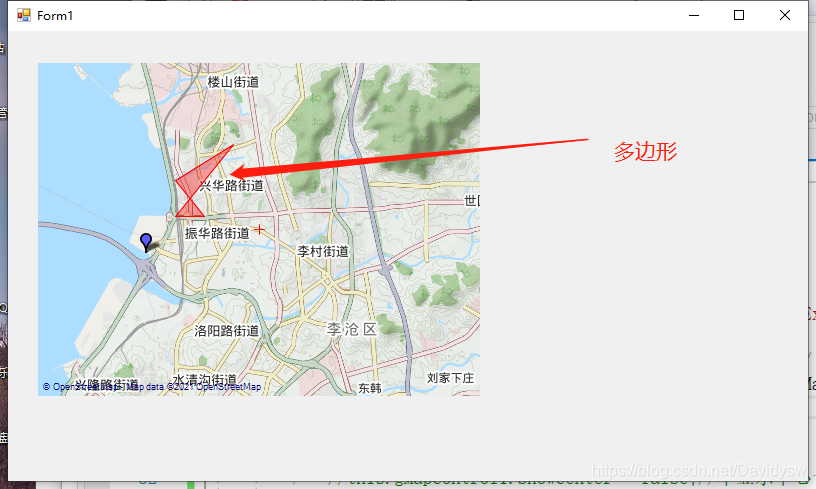
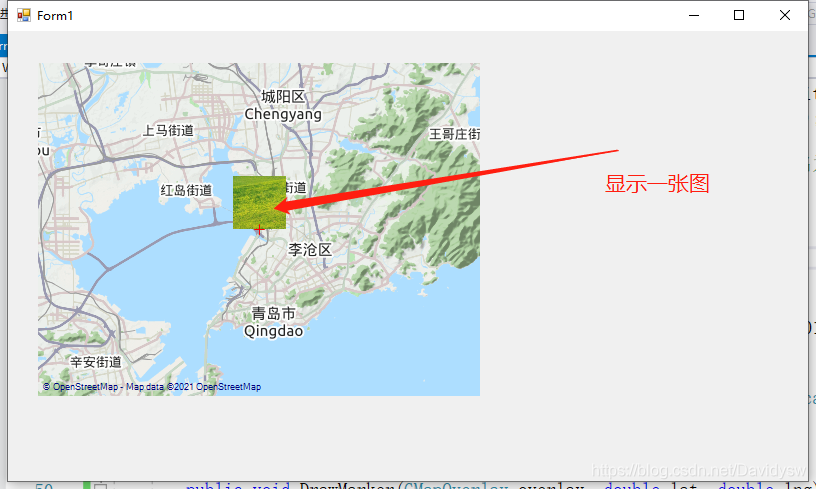
7、Winform程序 在地图上画图片
- 添加画图片的代码,准备一张“path.png”的图片放在debug文件中
        //添加标记图片
        public void DrawMarkerPicture(GMapOverlay overlay, double lat, double lng, string filename)
        {
            Bitmap bitmap = Bitmap.FromFile(filename) as Bitmap;

            //创建标记,并设置位置及样式
            GMapMarker marker = new GMarkerGoogle(new PointLatLng(lat, lng), bitmap);
            //将标记添加到图层
            overlay.Markers.Add(marker);
            //将图层添加到地图
            this.gMapControl1.Overlays.Add(overlay);

            //鼠标标记点提示框ToolTip
            marker.ToolTipText = "一张图片";
            marker.ToolTip.Fill = new SolidBrush(Color.FromArgb(100, Color.Black));
            marker.ToolTip.Foreground = Brushes.White;
            marker.ToolTip.TextPadding = new Size(20, 20);
        }
- 1
- 2
- 3
- 4
- 5
- 6
- 7
- 8
- 9
- 10
- 11
- 12
- 13
- 14
- 15
- 16
- 17
- 18
- 测试代码
        public static GMapOverlay OverlayMarker;//放在全局使用
        private void Form1_Load(object sender, EventArgs e)
        {
            string mapPath = Application.StartupPath + "\\DataExp.gmdb";
            GMap.NET.GMaps.Instance.ImportFromGMDB(mapPath);
            gMapControl1.Manager.Mode = AccessMode.CacheOnly;//  ServerOnly,ServerAndCache设置从服务器和缓存中获取地图数据
            gMapControl1.MapProvider = GMapProviders.OpenCycleMap;//GMapProviders.GoogleChinaMap;   //谷歌中国地图
            gMapControl1.MinZoom = 3;      //最小比例
            gMapControl1.MaxZoom = 18;     //最大比例
            gMapControl1.Zoom = 10;        //当前比例
            //this.gMapControl1.ShowCenter = false;//不显示中心十字标记
            this.gMapControl1.DragButton = System.Windows.Forms.MouseButtons.Left;//左键拖拽地图
            gMapControl1.MouseWheelZoomType = MouseWheelZoomType.MousePositionAndCenter;//鼠标缩放模式
            gMapControl1.Position = new PointLatLng(36.164822, 120.357477);//地图中心坐标

            OverlayMarker = new GMapOverlay("OverlayMarker"); //创建一个名为“OverlayMarker”的图层
            this.gMapControl1.Overlays.Add(OverlayMarker);

            //添加标记
            DrawMarker(OverlayMarker, 36.164822, 120.357477);

            //添加多边形
            DrawPolygons(OverlayMarker, 36.164822 + 0.01, 120.357477 + 0.01, 36.164822 + 0.01, 120.357477 + 0.02, 36.164822 + 0.02, 120.357477 + 0.01, 36.164822 + 0.03, 120.357477 + 0.03);

            //添加图片
            DrawMarkerPicture(OverlayMarker, 36.26282268, 120.24647712, Application.StartupPath + "\\path.png");
        }
- 1
- 2
- 3
- 4
- 5
- 6
- 7
- 8
- 9
- 10
- 11
- 12
- 13
- 14
- 15
- 16
- 17
- 18
- 19
- 20
- 21
- 22
- 23
- 24
- 25
- 26
- 27
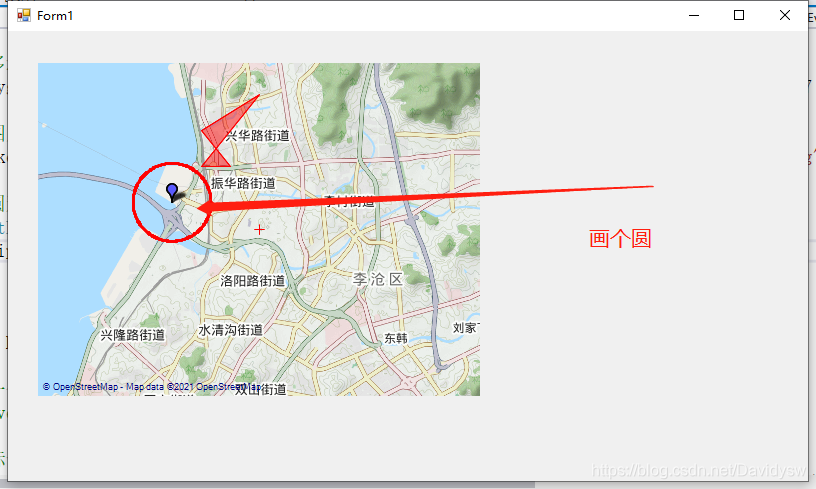
8、Winform程序 在地图上利用路线层画个圆
- 新创一个类添加到工程中,MyLatLng.class
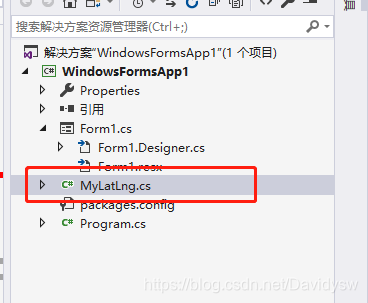
- MyLatLng.class
using System;
using System.Collections.Generic;
using System.Linq;
using System.Text;

namespace WindowsFormsApp1
{
    //自定义经纬度类
    public class MyLatLng
    {
        public double Rc = 6378137;     //赤道半径
        public double Rj = 6356725;     //极半径
        public double m_LoDeg, m_LoMin, m_LoSec;
        public double m_LaDeg, m_LaMin, m_LaSec;
        public double m_Longitude, m_Latitude;
        public double m_RadLo, m_RadLa;
        public double Ec;
        public double Ed;
        public MyLatLng(double longitude, double latitude)
        {
            m_LoDeg = (int)longitude;
            m_LoMin = (int)((longitude - m_LoDeg) * 60);
            m_LoSec = (longitude - m_LoDeg - m_LoMin / 60) * 3600;

            m_LaDeg = (int)latitude;
            m_LaMin = (int)((latitude - m_LaDeg) * 60);
            m_LaSec = (latitude - m_LaDeg - m_LaMin / 60) * 3600;

            m_Longitude = longitude;
            m_Latitude = latitude;
            m_RadLo = longitude * Math.PI / 180;
            m_RadLa = latitude * Math.PI / 180;
            Ec = Rj + (Rc - Rj) * (90 - m_Latitude) / 90;
            Ed = Ec * Math.Cos(m_RadLa);
        }


        private const double EARTH_RADIUS = 6378.137;//地球半径
        private static double rad(double d)
        {
            return d * Math.PI / 180.0;
        }
        //
        public static double GetDistance(double lat1, double lng1, double lat2, double lng2)
        {
            double radLat1 = rad(lat1);
            double radLat2 = rad(lat2);
            double a = radLat1 - radLat2;
            double b = rad(lng1) - rad(lng2);

            double s = 2 * Math.Asin(Math.Sqrt(Math.Pow(Math.Sin(a / 2), 2) +
             Math.Cos(radLat1) * Math.Cos(radLat2) * Math.Pow(Math.Sin(b / 2), 2)));
            s = s * EARTH_RADIUS;
            s = Math.Round(s * 10000) / 10000;
            return s;
        }


        //度 转换成 弧度
        public static double DegreesToRadians(double degrees)
        {
            const double degToRadFactor = Math.PI / 180;
            return degrees * degToRadFactor;
        }

        //弧度 转换成 度
        public static double RadiansToDegrees(double radians)
        {
            const double radToDegFactor = 180 / Math.PI;
            return radians * radToDegFactor;
        }

        /**
         * 求圆点四周,距离圆点距离为指定半径的所有点位置(经纬度)
        * 求B点经纬度
        * @param A 已知点的经纬度,
        * @param distance   AB两地的距离  单位km
        * @param angle  AB连线与正北方向的夹角(0~360)
        * @return  B点的经纬度
        */
        public static MyLatLng getMyLatLng(MyLatLng A, double distance, double angle)
        {
            double dx = distance * 1000 * Math.Sin(DegreesToRadians(angle));
            double dy = distance * 1000 * Math.Cos(DegreesToRadians(angle));

            double bjd = (dx / A.Ed + A.m_RadLo) * 180 / Math.PI;
            double bwd = (dy / A.Ec + A.m_RadLa) * 180 / Math.PI;
            return new MyLatLng(bjd, bwd);
        }

    }
}
- 1
- 2
- 3
- 4
- 5
- 6
- 7
- 8
- 9
- 10
- 11
- 12
- 13
- 14
- 15
- 16
- 17
- 18
- 19
- 20
- 21
- 22
- 23
- 24
- 25
- 26
- 27
- 28
- 29
- 30
- 31
- 32
- 33
- 34
- 35
- 36
- 37
- 38
- 39
- 40
- 41
- 42
- 43
- 44
- 45
- 46
- 47
- 48
- 49
- 50
- 51
- 52
- 53
- 54
- 55
- 56
- 57
- 58
- 59
- 60
- 61
- 62
- 63
- 64
- 65
- 66
- 67
- 68
- 69
- 70
- 71
- 72
- 73
- 74
- 75
- 76
- 77
- 78
- 79
- 80
- 81
- 82
- 83
- 84
- 85
- 86
- 87
- 88
- 89
- 90
- 91
- 92
- 93
- 94
- 95
- 创建一个画圆函数
        //描述:以centerP为圆心,绘制半径为radius的圆
        //gMapControl:Gmap控制器		overlay:图层
        //centerP:圆心点	 radius:圆半径(单位: km)  name:路线id
        public static void DrawEllipse(GMapControl gMapControl, GMapOverlay overlay, PointLatLng centerP, double radius, string name,Color color)
        {
            try
            {
                if (radius <= 0)
                    return;

                List<PointLatLng> latLngs = new List<PointLatLng>();
                MyLatLng centerLatLng = new MyLatLng(centerP.Lng, centerP.Lat);

                // 0 - 360度 寻找半径为radius,圆心为centerP的圆上点的经纬度
                for (int i = 0; i <= 360; i++)
                {
                    //获取目标经纬度
                    MyLatLng tempLatLng = MyLatLng.getMyLatLng(centerLatLng, radius, i);
                    //将自定义的经纬度类 转换成 标准经纬度类
                    PointLatLng p = new PointLatLng(tempLatLng.m_Latitude, tempLatLng.m_Longitude);
                    latLngs.Add(p);
                }

                //安全性检查
                if (latLngs.Count < 20)
                {
                    return;
                }

                //通过绘制路线的方式绘制圆
                GMapRoute route = new GMapRoute(latLngs, name);
                if (route == null)
                {
                    return;
                }
                route.Stroke = new Pen(color, 2.5f);
                //route.Stroke.DashStyle = System.Drawing.Drawing2D.DashStyle.Dash;   //虚线
                overlay.Routes.Add(route);
            }
            catch (Exception ex)
            {
                //Dialog.Error(ex);
            }
        }
- 1
- 2
- 3
- 4
- 5
- 6
- 7
- 8
- 9
- 10
- 11
- 12
- 13
- 14
- 15
- 16
- 17
- 18
- 19
- 20
- 21
- 22
- 23
- 24
- 25
- 26
- 27
- 28
- 29
- 30
- 31
- 32
- 33
- 34
- 35
- 36
- 37
- 38
- 39
- 40
- 41
- 42
- 43
- 44
- 测试代码
        public static GMapOverlay OverlayMarker;//放在全局使用
        private void Form1_Load(object sender, EventArgs e)
        {
            string mapPath = Application.StartupPath + "\\DataExp.gmdb";
            GMap.NET.GMaps.Instance.ImportFromGMDB(mapPath);
            gMapControl1.Manager.Mode = AccessMode.CacheOnly;//  ServerOnly,ServerAndCache设置从服务器和缓存中获取地图数据
            gMapControl1.MapProvider = GMapProviders.OpenCycleMap;//GMapProviders.GoogleChinaMap;   //谷歌中国地图
            gMapControl1.MinZoom = 3;      //最小比例
            gMapControl1.MaxZoom = 18;     //最大比例
            gMapControl1.Zoom = 10;        //当前比例
            //this.gMapControl1.ShowCenter = false;//不显示中心十字标记
            this.gMapControl1.DragButton = System.Windows.Forms.MouseButtons.Left;//左键拖拽地图
            gMapControl1.MouseWheelZoomType = MouseWheelZoomType.MousePositionAndCenter;//鼠标缩放模式
            gMapControl1.Position = new PointLatLng(36.164822, 120.357477);//地图中心坐标

            OverlayMarker = new GMapOverlay("OverlayMarker"); //创建一个名为“OverlayMarker”的图层
            this.gMapControl1.Overlays.Add(OverlayMarker);

            //添加标记
            DrawMarker(OverlayMarker, 36.164822, 120.357477);

            //添加多边形
            DrawPolygons(OverlayMarker, 36.164822 + 0.01, 120.357477 + 0.01, 36.164822 + 0.01, 120.357477 + 0.02, 36.164822 + 0.02, 120.357477 + 0.01, 36.164822 + 0.03, 120.357477 + 0.03);

            //添加图片
            DrawMarkerPicture(OverlayMarker, 36.064822, 120.357477, Application.StartupPath + "\\path.png");

            //添加圆形
            PointLatLng LatLng = new PointLatLng(36.164822, 120.357477);
            DrawEllipse(this.gMapControl1, OverlayMarker, LatLng, 1.2, "123",Color.Red);
        }
- 1
- 2
- 3
- 4
- 5
- 6
- 7
- 8
- 9
- 10
- 11
- 12
- 13
- 14
- 15
- 16
- 17
- 18
- 19
- 20
- 21
- 22
- 23
- 24
- 25
- 26
- 27
- 28
- 29
- 30
- 31
9、Winform程序 清除标记、多边形、图片
        //清除图层标记
        public static void ClearMarkers(GMapOverlay overlay)//参数:图层
        {
            overlay.Markers.Clear();
        }

        //清除图层路线
        public static void ClearRoutes(GMapOverlay overlay)//参数:图层
        {
            overlay.Routes.Clear();
        }

        //清除图层多边形
        public static void ClearPolygons(GMapOverlay overlay)//参数:图层
        {
            overlay.Polygons.Clear();
        }
- 1
- 2
- 3
- 4
- 5
- 6
- 7
- 8
- 9
- 10
- 11
- 12
- 13
- 14
- 15
- 16
- 17
10、Winform程序 鼠标移动获取经纬度
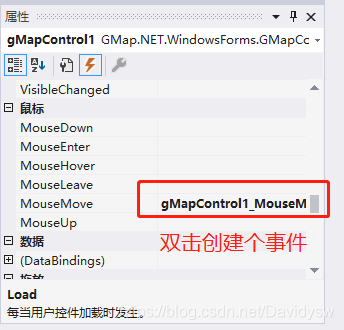
- 添加事件的代码
        //鼠标移过gMapControl1后发生的事件
        private void gMapControl1_MouseMove(object sender, MouseEventArgs e)
        {
                PointLatLng point = gMapControl1.FromLocalToLatLng(e.Location.X, e.Location.Y);//获取鼠标位置(FromLocalToLatLng是将数值转换成坐标  )
                StatusLabel_x.Text = point.Lat.ToString("0.000000");
                StatusLabel_y.Text = point.Lng.ToString("0.000000");
        }
- 1
- 2
- 3
- 4
- 5
- 6
- 7
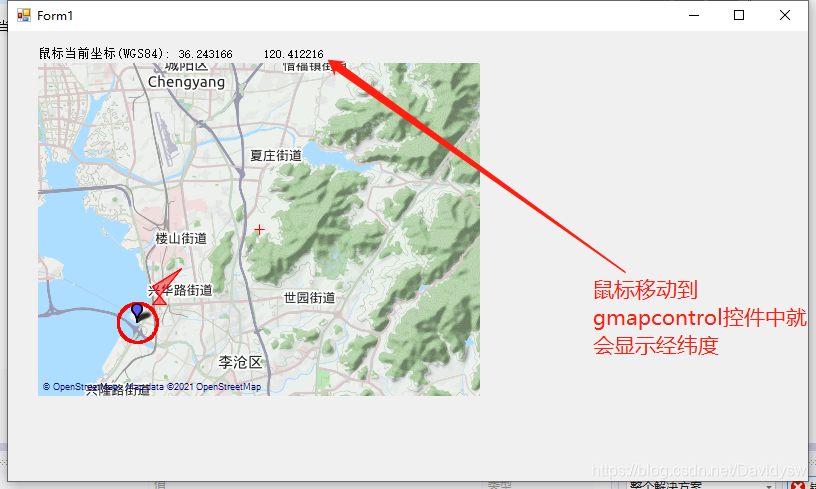
11、根据需开发中可能使用的函数
- (1)计算两点直间的距离
        private const double EARTH_RADIUS = 6378137;//地球半径m
        private static double rad(double d)
        {
            return d * Math.PI / 180.0;
        }
        //
        public static double GetDistance(double lat1, double lng1, double lat2, double lng2)
        {
            double radLat1 = rad(lat1);
            double radLat2 = rad(lat2);
            double a = radLat1 - radLat2;
            double b = rad(lng1) - rad(lng2);

            double s = 2 * Math.Asin(Math.Sqrt(Math.Pow(Math.Sin(a / 2), 2) +
             Math.Cos(radLat1) * Math.Cos(radLat2) * Math.Pow(Math.Sin(b / 2), 2)));
            s = s * EARTH_RADIUS;
            //s = Math.Round(s * 10000) / 10000;
            return s;
        }
- 1
- 2
- 3
- 4
- 5
- 6
- 7
- 8
- 9
- 10
- 11
- 12
- 13
- 14
- 15
- 16
- 17
- 18
- 19
        //计算与中心点的距离
        public void DistanceToCenter(double lat1, double lng1, double lat2, double lng2)
        {
            double latdiffer = 0;//纬度差
            double lngdiffer = 0;//经度差
            double latDifferDistance = 0;   //纬度实际距离差米
            double lngDifferDistance = 0;   //经度实际距离差米

            //计算出纬度经度差
            latdiffer = lat2 - lat1;
            lngdiffer = lng2 - lng1;
            //根据纬度经度差算出实际的距离差
            latDifferDistance = latdiffer * 111000;    //在经线上纬度差1度对应的实际距离是111千米
            lngDifferDistance = lngdiffer * 111000 * Math.Cos(lat1 / 180 * Math.PI);//在除赤道外的其他纬线上,经度差1度对应的实际距离是111*cos纬度。C#中Match.Cos(度数 / 180 * Math.PI),括号内是弧度,因此与角度换算
            label10.Text = latDifferDistance.ToString("0.000") + "m";//横向距离
            label11.Text = lngDifferDistance.ToString("0.000") + "m";//纵向距离
            label14.Text = MyLatLng.GetDistance(lat1, lng1, lat2, lng2).ToString("0.000") + "m";//计算两点之间的直线距离

        }
- 1
- 2
- 3
- 4
- 5
- 6
- 7
- 8
- 9
- 10
- 11
- 12
- 13
- 14
- 15
- 16
- 17
- 18
- 19
- (2)坐标“度.分”格式转换为“度.度”格式
        //模块输出的是“度.分”格式   经度 11324.420920 纬度:2303.006850,需用下面函数转换成“度.度”格式
        double DegreeConvert(double sDegree)
        {
            double dDegree;
            if (sDegree == 0) return 0;
            int integer = (int)sDegree;
            double decimal1 = sDegree - (int)sDegree;
            double min = integer % 100;
            int hour = (int)(integer / 100);
            dDegree = (double)hour + (double)(min / 60) + (double)(decimal1 / 60);
            return dDegree;
        }
- 1
- 2
- 3
- 4
- 5
- 6
- 7
- 8
- 9
- 10
- 11
- 12
12、注意
- 例程中使用的坐标是WGS84坐标,如转成国内高德或者百度地图,注意坐标转换。
例程连接:https://download.csdn.net/download/Davidysw/18936123
声明:本文内容由网友自发贡献,转载请注明出处:【wpsshop博客】
推荐阅读

相关标签

