
热门标签
热门文章
- 1Vue 登录权限配置_vue3登录游客登录和管理员登录
- 2STM32_PWM呼吸灯_stm32pwm的呼吸灯设计总结
- 3python网球比赛模拟_2019-05-12 Python之模拟体育竞赛
- 4如何理解期权的保证金和权利金的区别?
- 5python做应用程序错误_pythonw.exe应用程序错误
- 6Python+Selenium详解(超全)_selenium,python
- 7云服务器搭载zookeeper集群遇到的坑,java.net.BindExxeption和java.net.SoketTimeoutException_quorumlistenonallips=true
- 8提取数据_python pdf文件提取表格数据
- 9【联邦学习+区块链】TORR: A Lightweight Blockchain for Decentralized Federated Learning_federated learning blockchain call for paper
- 10【编程入门题--二维数组的转置】
当前位置: article > 正文
【IDEA】idea 一直scanning files to index的四种解决方法_idea 正在扫描要建立索引的文件
作者:数据科学创新者 | 2024-01-16 14:04:51
赞
踩
idea 正在扫描要建立索引的文件

1.概述
转载:idea 一直scanning files to index的四种解决方法
1.1 问题描述
长时间/重复性的scanning files to index
scanning files to index :扫描文件建立索引
scanning files to index 扫描文件建立索引
- 1
2.方法一
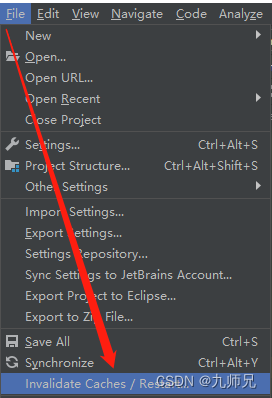
File -> Invalidate Caches / Restart
3.方法二
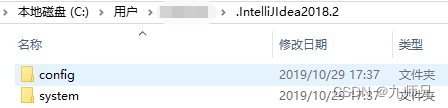
删除C:\Users\xxx.IntelliJIdea2018.2\system文件夹
4.方法三
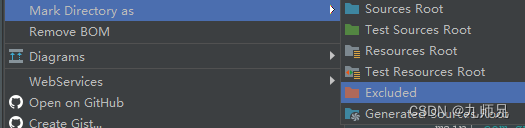
将扫描的文件夹排除在建立索引的范围之外,即将xxx文件夹标记为Excluded。
5.方法四
更改Edit Configurations和idea配置路径
1、一直扫描很长时间,点击Edit Configurations,update classes and resources更改为Do nothing。


2、会发现扫描时间很短,但是还会一直重复扫描
3、更改idea配置路径 或 直接注掉三行注释 达到刷新目的
xx\bin\idea.properties
idea.config.path=D:\Java\idea\IntelliJ IDEA 2018.2.4\01edit\config
idea.system.path=D:\Java\idea\IntelliJ IDEA 2018.2.4\01edit\system
idea.plugins.path=D:\Java\idea\IntelliJ IDEA 2018.2.4\01edit\plugins

#---------------------------------------------------------------------
# Uncomment this option if you want to customize path to IDE config folder. Make sure you're using forward slashes.
#---------------------------------------------------------------------
# idea.config.path=${user.home}/.IntelliJIdea/config
#---------------------------------------------------------------------
# Uncomment this option if you want to customize path to IDE system folder. Make sure you're using forward slashes.
#---------------------------------------------------------------------
# idea.system.path=${user.home}/.IntelliJIdea/system

#---------------------------------------------------------------------
# Uncomment this option if you want to customize path to user installed plugins folder. Make sure you're using forward slashes.
#---------------------------------------------------------------------
# idea.plugins.path=${idea.config.path}/plugins

- 1
- 2
- 3
- 4
- 5
- 6
- 7
- 8
- 9
- 10
- 11
- 12
- 13
- 14
- 15
- 16
- 17
过程:
重启idea,重装idea,关机重启,kill idea进程都不好使
重新download的代码一样的问题,所以一定是配置的问题
配置文件删掉一样不好使,可能是需要刷新加载配置文件
不重启的情况下(重启也不一定好用),更改idea配置路径即可起到刷新的效果,或者尝试放开、注掉配置文件,再或者拿同事好用的配置文件直接覆盖…
更改完毕后,关闭idea,任务管理器杀死进程,重新启动
发现update完毕后就不会重复扫描建立索引了
6.方法五、项目文件过多
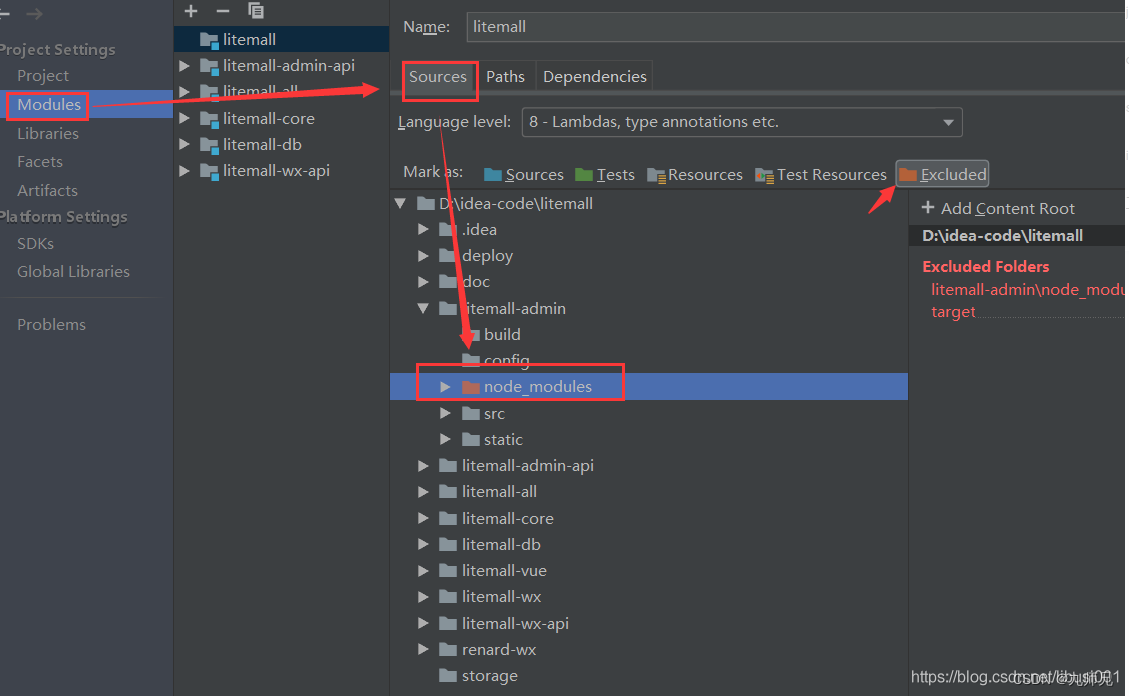
项目文件过多的情况会创建索引就会很慢,所以可以把文件数量很大的目录排除创建索引的范围就可以了。借图。
声明:本文内容由网友自发贡献,不代表【wpsshop博客】立场,版权归原作者所有,本站不承担相应法律责任。如您发现有侵权的内容,请联系我们。转载请注明出处:https://www.wpsshop.cn/article/detail/40157
推荐阅读

相关标签

