- 1leetcode刷题笔记-144. 二叉树的前序遍历(java实现)_给你二叉树的根节点 root ,返回它节点值的 前序 遍历。
- 2微信授权登录并获取用户信息接口开发_微信接口开发获取个人微信信息
- 3如何配置Pycharm服务器并结合内网穿透工具实现远程开发
- 4okhttp3的使用和封装_okhttp3依赖
- 5Softmax分类器
- 6Kubernetes CRD 系列(四):ClientSet 和 Informer_client-set,informer是干啥的
- 7kali的下载与安装(VM虚拟机)_kali下载
- 8Codeforces Round #737 (Div. 2)部分题解_codeforces737 div2
- 9(Linux) WSL 适用于Linux的Windows子系统_适用于 linux 的 windows 子系统 (wsl)
- 10Innodb_buffer_pool_pages_innodb_buffer_pool_pages_data
【研究开源机器臂】(3):低成本实现200多元实现,开源机械臂,使用Wemos D1 R32 ESP32 +Arduino CNC,可以控制机械臂往复运动了,有视频介绍和演示说明_arduino机械臂开源
赞
踩
开源机械臂资料
文章分类:
https://blog.csdn.net/freewebsys/category_5782941.html
前面讨论了相关的技术调研。
1,首先是设备购买机械臂 170 - 180 左右,大家可以去小黄鱼去找找
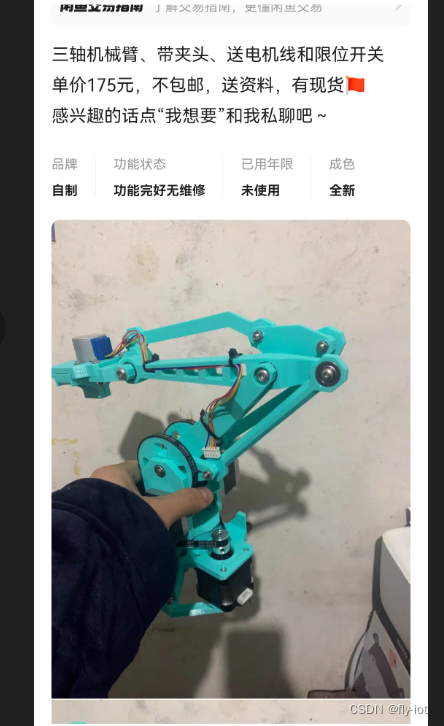
或者这样的:
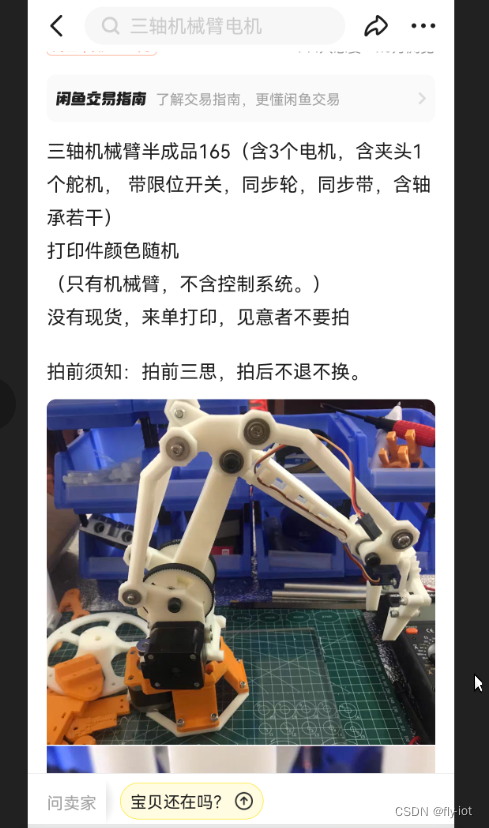
第一次折腾,价格便宜就行。
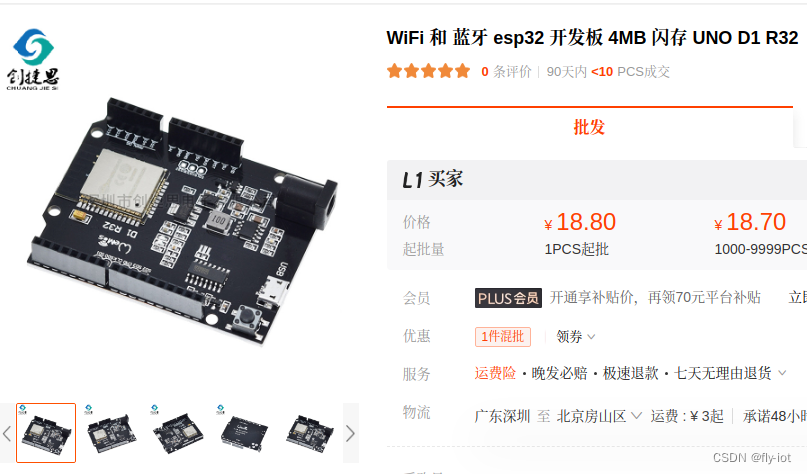
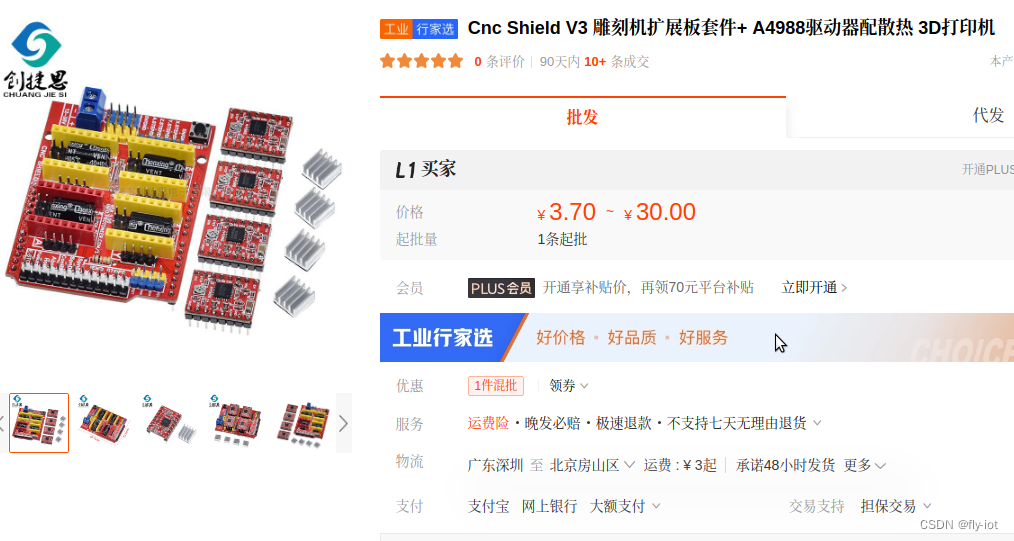
2,控制方案,使用Wemos D1 R32 ESP32 +Arduino CNC Shield v3 进行设备控制,成本 30 元
https://detail.1688.com/offer/656424665619.html
v3 雕刻机扩展板+ A4988套件 21 元:
https://detail.1688.com/offer/710743362308.html
3,控制方案,参考太极创客 文章,使用AccelStepper库 进行控制
http://www.taichi-maker.com/homepage/reference-index/motor-reference-index/arduino-cnc-shield/#other-pins
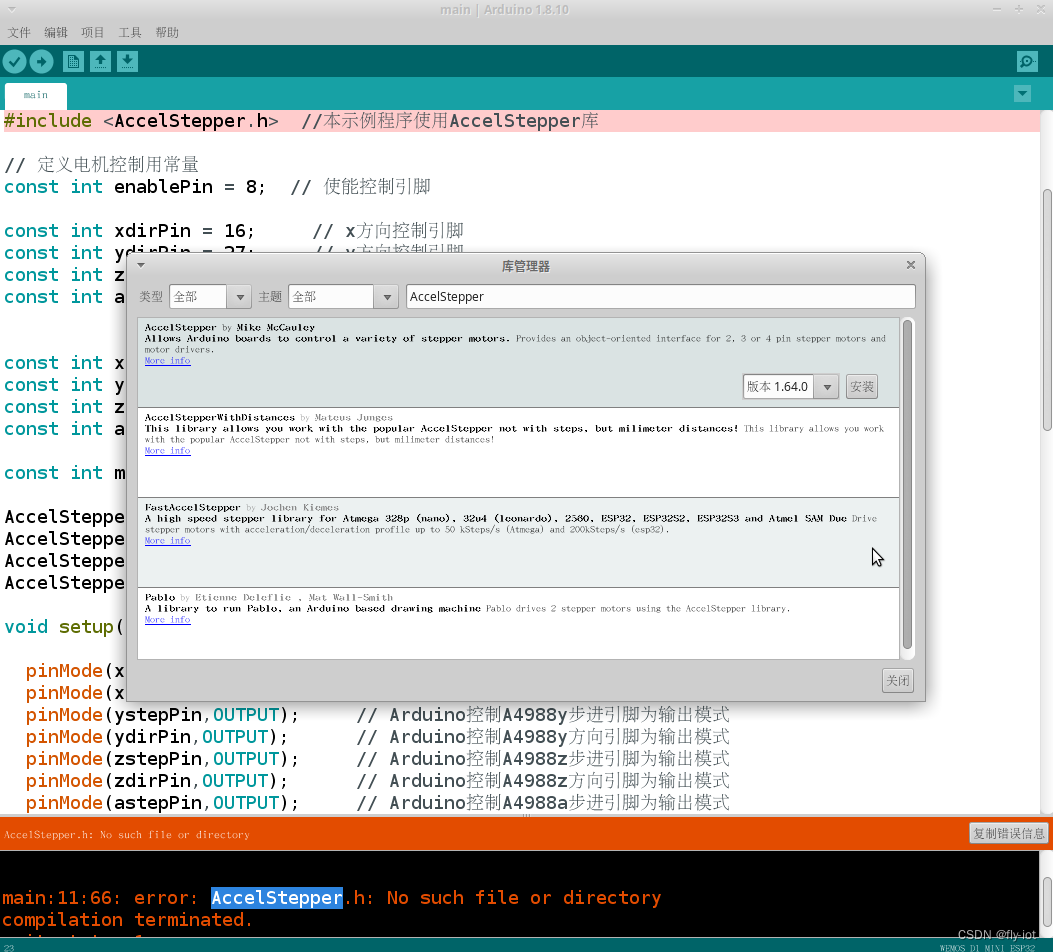
直接使用 arduino 安装库组件,然后编程即可。
同时文章里面还you 接线方式:
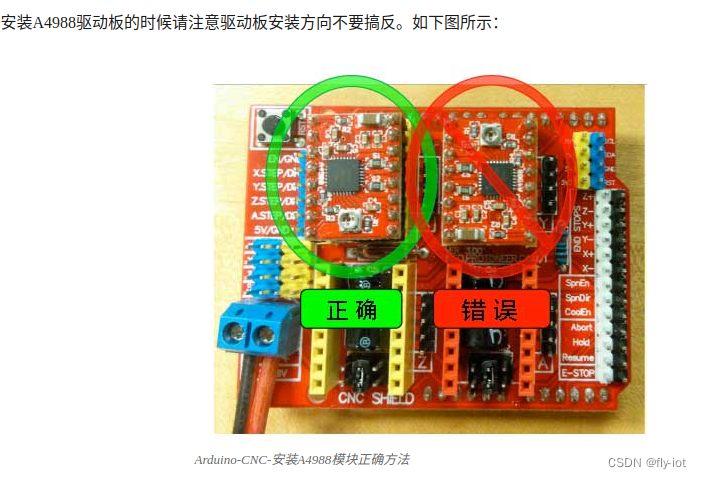
然后连接电机进行供电:
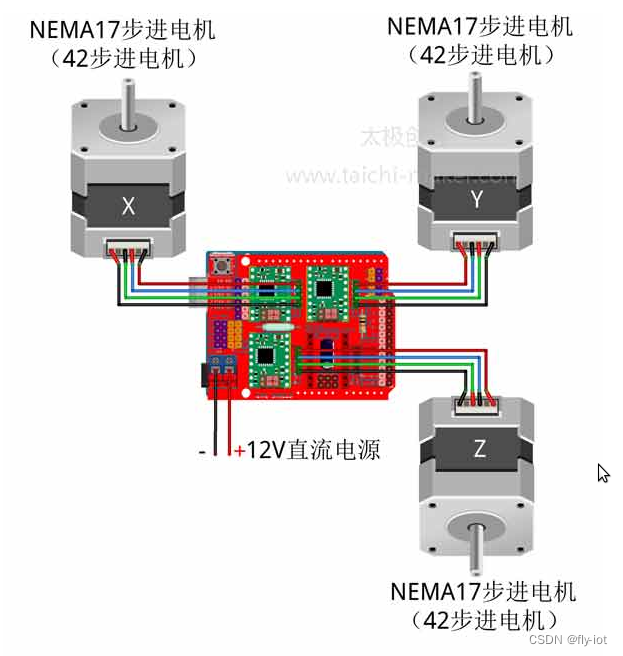
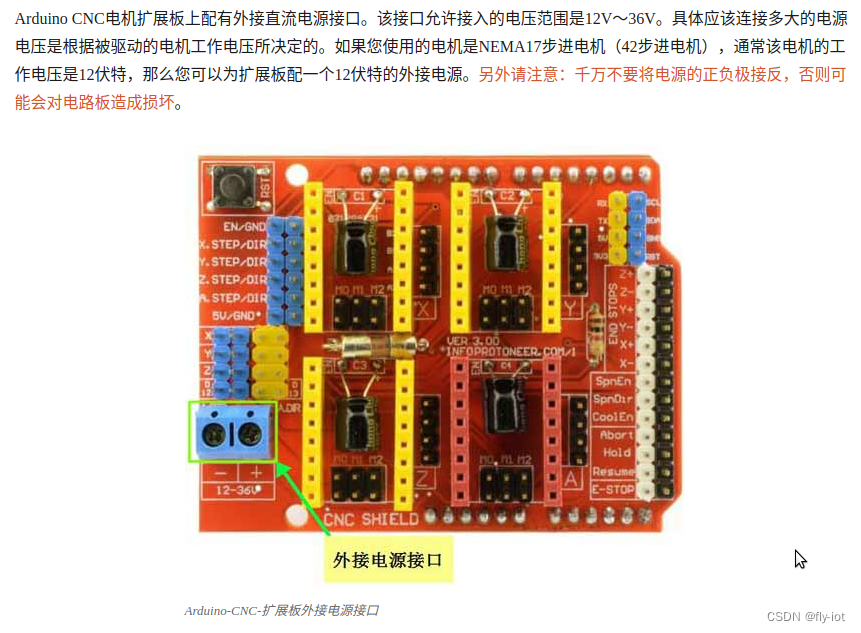
需要一个 12 v 的供电电源,高电压会导致抖动。 42 步进电机电压是 12 v。
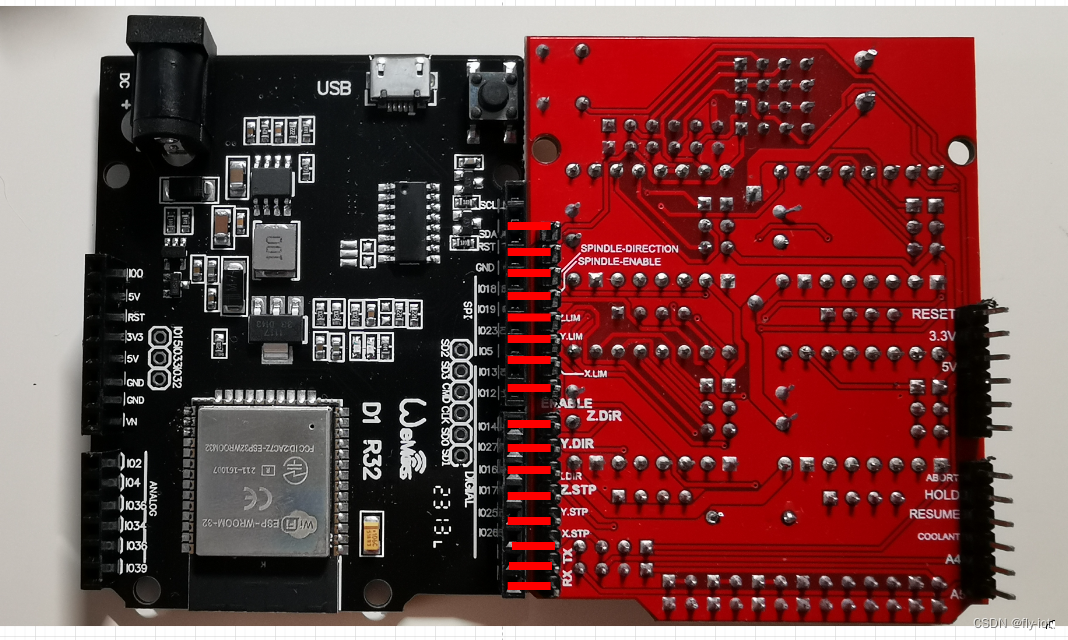
4,演示控制的全部控制代码,只适用Wemos D1 R32 ESP32 +Arduino CNC Shield v3 这个方案的引脚
因为是特别针对 Wemos D1 R32 ESP32 +Arduino CNC Shield v3 这个进行的引脚配置。
要是标准的arduino 可以参考 太极创客的文章:
http://www.taichi-maker.com/homepage/reference-index/motor-reference-index/arduino-cnc-shield/#other-pins
主要是引脚的不同,其他都一样。
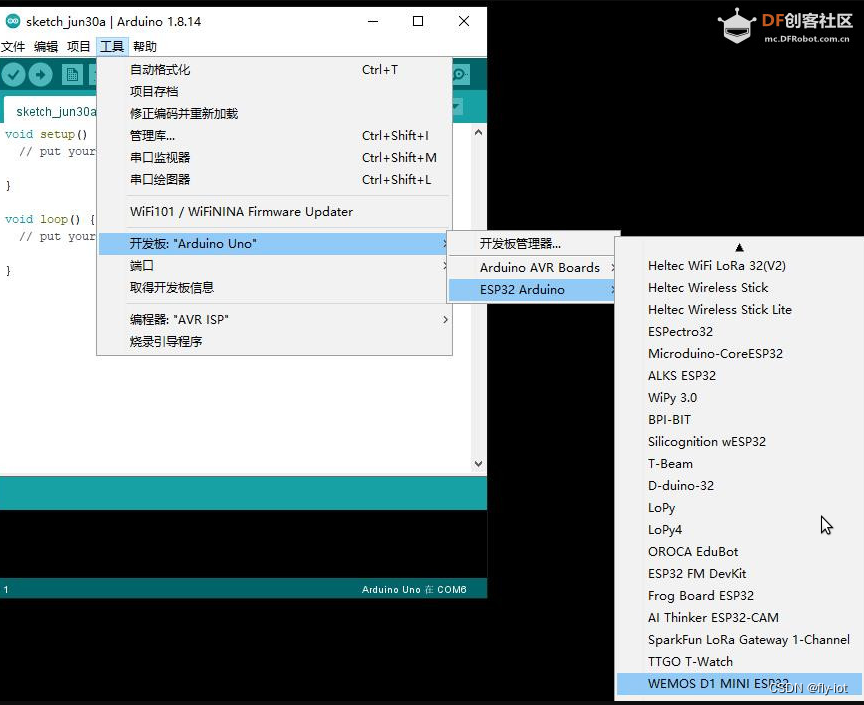
选择 wemos d1 r32 版本:
| Arduino Uno CNC Shield | D1 R32 - ESP32 |
|---|---|
| D0 RX | RX0 |
| D1 TX | TX0 |
| D2 X-STEP | IO26 |
| D3 Y-STEP | IO25 |
| D4 Z-STEP | IO17 |
| D5 X-DIR | IO16 |
| D6 Y-DIR | IO27 |
| D7 Z-DIR | IO14 |
| D8 EN | IO12 拆掉CNC板子上的10K上拉电阻 |
| D9 X-、X+ | IO13 |
| D10 Y-、Y+ | IO05 |
| D11 Z-、Z+ | IO23 |
| D12 A-STEP、SpinEn | IO19 |
| D13 A-DIR、SpinDir | IO18 |
代码:
/*
Arduino CNC电机扩展板驱动4个NEMA17步进电机示例程序
http://www.taichi-maker.com/homepage/reference-index/motor-reference-index/arduino-cnc-shield/#other-pins

By 太极创客(http://www.taichi-maker.com)
2019-03-10

@2023.09.09 修改,只适配  Wemos D1 R32 ESP32 +Arduino CNC Shield v3  方案
*/
#include <AccelStepper.h>  //本示例程序使用AccelStepper库

// 定义电机控制用常量
const int enablePin = 12;  // 使能控制引脚

const int xdirPin = 16;     // x方向控制引脚
const int ydirPin = 27;     // y方向控制引脚
const int zdirPin = 14;     // z方向控制引脚

const int xstepPin = 26;    // x步进控制引脚
const int ystepPin = 25;    // y步进控制引脚
const int zstepPin = 17;    // z步进控制引脚

const int moveSteps = 100;    //测试电机运行使用的运行步数

const int stepperMaxSpeed = 550;
const int stepperAcceleration = 55;

AccelStepper stepper1(1,xstepPin,xdirPin);//建立步进电机对象1
AccelStepper stepper2(1,ystepPin,ydirPin);//建立步进电机对象2
AccelStepper stepper3(1,zstepPin,zdirPin);//建立步进电机对象3

void setup() {
  Serial.begin(115200);

  pinMode(xstepPin,OUTPUT);     // Arduino控制A4988x步进引脚为输出模式
  pinMode(xdirPin,OUTPUT);      // Arduino控制A4988x方向引脚为输出模式

  pinMode(ystepPin,OUTPUT);     // Arduino控制A4988y步进引脚为输出模式
  pinMode(ydirPin,OUTPUT);      // Arduino控制A4988y方向引脚为输出模式

  pinMode(zstepPin,OUTPUT);     // Arduino控制A4988z步进引脚为输出模式
  pinMode(zdirPin,OUTPUT);      // Arduino控制A4988z方向引脚为输出模式

  pinMode(enablePin,OUTPUT);   // Arduino控制A4988使能引脚为输出模式
  digitalWrite(enablePin,LOW); // 将使能控制引脚设置为低电平从而让
                               // 电机驱动板进入工作状态

  stepper1.setMaxSpeed(stepperMaxSpeed);     // 设置电机最大速度
  stepper1.setAcceleration(stepperAcceleration);  // 设置电机加速度
  stepper2.setMaxSpeed(stepperMaxSpeed);     // 设置电机最大速度
  stepper2.setAcceleration(stepperAcceleration);  // 设置电机加速度
  stepper3.setMaxSpeed(stepperMaxSpeed);     // 设置电机最大速度
  stepper3.setAcceleration(stepperAcceleration);  // 设置电机加速度

  pinMode(2, OUTPUT);

}

void loop() {
  // 控制步进电机1往复运动
  if (stepper1.currentPosition() == 0 ){
    stepper1.moveTo(moveSteps);
     digitalWrite(2, HIGH);   // turn LED on
  } else if ( stepper1.currentPosition() == moveSteps  ){
    stepper1.moveTo(0);
    digitalWrite(2, LOW);   // turn LED off
  }

  // 控制步进电机2往复运动
  if ( stepper2.currentPosition() == 0 ){
    stepper2.moveTo(moveSteps);
  } else if ( stepper2.currentPosition() == moveSteps  ){
    stepper2.moveTo(0);
  }

  // 控制步进电机3往复运动
  if ( stepper3.currentPosition() == 0 ){
    stepper3.moveTo(moveSteps);
  } else if ( stepper3.currentPosition() == moveSteps  ){
    stepper3.moveTo(0);
  }

  stepper1.run();   // 1号电机运行
  stepper2.run();   // 2号电机运行
  stepper3.run();   // 3号电机运行

}

- 1
- 2
- 3
- 4
- 5
- 6
- 7
- 8
- 9
- 10
- 11
- 12
- 13
- 14
- 15
- 16
- 17
- 18
- 19
- 20
- 21
- 22
- 23
- 24
- 25
- 26
- 27
- 28
- 29
- 30
- 31
- 32
- 33
- 34
- 35
- 36
- 37
- 38
- 39
- 40
- 41
- 42
- 43
- 44
- 45
- 46
- 47
- 48
- 49
- 50
- 51
- 52
- 53
- 54
- 55
- 56
- 57
- 58
- 59
- 60
- 61
- 62
- 63
- 64
- 65
- 66
- 67
- 68
- 69
- 70
- 71
- 72
- 73
- 74
- 75
- 76
- 77
- 78
- 79
- 80
- 81
- 82
- 83
- 84
- 85
- 86
- 87
5,运行效果,说明和视频演示
https://www.bilibili.com/video/BV1uP41187EJ/
【研究开源机器臂】组装个步进电机机械臂,使用Wemos D1 R32 ESP32 Arduino开发板和CNC Shield v3控制版,成功控制3D打印机械臂
6,总结
低成本实现200多元实现,终于调试好了。
主要花费是3d打印的开源机械臂,170-180左右。
控制芯片使用:Wemos D1 R32 ESP32 +Arduino CNC Shield v3
工具使用 arduino + ESP32 + AccelStepper 库进行开发
目前还有一点抖动,估计是电压过高导致的,使用了24v电压,但是 42 电机估计只能用12v 电压。